
Today I was configuring key-based authentication on a FortiGate... Full Story
By Manny Fernandez
March 8, 2026

No compatible key-exchange method – SecureCRT and FortiGate
Today I was configuring key-based authentication on a FortiGate in my lab. The idea was to use SSH key to authenticate. The way the FortiGate does this is by you adding a ssh-public-key and adding you public key. I ended up going down a rabbit hole and re-creating my key-pair. Ended up making some changes and thought I would share here.
Let’s get started
I am running FortiOS 7.6.6 and SecureCRT Version 9.7.1 (ARM64 build 3815) - Official Release - February 17, 2026
SecureCRT – The Error

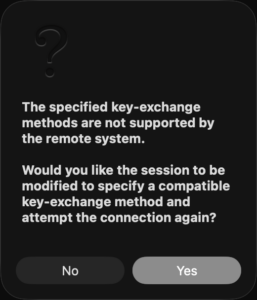
I connected to the FortiGate and added a new user…. we will go through that next. But when I added the new host to SecureCRT, and attempted to connect, I got the message above.
Key exchange failed.
No compatible key-exchange method. The server supports these methods:
diffie-hellman-group14-sha256,diffie-hellman-group16-sha512,diffie-hellman-group18-sha512,diffie-helIman-group-exch cdh-sha2-nistp384,ecdh-sha2-nistp521,kex-strict-s-v00@openssh.com
The following key-exchange method(s) are supported but not currently allowedfor this session:
ecdh-sha2-nistp521,ecdh-sha2-nistp384,ecdh-sha2-nistp256,diffie-hellman-group-exchange-sha256, diffie-hellman-group1-sha256
I decided to dive deep into fixing it.
SecureCRT – Generating Key-Pair
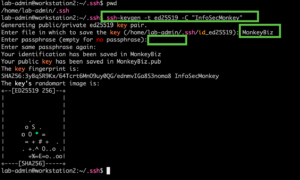
You can generate the key-pair from the cli with ssh-keygen. I wrote an article in 2025
ssh-keygen -t ed25519 -C "InfoSecMonkey"
It is going to ask you for a name for the file, and then a passphrase. You CAN leave blank, but I do not suggest. You will be asked for it every time you use it. If your public key falls into the wrong hands, you can be hosed.
From within SecureCRT
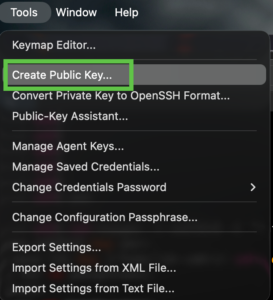
Once inside of SecureCRT, you can go to Tools then choose Create Public Key
This will launch the wizard.
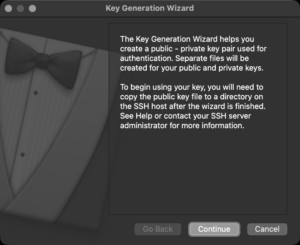
What key-type do you want to use. I have almost exclusively gone to Ed25519
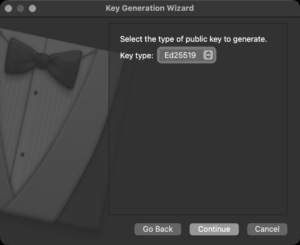
Ed25519 is the Current Gold Standard IMHO
Superior Security-to-Size Ratio
Ed25519 is based on the Edwards-curve Digital Signature Algorithm (EdDSA). It provides a high level of security with very small keys. An Ed25519 public key is only 68 characters long, whereas a comparable RSA key (3072-bit or 4096-bit) is a massive block of text.
Resistance to Side-Channel Attacks
The design of Ed25519 is mathematically “cleaner” than older Elliptic Curve algorithms like ECDSA (NIST curves). It is specifically designed to be resistant to side-channel attacks and does not rely on a high-quality random number generator for every signature, which was a known weakness in older standards.
Blazing Fast Performance
Generating and verifying Ed25519signatures is significantly faster than RSA. While you might not notice this on a powerful MacBook, it becomes very apparent on low-resource hardware like IoT devices or older Raspberry Pi units.
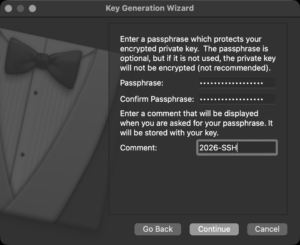
Now we will assign a passphrase and a comment. When you cat the .pub file created, it will have the comment right after the key.
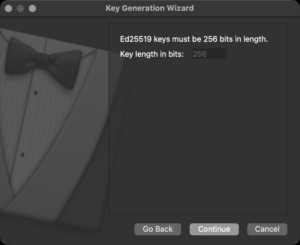
Key length should be 256. You can see it is gray’d out.
Key Details
Public Key – 32 bytes (256 bits).
Private Key (Seed) – 32 bytes (256 bits).
Signature Size – 64 bytes (512 bits).
SSH Format – Usually represented as a base64-encoded string, resulting in 68 characters
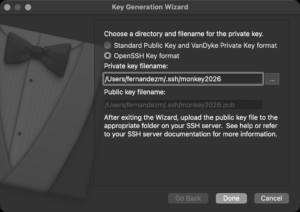
You will be prompted for a path. My default, it will but it in your ~/%username%/.ssh/%name%. I like to use OpenSSH key format.
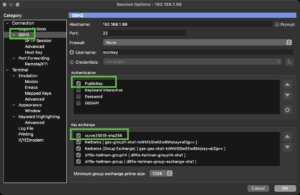
Under the SSH2 of the Session page, you should disable all authentication methods except for PublicKey. Additionally, you should enable and re-position the curve25519-sha256 at the start.
Configuring the FortiGate
In FortiOS 7.6.6, the command to manage SSH Key Exchange (KEX) algorithms has moved from the general system settings to a specific SSH configuration sub-level.
Previously (pre-7.0), these settings were often found directly under config system global. In the 7.6.x branch, you should use the following path:
config system ssh-config
set ssh-kex-algo curve25519-sha256@libssh.org diffie-hellman-group-exchange-sha256 diffie-hellman-group16-sha512
set ssh-enc-algo aes128-gcm@openssh.com aes256-gcm@openssh.com aes256-ctr
set ssh-mac-algo hmac-sha2-256-etm@openssh.com hmac-sha2-512-etm@openssh.com hmac-sha2-512
set ssh-hsk-algo ssh-ed25519 ecdsa-sha2-nistp256
end
Key Exchange (KEX) algorithms are the mechanisms used in protocols like SSH and TLS to allow two parties to establish a shared secret key over an insecure channel. This secret key is then used to encrypt the rest of the communication using symmetric encryption (like AES).
config system admin edit monkeyset accprofile super_adminset ssh-public-key1 "ssh-ed25519 AAAAC3Nza<REMOVED>+f2ePU9Pg"set password SuperSecretPasswordendCrisis averted. Hope this helps.
Recent posts
-

-

At its core, IEEE 802.1X is a network layer... Full Story
-

Netcat, often called the "Swiss Army knife" of networking,... Full Story
-

In case you did not see the previous FortiNAC... Full Story
-

This is our 5th session where we are going... Full Story
-

Now that we have Wireshark installed and somewhat configured,... Full Story
-

The Philosophy of Packet Analysis Troubleshooting isn't about looking... Full Story