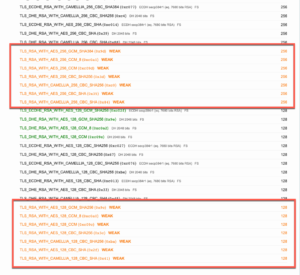
A customer of mine sent me an email after having a vulnerability assessment done against his environment. He got back some issues with weak ciphers and only scored a ‘B’ using Qualys’ SSL Test site. Even though the global setting called for ‘strong crypto enabled’ (which is the default in 5.4 and above), it was still accepting weaker cyphers.
FIRST STEPS
Ensure that the global command for strong cypher is enabled.
config system global
set strong-crypto enable
end
This is the “default’ish” configuration on the SSL VPN
config vpn ssl settings
set reqclientcert disable
set tlsv1-0 disable
set tlsv1-1 enable
set tlsv1-2 enable
unset banned-cipher
set ssl-insert-empty-fragment enable
set algorithm high
set idle-timeout 300
end
I removed some of the output for brevity.
CHANGES I MADE
Here are the changes I made to my configuration.
config vpn ssl settings
set reqclientcert disable
set tlsv1-0 disable #Should be disabled
set tlsv1-1 disable #Disable this one
set tlsv1-2 enable
set banned-cipher RSA #This is what I disabled to get passed the SSL test
end
The ‘set banned-cipher’ command disables the entire cipher. In my case, I disabled all the RSA ciphers. This gave me a pass on the cypher side. I still found another chain certificate issues which will get me the ‘A’ rating I am looking for.
NOTE: This configuration is ONLY for the SSL VPN. Use the ‘trusted hosts’ configuration to block access to the GUI admin side of the Fortigate.
From the following Fortinet KB Article.
The following cipher suites are offered by the FortiGate when ‘strong-crypto’ is ENABLED:
TLSv1.0:
| ciphers:
| TLS_DHE_RSA_WITH_AES_128_CBC_SHA (dh 128)
| TLS_DHE_RSA_WITH_AES_256_CBC_SHA (dh 128)
| TLS_RSA_WITH_AES_128_CBC_SHA (rsa 2048)
| TLS_RSA_WITH_AES_256_CBC_SHA (rsa 2048)
TLSv1.1:
| ciphers:
| TLS_DHE_RSA_WITH_AES_128_CBC_SHA (dh 128)
| TLS_DHE_RSA_WITH_AES_256_CBC_SHA (dh 128)
| TLS_RSA_WITH_AES_128_CBC_SHA (rsa 2048)
| TLS_RSA_WITH_AES_256_CBC_SHA (rsa 2048)
TLSv1.2:
| ciphers:
| TLS_DHE_RSA_WITH_AES_128_CBC_SHA (dh 128)
| TLS_DHE_RSA_WITH_AES_128_CBC_SHA256 (dh 128)
| TLS_DHE_RSA_WITH_AES_256_CBC_SHA (dh 128)
| TLS_DHE_RSA_WITH_AES_256_CBC_SHA256 (dh 128)
| TLS_RSA_WITH_AES_128_CBC_SHA (rsa 2048)
| TLS_RSA_WITH_AES_128_CBC_SHA256 (rsa 2048)
| TLS_RSA_WITH_AES_256_CBC_SHA (rsa 2048)
| TLS_RSA_WITH_AES_256_CBC_SHA256 (rsa 2048)