
At its core, IEEE 802.1X is a network layer... Full Story
By Manny Fernandez
February 9, 2026

Installing OpenSource SAML in Your Lab Environment
In my lab, I did not want to spend money on getting EntraID or Google Woskspace SAML, so I set out to find an Open Source project that would allow me to run SAML servers as an SP and be able to connect my lab FortiGates, FortiAuthenticators, etc. to it. I found Authentik, although some of the features it has are in the FAC, I wanted to be able to mimic the FAC connecting to an SP.
Install Ubuntu Server
You can use the standard Ubuntu Server installation. I use the minimum but you can use what you feel comfortable with. Once your Ubuntu server is up and running, we will need to run a sudo apt update and sudo apt upgrade
Add Docker’s official GPG key
sudo apt update
sudo apt install ca-certificates curl ##My apt update upgraded these for me.
sudo install -m 0755 -d /etc/apt/keyrings
sudo curl -fsSL https://download.docker.com/linux/ubuntu/gpg -o /etc/apt/keyrings/docker.asc
sudo chmod a+r /etc/apt/keyrings/docker.asc
Add the repository to Apt sources
sudo tee /etc/apt/sources.list.d/docker.sources <<EOF
Types: deb
URIs: https://download.docker.com/linux/ubuntu
Suites: $(. /etc/os-release && echo "${UBUNTU_CODENAME:-$VERSION_CODENAME}")
Components: stable
Signed-By: /etc/apt/keyrings/docker.asc
EOF
Then run sudo apt update again.
Install The Docker Packages
sudo apt install docker-ce docker-ce-cli containerd.io docker-buildx-plugin docker-compose-plugin
Docker Should Start Automatically, but lets test.
sudo systemctl status docker
Verify that the installation is successful by running the hello-world image:
sudo docker run hello-world
Directory Structure
Make some directory structure (e.g mkdir docker )
Download the latest Authentik .yml file
wget https://docs.goauthentik.io/docker-compose.yml
By running this command, it will generate a .env file in the docker directory you created and ran the .yml file from.
echo "PG_PASS=$(openssl rand -base64 36 | tr -d '\n')" >> .env
echo "AUTHENTIK_SECRET_KEY=$(openssl rand -base64 60 | tr -d '\n')" >> .env
Pull Down the Docker Container
Now lets pull down the docker image and get to getting
sudo docker compose pull
sudo docker compose up -d
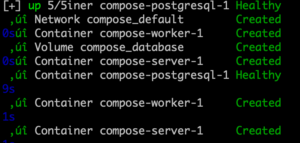
Once this is complete, you should see something like this on your SSH console
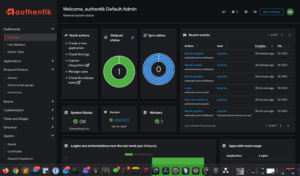
Initial Login
You will need to ensure that you add the initial-setup/ at the end.
HTTP: http://<your server's IP or hostname>:9000/if/flow/initial-setup/
HTTPS: https://<your server's IP or hostname>:9443/if/flow/initial-setup/
I will be posting more about my lab setup and the “infrastructure” I created (e.g. Bind Server, Postfix, Dovecot, Authentik, CA server, etc.)
Hope this helps.
Thanks to Bill Eden for pointing out a missing step.
Recent posts
-

-

In case you did not see the previous FortiNAC... Full Story
-

This is our 5th session where we are going... Full Story
-

Now that we have Wireshark installed and somewhat configured,... Full Story
-

The Philosophy of Packet Analysis Troubleshooting isn't about looking... Full Story