
At its core, IEEE 802.1X is a network layer... Full Story
By Manny Fernandez
February 15, 2026

OWASP Juice Shop on ProxMox and Docker
UPDATE: I added WebGoat as well.
Part of setting up my lab, is to show customers how the variouos Fortinet products work. In my previous article, I discussed deploying FortiWeb in ProxMox. The idea is to show how the attacks are sucessful without any protection (directly to the IP of the Juice Shop) while going through the FortiWeb, the attacks are thwarted. Here is the lab design.
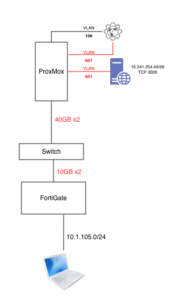
The plan is to write a script that changes my /etc/hosts file, from pointing to 10.241.254.49 (the OWASP Juice Store) to the IP of the FortiWeb. I created a VLAN 601, that is isolated from the other network. FortiWeb will have one leg on that network.
I installed Ubuntu Server 24.04.4.
Update and Upgrade
Now we are going to run the updates and upgrades. Run the following command
sudo apt update && sudo apt upgrade -y
Installing Docker
sudo apt install docker.io -y
Starting the Service
sudo systemctl start docker
sudo systemctl enable docker
Testing the Docket Version
sudo docket --version

Download Docker
You will now download the actual docker container from Docket Hub and start it on TCP 3000
sudo docker run -d -p 3000:3000 bkimminich/juice-shop --name JuiceShop
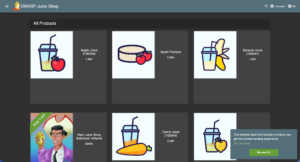
Connect to Juice Shop
To connect, point your browser to http://%The_IP_you_gave_it:3000
Installing WebGoat
If you want to go ahead and install WebGoat on this same Docker……
docker run -d \
-p 8080:8080 \
-p 9090:9090 \
--name webgoat2 \
webgoat/webgoat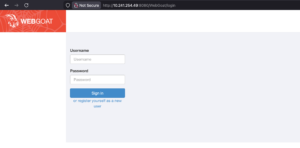
Recent posts
-

-

In case you did not see the previous FortiNAC... Full Story
-

This is our 5th session where we are going... Full Story
-

Now that we have Wireshark installed and somewhat configured,... Full Story
-

The Philosophy of Packet Analysis Troubleshooting isn't about looking... Full Story