
At its core, IEEE 802.1X is a network layer... Full Story
By Manny Fernandez
January 25, 2026

Random Password Generator from the Command Line
Sometimes you will need to create a pre-shared key (PSK) for a VPN or a password for a website. One of the tools you can use is pwgen. You can install pwgen on the follwing platforms:
macOS running Homebrew by running brew install pwgen
Ubuntu sudo apt install -y pwgen
Red Hat sudo dnf install pwgen
There is a Windows version of PWgen but the only Windows I have are the ones on my wall that allow me to look outside 😀.
-s “secure” option generates “random, not easily memorized passwords”
-y denotes password should include at least one symbol (special charecter)
-n denotes password should include at least on numeric value
-c denotes password should inclide at least on capital letter
-B denotes password should not contain ambiguos charectors such as l (lowercase L), 1 (number 1), 0 (number 0), O (letter O)
-l denotes password should be easily remembered
%Length% denotes the length of the password in characters
%Number% specifies that only one password should be generated
pwgen -Bync 23 20
This is telling pwgen that we want 20 passwords, each 23 charecters each, non ambiguous, containing special charecters, with numbers, and capital letters.
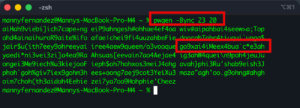
This is the output you will see when you run the above command.
You can always right them to a file by adding the > %filename% after it.
pwgen -Bync 23 20 > passwordlist.txt
Hope this helps
Recent posts
-

-

In case you did not see the previous FortiNAC... Full Story
-

This is our 5th session where we are going... Full Story
-

Now that we have Wireshark installed and somewhat configured,... Full Story
-

The Philosophy of Packet Analysis Troubleshooting isn't about looking... Full Story