
If you've spent any time configuring user authentication on... Full Story
By Manny Fernandez
February 16, 2026
IPsec VPNs Deep Dive
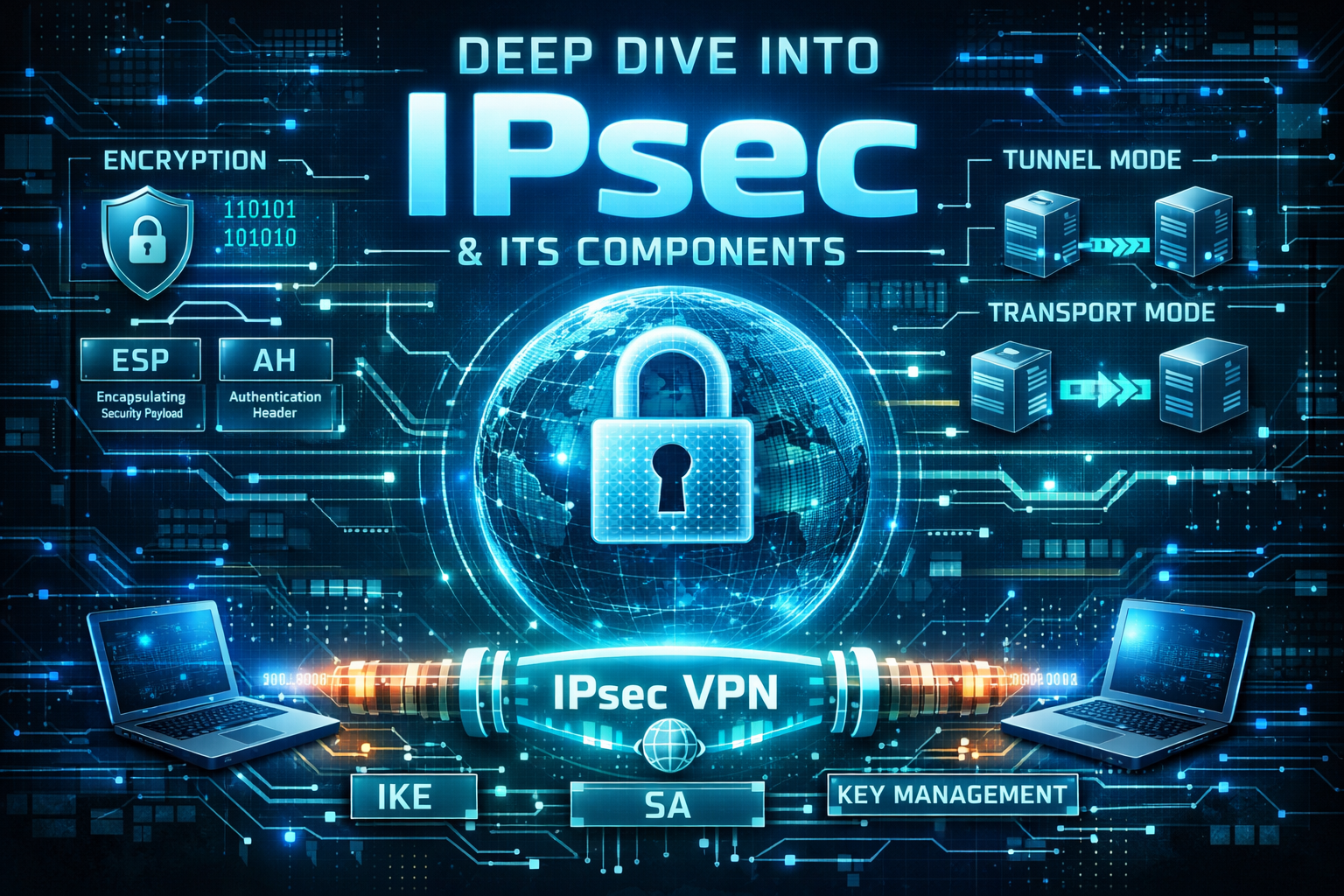
Establishing an IPsec VPN between two sites or even among multiple sites such as Fortinet’s ADVPN. But do we really knnow what goes on and what to choose when you are going through the confiuration. Without a good knowledge of what is happening, it is almost impossible to troubleshoot it when things go south. I compiles some details about the phases, protocols used, diffie-hellman groups, PFS, etc. Hopefully this will help you make wise choices when configuring IPsec VPNs.
The Phases
Phase 1: The Management Tunnel (IKE Phase 1)
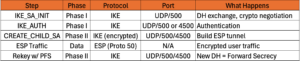
The goal of Phase 1 is to establish a secure, authenticated bidirectional communication channel between the two VPN gateways (ISAKMP SA).
- Negotiation – The initiator sends a list of supported encryption (
AES/ChaCha20), hashing (SHA256/512), and authentication methods (proposal). - Diffie-Hellman (DH) Exchange – The nodes exchange public keys to generate a shared secret key over an insecure channel.
- Ports –
UDP 500(ISAKMP). If NAT (network address translation) is detected, it switches toUDP 4500. - Authentication – The peers verify each other’s identity using a Pre-Shared Key (
PSK) orDigital Certificates.
Phase 2: The Data Tunnel (IKE Phase 2)
With the Phase 1 tunnel protecting the conversation, the gateways negotiate the specific parameters for the actual user traffic (IPsec SAs).
1. Security Parameter Negotiation – They agree on which traffic to encrypt (Proxy IDs/Traffic Selectors) and whether to use ESP or AH. AH has beem almost entirely replaced by ESP.
2. Key Refresh – New keying material is generated for the data tunnel (often using Perfect Forward Secrecy or PFS).
3. Tunnel Establishment – The IPsec SA is “installed,” and the tunnel is ready to pass traffic.

Note – ESP and AH are IP Protocols, not TCP or UDP ports. If your firewall only opens TCP/UDP, the tunnel will fail unless NAT-T (UDP 4500) is used to “wrap” the ESP traffic inside a UDP packet.
What is ISAKMP?
ISAKMP stands for Internet Security Association and Key Management Protocol.. It is a framework defined in RFC 2408 that provides a standard way for two devices (like routers or firewalls) to:
- Authenticate each other.
- Establish and manage Security Associations (
SAs). - Generate and distribute cryptographic keys.
Important Note: While ISAKMP provides the framework, it doesn’t do the heavy lifting of key exchange on its own. It typically uses IKE (Internet Key Exchange) as the protocol that actually negotiates the keys.
Navigating the Cipher – Choosing the Right Diffie-Hellman Group for Your IPsec VPN
In the world of secure networking, the Diffie-Hellman (DH) key exchange is the handshake that makes everything else possible. It allows two parties—who have no prior knowledge of each other—to jointly establish a shared secret key over an insecure channel. In an IPsec VPN, this secret key is the foundation upon which your data encryption sits.
However, not all handshakes are created equal. When configuring a VPN tunnel, you’ll encounter DH Groups. Choosing the wrong one can leave your data vulnerable to modern “harvest now, decrypt later” attacks or, conversely, bog down your hardware with unnecessary computational overhead.
Understanding the DH Group Landscape
DH groups define the strength of the mathematical keys used in the exchange process. Traditionally, these were based on modular exponential (MODP) groups, but modern standards have shifted toward Elliptic Curve (EC) groups for better efficiency.
The Legacy Groups (Groups 1, 2, and 5)
Group 1(768-bit)Group 2(1024-bit)Group 5(1536-bit)
The Verdict:
- Obsolete –
Groups 1,2, and5are considered legacy and insecure, with industry standards recommending they be avoided or replaced, as they are no longer secure. - Drawbacks – These groups are no longer considered secure.
Group 2, once the industry standard, can now be cracked by well-funded adversaries or massive computing clusters. Using these in 2026 is essentially leaving your front door unlocked.
The Modern MODP Standards (Groups 14, 15, and 16)
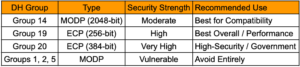
Group 14 (2048-bit) – This is currently the “minimum baseline” for secure VPNs. It provides roughly 112 bits of security strength.
Groups 15 (3072-bit) & Group 16 (4096-bit) – These offer significantly higher security (up to 128 and 150 bits respectively).
Benefits – Highly compatible with almost every enterprise firewall and router.
Drawbacks – They are computationally expensive. The larger the bit size, the longer the “handshake” takes, which can delay tunnel establishment and increase CPU load on the VPN gateway.
The Elliptic Curve Powerhouses (Groups 19, 20, and 21)
Group 19 (256-bit ECP) and Group 20 (384-bit ECP) – Based on NIST curves.
Benefits – These are the gold standard for modern VPNs. Because they use Elliptic Curve Cryptography (ECC), they provide massive security with much smaller key sizes. For example, Group 19 (256-bit) is roughly equivalent in strength to Group 14 (2048-bit) but is significantly faster and uses less power.
Drawback – Older “legacy” hardware might not support ECC, though this is becoming rare in 2026.
Diffie-Hellman Group 21 is a high-security cryptographic standard that belongs to the same family of Elliptic Curve groups mentioned above. While Groups 19 and 20 cover 256-bit and 384-bit curves respectively, Group 21 pushes the envelope further for environments requiring maximum data protection.
Benefits
- Extreme Security – It is considered the highest-tier “gold standard” for modern VPNs and secure communications.
- Efficiency – Despite its high security, it provides massive protection with a much smaller key size compared to traditional RSA or non-ECC groups.
- Performance vs. Legacy – It is significantly more efficient in terms of speed and power consumption than traditional groups like Group 14, while offering vastly superior cryptographic strength.
Drawbacks
- Hardware Support – The primary drawback is that older “legacy” hardware may not support
ECCor specific521-bitcurves, though this is increasingly rare in 2026. - Computational Overhead – While faster than equivalent non-
ECCgroups,Group 21is computationally “heavier” thanGroups 19or20due to the larger bit size.
What to Consider When Choosing
Choosing the “best” group isn’t just about picking the highest number; it’s about balancing the Security-Performance-Compatibility triangle.
Security Requirements (Compliance)
If you are handling government or highly regulated financial data, you may be required to use Group 20 or higher to meet Suite B or FIPS compliance. For standard enterprise use, Group 19 or Group 14 is usually the sweet spot.
Hardware Capabilities
Every time a VPN tunnel rekeys (which can happen every hour), the CPU must perform the DH calculation. If you have a head-end VPN concentrator supporting thousands of simultaneous tunnels, using Group 16 (4096-bit MODP) might cause a performance bottleneck. In this scenario, Group 19 (ECC) is superior because it provides high security with low CPU impact.
The “Weakest Link” Principle
Your DH group should match the strength of your encryption algorithm (AES).
If you use AES-128, Group 14 or 19 is appropriate.
If you use AES-256, you should use Group 15, 16, or 20 to ensure the key exchange isn’t the “weak link” in the chain.
The Verdict: What Should You Use?
For the vast majority of modern IPsec VPN deployments, DH Group 19 is the best choice. It offers an ideal balance of high-speed performance and robust security that is resistant to most modern brute-force techniques.
If you are dealing with older equipment that doesn’t support Elliptic Curves, your fallback should be DH Group 14. It is the “universal donor” of the VPN world, secure enough for now and compatible with almost everything. I would seriously consider upgrading your equipment.
Summary Table
Encryption Schemes
In the ever-evolving landscape of cybersecurity, choosing the right encryption and hashing algorithms for an IPsec VPN is no longer just a “best practice”, it is a necessity for survival. As we navigate 2026, the industry has largely consolidated around a “Gold Standard” while maintaining legacy support for specific architectures.
If you are looking for the absolute best performance and security for a modern IPsec VPN, the answer is AES-GCM (Galois/Counter Mode) paired with SHA-384 (or NULL for Phase 2). NULL should ONLY be used in certain use cases, of which I rarely come across.
The Best Encryption Scheme – AES-GCM
For years, AES-CBC (Cipher Block Chaining) was the king of the mountain. However, AES-GCM has officially claimed the throne in 2026. The primary reason is that GCM is an AEAD (Authenticated Encryption with Associated Data) algorithm. This means it provides both confidentiality and integrity in a single, efficient operation. GCM stands for Galois/Counter Mode. It is a high-performance, authenticated encryption mode that combines CTR (Counter) mode for encryption with a Galois Field multiplier (GMAC) to provide both confidentiality and data integrity/authentication. It is widely used in network security protocols like TLS 1.2 and HTTP/3
Benefits of AES-GCM
Performance – Unlike older modes like CBC, AES-GCM is parallelizable. It can encrypt multiple blocks of data simultaneously, allowing it to take full advantage of modern multi-core CPUs and hardware acceleration like Intel’s AES-NI.
Security – By integrating authentication, GCM eliminates the “encrypt-then-MAC” manual stitching that often led to implementation vulnerabilities (like the “Lucky 13” attack).
Efficiency – It requires less overhead. Since it handles integrity itself, you don’t need a separate hashing algorithm for the data payload (Phase 2).
Authenticated Encryption with Associated Data (AEAD)
Authenticated Encryption with Associated Data (AEAD) is a variant of symmetric encryption that simultaneously provides confidentiality, integrity, and authenticity.
While standard encryption (like AES in CBC mode) only hides data, it doesn’t prevent an attacker from modifying the ciphertext. AEAD solves this by ensuring that if even a single bit of the message is tampered with, decryption will fail.
Drawbacks of AES-GCM
Hardware Sensitivity – While it’s blazing fast on modern chips, older legacy hardware without dedicated AES acceleration may actually perform worse with GCM compared to simple CBC.
Interoperability – Some very old “legacy” routers or IoT gateways simply don’t support it, forcing a fallback to older standards.
Hashing Schemes
The Best Hashing Scheme – SHA-2 (SHA-384/512)
While AES-GCM handles integrity for the data itself, you still need a hash for the Internet Key Exchange (IKE) phase to authenticate the peers and ensure the management messages haven’t been tampered with.
The Winner – SHA-384. It offers a higher security margin than SHA-256 and is specifically recommended by the NSA’s Commercial National Security Algorithm (CNSA) suite.
The Runner-Up – SHA-256. This remains the most widely compatible “safe” option.
Avoid – MD5 and SHA-1. These are cryptographically broken and should be disabled across your entire environment.
Choosing the Encryption Domain
The “Encryption Domain” (also known as the Traffic Selector or Proxy ID) defines exactly which traffic is allowed to enter the VPN tunnel. Choosing this correctly is the difference between a stable connection and a troubleshooting nightmare.
Policy-Based vs. Route-Based
Policy-Based – You define specific source and destination subnets (e.g., 10.0.1.0/24 to 192.168.1.0/24). If the traffic doesn’t match this exactly, the tunnel won’t even try to pick it up.
Route-Based (VTI) – You use an “Any-to-Any” (0.0.0.0/0) domain and let your router’s routing table decide what goes into the tunnel.
This is the modern preference because it is much more flexible and easier to manage.
Considerations for Success
Symmetry is King – Both sides of the VPN must have a perfect “mirror image” of the encryption domain. If Side A says “Allow 10.0.1.0/24” and Side B says “Allow 10.0.0.0/8“, the Phase 2 negotiation will fail.
Granularity vs. Simplicity – While it’s tempting to use 0.0.0.0/0 everywhere for ease of use, a tighter encryption domain provides a layer of “Security by Design” by ensuring only the necessary subnets can talk to each other.
Avoid Overlap – Ensure your local encryption domain subnets do not overlap with the remote subnets. This causes routing loops and “black-holed” traffic.
Main vs Aggressive Mode
In the world of network security, the “handshake” is everything. When two gateways want to establish a secure IPsec tunnel, they use the Internet Key Exchange (IKE) protocol. But not all handshakes are created equal. Depending on your needs for speed versus stealth, you’ll likely find yourself choosing between Main Mode and Aggressive Mode.
The Reliable Veteran: Main Mode
Main Mode is the standard approach for a reason: it’s thorough. It uses a six-packet exchange to negotiate security associations.
How it works – The first four packets establish the encryption algorithm and verify identities, and only then, once a secure channel is built, are the sensitive identity details (like IP addresses or certificates) exchanged.
The Big Win – Privacy, Because the identities are encrypted before they are shared, an attacker sniffing the wire can’t easily tell who is talking to whom.
The Speedster – Aggressive Mode
As the name suggests, Aggressive Mode is all about efficiency. It crushes the negotiation into just three packets.
How it works – The initiator sends everything at once—their identity, the security proposal, and the key exchange data. The responder then fires back with a confirmation.
The Catch – Because the identity is sent in the very first packet *before* a secure channel exists, it is sent in the clear (unencrypted). This makes it susceptible to offline dictionary attacks if a hacker captures the hash.
Which One Should You Use?
In the modern landscape, Main Mode is the default recommendation for site-to-site VPNs where both sides have static IP addresses. It provides that extra layer of identity protection that today’s zero-trust environments demand.
However, Aggressive Mode isn’t “dead.” It remains a functional tool for Remote Access VPNs or scenarios where one end has a dynamic IP address. When the responder doesn’t know the initiator’s IP beforehand, Aggressive Mode allows the tunnel to look up the correct pre-shared key based on the ID provided in that first packet. FortiGate can do remote access using Main mode and is recommended.
The Bottom Line – Use Main Mode whenever possible for superior security. If you must use Aggressive Mode for compatibility or dynamic setups, ensure you are using incredibly complex, long passwords to mitigate the risk of a hash being cracked.
Securing the Tunnel: PSK vs. Certificate-Based Authentication
When setting up an IPsec VPN, you’re essentially building a private, encrypted hallway through the chaotic public lobby of the internet. But before anyone is allowed into that hallway, they need to prove who they are. In the world of IPsec, this usually comes down to two heavyweight contenders: Pre-Shared Keys (PSK) and Certificate-Based Authentication.
While both serve the same goal, they go about it with very different levels of sophistication and “administrative headache.”
Pre-Shared Key (PSK) – The Simple Handshake
Think of a PSK as a shared secret password. Both the VPN gateway and the remote client have the exact same string of characters stored locally. When a connection is initiated, both sides prove they know the secret without actually sending it over the wire.
The Pros – It’s incredibly easy to set up. If you have a small office with two or three remote users, typing in a 64-character string is fast and effective.
The Cons – It doesn’t scale. If you have 100 employees using the same PSK and one leaves the company on bad terms, you technically have to change the key for “everyone”. Furthermore, PSKs are vulnerable to brute-force attacks if the key isn’t sufficiently complex.
Certificate-Based Authentication: The Digital Passport
Digital certificates rely on a Public Key Infrastructure (PKI). Instead of a shared password, each entity has a unique digital ID signed by a trusted Certificate Authority (CA). It’s the difference between telling a bouncer a secret code and showing them a government-issued ID.
The Pros – Superior security and scalability. Certificates allow for “mutual authentication,” where both parties verify each other’s identity through complex math rather than a simple string. If an employee leaves, you simply revoke their specific certificate; everyone else keeps working without interruption.
The Cons – Complexity. You need a way to issue, manage, and revoke these certificates (like a SCEP server or a local CA), which requires more initial expertise.
Which One Should You Choose?
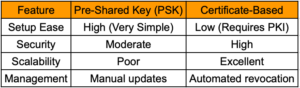
For a home lab or a small business, a long, complex PSK is usually “good enough.” However, for enterprise environments, or any organization handling sensitive data, certificates are the gold standard. They eliminate the “all eggs in one basket” risk of a single shared password and provide a much more robust defense against man-in-the-middle attacks. I created an article on FortiGates VPN using Ceritficates.
VPN Packet Flow
Recent posts
-

-

DNS is one of those technologies that quietly underpins... Full Story
-

BGP issues on FortiGate firewalls usually trace back to... Full Story
-

Every time your laptop talks to your router, a... Full Story
-

If you've spent any time configuring NAT on a... Full Story
-

If you have spent any time configuring firewall policies... Full Story
-

High availability on FortiGate is one of those features... Full Story
-

If you've configured SD-WAN on a FortiGate, you've almost... Full Story
-

FortiLink is the management protocol that turns a FortiSwitch... Full Story
-

FortiSwitches are pretty rock solid from Mean Time Between... Full Story
-

This is a quicky tip. Have you ever gone... Full Story
-

DNS is one of those quiet pieces of internet... Full Story
-

This article is an updated version of the previous... Full Story
-

You will add ns2 as a secondary (slave) BIND9... Full Story
-

In the process of deploying my lab, I needed... Full Story
-

RFC 8805, used to be known as Self-Correcting IP... Full Story
-

Years back, I wrote an article about certificate pinning. ... Full Story
-

FortiGates have the ability to send alerts to Microsoft... Full Story
-

In this post, I am going to walk through... Full Story
-

Troubleshooting VoIP on a FortiGate can feel like trying... Full Story
-

Prior to FortiOS 7.0, there were three commands to... Full Story
-

In this post, I am going to go over... Full Story
-

What we are going to do: We are going... Full Story
-

Choosing between FGCP (FortiGate Clustering Protocol) and FGSP (FortiGate... Full Story
-

Creating a VLAN on macOS (The "Pro" Move) A... Full Story
-

This blog post explores the logic behind how macOS... Full Story
-

Pretty Fly for a Wi-Fi Tell My Wi-Fi Love... Full Story
-

Part of my daily gig is creating BoMs (Bill-of-Materials)... Full Story
-

ICMP introduces several security risks, but careful filtering, rate... Full Story
-

The command diag debug application dhcps -1 enables full... Full Story
-

In the world of FortiOS, execute tac report is... Full Story
-

LLDP; What is it The Link Layer Discovery Protocol... Full Story
-

What it actually does When you run diagnose fdsm... Full Story
-

Monkey Bites are bite-sized, high-impact security insights designed for... Full Story
-

I have run macOS in macOS with Parallels but... Full Story
-

Don't be confused with my other FortiNAC posts where... Full Story
-

This is the third session in a multi-part article... Full Story
-

Today I was configuring key-based authentication on a FortiGate... Full Story
-

Netcat, often called the "Swiss Army knife" of networking,... Full Story
-

At its core, IEEE 802.1X is a network layer... Full Story
-

In case you did not see the previous FortiNAC... Full Story
-

This is our 5th session where we are going... Full Story
-

Now that we have Wireshark installed and somewhat configured,... Full Story
-

The Philosophy of Packet Analysis Troubleshooting isn't about looking... Full Story
-

In this guide Executive Summary Prerequisites: Which vi Do... Full Story
-

Objective: Strip blank and whitespace-only lines out of config... Full Story
-

In this guide Executive Summary Prerequisites and Architecture How... Full Story