
At its core, IEEE 802.1X is a network layer... Full Story
By Manny Fernandez
February 23, 2021
Querying Nested LDAP Groups on the FortiGate
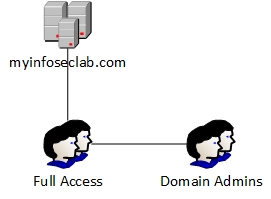
Use case: When dealing with LDAP queries, sometime you have issues with using nested groups. That is, you have a group called Full Access and inside that group, you add Domain Admins. You could run into a situation where the query would not see the username manny_admin as an example in the group even though manny_admin is a member of Domain Admins.
Lets assume you have already configured LDAP for your authentication. If not, I have plenty of articles with different options.
config user ldap
    edit "DC01"
       set server "10.1.1.11"
       set cnid "sAMAccountName"
       set dn "dc=myinfoseclab,dc=com"
       set type regular
       set username "ldapsvc@myinfoseclab.com"
       set password ENC MTAwNIqIwCqnqXcuPuFods/e/E2cEqGBCXUCqLRQqcttZT7vwN78EaITXO/HPDMd7oLBC4Ae1E2cEqGBCXUCqLRQqcga4pHp3vP1skMZlFbZGLKMnVrbqNTz+p4/baVS4u5qjKHT3pJy6YftjQrsqis6wDGxL88vLtPXX75V6wlW2AQvUSAZO71gljG7h5zg==
   next
   edit "DC02"
       set server "10.1.1.12"
       set cnid "sAMAccountName"
       set dn "dc=myinfoseclab,dc=com"
       set type regular
       set username "ldapsvc@myinfoseclab.com"
       set password ENC MTAwNIqIwCqnqXcuPuFods/e/E2cEqGBCXUCqLRQqcvttZT7vwN78EaITXO/HPDMd7oLBC4Ae1E2cEqGBCXUCqLRQqcga4pHp3vP1skMZlFbZGLKMnVrbqNTz+p4/baVS4u5qjKHT3pJy6YftjQrsqis6wDGxL88vLtPXX75V6wlW2AQvUSAZO71gljG7h5zg==
   next
end
Above is an example of the LDAP configuration from the CLI.
By default, nested groups (groups that are members or other groups) are not searched in Windows Active Directory (AD) LDAP servers because this can slow down the group membership search. There is an option in FortiOS to enable the searching of nested groups for user group memberships on AD LDAP servers.
In order to enable recursive searches or nested searches, you can add the following command to your LDAP configuration.
set search-type recursive
The config should look like the snippet below.
config user ldap
    edit "DC01"
       set server "10.1.1.11"
       set cnid "sAMAccountName"
       set dn "dc=myinfoseclab,dc=com"
       set type regular
       set username "ldapsvc@myinfoseclab.com"
       set password ENC MTAwNIqIwCqnqXcuPuFods/e/E2cEqGBCXUCqLRQqcttZT7vwN78EaITXO/HPDMd7oLBC4Ae1E2cEqGBCXUCqLRQqcga4pHp3vP1skMZlFbZGLKMnVrbqNTz+p4/baVS4u5qjKHT3pJy6YftjQrsqis6wDGxL88vLtPXX75V6wlW2AQvUSAZO71gljG7h5zg==
       set search-type recursive
   next
    edit "DC02"
       set server "10.1.1.12"
       set cnid "sAMAccountName"
       set dn "dc=myinfoseclab,dc=com"
       set type regular
       set username "ldapsvc@myinfoseclab.com"
       set password ENC MTAwNIqIwCqnqXcuPuFods/e/E2cEqGBCXUCqLRQqcvttZT7vwN78EaITXO/HPDMd7oLBC4Ae1E2cEqGBCXUCqLRQqcga4pHp3vP1skMZlFbZGLKMnVrbqNTz+p4/baVS4u5qjKHT3pJy6YftjQrsqis6wDGxL88vLtPXX75V6wlW2AQvUSAZO71gljG7h5zg==
       set search-type recursive
   next
end
That’s it. That should work now.
NOTE: This feature does not work with open ldap and other supported LDAP servers from the FortiGate. This is Microsoft specific.
Hope this helps.
Recent posts
-

-

In case you did not see the previous FortiNAC... Full Story
-

This is our 5th session where we are going... Full Story
-

Now that we have Wireshark installed and somewhat configured,... Full Story
-

The Philosophy of Packet Analysis Troubleshooting isn't about looking... Full Story