
If you've spent any time configuring user authentication on... Full Story
By Manny Fernandez
July 16, 2026
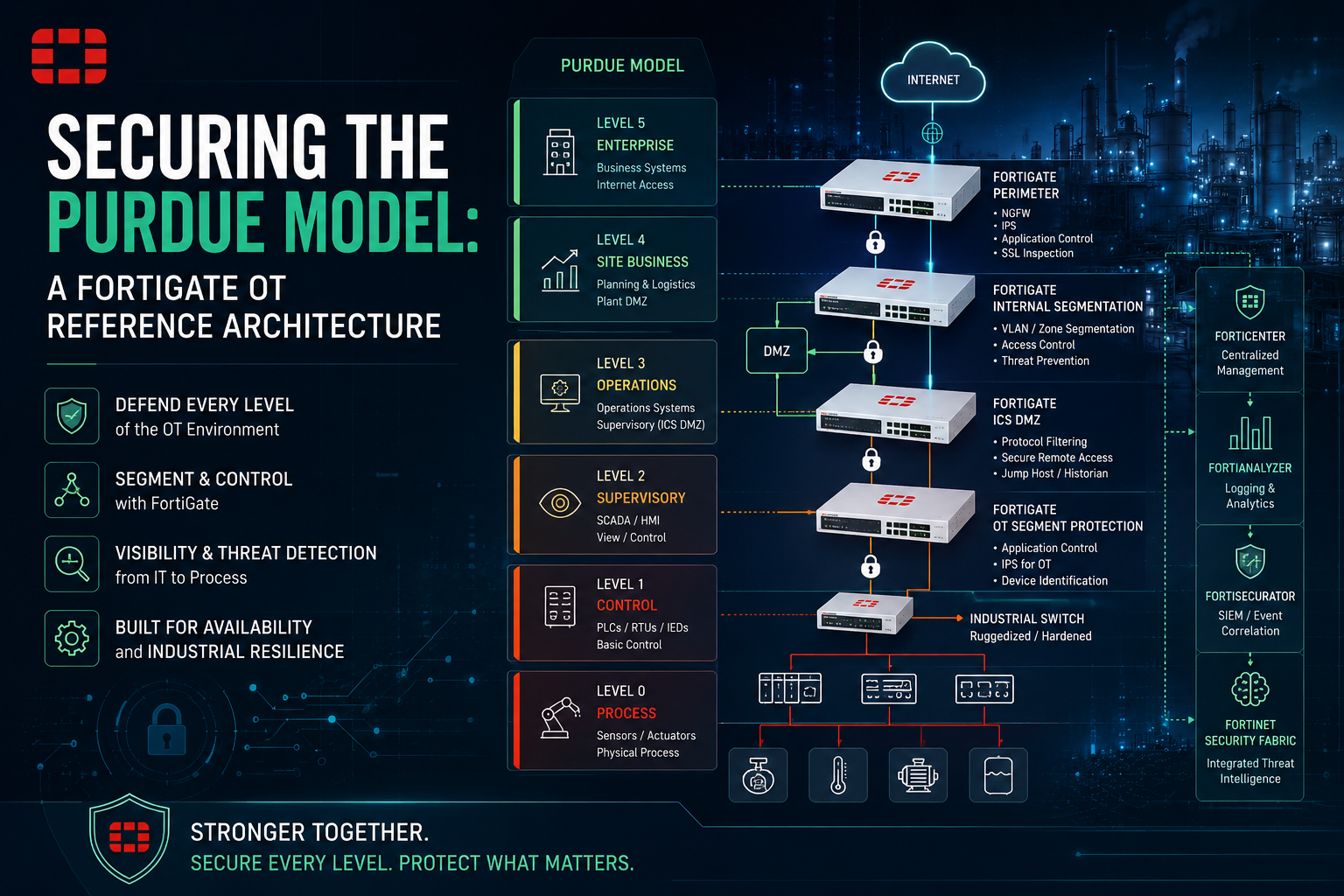
Securing the Purdue Model: A FortiGate OT Reference Architecture
1. Executive Summary
Objective: This guide provides a production-grade reference architecture for retrofitting Fortinet OT security controls onto an existing (brownfield) industrial network organized around the Purdue Enterprise Reference Architecture (PERA). It walks through inserting FortiGate firewalls and FortiSwitch access at the right Purdue boundaries, building the Industrial DMZ (IDMZ), and enforcing east-west microsegmentation without disrupting live production. The result is a defensible, auditable network that maps cleanly to IEC 62443 zones and conduits.
Why it matters: Most plant networks were built flat for reliability, not security. A breach at the enterprise level (Level 4/5) routinely reaches the control level (Level 0/1) because there is no inspected boundary between them. Retrofitting Fortinet controls along Purdue lines contains lateral movement, gives you visibility into industrial protocols, and satisfies the segmentation requirements auditors now expect, all while respecting the uptime and safety constraints that make OT different from IT.
Target audience: OT/ICS Network Engineers, Plant Network Architects, Industrial Security Engineers, and IT/OT convergence teams responsible for SCADA, DCS, PLC, and field device networks. Assumes you own or co-own the FortiGate platform and have change-control authority in the plant.
2. Prerequisites and Architecture
Assumed Knowledge
- The Purdue Model levels (0 through 5) and the concept of an Industrial DMZ
- FortiGate fundamentals: interfaces, zones, firewall policies, routing, VDOMs
- Basic switching: VLANs, 802.1Q trunking, native VLAN, spanning tree behavior
- Industrial protocols at a conceptual level: Modbus TCP, EtherNet/IP (CIP), OPC UA, DNP3, PROFINET
- IEC 62443 zone and conduit terminology (helpful, not mandatory)
Environment and Lab Requirements
For pre-staging the retrofit, validate the full design in EVE-NG or GNS3 before touching production. Production requirements below.
| Requirement | Detail |
|---|---|
| FortiGate model | Ruggedized FortiGate Rugged series (e.g., FGR-70F/60F) for plant floor, or 1U FortiGate (e.g., 100F/200F) for the IDMZ core. Size to throughput plus inspection headroom. |
| FortiOS version | 7.4.x or later (7.6.x preferred for current OT signature and virtual patching support) |
| OT detection | FortiGuard Industrial Security Service (ISDB application signatures, OT IPS, OT virtual patching) subscription |
| Access layer | FortiSwitch (FortiLink-managed) for Level 2/1 access segmentation and 802.1X |
| Visibility | FortiGuard OT detection plus optional FortiNAC for asset discovery and ICS device profiling |
| Management | FortiManager and FortiAnalyzer (out-of-band, Level 4 or dedicated management zone) |
| Change control | Approved maintenance window, rollback plan, and a verified config backup of every device in scope |
Purdue-to-Fortinet Component Mapping
| Purdue Level | Function | Fortinet Control | Example Zone / Subnet |
|---|---|---|---|
| Level 5 | Enterprise network | Upstream FortiGate / IT firewall | Corp: 10.0.0.0/8 |
| Level 4 | Site business / DMZ services | FortiGate (Enterprise edge VDOM) | L4-BIZ: 172.16.40.0/24 |
| Level 3.5 | Industrial DMZ (IDMZ) | FortiGate IDMZ VDOM (broker zone) | IDMZ: 172.16.35.0/24 |
| Level 3 | Site operations (historian, MES, engineering WS) | FortiGate OT-core VDOM + FortiSwitch | L3-OPS: 192.168.30.0/24 |
| Level 2 | Area supervisory (SCADA, HMI) | FortiGate zone + FortiSwitch | L2-SCADA: 192.168.20.0/24 |
| Level 1 | Basic control (PLC, RTU, DCS controllers) | FortiGate zone + FortiSwitch (no direct internet) | L1-CTRL: 192.168.10.0/24 |
| Level 0 | Field devices (sensors, actuators) | Access-layer isolation, no L3 from above | L0-FIELD: 192.168.0.0/24 |
Design rule: Level 3.5 (the IDMZ) is the only place where IT and OT data exchange occurs. No protocol traverses directly from Level 4/5 to Level 3 or below. Every flow terminates at a broker, replication, or proxy host inside the IDMZ.
3. Step-by-Step Implementation Workflow
The retrofit follows seven phases. In a brownfield plant, the ordering matters: you build the new boundary in parallel, validate in monitor mode, then cut over level by level during maintenance windows. Never insert a deny-by-default boundary into a live flat network without a learning phase first.
Phase 0: Discovery and Baseline (Do This Before Any Config)
Goal: Know exactly what talks to what before you draw a single boundary. Brownfield failures are almost always undocumented flows.
Action: Span the existing core switch uplinks to a FortiGate interface in sniffer/one-arm mode, or deploy a FortiGate inline in transparent (Layer 2) mode with all policies set to allow-and-log. Run for at least one full production cycle (a week minimum, longer if the plant has weekly or monthly batch jobs).
Config (one-arm sniffer on a dedicated port):
config system interface
    edit "port5"
        set ip 0.0.0.0 0.0.0.0
    next
end

config system sniffer
    edit 1
        set interface "port5"
        set host ""
        set ipv6 disable
        set non-ip enable
    next
end
GUI verification: Navigate to Dashboard > FortiView > Sources and Applications. Confirm you are seeing OT application signatures (Modbus, EtherNet/IP, OPC UA) populate. If you see only generic TCP, your ISDB/OT service is not licensed or not applied.
Phase 1: Provision the Boundary FortiGate and VDOMs
Goal: Create logical separation between the enterprise edge, the IDMZ, and the OT core on a single platform (or dedicated platforms for larger sites).
Action: Enable multi-VDOM and create three VDOMs: ENT-EDGE, IDMZ, OT-CORE. Inter-VDOM links force all cross-level traffic through inspected policies.
Config:
config system global
    set vdom-mode multi-vdom
end

config vdom
    edit "ENT-EDGE"
    next
    edit "IDMZ"
    next
    edit "OT-CORE"
    next
end
GUI verification: System > VDOM. Confirm all three VDOMs are present and in NAT mode (transparent only where you are bridging an existing segment you cannot re-IP).
Phase 2: Define Zones and Interfaces per Purdue Level
Goal: Map each Purdue level to a FortiGate zone so policy intent reads in plant terms, not port numbers.
Action: In the OT-CORE VDOM, create one zone per level and disable intra-zone traffic so devices within a level cannot freely talk to each other without a policy (this is the foundation of microsegmentation).
Config (run inside the OT-CORE VDOM):
config system zone
    edit "L3-OPS"
        set interface "fortilink-vlan30"
        set intrazone deny
    next
    edit "L2-SCADA"
        set interface "fortilink-vlan20"
        set intrazone deny
    next
    edit "L1-CTRL"
        set interface "fortilink-vlan10"
        set intrazone deny
    next
end
GUI verification: Network > Interfaces, grouped by zone. Each level should show its VLAN interface assigned and intra-zone set to deny. Watch the FortiView logs after enabling intra-zone deny in a maintenance window; you will discover peer-to-peer flows (e.g., HMI-to-HMI redundancy) that need explicit policies.
Phase 3: Deploy FortiSwitch Access Segmentation (Level 2/1)
Goal: Push segmentation down to the access port so a compromised HMI cannot reach a PLC on the same physical switch.
Action: Adopt existing or new FortiSwitch units under FortiLink. Assign access ports to per-level VLANs and apply 802.1X (FortiAuthenticator or FortiNAC as RADIUS) where the OT vendor supports it. For legacy field devices that cannot do 802.1X, use MAC-based port security and dynamic VLAN assignment by device profile.
Config (FortiLink-managed switch port assignment):
config switch-controller managed-switch
    edit "S1-L2-Cabinet-A"
        config ports
            edit "port3"
                set vlan "vlan20"
                set allowed-vlans "vlan20"
                set stp-state enabled
                set edge-port enabled
            next
        end
    next
end
GUI verification: WiFi & Switch Controller > FortiSwitch Ports. Confirm each port is pinned to its level VLAN and untagged correctly. For PLC ports, verify no trunk allows VLANs from higher Purdue levels.
Phase 4: Build the Industrial DMZ (Level 3.5)
Goal: Create the single sanctioned exchange point between IT and OT. Historian replication, patch staging, remote access jump hosts, and AV/update mirrors live here, never spanning straight through.
Action: In the IDMZ VDOM, place broker services (e.g., a historian collector, a WSUS/patch mirror, a jump host). Write policies so that Level 4 talks only to IDMZ hosts, and Level 3 talks only to IDMZ hosts. No policy permits Level 4 to Level 3 directly.
Config (IDMZ policy pattern, abbreviated):
config firewall policy
    edit 0
        set name "L4-to-IDMZ-Historian"
        set srcintf "ent-link"
        set dstintf "idmz-link"
        set srcaddr "L4-BIZ-Clients"
        set dstaddr "IDMZ-Historian-Collector"
        set action accept
        set schedule "always"
        set service "OPCUA" "HTTPS"
        set utm-status enable
        set ips-sensor "OT-IPS"
        set application-list "OT-AppControl"
        set logtraffic all
    next
    edit 0
        set name "IDMZ-to-L3-Historian-Replication"
        set srcintf "idmz-link"
        set dstintf "ot-core-link"
        set srcaddr "IDMZ-Historian-Collector"
        set dstaddr "L3-Historian-Primary"
        set action accept
        set schedule "always"
        set service "OPCUA"
        set utm-status enable
        set ips-sensor "OT-IPS"
        set logtraffic all
    next
end
GUI verification: Policy & Objects > Firewall Policy. Filter by the IDMZ interfaces. You should see no policy whose source is a Level 4/5 object and destination is a Level 3 (or lower) object. If one exists, the IDMZ is being bypassed.
Phase 5: Enforce Conduits with OT-Aware Inspection
Goal: Allow only the industrial protocols each conduit legitimately needs, and inspect them for protocol-level abuse (malformed Modbus writes, unauthorized CIP function codes).
Action: Build an application control profile using the FortiGuard ICS/SCADA application signatures, and an IPS sensor filtered to industrial vulnerabilities with virtual patching for unpatched controllers. Apply both to the inter-level policies.
Config (OT application control and IPS sensor):
config application list
    edit "OT-AppControl"
        set other-application-action block
        config entries
            edit 1
                set category 27
                set action pass
            next
        end
    next
end

config ips sensor
    edit "OT-IPS"
        config entries
            edit 1
                set location server
                set os all
                set application "SCADA"
                set status enable
                set action block
            next
        end
    next
end
Action (writes are the dangerous direction): For a control-direction policy, restrict Modbus/CIP to read function codes from engineering workstations except during sanctioned maintenance. Use a one-direction policy from L2-SCADA to L1-CTRL permitting only the specific service and source HMI addresses.
GUI verification: Security Profiles > Application Control and > Intrusion Prevention. Confirm the OT/ICS category is set to monitor first (during cutover), then block. Check Log & Report > Security Events for OT signature hits.
Phase 6: Inter-Level Policy Cutover (Deny by Default)
Goal: Flip each Purdue boundary from allow-and-log to deny-by-default, one boundary per maintenance window, lowest risk first.
Action: Order of cutover: enterprise-to-IDMZ first (highest exposure, lowest production risk), then IDMZ-to-L3, then L3-to-L2, and L2-to-L1 last (closest to physical process, highest risk). Before each cutover, review the learned flows from Phase 0 and build explicit permit policies for every legitimate flow. Add an explicit deny-all-and-log policy at the bottom of each interface pair.
Config (explicit cleanup deny at the boundary):
config firewall policy
    edit 0
        set name "DENY-L2-to-L1-Default"
        set srcintf "fortilink-vlan20"
        set dstintf "fortilink-vlan10"
        set srcaddr "all"
        set dstaddr "all"
        set action deny
        set schedule "always"
        set service "ALL"
        set logtraffic all
    next
end
GUI verification: After cutover, FortiView > Policies should show your explicit permit policies carrying traffic and the deny-all policy logging only unexpected attempts. A spike in deny hits on the L2-to-L1 boundary after cutover means you missed a legitimate flow in Phase 0; do not leave it broken, add the specific permit and investigate why it was undocumented.
4. Verification and Validation
Validate the architecture top to bottom. Success is a network where every cross-level flow is explicit, inspected, and logged, and where no Purdue level can reach a non-adjacent level except through the IDMZ.
Confirm VDOM and zone separation:
diagnose sys vdom list
get system zone
Success: three VDOMs present; each OT zone shows intrazone: deny.
Confirm a flow takes the intended path (policy route trace):
diagnose firewall iprope lookup <src_ip> <src_port> <dst_ip> <dst_port> <protocol> <interface>
Success: the matched policy ID is your explicit per-level permit, not an implicit or overly broad policy.
Confirm OT protocol detection is live:
diagnose test application ipsmonitor 1
get ips global
Success: IPS engine running; OT/SCADA signatures loaded (non-zero count).
Confirm the IDMZ is not bypassed (the key audit test): From a Level 4 host, attempt to reach a Level 3 historian directly (not the IDMZ collector).
# From an L4 test host:
ping <l3_historian_ip>        # expect: no reply (blocked)
# Then confirm the sanctioned path works:
ping <idmz_collector_ip>      # expect: reply
Success: direct L4-to-L3 fails; L4-to-IDMZ succeeds. This single test demonstrates the segmentation boundary to an auditor.
Confirm session inspection on a live conduit:
diagnose sys session filter dport 502
diagnose sys session list
Success: Modbus (502) sessions show the expected source/destination and the applied IPS/AppControl profile in the session detail.
Confirm FortiSwitch port pinning:
diagnose switch-controller switch-info port-stats <switch-id> <port>
Success: the PLC port reports only its assigned access VLAN, no higher-level VLAN tags present.
5. Troubleshooting and Gotchas
Gotcha 1: Asymmetric Routing Breaks SCADA After Inserting the FortiGate
Symptom: After inserting the firewall, HMIs intermittently lose PLC connectivity, or sessions establish but stall. Logs show traffic arriving on one path and returning on another.
Why: Brownfield plants frequently have multiple Layer 3 paths and dual-homed historians. When you insert a stateful FortiGate, the return packet may bypass it, so the firewall never sees the full session and drops it.
Diagnose:
diagnose debug flow filter addr <plc_ip>
diagnose debug flow show function-name enable
diagnose debug flow trace start 20
diagnose debug enable
Look for reverse path check fail or no session matched.
Resolve: Either correct the routing so traffic is symmetric through the FortiGate, or for legacy paths you cannot re-engineer immediately, relax the check with set asymroute enable on the specific VDOM/interface as a temporary measure, and disable set rpf-check selectively. Treat this as a stopgap, not a design; asymmetric flows undermine inspection.
Gotcha 2: Deny-by-Default Cutover Breaks an Undocumented Redundancy Heartbeat
Symptom: Immediately after flipping a boundary to deny-by-default, a redundant controller pair or HMI cluster fails over or alarms, even though operator traffic looks fine.
Why: Vendor redundancy protocols (controller sync, HMI redundancy heartbeats, multicast for producer/consumer CIP) often run peer-to-peer within or across levels and rarely appear in documentation. The intra-zone deny or the boundary deny silently kills them.
Diagnose:
diagnose sys session filter src <controller_a_ip>
diagnose sys session filter dst <controller_b_ip>
diagnose sys session list
# And check the deny logs:
execute log filter category 0
execute log display
Match the deny hits to the failover timestamp.
Resolve: Add a tightly scoped permit policy for the specific heartbeat (exact source/destination addresses and service, and multicast group if applicable). For producer/consumer EtherNet/IP, ensure IGMP snooping is configured on the FortiSwitch so multicast is delivered, not flooded or dropped. This is exactly why Phase 0 monitor-mode learning runs for a full production cycle; failover events may only occur weekly.
Gotcha 3: OT Signatures Block Legitimate Engineering Writes
Symptom: Engineers cannot download logic or change setpoints; the IPS log shows blocked SCADA write function codes from the engineering workstation.
Why: A correctly tuned OT IPS blocks unauthorized Modbus/CIP writes, but a legitimate maintenance window needs those writes. A blanket block profile treats the engineer the same as an attacker.
Diagnose:
diagnose ips signature read
execute log filter category 2
execute log display
Identify the signature ID and the source workstation in the block events.
Resolve: Build a maintenance-window policy: a separate firewall policy from the engineering workstation address group to the controller, active only on a maintenance schedule object, with a permissive (monitor) OT profile, while the default operator policy keeps writes blocked. Tie the schedule to your change-control process so write capability is open only during approved windows. Never globally allow writes to solve this; scope it by source, destination and time.
Recent posts
-

-

DNS is one of those technologies that quietly underpins... Full Story
-

BGP issues on FortiGate firewalls usually trace back to... Full Story
-

Every time your laptop talks to your router, a... Full Story
-

If you've spent any time configuring NAT on a... Full Story
-

If you have spent any time configuring firewall policies... Full Story
-

High availability on FortiGate is one of those features... Full Story
-

If you've configured SD-WAN on a FortiGate, you've almost... Full Story
-

FortiLink is the management protocol that turns a FortiSwitch... Full Story
-

FortiSwitches are pretty rock solid from Mean Time Between... Full Story
-

This is a quicky tip. Have you ever gone... Full Story
-

DNS is one of those quiet pieces of internet... Full Story
-

This article is an updated version of the previous... Full Story
-

You will add ns2 as a secondary (slave) BIND9... Full Story
-

In the process of deploying my lab, I needed... Full Story
-

RFC 8805, used to be known as Self-Correcting IP... Full Story
-

Years back, I wrote an article about certificate pinning. ... Full Story
-

FortiGates have the ability to send alerts to Microsoft... Full Story
-

In this post, I am going to walk through... Full Story
-

Troubleshooting VoIP on a FortiGate can feel like trying... Full Story
-

Prior to FortiOS 7.0, there were three commands to... Full Story
-

In this post, I am going to go over... Full Story
-

What we are going to do: We are going... Full Story
-

Choosing between FGCP (FortiGate Clustering Protocol) and FGSP (FortiGate... Full Story
-

Creating a VLAN on macOS (The "Pro" Move) A... Full Story
-

This blog post explores the logic behind how macOS... Full Story
-

Pretty Fly for a Wi-Fi Tell My Wi-Fi Love... Full Story
-

Part of my daily gig is creating BoMs (Bill-of-Materials)... Full Story
-

ICMP introduces several security risks, but careful filtering, rate... Full Story
-

The command diag debug application dhcps -1 enables full... Full Story
-

In the world of FortiOS, execute tac report is... Full Story
-

LLDP; What is it The Link Layer Discovery Protocol... Full Story
-

What it actually does When you run diagnose fdsm... Full Story
-

Monkey Bites are bite-sized, high-impact security insights designed for... Full Story
-

I have run macOS in macOS with Parallels but... Full Story
-

Don't be confused with my other FortiNAC posts where... Full Story
-

This is the third session in a multi-part article... Full Story
-

Today I was configuring key-based authentication on a FortiGate... Full Story
-

Netcat, often called the "Swiss Army knife" of networking,... Full Story
-

At its core, IEEE 802.1X is a network layer... Full Story
-

In case you did not see the previous FortiNAC... Full Story
-

This is our 5th session where we are going... Full Story
-

Now that we have Wireshark installed and somewhat configured,... Full Story
-

The Philosophy of Packet Analysis Troubleshooting isn't about looking... Full Story
-

FortiOS applies a CLI change the moment you type... Full Story
-

macOS file management runs on BSD userland tools sitting... Full Story
-

Practitioners call FortiOS's onboard automation engine a lot of... Full Story