
If you've spent any time configuring user authentication on... Full Story
By Manny Fernandez
September 30, 2026
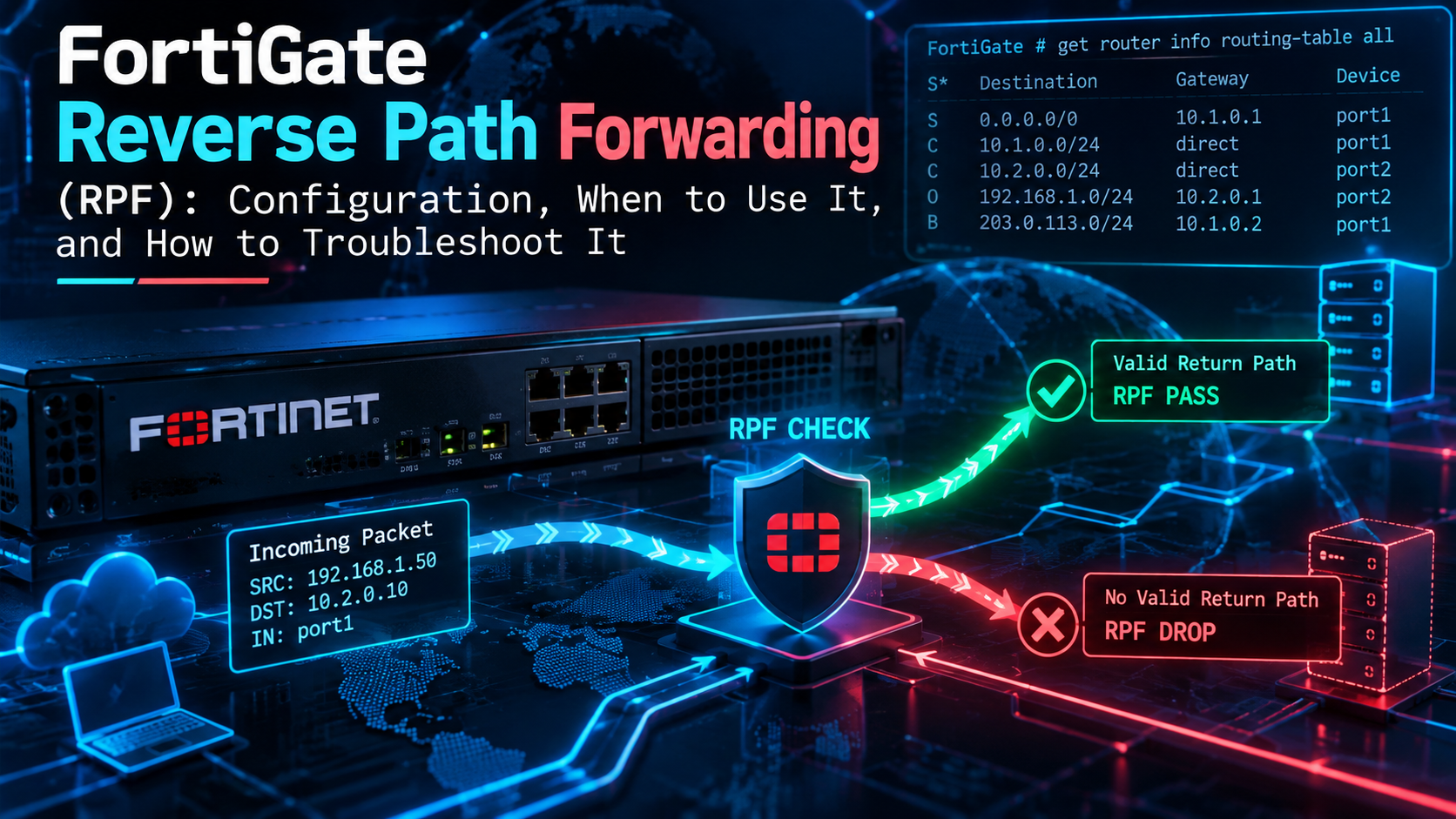
FortiGate Reverse Path Forwarding (RPF): Configuration, When to Use It, and How to Troubleshoot It
In this post
1. Executive Summary
Title: FortiGate Reverse Path Forwarding (RPF): Configuration, When to Use It, and How to Troubleshoot It
Objective: Explain exactly how FortiOS performs its Reverse Path Forwarding (RPF) anti-spoofing check, configure loose mode, strict mode, and per-interface exemptions correctly, and give you a repeatable workflow for proving (or ruling out) RPF as the reason a new session never shows up.
Target audience: Network and security engineers who run FortiGates in NAT mode with more than one path in or out: dual WAN, SD-WAN, IPsec hubs, and internal L3 cores. You should be comfortable in the FortiOS CLI.
RPF is one of those checks that works quietly for years and then eats a production service the day someone adds a backup ISP or a second core router. When it drops a packet there is no session, no policy hit, and usually no forward traffic log. If you know where to look, it takes two commands to confirm. If you don’t, it takes an afternoon of staring at firewall policies that are not the problem.
2. How RPF Works on a FortiGate
When the first packet of a new session arrives, FortiOS asks one question about the source address before it ever looks at firewall policy: could I route back to this source out of the interface it just arrived on? If the answer is no, the packet is treated as spoofed and dropped. The debug flow message for this is reverse path check fail, drop.
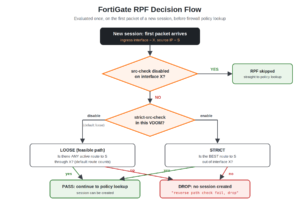
A few details matter more than the headline:
- It runs on session creation only. RPF is evaluated for the first packet of a session (the SYN for TCP). Packets that match an existing session are not re-checked against RPF.
- It runs before policy lookup. A packet that fails RPF never reaches the policy table, which is why you will not see an implicit deny (policy 0) hit or a forward traffic log for it.
- It uses the active routing table (RIB/FIB), not the routing database. A floating static route that is configured but not installed because it has a higher distance does not count. Neither do policy routes or SD-WAN service rules, because those are steering decisions, not routes.
- It uses the original source IP. The check happens before any source NAT is applied on egress, and the VIP/DNAT destination has no bearing on it.
- It is evaluated per VRF. With VRFs configured, the lookup happens in the VRF of the ingress interface.
- It is not multicast RPF. Multicast routing (PIM) has its own RPF logic tied to the path toward the source or RP. This post covers the unicast anti-spoofing check only.
Loose vs. strict mode
FortiOS offers two evaluation modes, set per VDOM, plus a per-interface switch that turns the check off entirely for traffic arriving on that interface.
| Mode | Setting | Question FortiOS asks | Practical effect |
|---|---|---|---|
| Loose (feasible path) | strict-src-check disable (default) |
Is there any active route to the source through the ingress interface? | A default route on the ingress interface satisfies the check for every source. Blocks sources that can only be reached out of some other interface. |
| Strict | strict-src-check enable |
Is the best route to the source out of the ingress interface? | The ingress interface must be the one FortiOS would actually use to reach the source. Stronger anti-spoofing, much less tolerant of multi-path designs. |
| Disabled on an interface | src-check disable (interface) |
None, for packets arriving on that interface | No anti-spoofing on that interface. Use as a scalpel, not a default. |
A concrete way to see the difference: a packet arrives on wan1 with a spoofed source of 10.0.1.25, which is actually your LAN. In loose mode the default route out of wan1 matches 10.0.1.25, so the check passes and the packet moves on to policy (where hopefully nothing allows it). In strict mode the best route to 10.0.1.25 is the connected route on port1, not wan1, so the packet is dropped at RPF.
Now flip it: a LAN host on port1 sends a packet sourced from 172.16.99.10, a range that exists nowhere behind port1. The only route that matches is the default route out of wan1. Loose mode drops it (no route through port1), and so does strict mode. This is the anti-spoofing that the default configuration already gives you, and it is the reason most internal spoofing never makes it past a FortiGate.
3. Prerequisites and Architecture
Assumed knowledge
- FortiOS CLI navigation,
config/edit/set/endworkflow, and VDOM context if you run multi-VDOM. - Static route attributes: distance vs. priority, and how FortiOS decides which routes are installed.
- Basic use of
diagnose debug flowanddiagnose sniffer packet.
Lab requirements
- One FortiGate in NAT mode running FortiOS 7.2, 7.4, or 7.6. The syntax covered here has been stable across 6.x and 7.x.
- Two WAN uplinks (or two simulated upstream routers) and one internal segment with a downstream L3 router.
- A Linux host on the LAN with
hping3installed for the spoof tests. - Lab addressing follows the InfoSecMonkey convention:
198.18.0.0/15stands in for public and transit space,10.0.0.0/16for internal LANs.
Lab components
| Component | Interface / Address | Role |
|---|---|---|
FortiGate wan1 |
198.18.1.2/30, gateway 198.18.1.1 |
Primary ISP |
FortiGate wan2 |
198.18.2.2/30, gateway 198.18.2.1 |
Backup ISP, also hosts an inbound VIP |
FortiGate port1 |
10.0.1.1/24 |
LAN and transit to the core router |
| Core router | 10.0.1.254 |
Routes to the remote branch LAN 10.0.50.0/24 |
IPsec tunnel to-site-b |
Remote LAN 10.0.60.0/24 |
Site-to-site VPN |
| Test host | 10.0.1.50 |
Linux host with hping3 |
| Web server | 10.0.1.20 |
Published on wan2 through a VIP |
4. When to Use Each Mode
The honest answer for most deployments is: leave loose mode on, make your routing table tell the truth, and only reach for strict mode or per-interface exemptions when you have a specific reason. Here is how that plays out in real designs.
| Scenario | Recommendation | Why |
|---|---|---|
| Single ISP internet edge, simple LAN | Loose (default) | Already blocks internal hosts from spoofing external sources. Strict adds WAN-side protection if you want it and there is only one path. |
| Dual WAN or SD-WAN with inbound services on both links | Loose, with both default routes active | Strict mode drops inbound sessions on whichever link is not the best route. Loose passes as long as each WAN has an active default route. |
| Segmentation firewall between internal zones, one legitimate path per subnet | Strict is a good fit | Every subnet has exactly one correct ingress interface, so strict mode turns any deviation into a drop. |
| Customer edge where you must enforce BCP 38 style ingress filtering | Strict, validated in a window | Guarantees traffic only enters from where its source is actually routed. |
| IPsec hub with many spokes and dynamic routing | Loose | Routes appear and disappear as tunnels and BGP sessions flap. Strict mode amplifies every convergence event into drops. |
| Link where asymmetric arrival is by design and routing cannot be corrected | Loose globally, src-check disable on that one interface |
Contains the loss of anti-spoofing to a single interface instead of the whole VDOM. |
Rule of thumb: Before disabling src-check anywhere, ask whether a missing route is the real problem. Nine times out of ten the fix is a static route, a summary, or a distance change, and you keep the anti-spoofing.
5. Step-by-Step Implementation Workflow
Step 1: Baseline the current RPF state
Goal: Know which mode the VDOM uses and whether any interface already has RPF disabled before you change anything.
Action: Check the VDOM setting and search every interface for a non-default src-check.
show full-configuration system settings | grep strict-src-check
show system interface | grep -f src-check
Expected output on a default build shows set strict-src-check disable. The second command only prints interfaces where src-check was changed (non-default values appear in show), so no output means every interface is still enforcing RPF.
GUI Verification: None. Both settings are CLI-only. Record the output in your change ticket.
Step 2: Make the routing table tell the truth
Goal: Ensure every legitimate source has an active route through the interface it arrives on. This is what keeps loose mode quiet in multi-path designs.
Action: Configure both default routes with the same distance and different priorities, so both are installed in the RIB while wan1 stays preferred for outbound traffic. Add routes for anything that lives behind a downstream router.
config router static
    edit 1
        set gateway 198.18.1.1
        set device "wan1"
        set distance 10
        set priority 1
    next
    edit 2
        set gateway 198.18.2.1
        set device "wan2"
        set distance 10
        set priority 10
    next
    edit 3
        set dst 10.0.50.0 255.255.255.0
        set gateway 10.0.1.254
        set device "port1"
    next
end
Because both defaults are active, a session that arrives on wan2 (for example to the VIP on wan2) passes loose RPF, and FortiOS returns the reply out wan2 since a valid route through that interface exists. If wan2 had distance 20 instead, its route would sit in the routing database, not the RIB, and every inbound session on wan2 would fail RPF.
For IPsec, make sure the remote subnets have a route through the tunnel interface, either statically, via add-route enable on dial-up phase1 definitions, or through BGP/OSPF over the tunnel.
config router static
    edit 10
        set dst 10.0.60.0 255.255.255.0
        set device "to-site-b"
    next
end
GUI Verification: Dashboard > Network > Static & Dynamic Routing (the Routing Monitor). Both 0.0.0.0/0 entries and the 10.0.50.0/24 and 10.0.60.0/24 routes should be listed as active.
Step 3 (optional): Enable strict mode for the VDOM
Goal: Require the ingress interface to be the best route back to the source.
Action: Enable strict source checking. This applies to every interface in the VDOM, so do it in a maintenance window and run Section 6 immediately afterward.
config system settings
    set strict-src-check enable
end
Watch out: With the Step 2 routing in place, strict mode still treats wan1 as the best default route because it has the lower priority. Inbound sessions arriving on wan2 will now fail RPF. Strict mode and active/backup inbound services on multiple WANs do not mix.
To revert:
config system settings
    set strict-src-check disable
end
GUI Verification: None. Confirm with show full-configuration system settings | grep strict-src-check.
Step 4 (optional): Exempt a single interface
Goal: Stop RPF drops on one interface where asymmetric arrival is intentional and cannot be fixed with routing, while every other interface keeps anti-spoofing.
Action: Disable src-check on that interface only.
config system interface
    edit "port5"
        set src-check disable
    next
end
Document why in the interface description or comments. An exempt interface is an easy thing to forget during the next audit, and it is exactly where a spoofed source will get through.
config system interface
    edit "port5"
        set description "src-check disabled: partner transit, CHG-2026-0412"
    next
end
GUI Verification: None for src-check itself. The description is visible under Network > Interfaces.
Step 5: Prove the check with a controlled spoof
Goal: Confirm RPF drops what it should drop, and see the exact debug signature so you recognize it in production.
Action: Start a debug flow filtered on the spoofed source, then send a few SYNs from the LAN test host using a source address that is not routed behind port1.
diagnose debug reset
diagnose debug flow filter clear
diagnose debug flow filter addr 172.16.99.10
diagnose debug flow show function-name enable
diagnose debug console timestamp enable
diagnose debug flow trace start 20
diagnose debug enable
From the Linux test host (10.0.1.50):
sudo hping3 -S -p 443 -c 3 -a 172.16.99.10 198.18.200.10Stop the debug when you are done:
diagnose debug disable
diagnose debug flow trace stop
diagnose debug flow filter clear
GUI Verification: None. RPF drops happen before policy, so Log & Report > Forward Traffic will not show these packets. The CLI output in Section 6 is the evidence.
6. Verification and Validation
Expected result: spoofed source dropped
The debug flow for each spoofed SYN should look like this (IDs, line numbers, and function names vary by build):
id=65308 trace_id=1 func=print_pkt_detail line=5895
  msg="vd-root:0 received a packet(proto=6,
  172.16.99.10:2471->198.18.200.10:443) tun_id=0.0.0.0
  from port1. flag [S], seq 1784210593, ack 0, win 512"
id=65308 trace_id=1 func=init_ip_session_common line=6076
  msg="allocate a new session-0003b1a4, tun_id=0.0.0.0"
id=65308 trace_id=1 func=vf_ip_route_input_common line=2605
  msg="reverse path check fail, drop"
Three things in that output confirm RPF: the packet was received, no policy ID appears anywhere, and the last message is reverse path check fail, drop. Output is wrapped here for readability; on the console each message is a single line.
Expected result: legitimate traffic passes
Repeat the test with a real LAN source (drop the -a flag) and a filter on 10.0.1.50. You should see the route lookup, a policy match, and allowed by Policy-N instead of the RPF drop:
func=vf_ip_route_input_common msg="find a route: flag=04000000
  gw-198.18.1.1 via wan1"
func=fw_forward_handler msg="Allowed by Policy-1: SNAT"
Validate the routing that RPF will use
For any source you care about, ask FortiOS directly which route it would use to reach that source:
get router info routing-table details 10.0.50.10Expected output when the core router route from Step 2 is in place:
Routing table for VRF=0
Routing entry for 10.0.50.0/24
  Known via "static", distance 10, metric 0, best
  * vrf 0 10.0.1.254, via port1
If the answer is the default route via wan1, any packet sourced from 10.0.50.10 arriving on port1 will fail RPF in both loose and strict mode. That single command settles most RPF tickets.
To confirm both default routes are active (not just configured) for the dual-WAN case:
get router info routing-table all | grep 0.0.0.0/0
get router info routing-table database | grep 0.0.0.0/0
Both wan1 and wan2 defaults should appear in routing-table all. If wan2 appears only in the database output, it is configured but not installed, and inbound sessions on wan2 will fail RPF.
7. Troubleshooting and Gotchas
The workflow below is the same one to use in production whenever a new session silently fails. It takes less than five minutes and either proves or eliminates RPF.
- Confirm the packet actually arrives. Run
diagnose sniffer packet any 'host <src> and host <dst>' 4 0 l. You want to see the packet ingress on the expected interface and nothing egress. - Run a filtered debug flow on the source address (Step 5 commands). If the last message is
reverse path check fail, drop, it is RPF. If you see a policy ID, it is not RPF. - Ask the routing table with
get router info routing-table details <src>. The interface in the answer versus the ingress interface from the sniffer tells you exactly why the check failed. - Fix the route, not the check. Add or correct the route, rerun the test, and only consider
src-check disableif the asymmetry is intentional.
Gotcha 1: Inbound services on the backup WAN stop working
Symptom: A VIP or remote-access service on wan2 works during a failover test but not when wan1 is up. The sniffer shows SYNs arriving on wan2 and nothing leaving.
Diagnosis: The wan2 default route has a higher distance than wan1, so it is not in the active routing table. Loose RPF finds no active route to the internet source through wan2.
get router info routing-table database | grep 0.0.0.0/0
diagnose debug flow filter addr <client-public-ip>
Resolution: Give both default routes the same distance and use priority to prefer wan1, as in Step 2. With SD-WAN, place both links in the SD-WAN zone so each member contributes an active route. If strict mode is enabled, this design will still fail on wan2; go back to loose mode.
Gotcha 2: A subnet behind an internal router is dropped
Symptom: Users on 10.0.50.0/24 (behind the core router) cannot reach anything through the FortiGate, while hosts on 10.0.1.0/24 work fine. No forward traffic logs exist for the branch subnet.
Diagnosis: There is no route to 10.0.50.0/24 via port1, so the only match is the default route out of wan1.
get router info routing-table details 10.0.50.10Resolution: Add the static route (or a summary such as 10.0.0.0/16 via 10.0.1.254) or learn it via OSPF/BGP from the core. Do not disable src-check on the LAN interface to work around a missing route; that removes anti-spoofing for your entire user segment.
Gotcha 3: VPN traffic dropped after a tunnel or BGP flap
Symptom: A tunnel is up and phase 2 selectors are correct, but traffic from the remote site is dropped for a period after the tunnel comes up, or permanently on a dial-up tunnel.
Diagnosis: The route to the remote subnet is missing. Common causes are BGP over IPsec still converging, add-route disable on a dial-up phase1, or a static route pointing at the wrong tunnel interface.
diagnose vpn tunnel list name to-site-b
get router info bgp summary
get router info routing-table details 10.0.60.10
Resolution: Make sure a route through the tunnel interface exists for every remote source. On dial-up tunnels either keep add-route enable or advertise the routes dynamically. If you keep a blackhole route for the remote subnet (distance 254) to stop leaks when the tunnel is down, that is fine; it only becomes active when the tunnel route disappears.
Gotcha 4: Policy routes and SD-WAN rules do not satisfy RPF
Symptom: A policy route or SD-WAN rule steers return traffic for a partner network out port3, but traffic from that partner arriving on port3 is dropped.
Diagnosis: RPF checks the routing table only. Policy routes (diagnose firewall proute list) are steering entries, not routes.
Resolution: Add a real static route for the partner prefixes through port3 (a higher priority is fine for loose mode; a higher distance is not if a lower-distance route to the same prefix exists, because it will not be installed), or disable src-check on port3 and document it.
Gotcha 5: Strict mode enabled, random multi-path failures
Symptom: After enabling strict-src-check, some flows fail intermittently, often around failovers, ECMP changes, or BGP best-path changes.
Diagnosis: In strict mode, the ingress interface must be the current best route. Any design where traffic can legitimately arrive on a non-preferred path will fail.
Resolution: Revert to loose mode (set strict-src-check disable) for that VDOM. If you need strict anti-spoofing only for a subset of segments, move those segments into their own VDOM and enable strict mode there.
Reading the drop message correctly
Not every silent drop is RPF. Match the last debug flow message to its cause before you change anything:
| Debug flow message | What it means | Where to look |
|---|---|---|
reverse path check fail, drop |
RPF: no valid route back to the source through the ingress interface | get router info routing-table details <src> |
Denied by forward policy check (policy 0) |
No firewall policy matched; implicit deny | Policy interfaces, addresses, services, schedules |
iprope_in_check() check failed on policy 0, drop |
Traffic to the FortiGate itself was rejected (local-in or admin access) | allowaccess, local-in policies, trusted hosts |
no matching IPsec selector, drop |
Traffic hit the tunnel but did not match any phase 2 selector | Phase 2 src-subnet / dst-subnet |
Do not confuse RPF with asymroute: set asymroute enable under config system settings changes how FortiOS tracks session state when forward and reply packets take different paths, and it has VDOM-wide inspection consequences. It is a separate control from RPF and is not the fix for a reverse path check fail message.
8. Quick Reference
| Task | Command |
|---|---|
| Show VDOM RPF mode | show full-configuration system settings | grep strict-src-check |
| Enable / disable strict mode | config system settings then set strict-src-check enable|disable |
| Find interfaces with RPF disabled | show system interface | grep -f src-check |
| Disable RPF on one interface | config system interface, edit <port>, set src-check disable |
| Which route reaches a source? | get router info routing-table details <src-ip> |
| Active vs. configured routes | get router info routing-table all vs. ... database |
| Kernel forwarding table | get router info kernel |
| Confirm arrival on the wire | diagnose sniffer packet any 'host <src>' 4 0 l |
| Prove the drop reason | diagnose debug flow filtered on the source address |
9. Wrapping Up
RPF on a FortiGate is simple once you internalize three facts: it only checks the source, it only uses active routes, and it runs before policy. Keep loose mode as your default, make every legitimate source routable through the interface it arrives on, use strict mode where there is exactly one correct path, and treat src-check disable as a documented exception. When a session silently disappears, a sniffer, a filtered debug flow, and one routing-table lookup will tell you whether RPF is the culprit in minutes.
Recent posts
-

-

DNS is one of those technologies that quietly underpins... Full Story
-

BGP issues on FortiGate firewalls usually trace back to... Full Story
-

Every time your laptop talks to your router, a... Full Story
-

If you've spent any time configuring NAT on a... Full Story
-

If you have spent any time configuring firewall policies... Full Story
-

High availability on FortiGate is one of those features... Full Story
-

If you've configured SD-WAN on a FortiGate, you've almost... Full Story
-

FortiLink is the management protocol that turns a FortiSwitch... Full Story
-

FortiSwitches are pretty rock solid from Mean Time Between... Full Story
-

This is a quicky tip. Have you ever gone... Full Story
-

DNS is one of those quiet pieces of internet... Full Story
-

This article is an updated version of the previous... Full Story
-

You will add ns2 as a secondary (slave) BIND9... Full Story
-

In the process of deploying my lab, I needed... Full Story
-

RFC 8805, used to be known as Self-Correcting IP... Full Story
-

Years back, I wrote an article about certificate pinning. ... Full Story
-

FortiGates have the ability to send alerts to Microsoft... Full Story
-

In this post, I am going to walk through... Full Story
-

Troubleshooting VoIP on a FortiGate can feel like trying... Full Story
-

Prior to FortiOS 7.0, there were three commands to... Full Story
-

In this post, I am going to go over... Full Story
-

What we are going to do: We are going... Full Story
-

Choosing between FGCP (FortiGate Clustering Protocol) and FGSP (FortiGate... Full Story
-

Creating a VLAN on macOS (The "Pro" Move) A... Full Story
-

This blog post explores the logic behind how macOS... Full Story
-

Pretty Fly for a Wi-Fi Tell My Wi-Fi Love... Full Story
-

Part of my daily gig is creating BoMs (Bill-of-Materials)... Full Story
-

ICMP introduces several security risks, but careful filtering, rate... Full Story
-

The command diag debug application dhcps -1 enables full... Full Story
-

In the world of FortiOS, execute tac report is... Full Story
-

LLDP; What is it The Link Layer Discovery Protocol... Full Story
-

What it actually does When you run diagnose fdsm... Full Story
-

Monkey Bites are bite-sized, high-impact security insights designed for... Full Story
-

I have run macOS in macOS with Parallels but... Full Story
-

Don't be confused with my other FortiNAC posts where... Full Story
-

This is the third session in a multi-part article... Full Story
-

Today I was configuring key-based authentication on a FortiGate... Full Story
-

Netcat, often called the "Swiss Army knife" of networking,... Full Story
-

At its core, IEEE 802.1X is a network layer... Full Story
-

In case you did not see the previous FortiNAC... Full Story
-

This is our 5th session where we are going... Full Story
-

Now that we have Wireshark installed and somewhat configured,... Full Story
-

The Philosophy of Packet Analysis Troubleshooting isn't about looking... Full Story
-

InfoSecMonkey Threat Response October 24, 2026 | No fluff.... Full Story
-

InfoSecMonkey Threat Response October 24, 2026 | No fluff.... Full Story
-

Plus what you actually get with FortiCare Essential, Premium... Full Story