
If you've spent any time configuring user authentication on... Full Story
By Manny Fernandez
May 28, 2020

Bi-directional DNAT on FortiGate Firewalls
I am a BIG supporter of Central NAT. I believe it is in-line with the present day firewall platforms. Even if you use Policy NAT (the original way on FortiOS) or Central NAT you normally want bidirectional NAT’ng, that is SNAT and DNAT.
DNAT / VIP
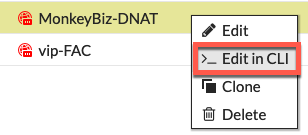
There is a feature on the CLI of the VIP which makes the VIP bi-directional. That command is set nat-source-vip enable. This is NOT enabled by default. You can get to the VIP settings by right-clicking the VIP and choosing edit in cli
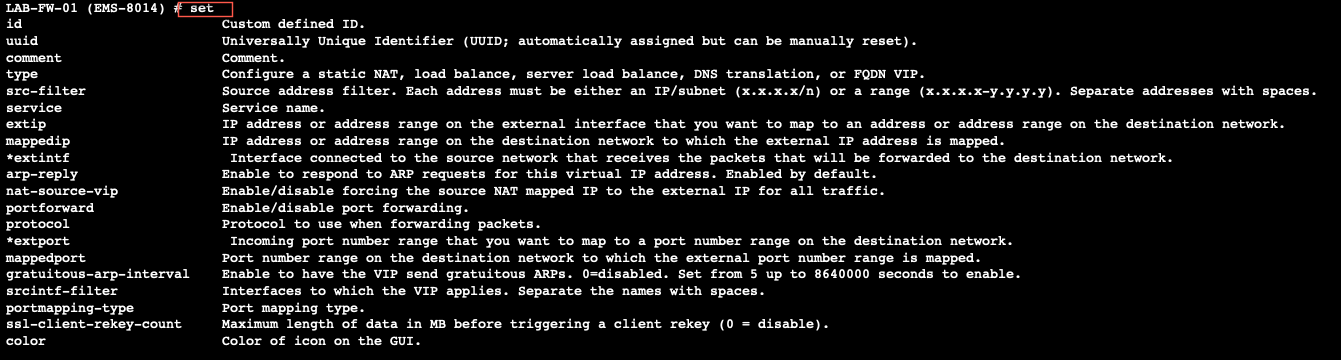
Once you are in the cli you can type set ? and it will show you all of the set options available to you. You can also give the show full to see all the options, default and or custom.
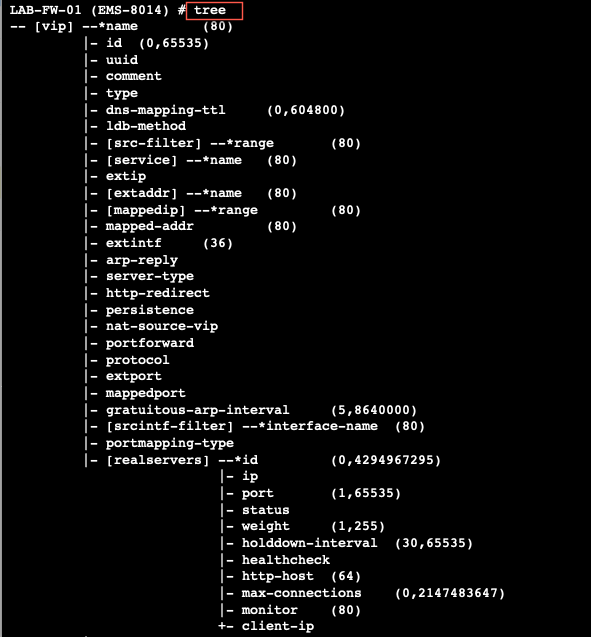
The other option you can type is tree which gives you the entire command structure for that section.
Once you shell out to the cli FortiOS will show you the basic configuration for that VIP
config firewall vip
    edit "OBSER"
        set uuid 169ccfa6-a086-51ea-ec2a-49abe0fe0179
        set extip 23.126.140.221
        set extintf "any"
        set color 6
        set mappedip "10.1.106.50"
     next
We can now set the nat-source-vip enabled
config firewall vip
    edit "OBSER"
        set uuid 169ccfa6-a086-51ea-ec2a-49abe0fe0179
        set extip 23.126.140.221
        set extintf "any"
        set nat-source-vip enable
        set color 6
        set mappedip "10.1.106.50"
     next
In this scenario where we are using the set nat-source-vip enable we will use the same VIP IP address when we egress to the Internet. I used the following debug commands to identify the traffic.
diagnose debug reset
diagnose debug flow filter saddr 10.1.106.50
diagnose debug flow filter daddr 96.76.81.226
diagnose debug flow show functi
diagnose debug enable
diagnose debug flow trace start 10
I then connected to my Linux box (10.1.106.50) and attempted to connect to 96.76.81.226
LAB-FW-01 # id=20085 trace_id=55 func=print_pkt_detail line=5618 msg="vd-root:0 received a packet(proto=6, 10.1.106.50:41248->96.76.81.226:22) from Servers. flag [S], seq 4253066238, ack 0, win 29200"
id=20085 trace_id=55 func=init_ip_session_common line=5788 msg="allocate a new session-0080dd0e"
id=20085 trace_id=55 func=vf_ip_route_input_common line=2595 msg="find a route: flag=04000000 gw-23.126.142.222 via port1"
id=20085 trace_id=55 func=fw_forward_handler line=771 msg="Allowed by Policy-8: SNAT"
id=20085 trace_id=55 func=__ip_session_run_tuple line=3396 msg="SNAT 10.1.106.50->23.126.140.221:41248"
id=20085 trace_id=56 func=print_pkt_detail line=5618 msg="vd-root:0 received a packet(proto=6, 10.1.106.50:41248->96.76.81.226:22) from Servers. flag [S], seq 4253066238, ack 0, win 29200"
id=20085 trace_id=56 func=resolve_ip_tuple_fast line=5698 msg="Find an existing session, id-0080dd0e, original direction"
We can see from the output, that the SNAT was performed and the firewall NAT’d the 10.1.106.50 to 23.126.140.221 which is the expected behavior.
Port Forwarding on the VIP
Unlike the behavior above, when using port-forwarding on the VIP, the set nat-source-vip enable will be ignored.
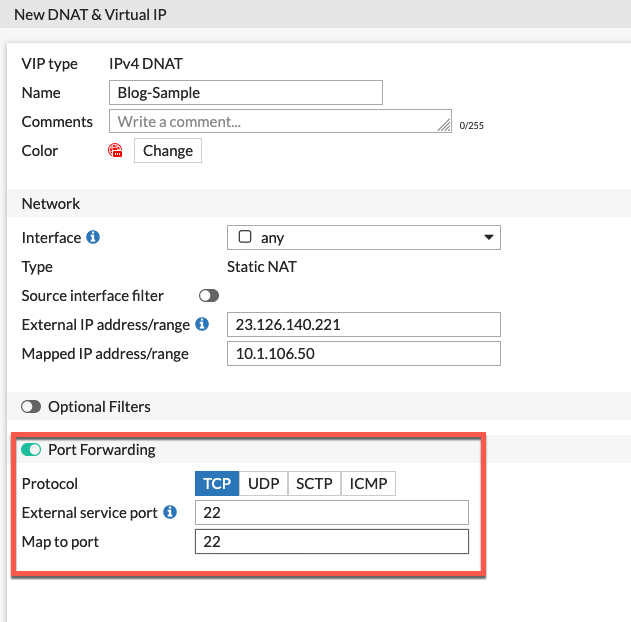
Her we can see the cli output with the set nat-source-vip enable set on the VIP.
config firewall vip
    edit "Blog-Sample"
        set extip 23.126.142.221
        set nat-source-vip enable
        set extintf "port1"
        set portforward enableset color 6
        set mappedip "10.1.106.50"
        set extport 22
       set mappedport 22
    next
end
When we run the same diag commands, we see a different outcome
LAB-FW-01 # id=20085 trace_id=38 func=print_pkt_detail line=5618 msg="vd-root:0 received a packet(proto=6, 10.1.106.50:41242->96.76.81.226:22) from Servers. flag [S], seq 4261424728, ack 0, win 29200"
id=20085 trace_id=38 func=init_ip_session_common line=5788 msg="allocate a new session-0080c802"
id=20085 trace_id=38 func=vf_ip_route_input_common line=2595 msg="find a route: flag=04000000 gw-23.126.142.222 via port1"
id=20085 trace_id=38 func=fw_forward_handler line=771 msg="Allowed by Policy-8: SNAT"
id=20085 trace_id=38 func=__ip_session_run_tuple line=3396 msg="SNAT 10.1.106.50->23.126.142.209:41242"
id=20085 trace_id=39 func=print_pkt_detail line=5618 msg="vd-root:0 received a packet(proto=6, 10.1.106.50:41242->96.76.81.226:22) from Servers. flag [S], seq 4261424728, ack 0, win 29200"
id=20085 trace_id=39 func=resolve_ip_tuple_fast line=5698 msg="Find an existing session, id-0080c802, original direction"
Here we can see the SNAT is not matching the extip that is configured. This is because we are not matching a destination and/or the port 22. It is matching the catch-all central NAT policy using the outgoing interface.
How to get around this
The assumption when using port-forwarding is that you have limited public facing IP addresses and need to do port-address translation. With that said, you can use a Central NAT entry with a corresponding pool
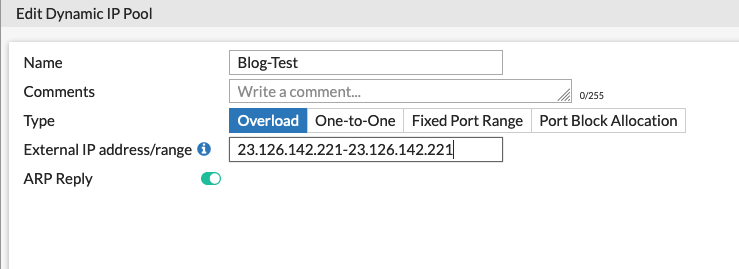
Here we created a pool named Blog-Test with the .221 IP address which matches the VIP we created above. We set it to Overload and save it.
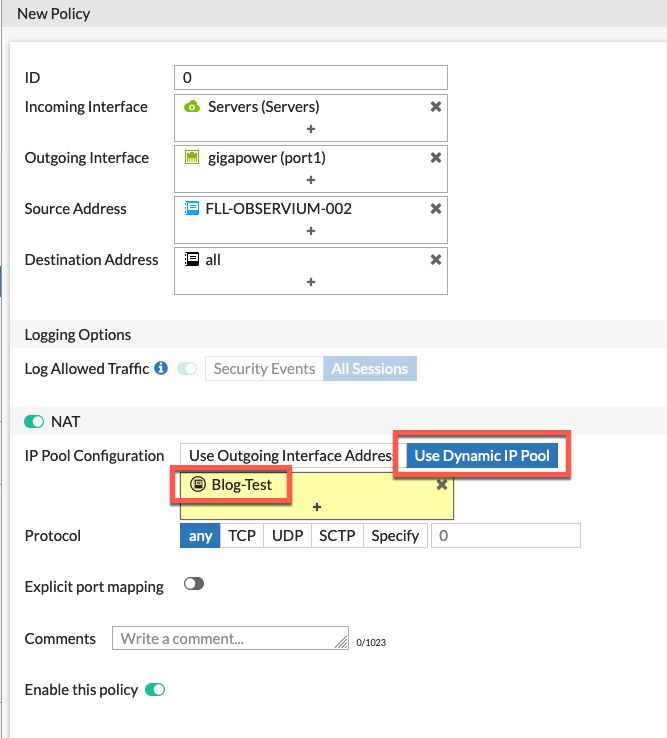
Here we can see the Central NAT policy we created matching the outbound traffic and then using the Use Dynamic IP Pool option and we chose Blog-Test.
NOTE: You can add multiple hosts to the Source Address field and then all of those hosts when egressing through gigapower will get SNAT'd using that Pool.
Hope this helps.
Recent posts
-

-

DNS is one of those technologies that quietly underpins... Full Story
-

BGP issues on FortiGate firewalls usually trace back to... Full Story
-

Every time your laptop talks to your router, a... Full Story
-

If you've spent any time configuring NAT on a... Full Story
-

If you have spent any time configuring firewall policies... Full Story
-

High availability on FortiGate is one of those features... Full Story
-

If you've configured SD-WAN on a FortiGate, you've almost... Full Story
-

FortiLink is the management protocol that turns a FortiSwitch... Full Story
-

FortiSwitches are pretty rock solid from Mean Time Between... Full Story
-

This is a quicky tip. Have you ever gone... Full Story
-

DNS is one of those quiet pieces of internet... Full Story
-

This article is an updated version of the previous... Full Story
-

You will add ns2 as a secondary (slave) BIND9... Full Story
-

In the process of deploying my lab, I needed... Full Story
-

RFC 8805, used to be known as Self-Correcting IP... Full Story
-

Years back, I wrote an article about certificate pinning. ... Full Story
-

FortiGates have the ability to send alerts to Microsoft... Full Story
-

In this post, I am going to walk through... Full Story
-

Troubleshooting VoIP on a FortiGate can feel like trying... Full Story
-

Prior to FortiOS 7.0, there were three commands to... Full Story
-

In this post, I am going to go over... Full Story
-

What we are going to do: We are going... Full Story
-

Choosing between FGCP (FortiGate Clustering Protocol) and FGSP (FortiGate... Full Story
-

Creating a VLAN on macOS (The "Pro" Move) A... Full Story
-

This blog post explores the logic behind how macOS... Full Story
-

Pretty Fly for a Wi-Fi Tell My Wi-Fi Love... Full Story
-

Part of my daily gig is creating BoMs (Bill-of-Materials)... Full Story
-

ICMP introduces several security risks, but careful filtering, rate... Full Story
-

The command diag debug application dhcps -1 enables full... Full Story
-

In the world of FortiOS, execute tac report is... Full Story
-

LLDP; What is it The Link Layer Discovery Protocol... Full Story
-

What it actually does When you run diagnose fdsm... Full Story
-

Monkey Bites are bite-sized, high-impact security insights designed for... Full Story
-

I have run macOS in macOS with Parallels but... Full Story
-

Don't be confused with my other FortiNAC posts where... Full Story
-

This is the third session in a multi-part article... Full Story
-

Today I was configuring key-based authentication on a FortiGate... Full Story
-

Netcat, often called the "Swiss Army knife" of networking,... Full Story
-

At its core, IEEE 802.1X is a network layer... Full Story
-

In case you did not see the previous FortiNAC... Full Story
-

This is our 5th session where we are going... Full Story
-

Now that we have Wireshark installed and somewhat configured,... Full Story
-

The Philosophy of Packet Analysis Troubleshooting isn't about looking... Full Story
-

In this guide Executive Summary Prerequisites: Which vi Do... Full Story
-

Objective: Strip blank and whitespace-only lines out of config... Full Story
-

In this guide Executive Summary Prerequisites and Architecture How... Full Story