
If you've spent any time configuring user authentication on... Full Story
By Manny Fernandez
June 11, 2026
FortiGate Administrator Profiles: Access Control Reference
Overview
Administrator profiles (also called access profiles) are the role-based access control (RBAC) mechanism in FortiOS. A profile defines what an administrator can see and change by assigning an access level to each functional area of the device. Every administrator account except the built-in super_admin is bound to exactly one access profile, and that profile is enforced consistently across the GUI, the CLI, and the REST API.
The guiding principle is least privilege. A profile should grant only the access an administrator needs to perform their role and nothing more. This document breaks down the access levels, the functional areas they control, the way permissions interact (including overlapping and dependent permissions), the override theme behavior, and recommended profile builds for common operational roles.
Access Levels
Each functional area in a profile can be set to one of the following access levels.
| Level | CLI keyword | Meaning |
| None | none | The administrator cannot view or modify anything in this area. Menus are hidden in the GUI and related CLI commands are rejected. |
| Read | read | The administrator can view configuration and status but cannot make changes. Required to see configurations. |
| Read-Write | read-write | The administrator can both view and modify configuration in this area. Required to make configuration changes. |
Read access is required to view configurations. Write access is required to make configuration changes. These two are layered: read-write inherently includes read. You cannot grant write without read, because viewing is a prerequisite for changing.
The super_admin Profile
The super_admin profile is a special built-in profile that cannot be edited or deleted. Accounts assigned super_admin (such as the default admin account) behave like the root administrator. They have full permission to view and change all configuration options, including the ability to view and change other administrator accounts and to access every CLI command on the system.
Key points about super_admin:
– It is the only profile with unrestricted access to all CLI commands.
– It is required for certain global and system-critical operations that no custom profile can be granted.
– In a VDOM-enabled deployment, super_admin operates at the global level. The prof_admin equivalent operates within a single VDOM.
– Because of its power, super_admin accounts should be few, tightly controlled, protected with strong unique passwords, MFA, and trusted-host restrictions, and audited regularly.
For everything else, build custom profiles rather than handing out super_admin.
Functional Areas Controlled by a Profile
A custom access profile assigns an access level to each of the following permission groups. The CLI configuration lives under config system accprofile. The exact set varies slightly by FortiOS version, but the current groupings are below.
| Profile area | CLI field | What it governs |
| Security Fabric | fabricgrp | Security Fabric topology, fabric connectors, automation stitch participation |
| FortiView / Monitor | ftviewgrp | FortiView dashboards, monitors, logging-derived analytics views |
| User & Device | authgrp | User definitions, groups, device inventory, authentication settings, FSSO |
| Firewall | fwgrp | Firewall policies, addresses, services, schedules, virtual IPs, traffic shaping |
| Log & Report | loggrp | Log configuration, log viewing, report generation and templates |
| Network | netgrp | Interfaces, DNS, packet capture, SD-WAN, static and dynamic routing |
| System | sysgrp | System settings, HA, SNMP, admin accounts (via admingrp sub-permission), firmware |
| Security Profile | utmgrp | All UTM inspection: AV, web filter, DNS filter, app control, IPS, file filter, video filter, DLP |
| VPN | vpngrp | IPsec and SSL VPN configuration and monitoring |
| WAN Opt & Cache | wanoptgrp | WAN optimization, web cache, explicit proxy elements |
| WiFi & Switch | wifi | FortiAP (managed AP) and FortiSwitch (managed switch) controller functions |
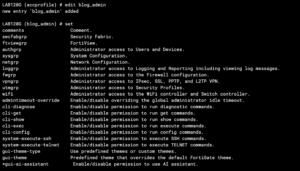
Several of these groups expand into sub-permissions that can be set individually. The most important examples are listed in the next section.
Sub-Permissions and Granular Controls
Some permission groups allow finer control rather than a single read/write toggle across the whole group. The two most operationally significant are:
Firewall (fwgrp) sub-permissions:
– Policy
– Address
– Service
– Schedule
– Others
System (sysgrp) sub-permissions:
– cfg (general system configuration)
– mnt (maintenance, including firmware, backup/restore, factory reset)
– admin (admingrp: create, edit, delete other administrator accounts and profiles)
– upd (FortiGuard updates)
The System -> Administrator (admin) sub-permission is the most sensitive granular control on the box. Granting read-write here lets an administrator create accounts, change other admins’ passwords, and assign profiles, which is effectively a path to privilege escalation. Treat it like super_admin for risk purposes and grant it only to platform owners.
Security Profile (utmgrp) sub-permissions can also be split so that, for example, a help desk role gets web filter access without IPS or DLP access. This is the basis for the help desk web content profile recommended later.
Permission Hierarchy and How Areas Interact
Permissions in FortiOS are not fully independent. There is an implied dependency hierarchy where a permission in one area is only useful, or only functions correctly, when a supporting permission in another area is also present. Misunderstanding this is the most common cause of either a broken profile (admin cannot do the assigned job) or an over-permissioned profile (admin can reach more than intended).
The read-before-write rule
Within any single area, write always implies read. You never set write without read; the system treats read-write as the superset. This is the simplest layer of the hierarchy.
Cross-area dependencies (the overlap problem)
The harder layer is that effective use of one area often requires read in a second area. Enabling one permission without its corresponding companion produces a profile that looks complete but does not work as intended. Common dependency pairs:
| If you grant write to… | You also need read/write on… | Why |
| Firewall policy | Network, User & Device, Security Profile | A policy references interfaces, addresses, users, and security profiles. Without read on those areas the object pickers come up empty. |
| Security Profile (utmgrp) | Firewall read | UTM profiles only take effect when attached to a firewall policy. UTM-only admins cannot see where a profile is applied without firewall read. |
| VPN (vpngrp) | Network, Firewall | Tunnels need interface and route context, and VPN traffic is governed by firewall policy. |
| WiFi & Switch (wifi) | Network, User & Device | Managed AP/switch ports map to VLAN interfaces and often to 802.1X user authentication. |
| Log & Report traffic view | Firewall read | Filtering logs by policy ID requires seeing the policies those IDs refer to. |
| Any account management | System -> admin (admingrp) | Creating or editing administrators is gated entirely by this sub-permission. |
Recommendation for handling overlap
When you enable a permission, walk its dependency chain and decide deliberately about each companion permission rather than leaving it at the default of none. The safe pattern is:
1. Grant read-write only on the area that is the administrator’s actual job.
2. Grant read (not write) on every area that job depends on for object selection and context.
3. Leave everything else at none.
This produces a profile that functions correctly without silently widening the blast radius. The failure mode to avoid is granting write to the dependency area when read would have been sufficient. For example, a firewall policy admin needs to read Network objects to build policies, but does not need to write Network configuration; granting netgrp read-write would let them reconfigure interfaces and routing, which is outside their role.
Override Theme (per_user_admin_setting / GUI override)
FortiOS lets an individual administrator override certain presentation and idle-behavior settings from the global defaults. The most visible of these is the GUI theme (color scheme), but the override concept also covers items such as the idle timeout and landing page in some versions.
The behavior is layered like the rest of the system:
– A global default theme and idle timeout are set under System settings.
– An individual administrator account can be allowed to override the theme so their own session uses a different color scheme without changing the global default or affecting other admins.
– The override is per-account and cosmetic for the theme; it does not change what the administrator can access. Theme override is an appearance preference, not a privilege.
Practical guidance: theme override is harmless and can be left to administrator preference. The override that does matter operationally is the idle-timeout override. If you allow accounts to override the global idle timeout, ensure the per-account value is not set longer than your security policy permits, because a long idle timeout on a privileged account is a real session-hijack exposure. Keep override of security-relevant timers disabled for privileged profiles and rely on the global value.

Recommended Profiles for Common Roles
The following are starting-point profile builds. Adjust to your environment, and always test with a non-production account before rolling out. All areas not listed should be set to none.
1. FortiSwitch and FortiAP Administrator (LAN Edge operator)
Intended for staff who manage the managed-switch and managed-AP layer: port configuration, VLAN assignment to ports, AP provisioning, SSIDs, and PoE, without touching the security policy or system platform.
| Area | Level | Notes |
| WiFi & Switch (wifi) | Read-Write | Core of the role: managed AP and switch control |
| Network (netgrp) | Read | See VLAN interfaces the switch ports map to. Write only if this role creates the VLAN interfaces. |
| User & Device (authgrp) | Read | 802.1X / device context on ports and SSIDs |
| FortiView / Monitor | Read | Client and AP/switch status visibility |
| Log & Report (loggrp) | Read | Connectivity troubleshooting |
| Everything else | None | No firewall, VPN, UTM, or system access |
Rationale: this role lives in the WiFi & Switch area but depends on Network and User read for the objects it references. Keep Network at read unless the team genuinely owns interface creation, in which case scope that carefully.
2. Help Desk with Web Content (web filter) access
Intended for tier-1 support who handle “this site is blocked / please unblock” tickets and similar web-access requests, with the ability to adjust web filtering but no other security or platform power.
| Area | Level | Notes |
| Security Profile -> Web Filter | Read-Write | Scope to the web filter sub-permission only; leave IPS, DLP, AV, app control at none or read |
| Firewall (fwgrp) | Read | See which policies the web filter profile is attached to |
| FortiView / Monitor | Read | Investigate user web activity tied to a ticket |
| Log & Report (loggrp) | Read | Confirm a block event and its category |
| User & Device (authgrp) | Read | Map a complaint to a user or device |
| Everything else | None | No firewall policy write, no network, no system, no VPN |
Rationale: this is the canonical overlap case. Web filter write alone is useless without firewall read for context and log read for verification. Grant the dependency areas at read only so the help desk can diagnose and adjust web content handling but cannot alter the policy structure itself.
3. Network / Routing Administrator
Intended for staff who own interfaces, routing, DNS, and SD-WAN, but not security inspection or firewall policy.
| Area | Level | Notes |
| Network (netgrp) | Read-Write | Interfaces, routing, DNS, SD-WAN, packet capture |
| Firewall (fwgrp) | Read | Context for how traffic is policed |
| VPN (vpngrp) | Read-Write | If this role also owns site-to-site tunnels |
| FortiView / Monitor | Read | |
| Log & Report (loggrp) | Read | |
| Everything else | None |
4. Security Policy Administrator
Intended for the firewall and security inspection owner.
| Area | Level | Notes |
| Firewall (fwgrp) | Read-Write | Policies, addresses, services, schedules |
| Security Profile (utmgrp) | Read-Write | Full UTM ownership |
| Network (netgrp) | Read | Select interfaces and addresses in policy |
| User & Device (authgrp) | Read | Select users and groups in policy |
| FortiView / Monitor | Read | |
| Log & Report (loggrp) | Read | |
| Everything else | None |
5. Read-Only Auditor / Monitor
Intended for compliance, audit, or NOC watch roles that must see everything and change nothing.
| Area | Level | Notes |
| All areas | Read | Full visibility |
| System -> admin (admingrp) | None | Do not expose administrator account management even at read |
| Everything writable | None | No write anywhere |
Configuration Reference (CLI)
A custom profile is created and assigned as follows. Field names shown are representative; confirm against your FortiOS version with config system accprofile then set ?.
config system accprofile
edit "helpdesk_webfilter"
set fwgrp read
set loggrp read
set ftviewgrp read
set authgrp read
config utmgrp-permission
set webfilter read-write
end
next
end
config system admin
edit "jdoe"
set accprofile "helpdesk_webfilter"
set vdom "root"
next
end
Notes on the CLI:
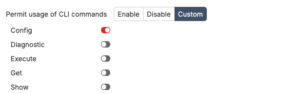
– The sub-permission blocks (for example config utmgrp-permission and config fwgrp-permission) only appear when the parent group is set to a level that permits granularity. Set the parent group, then drop into the sub-block to scope it.
– Available CLI commands for a logged-in administrator are filtered by their profile. An admin without an area’s read access will not even see the related commands, which can look like a missing feature rather than a permission block. Check the profile before assuming a CLI bug.
– In VDOM mode, assign the profile per VDOM and use prof_admin scoping rather than super_admin for VDOM-level operators.
Quick Best-Practice Checklist
1. Default everything to none, then add only what the role needs.
2. Grant read-write only on the role’s core area; grant read on its dependency areas.
3. Never hand out write on a dependency area when read is sufficient (the classic over-permission mistake).
4. Treat System -> admin (admingrp) as equivalent to super_admin for risk; restrict it to platform owners.
5. Reserve super_admin for a small, audited set of accounts with strong auth and trusted-host restrictions.
6. Keep theme override at administrator discretion; keep idle-timeout override disabled or tightly bounded for privileged profiles.
7. Test every new profile with a disposable account before assigning it to real staff.
8. Review profiles on a schedule and when roles change.
Recent posts
-

-

DNS is one of those technologies that quietly underpins... Full Story
-

BGP issues on FortiGate firewalls usually trace back to... Full Story
-

Every time your laptop talks to your router, a... Full Story
-

If you've spent any time configuring NAT on a... Full Story
-

If you have spent any time configuring firewall policies... Full Story
-

High availability on FortiGate is one of those features... Full Story
-

If you've configured SD-WAN on a FortiGate, you've almost... Full Story
-

FortiLink is the management protocol that turns a FortiSwitch... Full Story
-

FortiSwitches are pretty rock solid from Mean Time Between... Full Story
-

This is a quicky tip. Have you ever gone... Full Story
-

DNS is one of those quiet pieces of internet... Full Story
-

This article is an updated version of the previous... Full Story
-

You will add ns2 as a secondary (slave) BIND9... Full Story
-

In the process of deploying my lab, I needed... Full Story
-

RFC 8805, used to be known as Self-Correcting IP... Full Story
-

Years back, I wrote an article about certificate pinning. ... Full Story
-

FortiGates have the ability to send alerts to Microsoft... Full Story
-

In this post, I am going to walk through... Full Story
-

Troubleshooting VoIP on a FortiGate can feel like trying... Full Story
-

Prior to FortiOS 7.0, there were three commands to... Full Story
-

In this post, I am going to go over... Full Story
-

What we are going to do: We are going... Full Story
-

Choosing between FGCP (FortiGate Clustering Protocol) and FGSP (FortiGate... Full Story
-

Creating a VLAN on macOS (The "Pro" Move) A... Full Story
-

This blog post explores the logic behind how macOS... Full Story
-

Pretty Fly for a Wi-Fi Tell My Wi-Fi Love... Full Story
-

Part of my daily gig is creating BoMs (Bill-of-Materials)... Full Story
-

ICMP introduces several security risks, but careful filtering, rate... Full Story
-

The command diag debug application dhcps -1 enables full... Full Story
-

In the world of FortiOS, execute tac report is... Full Story
-

LLDP; What is it The Link Layer Discovery Protocol... Full Story
-

What it actually does When you run diagnose fdsm... Full Story
-

Monkey Bites are bite-sized, high-impact security insights designed for... Full Story
-

I have run macOS in macOS with Parallels but... Full Story
-

Don't be confused with my other FortiNAC posts where... Full Story
-

This is the third session in a multi-part article... Full Story
-

Today I was configuring key-based authentication on a FortiGate... Full Story
-

Netcat, often called the "Swiss Army knife" of networking,... Full Story
-

At its core, IEEE 802.1X is a network layer... Full Story
-

In case you did not see the previous FortiNAC... Full Story
-

This is our 5th session where we are going... Full Story
-

Now that we have Wireshark installed and somewhat configured,... Full Story
-

The Philosophy of Packet Analysis Troubleshooting isn't about looking... Full Story
-

In this guide Executive Summary Prerequisites: Which vi Do... Full Story
-

Objective: Strip blank and whitespace-only lines out of config... Full Story
-

In this guide Executive Summary Prerequisites and Architecture How... Full Story