
If you've spent any time configuring user authentication on... Full Story
By Manny Fernandez
June 26, 2026
Blocking Scribd Uploads on FortiGate Using Built-In FortiGuard Controls
Customer asked us how to block scribd uploads. I figured I would write an article and share with everyone.
Executive Summary
A common data-protection ask lands on a firewall engineer’s desk in roughly this shape: “Make sure people cannot push our documents up to Scribd.” The instinct is often to reach for a custom IPS or application control signature, hand-crafting an F-SBID rule to catch the upload. That instinct is usually wrong, and not because the signature language cannot express it. It is wrong because Scribd is already a fully classified application in the FortiGuard Application Control database, and because the thing you actually care about, a document leaving your network, is far better caught by content inspection than by chasing one website’s upload endpoint.
This guide walks through the supported, maintainable way to identify and block Scribd uploads on a FortiGate using controls that ship in the box: Application Control for the application identity, Web Filter as a coarse backstop, and DLP when the real goal is stopping sensitive files regardless of destination. The single most important prerequisite, the one that makes or breaks every approach here, is deep SSL inspection. Without it, Scribd is just an opaque TLS tunnel and your granularity collapses to the server name in the handshake. With it, the FortiGate sees the HTTP POST, the file, and the application sub-behavior.
The central tradeoff to keep in mind throughout: destination-based blocking (Application Control, Web Filter) is easy to deploy and easy to evade, while content-based blocking (DLP) is harder to tune but far harder to bypass by simply switching to a different sharing site. Most mature deployments use both layers.
Why Not a Custom Signature
Fortinet maintains Scribd in the FortiGuard Application Control database, where it sits under the cloud storage and file-sharing classification. Because the signature already exists and is updated through your FortiGuard subscription, a hand-rolled custom signature would duplicate vendor-maintained work, break when Scribd changes its CDN or API paths, and carry none of the hierarchical parent/child behavior that the official signature already provides. The supported path is to consume the existing signature, not to recreate it.
There is also a maintenance argument. A custom signature is yours to keep alive forever. The moment Scribd shifts a hostname or moves an upload to a new subdomain, your rule silently stops matching and nobody notices until an auditor does. The FortiGuard signature absorbs those changes for you.
Prerequisite: Deep SSL Inspection
Scribd is served entirely over HTTPS. A FortiGate using only certificate-based (SNI) inspection can see that a session is headed to scribd.com, but it cannot see the HTTP method, the request body, or the uploaded file. That is enough to block Scribd entirely, but not enough to distinguish an upload from ordinary reading, and not enough for DLP to inspect file content.
Key caveat: Every granular control in this guide (upload-specific application signatures, DLP file inspection, and POST-body matching) requires a full SSL inspection profile with a trusted CA certificate deployed to your endpoints. Certificate-based inspection alone will only let you block or allow Scribd wholesale. Plan the CA rollout before you plan the policy.
I wrote a few articles on SSL decryption
Deploy your FortiGate’s SSL inspection CA to the endpoint trust stores via group policy, MDM, or your endpoint management platform first. Account for certificate-pinned applications, which will fail when intercepted and may need an SSL exemption. Test in a pilot OU before going wide.
Approach 1: Application Control
Application Control is the cleanest fit when the goal is “no Scribd, or no Scribd uploads specifically.”
GUI Steps
Navigate to Security Profiles > Application Control and either edit an existing sensor or create a new one. In the Application Overrides section, select Add Signatures, then use the filter field to search for Scribd. Select the Scribd signature, or any upload-specific child signatures that appear, and set the action to Block. Save the sensor.
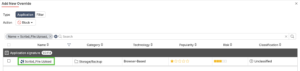
Then attach the sensor to the relevant firewall policy and confirm the policy uses a **deep-inspection** SSL/SSH profile rather than certificate inspection.
CLI Configuration
config application list
edit "block-scribd"
set comment "InfoSecMonkey: block Scribd application traffic"
config entries
edit 1
set action block
config application
# Replace with the Scribd signature ID from
#get application name status | grep -i scribd -B 1 -A 2
set id 30708
end
next
end# Optional: log everything the sensor sees while tuning
set unknown-application-action pass
next
end
–B 1 tells the CLI to show 1 line before the match (which captures the actual Application Name string).
–A 2 tells the CLI to show 2 lines after the match (which captures the numerical ID and the Application Category).
Apply the sensor to a policy with deep inspection:
config firewall policy
edit <policy-id>
set utm-status enable
set application-list "block-scribd"
set ssl-ssh-profile "deep-inspection"
set logtraffic all
next
end
To find the exact signature ID and confirm whether upload-specific child signatures exist on your build, run:
diagnose application meta list | grep -i scribd
Practitioner note: Application Control signatures are hierarchical. A parent Scribd signature takes precedence over its children, so if you want to allow reading but block uploading, set the action on the upload child signature and leave the parent permissive. If the parent is set to Block, the children never get evaluated.
Approach 2: Web Filter Backstop
Web Filter operates on URL and FortiGuard category and makes a useful coarse second layer. Scribd falls under the File Sharing and Storage web category, so a category action will catch it even if a specific application signature lags behind a site change.
CLI Configuration
config webfilter profile
edit "scribd-backstop"
config ftgd-wf
config filters
edit 1
# File Sharing and Storage category
set category 88
set action block
next
end
end
To get a list of the cateogries and their IDs run the following command:
get webfilter categories
For a precise hostname block independent of category lookups, use a URL filter entry:
config webfilter urlfilter
edit 1
set name "scribd-urls"
config entries
edit 1
set url "scribd.com"
set type wildcard
set action block
next
edit 2
set url "*.scribd.com"
set type wildcard
set action block
next
end
next
end
Key caveat: Web Filter category numbers vary across FortiOS builds. Confirm the File Sharing and Storage category ID on your version before pasting set category 88 blindly. The category name is stable; the numeric ID is what to verify.
The limitation of Web Filter here is that it is destination-blind to intent. It blocks Scribd as a site, but it cannot tell an upload from a download. If your requirement is genuinely “block uploads but allow reading published documents,” Web Filter alone is too blunt and you should lean on the upload child signature in Application Control, or on DLP.
Approach 3: DLP for Content-Based Control
If the actual business goal is preventing sensitive documents from leaving the organization, then chasing Scribd specifically is solving the wrong problem. A user blocked from Scribd will try the next file-sharing site. Data Loss Prevention inspects the content of what is being uploaded, across any site, and is the durable control.
A DLP sensor inspecting HTTP and HTTPS POST traffic, paired with deep inspection, can match on file type, file size, fingerprinted documents, or sensitive data patterns, and block the upload regardless of whether the destination is Scribd, a competitor’s site, or webmail.
CLI Configuration
config dlp profile
edit "block-doc-uploads"
set comment "InfoSecMonkey: block document uploads over HTTP POST"
config rule
edit 1
set name "block-office-docs-post"
set proto http-post
set filter-by file-type
set file-type <file-type-list-id>
set action block
next
end
next
end
Build the file-type list to cover the document formats you care about (PDF, DOCX, XLSX, PPTX, and so on):
config dlp filepattern
edit <file-type-list-id>
set name "office-docs"
config entries
edit "*.pdf"
set filter-type pattern
next
edit "*.docx"
set filter-type pattern
next
edit "*.xlsx"
set filter-type pattern
next
end
next
end
Attach the DLP profile to the firewall policy alongside deep inspection:
config firewall policy
edit <policy-id>
set utm-status enable
set dlp-profile "block-doc-uploads"
set ssl-ssh-profile "deep-inspection"
set logtraffic all
next
end
Practitioner note: DLP profile and rule syntax changed meaningfully between FortiOS 7.2 and 7.4 when Fortinet reworked the DLP engine around data types and dictionaries. Validate the exact `config dlp` hierarchy against your running version. The conceptual model (match on POST, filter by file content, block) holds across versions even where the keywords shift.
Putting the Layers Together
The recommended posture for “block Scribd uploads” in a real deployment combines all three:
1. Deep SSL inspection on the egress policy, with the CA trusted on endpoints. Nothing else works without this.
2. Application Control with the Scribd signature, set to block the upload child signature if you want reading preserved, or the parent if you want the site gone entirely.
3. Web Filter category and hostname block as a backstop for when the application signature lags a site change.
4. DLP on HTTP POST as the durable, destination-agnostic control that catches the document leaving no matter which site the user tries next.
| Control | What it blocks | Upload vs read | Needs deep inspect | Evasion resistance |
| App Control (parent) | All Scribd traffic | No, blocks all | Recommended | Low, switch sites |
| App Control (upload child) | Scribd uploads only | Yes | Yes, required | Low, switch sites |
| Web Filter (category) | Scribd plus all file-sharing | No | No, SNI suffices | Low to medium |
| Web Filter (URL) | Scribd hostnames | No | No, SNI suffices | Low |
| DLP (HTTP POST) | Sensitive files to any site | Yes, by design | Yes, required | High |
Verification and Logging
After deployment, confirm matches are landing where you expect. Generate a test upload from a pilot endpoint and check the logs:
# Live application control debug
diagnose debug application appctrl -1
diagnose debug enable
# Then review logged hits under
Log & Report > Application Control (or Security Events)
Confirm the SSL inspection is actually intercepting by checking that the session shows the FortiGate CA rather than Scribd’s real certificate chain on a test endpoint. If the endpoint still sees Scribd’s original certificate, deep inspection is not engaging on that policy and every granular control above will silently fall back to SNI-only behavior.
Closing
The temptation to write a custom signature for a task like this is understandable, but the supported toolset already covers it more robustly than a hand-built rule ever could. Lead with deep inspection, use the FortiGuard-maintained Scribd application signature for identity, back it with Web Filter, and reach for DLP when the real requirement is keeping documents inside the building rather than keeping users off one specific site. Verify the syntax against your running FortiOS build before production, since application IDs, category numbers, and the DLP hierarchy all vary across versions.
Recent posts
-

-

DNS is one of those technologies that quietly underpins... Full Story
-

BGP issues on FortiGate firewalls usually trace back to... Full Story
-

Every time your laptop talks to your router, a... Full Story
-

If you've spent any time configuring NAT on a... Full Story
-

If you have spent any time configuring firewall policies... Full Story
-

High availability on FortiGate is one of those features... Full Story
-

If you've configured SD-WAN on a FortiGate, you've almost... Full Story
-

FortiLink is the management protocol that turns a FortiSwitch... Full Story
-

FortiSwitches are pretty rock solid from Mean Time Between... Full Story
-

This is a quicky tip. Have you ever gone... Full Story
-

DNS is one of those quiet pieces of internet... Full Story
-

This article is an updated version of the previous... Full Story
-

You will add ns2 as a secondary (slave) BIND9... Full Story
-

In the process of deploying my lab, I needed... Full Story
-

RFC 8805, used to be known as Self-Correcting IP... Full Story
-

Years back, I wrote an article about certificate pinning. ... Full Story
-

FortiGates have the ability to send alerts to Microsoft... Full Story
-

In this post, I am going to walk through... Full Story
-

Troubleshooting VoIP on a FortiGate can feel like trying... Full Story
-

Prior to FortiOS 7.0, there were three commands to... Full Story
-

In this post, I am going to go over... Full Story
-

What we are going to do: We are going... Full Story
-

Choosing between FGCP (FortiGate Clustering Protocol) and FGSP (FortiGate... Full Story
-

Creating a VLAN on macOS (The "Pro" Move) A... Full Story
-

This blog post explores the logic behind how macOS... Full Story
-

Pretty Fly for a Wi-Fi Tell My Wi-Fi Love... Full Story
-

Part of my daily gig is creating BoMs (Bill-of-Materials)... Full Story
-

ICMP introduces several security risks, but careful filtering, rate... Full Story
-

The command diag debug application dhcps -1 enables full... Full Story
-

In the world of FortiOS, execute tac report is... Full Story
-

LLDP; What is it The Link Layer Discovery Protocol... Full Story
-

What it actually does When you run diagnose fdsm... Full Story
-

Monkey Bites are bite-sized, high-impact security insights designed for... Full Story
-

I have run macOS in macOS with Parallels but... Full Story
-

Don't be confused with my other FortiNAC posts where... Full Story
-

This is the third session in a multi-part article... Full Story
-

Today I was configuring key-based authentication on a FortiGate... Full Story
-

Netcat, often called the "Swiss Army knife" of networking,... Full Story
-

At its core, IEEE 802.1X is a network layer... Full Story
-

In case you did not see the previous FortiNAC... Full Story
-

This is our 5th session where we are going... Full Story
-

Now that we have Wireshark installed and somewhat configured,... Full Story
-

The Philosophy of Packet Analysis Troubleshooting isn't about looking... Full Story
-

InfoSecMonkey Threat Response October 24, 2026 | No fluff.... Full Story
-

InfoSecMonkey Threat Response October 24, 2026 | No fluff.... Full Story
-

Plus what you actually get with FortiCare Essential, Premium... Full Story