
If you've spent any time configuring user authentication on... Full Story
By Manny Fernandez
July 16, 2026
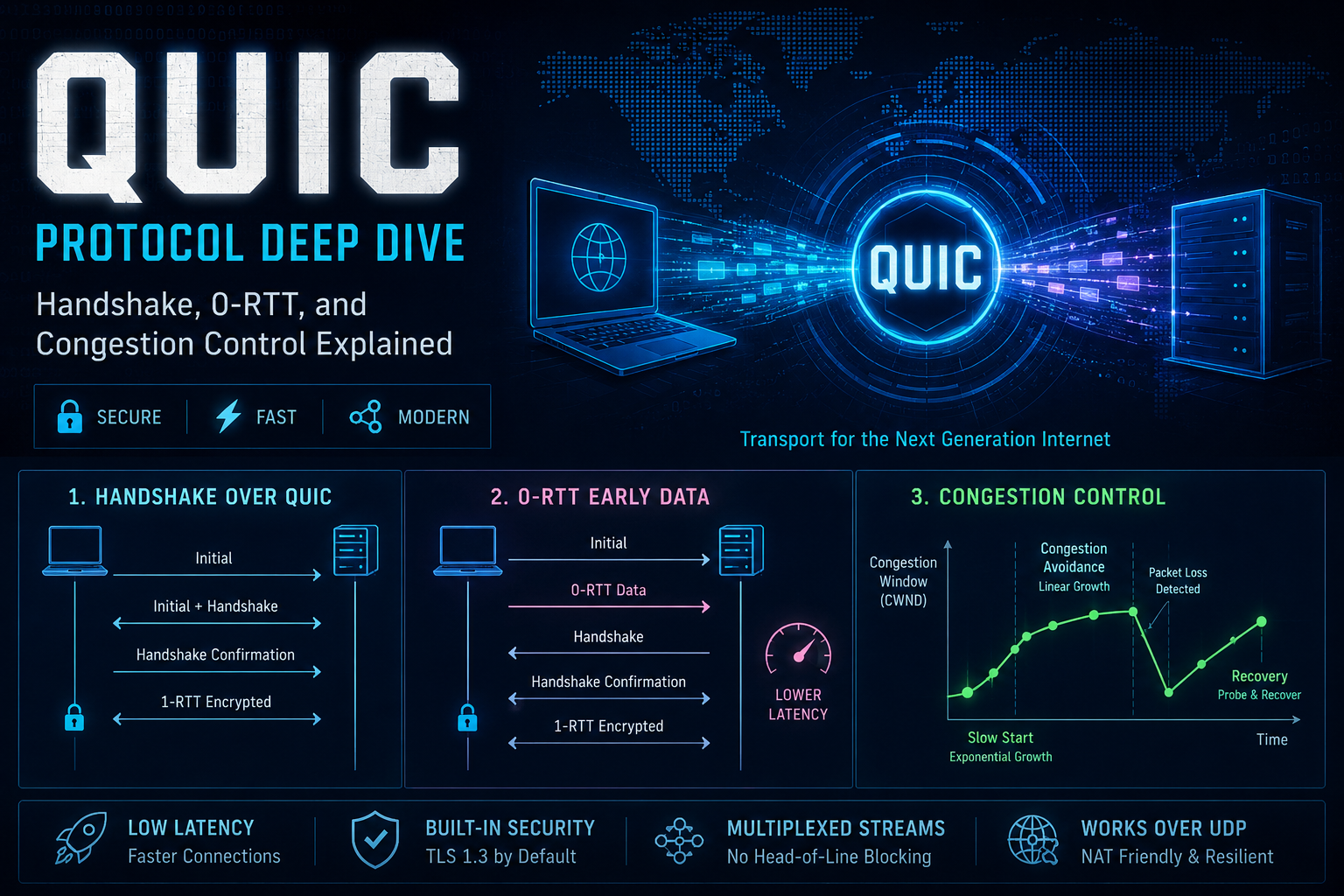
Deep Dive QUIC Explanation
Executive Summary
Objective: This guide breaks down QUIC (RFC 9000/9001/9002) at the wire-format level, showing exactly how the transport establishes a connection, integrates TLS 1.3 into that establishment, resumes sessions with zero round-trip latency, multiplexes independent streams, and controls congestion without relying on TCP. It is built around hands-on packet capture rather than theory alone, so every mechanism described can be observed directly with open tools.
Target Audience: Network engineers, security engineers, packet analysts, SEs evaluating firewall/IPS behavior against QUIC, and protocol/application developers who need an accurate mental model of QUIC rather than a marketing-level summary.
Prerequisites & Architecture
Assumed Knowledge
- TCP/IP fundamentals: three-way handshake, sequence numbers, ACKs, retransmission
- TLS 1.3 handshake flow: ClientHello/ServerHello, key schedule, session resumption via PSK
- Basic UDP characteristics: connectionless, no built-in ordering or reliability
- General familiarity with HTTP/2 stream multiplexing concepts
Environment / Lab Requirements
| Tool | Version | Purpose |
|---|---|---|
| Wireshark | 3.6+ (4.x preferred) | Native QUIC dissector for packet-level analysis |
| curl | 7.88+ built with HTTP/3 (ngtcp2+nghttp3 or quiche) | Generates real QUIC/HTTP-3 traffic from the CLI |
| OpenSSL | 3.x | Inspecting certificates, manual TLS testing |
| A QUIC-capable test endpoint | N/A | Any public HTTP/3 site (for example, a CDN edge that advertises h3 via Alt-Svc) |
| qlog-capable client (optional) | ngtcp2, quic-go, or Chrome --log-net-log |
Exposes internal state (congestion window, RTT samples) not visible on the wire |
| qvis | web-based | Visualizes qlog output for congestion control and loss recovery analysis |
QUIC runs entirely over UDP, so no special lab topology is required beyond a host that can send/receive UDP/443 and a packet capture point between client and server.
Component Table
| Component | Defining RFC | Role |
|---|---|---|
| QUIC Transport | RFC 9000 | Connection lifecycle, streams, flow control, connection IDs |
| TLS 1.3 over QUIC | RFC 9001 | Key derivation and handshake message integration |
| Loss Detection & Congestion Control | RFC 9002 | ACK processing, loss recovery, congestion window management |
| HTTP/3 | RFC 9114 | Application mapping of HTTP semantics onto QUIC streams |
| QPACK | RFC 9204 | Header compression for HTTP/3 (HPACK adapted for out-of-order delivery) |
| Connection ID | RFC 9000 §5.1 | Opaque identifier decoupling a connection from the IP/port 4-tuple |
| Packet Number Space | RFC 9000 §12.3 | Independent numbering per encryption level (Initial, Handshake, 1-RTT) |
Step-by-Step Implementation Workflow
Phase 1: Building the Capture Lab
The Goal: Produce a decryptable QUIC packet capture. Unlike plaintext TCP, QUIC encrypts everything past the Initial packet, so without a key log you will see valid frames but opaque payloads.
The Action: Export a TLS key log file before launching any QUIC client, then capture on UDP/443 while generating traffic.
The Code/CLI:
# Export the standard NSS-format key log location
export SSLKEYLOGFILE=~/quic_keys.log

# Generate HTTP/3 traffic with curl (requires an HTTP/3-enabled curl build)
curl --http3-only -v https://<target_fqdn>/ -o /dev/null

# Capture simultaneously with tshark, filtering to UDP/443
tshark -i <interface> -f "udp port 443" -w quic_capture.pcapng
GUI Verification (Wireshark): Edit > Preferences > Protocols > TLS > (Pre)-Master-Secret log filename, point it at quic_keys.log. Apply the display filter quic. Decrypted CRYPTO frames and Application Data should now show readable TLS handshake messages and HTTP/3 frame contents instead of Protected Payload.
Phase 2: Version Negotiation and the Initial Packet
The Goal: Understand how a QUIC connection begins before any encryption keys are truly private.
The Action: Examine the long header format used for Initial packets (RFC 9000 §17.2). Fields include: Header Form, Fixed Bit, Long Packet Type (0x00 = Initial), Version (32-bit), Destination/Source Connection ID (with explicit length prefixes), a Token field (used for retry validation), Length, and a variable-length Packet Number.
A critical, often-missed detail: Initial packets are encrypted, but with keys derived deterministically from the client’s chosen Destination Connection ID using HKDF and a version-specific public salt. This is not confidentiality, since any observer can derive the same keys. It exists purely to prevent network middleboxes from ossifying on cleartext fields.
If client and server do not share a supported QUIC version, the server responds with a Version Negotiation packet: a long header with Version field set to 0x00000000, followed by a list of versions the server supports. The client restarts the handshake with a mutually supported version.
The Code/CLI: In Wireshark, isolate this phase with:
quic.long.packet_type == 0
GUI Verification: Expand the Initial packet in Wireshark’s detail pane. You should see distinct Destination Connection ID and Source Connection ID fields (client picks both on the very first packet) and a Version field of 0x00000001 for QUIC v1.
Phase 3: The Integrated TLS 1.3 Handshake
The Goal: Understand that QUIC does not run “TLS over QUIC” as a separate tunnel. It carries TLS 1.3 handshake messages directly inside QUIC CRYPTO frames (type 0x06), and QUIC derives its own packet-protection keys from the TLS key schedule at each encryption level.
The Action: Map the message flow across QUIC’s three independent packet number spaces:
| Packet Number Space | TLS Messages Carried | Encryption Keys |
|---|---|---|
| Initial | ClientHello / ServerHello | Derived from Destination Connection ID (not secret) |
| Handshake | EncryptedExtensions, Certificate, CertificateVerify, Finished | Handshake secrets from TLS key schedule |
| 1-RTT (Application) | Post-handshake messages, all application data | Application traffic secrets |
Each space maintains its own packet number sequence and its own ACK tracking, which is why QUIC can process a lost Initial packet without blocking Handshake-space processing. There is no shared sequence number to stall on, unlike a single TCP stream.
The ClientHello’s CRYPTO frame also carries the quic_transport_parameters TLS extension (codepoint 0x39), which negotiates transport-level settings (max stream data, idle timeout, active connection ID limit) inside the same round trip as the crypto handshake, something TCP+TLS cannot do without a separate negotiation layer.
The Code/CLI:
# Isolate CRYPTO frame contents once decrypted
quic.frame_type == 0x06 && tls.handshake.type
GUI Verification: In the decrypted capture, the Handshake-space packet from the server should show a single UDP datagram containing multiple coalesced QUIC packets (Initial + Handshake), each with its own header. QUIC explicitly permits packet coalescing to reduce round trips.
Phase 4: 0-RTT Early Data and Session Resumption
The Goal: Understand how QUIC eliminates the round trip for repeat connections using TLS 1.3’s PSK resumption, and why this introduces a real security trade-off.
The Action: On a prior connection, the server sends a NewSessionTicket message (post-handshake, in 1-RTT space) containing a PSK. On a subsequent connection, the client immediately sends 0-RTT packets (long header, Long Packet Type 0x01) carrying both the resumed ClientHello and early application data, without waiting for any server response.
This data is encrypted with keys derived from the earlier PSK, which means it lacks forward secrecy for that specific data and, more importantly, can be replayed by an attacker who captured the original 0-RTT packets, since there is no fresh randomness from the server involved yet. For this reason, 0-RTT data should only carry idempotent requests (for example, GET without side effects), and servers commonly enforce single-use tickets or a narrow replay-detection window.
The server can reject 0-RTT even if it accepts the resumed session. It simply omits early_data from the extensions it returns, and the client falls back to treating that data as needing retransmission in 1-RTT.
The Code/CLI:
# Save a session ticket on first connection
curl --http3-only -v --ssl-session-cache-file ticket.cache https://<target_fqdn>/

# Reuse it on the second connection to trigger 0-RTT
curl --http3-only -v --ssl-session-cache-file ticket.cache https://<target_fqdn>/
GUI Verification: Filter Wireshark with:
quic.long.packet_type == 1
A successful 0-RTT attempt shows client-sent long-header packets with Packet Type 0x01 before any Handshake-space packet from the server. Confirm acceptance by checking the ServerHello’s extensions for early_data in the decrypted TLS layer.
Phase 5: Stream Multiplexing and Flow Control
The Goal: Understand how QUIC delivers HTTP/2-style multiplexing without HTTP/2’s head-of-line blocking problem, because loss recovery in QUIC operates per-stream rather than per-connection.
The Action: Each stream is identified by a 62-bit Stream ID whose two low-order bits encode initiator and directionality:
| Bit 0 (initiator) | Bit 1 (direction) | Stream Type |
|---|---|---|
| 0 | 0 | Client-initiated bidirectional |
| 0 | 1 | Client-initiated unidirectional |
| 1 | 0 | Server-initiated bidirectional |
| 1 | 1 | Server-initiated unidirectional |
Data on each stream travels in STREAM frames (frame types 0x08 to 0x0f, with low-order bits signaling presence of an Offset, Length, and FIN flag). Because each stream has its own byte offset space, a lost packet carrying stream A’s data does not block delivery of already-received data on stream B. The receiver’s transport layer can deliver stream B to the application immediately.
Flow control operates at two levels using dedicated frames: MAX_STREAM_DATA (0x11) caps bytes on an individual stream, and MAX_DATA (0x10) caps total bytes across the connection. When a sender is blocked by either limit it signals this explicitly with STREAM_DATA_BLOCKED (0x15) or DATA_BLOCKED (0x14) rather than silently stalling, which makes flow-control-induced stalls directly visible in a capture.
The Code/CLI:
quic.frame_type >= 0x08 && quic.frame_type <= 0x0f
GUI Verification: Follow a single HTTP/3 request/response pair in Wireshark by right-clicking a STREAM frame and using “Follow > HTTP3 Stream” (Wireshark 4.x) to see reassembled request/response bodies independent of other concurrent streams.
Phase 6: Connection ID and Path Migration
The Goal: Understand why QUIC connections survive network changes (Wi-Fi to cellular handoff, NAT rebinding) that would kill a TCP connection outright.
The Action: TCP identifies a connection by the 4-tuple (src IP, src port, dst IP, dst port). QUIC instead identifies a connection primarily by its Connection ID, an opaque value chosen by each endpoint for the other to use. Because the IP/port tuple is not the source of truth, a client can change networks mid-connection and continue using the same Connection ID.
Endpoints supply pools of usable Connection IDs in advance via NEW_CONNECTION_ID frames (0x18), and retire old ones with RETIRE_CONNECTION_ID frames (0x19). This also mitigates linkability, since rotating Connection IDs prevents an on-path observer from trivially correlating a client’s traffic across network changes.
When a peer observes traffic arriving from a new IP/port for a known Connection ID, it does not trust the path automatically. It validates the new path using PATH_CHALLENGE (0x1a) containing random data, and requires the matching PATH_RESPONSE (0x1b) echoing that data before treating the new path as authenticated, preventing off-path attackers from redirecting traffic by spoofing a source address.
The Code/CLI:
quic.frame_type == 0x1a || quic.frame_type == 0x1b
GUI Verification: In a migration test capture (for example, toggling Wi-Fi off/on mid-download), confirm the Destination Connection ID remains constant across the IP address change while the UDP source IP/port differs. This is the definitive signature of successful QUIC connection migration.
Phase 7: Loss Detection and Congestion Control
The Goal: Understand how QUIC decides how much data it is safe to send, entirely at the transport layer, without any OS-level TCP stack involvement.
The Action: RFC 9002 defines a reference congestion controller modeled on NewReno-style slow start and congestion avoidance:
- Initial window:
min(10 * max_datagram_size, max(2 * max_datagram_size, 14720))bytes, roughly equivalent to TCP’s RFC 6928 IW10, but specified explicitly rather than left to OS defaults. - Minimum congestion window:
2 * max_datagram_size, enforced even after loss, so the connection can always make forward progress. - Loss detection: a packet is declared lost if either a packet-threshold (
kPacketThreshold = 3packets sent later have been acknowledged) or a time-threshold (9/8 * max(smoothed_rtt, latest_rtt)) is exceeded, evaluated independently in each packet number space. - Probe Timeout (PTO):
smoothed_rtt + max(4 * rttvar, kGranularity) + max_ack_delay, doubling on each consecutive expiration (exponential backoff), used to recover from scenarios where no ACK-eliciting packet is outstanding to trigger loss detection.
Note the important nuance: RFC 9002’s algorithm is a reference implementation, not a mandate. Production stacks frequently substitute CUBIC or BBR/BBRv2. Chrome’s QUICHE stack, for example, defaults to a BBR-family controller rather than the RFC 9002 NewReno variant. Do not assume every QUIC connection you capture is running the RFC 9002 default.
QUIC also natively supports ECN (Explicit Congestion Notification) feedback inside the ACK frame itself (ECT0, ECT1, and ECN-CE counts), letting the sender react to congestion signals from network devices without depending on OS-level ECN plumbing the way TCP does.
The Code/CLI: Congestion window is sender-internal state, not a wire field, so it is not visible in a packet capture. Use qlog output instead:
# Example: ngtcp2 client with qlog enabled
ngtcp2-client --qlog-file=session.qlog <target_fqdn> 443

# Load session.qlog into qvis (https://qvis.quictools.info)
# under the "Congestion" tab to view cwnd, bytes-in-flight, and RTT over time
GUI Verification (qvis): The Congestion Graph should show a steep linear climb during slow start, a visible drop at the first loss event (window reduced, typically by half under a Reno-style controller), then a slower additive-increase climb during congestion avoidance.
Verification & Validation
| What to Verify | Method | Success Indicator |
|---|---|---|
| 1-RTT keys established | Wireshark, filter quic.header_form == 0 |
Short-header packets decrypt to readable Application Data / HTTP-3 frames |
| 0-RTT accepted | Decrypted TLS layer of ServerHello | early_data extension present in ServerHello’s extension list |
| 0-RTT rejected | Decrypted TLS layer | early_data extension absent; client retransmits early data in 1-RTT space |
| Version correctly negotiated | Filter quic.version |
0x00000001 on both Initial packets (client and server) |
| Connection migration succeeded | Compare Destination Connection ID pre/post IP change | Connection ID unchanged despite new source IP/port |
| Path validated post-migration | Filter quic.frame_type == 0x1a || quic.frame_type == 0x1b |
PATH_RESPONSE payload matches the preceding PATH_CHALLENGE payload exactly |
| Congestion control behaving correctly | qvis Congestion Graph from qlog | Slow-start climb, window reduction on loss, no runaway growth past bytes-in-flight limits |
| Stream independence under loss | Wireshark stream reassembly (Phase 5) | Unaffected stream’s data is delivered to the application layer while a sibling stream is still recovering a lost packet |
Troubleshooting & Gotchas
Gotcha 1: Silent fallback to TCP/TLS due to blocked UDP/443
Symptom: Client appears to use HTTP/2 over TCP even though the server advertises HTTP/3.
Diagnostic: Check the response headers for Alt-Svc: h3=":443" confirming the server did advertise QUIC, then force the protocol to isolate the failure:
curl --http3-only -v https://<target_fqdn>/
If this hangs or errors while --http1.1 / --http2 succeed, a firewall, NAT, or carrier network is dropping or rate-limiting UDP/443. This is extremely common, since many enterprise edge devices historically treated large volumes of UDP/443 as anomalous.
Resolution: Explicitly permit UDP/443 in both directions for the relevant destinations, or accept the intentional fallback if QUIC is not desired on that path (some security teams deliberately block QUIC to force traffic through inspectable TLS-over-TCP).
Gotcha 2: 0-RTT data unexpectedly rejected after a config or clock change
Symptom: A previously working 0-RTT resumption starts falling back to a full 1-RTT handshake, adding a round trip back into every connection.
Diagnostic: Decrypt the ServerHello and confirm whether early_data is present. Also check for significant clock skew between client and server, and whether the server’s ticket-encryption key rotated (common in load-balanced deployments where tickets are not shared across nodes) or the ticket’s lifetime expired.
Resolution: Ensure NTP sync on both endpoints, verify session ticket keys are consistently shared/rotated across all terminating nodes in a load-balanced fleet, and confirm ticket lifetime configuration matches expected client reconnect intervals.
Gotcha 3: Version Negotiation loop or connection stall on mixed QUIC deployments
Symptom: Client sends an Initial packet, receives a Version Negotiation packet, retries, and repeats without ever completing a handshake.
Diagnostic: Filter for quic.version == 0, which identifies Version Negotiation packets, and inspect the list of versions offered by the server against what the client actually supports.
Resolution: This typically indicates a client library with an outdated or draft QUIC version (pre-RFC 9000 “quic-draft” identifiers) talking to a server that only advertises the final QUIC v1 (0x00000001). Upgrade the client library, since draft-version implementations are not wire-compatible with the finalized standard.
Gotcha 4: Congestion window appears to collapse permanently after a single loss burst
Symptom: Throughput never recovers to pre-loss levels even minutes after a transient loss event.
Diagnostic: Pull qlog output and inspect the Congestion Graph for repeated PTO expirations (visible as repeated small congestion window resets) rather than a single controlled reduction.
Resolution: Repeated PTOs usually indicate the path has sustained, not transient, loss (or an intermediate device silently dropping specific QUIC frame types). Cross-check with ACK frame ECN counts (if ECN is enabled) to distinguish real congestion from packet corruption/drops unrelated to congestion, and check for MTU-related blackholing if using larger max_datagram_size values. QUIC relies on DPLPMTUD (RFC 8899) probing, and a middlebox silently dropping oversized UDP datagrams without an ICMP response can masquerade as a congestion event.
Appendix: Reference RFCs
| RFC | Title |
|---|---|
| RFC 9000 | QUIC: A UDP-Based Multiplexed and Secure Transport |
| RFC 9001 | Using TLS to Secure QUIC |
| RFC 9002 | QUIC Loss Detection and Congestion Control |
| RFC 9114 | HTTP/3 |
| RFC 9204 | QPACK: Field Compression for HTTP/3 |
| RFC 8899 | Packetization Layer Path MTU Discovery (DPLPMTUD), referenced by QUIC for datagram sizing |
Recent posts
-

-

DNS is one of those technologies that quietly underpins... Full Story
-

BGP issues on FortiGate firewalls usually trace back to... Full Story
-

Every time your laptop talks to your router, a... Full Story
-

If you've spent any time configuring NAT on a... Full Story
-

If you have spent any time configuring firewall policies... Full Story
-

High availability on FortiGate is one of those features... Full Story
-

If you've configured SD-WAN on a FortiGate, you've almost... Full Story
-

FortiLink is the management protocol that turns a FortiSwitch... Full Story
-

FortiSwitches are pretty rock solid from Mean Time Between... Full Story
-

This is a quicky tip. Have you ever gone... Full Story
-

DNS is one of those quiet pieces of internet... Full Story
-

This article is an updated version of the previous... Full Story
-

You will add ns2 as a secondary (slave) BIND9... Full Story
-

In the process of deploying my lab, I needed... Full Story
-

RFC 8805, used to be known as Self-Correcting IP... Full Story
-

Years back, I wrote an article about certificate pinning. ... Full Story
-

FortiGates have the ability to send alerts to Microsoft... Full Story
-

In this post, I am going to walk through... Full Story
-

Troubleshooting VoIP on a FortiGate can feel like trying... Full Story
-

Prior to FortiOS 7.0, there were three commands to... Full Story
-

In this post, I am going to go over... Full Story
-

What we are going to do: We are going... Full Story
-

Choosing between FGCP (FortiGate Clustering Protocol) and FGSP (FortiGate... Full Story
-

Creating a VLAN on macOS (The "Pro" Move) A... Full Story
-

This blog post explores the logic behind how macOS... Full Story
-

Pretty Fly for a Wi-Fi Tell My Wi-Fi Love... Full Story
-

Part of my daily gig is creating BoMs (Bill-of-Materials)... Full Story
-

ICMP introduces several security risks, but careful filtering, rate... Full Story
-

The command diag debug application dhcps -1 enables full... Full Story
-

In the world of FortiOS, execute tac report is... Full Story
-

LLDP; What is it The Link Layer Discovery Protocol... Full Story
-

What it actually does When you run diagnose fdsm... Full Story
-

Monkey Bites are bite-sized, high-impact security insights designed for... Full Story
-

I have run macOS in macOS with Parallels but... Full Story
-

Don't be confused with my other FortiNAC posts where... Full Story
-

This is the third session in a multi-part article... Full Story
-

Today I was configuring key-based authentication on a FortiGate... Full Story
-

Netcat, often called the "Swiss Army knife" of networking,... Full Story
-

At its core, IEEE 802.1X is a network layer... Full Story
-

In case you did not see the previous FortiNAC... Full Story
-

This is our 5th session where we are going... Full Story
-

Now that we have Wireshark installed and somewhat configured,... Full Story
-

The Philosophy of Packet Analysis Troubleshooting isn't about looking... Full Story
-

FortiOS applies a CLI change the moment you type... Full Story
-

macOS file management runs on BSD userland tools sitting... Full Story
-

Practitioners call FortiOS's onboard automation engine a lot of... Full Story