
If you've spent any time configuring user authentication on... Full Story
By Manny Fernandez
September 7, 2026
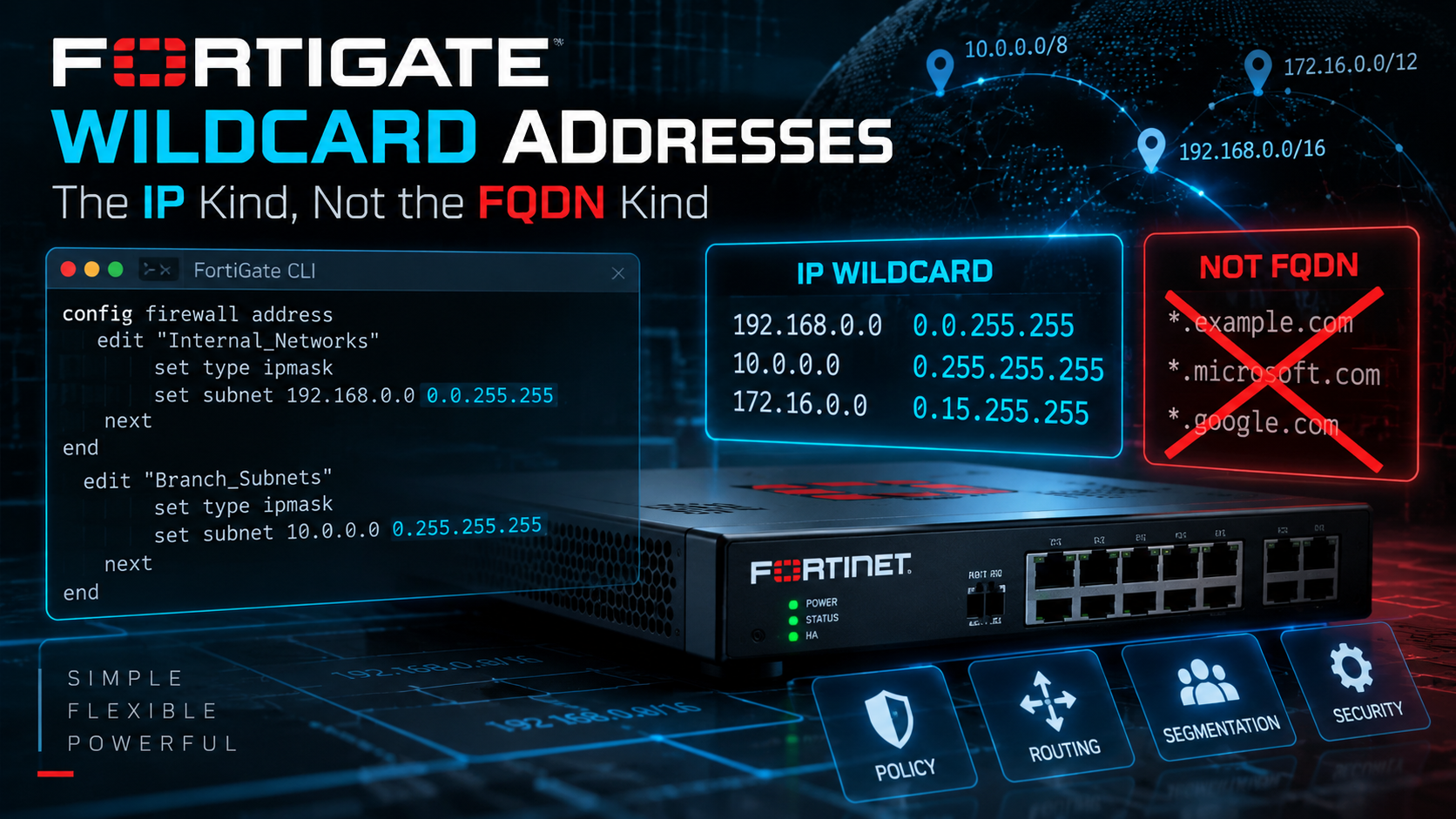
FortiGate Wildcard Addresses: The IP Kind, Not the FQDN Kind
Objective: a working reference for creating and using the wildcard address type in FortiOS, the IP-plus-wildcard-netmask object, and drawing a hard line between it and Wildcard FQDN, a completely different address type that shares the name.
Audience: FortiGate admins who need to match non-contiguous or scattered IP ranges in firewall policy without stacking dozens of address objects.
Search “FortiGate wildcard address” and you land on two unrelated features that happen to share a name. One matches domain names with an asterisk in them and gets resolved through DNS. The other matches IP addresses with a bitwise mask, the same trick Cisco admins have used in access-lists for decades. This post is about the second one, the type wildcard address object under config firewall address.
Wildcard FQDN vs. Wildcard Address: Same Word, Different Object
FortiOS ships two address mechanisms with “wildcard” in the name, and they do not overlap:
- Wildcard FQDN (
type fqdn, something like*.example.com) matches domain name patterns. It’s resolved through DNS traffic passing through the FortiGate and is mainly used for SSL inspection exemptions and proxy policy. If that’s what you came here for, this isn’t your post. - Wildcard address (
type wildcard) matches IP addresses using an IP plus a wildcard netmask. No DNS involved. This is the one covered here.
The Bit Math: How a Wildcard Netmask Actually Works
A regular subnet mask and a FortiGate wildcard netmask use the same bit logic: a 1 bit means “this bit must match,” a 0 bit means “don’t care.” The difference is that a subnet mask has to be a contiguous run of 1s from the left, that’s what makes it a valid CIDR mask, while a wildcard netmask can scatter 1s and 0s wherever you need them, at any bit position, in any octet.
Take the example straight from Fortinet’s own documentation:
config firewall address
    edit "example_wildcard_address"
        set type wildcard
        set wildcard 192.168.0.56 255.255.0.255
    next
end
Written in binary, the wildcard netmask 255.255.0.255 is:
255        255        0          255
11111111   11111111   00000000   11111111
Octets 1, 2, and 4 are all 1s, so those three octets of a candidate address must match 192, 168, and 56 exactly. Octet 3 is all 0s, a free variable, anything 0 through 255. The object matches host ID .56 across every subnet in 192.168.0.0/16, useful if you’ve got a management host or jump box provisioned with the same last octet on every VLAN.
Because you’re not limited to whole octets, you can target individual bits too. Say you want to match every even-numbered subnet in a per-site /24 design, third octet 0, 2, 4, 6 … 254. You only care about one bit, the least significant bit of that octet:
config firewall address
    edit "even-numbered-site-subnets"
        set type wildcard
        set wildcard 10.0.0.0 255.255.1.255
        set comment "Matches every even third-octet subnet under 10.0.0.0"
    next
end
1 in binary is 00000001, so only the last bit of the third octet is checked. The reference address’s third octet is 0, an even number, so the object matches any third octet where that same bit is also 0, every even value from 0 to 254.
The Cisco Trap
If you’ve spent years writing Cisco IOS access-lists, you already know wildcard masks, just with the bits flipped. Cisco’s ACL wildcard mask uses 0 to mean “check this bit” and 1 to mean “ignore this bit,” the mirror image of what FortiGate’s firewall address wildcard does. Copy a Cisco ACL wildcard mask straight into a FortiGate type wildcard object without inverting it, and you won’t get an error. You’ll get an object that matches the exact opposite of what you intended, and it can sail right through a quick test if your test host happens to land inside the part of the range that still overlaps.
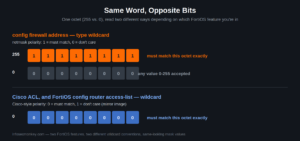
Same octet values, opposite meaning, depending on which FortiOS feature is reading them.
To translate a genuine Cisco ACL wildcard mask into a FortiGate firewall address wildcard mask, invert every octet, subtract each value from 255. 0.0.0.255 on Cisco, “match a /24, wildcard the host bits”, becomes 255.255.255.0 on FortiGate, which, not coincidentally, is just a normal subnet mask. A plain contiguous Cisco wildcard is always mathematically the same thing as a subnet mask once you flip the polarity.
To make this messier, FortiOS also has a second, unrelated CLI object, config router access-list, with its own set wildcard field, and that one genuinely uses Cisco’s bit convention as-is. It’s built for route-map and BGP filtering, not firewall policy. If you’re translating a Cisco wildcard-mask ACL that’s used for routing, that’s the field to reach for, and you can paste the Cisco value in unmodified. If you’re translating a Cisco wildcard mask that’s used for a firewall or NAT ACL, you’re in config firewall address territory and you need to invert it first. Two different FortiOS features, two different conventions, same word.
Creating a Wildcard Address
CLI
config firewall address
    edit "site-jumpbox-anyvlan"
        set type wildcard
        set wildcard 192.168.0.56 255.255.0.255
        set comment "Matches .56 jump host across every VLAN"
    next
end
GUI
Current FortiOS releases let you build these without touching the CLI:
- Go to Policy & Objects > Addresses and click Create New > Address.
- Set Type to Wildcard.
- Enter the IP/Wildcard Mask as address and mask, space-separated, same as the CLI.
- Save, then use it in a firewall policy source or destination field like any other address object.
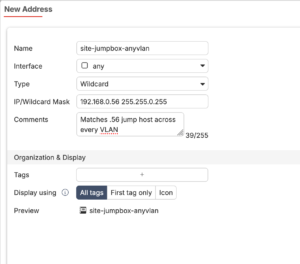
Older FortiOS releases required CLI-only creation for this address type, so if your build doesn’t show a Wildcard option in the address type dropdown, that’s why. The CLI syntax above still works regardless of GUI support.
IPv6
The IPv6 equivalent lives under firewall address6, same logic, hex nibbles instead of decimal octets:
config firewall address6
    edit "test-wildcard6-1"
        set type wildcard
        set wildcard 2000:172:16:200::55 ffff:ffff:ffff:ffff::ffff
    next
end
Using It in a Firewall Policy
Once created, the object shows up in the address list like any other type and can be selected as a source or destination:
config firewall policy
    edit 0
        set srcintf "lan"
        set dstintf "wan1"
        set srcaddr "site-jumpbox-anyvlan"
        set dstaddr "all"
        set action accept
        set schedule "always"
        set service "ALL"
    next
end
Verification
show firewall address "site-jumpbox-anyvlan"confirms the type and the exact wildcard mask that got saved. Worth double checking after copying a value from a spreadsheet or another firewall’s config, a single transposed digit changes the entire match set and nothing errors on a “valid but wrong” mask.- Firewall policy hit counters,
get firewall policyor the GUI policy list, tell you whether traffic you expect to match is actually landing on that policy. diagnose sniffer packetagainst a host that should fall inside the wildcard range, and one that shouldn’t, is the fastest way to prove the match boundary is where you think it is before you trust it in production.
Gotchas
- Polarity, again. This is worth repeating because it’s the single most common mistake: FortiGate’s firewall address wildcard mask is netmask-polarity, 1 means match, 0 means ignore, not Cisco ACL polarity. Don’t paste a Cisco value in unmodified.
- No error on a legal but wrong mask. FortiOS accepts any 32-bit pattern as a wildcard mask. It has no way to know your intent, so a typo doesn’t fail to commit, it just quietly matches the wrong set of addresses.
- Comment every wildcard object. A normal /24 address object is self-explanatory. A wildcard mask like
255.255.1.255is not. Six months from now, even you won’t remember what it was for without theset commentfield spelled out. - This is an advanced feature, not a subnetting shortcut. Fortinet explicitly documents wildcard addresses as an advanced option for complex filtering needs. If a plain CIDR block or an address range object expresses what you need, use that instead and save the wildcard type for the cases a contiguous mask genuinely can’t cover.
- It isn’t Wildcard FQDN. If your actual goal was matching a family of hostnames like
*.example.com, you wanttype fqdnand a wildcard string, not this.
Quick Reference
| You want to match | Wildcard netmask |
|---|---|
| One host ID across every subnet in a /16 | 255.255.0.255 |
| A contiguous /21-style block, entered as a wildcard | 255.255.248.0 |
| Every even-numbered subnet at the third octet | 255.255.1.255 |
Straight equivalent of a Cisco 0.0.0.255 ACL wildcard |
255.255.255.0 |
Hope this helps.
Recent posts
-

-

DNS is one of those technologies that quietly underpins... Full Story
-

BGP issues on FortiGate firewalls usually trace back to... Full Story
-

Every time your laptop talks to your router, a... Full Story
-

If you've spent any time configuring NAT on a... Full Story
-

If you have spent any time configuring firewall policies... Full Story
-

High availability on FortiGate is one of those features... Full Story
-

If you've configured SD-WAN on a FortiGate, you've almost... Full Story
-

FortiLink is the management protocol that turns a FortiSwitch... Full Story
-

FortiSwitches are pretty rock solid from Mean Time Between... Full Story
-

This is a quicky tip. Have you ever gone... Full Story
-

DNS is one of those quiet pieces of internet... Full Story
-

This article is an updated version of the previous... Full Story
-

You will add ns2 as a secondary (slave) BIND9... Full Story
-

In the process of deploying my lab, I needed... Full Story
-

RFC 8805, used to be known as Self-Correcting IP... Full Story
-

Years back, I wrote an article about certificate pinning. ... Full Story
-

FortiGates have the ability to send alerts to Microsoft... Full Story
-

In this post, I am going to walk through... Full Story
-

Troubleshooting VoIP on a FortiGate can feel like trying... Full Story
-

Prior to FortiOS 7.0, there were three commands to... Full Story
-

In this post, I am going to go over... Full Story
-

What we are going to do: We are going... Full Story
-

Choosing between FGCP (FortiGate Clustering Protocol) and FGSP (FortiGate... Full Story
-

Creating a VLAN on macOS (The "Pro" Move) A... Full Story
-

This blog post explores the logic behind how macOS... Full Story
-

Pretty Fly for a Wi-Fi Tell My Wi-Fi Love... Full Story
-

Part of my daily gig is creating BoMs (Bill-of-Materials)... Full Story
-

ICMP introduces several security risks, but careful filtering, rate... Full Story
-

The command diag debug application dhcps -1 enables full... Full Story
-

In the world of FortiOS, execute tac report is... Full Story
-

LLDP; What is it The Link Layer Discovery Protocol... Full Story
-

What it actually does When you run diagnose fdsm... Full Story
-

Monkey Bites are bite-sized, high-impact security insights designed for... Full Story
-

I have run macOS in macOS with Parallels but... Full Story
-

Don't be confused with my other FortiNAC posts where... Full Story
-

This is the third session in a multi-part article... Full Story
-

Today I was configuring key-based authentication on a FortiGate... Full Story
-

Netcat, often called the "Swiss Army knife" of networking,... Full Story
-

At its core, IEEE 802.1X is a network layer... Full Story
-

In case you did not see the previous FortiNAC... Full Story
-

This is our 5th session where we are going... Full Story
-

Now that we have Wireshark installed and somewhat configured,... Full Story
-

The Philosophy of Packet Analysis Troubleshooting isn't about looking... Full Story
-

The Problem This Solves FortiGate matches policies referencing a... Full Story
-

Ran execute factory reset on a FortiGate and now... Full Story
-

Objective: a working reference for creating and using the... Full Story