
If you've spent any time configuring user authentication on... Full Story
By Manny Fernandez
September 7, 2026
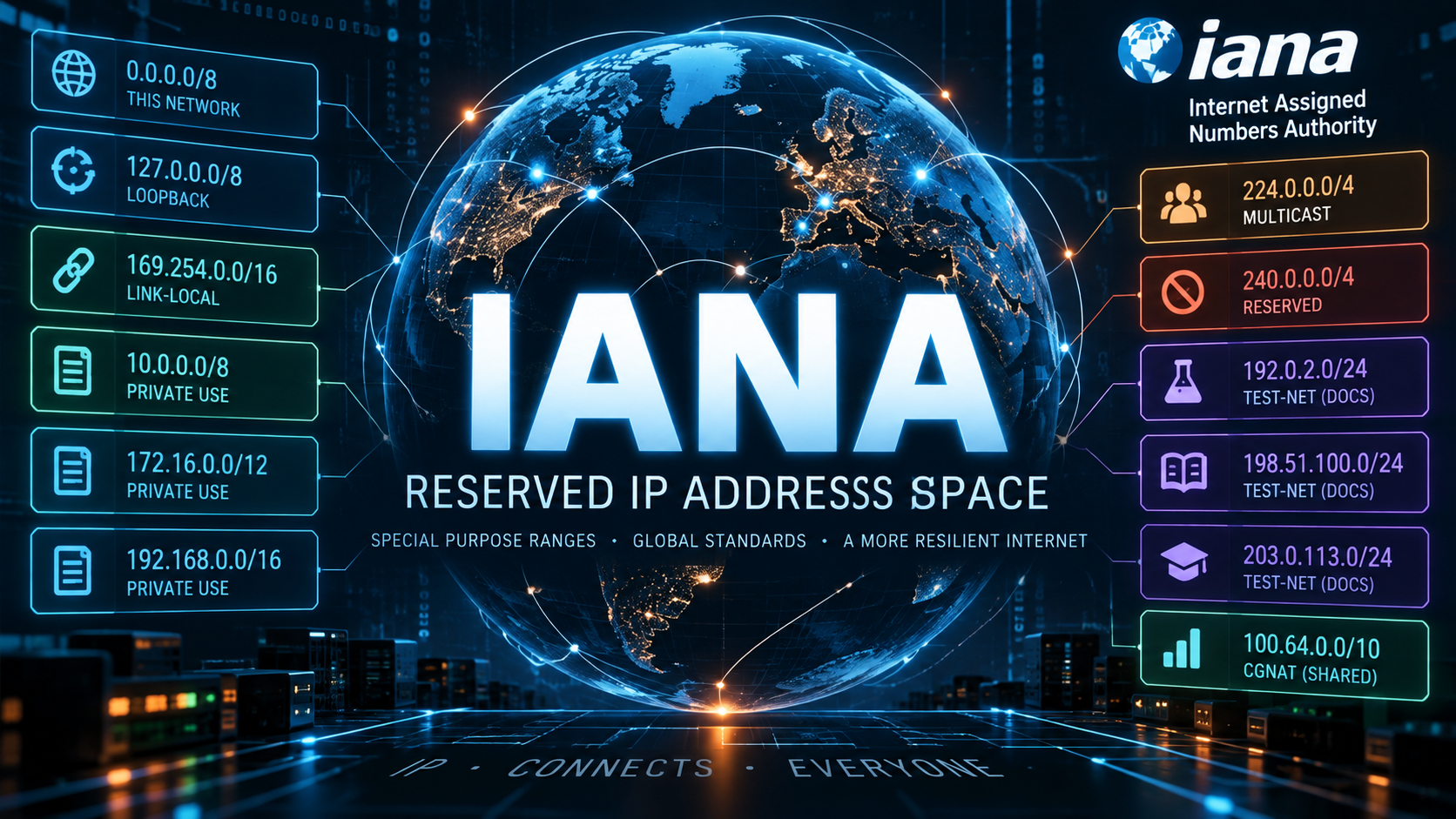
IANA Reserved IP Address Space
Executive Summary
Objective: give practitioners a working reference for the IANA IPv4 Special-Purpose Address Registry, with a deep dive on RFC 1918 private-use space, so that address planning, NAT design, and perimeter filtering decisions are grounded in what these blocks actually are (and are not) allowed to do.
Target audience: network and security engineers doing address planning, VPN/SD-WAN design, firewall policy, or bogon filtering. Fortinet admins building address objects will find the FortiGate example directly usable.
Every IPv4 packet you route, NAT, or drop touches this registry somewhere, whether it is a private LAN, a loopback probe, a documentation example in a vendor’s config guide, or a stray multicast join. Knowing the boundaries of these blocks, and which ones are routable, forwardable, or globally reachable, is the difference between a clean address plan and a subnet collision that surfaces six months into a merger.
What “IANA Reserved” Actually Means
IANA does not just hand out address space to the five Regional Internet Registries (ARIN, RIPE NCC, APNIC, LACNIC, AFRINIC) for public allocation. A separate registry, the IPv4 Special-Purpose Address Registry, tracks blocks that IETF standards have carved out for a specific technical purpose rather than general-purpose unicast routing. The governing document is RFC 6890 (BCP 153), which itself obsoleted four earlier RFCs (4773, 5156, 5735, and 5736) and has since been updated by RFC 8190.
For every entry, the registry records five boolean properties that matter far more than the name of the block:
| Property | What it tells you |
|---|---|
| Source | Valid as a packet’s source address across a router hop |
| Destination | Valid as a packet’s destination address across a router hop |
| Forwardable | A router may forward a packet to this destination between external interfaces |
| Globally Reachable | The destination is reachable beyond a single administrative domain |
| Reserved-by-Protocol | Every compliant IP stack must special-case this block, regardless of routing policy |
This is why 127.0.0.0/8 (loopback) and 10.0.0.0/8 (RFC 1918) feel so different in practice even though both are “reserved.” Loopback is Reserved-by-Protocol and non-forwardable by definition; RFC 1918 space is fully routable inside a private network (Source, Destination, and Forwardable are all true) and only fails the Globally Reachable test, because the public internet is expected to drop or NAT it at the edge.
RFC 1918: Private-Use Address Space
RFC 1918 formalized private addressing in February 1996, obsoleting the original RFC 1597 from 1994. It carved three blocks out of the existing class-based allocations specifically so that organizations could number internal networks without requesting globally unique space for every host, a necessity as classful addressing ran out of runway well before CIDR and NAT became universal.
| Block | Range | Hosts | Typical Use |
|---|---|---|---|
| 10.0.0.0/8 | 10.0.0.0 – 10.255.255.255 | 16,777,216 | Enterprise / data center / SD-WAN |
| 172.16.0.0/12 | 172.16.0.0 – 172.31.255.255 | 1,048,576 | Mid-size segmentation, labs |
| 192.168.0.0/16 | 192.168.0.0 – 192.168.255.255 | 65,536 | SOHO / branch / consumer defaults |
All three blocks share the same registry attributes: Source = True, Destination = True, Forwardable = True, Globally Reachable = False, Reserved-by-Protocol = False. In plain terms, this space routes fine anywhere you control, but no internet router should ever forward it, and no ISP should ever accept it as a valid source address crossing into their network (this is the address-plan half of BCP 38 source-address filtering, not just a courtesy).
Practitioner Note on Block Selection
The three blocks are not interchangeable in practice, mainly because of how often each one collides during mergers, acquisitions, or VPN peering:
- 192.168.0.0/16 is the most collision-prone block on the planet. It is the factory default on nearly every consumer router, so two networks standardized on 192.168.1.0/24 is the single most common address-overlap problem in site-to-site VPN and SD-WAN deployments.
- 172.16.0.0/12 is underused relative to its size, which paradoxically makes it a good choice for lab environments, point-to-point links, and loopback addressing where you want a block that is unlikely to already be in use somewhere else in the org.
- 10.0.0.0/8 is the default for anything at real enterprise scale, precisely because its size supports hierarchical subnetting (per-site, per-VLAN, per-function) without running out of room. It is also the block most likely to require careful subnet allocation tracking (IPAM) once multiple business units start carving it up independently.
If you are designing a multi-site SD-WAN overlay, decide your RFC 1918 allocation strategy before you provision the first tunnel. Renumbering a live hub-and-spoke topology because two acquired sites both picked 192.168.1.0/24 is a bad way to spend a weekend.
The Full Special-Purpose Registry, At a Glance
The table below reflects the current IANA IPv4 Special-Purpose Address Registry. Not every entry shows up in day-to-day operations, but every one of them will eventually explain a weird packet capture.
| Address Block | Name | RFC | Globally Reachable |
|---|---|---|---|
| 0.0.0.0/8 | “This network” | RFC 791 | No |
| 0.0.0.0/32 | “This host on this network” | RFC 1122 | No |
| 10.0.0.0/8 | Private-Use | RFC 1918 | No |
| 100.64.0.0/10 | Shared Address Space | RFC 6598 | No |
| 127.0.0.0/8 | Loopback | RFC 1122 | No |
| 169.254.0.0/16 | Link Local | RFC 3927 | No |
| 172.16.0.0/12 | Private-Use | RFC 1918 | No |
| 192.0.0.0/24 | IETF Protocol Assignments | RFC 6890 | No |
| 192.0.0.0/29 | IPv4 Service Continuity Prefix | RFC 7335 | No |
| 192.0.0.8/32 | IPv4 dummy address | RFC 7600 | No |
| 192.0.0.9/32 | Port Control Protocol Anycast | RFC 7723 | Yes |
| 192.0.0.10/32 | TURN Anycast | RFC 8155 | Yes |
| 192.0.0.170/171/32 | NAT64/DNS64 Discovery | RFC 8880 / 7050 | No |
| 192.0.2.0/24 | Documentation (TEST-NET-1) | RFC 5737 | No |
| 192.31.196.0/24 | AS112-v4 | RFC 7535 | Yes |
| 192.52.193.0/24 | AMT | RFC 7450 | Yes |
| 192.88.99.0/24 | Deprecated (6to4 Relay Anycast) | RFC 7526 | Retired 2015 |
| 192.88.99.2/32 | 6a44 Relay Anycast | RFC 6751 | No |
| 192.168.0.0/16 | Private-Use | RFC 1918 | No |
| 192.175.48.0/24 | Direct Delegation AS112 Service | RFC 7534 | Yes |
| 198.18.0.0/15 | Benchmarking | RFC 2544 | No |
| 198.51.100.0/24 | Documentation (TEST-NET-2) | RFC 5737 | No |
| 203.0.113.0/24 | Documentation (TEST-NET-3) | RFC 5737 | No |
| 240.0.0.0/4 | Reserved for future use | RFC 1112 | No |
| 255.255.255.255/32 | Limited Broadcast | RFC 8190 / 919 | No |
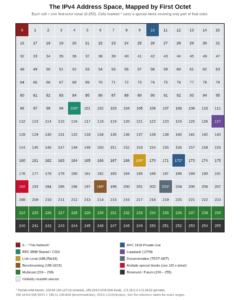
The Address Space, Visually
Each cell below represents one first-octet value. Cells marked with an asterisk carry a special-purpose block that covers only part of that octet; see the tables above for exact ranges.
Blocks You Will Actually Run Into
Loopback and “This Network”
0.0.0.0/8, 0.0.0.0/32, 127.0.0.0/8. 127.0.0.0/8 is the whole loopback block, not just 127.0.0.1; any address in that /8 loops back to the local stack. 0.0.0.0/8 is the “unspecified network,” most visible as a default-route placeholder or a DHCP client’s source address before it has a lease.
Link-Local, a.k.a. APIPA
169.254.0.0/16, RFC 3927 space. When a host cannot reach a DHCP server, it self-assigns from this block. Seeing a 169.254.x.x address on an interface is a DHCP failure symptom, not a configuration choice, nine times out of ten.
Documentation Ranges
192.0.2.0/24, 198.51.100.0/24, 203.0.113.0/24. RFC 5737’s three TEST-NET blocks exist so that documentation, training material, and configuration examples never accidentally reference a real, routable address. If you have ever wondered why every vendor’s sample config uses 192.0.2.x, this is why. They are non-routable everywhere by design.
Benchmarking
198.18.0.0/15. RFC 2544 set this /15 aside specifically for network device throughput and performance testing, so that lab traffic never leaks onto the production internet and never collides with a customer’s real addressing. If you have followed any of our multi-site lab guides, this is the same block we use for public/transit addressing in FortiGate SD-WAN lab topologies, precisely because it is guaranteed not to route anywhere in production.
Shared Address Space
100.64.0.0/10. RFC 6598 space, allocated to carriers in 2012 for Carrier-Grade NAT, sitting between the CPE and the ISP’s own NAT44 boundary. It is easy to mistake for RFC 1918 space, but it is a distinct registry entry with its own attributes, and treating it as “just another private range” in an address plan is a common mistake. We covered the CGN use case for this block in detail in an earlier post on RFC 6598.
The 192.0.0.0/24 Cluster
This one /24 is itself a mini-registry: a /29 for IPv4 Service Continuity, a dummy address for calculating an MTU without touching the real network, anycast addresses for Port Control Protocol and TURN, and two addresses reserved for NAT64/DNS64 discovery. None of it is meant to be forwarded outside its narrow protocol purpose.
AS112 and AMT Anycast
192.31.196.0/24, 192.175.48.0/24, 192.52.193.0/24. AS112 is the community-run anycast sink that absorbs the reverse-DNS lookup traffic generated by RFC 1918 and other non-delegated space (every time something queries PTR records for a 10.x.x.x address, this is often where it lands). AMT (Automatic Multicast Tunneling) uses its own anycast relay range to tunnel multicast traffic across networks that do not support native multicast routing.
6to4 and 6a44 Relay Anycast
192.88.99.0/24, 192.88.99.2/32. The original 6to4 relay anycast block was formally deprecated in 2015 as native IPv6 and other transition mechanisms took over; you may still find it referenced in older configs or legacy transition-technology documentation. The 6a44 relay anycast address remains active.
Multicast
224.0.0.0/4. Not part of the special-purpose registry table above (it has its own IANA multicast address registry under RFC 5771 and successors), but every practitioner needs it in the same mental map: the entire 224.0.0.0-239.255.255.255 range is Class D multicast, never assigned to a single host.
Reserved for Future Use
240.0.0.0/4. The old “Class E” block. It has sat reserved since 1989 and, outside of experimental use, is not expected to appear in production traffic. Seeing it as a source or destination address in a capture usually means malformed traffic, not a legitimate host.
Limited Broadcast
255.255.255.255/32. Valid as a destination, never as a source, and never forwarded past the local link. DHCP discovery is the most common thing you will see using it.
Security and Practitioner Notes
Bogon filtering. “Bogon” traffic is any packet sourced from address space that should never appear on the public internet: unallocated space, and every reserved/special-purpose block covered above. Filtering bogons at the WAN edge is standard perimeter hygiene, both for inbound traffic claiming to originate from RFC 1918 space (a classic spoofing indicator) and for preventing accidental RFC 1918 route leaks outbound to a peer.
A simple FortiGate example: building an address group for the RFC 1918 ranges so it can be referenced in an ingress deny policy on the WAN interface.
config firewall address
    edit "RFC1918-10.0.0.0-8"
        set subnet 10.0.0.0 255.0.0.0
    next
    edit "RFC1918-172.16.0.0-12"
        set subnet 172.16.0.0 255.240.0.0
    next
    edit "RFC1918-192.168.0.0-16"
        set subnet 192.168.0.0 255.255.0.0
    next
end
config firewall addrgrp
    edit "grp-bogon-rfc1918"
        set member "RFC1918-10.0.0.0-8" "RFC1918-172.16.0.0-12" "RFC1918-192.168.0.0-16"
    next
end
config firewall policy
    edit 0
        set name "deny-wan-inbound-rfc1918-spoof"
        set srcintf "wan1"
        set dstintf "any"
        set srcaddr "grp-bogon-rfc1918"
        set dstaddr "all"
        set schedule "always"
        set service "ALL"
        set action deny
        set logtraffic all
    next
end
Extend the same address-object pattern to 100.64.0.0/10, 127.0.0.0/8, 169.254.0.0/16, and the documentation/benchmarking ranges if your threat model calls for full bogon coverage rather than just RFC 1918.
Common Misconfiguration: Leaking Private Routes
BGP sessions to an ISP or an internet exchange should always carry outbound prefix filters that strip RFC 1918, RFC 6598, and the other non-globally-reachable blocks. A leaked 10.0.0.0/8 advertisement will not get you anywhere on the internet, but it is a reliable sign of a missing route-map on a peering session, and it is worth auditing for during any BGP troubleshooting pass.
A Short IPv6 Note
IPv6 has its own equivalents, worth keeping in the same mental drawer:
| Purpose | IPv6 Block | RFC |
|---|---|---|
| Loopback | ::1/128 | RFC 4291 |
| Link-Local | fe80::/10 | RFC 4291 |
| Unique Local Address (private-use equivalent) | fc00::/7 | RFC 4193 |
| Documentation | 2001:db8::/32 | RFC 3849 |
Unique Local Addresses are the closest conceptual match to RFC 1918, but the comparison only goes so far: ULA space is generated with a pseudo-random /48 prefix specifically to make collisions statistically unlikely, which sidesteps the “everyone picked 192.168.1.0/24” problem that plagues IPv4 private addressing.
Quick Reference Cheat Sheet
| Block | One-line reason to remember it |
|---|---|
| 10.0.0.0/8 | RFC 1918 private, largest block, enterprise default |
| 172.16.0.0/12 | RFC 1918 private, underused, good for labs/links |
| 192.168.0.0/16 | RFC 1918 private, most collision-prone block in existence |
| 100.64.0.0/10 | Shared/CGN space, not RFC 1918, do not treat it as private |
| 127.0.0.0/8 | Loopback, entire /8, not just 127.0.0.1 |
| 169.254.0.0/16 | APIPA, means DHCP failed |
| 192.0.2.0/24, 198.51.100.0/24, 203.0.113.0/24 | Documentation-only, never routable |
| 198.18.0.0/15 | Benchmarking, safe for lab public/transit addressing |
| 224.0.0.0/4 | Multicast, Class D |
| 240.0.0.0/4 | Reserved, “Class E,” should not appear in production |
| 255.255.255.255/32 | Limited broadcast, destination-only |
Key Takeaways
- RFC 1918 gave us three private-use blocks in 1996, and the size and collision-risk profile of each one still drives real address-planning decisions today.
- “Reserved” is not one category. The registry’s Source, Destination, Forwardable, and Globally Reachable attributes tell you what a block can actually do, and they differ block by block.
- The Shared Address Space (100.64.0.0/10) and the documentation/benchmarking ranges are frequently confused with RFC 1918 or with each other. They are not interchangeable in an address plan or a filtering policy.
- Bogon filtering at the network edge, in both directions, is standard practice, not an edge case, and it is a five-minute FortiGate address-group exercise once you have the block list in front of you.
References
- IANA, IPv4 Special-Purpose Address Registry
- RFC 1918, Address Allocation for Private Internets
- RFC 6890 (BCP 153), Special-Purpose IP Address Registries
- RFC 8190, Updates to the Special-Purpose IP Address Registries
- RFC 6598, IANA-Reserved IPv4 Prefix for Shared Address Space
- RFC 2544, Benchmarking Methodology for Network Interconnect Devices
- RFC 5737, IPv4 Address Blocks Reserved for Documentation
Recent posts
-

-

DNS is one of those technologies that quietly underpins... Full Story
-

BGP issues on FortiGate firewalls usually trace back to... Full Story
-

Every time your laptop talks to your router, a... Full Story
-

If you've spent any time configuring NAT on a... Full Story
-

If you have spent any time configuring firewall policies... Full Story
-

High availability on FortiGate is one of those features... Full Story
-

If you've configured SD-WAN on a FortiGate, you've almost... Full Story
-

FortiLink is the management protocol that turns a FortiSwitch... Full Story
-

FortiSwitches are pretty rock solid from Mean Time Between... Full Story
-

This is a quicky tip. Have you ever gone... Full Story
-

DNS is one of those quiet pieces of internet... Full Story
-

This article is an updated version of the previous... Full Story
-

You will add ns2 as a secondary (slave) BIND9... Full Story
-

In the process of deploying my lab, I needed... Full Story
-

RFC 8805, used to be known as Self-Correcting IP... Full Story
-

Years back, I wrote an article about certificate pinning. ... Full Story
-

FortiGates have the ability to send alerts to Microsoft... Full Story
-

In this post, I am going to walk through... Full Story
-

Troubleshooting VoIP on a FortiGate can feel like trying... Full Story
-

Prior to FortiOS 7.0, there were three commands to... Full Story
-

In this post, I am going to go over... Full Story
-

What we are going to do: We are going... Full Story
-

Choosing between FGCP (FortiGate Clustering Protocol) and FGSP (FortiGate... Full Story
-

Creating a VLAN on macOS (The "Pro" Move) A... Full Story
-

This blog post explores the logic behind how macOS... Full Story
-

Pretty Fly for a Wi-Fi Tell My Wi-Fi Love... Full Story
-

Part of my daily gig is creating BoMs (Bill-of-Materials)... Full Story
-

ICMP introduces several security risks, but careful filtering, rate... Full Story
-

The command diag debug application dhcps -1 enables full... Full Story
-

In the world of FortiOS, execute tac report is... Full Story
-

LLDP; What is it The Link Layer Discovery Protocol... Full Story
-

What it actually does When you run diagnose fdsm... Full Story
-

Monkey Bites are bite-sized, high-impact security insights designed for... Full Story
-

I have run macOS in macOS with Parallels but... Full Story
-

Don't be confused with my other FortiNAC posts where... Full Story
-

This is the third session in a multi-part article... Full Story
-

Today I was configuring key-based authentication on a FortiGate... Full Story
-

Netcat, often called the "Swiss Army knife" of networking,... Full Story
-

At its core, IEEE 802.1X is a network layer... Full Story
-

In case you did not see the previous FortiNAC... Full Story
-

This is our 5th session where we are going... Full Story
-

Now that we have Wireshark installed and somewhat configured,... Full Story
-

The Philosophy of Packet Analysis Troubleshooting isn't about looking... Full Story
-

Executive Summary Objective: Get you from zero to writing... Full Story
-

NAND cells, the flash translation layer, SLC caching, TRIM,... Full Story
-

Nmap Scripting Engine (NSE): From One-Liners to Your First... Full Story