
If you've spent any time configuring user authentication on... Full Story
By Manny Fernandez
October 8, 2026
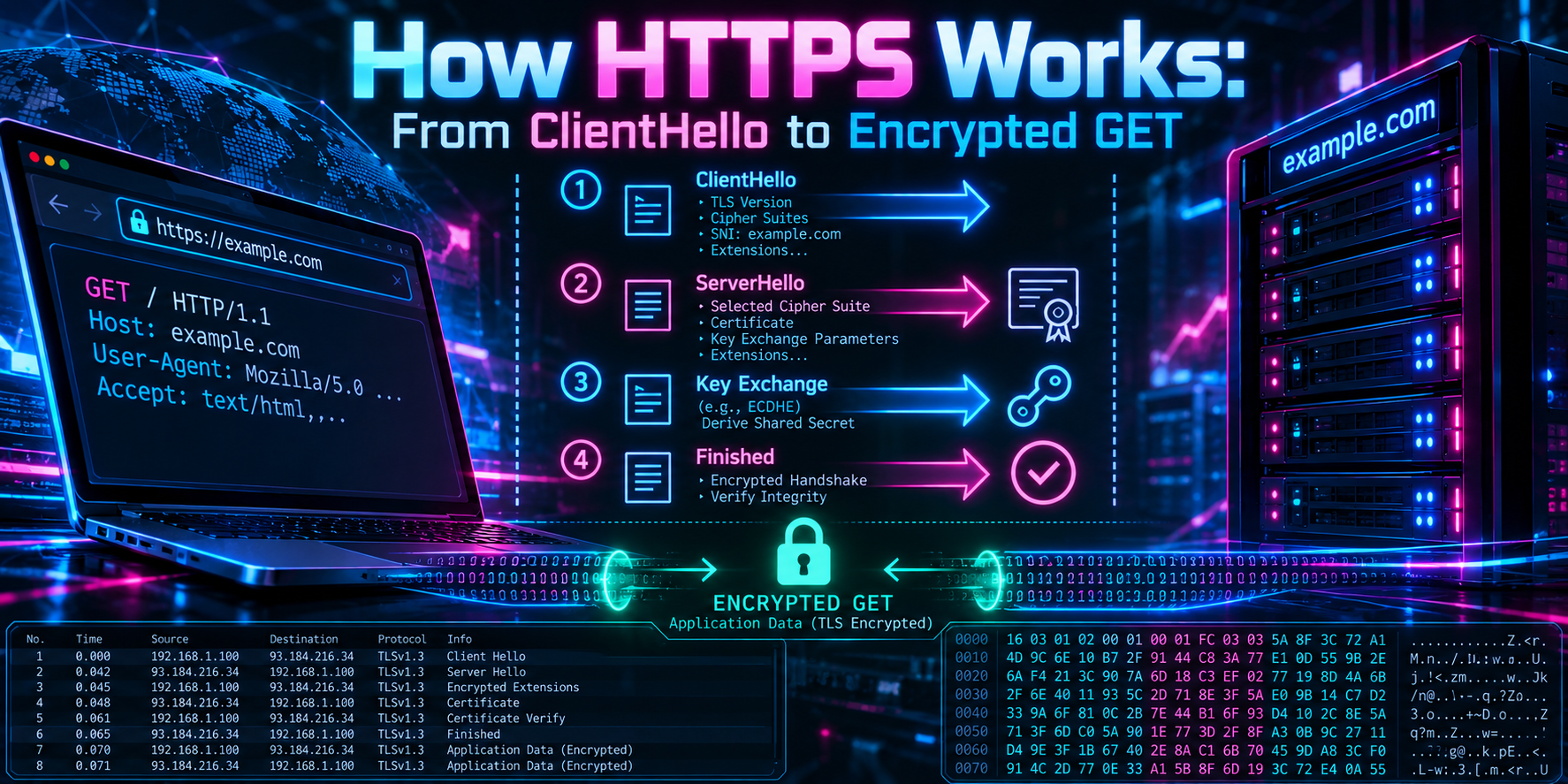
How HTTPS Works: From ClientHello to Encrypted GET
A practitioner walk-through of DNS, TCP, TLS 1.3, certificates, and the record layer, with the commands to watch every step yourself.
In this guide
- Executive Summary
- Prerequisites & Architecture
- What HTTPS Protects (and What It Does Not)
- The Connection Timeline, Step by Step
- TLS 1.2 vs. TLS 1.3
- Resumption and 0-RTT
- HTTP/3 and QUIC
- Post-Quantum Key Exchange Is Already on the Wire
- Hardening the Server Side
- Where the FortiGate Fits: SSL Inspection
- Verification & Validation: The Practitioner Toolkit
- Troubleshooting & Gotchas
- Quick Reference
- Wrapping Up
Executive Summary
Objective: Explain exactly what happens between typing https:// into a browser and receiving an encrypted HTTP response, at the level of detail you need to troubleshoot it with packet captures and CLI tools.
Target audience: Network and security engineers, firewall admins deciding how far to take SSL inspection, and anyone who has stared at a handshake failure alert and wanted to know which message actually broke.
TL;DR
HTTPS is plain HTTP carried inside TLS. TLS 1.3 uses an ephemeral key exchange to agree on secret keys in one round trip, a certificate plus a signature to prove the server’s identity, and AEAD encryption to protect every record after that. The certificate never encrypts your data. It only proves who you are talking to.
Prerequisites & Architecture
Assumed Knowledge
Basic TCP/IP (ports, the three-way handshake), how DNS resolution works, and the idea of public/private key pairs. You do not need to know the math behind elliptic curves.
Lab & Tooling
Examples use www.example.com resolving to 198.18.10.10 (the 198.18.0.0/15 benchmark range stands in for public IPs) with clients on 10.0.0.0/16.
| Component | Purpose | Notes |
|---|---|---|
| OpenSSL 3.x | Handshake testing, certificate decoding | 3.5+ needed for post-quantum groups. macOS ships LibreSSL as openssl; use Homebrew OpenSSL. |
| curl 8.x | Verbose TLS output and timing breakdowns | Honors SSLKEYLOGFILE when built with OpenSSL. |
| Wireshark / tshark | Handshake dissection and decryption | Needs a key log file to decrypt TLS 1.3. |
| tcpdump | Packet capture on Linux and macOS | Run with sudo. |
| nmap | Protocol and cipher enumeration | ssl-enum-ciphers NSE script. |
| FortiGate (optional) | SSL inspection and on-box sniffer | Any FortiOS 7.x build. |
The Stack
HTTPS is not a separate protocol. It is HTTP semantics layered on a security protocol layered on a transport. Which transport depends on the HTTP version:
| Layer | HTTP/1.1 and HTTP/2 | HTTP/3 |
|---|---|---|
| Application | HTTP semantics (RFC 9110) | HTTP semantics (RFC 9110) |
| Security | TLS 1.2 or TLS 1.3 (RFC 8446) | TLS 1.3 handshake inside QUIC (RFC 9001) |
| Transport | TCP, port 443 | QUIC over UDP, port 443 (RFC 9000) |
| Network | IPv4 / IPv6 | IPv4 / IPv6 |
What HTTPS Protects (and What It Does Not)
| Guarantee | Mechanism | Defeats |
|---|---|---|
| Confidentiality | AEAD cipher (AES-GCM or ChaCha20-Poly1305) keyed per session | Passive eavesdropping |
| Integrity | AEAD authentication tag on every record | Tampering and injection |
| Authentication | X.509 certificate chain plus a CertificateVerify signature | Impersonation and MITM |
| Forward secrecy | Ephemeral (EC)DHE key exchange, keys discarded after use | A stolen private key decrypting old captures |
Things an observer on the path can still see, even with TLS 1.3:
- The destination IP address and port.
- The hostname in the SNI extension of the ClientHello, unless the client and server both support Encrypted Client Hello (ECH).
- Your DNS query, unless you use DNS over HTTPS or DNS over TLS.
- Packet sizes and timing, which leak more about page content than most people expect.
Why this matters for firewalls
In TLS 1.2 the server certificate crossed the wire in cleartext, so a firewall could read it passively. In TLS 1.3 the certificate is encrypted. That is why FortiGate certificate-inspection mode leans on the SNI hostname for TLS 1.3 traffic, and why ECH is a real headache for category-based web filtering.
The Connection Timeline, Step by Step
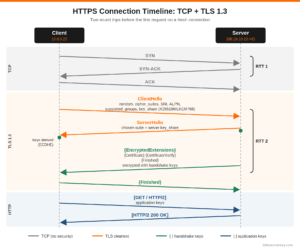
A fresh HTTPS connection over TCP costs two round trips before the first request byte leaves: one for TCP and one for TLS 1.3. Each step below lists its goal, what actually happens, and how to see it yourself.
Step 1: DNS Resolution
Goal: Turn the hostname into an IP address and, increasingly, learn the server’s HTTPS capabilities before connecting.
The client queries A and AAAA records as usual. Modern browsers also query the HTTPS resource record (type 65, RFC 9460), which can advertise supported ALPN protocols such as h3 and h2, IP hints, and ECH keys. That lets the browser go straight to HTTP/3 instead of discovering it on a later connection.
Command
dig +short www.example.com A
dig +short www.example.com HTTPS
Expected output
198.18.10.10
1 . alpn="h3,h2" ipv4hint=198.18.10.10
Step 2: TCP Handshake
Goal: Establish a reliable byte stream to port 443.
SYN, SYN-ACK, ACK. One round trip, zero security. Nothing about TLS has happened yet, and HTTP/3 skips this step entirely because QUIC runs over UDP.
Command
sudo tcpdump -ni en0 'host 198.18.10.10 and tcp port 443 and
  tcp[tcpflags] & (tcp-syn|tcp-fin|tcp-rst) != 0'
Step 3: The TLS 1.3 Handshake
Goal: Agree on fresh symmetric keys, prove the server’s identity, and confirm nobody tampered with the negotiation, all in a single round trip.
ClientHello: the only big cleartext message. The client sends 32 random bytes, a list of cipher suites, and a set of extensions that do most of the real work:
| Extension | What it carries | Why you care |
|---|---|---|
server_name (SNI) |
The hostname being requested | Lets one IP serve many certificates. Visible to firewalls. |
supported_versions |
0x0304 for TLS 1.3 |
The real version negotiation. The legacy version field is frozen at 0x0303 (TLS 1.2). |
supported_groups |
X25519MLKEM768, x25519, secp256r1, … |
Key exchange algorithms the client accepts. |
key_share |
The client’s ephemeral public key(s) | A guess at the server’s preferred group so the key exchange finishes in one round trip. |
signature_algorithms |
ecdsa_secp256r1_sha256, rsa_pss_rsae_sha256, … |
What the server is allowed to sign with. |
| ALPN | h2, http/1.1 |
Picks the HTTP version that runs inside the tunnel. |
pre_shared_key |
A resumption ticket from an earlier session | Lets a returning client skip certificate validation. |
TLS 1.3 cut the cipher suite list down to AEAD-only choices, and the suite name no longer includes the key exchange or signature algorithm. In practice you will see three: TLS_AES_128_GCM_SHA256, TLS_AES_256_GCM_SHA384, and TLS_CHACHA20_POLY1305_SHA256.
ServerHello: the moment everything goes dark. The server picks a cipher suite and a group, and returns its own key_share. Both sides now run the key exchange (ECDH, or the hybrid post-quantum equivalent) and arrive at the same shared secret without ever sending it. Every handshake message after ServerHello is encrypted with handshake traffic keys derived from that secret.
HelloRetryRequest
If none of the client’s key_share guesses match a group the server supports, the server answers with a HelloRetryRequest naming the group it wants. The client sends a second ClientHello, and you pay an extra round trip. Seeing HRRs in bulk usually means a client and server disagree on group preference.
The encrypted server flight arrives in the same round trip as ServerHello:
| Message | Purpose |
|---|---|
| EncryptedExtensions | The ALPN choice and other parameters that do not affect key derivation. |
| Certificate | The server’s certificate chain: leaf plus intermediates. The root is never needed. |
| CertificateVerify | A signature over the entire handshake transcript, made with the certificate’s private key. |
| Finished | An HMAC over the transcript that proves nothing was altered in flight. |
CertificateVerify is the part people skip, and it is the part that matters. Anyone can copy a public certificate. Only the holder of the matching private key can sign a transcript that includes this session’s random values and key shares. That signature is what stops an attacker from replaying a stolen certificate.
Client Finished and the first request. The client validates the certificate chain, checks the signature, sends its own Finished, and can put the HTTP request in the same flight. TLS 1.3 adds one round trip on top of TCP. TLS 1.2 needed two.
Step 4: Certificate Validation
Goal: Decide whether the public key in the certificate really belongs to the hostname the user asked for. The client runs these checks:
- Build the chain from the leaf through the intermediates to a root in the local trust store. The server must send its intermediates.
- Verify each signature up the chain.
- Check validity dates (
notBeforeandnotAfter) against the local clock. - Match the hostname against the Subject Alternative Name (SAN) extension. Modern browsers ignore the Common Name entirely, and a wildcard covers exactly one label.
- Check key usage: the Extended Key Usage must include TLS Web Server Authentication.
- Check revocation. OCSP and CRLs still exist, but browsers mostly rely on their own pushed revocation lists (CRLSets in Chrome, CRLite in Firefox), and Let’s Encrypt shut down its OCSP service in 2025.
- Check Certificate Transparency. Publicly trusted certificates must carry signed certificate timestamps (SCTs) proving they were logged. Chrome and Safari enforce this.
Command
openssl s_client -connect www.example.com:443 -servername www.example.com \
  </dev/null 2>/dev/null | openssl x509 -noout -subject -issuer -dates \
  -ext subjectAltName,extendedKeyUsage
Expected output
subject=CN=www.example.com
issuer=C=US, O=Example CA, CN=Example Issuing CA E1
notBefore=Sep  1 00:00:00 2026 GMT
notAfter=Nov 30 23:59:59 2026 GMT
X509v3 Subject Alternative Name:
    DNS:www.example.com, DNS:example.com
X509v3 Extended Key Usage:
    TLS Web Server Authentication
Certificate lifetimes are shrinking fast
CA/Browser Forum Ballot SC-081 caps publicly trusted TLS certificates at 200 days from March 15, 2026, then 100 days from March 15, 2027, and 47 days from March 15, 2029. If any certificate in your environment is still renewed by hand, automate it with ACME now.
Step 5: The Key Schedule
Goal: Turn one shared secret into many independent keys.
TLS 1.3 feeds secrets through HKDF in three stages: the Early Secret (from a resumption PSK, or zeros), the Handshake Secret (mixing in the key exchange result), and the Master Secret. Each stage is bound to a hash of the transcript so far and produces separate client and server keys. Handshake keys and application keys are different, each direction has its own key, and the ephemeral private keys are thrown away. That last part is forward secrecy: stealing the server’s certificate key tomorrow does not decrypt today’s capture.
You can see these secrets directly. When SSLKEYLOGFILE is set, browsers and curl write lines like these, which is exactly what Wireshark needs to decrypt a capture:
Key log format
CLIENT_HANDSHAKE_TRAFFIC_SECRET <client_random> <secret>
SERVER_HANDSHAKE_TRAFFIC_SECRET <client_random> <secret>
CLIENT_TRAFFIC_SECRET_0 <client_random> <secret>
SERVER_TRAFFIC_SECRET_0 <client_random> <secret>
Step 6: The Record Layer
Goal: Protect every byte of application data.
Data is chopped into records of up to 16 KB of plaintext, each sealed with the AEAD cipher. The per-record nonce is a static IV XORed with a 64-bit sequence number, so a dropped, reordered, or replayed record fails authentication. The real content type is encrypted inside the record. The outer header always claims application_data (23) with version 0x0303, which is why a TLS 1.3 capture looks like one long stream of “Application Data” once the handshake is over. Long-lived connections rotate keys with a KeyUpdate message.
Step 7: HTTP Inside the Tunnel
Goal: Send the actual request.
ALPN already decided the HTTP version. With h2, many requests share one TLS connection as multiplexed streams. With http/1.1, it is one request at a time per connection. The Host header (or :authority in HTTP/2) should match the SNI, and many servers return 421 Misdirected Request when it does not.
Command
curl -v https://www.example.com -o /dev/nullExpected output (abridged; format varies by curl build)
* SSL connection using TLSv1.3 / TLS_AES_256_GCM_SHA384 / X25519MLKEM768
* ALPN: server accepted h2
* Server certificate:
*  subject: CN=www.example.com
*  subjectAltName: host "www.example.com" matched cert's "www.example.com"
*  SSL certificate verify ok.
* using HTTP/2
> GET / HTTP/2
> Host: www.example.com
< HTTP/2 200
TLS 1.2 vs. TLS 1.3
| Area | TLS 1.2 | TLS 1.3 |
|---|---|---|
| Full handshake | 2 round trips | 1 round trip |
| Key exchange | Static RSA or (EC)DHE | (EC)DHE only, so forward secrecy is mandatory |
| Bulk ciphers | CBC, RC4, and AEAD | AEAD only |
| Server certificate on the wire | Cleartext | Encrypted |
| Handshake signature | Covers ServerKeyExchange only | Covers the whole transcript (CertificateVerify) |
| Resumption | Session IDs or tickets | PSK tickets, optional 0-RTT |
| Renegotiation | Supported | Removed; KeyUpdate handles key rotation |
| Compression | Optional | Removed (CRIME attack) |
Resumption and 0-RTT
After the handshake, the server sends one or more NewSessionTicket messages. On the next connection the client offers that ticket as a pre-shared key, and both sides skip the certificate and signature entirely. If the client also includes early_data, it can send the HTTP request in its very first flight: zero round trips for TLS.
0-RTT data can be replayed
Early data is not protected against replay. An attacker who captures it can resend it. Servers should accept 0-RTT only for idempotent requests like GET, and can answer 425 Too Early to force the client to wait for the full handshake.
HTTP/3 and QUIC
QUIC merges the transport and TLS handshakes, so a new HTTP/3 connection needs one round trip total, and zero on resumption. The TLS 1.3 handshake messages ride inside QUIC CRYPTO frames, and QUIC uses the keys TLS derives to encrypt its own packets instead of using TLS records. Clients discover HTTP/3 through an Alt-Svc: h3=":443" response header or through the HTTPS DNS record from Step 1.
The firewall angle
Many security teams block UDP 443 outbound so browsers fall back to TCP, where SSL inspection is mature and well understood. On FortiGate, recent FortiOS releases add a quic option to the SSL/SSH inspection profile (inspect, bypass, or block), so check what your build supports before deciding.
Post-Quantum Key Exchange Is Already on the Wire
A future quantum computer could break X25519 and recover session keys from traffic recorded today. That “harvest now, decrypt later” risk is why browsers moved first. The hybrid group X25519MLKEM768 (codepoint 0x11EC) runs classical X25519 and ML-KEM-768 (FIPS 203) together, and the session stays safe unless both are broken. It is enabled by default in current Chrome, Edge, and Firefox, across major CDNs, and in OpenSSL 3.5.
| Key share | Client sends | Server sends |
|---|---|---|
x25519 |
32 bytes | 32 bytes |
X25519MLKEM768 |
1,216 bytes | 1,120 bytes |
The practical impact is size. The ClientHello grows past a typical 1,500-byte MTU and splits across two TCP segments. Middleboxes that assume the whole ClientHello fits in one packet drop or reset it, which shows up as sites that fail in Chrome but load fine from an older curl. Certificates and signatures are still classical for now; post-quantum signatures (ML-DSA) have not reached the public WebPKI.
Command (OpenSSL 3.5+)
openssl s_client -connect www.example.com:443 -servername www.example.com \
  -groups X25519MLKEM768 -brief </dev/null
Expected output (abridged)
CONNECTION ESTABLISHED
Protocol version: TLSv1.3
Ciphersuite: TLS_AES_256_GCM_SHA384
Peer certificate: CN = www.example.com
Verification: OK
Negotiated TLS1.3 group: X25519MLKEM768
Hardening the Server Side
- Redirect port 80 to HTTPS with a 301, then send HSTS (
Strict-Transport-Security) so browsers never try cleartext again. - Allow TLS 1.3 and TLS 1.2 only, and restrict TLS 1.2 to ECDHE with AEAD ciphers.
- Always serve the full chain (leaf plus intermediates).
- Automate renewal with ACME before the shorter lifetimes arrive.
- Publish a CAA DNS record so only your chosen CAs can issue for your domain.
nginx example
server {
    listen 443 ssl;
    http2 on;
    server_name www.example.com;

    ssl_certificate     /etc/ssl/example/fullchain.pem;
    ssl_certificate_key /etc/ssl/example/privkey.pem;
    ssl_protocols       TLSv1.2 TLSv1.3;
    ssl_ciphers         ECDHE+AESGCM:ECDHE+CHACHA20;
    ssl_session_tickets on;

    add_header Strict-Transport-Security "max-age=63072000" always;
}
Check CAA
dig +short example.com CAAExpected output
0 issue "letsencrypt.org"Where the FortiGate Fits: SSL Inspection
A FortiGate sees the same handshake as any other observer, so it has two options. Certificate inspection reads what is visible (SNI in TLS 1.3, SNI plus the certificate in TLS 1.2) and makes web filtering decisions without decrypting. Deep inspection terminates the client’s TLS session with a certificate re-signed by the FortiGate CA, opens a separate TLS session to the real server, and inspects the plaintext in between.
Deep inspection only works if clients trust the FortiGate CA, and it breaks anything that pins certificates or uses mutual TLS. Exempt sensitive categories such as finance and health for privacy reasons.
FortiOS CLI
config firewall ssl-ssh-profile
    edit "custom-deep-inspection"
        set comment "Full TLS inspection for user egress"
        config https
            set ports 443
            set status deep-inspection
        end
        set server-cert-mode re-sign
        set caname "Fortinet_CA_SSL"
    next
end
On-box capture
diagnose sniffer packet any 'host 198.18.10.10 and port 443' 4 0 lVerification & Validation: The Practitioner Toolkit
One-line handshake summary
Command
openssl s_client -connect www.example.com:443 -servername www.example.com \
  -brief </dev/null
Success looks like: Protocol version: TLSv1.3 and Verification: OK.
Count the certificates the server sends
Command
openssl s_client -connect www.example.com:443 -servername www.example.com \
  -showcerts </dev/null 2>/dev/null | grep -E '^ *[0-9]+ s:'
Expected output
 0 s:CN = www.example.com
 1 s:C = US, O = Example CA, CN = Example Issuing CA E1
Success looks like: depth 0 (leaf) plus at least one intermediate. Only depth 0 means an incomplete chain.
Measure where the time goes
Command
curl -so /dev/null https://www.example.com \
  -w 'dns=%{time_namelookup} tcp=%{time_connect} tls=%{time_appconnect}\n'
Expected output
dns=0.012 tcp=0.031 tls=0.058Success looks like: tls minus tcp roughly equal to one network round trip. Twice that suggests TLS 1.2 or a HelloRetryRequest.
Enumerate protocols and ciphers
Command
nmap --script ssl-enum-ciphers -p 443 www.example.comExpected output (abridged)
| ssl-enum-ciphers:
|   TLSv1.2:
|     ciphers:
|       TLS_ECDHE_ECDSA_WITH_AES_128_GCM_SHA256 (secp256r1) - A
|   TLSv1.3:
|     ciphers:
|       TLS_AKE_WITH_AES_128_GCM_SHA256 (ecdh_x25519) - A
|_  least strength: A
Capture only ClientHellos and pull out the SNI
Command
sudo tcpdump -ni en0 -w hello.pcap 'tcp port 443 and
  tcp[((tcp[12:1] & 0xf0) >> 2):1] = 0x16 and
  tcp[((tcp[12:1] & 0xf0) >> 2) + 5:1] = 0x01'

tshark -r hello.pcap -Y 'tls.handshake.type == 1' \
  -T fields -e ip.dst -e tls.handshake.extensions_server_name
The filter reads the TCP header length from byte 12, jumps to the start of the payload, and matches content type 0x16 (handshake) with handshake type 0x01 (ClientHello).
Decrypt a capture in Wireshark
Command
export SSLKEYLOGFILE="$HOME/tls-keys.log"
curl -s https://www.example.com -o /dev/null
In Wireshark, open Preferences > Protocols > TLS and point (Pre)-Master-Secret log filename at tls-keys.log. The Application Data records turn into readable HTTP/2 frames. Treat that file like a private key and delete it when done.
Troubleshooting & Gotchas
1. Works in the browser, fails in curl, Python, or Java
Cause: An incomplete chain. Browsers quietly fetch missing intermediates through the AIA extension or use cached copies. Most libraries do not.
Diagnose
openssl s_client -connect www.example.com:443 -servername www.example.com \
  -verify_return_error </dev/null 2>&1 | grep -i 'verify error'
Failure signature
verify error:num=20:unable to get local issuer certificateFix: Point the server at fullchain.pem, not cert.pem.
2. Wrong certificate or hostname mismatch
Cause: The client did not send SNI, or the server has no SNI mapping for that name and falls back to its default certificate.
Diagnose
openssl s_client -connect 198.18.10.10:443 -servername www.example.com \
  -verify_hostname www.example.com </dev/null 2>&1 | grep -i verify
Failure signature
verify error:num=62:hostname mismatchFix: Add the name to the certificate SAN, or add the SNI mapping on the server or load balancer. Test once with and once without -servername to confirm.
3. “Certificate is not yet valid” on one device only
Cause: Clock skew. A freshly issued certificate looks like it is from the future to a device whose clock is behind.
Diagnose
date -uFailure signature
verify error:num=9:certificate is not yet validFix: Fix NTP on the device. On embedded gear and lab VMs this is the most common cause.
4. Chrome resets, older tools connect fine
Cause: A middlebox choking on the large post-quantum ClientHello.
Diagnose
openssl s_client -connect www.example.com:443 -servername www.example.com \
  -groups x25519 -brief </dev/null
openssl s_client -connect www.example.com:443 -servername www.example.com \
  -groups X25519MLKEM768 -brief </dev/null
If the first succeeds and the second hangs or resets, a packet capture will usually show a two-segment ClientHello followed by a RST from the path. Fix: Update the middlebox firmware. As a temporary workaround, Chrome’s PostQuantumKeyAgreementEnabled enterprise policy can turn off the hybrid group.
5. Handshake failure alert right after ClientHello
Cause: No overlap in protocol versions, cipher suites, or signature algorithms. Common with legacy appliances that only speak TLS 1.0 or 1.1.
Diagnose
openssl s_client -connect legacy.example.com:443 -tls1_2 -brief </dev/null
nmap --script ssl-enum-ciphers -p 443 legacy.example.com
Failure signatures
tlsv1 alert protocol version
ssl/tls alert handshake failure
Fix: Upgrade the endpoint, or front it with a reverse proxy that speaks modern TLS. Re-enabling old protocols on clients should be a last resort with an expiry date.
Quick Reference
| What to check | Command |
|---|---|
| Version, cipher, group | openssl s_client -connect H:443 -servername H -brief |
| Certificate chain | openssl s_client -connect H:443 -servername H -showcerts |
| Certificate fields | ... | openssl x509 -noout -text |
| Handshake timing | curl -so /dev/null -w '%{time_appconnect}\n' https://H |
| Supported ciphers | nmap --script ssl-enum-ciphers -p 443 H |
| HSTS header | curl -sI https://H | grep -i strict |
| HTTPS DNS record | dig +short H HTTPS |
| FortiGate capture | diagnose sniffer packet any 'port 443' 4 0 l |
Wrapping Up
Every HTTPS failure lands in one of the steps above: name resolution, transport, key exchange, identity, or the HTTP layer inside the tunnel. Once you know which message carries what, a packet capture stops being a wall of Application Data and becomes a checklist. Start with openssl s_client -brief, add -showcerts when identity looks wrong, and reach for a key log file when you need to see inside.
Recent posts
-

-

DNS is one of those technologies that quietly underpins... Full Story
-

BGP issues on FortiGate firewalls usually trace back to... Full Story
-

Every time your laptop talks to your router, a... Full Story
-

If you've spent any time configuring NAT on a... Full Story
-

If you have spent any time configuring firewall policies... Full Story
-

High availability on FortiGate is one of those features... Full Story
-

If you've configured SD-WAN on a FortiGate, you've almost... Full Story
-

FortiLink is the management protocol that turns a FortiSwitch... Full Story
-

FortiSwitches are pretty rock solid from Mean Time Between... Full Story
-

This is a quicky tip. Have you ever gone... Full Story
-

DNS is one of those quiet pieces of internet... Full Story
-

This article is an updated version of the previous... Full Story
-

You will add ns2 as a secondary (slave) BIND9... Full Story
-

In the process of deploying my lab, I needed... Full Story
-

RFC 8805, used to be known as Self-Correcting IP... Full Story
-

Years back, I wrote an article about certificate pinning. ... Full Story
-

FortiGates have the ability to send alerts to Microsoft... Full Story
-

In this post, I am going to walk through... Full Story
-

Troubleshooting VoIP on a FortiGate can feel like trying... Full Story
-

Prior to FortiOS 7.0, there were three commands to... Full Story
-

In this post, I am going to go over... Full Story
-

What we are going to do: We are going... Full Story
-

Choosing between FGCP (FortiGate Clustering Protocol) and FGSP (FortiGate... Full Story
-

Creating a VLAN on macOS (The "Pro" Move) A... Full Story
-

This blog post explores the logic behind how macOS... Full Story
-

Pretty Fly for a Wi-Fi Tell My Wi-Fi Love... Full Story
-

Part of my daily gig is creating BoMs (Bill-of-Materials)... Full Story
-

ICMP introduces several security risks, but careful filtering, rate... Full Story
-

The command diag debug application dhcps -1 enables full... Full Story
-

In the world of FortiOS, execute tac report is... Full Story
-

LLDP; What is it The Link Layer Discovery Protocol... Full Story
-

What it actually does When you run diagnose fdsm... Full Story
-

Monkey Bites are bite-sized, high-impact security insights designed for... Full Story
-

I have run macOS in macOS with Parallels but... Full Story
-

Don't be confused with my other FortiNAC posts where... Full Story
-

This is the third session in a multi-part article... Full Story
-

Today I was configuring key-based authentication on a FortiGate... Full Story
-

Netcat, often called the "Swiss Army knife" of networking,... Full Story
-

At its core, IEEE 802.1X is a network layer... Full Story
-

In case you did not see the previous FortiNAC... Full Story
-

This is our 5th session where we are going... Full Story
-

Now that we have Wireshark installed and somewhat configured,... Full Story
-

The Philosophy of Packet Analysis Troubleshooting isn't about looking... Full Story
-

Executive Summary Objective: Give you a working command of... Full Story
-

You have configured it a dozen times. Server IP,... Full Story
-

Executive Summary Objective: Walk through every message a FortiGate... Full Story