
If you've spent any time configuring user authentication on... Full Story
By Manny Fernandez
October 7, 2026
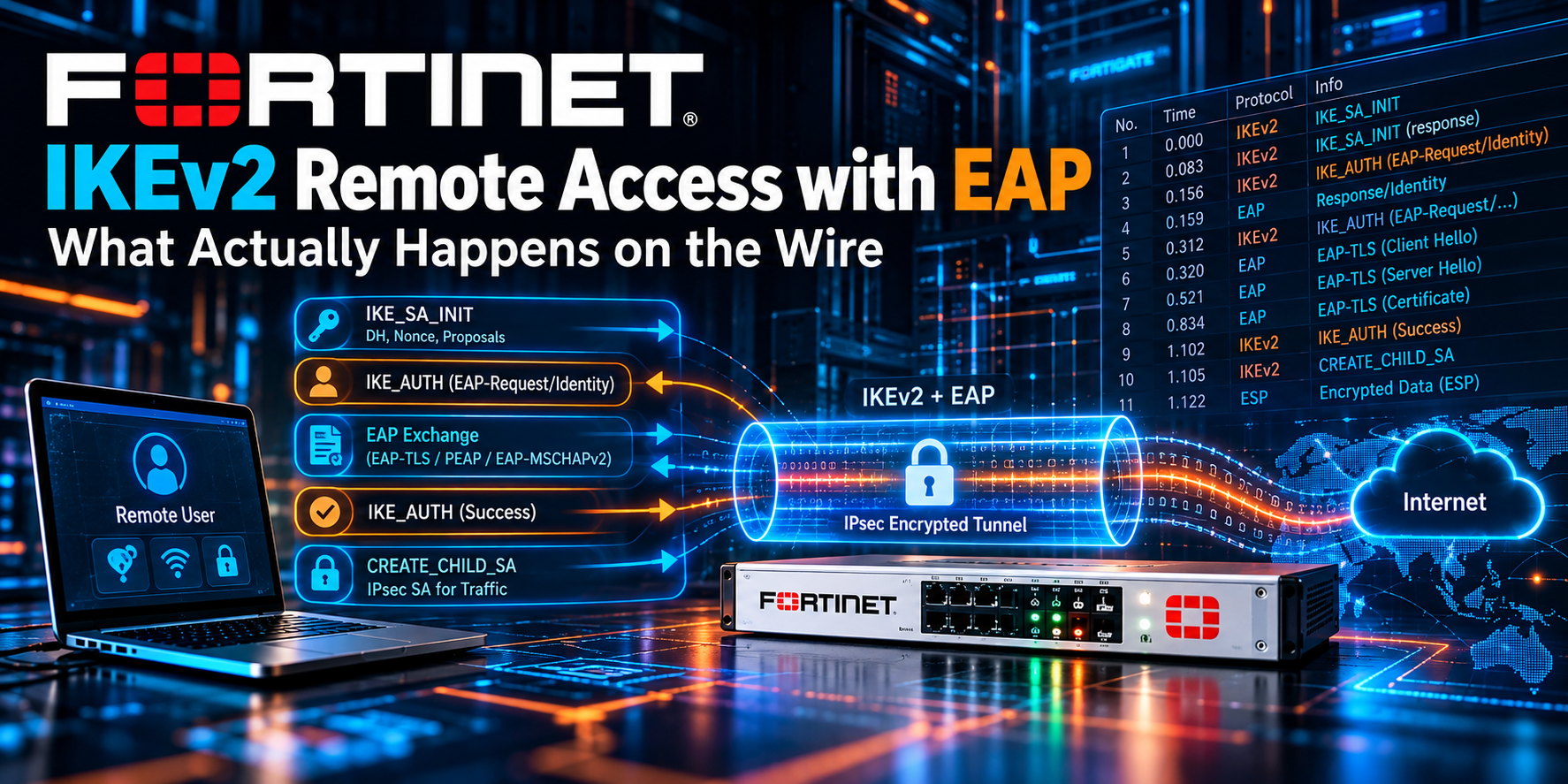
FortiGate IKEv2 Remote Access with EAP: What Actually Happens on the Wire
Executive Summary
Objective: Walk through every message a FortiGate exchanges when a remote user connects over a dial-up IKEv2 tunnel with EAP authentication, explain what the firewall is doing in the background at each step, and show how to watch it happen in the debugs.
Target audience: Network and security engineers who deploy or troubleshoot FortiGate remote access IPsec and want to know why the tunnel fails where it fails, instead of guessing from a generic error on the client.
The short version: IKEv2 with EAP is five phases. IKE_SA_INIT builds an encrypted channel with nobody authenticated. The first IKE_AUTH carries the client identity with the AUTH payload deliberately missing. The FortiGate proves its own identity, then relays EAP between the client and the user database. Once EAP succeeds, both sides exchange a final AUTH derived from the EAP session key, and the first child SA comes up with an IP address pushed to the client.
Prerequisites and Architecture
Assumed knowledge
- IPsec basics: IKE SA versus child SA (phase 1 versus phase 2 in IKEv1 terms), proposals, Diffie-Hellman.
- FortiGate dial-up phase1-interface configuration and firewall policy basics.
- RADIUS fundamentals: Access-Request, Access-Challenge, Access-Accept.
Lab environment
Addresses in 198.18.0.0/15 stand in for public IPs. 10.0.0.0/16 is the internal network.
| Component | Role | Lab value |
|---|---|---|
| FortiGate | IKEv2 responder, EAP authenticator, RADIUS client | wan1 198.18.1.1 |
| VPN client | IKEv2 initiator, EAP peer (FortiClient or native OS client) | Public IP 198.18.50.25 |
| RADIUS server | EAP server (NPS, FortiAuthenticator, or similar) | 10.0.10.20 |
| Address pool | Mode-config range handed to clients | 10.0.200.10 to 10.0.200.250 |
| DNS server | Pushed to clients through mode-config | 10.0.10.10 |
The whole exchange in one picture
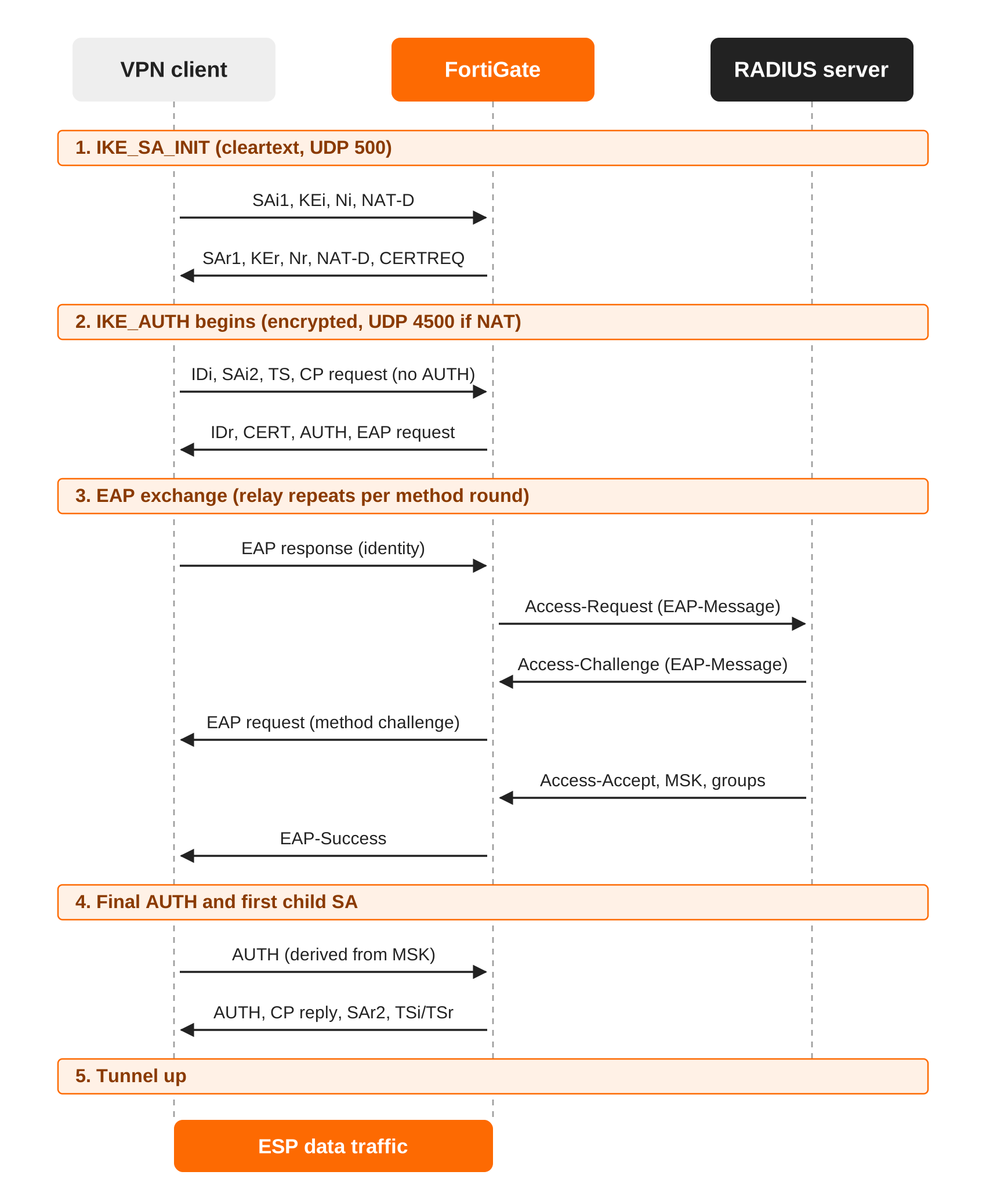
Keep this diagram handy. The rest of the post is each band of it, explained.
Step-by-Step: The Exchange
Step 1: IKE_SA_INIT (two messages, cleartext, UDP 500)
Goal: Agree on IKE crypto, exchange Diffie-Hellman values, and detect NAT. Nobody is authenticated yet.
Client to FortiGate: SAi1 (IKE proposals), KEi (DH public value), Ni (nonce), NAT_DETECTION_SOURCE_IP and NAT_DETECTION_DESTINATION_IP notifies, and a fragmentation-supported notify.
FortiGate to client: SAr1 (the chosen proposal), KEr, Nr, its own NAT detection hashes, and optionally a CERTREQ.
What the FortiGate is doing in the background:
- Gateway selection. There is no peer identity yet, so the FortiGate picks a candidate phase1 by incoming interface, local gateway IP, and proposal match. With several dial-up phase1s on one interface it can land on the wrong one here, then re-evaluate when the ID arrives in
IKE_AUTH. That is wherepeerid,network-id, and certificate matching come into play. - Retries. If the client guessed a DH group the FortiGate does not accept, it gets
INVALID_KE_PAYLOADand tries again with the right group. Under load the FortiGate can demand aCOOKIEbefore doing any DH math. - NAT detection. Each side hashes the addresses and ports it sees and compares them with the hashes from the peer. On a mismatch, both float to UDP 4500 for everything that follows.
- Key derivation. Both sides compute
SKEYSEEDfrom the DH shared secret and the nonces, then deriveSK_d(seed for child SA keys),SK_aiandSK_ar(integrity),SK_eiandSK_er(encryption), andSK_piandSK_pr(used inside the AUTH payloads).
Note: At the end of step 1 the channel is encrypted, but neither side has proven who it is. Everything from here on rides inside the encrypted SK{} payload.
Step 2: First IKE_AUTH request (the missing AUTH payload)
Goal: The client states who it is and what it wants, and signals that it will authenticate with EAP.
The client sends IDi, SAi2 (ESP proposals), TSi and TSr (traffic selectors), and CP(CFG_REQUEST) asking for an inner IP address, DNS, and related attributes.
The important part is what is not there. The client leaves out the AUTH payload on purpose. In IKEv2 that omission is the signal for EAP: “I am not proving my identity with a key or certificate here, start an EAP conversation.”
Step 3: FortiGate authenticates itself and starts EAP
Goal: The gateway proves its identity before the user sends any credentials.
The FortiGate replies with IDr, its own AUTH payload, and the first EAP request.
- Gateway authentication. With
set authmethod signaturethe FortiGate sendsCERTplus anAUTHsigned with its private key, and the client validates the chain and the name. This is what the RFC intends and what native OS clients require. FortiOS also allows a pre-shared key combined with EAP, which is the common FortiClient deployment. In that caseAUTHis derived from the PSK. - EAP identity. With
set eap-identity send-requestthe FortiGate sends an EAP-Request/Identity and the client answers with the username. Withuse-id-payloadit skips that round and takes the identity fromIDi.
Step 4: The EAP conversation (multiple IKE_AUTH round trips)
Goal: Authenticate the user against the real user database.
Every EAP message travels in its own IKE_AUTH request and response pair. What the FortiGate does with it depends on where the user lives:
| User source | FortiGate behavior | Notes |
|---|---|---|
| RADIUS | Pass-through authenticator. Wraps each EAP packet in an Access-Request (EAP-Message plus Message-Authenticator) and relays each Access-Challenge back to the client. |
The EAP method (EAP-MSCHAPv2, EAP-TLS, PEAP) is negotiated between the client and the RADIUS server. The FortiGate only relays. |
| Local users | Terminates EAP-MSCHAPv2 itself. | No third party involved. Good for labs. |
| LDAP | Cannot complete classic EAP-MSCHAPv2, because the FortiGate never sees a cleartext password to bind with. | Newer FortiOS and FortiClient builds address this with EAP-TTLS. Check the release notes for your versions. |
Inside FortiOS, the IKE daemon hands the EAP payloads to eap_proxy and fnbamd, which own the RADIUS conversation. That is why three separate debugs are useful later.
On success, the RADIUS Access-Accept carries two things that matter:
- The MSK (in the
MS-MPPE-Send-KeyandMS-MPPE-Recv-Keyattributes). This is keying material generated by the EAP method itself. - Authorization attributes such as
Fortinet-Group-Name,Framed-IP-Address, orClass.
The FortiGate then sends EAP-Success to the client and matches the user against the groups allowed on this tunnel.
Step 5: Final AUTH exchange and the first child SA
Goal: Bind the EAP result to this exact IKE SA, then build the data tunnel.
EAP success alone is not enough. Both sides must prove they took part in the same IKE_SA_INIT and the same EAP session. This is what defeats a man in the middle who relays EAP from somewhere else.
- Client sends
AUTH, computed over its signed octets with the MSK as the shared secret. - FortiGate verifies it, then sends its own MSK-based
AUTHtogether withCP(CFG_REPLY),SAr2, and the narrowedTSiandTSr.
| Payload | What it carries |
|---|---|
CP(CFG_REPLY) |
Assigned inner IP (from the mode-config pool or Framed-IP-Address), DNS servers, and other mode-config settings. |
SAr2 |
The chosen ESP proposal for the first child SA. |
TSi / TSr |
Narrowed traffic selectors. This is how split tunneling is enforced in IKEv2: TSr is narrowed to the networks in ipv4-split-include. |
The first child SA now exists. Its keys come from SK_d and the original nonces, so there is no separate Diffie-Hellman exchange (no PFS) until the first rekey.
Step 6: What the FortiGate does locally once the tunnel is up
- Creates a dynamic tunnel instance named after the phase1 (
RA-IKEv2_0,RA-IKEv2_1, and so on). - Installs a host route for the client’s assigned IP pointing at that instance.
- Pushes the IPsec SAs to the kernel, and to the NPU when offload applies.
- Adds the user and group to the firewall authentication table so policies with groups in the source can match.
- Starts DPD and, if NAT was detected, NAT keepalives.
- Handles later rekeys with
CREATE_CHILD_SAexchanges. Whether the user has to run EAP again when the IKE SA expires depends on the reauthentication settings.
Reference Configuration
Goal: A minimal dial-up IKEv2 tunnel with EAP against RADIUS, certificate authentication for the gateway, and split tunneling. Replace anything in angle brackets.
RADIUS server and user group
config user radius
    edit "RAD-01"
        set server "10.0.10.20"
        set secret <radius-shared-secret>
    next
end
config user group
    edit "VPN-Users"
        set member "RAD-01"
        config match
            edit 1
                set server-name "RAD-01"
                set group-name "VPN-Users"
            next
        end
    next
end
Phase 1
config vpn ipsec phase1-interface
    edit "RA-IKEv2"
        set type dynamic
        set interface "wan1"
        set ike-version 2
        set authmethod signature
        set certificate "<vpn-server-cert>"
        set peertype any
        set net-device disable
        set mode-cfg enable
        set proposal aes256-sha256
        set dhgrp 19 14
        set eap enable
        set eap-identity send-request
        set authusrgrp "VPN-Users"
        set ipv4-start-ip 10.0.200.10
        set ipv4-end-ip 10.0.200.250
        set ipv4-netmask 255.255.255.0
        set dns-mode manual
        set ipv4-dns-server1 10.0.10.10
        set ipv4-split-include "RA-Split-Networks"
        set dpd on-idle
    next
end
Note: For the FortiClient PSK variant, swap the authmethod and certificate lines for set authmethod psk and set psksecret <pre-shared-key>. Option names and defaults shift between FortiOS releases, so confirm with set ? on your build.
Phase 2 and policy
config vpn ipsec phase2-interface
    edit "RA-IKEv2-P2"
        set phase1name "RA-IKEv2"
        set proposal aes256-sha256
        set dhgrp 19 14
    next
end
config firewall policy
    edit 0
        set name "RA-IKEv2-to-LAN"
        set srcintf "RA-IKEv2"
        set dstintf "internal"
        set srcaddr "all"
        set dstaddr "RA-Split-Networks"
        set action accept
        set schedule "always"
        set service "ALL"
        set logtraffic all
    next
end
GUI verification: VPN > IPsec Tunnels shows RA-IKEv2 as a dial-up tunnel. After a client connects, Dashboard > Network > IPsec lists the user, the assigned IP, and the tunnel instance.
Note: Pick one place for group enforcement. Either set authusrgrp on the phase1 (shown here) or leave it unset and put the groups in the firewall policy source. Doing both is a classic cause of tunnels that authenticate and then pass no traffic.
Verification and Validation
Test RADIUS before you touch the VPN
diagnose test authserver radius RAD-01 mschap2 <username> <password>
A success here, with the expected group returned, removes the RADIUS server from the list of suspects before the first IKE packet is sent.
Watch the exchange live
diagnose vpn ike log filter rem-addr4 198.18.50.25
diagnose debug application ike -1
diagnose debug application eap_proxy -1
diagnose debug application fnbamd -1
diagnose debug console timestamp enable
diagnose debug enable
On older builds the filter command is diagnose vpn ike log-filter dst-addr4 198.18.50.25. Stop everything with diagnose debug disable and diagnose debug reset.
| Debug | What it shows | Maps to |
|---|---|---|
ike |
SA_INIT, each IKE_AUTH round, gateway matching, mode-config, child SA | Steps 1, 2, 3, 5 |
eap_proxy |
EAP packets being relayed between IKE and the auth daemon | Step 4 |
fnbamd |
RADIUS requests and replies, returned attributes, group matching | Step 4 |
What success looks like
Representative ike debug lines for a good connection, trimmed. Exact wording varies by build, but the order does not:
ike 0: comes 198.18.50.25:500->198.18.1.1:500,ifindex=5...
ike 0:RA-IKEv2:41: responder received SA_INIT msg
ike 0:RA-IKEv2:41: matched proposal id 1
ike 0:RA-IKEv2:41: responder received AUTH msg
ike 0:RA-IKEv2:41: responder preparing EAP identity request
ike 0:RA-IKEv2:41: responder received EAP msg
ike 0:RA-IKEv2:41: send EAP message to FNBAM
ike 0:RA-IKEv2:41: EAP 8842 result FNBAM_CHALLENGED
ike 0:RA-IKEv2:41: EAP 8842 result FNBAM_SUCCESS
ike 0:RA-IKEv2:41: EAP succeeded for user "jsmith" group "VPN-Users"
ike 0:RA-IKEv2:41: auth verify done
ike 0:RA-IKEv2:41: mode-cfg assigned (1) IPv4 address 10.0.200.10
ike 0:RA-IKEv2_0:41: established IKE SA
ike 0:RA-IKEv2_0:41:RA-IKEv2-P2:77: added IPsec SA: SPIs=...
Confirm the end state
diagnose vpn ike gateway list name RA-IKEv2_0
diagnose vpn tunnel list name RA-IKEv2_0
diagnose firewall auth list
get router info routing-table all | grep RA-IKEv2
- The gateway list shows the IKE SA as established, with the EAP user and the assigned address.
- The tunnel list shows the child SA with selectors matching your split-include networks and non-zero packet counters once traffic flows.
- The auth list shows the user with the expected group.
- The routing table shows a host route for
10.0.200.10through the tunnel.
Troubleshooting and Gotchas
1. It dies in IKE_SA_INIT
Symptom: no proposal chosen, or the client retries forever and the ike debug shows nothing past SA_INIT.
- Proposal or DH group mismatch. Native clients are opinionated: Windows and macOS each have a short default list. Compare the client’s offered proposals in the debug with your
proposalanddhgrplines. - Wrong phase1 selected. With several dial-up phase1s on one interface, the first match by proposal wins at this stage. Give each one a distinct
network-idor proposal set, or usepeeridso the FortiGate can re-match on the ID in step 2. - No debug output at all means the packet is not arriving. Check with
diagnose sniffer packet wan1 "host 198.18.50.25 and udp port 500" 4.
2. SA_INIT is fine, IKE_AUTH never completes
Symptom: The client times out right after the first exchange.
- IKE fragmentation. The IKE_AUTH reply with a full certificate chain is large. If UDP fragments are dropped in the path, the client never sees it. Keep
set fragmentation enableon the phase1 and trim the chain where you can. - The client rejects the gateway certificate. Native clients need the server name in the SAN, the correct EKU, and a chain to a trusted root. The FortiGate debug looks healthy up to the point where the client goes silent.
3. EAP fails or stalls
Symptom: ike shows send EAP message to FNBAM, then a timeout or a failure result.
diagnose debug application fnbamd -1
diagnose sniffer packet any "host 10.0.10.20 and udp port 1812" 4
- No reply from RADIUS: wrong source IP on the FortiGate (set
source-ipunder the RADIUS server), shared secret mismatch, or the FortiGate is not registered as a RADIUS client. - Access-Reject: the server policy does not allow the EAP method the client is offering. On NPS, the network policy must list the method explicitly.
- Slow MFA push: the default
remoteauthtimeoutis too short for a human to approve a push. Raise it underconfig system global. - LDAP user source with EAP-MSCHAPv2: this cannot work, as explained in step 4. Put RADIUS in front of the directory.
4. EAP succeeds, then the tunnel is torn down or passes nothing
Symptom: FNBAM_SUCCESS in the debug, followed by a group failure, or a connected client with no traffic.
- Group mismatch. The value in
Fortinet-Group-Name(or whichever attribute you match on) has to equal thegroup-namein the user group match rule, character for character. - Group enforced in two places. See the note in the configuration section.
- Traffic selectors. If
diagnose vpn tunnel listshows selectors that do not cover your destination, the split-include address group is wrong or missing. - No policy from the tunnel interface, or the return route for the pool range is missing on an internal router.
Quick Reference
| Phase | Messages | If it fails here, look at |
|---|---|---|
| 1. IKE_SA_INIT | 2, cleartext | Proposals, DH groups, reachability, phase1 selection |
| 2. IKE_AUTH begins | 1 request, no AUTH | Peer ID matching, fragmentation |
| 3. Gateway auth | 1 reply with AUTH and EAP request | Server certificate, PSK, client trust store |
| 4. EAP relay | 2 or more round trips | RADIUS reachability, EAP method, timeouts |
| 5. Final AUTH | 2, MSK-based | Group match, mode-config pool, traffic selectors |
Recent posts
-

-

DNS is one of those technologies that quietly underpins... Full Story
-

BGP issues on FortiGate firewalls usually trace back to... Full Story
-

Every time your laptop talks to your router, a... Full Story
-

If you've spent any time configuring NAT on a... Full Story
-

If you have spent any time configuring firewall policies... Full Story
-

High availability on FortiGate is one of those features... Full Story
-

If you've configured SD-WAN on a FortiGate, you've almost... Full Story
-

FortiLink is the management protocol that turns a FortiSwitch... Full Story
-

FortiSwitches are pretty rock solid from Mean Time Between... Full Story
-

This is a quicky tip. Have you ever gone... Full Story
-

DNS is one of those quiet pieces of internet... Full Story
-

This article is an updated version of the previous... Full Story
-

You will add ns2 as a secondary (slave) BIND9... Full Story
-

In the process of deploying my lab, I needed... Full Story
-

RFC 8805, used to be known as Self-Correcting IP... Full Story
-

Years back, I wrote an article about certificate pinning. ... Full Story
-

FortiGates have the ability to send alerts to Microsoft... Full Story
-

In this post, I am going to walk through... Full Story
-

Troubleshooting VoIP on a FortiGate can feel like trying... Full Story
-

Prior to FortiOS 7.0, there were three commands to... Full Story
-

In this post, I am going to go over... Full Story
-

What we are going to do: We are going... Full Story
-

Choosing between FGCP (FortiGate Clustering Protocol) and FGSP (FortiGate... Full Story
-

Creating a VLAN on macOS (The "Pro" Move) A... Full Story
-

This blog post explores the logic behind how macOS... Full Story
-

Pretty Fly for a Wi-Fi Tell My Wi-Fi Love... Full Story
-

Part of my daily gig is creating BoMs (Bill-of-Materials)... Full Story
-

ICMP introduces several security risks, but careful filtering, rate... Full Story
-

The command diag debug application dhcps -1 enables full... Full Story
-

In the world of FortiOS, execute tac report is... Full Story
-

LLDP; What is it The Link Layer Discovery Protocol... Full Story
-

What it actually does When you run diagnose fdsm... Full Story
-

Monkey Bites are bite-sized, high-impact security insights designed for... Full Story
-

I have run macOS in macOS with Parallels but... Full Story
-

Don't be confused with my other FortiNAC posts where... Full Story
-

This is the third session in a multi-part article... Full Story
-

Today I was configuring key-based authentication on a FortiGate... Full Story
-

Netcat, often called the "Swiss Army knife" of networking,... Full Story
-

At its core, IEEE 802.1X is a network layer... Full Story
-

In case you did not see the previous FortiNAC... Full Story
-

This is our 5th session where we are going... Full Story
-

Now that we have Wireshark installed and somewhat configured,... Full Story
-

The Philosophy of Packet Analysis Troubleshooting isn't about looking... Full Story
-

Executive Summary Objective: Give you a working command of... Full Story
-

You have configured it a dozen times. Server IP,... Full Story
-

Executive Summary Objective: Walk through every message a FortiGate... Full Story