
If you've spent any time configuring user authentication on... Full Story
By Manny Fernandez
October 7, 2026
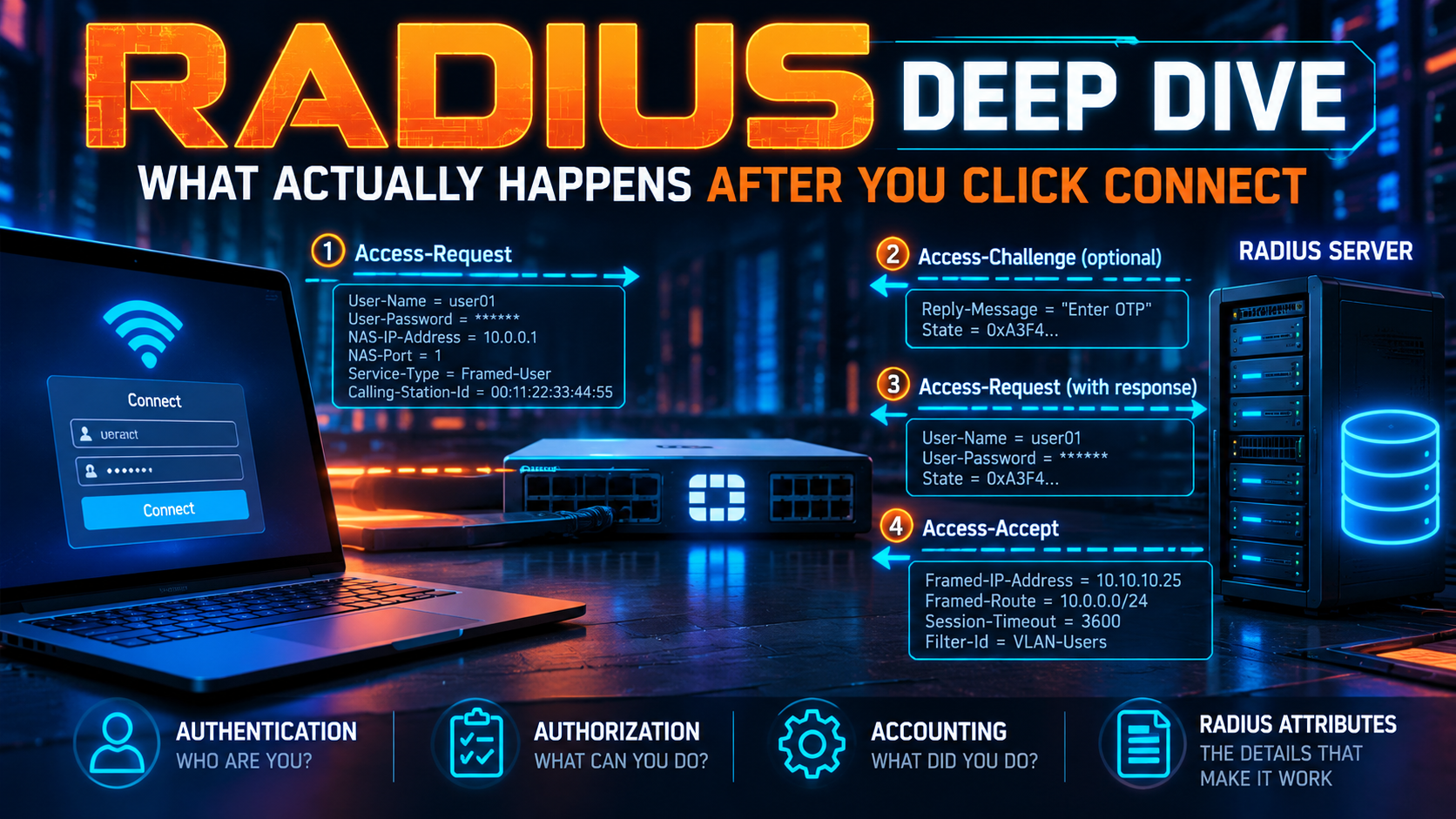
RADIUS Deep Dive: What Actually Happens After You Click Connect
You have configured it a dozen times. Server IP, shared secret, Test Connectivity, green check, move on. RADIUS is the protocol behind most VPN logins, every 802.1X port, and nearly every enterprise Wi-Fi association, and most of us treat it as a box that says yes or no.
This post opens the box. We will walk through what is actually in the packets, how the shared secret is used (it never crosses the wire), where your group membership comes from, why MFA pushes time out, and what the 2024 Blast-RADIUS vulnerability changed. By the end you should be able to read a RADIUS capture and know which side is at fault.
Audience: Network engineers who have pointed a firewall or VPN gateway at a RADIUS server and made it work, but have not had a reason to look underneath. Examples use a FortiGate as the RADIUS client. The protocol behavior is the same on any vendor.
The 60-Second Version
RADIUS (Remote Authentication Dial-In User Service) is a client/server AAA protocol. Authentication and authorization are defined in RFC 2865, accounting in RFC 2866. It runs over UDP: port 1812 for authentication and 1813 for accounting. Older gear used 1645 and 1646, and you will still find those defaults in the wild.
Three facts that surprise people the first time they look closely:
- The RADIUS client is not the user. It is the network device the user connects to: your FortiGate, switch, or wireless controller. The user’s laptop never sends a RADIUS packet.
- Authentication and authorization arrive together. There is no separate authorization exchange. The Access-Accept carries the attributes (group, VLAN, timeout, IP) that decide what the user gets.
- Almost nothing is encrypted. Usernames, NAS details, and reply attributes travel in cleartext. Only the password field is hidden, and only with an MD5-based keystream.
The Cast
| Role | Typical device | What it does |
|---|---|---|
| User / supplicant | FortiClient, native OS VPN client, Wi-Fi supplicant | Presents credentials to the NAS over the access protocol (IKEv2, SSL VPN, 802.1X). Never speaks RADIUS. |
| NAS (the RADIUS client) | FortiGate, switch, AP or wireless controller | Translates the login into an Access-Request, enforces whatever the server sends back, and reports session accounting. |
| RADIUS server | FortiAuthenticator, Microsoft NPS, FreeRADIUS, Cisco ISE, ClearPass | Validates the request, checks policy, and returns Accept, Reject, or Challenge with attributes. |
| Identity store | Active Directory / LDAP, local database, cloud IdP | Holds the actual credentials and group memberships. The RADIUS server queries it. |
| Proxy (optional) | MFA authentication proxy, roaming federation server | Receives a request and forwards it to another RADIUS server, usually based on the realm in the username. It is a server to the NAS and a client to the next hop. |
NAS stands for Network Access Server, a name left over from the dial-up era when the device was a modem bank. The term stuck, and it shows up in attribute names like NAS-IP-Address and NAS-Identifier.
Packet Anatomy
Every RADIUS packet has the same 20-byte header followed by a list of attributes:
 0                   1                   2                   3
 0 1 2 3 4 5 6 7 8 9 0 1 2 3 4 5 6 7 8 9 0 1 2 3 4 5 6 7 8 9 0 1
+-+-+-+-+-+-+-+-+-+-+-+-+-+-+-+-+-+-+-+-+-+-+-+-+-+-+-+-+-+-+-+-+
|     Code      |  Identifier   |            Length             |
+-+-+-+-+-+-+-+-+-+-+-+-+-+-+-+-+-+-+-+-+-+-+-+-+-+-+-+-+-+-+-+-+
|                                                               |
|                   Authenticator (16 bytes)                    |
|                                                               |
|                                                               |
+-+-+-+-+-+-+-+-+-+-+-+-+-+-+-+-+-+-+-+-+-+-+-+-+-+-+-+-+-+-+-+-+
|  Attributes (Type / Length / Value) ...
+-+-+-+-+-+-+-+-+-+-+-+-+-
| Field | Size | Purpose |
|---|---|---|
| Code | 1 byte | The packet type: Access-Request, Access-Accept, and so on. |
| Identifier | 1 byte | Matches a reply to its request. With only 256 values, a busy NAS uses multiple UDP source ports to keep more than 256 requests in flight to one server. |
| Length | 2 bytes | Total packet length. Minimum 20, maximum 4096 bytes. |
| Authenticator | 16 bytes | A random nonce in an Access-Request. A keyed MD5 hash in replies. This is how the NAS knows a reply came from a server that holds the shared secret. |
| Attributes | Variable | Type-Length-Value entries that carry everything else. |
Packet codes you will actually see
| Code | Name | Direction | Meaning |
|---|---|---|---|
| 1 | Access-Request | NAS to server | Here is a login attempt. |
| 2 | Access-Accept | Server to NAS | Allowed. Authorization attributes attached. |
| 3 | Access-Reject | Server to NAS | Denied. Optionally includes a Reply-Message. |
| 11 | Access-Challenge | Server to NAS | Need more: an OTP, or the next EAP message. |
| 4 | Accounting-Request | NAS to server | Session started, updated, or stopped. |
| 5 | Accounting-Response | Server to NAS | Accounting record received. |
| 12 | Status-Server | NAS to server | Keepalive probe (RFC 5997). |
| 40 / 41 / 42 | Disconnect-Request / ACK / NAK | Server to NAS and back | Terminate a live session (RFC 5176). |
| 43 / 44 / 45 | CoA-Request / ACK / NAK | Server to NAS and back | Change authorization on a live session (RFC 5176). |
The Shared Secret and the Authenticator
The shared secret is the only trust anchor in classic RADIUS. It is configured on both the NAS and the server, it is never transmitted, and it is used in three places.
1. Proving the reply is genuine
The NAS puts 16 random bytes in the Authenticator field of each Access-Request. This is the Request Authenticator. The server computes the Response Authenticator for its reply like this:
ResponseAuth = MD5( Code + Identifier + Length + RequestAuth
                    + Attributes + SharedSecret )
The NAS runs the same calculation when the reply arrives. If the result does not match, the reply is discarded. Only a party holding the secret could have produced that hash for that specific request.
2. Hiding the password (PAP)
With PAP, the User-Password attribute is not hashed. It is XORed with an MD5 keystream derived from the secret and the Request Authenticator, which makes it reversible by the server:
b1 = MD5( SharedSecret + RequestAuth )      c1 = p1 XOR b1
b2 = MD5( SharedSecret + c1 )               c2 = p2 XOR b2
...
User-Password = c1 + c2 + ...   (password padded to 16-byte blocks)
The server reverses the process and ends up holding the cleartext password. That is the reason PAP works with any backend: the server can bind to LDAP with it, compare it to any hash format, or hand it to an MFA service.
3. Signing the whole packet
The optional Message-Authenticator attribute (type 80) is an HMAC-MD5 over the entire packet, keyed with the shared secret. It was originally required only for EAP. Since 2024 it is effectively mandatory everywhere. More on that in the security section.
What a wrong secret looks like: RADIUS has no “bad secret” error code. Depending on the server and whether Message-Authenticator is present, a mismatch shows up as a silent drop (the NAS sees a timeout), as a reply the NAS throws away because the Response Authenticator fails to validate, or as an Access-Reject because the password decrypted to garbage. If the symptom makes no sense, re-enter the secret on both sides before you do anything else.
Attributes: Where Everything Lives
Attributes are simple TLVs: one byte of type, one byte of length, then the value. Because length is a single byte, one attribute holds at most 253 bytes of value. Larger payloads, such as EAP messages, are split across several attributes of the same type.
| Type | Attribute | Seen in | Why you care |
|---|---|---|---|
| 1 | User-Name | Request | The identity. May include a realm such as user@corp.example. |
| 2 | User-Password | Request | PAP password, hidden with the MD5 keystream. |
| 4 | NAS-IP-Address | Request | Which device is asking. Server policies commonly match on it. |
| 32 | NAS-Identifier | Request | A text name for the NAS. Same purpose. |
| 31 | Calling-Station-Id | Request | The client: its public IP for VPN, its MAC address for 802.1X and Wi-Fi. |
| 61 | NAS-Port-Type | Request | Virtual (VPN), Ethernet, Wireless-802.11, and so on. |
| 18 | Reply-Message | Challenge, Reject | Text shown to the user, such as a token prompt. |
| 24 | State | Challenge, Request | Opaque session cookie. The NAS must echo it in the next request. |
| 25 | Class | Accept, Accounting | Opaque value from the server. The NAS echoes it in accounting records. |
| 8 | Framed-IP-Address | Accept | Assign this IP to the user. |
| 27 | Session-Timeout | Accept | Maximum session length in seconds. |
| 64 / 65 / 81 | Tunnel-Type / Tunnel-Medium-Type / Tunnel-Private-Group-ID | Accept | Dynamic VLAN assignment on switches and wireless. |
| 26 | Vendor-Specific | Any | A container for vendor attributes. See below. |
| 79 | EAP-Message | Request, Challenge, Accept | A fragment of an encapsulated EAP packet. |
| 80 | Message-Authenticator | Any | HMAC-MD5 signature over the whole packet. |
Vendor-Specific Attributes (VSAs)
The standard attribute space is one byte, so vendors get a single type (26) and nest their own attributes inside it, keyed by their IANA enterprise number:
Type 26 | Length | Vendor-ID (4 bytes) | Vendor-Type | Vendor-Length | Value
Fortinet’s enterprise number is 12356. Cisco is 9 and Microsoft is 311. The Fortinet VSAs you will use most:
| Vendor-Type | Name | Use |
|---|---|---|
| 1 | Fortinet-Group-Name | Matched against the group name in a FortiGate user group. |
| 3 | Fortinet-Vdom-Name | Scopes a remote administrator to a VDOM. |
| 6 | Fortinet-Access-Profile | Assigns an admin profile to a remote administrator. |
This is the answer to a question almost everyone asks eventually: “How does the firewall know which group the user is in?” It does not look anything up. The RADIUS server decides, and says so with an attribute in the Access-Accept. A FreeRADIUS users entry that does this looks like:
manny   Cleartext-Password := "<lab-password>"
        Fortinet-Group-Name = "VPN-Users",
        Session-Timeout = 28800
If the attribute is missing, misspelled, or differs in case from what the NAS expects, authentication succeeds and the user still gets nothing. Keep that failure mode in mind.
Walkthrough: A VPN Login With a Token
Here is the full exchange for a remote access VPN user with a one-time password, from connect to accounting:
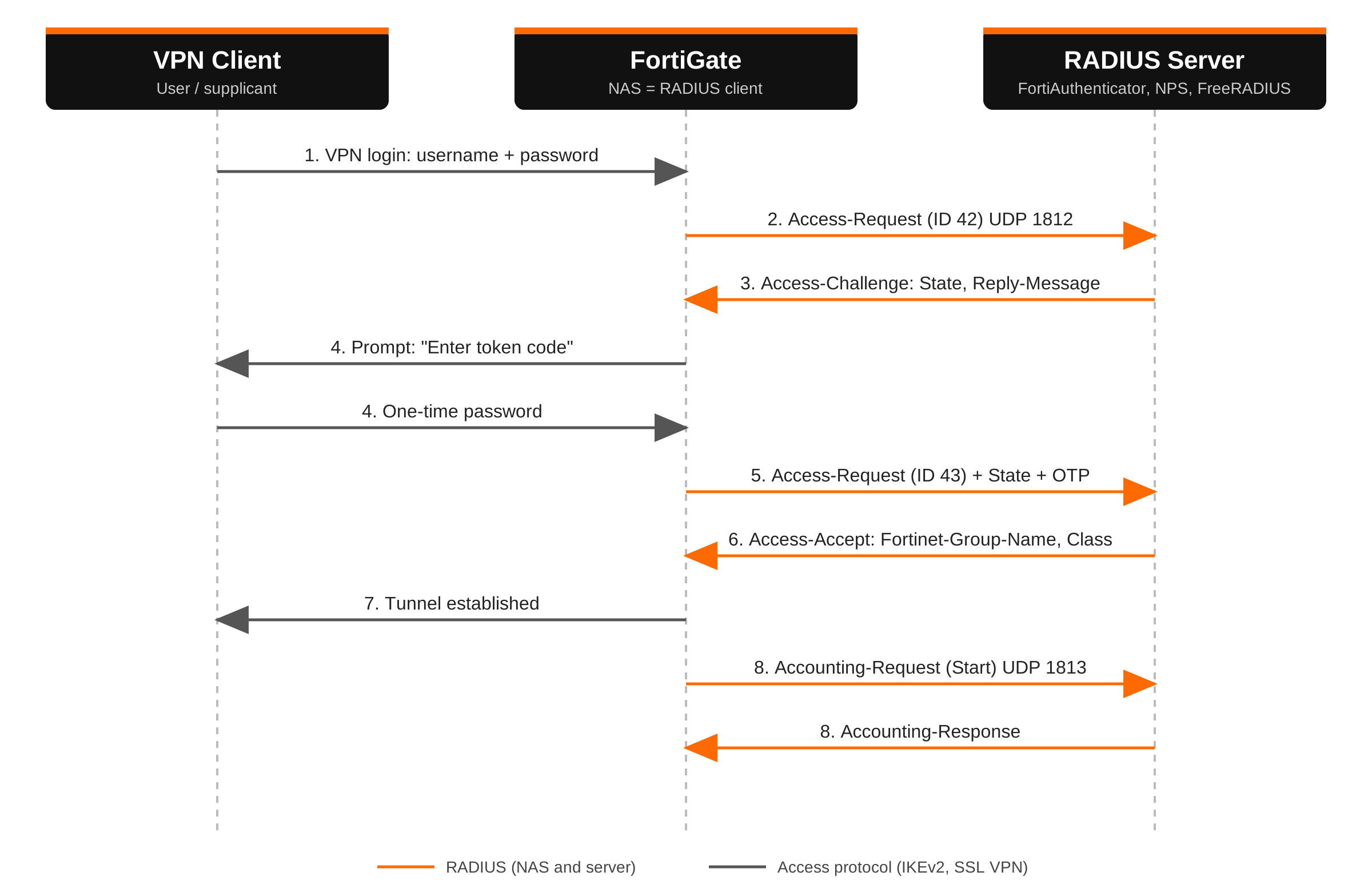
- The user enters a username and password in the VPN client. The client sends them to the FortiGate inside the VPN protocol. No RADIUS yet.
- The FortiGate builds an Access-Request: User-Name, the hidden User-Password, NAS-IP-Address, Calling-Station-Id, a fresh Identifier, and a random Request Authenticator. It goes to UDP 1812.
- The server validates the password against its identity store. The user needs a second factor, so it replies with an Access-Challenge containing a State value and a Reply-Message such as “Enter token code”.
- The FortiGate relays the prompt to the client. The user types the OTP.
- The FortiGate sends a second Access-Request with a new Identifier, the OTP in the User-Password field, and the State value echoed back so the server can tie it to step 3.
- The server validates the OTP and returns an Access-Accept with authorization attributes: Fortinet-Group-Name, Session-Timeout, Class, perhaps Framed-IP-Address.
- The FortiGate verifies the Response Authenticator, matches the group, and brings the tunnel up.
- The FortiGate sends an Accounting-Request (Start) to UDP 1813. The server acknowledges with an Accounting-Response. Interim updates and a Stop record follow over the life of the session.
Without MFA, steps 3 through 5 disappear and the first Access-Request is answered directly with an Accept or Reject. That is the entire protocol for a simple PAP login: two packets.
Authentication Methods: PAP, CHAP, MS-CHAPv2, and EAP
The “authentication type” dropdown on your NAS decides how the credential is packaged inside the Access-Request. It matters more than it looks, because each method constrains what the server must have stored.
| Method | What goes in the packet | What the server must have | Notes |
|---|---|---|---|
| PAP | User-Password, reversibly hidden with the shared secret | Anything. The server recovers the cleartext and can verify it against any backend. | Most compatible. Usually required by MFA proxies and LDAP-backed servers. Security depends entirely on the shared secret and the path. |
| CHAP | CHAP-Password: MD5 of an ID, the password, and a challenge | The cleartext password, or a reversibly stored one. | Rare today. Does not work against Active Directory in its default configuration. |
| MS-CHAPv2 | Microsoft VSAs (vendor 311) carrying the challenge and response | The NT hash of the password. | Works with AD through NPS or a domain-joined server. Cryptographically weak when not tunneled. |
| EAP | EAP-Message attributes plus Message-Authenticator | Depends on the inner method: a certificate for EAP-TLS, a password for PEAP-MSCHAPv2. | Used by 802.1X, WPA2/WPA3-Enterprise, and IKEv2 EAP. Multiple round trips. |
How EAP changes the picture
With EAP (RFC 3579), the NAS stops being a participant and becomes a relay. The supplicant and the RADIUS server hold an EAP conversation with each other. The NAS wraps each EAP packet from the client into EAP-Message attributes inside an Access-Request, and unwraps each Access-Challenge from the server back to the client. A PEAP or EAP-TLS login is typically 8 to 12 round trips, with the State attribute holding them together.
With tunneled methods, the NAS cannot see the credentials at all. The TLS tunnel terminates on the RADIUS server. When authentication finishes, the server sends the session keying material to the NAS in the Access-Accept (the MS-MPPE-Send-Key and MS-MPPE-Recv-Key VSAs), and that is what Wi-Fi encryption keys are derived from.
Gotcha: EAP-TLS and fragmentation: Certificate chains make EAP-TLS packets large. A RADIUS packet carrying a full certificate can exceed the path MTU and get IP-fragmented. If any firewall between the NAS and the server drops UDP fragments, the login stalls partway through the handshake and the NAS reports a timeout. PAP tests will pass, which makes it confusing. Look for fragments in the capture.
Access-Challenge and MFA
There are three common ways a second factor rides on RADIUS, and they behave differently on the wire:
| Pattern | On the wire | Operational impact |
|---|---|---|
| Challenge-response | Access-Challenge with State and Reply-Message, then a second Access-Request carrying the OTP | The NAS and the access protocol must both support relaying the prompt. Not every VPN client can. |
| Push approval | A single Access-Request. The server simply does not answer until the user taps Approve. | The NAS timeout must be longer than a human takes to find their phone. |
| OTP concatenation | A single Access-Request with password and OTP joined in the password field | Works with any client. Requires PAP, because the server has to split the string. |
The push pattern is behind the most common RADIUS support ticket: “MFA works but I have to be fast.” The FortiGate default remote authentication timeout is 5 seconds. Raise it globally and on the server object:
config system global
    set remoteauthtimeout 60
end
config user radius
    edit "LAB-RADIUS"
        set timeout 60
    next
end
Accounting
Accounting is a separate exchange on a separate port (1813) and is entirely optional. The NAS sends an Accounting-Request and the server answers with an Accounting-Response. The Acct-Status-Type attribute says what kind of record it is:
| Acct-Status-Type | Sent when | Typical contents |
|---|---|---|
| Start (1) | The session comes up | User-Name, Acct-Session-Id, Framed-IP-Address, Calling-Station-Id, Class |
| Interim-Update (3) | Periodically during the session | Running byte and time counters |
| Stop (2) | The session ends | Acct-Session-Time, Acct-Input-Octets, Acct-Output-Octets, Acct-Terminate-Cause |
| Accounting-On (7) / Off (8) | The NAS boots or shuts down | Tells the server to clear every session it believed that NAS had |
Accounting is how a server knows who is online right now, and it has a second life as a single sign-on feed. A device that receives accounting Start records learns the username to IP mapping without the user authenticating again. FortiGate’s RADIUS Single Sign-On (RSSO) works exactly this way.
One detail worth knowing: in accounting packets the Authenticator is not random. It is an MD5 hash over the packet and the shared secret, so accounting requests are integrity protected by design.
CoA and Disconnect: When the Server Talks First
Everything so far is initiated by the NAS. RFC 5176 adds the reverse direction. The server sends an unsolicited request to the NAS on UDP 3799:
- Disconnect-Request terminates a session. Used when an account is disabled or a posture check fails.
- CoA-Request (Change of Authorization) alters a live session: move the port to another VLAN, apply a different ACL, force a re-authentication.
The session is identified by attributes such as User-Name, Acct-Session-Id, or Calling-Station-Id, and the NAS answers with an ACK or NAK. Two practical consequences: the NAS must be configured to accept these messages from the server, and firewall policy between them must allow the server to initiate traffic to the NAS on 3799. NAC designs that work in the lab and fail in production are often missing that rule.
Reliability: Life on UDP
UDP gives RADIUS no delivery guarantee, so reliability is the client’s job:
- If no reply arrives within the timeout, the NAS retransmits the same packet with the same Identifier and Authenticator. The server recognizes the duplicate and resends its cached answer instead of authenticating twice.
- After the retry limit, the NAS marks the server as unresponsive and fails over to the secondary. Primary and secondary must have identical secrets, client entries, and policy, or you get failures that only appear during an outage.
- A server that does not recognize the source IP of a request does not reply at all. From the NAS, an unknown client looks exactly like a dead server.
The last point explains why the source IP matters so much. If the FortiGate reaches the server through an IPsec tunnel or a different interface than you expected, the request arrives from an address the server has no client entry for. Pin it with set source-ip or the interface selection options on the server object.
Security: Blast-RADIUS and What Changed
RADIUS was designed in the 1990s, and its integrity protection rests on MD5 with a shared secret. In July 2024, researchers disclosed Blast-RADIUS (CVE-2024-3596). An attacker positioned between the NAS and the server could use an MD5 chosen-prefix collision to turn an Access-Reject into a valid Access-Accept, without knowing the shared secret. PAP, CHAP, and MS-CHAP over UDP or TCP were affected. EAP was not, because EAP already required Message-Authenticator.
The fix is to sign every packet. Clients and servers now include Message-Authenticator in all requests and replies, and reject packets that lack it.
What this means on FortiOS
FortiOS 7.2.10, 7.4.5, and 7.6.1 made Message-Authenticator validation mandatory for RADIUS over UDP and TCP. If your RADIUS server has not been updated to send the attribute, authentication breaks right after the firmware upgrade, typically with “Invalid secret for the server” or “No message-authenticator attribute”. The fnbamd debug shows it plainly:
__rad_chk_resp_authenticator-The Message Authenticator validation is mandatory now
__rad_chk_resp_authenticator-No Message Authenticator
The correct fix is on the server side: patch it and enable Message-Authenticator. Microsoft NPS, FreeRADIUS, and the major MFA proxies all shipped updates. If you cannot patch immediately, FortiOS provides a per-server override. Treat it as a temporary exception and track it:
config user radius
    edit "LAB-RADIUS"
        set require-message-authenticator disable
    next
end
Hardening checklist
- Use a unique, long, random shared secret per NAS. The secret is the only thing protecting the password field, and captured exchanges can be attacked offline.
- Require Message-Authenticator on both the NAS and the server.
- Keep RADIUS on a management network. Never send it across an untrusted path without a tunnel.
- Use RADIUS over TLS (RadSec, RFC 6614, TCP 2083) where both ends support it. It wraps the entire conversation in TLS with certificate authentication.
- Prefer EAP-TLS or a tunneled EAP method wherever the access technology allows it.
- Restrict server client entries to specific NAS addresses, never whole subnets.
See It Yourself on a FortiGate
Reading about it only goes so far. The following lab uses a FortiGate at 10.0.1.1 and a RADIUS server at 10.0.10.50. Replace the placeholders with your own values.
Step 1: Define the server and a matching group
config user radius
    edit "LAB-RADIUS"
        set server "10.0.10.50"
        set secret <shared-secret>
        set auth-type auto
        set nas-ip 10.0.1.1
        set source-ip 10.0.1.1
    next
end
config user group
    edit "VPN-Users"
        set member "LAB-RADIUS"
        config match
            edit 1
                set server-name "LAB-RADIUS"
                set group-name "VPN-Users"
            next
        end
    next
end
The config match block is the piece people skip. Without it, every user the server accepts is a member of the group. With it, only users whose Access-Accept carries Fortinet-Group-Name = VPN-Users match.
Step 2: Test from the CLI
diagnose test authserver radius LAB-RADIUS pap <username> <password>
A healthy result reports that authentication succeeded and lists the group memberships returned by the server. Swap pap for chap, mschap, or mschap2 to confirm which methods the server policy actually permits.
Step 3: Watch the exchange
Open a second CLI session and enable the authentication daemon debug before you run the test again:
diagnose debug application fnbamd -1
diagnose debug console timestamp enable
diagnose debug enable
You will see the request being built, the server it is sent to, the code of the reply, and every attribute that came back, including the VSAs. Turn it off when you are done:
diagnose debug disable
diagnose debug reset
Step 4: Confirm on the wire
diagnose sniffer packet any 'host 10.0.10.50 and (port 1812 or port 1813)' 4 0 l
One request out and one reply back is a working exchange. Requests out with nothing coming back means the problem is the path or the server’s client list, not the credentials.
Wireshark tip: Take a capture from the GUI packet capture tool and open it in Wireshark. Under Preferences, Protocols, RADIUS, enter the shared secret. Wireshark will then decrypt the User-Password attribute and validate the authenticators for you, which confirms a secret mismatch in seconds. Do this in a lab, not with production secrets on a shared workstation.
Troubleshooting by Symptom
| Symptom | Likely cause | Where to look |
|---|---|---|
| Timeout, no reply at all | Server has no client entry for the NAS source IP, a firewall is blocking UDP 1812, or the server is discarding the request | Sniffer on the NAS, then the server log. Confirm the source IP the server actually sees. |
| “Invalid secret for the server” | Shared secret mismatch, or the reply lacks Message-Authenticator after a firmware upgrade | Re-enter the secret on both sides. Check fnbamd for the Message Authenticator lines. |
| Access-Reject with correct credentials | Method mismatch (NAS sends PAP, policy allows only MS-CHAPv2), or a policy condition such as NAS-IP or group did not match | The server log. The reject reason is recorded on the server and is never sent in the packet. |
| Access-Accept, but the user is denied or lands in the wrong group | Group attribute missing from the Accept, or the name does not match exactly | fnbamd debug, looking at the returned attributes. Compare against the config match entry. |
| MFA push works only if the user is quick | NAS timeout shorter than the approval time | remoteauthtimeout and the per-server timeout. |
| EAP login stalls partway, PAP test passes | UDP fragments dropped in the path | Capture on both ends and compare. Look for fragments that leave and never arrive. |
| Failures only when the primary is down | Secondary server has a different secret, client list, or policy | Test each server individually. |
Quick Reference
| Port | Protocol | Use |
|---|---|---|
| 1812 | UDP | Authentication and authorization |
| 1813 | UDP | Accounting |
| 1645 / 1646 | UDP | Legacy authentication / accounting |
| 3799 | UDP | CoA and Disconnect (server to NAS) |
| 2083 | TCP | RADIUS over TLS (RadSec) |
| 2083 | UDP | RADIUS over DTLS |
| RFC | Covers |
|---|---|
| 2865 | Core protocol: authentication and authorization |
| 2866 | Accounting |
| 2869 | Extensions, including Message-Authenticator and interim accounting |
| 3579 | EAP over RADIUS |
| 5176 | Dynamic authorization: CoA and Disconnect |
| 5997 | Status-Server |
| 6614 | RADIUS over TLS |
| 7360 | RADIUS over DTLS |
Wrapping Up
RADIUS is a small protocol: a 20-byte header, a list of TLVs, and a shared secret doing all of the trust work. Once you know that the NAS is the client, that authorization rides in the Access-Accept, and that silence usually means the server does not recognize the sender, most problems sort themselves into a short list. Run the fnbamd debug once on a working login so you know what normal looks like. The next time it breaks, the difference will be obvious.
Recent posts
-

-

DNS is one of those technologies that quietly underpins... Full Story
-

BGP issues on FortiGate firewalls usually trace back to... Full Story
-

Every time your laptop talks to your router, a... Full Story
-

If you've spent any time configuring NAT on a... Full Story
-

If you have spent any time configuring firewall policies... Full Story
-

High availability on FortiGate is one of those features... Full Story
-

If you've configured SD-WAN on a FortiGate, you've almost... Full Story
-

FortiLink is the management protocol that turns a FortiSwitch... Full Story
-

FortiSwitches are pretty rock solid from Mean Time Between... Full Story
-

This is a quicky tip. Have you ever gone... Full Story
-

DNS is one of those quiet pieces of internet... Full Story
-

This article is an updated version of the previous... Full Story
-

You will add ns2 as a secondary (slave) BIND9... Full Story
-

In the process of deploying my lab, I needed... Full Story
-

RFC 8805, used to be known as Self-Correcting IP... Full Story
-

Years back, I wrote an article about certificate pinning. ... Full Story
-

FortiGates have the ability to send alerts to Microsoft... Full Story
-

In this post, I am going to walk through... Full Story
-

Troubleshooting VoIP on a FortiGate can feel like trying... Full Story
-

Prior to FortiOS 7.0, there were three commands to... Full Story
-

In this post, I am going to go over... Full Story
-

What we are going to do: We are going... Full Story
-

Choosing between FGCP (FortiGate Clustering Protocol) and FGSP (FortiGate... Full Story
-

Creating a VLAN on macOS (The "Pro" Move) A... Full Story
-

This blog post explores the logic behind how macOS... Full Story
-

Pretty Fly for a Wi-Fi Tell My Wi-Fi Love... Full Story
-

Part of my daily gig is creating BoMs (Bill-of-Materials)... Full Story
-

ICMP introduces several security risks, but careful filtering, rate... Full Story
-

The command diag debug application dhcps -1 enables full... Full Story
-

In the world of FortiOS, execute tac report is... Full Story
-

LLDP; What is it The Link Layer Discovery Protocol... Full Story
-

What it actually does When you run diagnose fdsm... Full Story
-

Monkey Bites are bite-sized, high-impact security insights designed for... Full Story
-

I have run macOS in macOS with Parallels but... Full Story
-

Don't be confused with my other FortiNAC posts where... Full Story
-

This is the third session in a multi-part article... Full Story
-

Today I was configuring key-based authentication on a FortiGate... Full Story
-

Netcat, often called the "Swiss Army knife" of networking,... Full Story
-

At its core, IEEE 802.1X is a network layer... Full Story
-

In case you did not see the previous FortiNAC... Full Story
-

This is our 5th session where we are going... Full Story
-

Now that we have Wireshark installed and somewhat configured,... Full Story
-

The Philosophy of Packet Analysis Troubleshooting isn't about looking... Full Story
-

Executive Summary Objective: Give you a working command of... Full Story
-

You have configured it a dozen times. Server IP,... Full Story
-

Executive Summary Objective: Walk through every message a FortiGate... Full Story