
If you've spent any time configuring user authentication on... Full Story
By Manny Fernandez
October 12, 2026
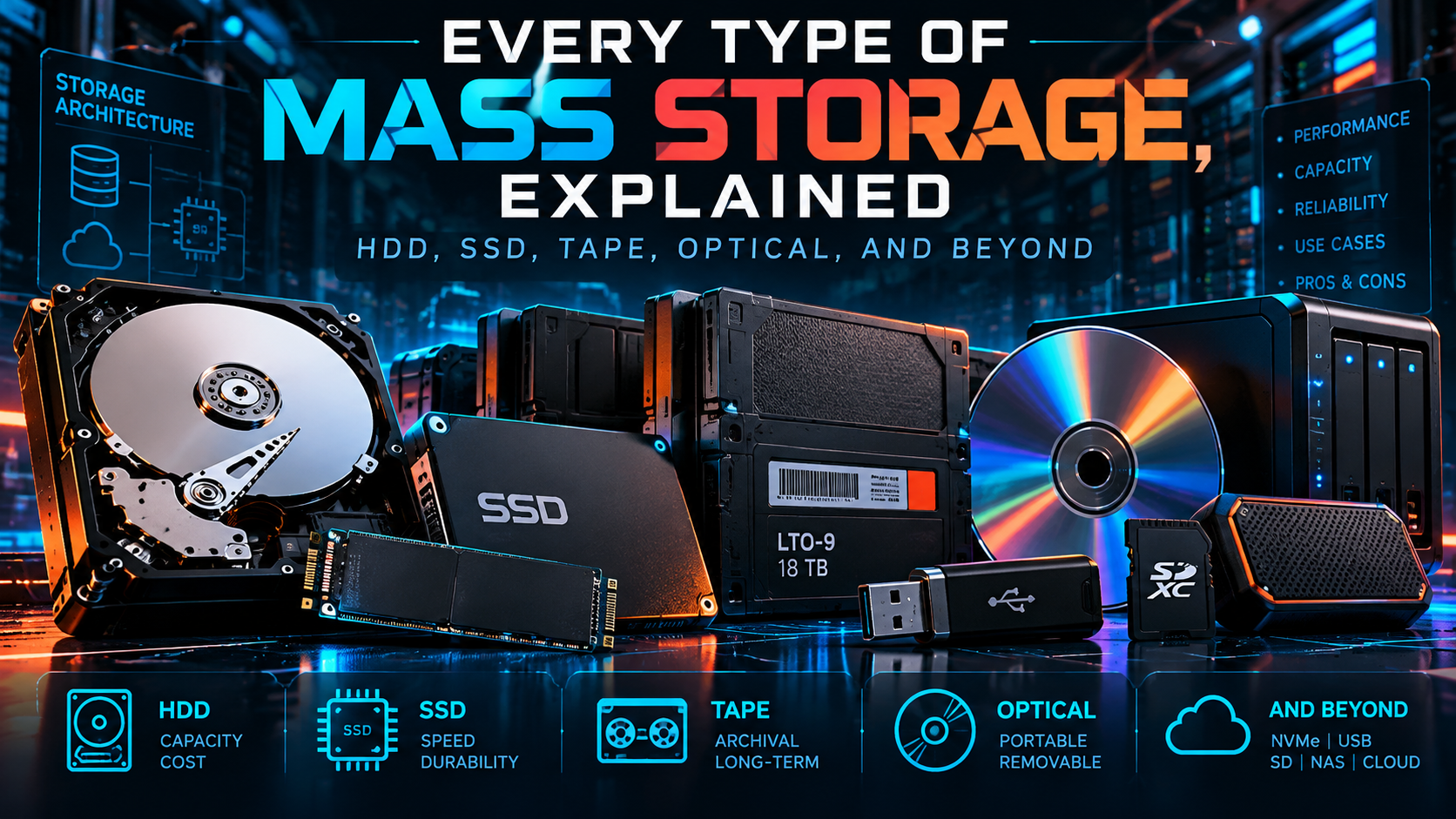
Every Type of Mass Storage, Explained: HDD, SSD, Tape, Optical, and Beyond
Executive Summary
Objective: Give practitioners one reference that covers every major class of mass storage in use today: how each one physically stores bits, which interfaces and form factors carry it, where it fits in a modern architecture, and how to identify, monitor, and sanitize it from the CLI.
Target audience: Network and security engineers, sysadmins, homelabbers, and anyone who has ever had to answer “what kind of drive is actually in that box?” during a hardware refresh, an RMA, or a data disposal audit.
The short version: Mass storage falls into four physical families (magnetic, solid-state, optical, and emerging media like glass and DNA), carried over a handful of interfaces (SATA, SAS, NVMe/PCIe, USB), and deployed in three architectures (DAS, NAS, SAN) plus object and cloud storage on top. Every family trades speed, capacity, cost, and durability differently, and the right answer for any workload is almost always a mix.
The Storage Hierarchy
Before we dig into individual media, it helps to see the whole stack. The closer a tier sits to the CPU, the faster and more expensive per terabyte it is. The farther away, the cheaper, denser, and slower it gets.
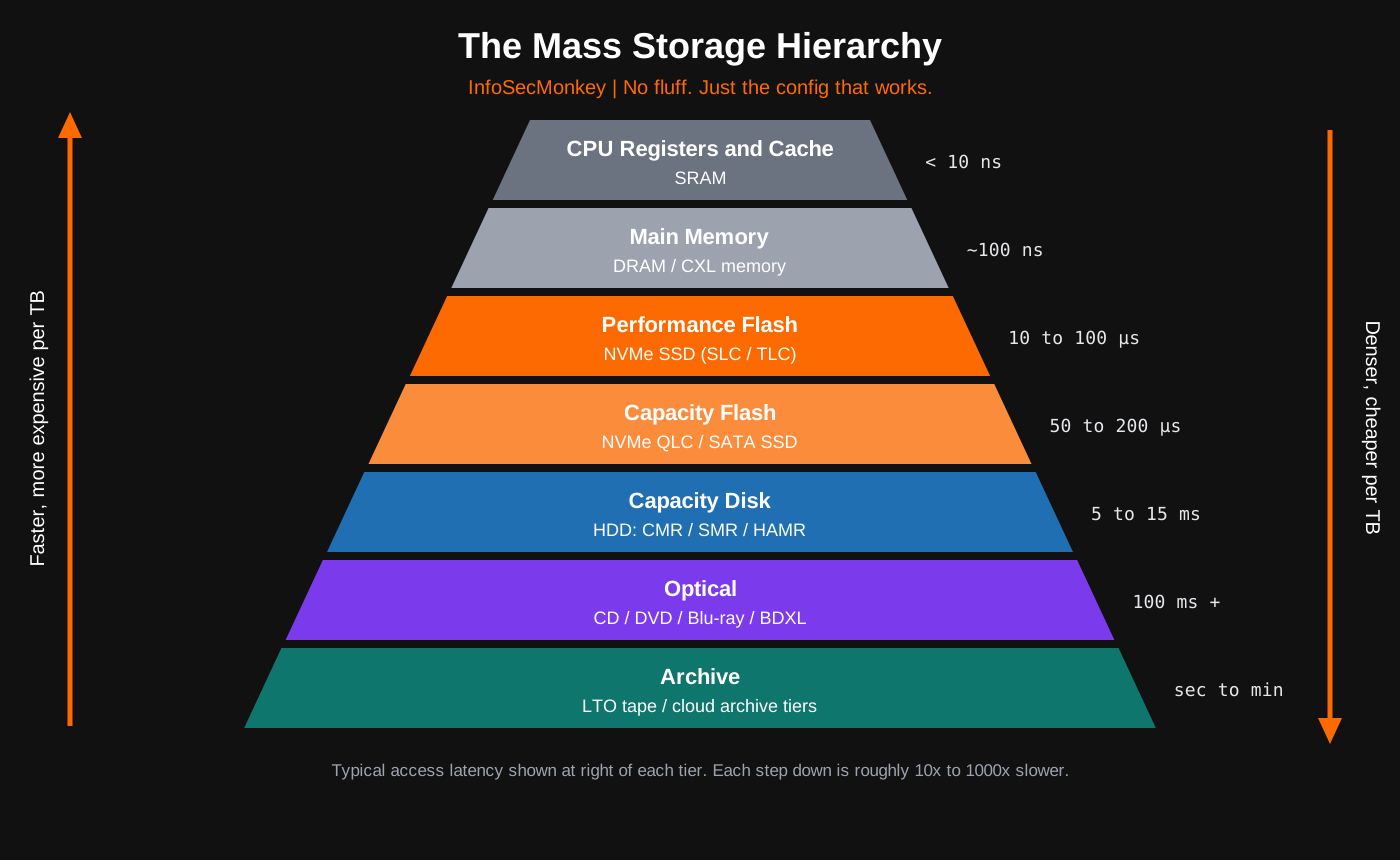
| Tier | Typical Media | Typical Access Latency | Role |
|---|---|---|---|
| Memory | DRAM, CXL-attached memory | ~100 ns | Working set, not persistent |
| Performance | NVMe SSD (TLC/SLC) | ~10 to 100 µs | Databases, VMs, OS boot |
| Capacity flash | NVMe QLC SSD, SATA SSD | ~50 to 200 µs | Read-heavy data, AI data lakes |
| Capacity disk | HDD (CMR, SMR, HAMR) | ~5 to 15 ms | Bulk storage, backups, NAS |
| Archive | LTO tape, optical | Seconds to minutes | Cold archive, air-gapped copies |
Rule of thumb: each step down the pyramid is roughly 10x to 1000x slower, and noticeably cheaper per terabyte. That gap is why tiering exists.
Part 1: Magnetic Storage
Magnetic media stores data as the orientation of tiny magnetized regions. It is the oldest mass storage family still in production, and it still holds the bulk of the world’s data.
Hard Disk Drives (HDD)
An HDD stores data on spinning platters coated with a magnetic film. A read/write head floats nanometers above the surface on an actuator arm. Access time is dominated by mechanics: the arm has to seek to the right track, then wait for the right sector to rotate under the head.
Key components and specs:
- Platters: aluminum or glass substrates, stacked (current high-capacity drives use 10 or 11 platters).
- Spindle speed: 5,400 RPM (low power, archive), 7,200 RPM (mainstream enterprise), 10K and 15K RPM (legacy performance, now largely replaced by SSD).
- Helium fill: sealed helium drives reduce turbulence and drag, allowing more, thinner platters in the same 3.5-inch shell.
- Dual actuator (Seagate MACH.2): two independent arms on one spindle, roughly doubling sequential throughput. The drive presents itself as two logical units.
Recording technologies you need to know:
| Technology | How It Works | Practical Impact |
|---|---|---|
| CMR / PMR (Conventional / Perpendicular) | Tracks are written side by side with no overlap | Predictable random write performance. The safe default for RAID and NAS. |
| SMR (Shingled) | Tracks overlap like roof shingles to pack more per platter | Higher capacity, but rewriting a track means rewriting its neighbors. Random writes and RAID rebuilds can slow dramatically. |
| ePMR | Enhanced PMR with a current applied to the write head | Squeezes more density out of conventional recording. |
| MAMR (Microwave-Assisted) | A spin-torque oscillator helps flip bits on high-coercivity media | Energy-assisted recording without a laser. |
| HAMR (Heat-Assisted) | A laser briefly heats each spot so tighter, more stable bits can be written | The path to 50TB, then 100TB drives. |
SMR comes in three flavors, and the difference matters:
- Drive-managed (DM-SMR): the drive hides the shingling behind a CMR-looking interface. The OS cannot tell, and performance tanks under sustained random writes.
- Host-aware (HA-SMR): backward compatible, but exposes zone information so the host can optimize.
- Host-managed (HM-SMR): the host must write sequentially within zones (Zoned Block Device). Used by hyperscalers with software built for it.
Where capacity stands in 2026: Seagate launched 44TB enterprise drives on its HAMR-based Mozaic 4+ platform in March 2026, qualified with two hyperscale cloud customers and ramping to volume. Western Digital is pushing ePMR with UltraSMR to 40TB in the second half of 2026, with its own HAMR drives (36TB CMR, 44TB UltraSMR) expected to ship in volume in 2027. Both vendors have published roadmaps targeting 100TB drives around the end of the decade.
Magnetic Tape (LTO)
Tape stores data on a long ribbon of magnetic film wound in a cartridge. It is sequential: to read a file near the end, the drive has to wind there first. That makes it terrible for random access and fantastic for everything else archive-related.
Why tape refuses to die:
- Cost per TB: the lowest of any mainstream medium.
- Air gap: a cartridge sitting on a shelf or in an offline library slot cannot be encrypted by ransomware.
- Longevity: LTO media is rated for decades of archival life under proper storage conditions.
- Power: an idle cartridge draws zero watts.
- WORM: write-once cartridges support compliance retention.
LTO generations at a glance:
| Generation | Native Capacity | Notes |
|---|---|---|
| LTO-7 | 6 TB | Type M (M8) media formatted to 9 TB in LTO-8 drives |
| LTO-8 | 12 TB | |
| LTO-9 | 18 TB | |
| LTO-10 | 30 TB or 40 TB | Two cartridge types; 40 TB uses a thinner aramid substrate. Up to 100 TB compressed at 2.5:1 |
LTO-10 gotcha: LTO-10’s new servo and track layout breaks backward read compatibility with older generations. If you have an LTO-8 or LTO-9 archive, keep a drive that can read it before you retire your old library.
LTFS (Linear Tape File System) lets a tape present itself as a mountable filesystem with a directory tree, so you can drag and drop files without proprietary backup software.
Legacy Magnetic Media
Floppy disks (8-inch, 5.25-inch, 3.5-inch), Zip and Jaz cartridges, and older tape formats (DLT, DDS/DAT, AIT) are obsolete, but you will still find them in OT/ICS environments, legacy CNC machines, and records retention closets. Treat them as data-bearing media during disposal.
Part 2: Solid-State Storage
Solid-state storage has no moving parts. Data lives as electrical charge trapped in NAND flash cells, managed by a controller that hides the messy physics behind a clean block interface.
How NAND Flash Works
Each NAND cell holds charge in a charge trap (modern 3D NAND) or floating gate (older planar NAND). The amount of charge represents one or more bits. Cells are organized into pages (the unit you write) and blocks (the unit you erase). You cannot overwrite a page in place; the drive must write somewhere new and erase old blocks later.
Cell types: bits per cell vs. endurance
| Type | Bits per Cell | Voltage States | Typical P/E Cycles | Where You See It |
|---|---|---|---|---|
| SLC | 1 | 2 | ~50,000 to 100,000 | Caches, industrial, write-heavy enterprise |
| MLC | 2 | 4 | ~3,000 to 10,000 | Older enterprise and prosumer drives |
| TLC | 3 | 8 | ~1,000 to 3,000 | Mainstream client and enterprise SSDs |
| QLC | 4 | 16 | ~100 to 1,500 | High-capacity, read-heavy drives |
| PLC | 5 | 32 | Lower still | In development |
P/E cycles = program/erase cycles. Figures vary widely by vendor, process node, and controller, so always check the drive’s rated TBW (terabytes written) or DWPD (drive writes per day).
The Controller and FTL: Where the Magic Happens
The SSD controller runs a Flash Translation Layer (FTL) that maps logical block addresses to physical NAND pages. It handles:
- Wear leveling: spreads writes across all cells so no block dies early.
- Garbage collection: consolidates valid pages and erases stale blocks in the background.
- Over-provisioning: hidden spare capacity that gives garbage collection room to work and replaces worn blocks.
- TRIM / UNMAP / Deallocate: the OS tells the drive which blocks are no longer in use, so garbage collection does not waste effort preserving deleted data.
- SLC caching: TLC and QLC drives often write incoming data to a fast SLC-mode region first, then fold it into dense cells later.
- Power Loss Protection (PLP): capacitors on enterprise drives flush in-flight data to NAND if power drops.
Security implication: because the FTL decides where data physically lands, overwriting a file or even the whole logical drive does not guarantee the old physical pages are gone. That is why SSD sanitization uses firmware commands, not overwrite tools. More on that below.
SSD Interfaces and Protocols
| Interface / Protocol | Max Link Speed | Real-World Throughput | Notes |
|---|---|---|---|
| SATA III (AHCI) | 6 Gb/s | ~550 MB/s | Legacy protocol designed for spinning disks; single queue of 32 commands |
| SAS-3 / SAS-4 | 12 / 24 Gb/s | ~1.1 / ~2.2 GB/s per port | Enterprise, dual-ported for HA, works with HDD and SSD |
| NVMe over PCIe 3.0 x4 | 8 GT/s per lane | ~3.5 GB/s | NVMe supports up to 64K queues of 64K commands |
| NVMe over PCIe 4.0 x4 | 16 GT/s per lane | ~7 GB/s | Mainstream client today |
| NVMe over PCIe 5.0 x4 | 32 GT/s per lane | ~14 GB/s | Current high-end client and enterprise |
| NVMe over PCIe 6.0 x4 | 64 GT/s per lane | ~28 GB/s | Enterprise only; Micron’s 9650 entered mass production in early 2026 |
The protocol matters as much as the wire. AHCI was built for a single spinning head; NVMe was built for massively parallel flash and talks to the CPU directly over PCIe with far less overhead.
SSD Form Factors
| Form Factor | Typical Interface | Where You Find It |
|---|---|---|
| 2.5-inch (7 mm / 15 mm) | SATA, SAS, or NVMe (U.2/U.3) | Laptops, servers, drop-in HDD replacement |
| M.2 2230 / 2242 / 2280 / 22110 | SATA or NVMe (B-key, M-key, B+M) | Laptops, desktops, handhelds, boot drives (22 mm wide, 30 to 110 mm long) |
| U.2 / U.3 | NVMe (U.3 also SAS/SATA tri-mode) | Enterprise servers, hot-swap bays |
| EDSFF E1.S / E1.L | NVMe | 1U servers; E1.L “ruler” for dense capacity |
| EDSFF E3.S / E3.L | NVMe (also CXL devices) | The modern enterprise standard replacing U.2 |
| Add-in card (AIC) | NVMe over PCIe slot | Workstations, accelerators |
| BGA (soldered) | NVMe | Thin laptops, embedded systems |
M.2 gotcha: M.2 is a connector shape, not a protocol. An M.2 SATA drive in an NVMe-only slot will not be detected, and vice versa. Check the keying and the motherboard manual.
Where capacity stands in 2026: Micron began shipping its 245.76TB 6600 ION, a PCIe Gen5 QLC drive, in May 2026. KIOXIA, SK hynix, Sandisk, and others have 245TB-class drives announced or sampling. These are data center parts aimed at AI and cloud capacity tiers, not desktop drives.
Removable and Embedded Flash
Not all flash lives in an SSD enclosure.
| Type | What It Is | Key Details |
|---|---|---|
| USB flash drive | NAND plus a simple USB controller | Usually no DRAM cache, minimal wear leveling, no TRIM. Great for transport, poor for sustained use. |
| SD / microSD | Removable flash cards | Capacity classes: SDHC (to 32 GB), SDXC (to 2 TB), SDUC (to 128 TB). Speed ratings: Class 10, UHS U1/U3, Video V30/V60/V90, App A1/A2. |
| CFexpress (Type A/B/C) | Removable cards using PCIe/NVMe | Pro cameras and high-bitrate video |
| eMMC | Soldered flash with an embedded controller | Budget laptops, Chromebooks, IoT, network appliances |
| UFS | Soldered flash with a full-duplex serial interface | Modern smartphones and tablets; much faster than eMMC |
Security note: firewalls, switches, and many appliances (including FortiGate models with onboard flash or SSD log disks) carry eMMC or SSD storage that holds configs, certificates, and logs. Those devices need a sanitization plan at end of life just like servers do.
Part 3: Optical Storage
Optical media stores data as microscopic pits and lands (pressed discs) or as changes in a dye or phase-change layer (recordable discs), read by a laser.
| Format | Laser | Capacity | Notes |
|---|---|---|---|
| CD | 780 nm (infrared) | 650 to 700 MB | CD-R (write once), CD-RW (rewritable) |
| DVD | 650 nm (red) | 4.7 GB (single layer), 8.5 GB (dual layer) | DVD±R, DVD±RW, DVD-RAM |
| Blu-ray | 405 nm (blue-violet) | 25 GB (single), 50 GB (dual) | Shorter wavelength = smaller pits = more density |
| BDXL | 405 nm | 100 GB (triple), 128 GB (quad) | Requires a BDXL-capable drive |
| M-DISC | Varies | DVD and Blu-ray capacities | Inorganic recording layer marketed for very long archival life |
| Archival Disc | 405 nm | 300 GB to 1 TB+ per disc | Enterprise optical archive cartridges |
Where optical stands today: consumer optical is in decline, and major manufacturers have been winding down recordable media production. Optical still has a niche in compliance archives (WORM by physics), software distribution in air-gapped environments, and evidence handling, but tape and object storage have taken most of its archive role.
Part 4: Hybrid and Persistent-Memory Storage
These technologies sit between categories or between tiers.
- SSHD (Solid-State Hybrid Drive): an HDD with a small NAND cache that holds frequently read blocks. Cheap speedup for consumer systems, now largely displaced by plain SSDs.
- Fusion Drive (Apple): macOS paired a separate SSD and HDD into one logical volume with automatic tiering. Apple has since dropped it in favor of all-flash.
- OptiNAND (Western Digital): embeds flash inside high-capacity HDDs for metadata, which frees platter space and improves capacity and resilience.
- Intel Optane (3D XPoint): a non-NAND persistent memory with very low latency and enormous endurance, sold as SSDs and as DIMMs. Intel announced the wind-down of the Optane business in 2022, but you will still find it in installed servers.
- NVDIMM: DRAM backed by flash and a power source so memory contents survive power loss.
- CXL memory expansion: Compute Express Link lets servers attach extra memory over PCIe-based links, often in E3.S form factors. It is memory, not mass storage, but it blurs the line between the top two tiers of the pyramid.
Part 5: Storage Architectures
The medium is only half the story. How storage is attached and shared defines how you secure, back up, and scale it.
DAS (Direct-Attached Storage)
Drives connected directly to one host: internal bays, a USB or Thunderbolt enclosure, or a SAS JBOD. Simple and fast, but only that host can use it natively.
NAS (Network-Attached Storage)
A file server sharing files over the network using file protocols:
- SMB/CIFS: Windows-native, also used by macOS.
- NFS (v3, v4.x): Unix/Linux-native.
- AFP: Apple’s legacy protocol, deprecated.
Mount an NFSv4 export from a NAS on Linux:
sudo mkdir -p /mnt/archive
sudo mount -t nfs4 10.0.20.10:/export/archive /mnt/archive
df -h /mnt/archive
SAN (Storage Area Network)
A dedicated network that presents blocks (raw LUNs or namespaces) to hosts, which then format them with their own filesystem.
| SAN Transport | Network | Notes |
|---|---|---|
| Fibre Channel (FC) | Dedicated FC fabric (16/32/64G) | Lossless, deterministic, expensive. Zoning provides isolation. |
| iSCSI | Standard Ethernet/IP | SCSI commands over TCP. Cheap and routable. |
| FCoE | Converged Ethernet with DCB | FC frames over lossless Ethernet. Niche today. |
| NVMe-oF (RDMA) | RoCE v2, InfiniBand, iWARP | NVMe semantics across the fabric with very low latency |
| NVMe-oF (FC) | FC fabric | NVMe over existing FC investment |
| NVMe/TCP | Standard Ethernet/IP | NVMe-oF over plain TCP. The iSCSI successor for flash. |
Discover and log in to an iSCSI target on Linux:
sudo iscsiadm -m discovery -t sendtargets -p 10.0.20.20
sudo iscsiadm -m node --login
lsblk
Connect to an NVMe/TCP subsystem on Linux:
sudo modprobe nvme-tcp
sudo nvme discover -t tcp -a 10.0.20.30 -s 8009
sudo nvme connect -t tcp -n <SUBSYSTEM_NQN> -a 10.0.20.30 -s 4420
sudo nvme list
Security note: iSCSI and NVMe/TCP are just TCP traffic. Put them on an isolated storage VLAN, enforce CHAP (iSCSI) or DH-HMAC-CHAP (NVMe-oF), and never let storage traffic share a flat network with user endpoints. A firewall policy between your storage segment and everything else is cheap insurance.
Object Storage
Object storage stores data as objects (data plus metadata plus a unique key) in flat buckets, accessed over HTTP APIs, with the Amazon S3 API as the de facto standard. It scales to exabytes, uses erasure coding instead of RAID, and supports features like versioning and Object Lock (immutable, WORM-style retention) that are core to modern ransomware-resilient backup designs.
Examples: AWS S3, Azure Blob, Google Cloud Storage, plus self-hosted options like Ceph RGW and MinIO-compatible platforms.
Cloud Storage Tiers
Public cloud wraps all of the above into service tiers: block (EBS, Azure Managed Disks), file (EFS, Azure Files), object (S3), and archive classes (S3 Glacier Deep Archive, Azure Archive) that are often backed by tape or similar cold media under the hood. The trade-off in archive tiers is retrieval time and retrieval fees.
Software-Defined Storage
Platforms like ZFS, Ceph, and Windows Storage Spaces pool commodity drives and handle redundancy, snapshots, and checksumming in software rather than on a hardware RAID controller.
Part 6: RAID and Redundancy Quick Reference
RAID is not a storage type, but it is how most mass storage is deployed, and the choice of medium changes the right RAID level.
| Level | Minimum Drives | Usable Capacity | Survives | Best For |
|---|---|---|---|---|
| RAID 0 | 2 | 100% | No failures | Scratch space only |
| RAID 1 | 2 | 50% | 1 drive | Boot mirrors |
| RAID 5 | 3 | (N-1)/N | 1 drive | Small SSD arrays; risky with large HDDs |
| RAID 6 | 4 | (N-2)/N | 2 drives | Large HDD arrays |
| RAID 10 | 4 | 50% | 1 per mirror pair | Databases, VMs |
| Erasure coding | Varies (e.g., 8+3) | Varies | Configurable | Object storage, Ceph, hyperscale |
Large-drive warning: rebuilding a failed 30TB to 44TB HDD can take days. During that window a second failure or an unrecoverable read error can lose the array. With large HDDs, use dual parity (RAID 6, RAIDZ2) or better, and keep tested backups.
RAID is not backup. It protects availability, not against deletion, corruption, or ransomware. Follow 3-2-1 (or 3-2-1-1-0: one copy offline or immutable, zero errors on restore tests).
Part 7: Emerging Storage Media
These are worth tracking even though none are in your rack yet.
- Glass storage: femtosecond lasers write data as 3D structures inside fused silica (for example, Microsoft’s Project Silica research). Designed for archive lifetimes measured in centuries with no need for climate control.
- DNA storage: encodes bits in synthetic DNA sequences. Enormous theoretical density and longevity, but write and read speeds and costs are still far from practical.
- Holographic storage: stores data throughout the volume of a medium rather than on a surface. Repeatedly promising, repeatedly not commercial.
- Ceramic and other novel archive media: several startups are pursuing ultra-durable write-once archive media aimed at the cold tier currently owned by tape.
The Big Comparison Table
| Medium | Access Latency | Largest Shipping Unit (2026) | Endurance / Life | Cost per TB | Best Fit |
|---|---|---|---|---|---|
| NVMe SSD (TLC) | ~10 to 100 µs | Tens of TB | Rated TBW / DWPD | High | OS, databases, VMs |
| NVMe SSD (QLC) | ~50 to 200 µs | 245.76 TB | Lower write endurance | Medium-high | Read-heavy capacity, AI data |
| SATA SSD | ~50 to 150 µs | ~8 TB client, more enterprise | Rated TBW | Medium | HDD replacement, older systems |
| HDD (CMR/HAMR) | ~5 to 15 ms | 44 TB | ~5 year design life typical | Low | Bulk, NAS, backup targets |
| HDD (SMR) | ~5 to 15 ms (worse on rewrites) | 40+ TB | Similar to CMR | Lowest HDD | Sequential, write-once workloads |
| LTO tape | Seconds to minutes | 40 TB native | Decades on the shelf | Lowest overall | Cold archive, air gap |
| Optical (BD/BDXL) | ~100 ms+ | 128 GB per disc | Long, media-dependent | Medium | Small WORM archives, distribution |
| USB / SD flash | Varies widely | Up to a few TB | Low | Medium | Transport, cameras, IoT |
Identifying and Monitoring Storage from the CLI
Linux
List block devices and see whether each one is rotational (ROTA=1 is an HDD, 0 is flash) and how it is attached:
lsblk -d -o NAME,ROTA,TRAN,SIZE,MODELCheck SMART health on SATA/SAS and NVMe:
sudo smartctl -a /dev/sda
sudo smartctl -a /dev/nvme0
NVMe-specific inventory and wear (watch percentage_used and media_errors):
sudo nvme list
sudo nvme smart-log /dev/nvme0
Check whether the kernel sees a drive as zoned (host-aware or host-managed SMR):
cat /sys/block/sda/queue/zonedGotcha: drive-managed SMR reports
nonehere, the same as CMR. The only reliable way to know is the model number and the vendor datasheet.
Tape drives and changers:
lsscsi -g
sudo mt -f /dev/nst0 status
macOS
diskutil list
diskutil info disk0 | grep -E "Device / Media Name|Protocol|Solid State"
system_profiler SPNVMeDataType
Windows (PowerShell)
Get-PhysicalDisk |
  Select-Object FriendlyName, MediaType, BusType, HealthStatus,
    @{n='SizeGB';e={[math]::Round($_.Size/1GB)}}

Get-PhysicalDisk | Get-StorageReliabilityCounter |
  Select-Object DeviceId, Temperature, Wear, ReadErrorsTotal
FortiGate
Many FortiGate models have an internal SSD or flash disk used for logging and WAN optimization caching. Check what is installed and its status:
execute disk list
diagnose hardware deviceinfo disk
Sanitization: Getting Data Off Each Media Type
Every storage type needs a different end-of-life approach. NIST published SP 800-88 Revision 2 in September 2025, replacing the 2014 Rev. 1. It keeps the three sanitization methods (Clear, Purge, Destroy), shifts focus to building an organizational sanitization program, and points to standards like IEEE 2883 for media-specific techniques instead of maintaining its own per-device tables. It also explicitly discourages the old multi-pass overwrite approach for HDDs.
| Media | Clear | Purge | Destroy |
|---|---|---|---|
| HDD | Single overwrite pass | ATA/SCSI Sanitize, or cryptographic erase on self-encrypting drives. Degaussing purges data but also destroys the drive. | Shred, disintegrate |
| SSD (SATA/NVMe) | Not reliable via overwrite (FTL) | NVMe Sanitize (block erase or crypto erase), ATA Sanitize, crypto erase on SED/Opal drives | Shred to a particle size small enough to break NAND chips |
| Tape | Overwrite | Degauss (with a degausser rated for the media’s coercivity) | Shred, incinerate |
| Optical | Not applicable | Not applicable | Shred, disintegrate, incinerate |
| USB / SD / eMMC | Overwrite (unreliable) | Vendor sanitize if supported, otherwise treat as destroy-only | Shred |
Degaussing does nothing to flash. SSDs, USB drives, and SD cards store charge, not magnetism.
Check NVMe sanitize support, then run a crypto erase sanitize:
sudo nvme id-ctrl /dev/nvme0 -H | grep -i -A4 "sanicap"
# WARNING: destroys all data on the controller's namespaces
sudo nvme sanitize /dev/nvme0 --sanact=4
sudo nvme sanitize-log /dev/nvme0
--sanact values: 2 = block erase, 3 = overwrite, 4 = crypto erase.
SATA drive sanitize (check status first; the drive must not be “frozen”):
sudo hdparm -I /dev/sdX | grep -i -A8 "Security:"
# WARNING: destroys all data
sudo hdparm --yes-i-know-what-i-am-doing --sanitize-crypto-scramble /dev/sdX
sudo hdparm --sanitize-status /dev/sdX
Verify, then document. Rev. 2 puts weight on validating that sanitization worked and recording it (media type, serial, method, date, operator) in a certificate of sanitization.
Troubleshooting and Gotchas
1. SMR drives in RAID or NAS arrays. Symptom: rebuilds that take days, arrays that drop drives as “failed” under heavy writes. Cause: drive-managed SMR drives stall when their CMR cache region fills. Fix: check the model against the vendor’s CMR/SMR list before buying. Use CMR drives for any parity RAID or ZFS pool.
2. QLC write cliff. Symptom: a large copy starts at several GB/s and then drops to a few hundred MB/s or less. Cause: the SLC cache filled, and the drive is now writing directly to QLC. Diagnose: run a sustained write longer than the cache size and watch throughput:
fio --name=seqwrite --filename=/mnt/test/fio.bin --rw=write \
    --bs=1M --size=200G --direct=1 --ioengine=libaio --iodepth=16
Fix: size QLC for read-heavy data; put write-heavy workloads on TLC or SLC-cached tiers.
3. Consumer SSDs in servers. Symptom: corruption after power events, unexpectedly fast wear-out. Cause: no power loss protection and low DWPD ratings. Fix: use enterprise SSDs with PLP for databases, hypervisors, and ZFS SLOG devices. Monitor wear with nvme smart-log.
4. Counterfeit capacity on flash media. Symptom: a “2 TB” USB stick or microSD card that silently corrupts data after a few dozen GB. Cause: firmware lies about capacity. Diagnose:
sudo f3probe --destructive --time-ops /dev/sdXFix: buy from authorized channels and test new media before trusting it.
5. LTO generation mismatches. Symptom: an older tape will not load or read in a new drive. Cause: each LTO generation reads only a limited range of older generations, and LTO-10 breaks the pattern entirely. Fix: keep a compatible drive (and a documented restore test) for every generation still in your retention schedule.
How to Choose: Quick Decision Guide
- Boot drive, VMs, databases: NVMe TLC SSD, enterprise class with PLP for servers.
- Large read-heavy datasets (AI, media libraries, analytics): NVMe QLC SSD if performance matters, CMR HDD if cost matters.
- NAS and backup targets: CMR HDDs in RAID 6 / RAIDZ2, plus an SSD cache if needed.
- Immutable backup copy: object storage with Object Lock, or LTO tape stored offline.
- Long-term cold archive: LTO tape, or a cloud archive tier.
- Transport and field work: USB flash or SD, encrypted, never the only copy.
- Compliance WORM on a small scale: LTO WORM cartridges or archival optical.
Key Takeaways
- Mass storage comes in four physical families: magnetic (HDD, tape), solid-state (NAND flash in every form factor), optical, and emerging archive media.
- Interface and protocol are separate from medium. M.2 is a shape, NVMe is a protocol, PCIe is the bus, and TLC is the cell type. Know all four when you spec a drive.
- HDDs are not going away. HAMR has pushed them to 44TB, and vendors are targeting 100TB. They remain the cheapest online capacity.
- SSDs have taken over performance and are now chasing capacity, with 245TB-class QLC drives shipping in 2026.
- Tape is the air gap. LTO-10 holds 30TB or 40TB native per cartridge, but plan around its broken backward compatibility.
- Sanitize by media type. Overwrites do not reliably clean SSDs, degaussing does nothing to flash, and NIST SP 800-88 Rev. 2 is now the reference.
Further Reading
- NIST SP 800-88 Rev. 2, Guidelines for Media Sanitization
- LTO Program (lto.org)
- Micron 6600 ION 245TB review (StorageReview)
- Western Digital HAMR roadmap (Tom’s Hardware)
- Seagate Mozaic 4+ 44TB launch
Recent posts
-

-

DNS is one of those technologies that quietly underpins... Full Story
-

BGP issues on FortiGate firewalls usually trace back to... Full Story
-

Every time your laptop talks to your router, a... Full Story
-

If you've spent any time configuring NAT on a... Full Story
-

If you have spent any time configuring firewall policies... Full Story
-

High availability on FortiGate is one of those features... Full Story
-

If you've configured SD-WAN on a FortiGate, you've almost... Full Story
-

FortiLink is the management protocol that turns a FortiSwitch... Full Story
-

FortiSwitches are pretty rock solid from Mean Time Between... Full Story
-

This is a quicky tip. Have you ever gone... Full Story
-

DNS is one of those quiet pieces of internet... Full Story
-

This article is an updated version of the previous... Full Story
-

You will add ns2 as a secondary (slave) BIND9... Full Story
-

In the process of deploying my lab, I needed... Full Story
-

RFC 8805, used to be known as Self-Correcting IP... Full Story
-

Years back, I wrote an article about certificate pinning. ... Full Story
-

FortiGates have the ability to send alerts to Microsoft... Full Story
-

In this post, I am going to walk through... Full Story
-

Troubleshooting VoIP on a FortiGate can feel like trying... Full Story
-

Prior to FortiOS 7.0, there were three commands to... Full Story
-

In this post, I am going to go over... Full Story
-

What we are going to do: We are going... Full Story
-

Choosing between FGCP (FortiGate Clustering Protocol) and FGSP (FortiGate... Full Story
-

Creating a VLAN on macOS (The "Pro" Move) A... Full Story
-

This blog post explores the logic behind how macOS... Full Story
-

Pretty Fly for a Wi-Fi Tell My Wi-Fi Love... Full Story
-

Part of my daily gig is creating BoMs (Bill-of-Materials)... Full Story
-

ICMP introduces several security risks, but careful filtering, rate... Full Story
-

The command diag debug application dhcps -1 enables full... Full Story
-

In the world of FortiOS, execute tac report is... Full Story
-

LLDP; What is it The Link Layer Discovery Protocol... Full Story
-

What it actually does When you run diagnose fdsm... Full Story
-

Monkey Bites are bite-sized, high-impact security insights designed for... Full Story
-

I have run macOS in macOS with Parallels but... Full Story
-

Don't be confused with my other FortiNAC posts where... Full Story
-

This is the third session in a multi-part article... Full Story
-

Today I was configuring key-based authentication on a FortiGate... Full Story
-

Netcat, often called the "Swiss Army knife" of networking,... Full Story
-

At its core, IEEE 802.1X is a network layer... Full Story
-

In case you did not see the previous FortiNAC... Full Story
-

This is our 5th session where we are going... Full Story
-

Now that we have Wireshark installed and somewhat configured,... Full Story
-

The Philosophy of Packet Analysis Troubleshooting isn't about looking... Full Story
-

1. Title and Executive Summary Objective: Configure a FortiGate... Full Story
-

TL;DR Every public CA is moving to the Let's... Full Story
-

Executive Summary Objective: Give practitioners one reference that covers... Full Story