
If you've spent any time configuring user authentication on... Full Story
By Manny Fernandez
October 12, 2026
The 47-Day Certificate: The Whole Industry Is Going Let’s Encrypt’s ACME Model
TL;DR
Every public CA is moving to the Let’s Encrypt model: short-lived TLS certificates renewed automatically, usually over ACME. The difference is that this is no longer a choice. The CA/Browser Forum has mandated it.
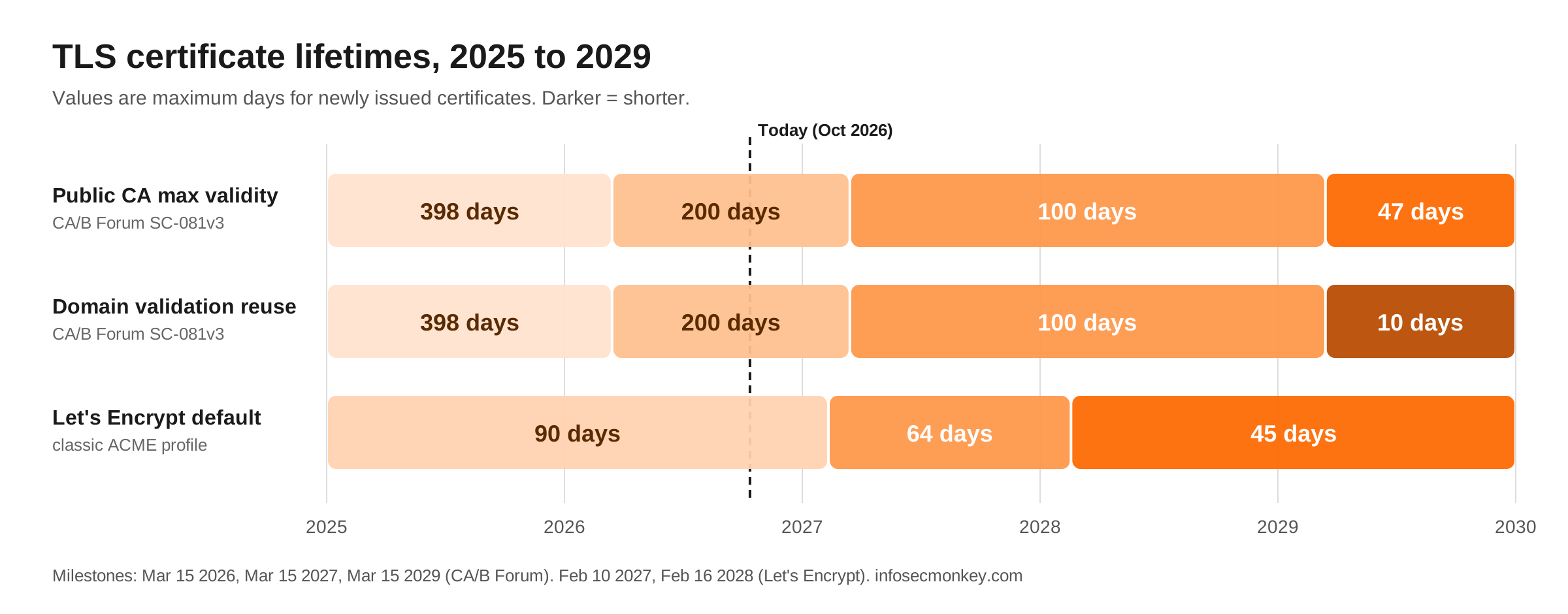
- Max public TLS validity is already down to 200 days (March 15, 2026), drops to 100 days in March 2027, and hits 47 days in March 2029.
- Domain validation reuse shrinks to 10 days by 2029, so the CA re-proves domain control almost every time it issues.
- Let’s Encrypt itself is going from 90 days to 64 days (Feb 2027) and then 45 days (Feb 2028).
- With a commercial CA, you are buying a subscription with ACME access, not a certificate.
- The hard part in 2027 and 2029 will not be which CA you pick. It will be everything in your environment that cannot speak ACME.
The 47-Day Certificate: The Whole Industry Is Going Let’s EncryptThe mandated schedule: CA/B Forum Ballot SC-081v3
The CA/Browser Forum passed Ballot SC-081v3 in April 2025. Apple, Google, Microsoft, and Mozilla all voted for it, 25 of 30 CAs voted for it, and nobody voted against it.
| Effective date | Max certificate validity | Domain validation (DCV) reuse |
|---|---|---|
| Before March 15, 2026 | 398 days | 398 days |
| March 15, 2026 (in effect now) | 200 days | 200 days |
| March 15, 2027 | 100 days | 100 days |
| March 15, 2029 | 47 days | 10 days |
Some CAs set their limits slightly under the Forum maximums. DigiCert, for example, caps at 199 days during the current phase so it is never out of compliance.
The detail most people miss: 10-day DCV reuse
Everyone focuses on 47 days. The DCV reuse window matters more operationally. Once proof of domain control is only good for 10 days, the CA has to validate your domain again on nearly every issuance. A workflow where someone logs into a portal, clicks the validation email, and pastes the cert into a device simply stops working, even if you renew early.
Why the browsers are pushing this
The Forum’s reasoning is that revocation does not work well at internet scale. CRLs and OCSP both have privacy, latency, and reliability problems, and clients often fail open. Short lifetimes turn expiry into the revocation mechanism: a stolen key or a misissued cert becomes useless within weeks, whether anyone revokes it or not. It also forces cryptographic agility. If you can rotate every cert every six weeks, you can swap algorithms (think post-quantum) without a multi-year migration project.
Let’s Encrypt is getting shorter too
Let’s Encrypt has issued 90-day certificates since the start. It is now cutting that in half:
| Date | Profile | Change |
|---|---|---|
| May 13, 2026 | tlsserver (opt-in) |
45-day certificates for early adopters and testing |
| February 10, 2027 | classic (default) |
64-day certificates, 10-day authorization reuse |
| February 16, 2028 | classic (default) |
45-day certificates, 7-hour authorization reuse |
There is also a shortlived profile issuing 6-day certificates, and Let’s Encrypt now supports certificates for IP addresses on its short-lived profile.
Two things make shorter lifetimes easier to live with:
- ACME Renewal Information (ARI). The CA tells the client when to renew instead of the client guessing. If your client does not support ARI yet, renew at roughly two-thirds of the certificate lifetime rather than on a fixed 60-day timer.
- DNS-PERSIST-01. A new challenge type for environments where touching DNS on every issuance is painful. Let’s Encrypt expected it to ship in 2026.
Client authentication is leaving public certificates
Separately, the Chrome Root Program requires every hierarchy in its trust store to be dedicated to TLS server authentication. The key deadline was June 15, 2026, and public CAs have been dropping the clientAuth EKU from new server certificates. Let’s Encrypt began phasing it out in February 2026 and its Generation Y intermediates do not carry it at all.
If anything in your environment uses a public TLS certificate as a client certificate (mutual TLS between servers, some VPN, Wi-Fi, or SAML setups), it needs to move to a private CA. Certificates already issued keep working until they expire, so this tends to surface as a surprise at the next renewal.
Private PKI is not affected
None of these limits apply to your internal CA. A Microsoft CA, a FortiAuthenticator CA, or any other private PKI can keep issuing whatever lifetimes your policy allows. The pattern most organizations will settle on:
- Public certs via ACME for anything internet-facing
- Private PKI for internal services, device identity, and client authentication
You buy the subscription, not the certificate
With commercial CAs, what you are really buying now is an entitlement: a set of domains, a validation level, and a term of one to several years. Within that term you reissue as often as you need. CAs already sold multi-year “plans” this way after the 398-day cap. Shorter lifetimes make it the only practical model.
How paid ACME works
- External Account Binding (EAB). The CA gives you a key ID and an HMAC key that tie your ACME client to your paid account. That binding is what separates a commercial CA’s ACME endpoint from an open one like Let’s Encrypt.
- Organization validation happens up front, and less often. For OV/EV, the CA vets your company once. Under SC-081 that vetting can be reused for 398 days.
- Domain validation becomes automatic. Proof of domain control has to be fresh (eventually 10 days), so the ACME client handles it on every issuance through HTTP-01, DNS-01, or TLS-ALPN-01 challenges.
Registering a client against a commercial CA’s ACME endpoint with EAB looks like this. The CA provides the directory URL, KID, and HMAC key.
certbot:
certbot certonly --standalone \
  --server https://acme.yourca.example/v2/directory \
  --eab-kid <EAB_KEY_ID> \
  --eab-hmac-key <EAB_HMAC_KEY> \
  -d vpn.example.com
acme.sh:
acme.sh --register-account \
  --server https://acme.yourca.example/v2/directory \
  --eab-kid <EAB_KEY_ID> \
  --eab-hmac-key <EAB_HMAC_KEY>

acme.sh --issue --server https://acme.yourca.example/v2/directory \
  -d vpn.example.com --standalone
When paying is actually worth it
For plain DV certificates on internet-facing services, you can often skip the commercial CA entirely. Let’s Encrypt, ZeroSSL, and Google Trust Services all offer free ACME. A paid subscription earns its cost when you need:
- OV/EV identity in the certificate, usually because a policy or contract requires it. Browsers no longer display it in a way users notice.
- Support and an SLA when issuance breaks, instead of community forums
- Inventory and reporting across many certificates and teams
- No rate limits for large estates
- Coverage for devices that cannot speak ACME, through API or agent-based deployment
- Private CA services bundled in for internal and client-auth use cases
The real product is now lifecycle management
The bigger market shift is that certificate lifecycle management (CLM) is becoming the product, and the certificate itself is a commodity. DigiCert Trust Lifecycle, Sectigo Certificate Manager, Keyfactor, CyberArk (Venafi), and AppViewX all position themselves as the layer that discovers every certificate, tracks who owns it, and automates renewal across multiple CAs.
Expect larger enterprises to buy a CLM platform and point it at one or more CAs. Smaller shops will use free ACME and monitor for renewal failures.
FortiGate: ACME is already built in
FortiOS has had a native ACME client since 7.0, so FortiGate public-facing certificates (admin GUI, SSL VPN, agentless VPN portal) do not need to be uploaded by hand once a year.
- FortiOS 7.0 added ACME with Let’s Encrypt.
- FortiOS 7.0.2 added “Other” ACME CAs, so you can point it at a commercial CA.
- FortiOS 7.6.3 added External Account Binding (CLI only) for paid ACME accounts.
- Supported challenges are TLS-ALPN-01 (TCP/443) and HTTP-01 (TCP/80), and the implementation supports a single domain per certificate.
Pick the public-facing interface the FortiGate will answer ACME challenges on:
config system acme
    set interface "port1"
end
Then create the certificate:
config vpn certificate local
    edit "acme-vpn"
        set enroll-protocol acme2
        set acme-domain "vpn.example.com"
        set acme-email "admin@example.com"
    next
end
Check the result and point the admin GUI at it:
get vpn certificate local details acme-vpn

config system global
    set admin-server-cert "acme-vpn"
end
For a commercial CA, set the ACME CA URL on the certificate and, on 7.6.3 or later, add the EAB values. Run set ? inside the certificate entry to confirm the exact field names on your build.
What to do now
- Inventory every public certificate and record how it is renewed today.
- Flag everything that cannot do ACME (older appliances, load balancers, embedded devices, legacy apps). That list is your 2027 and 2029 risk.
- Find any public cert used for client authentication and plan its move to a private CA.
- Move internet-facing services to ACME, free or paid, and enable ARI where your client supports it.
- Monitor renewals. With 47-day certs, a silent renewal failure becomes an outage within weeks.
- Decide whether you need a CLM platform or whether free ACME plus monitoring is enough.
The question to ask any environment is simple: what in here cannot do ACME? That list, not the CA choice, is where the pain will come from.
Sources
- CyberInsider: TLS certificate lifespans to be reduced to 47 days by 2029
- DigiCert: Shortened TLS/SSL Certificate Validity FAQ
- ISRG / Let’s Encrypt: Decreasing Certificate Lifetimes to 45 Days
- Neowin: Let’s Encrypt launches Generation Y
- The SSL Store: Chrome ends client authentication in public TLS certificates
- Fortinet Docs: Automatically provision a certificate (FortiOS 7.4)
- Fortinet Community: ACME with CAs other than Let’s Encrypt
Recent posts
-

-

DNS is one of those technologies that quietly underpins... Full Story
-

BGP issues on FortiGate firewalls usually trace back to... Full Story
-

Every time your laptop talks to your router, a... Full Story
-

If you've spent any time configuring NAT on a... Full Story
-

If you have spent any time configuring firewall policies... Full Story
-

High availability on FortiGate is one of those features... Full Story
-

If you've configured SD-WAN on a FortiGate, you've almost... Full Story
-

FortiLink is the management protocol that turns a FortiSwitch... Full Story
-

FortiSwitches are pretty rock solid from Mean Time Between... Full Story
-

This is a quicky tip. Have you ever gone... Full Story
-

DNS is one of those quiet pieces of internet... Full Story
-

This article is an updated version of the previous... Full Story
-

You will add ns2 as a secondary (slave) BIND9... Full Story
-

In the process of deploying my lab, I needed... Full Story
-

RFC 8805, used to be known as Self-Correcting IP... Full Story
-

Years back, I wrote an article about certificate pinning. ... Full Story
-

FortiGates have the ability to send alerts to Microsoft... Full Story
-

In this post, I am going to walk through... Full Story
-

Troubleshooting VoIP on a FortiGate can feel like trying... Full Story
-

Prior to FortiOS 7.0, there were three commands to... Full Story
-

In this post, I am going to go over... Full Story
-

What we are going to do: We are going... Full Story
-

Choosing between FGCP (FortiGate Clustering Protocol) and FGSP (FortiGate... Full Story
-

Creating a VLAN on macOS (The "Pro" Move) A... Full Story
-

This blog post explores the logic behind how macOS... Full Story
-

Pretty Fly for a Wi-Fi Tell My Wi-Fi Love... Full Story
-

Part of my daily gig is creating BoMs (Bill-of-Materials)... Full Story
-

ICMP introduces several security risks, but careful filtering, rate... Full Story
-

The command diag debug application dhcps -1 enables full... Full Story
-

In the world of FortiOS, execute tac report is... Full Story
-

LLDP; What is it The Link Layer Discovery Protocol... Full Story
-

What it actually does When you run diagnose fdsm... Full Story
-

Monkey Bites are bite-sized, high-impact security insights designed for... Full Story
-

I have run macOS in macOS with Parallels but... Full Story
-

Don't be confused with my other FortiNAC posts where... Full Story
-

This is the third session in a multi-part article... Full Story
-

Today I was configuring key-based authentication on a FortiGate... Full Story
-

Netcat, often called the "Swiss Army knife" of networking,... Full Story
-

At its core, IEEE 802.1X is a network layer... Full Story
-

In case you did not see the previous FortiNAC... Full Story
-

This is our 5th session where we are going... Full Story
-

Now that we have Wireshark installed and somewhat configured,... Full Story
-

The Philosophy of Packet Analysis Troubleshooting isn't about looking... Full Story
-

1. Title and Executive Summary Objective: Configure a FortiGate... Full Story
-

TL;DR Every public CA is moving to the Let's... Full Story
-

Executive Summary Objective: Give practitioners one reference that covers... Full Story