
If you've spent any time configuring user authentication on... Full Story
By Manny Fernandez
October 14, 2026
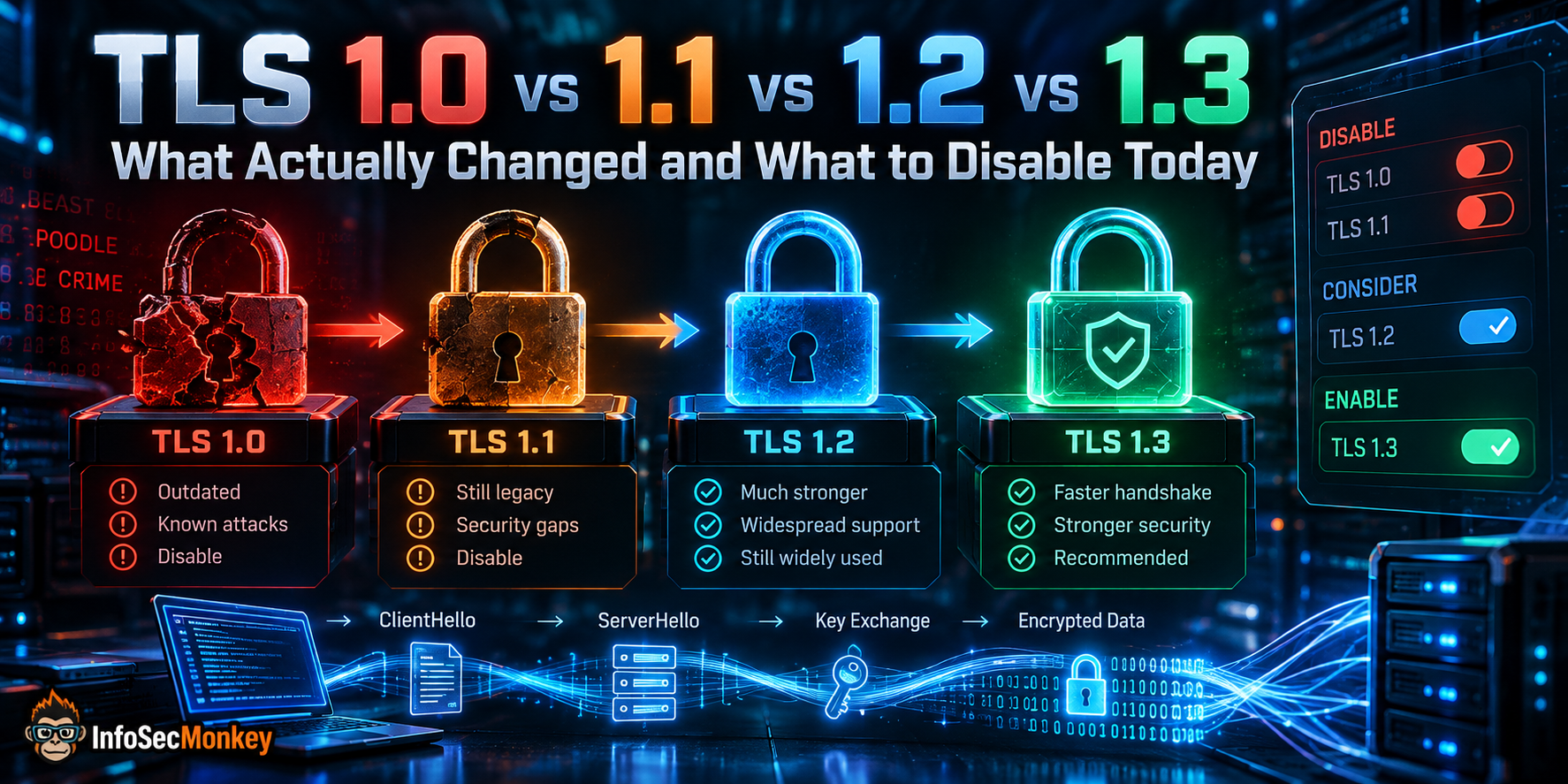
TLS 1.0 vs 1.1 vs 1.2 vs 1.3: What Actually Changed and What to Disable Today
A practitioner breakdown of every TLS version: handshakes, cipher suites, the attacks that killed the old ones, and the exact commands to test and harden your endpoints.
Objective: Explain what changed between each TLS version, why 1.0 and 1.1 are dead, how to harden 1.2, and why 1.3 should be your default.
Audience: Network and security engineers, firewall admins, sysadmins, and anyone who has to answer “why did the scanner flag this?”
Read time: 15 minutes
Audience: Network and security engineers, firewall admins, sysadmins, and anyone who has to answer “why did the scanner flag this?”
Read time: 15 minutes
TL;DR
- TLS 1.0 and 1.1 are formally deprecated (RFC 8996, March 2021). Every major browser removed them in 2020. If a scanner finds them, disable them.
- TLS 1.2 is still acceptable, but only with a hardened config: ECDHE key exchange, AEAD ciphers, no RSA key exchange, no CBC, no compression.
- TLS 1.3 is the target. It cut the handshake to one round trip, removed every legacy primitive, made forward secrecy mandatory, and encrypts the server certificate.
- Your minimum should be TLS 1.2, your preference TLS 1.3. Test before you cut: legacy clients (old Java, embedded/OT gear, Windows 7-era stacks) are what break.
The Comparison Table
Start here. Every row in this table is expanded in the sections below.
| Feature | TLS 1.0 | TLS 1.1 | TLS 1.2 | TLS 1.3 |
|---|---|---|---|---|
| Published | RFC 2246 (Jan 1999) | RFC 4346 (Apr 2006) | RFC 5246 (Aug 2008) | RFC 8446 (Aug 2018) |
| Status today | Deprecated (RFC 8996) | Deprecated (RFC 8996) | Acceptable if hardened | Preferred |
| Full handshake | 2-RTT | 2-RTT | 2-RTT | 1-RTT (0-RTT optional on resumption) |
| Key exchange | RSA, DH, ECDH(E) | RSA, DH, ECDH(E) | RSA, DHE, ECDHE | (EC)DHE or PSK only, plus hybrid post-quantum groups |
| Forward secrecy | Optional | Optional | Optional | Mandatory (except psk_ke resumption) |
| Bulk encryption | RC4, DES, 3DES, AES-CBC | RC4, 3DES, AES-CBC | Adds AES-GCM, AES-CCM, ChaCha20-Poly1305 | AEAD only: AES-GCM, ChaCha20-Poly1305, AES-CCM |
| Integrity | HMAC-MD5 / HMAC-SHA1 | HMAC-MD5 / HMAC-SHA1 | HMAC-SHA2 or AEAD | AEAD only |
| Key derivation | PRF: MD5 + SHA-1 | PRF: MD5 + SHA-1 | PRF: SHA-256 (or suite hash) | HKDF |
| CBC IV handling | Implicit (chained) | Explicit per record | Explicit per record | No CBC at all |
| Certificate on the wire | Cleartext | Cleartext | Cleartext | Encrypted |
| Renegotiation | Yes | Yes | Yes | Removed (KeyUpdate instead) |
| Compression | Allowed | Allowed | Allowed | Removed |
| Signature hash | Fixed MD5 + SHA-1 | Fixed MD5 + SHA-1 | Negotiated (signature_algorithms) | Negotiated: RSA-PSS, ECDSA, EdDSA |
A Short History: SSL to TLS
Netscape built SSL 2.0 (1995) and SSL 3.0 (1996). The IETF took over and renamed the protocol to TLS, so TLS 1.0 is essentially SSL 3.1. That is why the wire version numbers look strange: TLS 1.0 is 0x0301, TLS 1.1 is 0x0302, TLS 1.2 is 0x0303, and TLS 1.3 is 0x0304.
SSL 2.0 and 3.0 are long gone (RFC 6176 and RFC 7568). SSL 3.0 died to POODLE in 2014. If anything in your environment still says “SSL” in a settings menu, it almost always means TLS today, but verify.
TLS 1.0 (1999): SSL 3.0 With a New Name
TLS 1.0 was a modest update to SSL 3.0. It swapped in an HMAC-based integrity check and a new pseudorandom function, but kept the same overall design and much of the same weak crypto.
What was wrong with it
- Predictable CBC IVs. Each record’s IV was the last ciphertext block of the previous record. An attacker who can inject chosen plaintext can predict the IV, which is exactly what BEAST (2011) exploited to recover session cookies.
- MD5 and SHA-1 baked in. The PRF and the handshake signatures used a fixed MD5 + SHA-1 combination. You could not negotiate anything stronger.
- Weak cipher menu. RC4, single DES, 3DES, and export-grade suites were all legal. RC4 biases became practical attacks in 2013 to 2015, and RFC 7465 banned RC4 outright.
- MAC-then-encrypt. The MAC is computed on plaintext and then encrypted along with the padding, which opens the door to padding-oracle and timing attacks like Lucky 13.
Verdict: Disable. There is no configuration of TLS 1.0 that fixes the IV design or the MD5/SHA-1 PRF.
TLS 1.1 (2006): The BEAST Fix That Arrived Early
TLS 1.1 is a small, targeted revision. Its headline change landed five years before BEAST was published, but almost nobody deployed 1.1 in that window, so the industry got hit anyway.
What changed
- Explicit per-record IVs for CBC. Every record carries its own random IV, which kills the BEAST class of attack.
- Padding errors return
bad_record_macinstead of a distinctdecryption_failedalert, closing the most obvious padding oracle (Vaudenay-style attacks). - Export cipher suites can no longer be negotiated.
What did not change
Everything else. Same MD5 + SHA-1 PRF, same fixed signature hash, no AEAD ciphers, RC4 and 3DES still legal, still MAC-then-encrypt. TLS 1.1 fixed one bug and left the foundation alone, which is why RFC 8996 deprecated it alongside 1.0.
Verdict: Disable. TLS 1.1 offers almost nothing over 1.0, and every client that supports 1.1 in practice also supports 1.2.
TLS 1.2 (2008): The Workhorse
TLS 1.2 is the version that carried the internet for a decade, and it is still everywhere. Its big idea was negotiable cryptography: instead of hardcoding MD5 and SHA-1, the hash, PRF, and signature algorithms became negotiable.
What changed
- SHA-256 based PRF by default, with the cipher suite allowed to specify a stronger hash (for example SHA-384).
- The `signature_algorithms` extension lets client and server agree on signature and hash pairs instead of the fixed MD5 + SHA-1 combo.
- AEAD cipher suites: AES-GCM and AES-CCM (and later ChaCha20-Poly1305 via RFC 7905). AEAD encrypts and authenticates in one operation, which eliminates the MAC-then-encrypt padding problems entirely.
- IDEA and single DES removed from the defined suites.
The catch: TLS 1.2 is only as good as its config
TLS 1.2 still permits nearly every bad decision from the past: static RSA key exchange (no forward secrecy, and the root of ROBOT in 2017), CBC suites (Lucky 13), 3DES (SWEET32), compression (CRIME), and renegotiation (which needed RFC 5746 to fix). It also needed a later patch, the Extended Master Secret (RFC 7627), to stop the Triple Handshake attack.
A hardened TLS 1.2 deployment looks like this:
- ECDHE key exchange only. No static RSA, no plain DH. This gives you forward secrecy.
- AEAD ciphers only:
ECDHE-ECDSA-AES128-GCM-SHA256,ECDHE-RSA-AES256-GCM-SHA384,ECDHE-RSA-CHACHA20-POLY1305and friends. - Extended Master Secret and secure renegotiation supported (or renegotiation disabled).
- Compression off, session ticket keys rotated, RSA certificates at 2048 bits minimum.
Verdict: Keep enabled for compatibility, but strip it down to ECDHE + AEAD. RFC 9325 (BCP 195) says implementations MUST support TLS 1.2 and SHOULD support TLS 1.3.
TLS 1.3 (2018): The Rebuild
TLS 1.3 is not an incremental update. The working group spent four years and 28 drafts removing everything that had ever produced a CVE and redesigning the handshake around it.
What was removed
- Static RSA and static DH key exchange. Every full handshake uses ephemeral (EC)DHE, so forward secrecy is no longer optional.
- CBC mode, RC4, 3DES, and every non-AEAD cipher.
- MD5 and SHA-1 for handshake signatures and key derivation.
- Compression, renegotiation, custom DHE groups, and the ChangeCipherSpec message (it survives only as a dummy for middlebox compatibility).
What was added
- A 1-RTT handshake. The client guesses the key exchange group and sends its key share in the very first message. The server can respond with its key share and start encrypting immediately.
- Encrypted handshake. Everything after ServerHello, including the server certificate, is encrypted. Passive observers no longer see which certificate was presented.
- HKDF-based key schedule (RFC 5869) with clean separation between handshake and traffic keys.
- 0-RTT early data on resumption, letting a returning client send application data in its first flight. Fast, but replayable (more on that in the gotchas).
- PSK-based resumption replaces both session IDs and the old session ticket mechanism.
- Built-in downgrade protection through a sentinel value in ServerHello.random (covered below).
Only five cipher suites
In TLS 1.2 a cipher suite name described key exchange, authentication, encryption, and hash in one string. In TLS 1.3 the key exchange and signature algorithm are negotiated separately, so the suite only names the AEAD and the hash. There are five:
| Cipher suite | Code | Notes |
|---|---|---|
| TLS_AES_128_GCM_SHA256 | 0x1301 | Mandatory to implement. The workhorse. |
| TLS_AES_256_GCM_SHA384 | 0x1302 | Common default on servers. Required by CNSA-aligned policies. |
| TLS_CHACHA20_POLY1305_SHA256 | 0x1303 | Fast on CPUs without AES-NI (older phones, IoT). |
| TLS_AES_128_CCM_SHA256 | 0x1304 | Constrained and IoT environments. Rarely enabled. |
| TLS_AES_128_CCM_8_SHA256 | 0x1305 | Truncated 8-byte tag. Not recommended for general use. |
Post-quantum key exchange rides on TLS 1.3
Because TLS 1.3 negotiates the key exchange group separately, adding post-quantum protection was just a matter of defining new groups. The hybrid group X25519MLKEM768 combines classical X25519 with ML-KEM-768 and has been the default in Chrome since version 131 and Firefox since version 132. The hybrid ML-KEM groups were standardized as RFC 10024 in August 2026. This only exists in TLS 1.3, which is one more reason to make it your default: it is the only version that protects today’s traffic against “harvest now, decrypt later”.
Verdict: Enable and prefer it. The only setting to think hard about is 0-RTT, which should stay off unless your application is built for it.
The Handshakes, Side by Side
The diagram below shows the full handshake for TLS 1.2 with ECDHE next to TLS 1.3. Count the round trips before the client can send application data: two for 1.2, one for 1.3. The shaded region on the right is everything TLS 1.3 encrypts that TLS 1.2 sends in the clear.
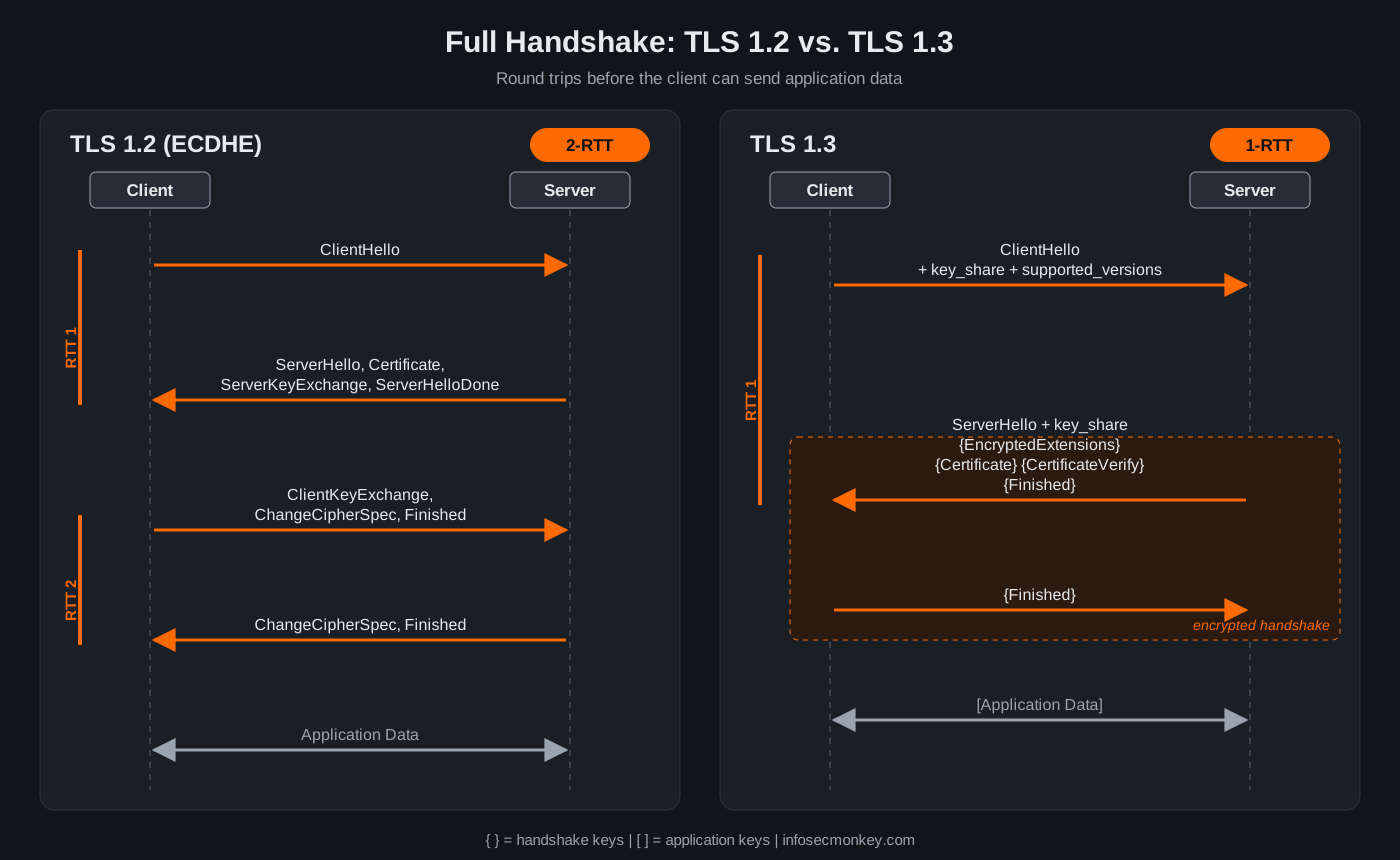
Message by message, TLS 1.2 looks like this:
Client                                       Server
ClientHello            -------->
                                        ServerHello
                                        Certificate
                                  ServerKeyExchange
                       <--------    ServerHelloDone
ClientKeyExchange
[ChangeCipherSpec]
Finished               -------->
                                 [ChangeCipherSpec]
                       <--------           Finished
Application Data       <------->   Application Data
And TLS 1.3 (curly braces mean encrypted with handshake keys, square brackets mean encrypted with application keys):
Client                                       Server
ClientHello
 + key_share
 + supported_versions  -------->
                                        ServerHello
                                        + key_share
                              {EncryptedExtensions}
                                      {Certificate}
                                {CertificateVerify}
                       <--------         {Finished}
{Finished}             -------->
[Application Data]     <------->  [Application Data]
If the client guesses the wrong key exchange group, the server sends a HelloRetryRequest and the handshake costs an extra round trip. That is rare in practice because every modern client sends an X25519 (or hybrid) share first.
Version Negotiation and Downgrade Protection
Version negotiation is where TLS 1.3 gets clever, and it trips up a lot of packet analysis.
- Up to TLS 1.2, the client puts its highest version in
ClientHello.client_versionand the server picks the highest it supports. - Middleboxes broke that. Plenty of devices choked on a version they did not recognize, so browsers added fallback retries, which attackers abused to force downgrades (this is how POODLE reached SSL 3.0).
TLS_FALLBACK_SCSV(RFC 7507) was the band-aid. - TLS 1.3 freezes the legacy field at
0x0303(TLS 1.2) and moves the real negotiation into thesupported_versionsextension. Old middleboxes see what looks like a TLS 1.2 handshake and leave it alone. - Downgrade sentinel. A TLS 1.3 server that negotiates 1.2 or lower writes a fixed value (ASCII
DOWNGRDfollowed by0x01or0x00) into the last 8 bytes of ServerHello.random. A TLS 1.3 client that sees it aborts, because someone tampered with the ClientHello.
Packet capture gotcha: a TLS 1.3 session shows record version
0x0303 and ClientHello version 0x0303. To confirm TLS 1.3, look at the supported_versions extension in the ServerHello, not the version fields.The Attacks That Shaped Each Version
| Attack | Year | What it hit | What fixed it |
|---|---|---|---|
| BEAST | 2011 | Predictable CBC IVs in SSL 3.0 / TLS 1.0 | TLS 1.1+ explicit IVs; 1/n-1 record splitting |
| CRIME | 2012 | TLS-level compression leaking secrets | Disable compression; removed in TLS 1.3 |
| Lucky 13 | 2013 | CBC MAC-then-encrypt timing (TLS 1.0 to 1.2) | Constant-time code; AEAD ciphers |
| RC4 biases | 2013 to 2015 | Statistical biases in the RC4 keystream | RFC 7465 bans RC4 |
| POODLE | 2014 | SSL 3.0 padding, reached via version fallback | Disable SSL 3.0; TLS_FALLBACK_SCSV |
| FREAK / Logjam | 2015 | Export-grade RSA and DHE | Remove export suites; 2048-bit DH minimum |
| SWEET32 | 2016 | 64-bit block ciphers (3DES) on long sessions | Remove 3DES |
| ROBOT | 2017 | Bleichenbacher oracle on static RSA key exchange | ECDHE only; RSA kex removed in TLS 1.3 |
| Raccoon | 2020 | Timing on reused DH secrets (TLS 1.2 and below) | Ephemeral keys; TLS 1.3 key schedule |
Notice the pattern: every row is a feature that TLS 1.3 deleted. That is the real difference between the versions.
Compliance: Who Says You Must Disable What
- IETF RFC 8996 (March 2021): TLS 1.0 and 1.1 are deprecated. Implementations MUST NOT negotiate them.
- IETF RFC 9325 / BCP 195 (Nov 2022): MUST support TLS 1.2, SHOULD support TLS 1.3, and prefer 1.3 when both are available.
- PCI DSS: SSL and early TLS (1.0, and in practice 1.1) had to be gone from cardholder data environments by June 30, 2018.
- NIST SP 800-52 Rev. 2: federal systems use TLS 1.2 at minimum and were required to support TLS 1.3 by January 1, 2024.
- Browsers: Chrome, Edge, Firefox, and Safari all removed TLS 1.0 and 1.1 in 2020. If a browser cannot reach your site over 1.2, it cannot reach your site.
Testing Your Endpoints
Before you change anything, find out what you are actually serving. Examples use 198.18.10.20 as the target.
Step 1: Probe each version with OpenSSL
Goal: confirm which versions the server accepts. Action: attempt one handshake per version. On OpenSSL 3.x you must lower the client security level to even offer 1.0 or 1.1, or the failure you see is your own client, not the server.
T=198.18.10.20:443
for v in tls1 tls1_1 tls1_2 tls1_3; do
  echo "== $v =="
  openssl s_client -connect "$T" -"$v" -brief \
    -cipher 'DEFAULT:@SECLEVEL=0' </dev/null 2>&1 \
    | grep -E 'Protocol version|Ciphersuite|alert|error' | head -3
done
Expected output on a hardened server: the 1.0 and 1.1 probes fail with a protocol alert, and the 1.2 and 1.3 probes succeed.
== tls1 ==
...:tlsv1 alert protocol version:...
== tls1_1 ==
...:tlsv1 alert protocol version:...
== tls1_2 ==
Protocol version: TLSv1.2
Ciphersuite: ECDHE-RSA-AES256-GCM-SHA384
== tls1_3 ==
Protocol version: TLSv1.3
Ciphersuite: TLS_AES_256_GCM_SHA384
Step 2: Enumerate cipher suites with Nmap
Goal: see every suite per version and its grade. Action: run the ssl-enum-ciphers script. Any grade below A, any CBC or 3DES entry under TLSv1.2, or any TLSv1.0/1.1 section at all is a finding.
nmap -sV --script ssl-enum-ciphers -p 443 198.18.10.20Step 3: Full audit with testssl.sh
Goal: a complete protocol, cipher, and vulnerability report. Action: -p checks protocols only; drop it for the full run, which also tests for BEAST, ROBOT, SWEET32, and friends.
git clone --depth 1 https://github.com/testssl/testssl.sh.git
cd testssl.sh
./testssl.sh -p 198.18.10.20:443     # protocols only
./testssl.sh 198.18.10.20:443        # full audit
Step 4: Pin a version with curl
Goal: test an application endpoint with SNI and HTTP in the loop. Action: clamp both the minimum and maximum version.
# Force exactly TLS 1.2
curl -sv --tlsv1.2 --tls-max 1.2 -o /dev/null https://app.example.com 2>&1 \
  | grep -E 'SSL connection|ALPN'

# Force exactly TLS 1.3
curl -sv --tlsv1.3 -o /dev/null https://app.example.com 2>&1 \
  | grep -E 'SSL connection|ALPN'
Step 5: Read it off the wire in Wireshark
Goal: see what clients are actually negotiating. Action: use these display filters.
tls.handshake.type == 1                      # ClientHello
tls.handshake.type == 2                      # ServerHello
tls.handshake.extensions.supported_version == 0x0304   # offers/picks 1.3
tls.handshake.version == 0x0301              # legacy TLS 1.0 hello
tls.handshake.version == 0x0302              # legacy TLS 1.1 hello
Hardening: Configs That Work
Nginx
ssl_protocols TLSv1.2 TLSv1.3;
ssl_ciphers ECDHE+AESGCM:ECDHE+CHACHA20;   # TLS 1.2 suites only
ssl_prefer_server_ciphers off;             # let clients pick (Mozilla guidance)
ssl_ecdh_curve X25519MLKEM768:X25519:prime256v1;  # PQ hybrid needs OpenSSL 3.5+
ssl_session_tickets off;
ssl_early_data off;                         # no 0-RTT unless the app handles replay
The ssl_ciphers directive only affects TLS 1.2. TLS 1.3 suites are controlled separately, and the OpenSSL defaults are already correct. If your OpenSSL is older than 3.5, drop X25519MLKEM768 from the curve list or Nginx will refuse to start.
Apache httpd
SSLProtocol         -all +TLSv1.2 +TLSv1.3
SSLCipherSuite      ECDHE+AESGCM:ECDHE+CHACHA20
SSLHonorCipherOrder off
SSLCompression      off
SSLSessionTickets   off
Windows (Schannel)
Run in an elevated PowerShell session, then reboot. This disables TLS 1.0 and 1.1 for both inbound (Server) and outbound (Client) connections. Test line-of-business apps first: anything still using an old .NET Framework default may need SchUseStrongCrypto set as well.
$base = 'HKLM:\SYSTEM\CurrentControlSet\Control\SecurityProviders\SCHANNEL'
$p = @{ PropertyType = 'DWord'; Force = $true }
foreach ($v in 'TLS 1.0','TLS 1.1') {
  foreach ($r in 'Server','Client') {
    $k = "$base\Protocols\$v\$r"
    New-Item $k -Force | Out-Null
    New-ItemProperty $k -Name Enabled -Value 0 @p | Out-Null
    New-ItemProperty $k -Name DisabledByDefault -Value 1 @p | Out-Null
  }
}
FortiGate
There are four separate places a FortiGate terminates or inspects TLS, and each has its own knob. Admin GUI and global minimum:
config system global
    set admin-https-ssl-versions tlsv1-2 tlsv1-3
    set ssl-min-proto-version TLSv1-2
end
SSL VPN (on versions that still ship it):
config vpn ssl settings
    set ssl-min-proto-ver tls1-2
end
Server load balancing VIPs that offload HTTPS (other required VIP fields omitted):
config firewall vip
    edit "vip-web01"
        set type server-load-balance
        set server-type https
        set ssl-min-version tls-1.2
        set ssl-max-version tls-1.3
    next
end
Deep inspection profiles, to block clients and servers negotiating legacy versions through the firewall. Option names vary slightly across FortiOS releases, so confirm with set ? on your build:
config firewall ssl-ssh-profile
    edit "deep-inspection-tls12"
        config https
            set min-allowed-ssl-version tls-1.2
            set unsupported-ssl-version block
        end
    next
end
Verification: from a client, run the OpenSSL loop in the Testing section against the FortiGate admin interface or VIP. TLS 1.0 and 1.1 should fail with a protocol alert.
Troubleshooting and Gotchas
1. “no protocols available” when testing TLS 1.0
Symptom: openssl s_client -tls1 fails instantly, before a packet leaves the box. Cause: your client refuses, not the server. OpenSSL 3.x security level 1+ and distro crypto policies (RHEL DEFAULT, Ubuntu 20.04+) disable TLS 1.0/1.1 at the client. Fix: add -cipher 'DEFAULT:@SECLEVEL=0' as shown above, or use Nmap or testssl.sh, which ship their own handshake logic.
2. Disabling TLS 1.0/1.1 breaks something you forgot about
Symptom: after the change, a scanner, printer, badge reader, old Java app, or Windows 7-era host stops connecting. Cause: embedded and OT devices often top out at TLS 1.0. Fix: measure before you cut. Log the negotiated protocol for a week and look for stragglers:
# Nginx: add protocol and cipher to the access log
log_format tlsaudit '$remote_addr $ssl_protocol $ssl_cipher "$http_user_agent"';
access_log /var/log/nginx/tls_audit.log tlsaudit;

# Then summarize
awk '{print $2}' /var/log/nginx/tls_audit.log | sort | uniq -c | sort -rn
On a FortiGate with deep inspection, the forward traffic log already records the negotiated TLS version per session, which gives you the same inventory for everything crossing the firewall.
3. TLS 1.3 changes what your firewall can see
Symptom: certificate-based web filtering or app control gets less accurate once traffic moves to TLS 1.3. Cause: the server certificate is encrypted in 1.3, so certificate-inspection mode can only see the SNI. With Encrypted Client Hello (ECH, RFC 9849, March 2026) the real SNI is hidden too. Fix: decide which traffic needs full deep inspection, and block or strip ECH where policy requires visibility. Also make sure any inspecting device fully supports TLS 1.3, since older middleboxes that assumed 1.2 behavior caused handshake failures during the 1.3 rollout.
4. 0-RTT replay
Symptom: none, until a captured early-data request gets replayed. Cause: 0-RTT data is not protected against replay by the protocol. Fix: leave it off, or allow it only for idempotent requests and have the backend reject unsafe ones with HTTP 425 Too Early (RFC 8470).
Bottom Line
TLS 1.0 and 1.1 differ from each other by one bug fix and from TLS 1.2 by a decade of attacks. TLS 1.2 is fine when you strip it down to ECDHE and AEAD. TLS 1.3 is what you get when you strip it down for everyone: fewer round trips, no legacy crypto, mandatory forward secrecy, an encrypted certificate, and the only path to post-quantum key exchange.
The config that works: minimum TLS 1.2 with ECDHE + AEAD only, TLS 1.3 enabled and preferred, 0-RTT off, and a week of protocol logging before you flip the switch.
References
- RFC 2246: The TLS Protocol Version 1.0
- RFC 4346: TLS Protocol Version 1.1
- RFC 5246: TLS Protocol Version 1.2
- RFC 8446: TLS Protocol Version 1.3
- RFC 8996: Deprecating TLS 1.0 and TLS 1.1
- RFC 9325: Recommendations for Secure Use of TLS and DTLS
- RFC 9849: TLS Encrypted Client Hello
- Hybrid ML-KEM for TLS 1.3 (RFC 10024 overview)
- Mozilla SSL Configuration Generator
- testssl.sh
Recent posts
-

-

DNS is one of those technologies that quietly underpins... Full Story
-

BGP issues on FortiGate firewalls usually trace back to... Full Story
-

Every time your laptop talks to your router, a... Full Story
-

If you've spent any time configuring NAT on a... Full Story
-

If you have spent any time configuring firewall policies... Full Story
-

High availability on FortiGate is one of those features... Full Story
-

If you've configured SD-WAN on a FortiGate, you've almost... Full Story
-

FortiLink is the management protocol that turns a FortiSwitch... Full Story
-

FortiSwitches are pretty rock solid from Mean Time Between... Full Story
-

This is a quicky tip. Have you ever gone... Full Story
-

DNS is one of those quiet pieces of internet... Full Story
-

This article is an updated version of the previous... Full Story
-

You will add ns2 as a secondary (slave) BIND9... Full Story
-

In the process of deploying my lab, I needed... Full Story
-

RFC 8805, used to be known as Self-Correcting IP... Full Story
-

Years back, I wrote an article about certificate pinning. ... Full Story
-

FortiGates have the ability to send alerts to Microsoft... Full Story
-

In this post, I am going to walk through... Full Story
-

Troubleshooting VoIP on a FortiGate can feel like trying... Full Story
-

Prior to FortiOS 7.0, there were three commands to... Full Story
-

In this post, I am going to go over... Full Story
-

What we are going to do: We are going... Full Story
-

Choosing between FGCP (FortiGate Clustering Protocol) and FGSP (FortiGate... Full Story
-

Creating a VLAN on macOS (The "Pro" Move) A... Full Story
-

This blog post explores the logic behind how macOS... Full Story
-

Pretty Fly for a Wi-Fi Tell My Wi-Fi Love... Full Story
-

Part of my daily gig is creating BoMs (Bill-of-Materials)... Full Story
-

ICMP introduces several security risks, but careful filtering, rate... Full Story
-

The command diag debug application dhcps -1 enables full... Full Story
-

In the world of FortiOS, execute tac report is... Full Story
-

LLDP; What is it The Link Layer Discovery Protocol... Full Story
-

What it actually does When you run diagnose fdsm... Full Story
-

Monkey Bites are bite-sized, high-impact security insights designed for... Full Story
-

I have run macOS in macOS with Parallels but... Full Story
-

Don't be confused with my other FortiNAC posts where... Full Story
-

This is the third session in a multi-part article... Full Story
-

Today I was configuring key-based authentication on a FortiGate... Full Story
-

Netcat, often called the "Swiss Army knife" of networking,... Full Story
-

At its core, IEEE 802.1X is a network layer... Full Story
-

In case you did not see the previous FortiNAC... Full Story
-

This is our 5th session where we are going... Full Story
-

Now that we have Wireshark installed and somewhat configured,... Full Story
-

The Philosophy of Packet Analysis Troubleshooting isn't about looking... Full Story
-

The Tuesday Afternoon Call It is a quiet Tuesday... Full Story
-

A practitioner breakdown of every TLS version: handshakes, cipher... Full Story
-

A practitioner guide to executables, libraries, mapped files, handles,... Full Story