
If you've spent any time configuring user authentication on... Full Story
By Manny Fernandez
October 29, 2026
Introducing Net3PO: A Free, Open-Source Network Engineer Toolkit for macOS, Windows and Linux
Introducing Net3PO: A Free, Open-Source Network Engineer Toolkit for macOS, Windows and Linux
No fluff. Just the config that works.
Executive Summary
Today I am launching Net3PO, a free, open-source network engineer toolkit that puts more than 20 everyday network and security tools into one desktop app. Subnet math, DNS checks, SNMP walks, a Syslog and TFTP server, a Fortinet command builder, a sniffer-to-PCAP converter, a script de-obfuscator and an SSH client all live in their own panels, in one window, on macOS, Windows and Linux. The app needs no admin rights to run, sends no telemetry, and the source is on GitHub under the Apache 2.0 license.
Objective: show what Net3PO does, get it installed and verified on your OS, and walk through a first-run workflow you can use on your next troubleshooting call.
Target audience: network engineers, security engineers, SEs and anyone who lives in a CLI and is tired of keeping fifteen single-purpose utilities up to date.
Net3PO v0.1.0 is a pre-release. The installers are not code signed yet, so each OS shows a one-time warning on first launch. Step 2 covers exactly what to click.
Why I Built It
Every engineer has the same junk drawer: a web subnet calculator you hope is not logging your ranges, a TFTP server that only runs on Windows, an SNMP walker from 2011, a regex tester in a browser tab, and a folder of half-finished scripts that turn FortiGate sniffer output into something Wireshark can open. When a customer call goes sideways, you spend the first ten minutes finding the right tool instead of fixing the problem.
Net3PO is my answer to that. One app, many tools, each in its own panel, with results you can collect into a single report when the call is over. The tools that touch the network treat every byte as hostile, and the tools that do not touch the network work fully offline.
What Is in the Network Engineer Toolkit
Here is the full launch lineup, grouped the way the app groups them.
| Category | Tool | What it does |
|---|---|---|
| Offline | Subnet Calculator | IPv4 and IPv6 math, including splitting a block into smaller subnets |
| Offline | Regex Builder | Build and test patterns, with ready-made networking recipes |
| Offline | Grep Builder | Assemble multi-pattern grep pipelines for GNU or BSD grep |
| Offline | MAC Vendor Lookup | OUI lookup against the IEEE registry, built into the app |
| Offline | Config Diff | Side-by-side diff of two configs |
| Network | Dig | DNS queries without leaving the app |
| Network | DNS Analyzer | Checks SPF, DMARC, DKIM, MX, DNSSEC and NS for a domain |
| Network | Port Scanner | TCP connect scan of a host or range |
| Network | Syslog Server | Receive and view syslog from a firewall or switch |
| Network | TFTP Server | Serve images and configs to devices |
| SNMP | SNMP Walk | Walk a device with SNMP v1, v2c or v3 |
| SNMP | SNMP Sweep | Find SNMP-speaking devices across a range |
| SNMP | Switch Port Mapper | Map which MAC lives on which switch port |
| Advanced | DHCP Monitor | Watch DHCP traffic and flag rogue DHCP servers |
| Advanced | Visual Traceroute | Hop-by-hop path view with Path MTU discovery |
| Fortinet | Fortinet Command Builder | Build FortiOS CLI commands without memorizing syntax |
| Fortinet | FortiGate Sniffer to PCAP | Convert FortiGate sniffer output into a PCAP for Wireshark |
| Decoders | Script Decoder | Unwraps obfuscated Python, Bash, JavaScript, PowerShell and XML statically, never executes input |
| Remote | SSH Client | Grouped saved connections, OS keychain secrets, host key pinning, tabs and a docked terminal |
| Workspace | Projects | Collect results from several tools and export one report as HTML, PDF, Markdown or text |
Prerequisites and Architecture
Assumed knowledge
- Comfortable installing desktop apps on your OS and opening a terminal or PowerShell.
- Basic DNS, SNMP and syslog concepts. Every example below uses lab addressing: 10.0.0.0/16 for internal LANs and 198.18.0.0/15 for public or transit space.
Lab requirements
| Item | Requirement |
|---|---|
| Operating system | macOS (Apple Silicon or Intel), Windows, or Linux (Ubuntu, Debian, RHEL, Fedora, or any distro via AppImage) |
| Privileges | None for the app itself. Some tools, such as Syslog or TFTP on their standard ports on Linux, need extra privileges and tell you what they need |
| Download | An installer from the Releases page plus the SHA256SUMS.txt file |
| Build from source (optional) | Rust stable, Node.js 22 or later, pnpm, and the Tauri 2 prerequisites for your OS |
How it is put together
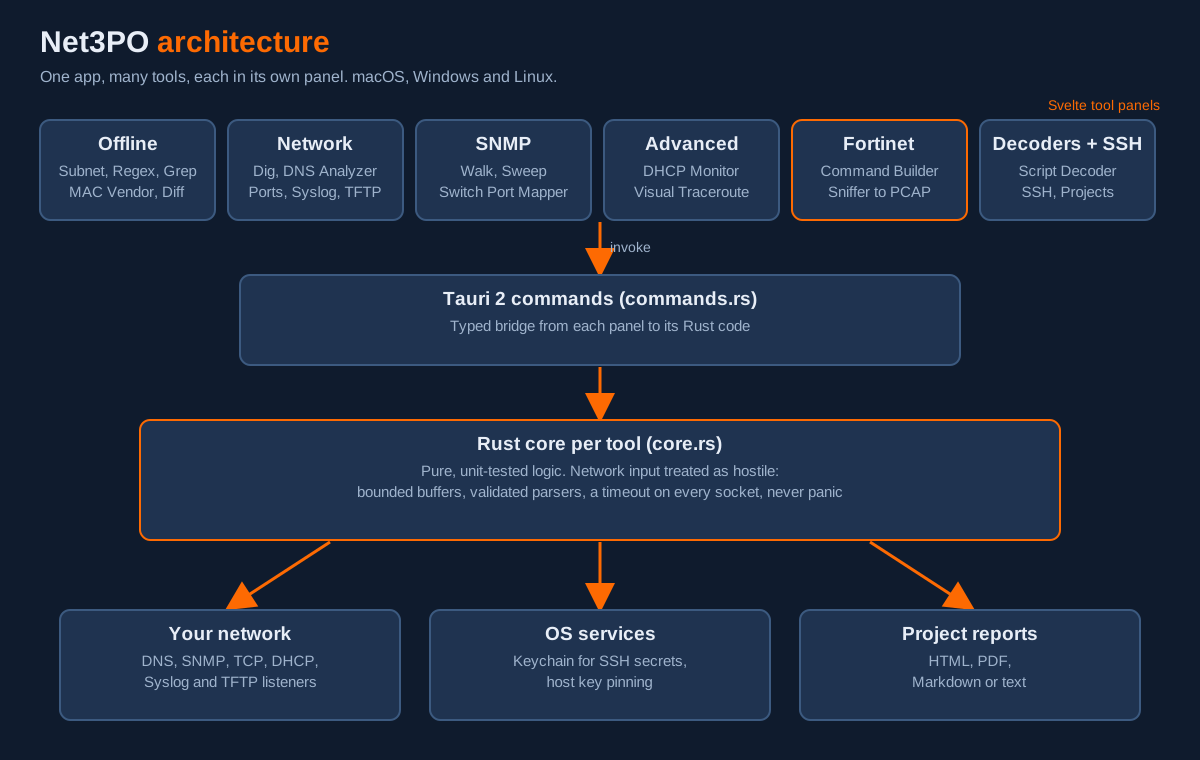
Figure 1: Net3PO architecture, from tool panel to the network
| Component | Role |
|---|---|
| Svelte panels | One UI panel per tool, in src/lib/tools/<Tool>/ |
| Tauri 2 shell | Native desktop window and installers for macOS, Windows and Linux |
| Tauri commands | The bridge from a panel to its Rust code, in commands.rs |
| Rust core | Pure, unit-tested logic per tool in src-tauri/src/tools/<tool>/core.rs, with bounded buffers, validated parsers and a timeout on every socket |
| OS keychain | Stores SSH secrets instead of a plain-text file |
| CI | fmt, clippy, tests and type checks on macOS, Windows and Ubuntu for every change |
Two design rules matter to a security audience. First, all network input is treated as hostile, and the code is written to never panic on bad input. Second, the Script Decoder only unwraps obfuscation statically. It never runs the script you paste in, so you can safely look at that suspicious PowerShell one-liner from a phishing email.
Step-by-Step: Install and Run Net3PO
Step 1: Download and verify the installer
Goal: Get the right installer and prove it is the file I published.
Action: Open the v0.1.0 release, download the installer for your OS and the SHA256SUMS.txt file into the same folder, then hash the installer.
macOS
cd ~/Downloads
shasum -a 256 <Net3PO-installer-file>
grep -i net3po SHA256SUMS.txt
Linux
cd ~/Downloads
sha256sum --ignore-missing -c SHA256SUMS.txt
Windows PowerShell
Set-Location $HOME\Downloads
Get-FileHash .\<Net3PO-installer-file> -Algorithm SHA256
Select-String -Path .\SHA256SUMS.txt -Pattern "Net3PO"
Verification: the hash printed for your installer matches its line in SHA256SUMS.txt character for character. On Linux, the check prints the file name followed by OK. If it does not match, delete the file and download it again.
Step 2: Install it on your OS
Goal: Get Net3PO installed and past the one-time unsigned-build warning.
Action: Use the installer that matches your platform.
macOS: the .dmg is universal for Apple Silicon and Intel. Open it and drag Net3PO to Applications. The first launch is blocked as an unidentified developer. Open System Settings, go to Privacy and Security, scroll down, click Open Anyway, then confirm.
Windows: the -setup.exe is recommended, with an .msi also available. If SmartScreen says Windows protected your PC, click More info, then Run anyway.
Linux: pick the package for your distro, or use the AppImage anywhere.
Linux
# Ubuntu and Debian
sudo apt install ./Net3PO_*.deb

# RHEL and Fedora
sudo dnf install ./Net3PO-*.rpm

# Any distro
chmod +x Net3PO_*.AppImage
./Net3PO_*.AppImage
GUI verification: Net3PO opens to its tool list. Open About and confirm the version reads 0.1.0. That version string is also what the bug report form asks for.
Step 3: Run a first-call workflow
Goal: Use three tools the way you would on a real troubleshooting call.
Action: Work through subnetting, DNS and a FortiGate packet capture, all from the same window.
Subnet Calculator. Enter 10.0.0.0/16 and split it into /24s. You get every network, usable range and broadcast address without a browser tab.
DNS Analyzer. Enter a mail domain you support and read the SPF, DMARC, DKIM, MX, DNSSEC and NS results on one screen. This is the fastest way to answer the classic ticket: why are our emails landing in spam?
FortiGate Sniffer to PCAP. Capture on the FortiGate with verbosity 6 so the output includes full packet hex, then paste the output into the panel and save a PCAP for Wireshark.
FortiGate CLI
diagnose sniffer packet any "host 10.0.10.25 and port 443" 6 100 lGUI verification: the subnet table lists 256 /24 networks, the DNS Analyzer shows a result for each record type, and the saved PCAP opens in Wireshark with the same packet count you captured (100 in this example).
Step 4: Collect everything in a Project
Goal: Turn a messy troubleshooting session into one report you can hand to a customer or attach to a ticket.
Action: Create a Project, add results from the tools you used, then export it.
Projects pull results from several tools into one place and export a single report as HTML, PDF, Markdown or text. That is your call summary, your ticket attachment and your change record, without copying and pasting from five windows.
GUI verification: the exported report opens and contains a section for each tool result you added.
Step 5: Build from source (optional)
Goal: Run the app from source, contribute a fix, or audit exactly what you are running.
Action: Install Rust stable, Node.js 22 or later, pnpm and the Tauri 2 prerequisites, then clone and run.
Shell
git clone https://github.com/infosecmonkey/Net3PO.git
cd Net3PO
pnpm install
pnpm tauri dev      # run with hot reload
pnpm tauri build    # installer for the current OS
The MAC vendor database is built from the IEEE registry at compile time. If your build machine has no internet access, build with the bundled seed set instead:
Shell
OUI_OFFLINE=1 pnpm tauri buildThese are the same checks CI runs on macOS, Windows and Ubuntu. Run them before you open a pull request:
Shell
cargo fmt --manifest-path src-tauri/Cargo.toml --check
cargo clippy --manifest-path src-tauri/Cargo.toml --all-targets -- -D warnings
cargo test --manifest-path src-tauri/Cargo.toml
pnpm check
Verification and Validation
Two quick tests prove the network-facing tools work on your machine and that nothing on the host is getting in the way.
Test 1: Syslog Server. Start the Syslog Server panel on the machine running Net3PO (10.0.10.50 in this lab), then send a test message from a Linux host on the same LAN.
Linux (util-linux logger)
logger -n 10.0.10.50 -P 514 -d "Net3PO syslog test from 10.0.10.60"Expected success: the message appears in the Syslog panel with the sender address 10.0.10.60. Then point a FortiGate at the same address for real traffic:
FortiGate CLI
config log syslogd setting
    set status enable
    set server "10.0.10.50"
    set port 514
end
Test 2: Port Scanner. Scan a lab host you own, such as the FortiGate LAN interface at 10.0.10.1, for 22 and 443.
Expected success: the ports you have enabled for admin access show as open, and closed ports come back quickly rather than hanging, because every socket has a timeout.
Only scan hosts and networks you own or have written permission to test.
Troubleshooting and Gotchas
1. macOS keeps blocking the app
Symptom: the app will not open and there is no Open Anyway button, or macOS says the app is damaged.
Diagnose: check whether the quarantine attribute is still set on the app.
macOS
xattr -l /Applications/Net3PO.app | grep quarantineFix: first try System Settings, then Privacy and Security, then Open Anyway, right after a launch attempt (the button only shows for a short time). If you verified the SHA-256 in Step 1 and it still will not open, remove the quarantine flag:
macOS
xattr -d com.apple.quarantine /Applications/Net3PO.app2. Syslog or TFTP will not start on Linux
Symptom: the Syslog Server or TFTP Server panel reports it cannot bind to its port.
Diagnose: ports below 1024 (514 for syslog, 69 for TFTP) are privileged on Linux, and a system daemon may already own them.
Linux
sudo ss -ulpn | grep -E ':(514|69)\b'Fix: if rsyslog or another TFTP daemon owns the port, stop it while you test, or use a different host. If nothing owns it, follow the guidance in the panel: the tool explains the privilege it needs on your system.
3. Nothing arrives on Windows
Symptom: the Syslog or TFTP server is running but no traffic shows up.
Diagnose: Windows Defender Firewall prompts the first time an app listens on the network. If that prompt was dismissed, inbound traffic is dropped.
Windows PowerShell
Get-NetFirewallRule -DisplayName "*Net3PO*" |
    Format-Table DisplayName, Enabled, Direction, Action, Profile
Fix: allow Net3PO on Private networks in Windows Security, under Firewall and network protection, then Allow an app through firewall. Avoid allowing it on Public networks.
Feedback, Contributing and License
Everything goes through GitHub, and a free account is enough. No email needed.
- Found a bug? Open a bug report. The form asks for the tool, your OS and the version from About.
- Have an idea? Request a feature. Tell me which tool you still keep in your junk drawer.
- Questions or general feedback? Start a thread in Discussions.
- Security problem? Report it privately, never in a public issue.
Please leave passwords, keys and real customer data out of anything you post.
Pull requests are welcome. Read CONTRIBUTING.md first: open an issue before building a new tool, keep tool logic in a unit-tested core.rs, and stick to permissive dependency licenses (MIT, Apache-2.0, BSD, ISC, Zlib or MPL-2.0), which CI enforces. No telemetry, and nothing from real customer networks in code, tests or fixtures.
Net3PO is licensed under the Apache License 2.0. Third-party licenses are listed in the app under About.
Grab it from the Releases page, give the repo a star if it saves you time, and tell me what tool should ship next.
Sources
Recent posts
-

-

DNS is one of those technologies that quietly underpins... Full Story
-

BGP issues on FortiGate firewalls usually trace back to... Full Story
-

Every time your laptop talks to your router, a... Full Story
-

If you've spent any time configuring NAT on a... Full Story
-

If you have spent any time configuring firewall policies... Full Story
-

High availability on FortiGate is one of those features... Full Story
-

If you've configured SD-WAN on a FortiGate, you've almost... Full Story
-

FortiLink is the management protocol that turns a FortiSwitch... Full Story
-

FortiSwitches are pretty rock solid from Mean Time Between... Full Story
-

This is a quicky tip. Have you ever gone... Full Story
-

DNS is one of those quiet pieces of internet... Full Story
-

This article is an updated version of the previous... Full Story
-

You will add ns2 as a secondary (slave) BIND9... Full Story
-

In the process of deploying my lab, I needed... Full Story
-

RFC 8805, used to be known as Self-Correcting IP... Full Story
-

Years back, I wrote an article about certificate pinning. ... Full Story
-

FortiGates have the ability to send alerts to Microsoft... Full Story
-

In this post, I am going to walk through... Full Story
-

Troubleshooting VoIP on a FortiGate can feel like trying... Full Story
-

Prior to FortiOS 7.0, there were three commands to... Full Story
-

In this post, I am going to go over... Full Story
-

What we are going to do: We are going... Full Story
-

Choosing between FGCP (FortiGate Clustering Protocol) and FGSP (FortiGate... Full Story
-

Creating a VLAN on macOS (The "Pro" Move) A... Full Story
-

This blog post explores the logic behind how macOS... Full Story
-

Pretty Fly for a Wi-Fi Tell My Wi-Fi Love... Full Story
-

Part of my daily gig is creating BoMs (Bill-of-Materials)... Full Story
-

ICMP introduces several security risks, but careful filtering, rate... Full Story
-

The command diag debug application dhcps -1 enables full... Full Story
-

In the world of FortiOS, execute tac report is... Full Story
-

LLDP; What is it The Link Layer Discovery Protocol... Full Story
-

What it actually does When you run diagnose fdsm... Full Story
-

Monkey Bites are bite-sized, high-impact security insights designed for... Full Story
-

I have run macOS in macOS with Parallels but... Full Story
-

Don't be confused with my other FortiNAC posts where... Full Story
-

This is the third session in a multi-part article... Full Story
-

Today I was configuring key-based authentication on a FortiGate... Full Story
-

Netcat, often called the "Swiss Army knife" of networking,... Full Story
-

At its core, IEEE 802.1X is a network layer... Full Story
-

In case you did not see the previous FortiNAC... Full Story
-

This is our 5th session where we are going... Full Story
-

Now that we have Wireshark installed and somewhat configured,... Full Story
-

The Philosophy of Packet Analysis Troubleshooting isn't about looking... Full Story
-

Introducing Net3PO: A Free, Open-Source Network Engineer Toolkit for... Full Story
-

No fluff. Just the config that works. PHP2Shell CVE-2026-109618... Full Story
-

ICAP Configuration on FortiGate, Palo Alto and Cisco: How... Full Story