
If you've spent any time configuring user authentication on... Full Story
By Manny Fernandez
July 23, 2020

Setting up Alerts in Observium Community Edition
In this article, I am going to show you how I set up Observium to send me an email alert when an interface goes down. Observium is amazing and integrates with many solutions out there. When I had a SOC, I used Slack to receive the alerts. This was great because when the SOC Analysts were off shift, whoever else was manning the consoles, would see the alerts. Obviously, Observium is more about up/down and historical performance, but if the SOC Analyst had some alert, we could easily correlate the status of the device (e.g. did the device go down, reboot, etc).
Lets get started.
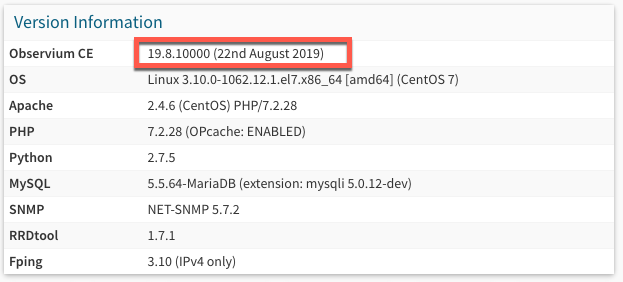
First of all, I am running the Community Edition (Free) v19.8.10000 on CentOS 7.
Creating the Checker
Next we will log into the Observium web portal
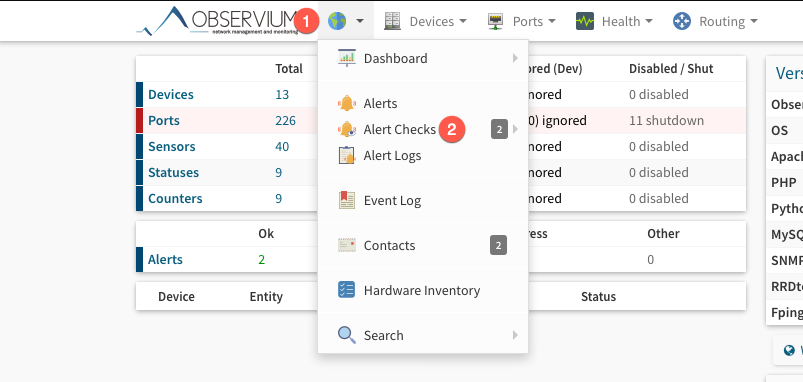
Once logged in, you will choose the globe icon and then choose Alert Checks

On the top right corner, you will see Add Checker . Click that and you will have options to choose such as: BGP or Device or Memory etc.
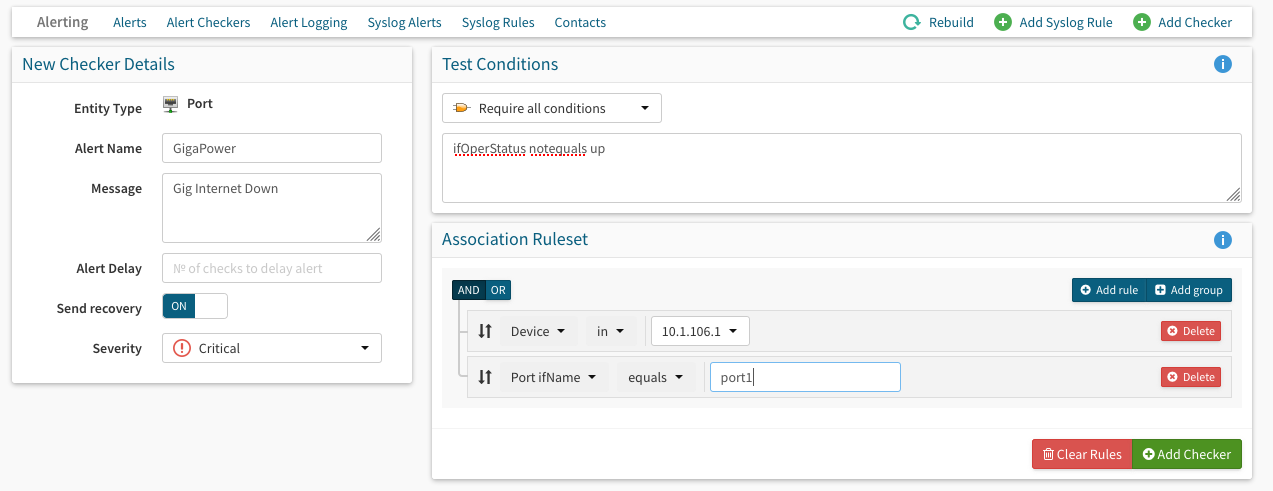
In my case, I wanted to monitor the Operational Status of my interface. Observium has a pretty good list of different Check Conditions on their site.
On the left you will see New Checker Details
- Entity Type – This is the port, memory, etc you want to monitor
- Alert Name – This can be anything you want to describe the checker but must be unique to the Observium install.
- Message – is a meaningful text message that will be sent along with any alerts generated by this checker. It should be used to direct the recipient to the cause and importance of the problem.
- Alert Delay – You can use this to limit the amount of alerts you receive. Lets say you want to wait for a high memory alert to fire 3 times before it notifies you.
- Send Recovery – Up/Down would be two different alerts.
- Severity – Locked on Critical
Then on the right side, you will see the Test Condition
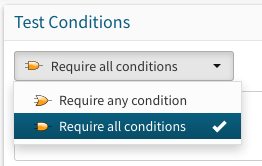
- Test Conditions – You have two options
Require any conditionandRequire all conditions
- Association Requests – Here you can specify a particular device, interface, etc. You can also do any device in your inventory if you want, but that COULD get noisy.
In my example, I am looking for condition that is notequal to up from ifOperStatus (essentially a Up/Down in the Cisco world).
Now you will need to Add Checker on the bottom.
Setting up the Contact
This is the email address that will receive these particular alerts. You can have network related alerts go to your networking teams but you may be monitoring a server and when the space is getting close to maxing out, maybe send those to your server or storage team.

On the top bar, you should see the Contacts button.
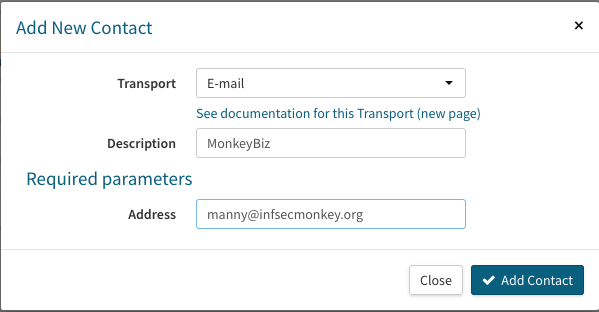
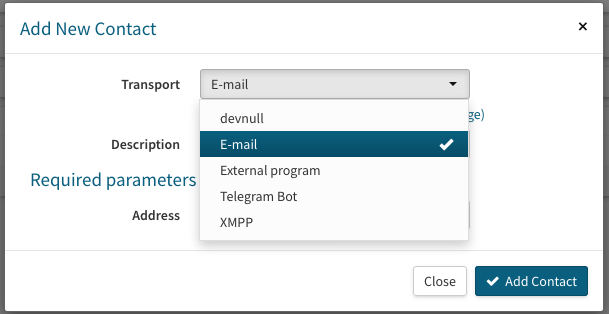
I chose E-Mail since this is the medium I want to receive this particular notification on, however there are more options via the drop-down.
Associating the Contact
Now that we have the checker and the contact, we need to associate the two. Although you could absolutely create the contact first and then the checker in one step, I just happened to do it this way because I was writing this article and did not want to use my real contact that I use to receive emails and did not think about it until after….. but I digress.

Going back into the Alert Checkers section and choosing your Alert Checker you will see the Associations button.
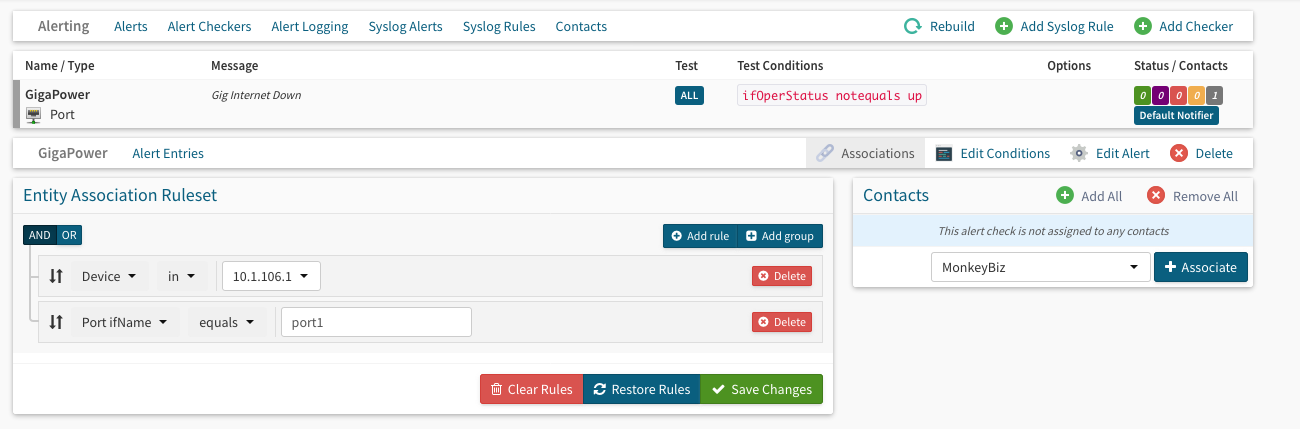
Once there, choose the Contact that you created in the previous section. You CAN choose to Add All but this could cause a lot of noise and in a group environment you could have a waste of time with multiple people checking the alerts.
Finally you will need to hit the rebuild button. It does not take you down and will take a few seconds. Click the Rebuild now button.

Hope this helps.
Recent posts
-

-

DNS is one of those technologies that quietly underpins... Full Story
-

BGP issues on FortiGate firewalls usually trace back to... Full Story
-

Every time your laptop talks to your router, a... Full Story
-

If you've spent any time configuring NAT on a... Full Story
-

If you have spent any time configuring firewall policies... Full Story
-

High availability on FortiGate is one of those features... Full Story
-

If you've configured SD-WAN on a FortiGate, you've almost... Full Story
-

FortiLink is the management protocol that turns a FortiSwitch... Full Story
-

FortiSwitches are pretty rock solid from Mean Time Between... Full Story
-

This is a quicky tip. Have you ever gone... Full Story
-

DNS is one of those quiet pieces of internet... Full Story
-

This article is an updated version of the previous... Full Story
-

You will add ns2 as a secondary (slave) BIND9... Full Story
-

In the process of deploying my lab, I needed... Full Story
-

RFC 8805, used to be known as Self-Correcting IP... Full Story
-

Years back, I wrote an article about certificate pinning. ... Full Story
-

FortiGates have the ability to send alerts to Microsoft... Full Story
-

In this post, I am going to walk through... Full Story
-

Troubleshooting VoIP on a FortiGate can feel like trying... Full Story
-

Prior to FortiOS 7.0, there were three commands to... Full Story
-

In this post, I am going to go over... Full Story
-

What we are going to do: We are going... Full Story
-

Choosing between FGCP (FortiGate Clustering Protocol) and FGSP (FortiGate... Full Story
-

Creating a VLAN on macOS (The "Pro" Move) A... Full Story
-

This blog post explores the logic behind how macOS... Full Story
-

Pretty Fly for a Wi-Fi Tell My Wi-Fi Love... Full Story
-

Part of my daily gig is creating BoMs (Bill-of-Materials)... Full Story
-

ICMP introduces several security risks, but careful filtering, rate... Full Story
-

The command diag debug application dhcps -1 enables full... Full Story
-

In the world of FortiOS, execute tac report is... Full Story
-

LLDP; What is it The Link Layer Discovery Protocol... Full Story
-

What it actually does When you run diagnose fdsm... Full Story
-

Monkey Bites are bite-sized, high-impact security insights designed for... Full Story
-

I have run macOS in macOS with Parallels but... Full Story
-

Don't be confused with my other FortiNAC posts where... Full Story
-

This is the third session in a multi-part article... Full Story
-

Today I was configuring key-based authentication on a FortiGate... Full Story
-

Netcat, often called the "Swiss Army knife" of networking,... Full Story
-

At its core, IEEE 802.1X is a network layer... Full Story
-

In case you did not see the previous FortiNAC... Full Story
-

This is our 5th session where we are going... Full Story
-

Now that we have Wireshark installed and somewhat configured,... Full Story
-

The Philosophy of Packet Analysis Troubleshooting isn't about looking... Full Story
-

Executive Summary Objective: Get you from zero to writing... Full Story
-

NAND cells, the flash translation layer, SLC caching, TRIM,... Full Story
-

Nmap Scripting Engine (NSE): From One-Liners to Your First... Full Story