
If you've spent any time configuring user authentication on... Full Story
By Manny Fernandez
June 9, 2026
The Complete Guide to Ethernet and Fiber Cabling: Categories, Uses, and Limitations
Cabling is the part of the network everyone forgets until it breaks. You can buy the fastest firewall and the most expensive switch on the market, but if the physical layer cannot move the bits, none of it matters. This guide walks through copper Ethernet categories and the major fiber types, what each is good for, and where each one runs out of road.
Why the Physical Layer Still Matters
Every protocol you care about, from BGP to TLS, eventually rides on a physical medium. The medium sets hard ceilings on bandwidth, distance, and noise immunity. Picking the wrong cable does not produce a clean failure. It produces intermittent retransmits, CRC errors, and link flaps that waste hours of troubleshooting. Choosing correctly the first time is the cheapest performance upgrade you will ever make.
Copper Ethernet: The CAT Categories
Twisted-pair copper cabling is rated in categories, abbreviated CAT. Each category defines the conductor quality, twist rate, shielding options, and tested frequency. Higher categories support higher frequencies, which translates into more bandwidth over a given distance.
CAT5 (Obsolete)
The original workhorse of 100 Mbps networks. CAT5 is rated to 100 MHz and supported Fast Ethernet. It has been superseded everywhere and should not be installed in any new project. If you find it in a building, treat it as a candidate for replacement.
– Max speed: 100 Mbps
– Bandwidth: 100 MHz
– Max distance: 100 meters
– Status: Deprecated, do not deploy
CAT5e (Enhanced)
CAT5e tightened the specifications on crosstalk and is still extremely common in existing installations. It comfortably carries Gigabit Ethernet and remains a reasonable choice for cost-sensitive runs that will never need more than 1 Gbps.
– Max speed: 1 Gbps
– Bandwidth: 100 MHz
– Max distance: 100 meters
– Best for: Workstations, IP phones, access points that do not need multi-gig
CAT6
CAT6 doubles the tested bandwidth to 250 MHz and introduces a longitudinal separator (the plastic spline) to reduce internal crosstalk. It supports 10 Gbps, but only over a reduced distance of about 55 meters. Beyond that, it falls back to Gigabit speeds.
– Max speed: 10 Gbps (up to 55 m), 1 Gbps (up to 100 m)
– Bandwidth: 250 MHz
– Max distance: 100 meters (with the 10G caveat above)
– Best for: New office cabling where some future multi-gig headroom is wanted
CAT6a (Augmented)
CAT6a is the current sweet spot for high-performance copper. It sustains 10 Gbps across the full 100 meter run and is rated to 500 MHz. The tradeoff is a thicker, stiffer, heavier cable that is harder to route and terminate. It is the default recommendation for new 10G horizontal cabling.
– Max speed: 10 Gbps
– Bandwidth: 500 MHz
– Max distance: 100 meters
– Best for: 10G to the desk, dense access points, server access where fiber is overkill
CAT7 and CAT7a
CAT7 raised bandwidth to 600 MHz (CAT7a to 1000 MHz) and mandated full shielding on each pair plus an overall shield. The catch is that CAT7 uses non-standard GG45 or TERA connectors and was never ratified by TIA, so it never gained mainstream adoption. In most modern designs, CAT6a or a jump to CAT8 makes more sense.
– Max speed: 10 Gbps
– Bandwidth: 600 to 1000 MHz
– Max distance: 100 meters
– Status: Niche, largely bypassed by the market
CAT8
CAT8 is built for the data center top-of-rack to server use case. It supports 25 Gbps and 40 Gbps but only over a short 30 meter distance, and it requires full shielding. It is not intended for general horizontal cabling.
– Max speed: 25 to 40 Gbps
– Bandwidth: 2000 MHz
– Max distance: 30 meters
– Best for: Short data center server-to-switch links
Shielding Terminology
Copper cable shielding is described with a U/F/S notation. The first letter is the overall cable shield, the second is the individual pair shield.
– UTP: Unshielded twisted pair. Cheapest, most flexible, most common in offices.
– FTP / F/UTP: Foil around the whole bundle.
– STP / S/FTP: Braided overall shield plus foil around each pair. Best noise immunity, used in industrial and high-interference environments.
Shielding helps in electrically noisy environments, but it only works if the shield is properly bonded and grounded at the terminations. A floating shield can make things worse, not better.
Copper Limitations You Cannot Engineer Around
– The 100 meter wall. Standard Ethernet over copper is capped at 100 meters per run, including patch cords. This is a fundamental limit, not a guideline.
– Electromagnetic interference. Copper is an antenna. Run it next to fluorescent ballasts, motors, or power lines and you invite errors.
– No galvanic isolation. Copper carries voltage. A lightning strike or ground potential difference between buildings can fry equipment on both ends, which is exactly why inter-building links should be fiber.
– Bandwidth ceiling. Even CAT8 tops out at 40 Gbps over 30 meters. For anything faster or longer, fiber is the only option.
– Power over Ethernet heat. Bundling many PoE cables raises temperature, which degrades the distance and performance ratings.
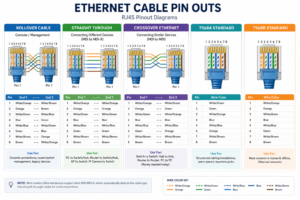
Pinouts
Fiber Optic Cabling
Fiber transmits light through a glass or plastic core rather than electrical signals through copper. This gives it three superpowers: immunity to electromagnetic interference, far greater distance, and far greater bandwidth. The two top-level families are multimode and single-mode.
Multimode Fiber (MMF)
Multimode has a wide core (typically 50 microns) that lets multiple light paths, or modes, travel at once. It is used with lower-cost light sources such as VCSELs and is the economical choice for short reaches inside a building or data center. Its limitation is modal dispersion: as distance grows, the multiple paths smear the signal and limit bandwidth.
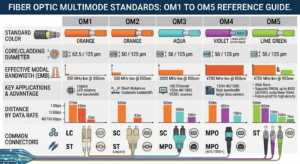
Multimode is graded with OM designations:
– OM1: 62.5 micron core, orange jacket, legacy only.
– OM2: 50 micron, orange jacket, legacy.
– OM3: 50 micron, aqua jacket, laser optimized. 10G to 300 m, 40/100G to 100 m.
– OM4: 50 micron, aqua or violet jacket. 10G to 400 m, 40/100G to 150 m.
– OM5: 50 micron, lime green jacket. Adds wideband support for shortwave division multiplexing.
– Best for: Data center fabric, building backbones, switch-to-switch links under a few hundred meters
– Limitation: Distance shrinks sharply as speed rises
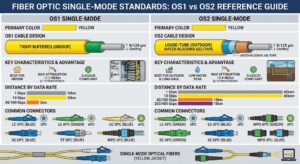
Single-Mode Fiber (SMF)
Single-mode has a tiny core (around 9 microns) that permits only one light path. This eliminates modal dispersion and allows enormous distances, from kilometers to tens of kilometers and beyond with the right optics. It uses more expensive laser optics, but the fiber itself is often cheaper than multimode. It is the standard for carrier, campus, and any long-haul link.
The common designations are OS1 (indoor, tight buffered) and OS2 (outdoor, loose tube, lower loss for long runs).
– OS1: Indoor use, up to roughly 10 km.
– OS2: Outdoor and long haul, 10 km and well beyond depending on optics.
– Best for: Inter-building links, campus backbones, metro and long-haul, anything over a few hundred meters
– Limitation: Optics cost more, and the small core demands more precise, cleaner terminations
When we talk about microns (abbreviated as µm) in fiber optic cabling, we are referring to the unit of measurement used to define the physical thickness specifically the diameter of the fiber strand’s internal components.
A micron is one-millionth of a meter (), or one-thousandth of a millimeter. To put that into perspective, a human hair is roughly 50 to 100 microns in diameter. In fiber optics, measuring at this microscopic scale is critical because the wavelengths of light used to transmit data are also measured in nanometers and microns.
Choosing Between Copper and Fiber
| Factor | Copper Wins | Fiber Wins |
| Cost per port | Yes, for low speeds | No |
| Distance | No, capped at 100 m | Yes, kilometers |
| EMI immunity | No | Yes |
| Bandwidth ceiling | No | Yes |
| Powering devices (PoE) | Yes | No |
| Inter-building safety | No | Yes, no ground loops |
| Termination simplicity | Yes | No, needs care |
A practical rule of thumb: use copper for the last 100 meters to endpoints and for PoE devices, and use fiber for any backbone, any inter-building run, and any link that needs more than 10 Gbps or more than 100 meters.
Connector Quick Reference
– RJ45: The universal copper Ethernet connector.
– LC: Small form factor fiber connector, the dominant choice today, often duplex.
– SC: Older square push-pull fiber connector, still common in patch panels.
– MPO / MTP: Multi-fiber connector used for 40G and 100G breakout and high-density trunks.
Closing Thoughts
The right cable is the one that meets your distance, speed, and environmental needs with the least cost and complexity, and with a little headroom for the next refresh cycle. For most new horizontal runs, CAT6a covers copper. For backbones and anything between buildings, fiber is not optional, it is the correct engineering answer. Get the physical layer right and the rest of the stack has a fighting chance.
Recent posts
-

-

DNS is one of those technologies that quietly underpins... Full Story
-

BGP issues on FortiGate firewalls usually trace back to... Full Story
-

Every time your laptop talks to your router, a... Full Story
-

If you've spent any time configuring NAT on a... Full Story
-

If you have spent any time configuring firewall policies... Full Story
-

High availability on FortiGate is one of those features... Full Story
-

If you've configured SD-WAN on a FortiGate, you've almost... Full Story
-

FortiLink is the management protocol that turns a FortiSwitch... Full Story
-

FortiSwitches are pretty rock solid from Mean Time Between... Full Story
-

This is a quicky tip. Have you ever gone... Full Story
-

DNS is one of those quiet pieces of internet... Full Story
-

This article is an updated version of the previous... Full Story
-

You will add ns2 as a secondary (slave) BIND9... Full Story
-

In the process of deploying my lab, I needed... Full Story
-

RFC 8805, used to be known as Self-Correcting IP... Full Story
-

Years back, I wrote an article about certificate pinning. ... Full Story
-

FortiGates have the ability to send alerts to Microsoft... Full Story
-

In this post, I am going to walk through... Full Story
-

Troubleshooting VoIP on a FortiGate can feel like trying... Full Story
-

Prior to FortiOS 7.0, there were three commands to... Full Story
-

In this post, I am going to go over... Full Story
-

What we are going to do: We are going... Full Story
-

Choosing between FGCP (FortiGate Clustering Protocol) and FGSP (FortiGate... Full Story
-

Creating a VLAN on macOS (The "Pro" Move) A... Full Story
-

This blog post explores the logic behind how macOS... Full Story
-

Pretty Fly for a Wi-Fi Tell My Wi-Fi Love... Full Story
-

Part of my daily gig is creating BoMs (Bill-of-Materials)... Full Story
-

ICMP introduces several security risks, but careful filtering, rate... Full Story
-

The command diag debug application dhcps -1 enables full... Full Story
-

In the world of FortiOS, execute tac report is... Full Story
-

LLDP; What is it The Link Layer Discovery Protocol... Full Story
-

What it actually does When you run diagnose fdsm... Full Story
-

Monkey Bites are bite-sized, high-impact security insights designed for... Full Story
-

I have run macOS in macOS with Parallels but... Full Story
-

Don't be confused with my other FortiNAC posts where... Full Story
-

This is the third session in a multi-part article... Full Story
-

Today I was configuring key-based authentication on a FortiGate... Full Story
-

Netcat, often called the "Swiss Army knife" of networking,... Full Story
-

At its core, IEEE 802.1X is a network layer... Full Story
-

In case you did not see the previous FortiNAC... Full Story
-

This is our 5th session where we are going... Full Story
-

Now that we have Wireshark installed and somewhat configured,... Full Story
-

The Philosophy of Packet Analysis Troubleshooting isn't about looking... Full Story
-

In this guide Executive Summary Prerequisites: Which vi Do... Full Story
-

Objective: Strip blank and whitespace-only lines out of config... Full Story
-

In this guide Executive Summary Prerequisites and Architecture How... Full Story