
If you've spent any time configuring user authentication on... Full Story
By Manny Fernandez
June 7, 2026
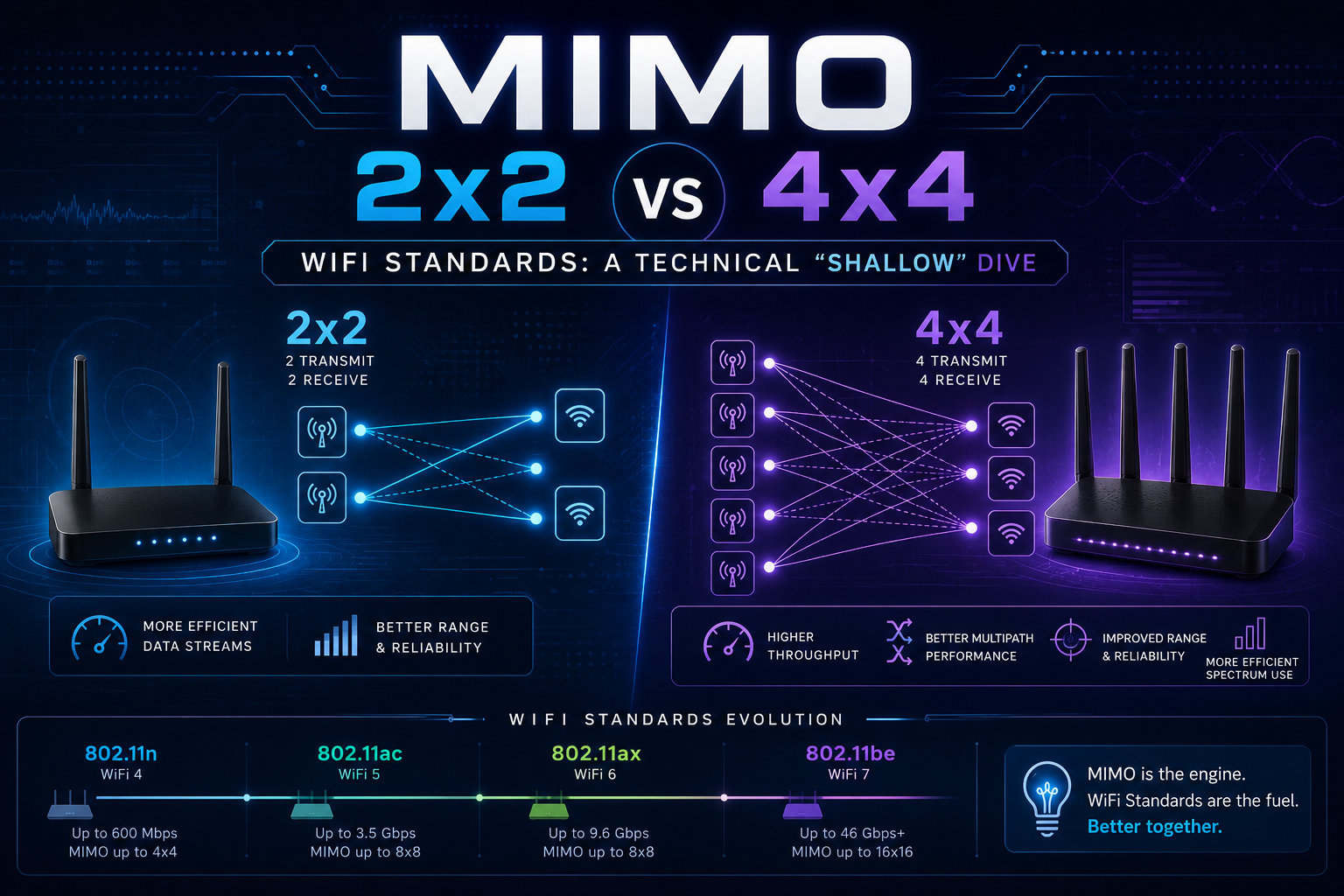
MIMO, 2×2 vs 4×4, and WiFi Standards: A Technical “Shallow” Dive
What MIMO Actually Does
Multiple Input, Multiple Output (MIMO) is the technique of using more than one antenna at both the transmitter and receiver to send and receive multiple independent data streams over the same radio channel at the same time. It is one of the foundational technologies that took WiFi from tens of megabits to multiple gigabits per second.
The key insight is that radio waves bounce. In any real environment, signals reflect off walls, furniture, and ceilings, arriving at the receiver along many different paths and at slightly different times. Older single-antenna systems treated this multipath as a problem to be fought. MIMO treats it as a resource. By placing antennas a fraction of a wavelength apart and applying digital signal processing, a MIMO system can mathematically separate signals that traveled different paths, effectively creating parallel pipes through the same slice of spectrum.
MIMO delivers three distinct benefits, and it is worth keeping them separate because they are often blurred together:
1. Spatial multiplexing. Sending different data on each stream to multiply throughput. This is the headline benefit.
2. Spatial diversity. Sending the same data on multiple paths so the receiver can combine them for a more reliable signal, improving range and resilience.
3. Beamforming. Shaping the combined transmission to focus energy toward a specific client rather than radiating equally in all directions.
A single MIMO radio uses these in combination depending on conditions. A client at the edge of coverage benefits from diversity and beamforming; a client close to the access point with a clean signal benefits from multiplexing.
Reading MIMO Notation: The aXb Format
MIMO configurations are written as `transmit x receive`, sometimes with a third number.
|
Notation |
Transmit |
Receive |
Spatial streams |
|
|
1 |
1 |
1 |
|
|
2 |
2 |
|
|
|
3 |
3 |
|
|
|
4 |
4 |
|
4x4:4 |
4 |
4 |
|
The first number is transmit chains, the second is receive chains. When a third number appears (for example 4x4:4), it states the number of spatial streams explicitly, because a device can have more antennas than streams. Antennas you cannot turn into independent streams still help with diversity and beamforming, but they do not add multiplexed throughput.
The number of usable spatial streams is capped by the smaller antenna count of the two endpoints. This is the single most important practical rule in MIMO.
2×2 vs 4×4: The Real Difference
On paper, 4x4 doubles the spatial streams of 2x2 and therefore can roughly double the peak data rate of a single link. A 2x2 client and a 4x4 client connected to the same access point under identical conditions will differ in peak throughput by about 2x, because the 4x4 device can carry four parallel streams while the 2x2 device carries two.
But the link is negotiated to the lowest common denominator. If your access point is 4x4 and your phone is 2x2, the link runs at 2x2. The extra two chains on the access point are not wasted, though. They contribute to:
– Better beamforming resolution, focusing energy more precisely toward the client.
– Improved receive diversity, since the AP has four antennas listening even when only two streams are in use.
– More headroom for MU-MIMO, where the spare chains serve other clients simultaneously.
This is why 4x4 access points remain valuable in dense environments even though almost no handheld client is 4x4. Phones and tablets are typically 1×1 or 2x2 due to space, antenna isolation, and battery constraints. Laptops are often 2x2. Dedicated 4x4 clients are rare outside of high-end APs talking to each other or specialized hardware.
The practical takeaway for design: 4x4 buys you aggregate capacity and coverage quality in multi-client settings far more than it buys any single user raw speed.
Single-User vs Multi-User MIMO
Early MIMO (802.11n) was single-user only. All spatial streams went to one client at a time. 802.11ac Wave 2 introduced downlink MU-MIMO, letting an AP transmit to multiple clients simultaneously using different spatial streams. 802.11ax (WiFi 6) extended MU-MIMO to the uplink and combined it with OFDMA. This is where extra antenna chains on an AP pay off most: a 4×4 AP can, for example, serve two 2×2 clients at full rate at the same time rather than time-slicing between them.
WiFi Standards: The 802.11 Family
WiFi is defined by the IEEE 802.11 family of standards. The WiFi Alliance introduced simplified generation names (WiFi 4, 5, 6) starting in 2018 to make the lineage easier to follow.
| Generation |
IEEE |
Year |
Bands |
Max streams | Key feature |
| legacy | 802.11b |
1999 |
2.4 GHz |
1 |
First mass-market WiFi |
| legacy | 802.11a |
1999 |
5 GHz |
1 |
5 GHz, OFDM |
| legacy | 802.11g |
2003 |
2.4 GHz |
1 |
OFDM on 2.4 GHz |
| WiFi 4 | 802.11n |
2009 |
2.4 / 5 GHz |
4 |
Introduced MIMO, 40 MHz |
| WiFi 5 | 802.11ac |
2013 |
5 GHz |
8 |
MU-MIMO DL, 160 MHz, 256-QAM |
| WiFi 6 | 802.11ax |
2019 |
2.4 / 5 GHz |
8 |
OFDMA, UL MU-MIMO, 1024-QAM |
| WiFi 6E | 802.11ax |
2020 |
2.4 / 5 / 6 GHz |
8 |
Extends WiFi 6 into 6 GHz |
| WiFi 7 | 802.11be |
2024 |
2.4 / 5 / 6 GHz |
16 |
320 MHz, MLO, 4096-QAM |
What Changed and Why It Matters
The progression is not just bigger numbers. Each generation attacked a different bottleneck.
802.11n (WiFi 4) brought MIMO to the mainstream and added channel bonding, doubling channel width from 20 to 40 MHz. This is the generation where the aXb notation started mattering to buyers.
802.11ac (WiFi 5) stayed in 5 GHz where more spectrum is available, widened channels to 80 and optionally 160 MHz, raised modulation to 256-QAM (more bits per symbol), and introduced downlink MU-MIMO so an AP could talk to several clients at once.
802.11ax (WiFi 6) shifted focus from peak speed to efficiency in crowded environments. Its signature feature, OFDMA, divides a channel into smaller resource units so the AP can serve many clients in a single transmission rather than one at a time. This is why WiFi 6 shines in offices, stadiums, and apartments where airtime contention, not raw link speed, is the real limit. It also added uplink MU-MIMO and 1024-QAM, and brought efficiency gains back to the 2.4 GHz band.
WiFi 6E is the same 802.11ax technology granted access to the newly opened 6 GHz band, which provides a large block of clean spectrum with room for many wide, non-overlapping channels and far less legacy interference.
802.11be (WiFi 7) pushes channels to 320 MHz, raises modulation to 4096-QAM, and introduces Multi-Link Operation (MLO), which lets a device use multiple bands simultaneously for higher throughput and lower latency. It doubles the maximum spatial streams to 16.
Bands in Brief
– 2.4 GHz. Longest range, best wall penetration, but narrow and crowded with only three non-overlapping 20 MHz channels and heavy interference from legacy and non-WiFi devices.
– 5 GHz. More channels and wider bandwidth, shorter range, the workhorse band for most modern WiFi.
– 6 GHz. Newest, largest contiguous block of spectrum, very clean, but the shortest range and limited to WiFi 6E and 7 clients.
Recent posts
-

-

DNS is one of those technologies that quietly underpins... Full Story
-

BGP issues on FortiGate firewalls usually trace back to... Full Story
-

Every time your laptop talks to your router, a... Full Story
-

If you've spent any time configuring NAT on a... Full Story
-

If you have spent any time configuring firewall policies... Full Story
-

High availability on FortiGate is one of those features... Full Story
-

If you've configured SD-WAN on a FortiGate, you've almost... Full Story
-

FortiLink is the management protocol that turns a FortiSwitch... Full Story
-

FortiSwitches are pretty rock solid from Mean Time Between... Full Story
-

This is a quicky tip. Have you ever gone... Full Story
-

DNS is one of those quiet pieces of internet... Full Story
-

This article is an updated version of the previous... Full Story
-

You will add ns2 as a secondary (slave) BIND9... Full Story
-

In the process of deploying my lab, I needed... Full Story
-

RFC 8805, used to be known as Self-Correcting IP... Full Story
-

Years back, I wrote an article about certificate pinning. ... Full Story
-

FortiGates have the ability to send alerts to Microsoft... Full Story
-

In this post, I am going to walk through... Full Story
-

Troubleshooting VoIP on a FortiGate can feel like trying... Full Story
-

Prior to FortiOS 7.0, there were three commands to... Full Story
-

In this post, I am going to go over... Full Story
-

What we are going to do: We are going... Full Story
-

Choosing between FGCP (FortiGate Clustering Protocol) and FGSP (FortiGate... Full Story
-

Creating a VLAN on macOS (The "Pro" Move) A... Full Story
-

This blog post explores the logic behind how macOS... Full Story
-

Pretty Fly for a Wi-Fi Tell My Wi-Fi Love... Full Story
-

Part of my daily gig is creating BoMs (Bill-of-Materials)... Full Story
-

ICMP introduces several security risks, but careful filtering, rate... Full Story
-

The command diag debug application dhcps -1 enables full... Full Story
-

In the world of FortiOS, execute tac report is... Full Story
-

LLDP; What is it The Link Layer Discovery Protocol... Full Story
-

What it actually does When you run diagnose fdsm... Full Story
-

Monkey Bites are bite-sized, high-impact security insights designed for... Full Story
-

I have run macOS in macOS with Parallels but... Full Story
-

Don't be confused with my other FortiNAC posts where... Full Story
-

This is the third session in a multi-part article... Full Story
-

Today I was configuring key-based authentication on a FortiGate... Full Story
-

Netcat, often called the "Swiss Army knife" of networking,... Full Story
-

At its core, IEEE 802.1X is a network layer... Full Story
-

In case you did not see the previous FortiNAC... Full Story
-

This is our 5th session where we are going... Full Story
-

Now that we have Wireshark installed and somewhat configured,... Full Story
-

The Philosophy of Packet Analysis Troubleshooting isn't about looking... Full Story
-

Executive Summary Objective: Get you from zero to writing... Full Story
-

NAND cells, the flash translation layer, SLC caching, TRIM,... Full Story
-

Nmap Scripting Engine (NSE): From One-Liners to Your First... Full Story