
If you've spent any time configuring user authentication on... Full Story
By Manny Fernandez
July 20, 2026
Securing Email with DNS: A Practitioner’s Guide to SPF, DKIM, DMARC and the Modern Authentication Stack
Executive Summary
Objective
This guide walks you end to end through the DNS-published controls that authenticate email and stop domain spoofing: SPF, DKIM and DMARC as the core trust triangle, plus the transport and brand layers (MTA-STS, TLS-RPT, BIMI, DANE) that increasingly round out a mature deployment. You will publish each record, validate it from the command line, read the receiver verdicts, and safely walk a domain from monitoring to full enforcement without breaking legitimate mail.
Why it matters: these are no longer optional hygiene. They are the difference between your mail reaching the inbox and being silently rejected by the world’s largest mailbox providers.
Target Audience
Network and systems engineers, DNS administrators, messaging and email deliverability specialists, DevOps and platform teams responsible for outbound mail, and security practitioners running anti-phishing or brand-protection programs.
Why now (the enforcement timeline): In February 2024, Google and Yahoo began requiring bulk senders (roughly 5,000+ messages per day to their consumer accounts) to publish SPF, DKIM and a DMARC record at a minimum policy of p=none, with at least one authentication method aligned. On May 5, 2025, Microsoft applied the same bar to outlook.com, hotmail.com and live.com, rejecting non-compliant bulk mail with 550 5.7.515. The bulk-sender thresholds also mandate one-click unsubscribe (RFC 8058) and spam complaint rates under 0.3%. If you send transactional or marketing mail at any scale, treat the full triangle as mandatory.
Prerequisites & Architecture
Assumed Knowledge
- Comfort editing DNS zones (TXT, MX, CNAME, PTR records) at your authoritative provider or on BIND/PowerDNS/Route 53/Cloudflare.
- A working mental model of SMTP mail flow: the MAIL FROM (envelope, RFC 5321) versus the visible From: header (RFC 5322).
- Command-line familiarity with dig or nslookup, and ideally openssl and swaks for live testing.
- An inventory mindset: you must know every system that sends mail as your domain before you enforce anything.
Environment & Lab Requirements
- A domain you control with delegated authoritative DNS. Everything here is published in that zone.
- Access to your sending platforms: Google Workspace, Microsoft 365, and/or an ESP such as SendGrid, Mailgun, Amazon SES, Klaviyo, Postmark. DKIM signing is enabled inside these consoles, not in DNS alone.
- A test mailbox at Gmail and Outlook so you can read real receiver verdicts via “Show original” / message headers.
- A DMARC report processor (self-hosted parser, or a managed service such as dmarcian, Valimail, EasyDMARC, PowerDMARC, Red Sift) so the aggregate XML is human-readable.
- For MTA-STS/BIMI: an HTTPS web host able to serve a policy file and an SVG logo over a valid TLS certificate. For DANE: a DNSSEC-signed zone.
- Client tooling: dig, openssl, swaks, and optionally python3 for a quick SPF lookup counter.
Component Table
Throughout this guide the example domain is example.com, its sending host is mail.example.com, and an authorized sending IP is 203.0.113.10. Substitute your own values.
| Control | DNS Location (example) | Type | Role |
|---|---|---|---|
| SPF | example.com | TXT | Authorizes which IPs and hosts may send from the envelope (MAIL FROM) domain. |
| DKIM | selector1._domainkey.example.com | TXT | Publishes the public key that verifies the message signature and body integrity. |
| DMARC | _dmarc.example.com | TXT | Ties SPF/DKIM to the visible From, sets the failure policy, and requests reports. |
| MTA-STS (record) | _mta-sts.example.com | TXT | Signals that an MTA-STS policy exists and carries a version id for cache refresh. |
| MTA-STS (policy) | mta-sts.example.com/.well-known/mta-sts.txt | HTTPS | Forces TLS on inbound SMTP and pins your valid MX hostnames. |
| TLS-RPT | _smtp._tls.example.com | TXT | Requests reports on TLS negotiation and MTA-STS policy failures. |
| BIMI | default._bimi.example.com | TXT | Publishes the brand logo (SVG) and certificate for inbox display. Requires DMARC enforcement. |
| DANE (TLSA) | _25._tcp.mail.example.com | TLSA | Binds the receiving MX TLS certificate via DNSSEC. A DNSSEC-native alternative to MTA-STS. |
| PTR / FCrDNS | 10.113.0.203.in-addr.arpa | PTR | Reverse DNS that forward-confirms the sending IP. A reputation prerequisite at Gmail/Outlook. |
How a Receiver Evaluates a Message
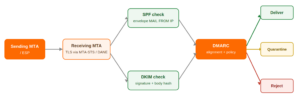
SPF, DKIM and DMARC solve different problems and are checked in a specific order. SPF asks “is this IP allowed to send for the envelope domain?” DKIM asks “was this message signed by a key the From domain published, and was it modified in transit?” DMARC then asks the question that actually matters to a phishing victim: “does the domain the human sees in the From header match a domain that just passed SPF or DKIM?” That last step is called alignment, and it is the reason SPF and DKIM alone do not stop spoofing.
Step-by-Step Implementation Workflow
The single most common way to break your own mail is to publish an enforcing DMARC policy before you know every legitimate source. Work the phases in order. Do not skip Phase 0.
Phase 0: Inventory Every Sending Source
Goal: Build a complete list of everything that sends mail as your domain: mail platform, marketing ESP, CRM, ticketing system, billing, monitoring alerts, on-prem apps.
Action: Interview owners, review your existing SPF record for hints, and confirm each platform’s documented sending IPs and DKIM signing capability. You cannot authorize what you have not enumerated.
Check what is already published:
dig +short TXT example.com
dig +short TXT _dmarc.example.com
dig +short MX example.com
Phase 1: Publish SPF
Goal: Declare exactly which servers are permitted to send from the envelope (MAIL FROM) domain, and instruct receivers to fail everything else.
Action: Publish a single TXT record at the domain apex. Only one SPF record may exist per domain. Combine every source into one record using include:, ip4:, and ip6: mechanisms.
; Zone record for example.com (apex)
example.com.  IN  TXT  "v=spf1 include:_spf.google.com include:sendgrid.net ip4:203.0.113.10 -all"
Mechanism and qualifier reference:
- -all hard fail (recommended once you are confident). ~all soft fail (use during rollout). ?all neutral. Never use +all, which authorizes the entire internet to spoof you.
- include: pulls in a provider’s record. Each include, a, mx, ptr and exists costs a DNS lookup. The hard ceiling is 10 lookups total (see Gotchas).
- Avoid the deprecated ptr mechanism entirely.
GUI verification: In Google Workspace, sending IPs come from the published _spf.google.com include. In Microsoft 365, use Admin center → Settings → Domains and add the include:spf.protection.outlook.com value it generates. At your DNS host, confirm the record appears as a single TXT string on the apex.
Phase 2: Enable and Publish DKIM
Goal: Cryptographically sign outbound mail so receivers can prove it came from a key your domain published and was not altered in transit. DKIM is the durable half of the triangle because, unlike SPF, it survives most forwarding.
Action: Generate a key pair inside each sending platform (do not hand-roll unless you run your own MTA). The platform holds the private key and signs; you publish the public key at a selector. Use a distinct selector per platform so you can isolate and rotate independently. Prefer 2048-bit RSA.
; Public key published as a TXT record at the selector
selector1._domainkey.example.com.  IN  TXT  "v=DKIM1; k=rsa; p=MIIBIjANBgkqhkiG9w0BAQEFAAOCAQ8AMIIBCgKCAQEArsT...QIDAQAB"

; Self-managed MTA example: generate the pair with openssl
;   openssl genrsa -out dkim.private 2048
;   openssl rsa -in dkim.private -pubout -out dkim.public
GUI verification: Google Workspace → Apps → Google Workspace → Gmail → Authenticate email, then click Start authentication after the TXT is live. Microsoft 365 → Defender portal → Email & collaboration → Policies & rules → Threat policies → Email authentication settings → DKIM, then toggle signing to Enabled. Most ESPs show a green “Verified” state on the domain page once the CNAME or TXT propagates.
Phase 3: Publish DMARC in Monitoring Mode
Goal: Turn on visibility without changing mail flow. A p=none policy tells receivers “take no action, but send me reports.” This is also the minimum bar the bulk-sender mandates require.
Action: Publish a TXT record at the _dmarc subdomain.
_dmarc.example.com. IN TXT "v=DMARC1; p=none; rua=mailto:dmarc-rua@example.com; ruf=mailto:dmarc-ruf@example.com; fo=1; adkim=r; aspf=r; pct=100; sp=none"Tag reference:
- p policy for the organizational domain: none, quarantine, or reject.
- sp policy for subdomains. If omitted it inherits p. Set it explicitly so an unused subdomain cannot be spoofed.
- rua aggregate report address (the useful daily XML). ruf forensic/failure reports (rarely sent now due to privacy).
- adkim / aspf alignment mode: r relaxed (organizational-domain match, the default) or s strict (exact match).
- pct percentage of mail the policy applies to. Use this to ramp enforcement gradually.
- fo=1 requests a failure report when either mechanism fails to produce an aligned pass.
External destination note: If rua points to a mailbox on a different domain (for example a managed DMARC service), that domain must publish an authorization record, or the reports will not be sent. See the DMARC gotcha below.
Phase 4: Read Reports and Remediate
Goal: Over one to four weeks of aggregate reports, identify every legitimate source that is failing alignment and fix it, until only mail you do not recognize is failing.
Action: Feed the XML into a parser or service. For each failing source, decide: add it to SPF, enable DKIM signing for it, or (if it is spoofing) leave it to be blocked. The finish line for this phase is “100% of legitimate mail passes DMARC.”
Phase 5: Ramp to Enforcement
Goal: Move the policy from monitoring to blocking, in controlled steps, so spoofed mail is actually stopped.
Action: Progress the record over successive maintenance windows, watching reports at each stage.
; Step 1: quarantine a slice of failing mail
"v=DMARC1; p=quarantine; pct=25; rua=mailto:dmarc-rua@example.com; adkim=s; aspf=s; sp=quarantine"

; Step 2: quarantine everything failing
"v=DMARC1; p=quarantine; pct=100; rua=mailto:dmarc-rua@example.com; adkim=s; aspf=s; sp=quarantine"

; Step 3: full enforcement
"v=DMARC1; p=reject; pct=100; rua=mailto:dmarc-rua@example.com; adkim=s; aspf=s; sp=reject"
Tighten adkim/aspf to strict only if your mail flow genuinely uses exact-match domains. Relaxed is correct for most environments that send from subdomains.
Phase 6: Enforce Inbound TLS with MTA-STS and TLS-RPT
Goal: SPF/DKIM/DMARC authenticate the sender. MTA-STS protects the transport by requiring senders to use TLS to your MX and to verify its certificate, defeating downgrade and man-in-the-middle attacks. TLS-RPT gives you telemetry on failures.
Action: Publish two DNS records and host one policy file over HTTPS. Start in testing mode, then move to enforce.
; DNS: signals a policy exists (bump the id whenever the policy file changes)
_mta-sts.example.com.   IN  TXT  "v=STSv1; id=20260720T120000Z;"

; DNS: where to send TLS failure reports
_smtp._tls.example.com. IN  TXT  "v=TLSRPTv1; rua=mailto:tlsrpt@example.com"

; HTTPS: served at exactly https://mta-sts.example.com/.well-known/mta-sts.txt
version: STSv1
mode: enforce
mx: mail.example.com
mx: *.example.net
max_age: 604800
The policy file must be served over a valid certificate on the mta-sts. hostname. The mx lines must list every hostname a sender may legitimately connect to. max_age is the cache lifetime in seconds.
Phase 7: Display Your Logo with BIMI (Optional)
Goal: Show your verified brand logo next to authenticated mail in Gmail, Yahoo Mail, Apple Mail and Fastmail. BIMI is a display layer, not a security control: it only activates once DMARC is at enforcement. Note that Microsoft Outlook does not support BIMI as of mid-2026.
Prerequisites: DMARC at p=quarantine or p=reject with pct=100; an SVG Tiny Portable/Secure logo (square, roughly 24 to 32 KB); and a certificate. A VMC (Verified Mark Certificate) requires a registered trademark and unlocks the Gmail blue checkmark and Apple Mail display. A CMC (Common Mark Certificate), which Gmail began accepting in late 2024, needs only 12 months of documented public logo use but does not trigger the checkmark.
default._bimi.example.com. IN TXT "v=BIMI1; l=https://example.com/bimi/logo.svg; a=https://example.com/bimi/vmc.pem"Phase 8: DANE and ARC (Situational)
DANE (TLSA): If your zone is DNSSEC-signed, DANE binds your MX TLS certificate directly in DNS, providing the same downgrade protection as MTA-STS without relying on HTTPS-hosted policy. It requires DNSSEC end to end, so it is common in the EU and among providers with signed zones but less so elsewhere.
; TLSA for the receiving MX on port 25 (requires a DNSSEC-signed zone)
_25._tcp.mail.example.com.  IN  TLSA  3 1 1 abc123...def   ; DANE-EE, SPKI, SHA-256
ARC (Authenticated Received Chain, RFC 8617): Not a DNS record, but essential context. When a message passes through a forwarder or mailing list that modifies it, SPF and often DKIM break, and DMARC fails on the far side. ARC lets an intermediary vouch for the original authentication results by sealing them. The IETF is reclassifying ARC as Historic on paper, but Google, Microsoft and Apple still honor it in practice, so keep it enabled on any relaying infrastructure you run.
Verification & Validation
1. Confirm every record is live
dig +short TXT example.com                         # SPF
dig +short TXT selector1._domainkey.example.com    # DKIM
dig +short TXT _dmarc.example.com                  # DMARC
dig +short TXT _mta-sts.example.com                # MTA-STS record
dig +short TXT _smtp._tls.example.com              # TLS-RPT
dig +short TXT default._bimi.example.com           # BIMI
curl -sI https://mta-sts.example.com/.well-known/mta-sts.txt   # MTA-STS policy is reachable over TLS
2. Send a real message and read the verdict
Send from each platform to a Gmail and an Outlook test mailbox, open the message, and use “Show original” (Gmail) or view headers (Outlook). Or reproduce it from the shell with swaks:
swaks --to test@gmail.com \
      --from notify@example.com \
      --server mail.example.com \
      --tls
3. What success looks like
In the Authentication-Results header, you want all three passing and DMARC aligned:
Authentication-Results: mx.google.com;
   dkim=pass header.i=@example.com header.s=selector1;
   spf=pass smtp.mailfrom=notify@example.com;
dmarc=pass (p=REJECT sp=REJECT dis=NONE) header.from=example.com- dmarc=pass with header.from equal to your domain is the outcome that stops spoofing.
- For MTA-STS, a green result in a checker plus the absence of failure entries in your TLS-RPT feed confirms enforcement.
- For BIMI, the logo appearing in a Gmail test message (and the blue checkmark, if you hold a VMC) is the only true confirmation. Every BIMI failure is silent.
Troubleshooting & Gotchas
Gotcha 1: SPF PermError from too many lookups (or two SPF records)
Symptom: SPF returns permerror and DMARC then leans entirely on DKIM. This happens when the total DNS lookups triggered by your include chain exceed 10, or when two separate SPF TXT records exist on the apex (which is invalid and fails hard).
Diagnose:
# Should return exactly ONE line starting with v=spf1
dig +short TXT example.com | grep spf1

# Expand includes and count lookups (nested records count too)
dig +short TXT _spf.google.com
Resolve: Merge into a single record. Remove providers you no longer use. Replace bulky nested includes with direct ip4:/ip6: ranges, or use an SPF flattening/macro service to stay under 10. Do not paper over it with +all.
Gotcha 2: DKIM fails on a mangled key or a modified body
Symptom: dkim=fail or dkim=permerror. Two frequent causes: a 2048-bit public key that had to be split across multiple quoted strings in the TXT record and was concatenated wrong by the DNS host, or a mailing list / security appliance that appended a footer or rewrote the body after signing, breaking the body hash.
Diagnose:
# Retrieve the published key; confirm p= is one clean base64 string
dig +short TXT selector1._domainkey.example.com

# In the message header, a body-hash break shows as:
#   dkim=fail reason="body hash did not verify"
Resolve: Re-publish the key so the quoted strings concatenate into a single valid p= value. For body-hash breaks, sign as close to the final send point as possible and exclude modifying middleware, or rely on ARC where a trusted forwarder is involved. Rotate to a fresh selector rather than editing a live key.
Gotcha 3: DMARC fails even though SPF and DKIM “pass” (alignment)
Symptom: Reports show spf=pass and/or dkim=pass but dmarc=fail. This is the classic ESP case: SPF passes for the provider’s bounce domain in the envelope, but that domain does not match your visible From, so it does not align. Forwarding produces the same effect by changing the sending IP.
Diagnose: Compare the smtp.mailfrom domain and the header.from domain in the Authentication-Results header. If they share no organizational domain, SPF cannot align and you are depending on DKIM.
Resolve: Configure a custom Return-Path / MAIL FROM on a subdomain of your own domain (usually a CNAME the ESP provides) so SPF aligns, and confirm the DKIM d= is your domain so DKIM aligns independently of forwarding. Keep alignment relaxed (adkim=r, aspf=r) unless you have a specific reason for strict.
Bonus gotcha (silent failures): Two controls fail without ever telling you. If your rua address is on a different organizational domain, that domain must publish example.com._report._dmarc.<their-domain> IN TXT “v=DMARC1” or the reports never arrive. And BIMI simply will not display if DMARC is still at p=none, the SVG is not Tiny P/S, or the certificate has expired. When something “does not work” and there is no error, check these first.
Recent posts
-

-

DNS is one of those technologies that quietly underpins... Full Story
-

BGP issues on FortiGate firewalls usually trace back to... Full Story
-

Every time your laptop talks to your router, a... Full Story
-

If you've spent any time configuring NAT on a... Full Story
-

If you have spent any time configuring firewall policies... Full Story
-

High availability on FortiGate is one of those features... Full Story
-

If you've configured SD-WAN on a FortiGate, you've almost... Full Story
-

FortiLink is the management protocol that turns a FortiSwitch... Full Story
-

FortiSwitches are pretty rock solid from Mean Time Between... Full Story
-

This is a quicky tip. Have you ever gone... Full Story
-

DNS is one of those quiet pieces of internet... Full Story
-

This article is an updated version of the previous... Full Story
-

You will add ns2 as a secondary (slave) BIND9... Full Story
-

In the process of deploying my lab, I needed... Full Story
-

RFC 8805, used to be known as Self-Correcting IP... Full Story
-

Years back, I wrote an article about certificate pinning. ... Full Story
-

FortiGates have the ability to send alerts to Microsoft... Full Story
-

In this post, I am going to walk through... Full Story
-

Troubleshooting VoIP on a FortiGate can feel like trying... Full Story
-

Prior to FortiOS 7.0, there were three commands to... Full Story
-

In this post, I am going to go over... Full Story
-

What we are going to do: We are going... Full Story
-

Choosing between FGCP (FortiGate Clustering Protocol) and FGSP (FortiGate... Full Story
-

Creating a VLAN on macOS (The "Pro" Move) A... Full Story
-

This blog post explores the logic behind how macOS... Full Story
-

Pretty Fly for a Wi-Fi Tell My Wi-Fi Love... Full Story
-

Part of my daily gig is creating BoMs (Bill-of-Materials)... Full Story
-

ICMP introduces several security risks, but careful filtering, rate... Full Story
-

The command diag debug application dhcps -1 enables full... Full Story
-

In the world of FortiOS, execute tac report is... Full Story
-

LLDP; What is it The Link Layer Discovery Protocol... Full Story
-

What it actually does When you run diagnose fdsm... Full Story
-

Monkey Bites are bite-sized, high-impact security insights designed for... Full Story
-

I have run macOS in macOS with Parallels but... Full Story
-

Don't be confused with my other FortiNAC posts where... Full Story
-

This is the third session in a multi-part article... Full Story
-

Today I was configuring key-based authentication on a FortiGate... Full Story
-

Netcat, often called the "Swiss Army knife" of networking,... Full Story
-

At its core, IEEE 802.1X is a network layer... Full Story
-

In case you did not see the previous FortiNAC... Full Story
-

This is our 5th session where we are going... Full Story
-

Now that we have Wireshark installed and somewhat configured,... Full Story
-

The Philosophy of Packet Analysis Troubleshooting isn't about looking... Full Story
-

Here is a quick article on running lldp on... Full Story
-

If you have ever stared at a Terminal window... Full Story
-

The Problem This Solves FortiGate matches policies referencing a... Full Story