
If you've spent any time configuring user authentication on... Full Story
By Manny Fernandez
August 23, 2026
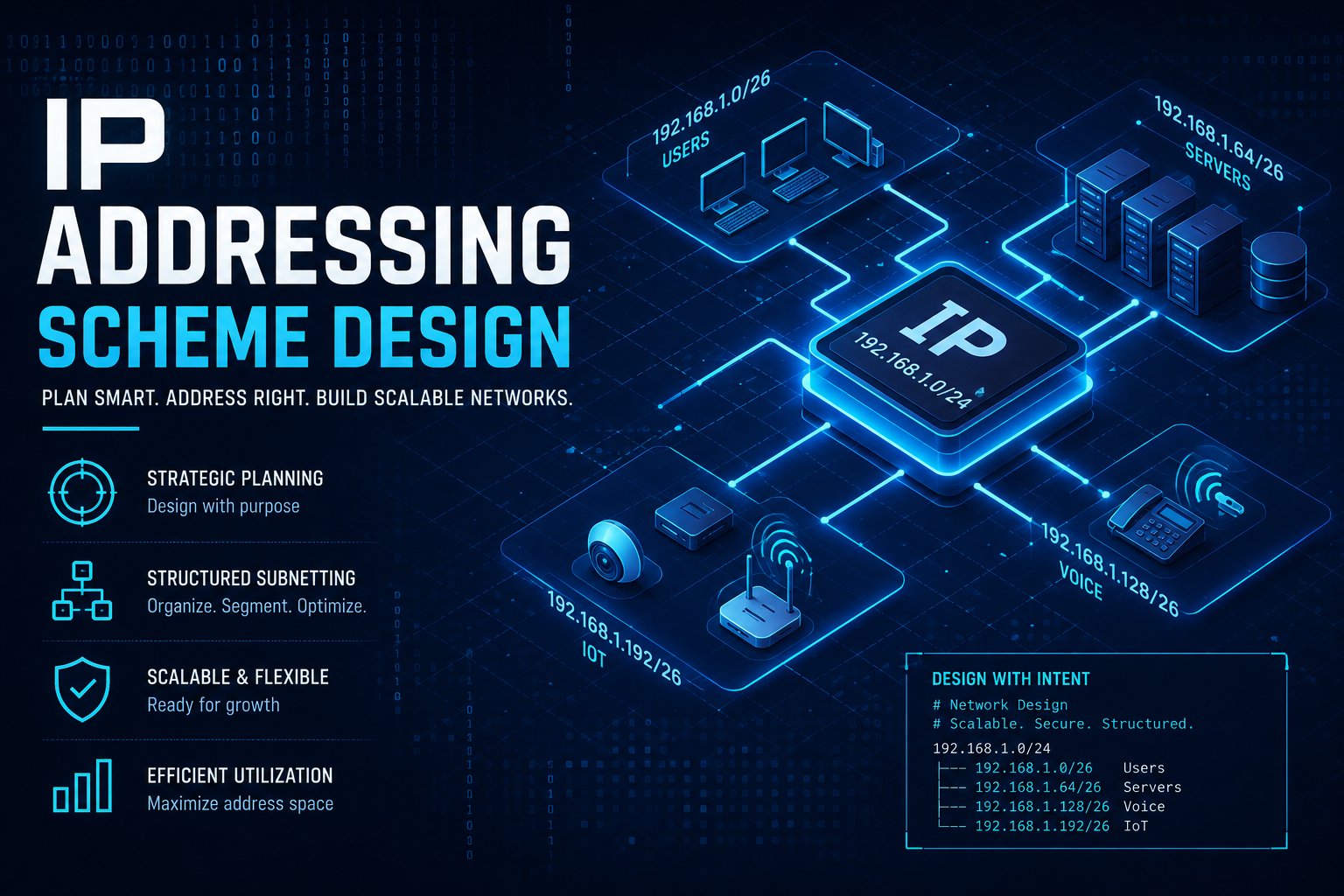
Creating and IP Addressing Scheme Design
Objective: Give you a repeatable method for designing an IP addressing scheme that scales, summarizes cleanly, and doesn’t need to be torn apart the first time the business opens a new site or acquires a company.
Target audience: Network and security engineers who are past subnetting math and need a framework for turning “we need IP space” into a documented, defensible plan.
Why This Is Worth Doing Right the First Time
Most IP addressing schemes aren’t designed. They accrete. Someone stands up a /24 for the first office, someone else grabs the next /24 that “looked free” for the second office, and five years later you’ve got a routing table full of discontiguous /24s and /27s that can’t summarize, a DHCP server with scope names nobody trusts, and a firewall policy set that references individual hosts because nobody can remember which subnet is which.
A good addressing scheme is infrastructure. It’s the thing every other design decision sits on top of: routing protocol summarization, firewall policy structure, DHCP and DNS boundaries, SD-WAN overlay design, and eventually IPv6 coexistence. Get it wrong and you pay for it in route table bloat, renumbering projects, and security zones that leak because the “engineering” VLAN and the “guest” VLAN ended up one subnet apart by accident.
This guide walks through the considerations that should drive the design, a step by step process for building the plan, and the tools that make it maintainable instead of a spreadsheet nobody opens.
Core Design Considerations
1. Design for Summarization, Not Just for Space
The single biggest mistake in addressing design is allocating space without thinking about how it will summarize upstream. If every site gets “the next available /24” out of a flat pool, you end up with routes that can never be aggregated, which means every site’s full subnet list ends up in every other site’s routing table.
Instead, build the hierarchy top down: pick a block big enough for the whole organization, carve it into region or site sized chunks on clean bit boundaries, and only then carve those into function level subnets. If a site is a /16, every subnet inside that site should summarize back to that single /16 at the WAN edge or OSPF area border. Your BGP or OSPF design should be a natural consequence of your addressing plan, not something you’re fighting against.
2. Right Size With VLSM, Then Add Headroom
Class based thinking (everything is a /24) wastes space in some places and starves it in others. Use VLSM to size subnets to what they actually need, but don’t size to the exact current headcount. A 40 person office that gets a /26 (62 usable) has zero room for growth, IoT devices, and a guest network expansion. Size for a realistic 2 to 3 year horizon, not today’s headcount.
A workable default for enterprise LAN subnets is /24 per function per site, even when current usage is much lower. It costs you address space you likely have plenty of (especially inside RFC 1918 space) and it buys you the ability to grow, add a VLAN for a new device class, or absorb an acquisition’s traffic without a redesign.
3. Segment by Function, Not by Convenience
Your subnet boundaries should map to your security policy boundaries. If users, servers, voice, guest, IoT/OT, and management traffic all share a subnet, your firewall policy is forced down to host level rules, which doesn’t scale and doesn’t audit well. Decide your functional categories up front (a reasonable starting set: users, servers, voice, wireless guest, IoT/OT, management/out of band, and point to point/transit links) and give each one its own subnet at every site, using the same function identifier across sites so policy templates are reusable.
4. Encode Meaning Into the Plan, Not Into Memory
A good scheme is readable by a human looking at an IP address, not just by whoever built the IPAM. A common pattern for a /16 per site design is:
Where the second octet identifies the site and the third octet identifies the function or VLAN. That means 10.12.20.0/24 is immediately recognizable as “site 12, function block 20” to anyone who has the site and function tables in front of them, without needing to query anything. Keep the encoding consistent across every site. The moment you have exceptions (“well, Miami does it differently because it was acquired”), you’ve reintroduced the tribal knowledge problem you were trying to eliminate.
5. Reserve Blocks for Growth and for Things That Aren’t LAN Subnets
Leave gaps in your function numbering. If your first few function blocks are 10, 20, 30, and 40, don’t fill 11, 12, 13 with the next thing you think of. Leaving room means a new function added two years from now still fits the pattern instead of getting bolted onto an unused high octet.
Also plan explicit space for things that aren’t user facing LAN subnets: router loopbacks and management interfaces, point to point WAN or overlay transit links, VPN client pools, and lab or DR environments. These have very different growth patterns than office LANs and deserve their own block so they don’t compete with real estate you need for site subnets.
6. Use a Safe Range for Documentation and Lab Work
When you’re writing internal documentation, building lab topologies, or drafting a design for review before real public IPs are assigned, don’t use real routable public space and don’t use RFC 1918 space that might collide with something else in your environment. The IANA reserved benchmarking range, 198.18.0.0/15 (RFC 2544), exists specifically for this. It’s non-routable on the internet, it won’t collide with a customer’s or acquisition target’s private space, and anyone who’s seen it before immediately recognizes it as placeholder space rather than a real public IP. It’s a small habit that saves you from ever accidentally publishing or hardcoding a real address into a diagram or config example.
7. Plan IPv6 Alongside IPv4, Not After It
Even in IPv4 heavy shops, sketch the IPv6 plan at the same time as the IPv4 plan. The mechanics are simpler than people expect: request or use a /48 per site (or per region, depending on scale), and allocate a /64 per subnet inside it, mapping to the same functional structure you used for IPv4. Because IPv6 subnetting isn’t space constrained the way IPv4 is, you don’t need the same growth headroom gymnastics, but keeping the site and function numbering consistent between the two address families means your documentation, DNS, and policy stay aligned instead of becoming two parallel, drifting schemes.
8. Plan for Collisions Before They Happen
RFC 1918 space feels infinite until you’re negotiating a site to site VPN with a partner, onboarding an acquisition, or supporting remote workers whose home routers are all handing out 192.168.1.0/24. Avoid the most commonly squatted ranges for anything that might need to talk to the outside world (home network defaults like 192.168.0.0/24 and 192.168.1.0/24 are the classic collision point for remote access VPN). Building your scheme inside 10.0.0.0/8 with a deliberate site numbering plan gives you the largest pool to work with and the least chance of colliding with whatever a future acquisition or partner happens to be using.
9. Align DHCP and DNS Boundaries to the Plan
Once the addressing plan exists, DHCP scopes and DNS zones should be a direct reflection of it, not a separate design exercise. Scope names should reference the site and function identifiers from the plan (not “Building 2 Wifi” with no mapping back to the subnet), and reverse DNS zone boundaries should align with your summarization boundaries so delegation stays clean as the organization grows.
Step by Step Design Process
1. Inventory requirements. Count sites (current and reasonably expected future sites), device classes per site, and rough per site headcounts. Don’t design against exact numbers, design against the shape of the environment.
2. Choose the top level block. For most enterprises this is a slice of 10.0.0.0/8. Decide how much of it you’re committing to this design versus reserving untouched for something else (an acquisition’s existing space, a future business unit, a DR site).
3. Define your hierarchy levels and bit boundaries. Typically: top block, then region (optional), then site, then function, then host. Pick clean boundaries (/16 per site, /24 per function is a common, defensible starting point) rather than jamming things together to save space you don’t need to save.
4. Assign site and function identifiers. Build the two tables that make the whole scheme readable: a site ID table (site name to octet or block) and a function ID table (function name to octet or block), and keep both consistent across every site.
5. Populate the plan in an IPAM, not a static spreadsheet. A spreadsheet is fine for the first draft; it’s a liability once more than one person needs to allocate from it. Move it into an IPAM tool as soon as the structure is agreed.
6. Validate against your routing design. Confirm every site’s subnets summarize to a single advertised block at the WAN edge or area border. If they don’t, the hierarchy has a boundary in the wrong place.
7. Reserve growth space explicitly. Document unused function and site slots as “reserved,” not just “unused.” A gap that’s documented as reserved doesn’t get squatted on by the next engineer who needs a quick subnet.
8. Pilot on one site, then roll out. Deploy the plan on a single site first, confirm DHCP, DNS, and firewall policy templates all map cleanly to it, then roll the pattern out to the rest.
Tools
| Category | Tools | Notes |
|---|---|---|
| IPAM (source of truth) | NetBox, phpIPAM, Infoblox, SolarWinds IPAM | NetBox and phpIPAM are open source and API driven, which matters if you want automation downstream. Infoblox and SolarWinds are common in larger enterprises already standardized on them. |
| Vendor-native IPAM | FortiOS local IPAM (FortiGate/Security Fabric) | Useful when the FortiGate is already the DHCP server and interface source of truth for smaller deployments; doesn’t replace a dedicated IPAM at scale, but keeps allocation consistent with the fabric root. |
| Subnet math and validation | ipcalc, sipcalc, Python’s ipaddress module | Command line calculators catch fat finger errors before they hit production. The Python module is worth scripting against for bulk validation. |
| Documentation and diagramming | draw.io / diagrams.net, IPAM export, markdown tables | Whatever you use, it has to be something the whole team can get to without asking you for a file. |
| Automation | NetBox or phpIPAM API with Ansible or Python | Once the plan lives in an IPAM with an API, DHCP scopes, DNS records, and firewall address objects can be generated from it instead of hand typed. |
A quick example of using Python’s ipaddress module to catch overlaps before they make it into the plan:
Run something like this against the full plan before it goes into the IPAM. It’s a cheap check that catches copy paste errors from a spreadsheet long before they become a production outage.
Worked Example: A Five Site Enterprise
Here’s the hierarchy applied to a five site organization (Atlanta, Miami, Doral, Tempe, and Louisville), using a /16 per site out of 10.0.0.0/8 and a /24 per function inside each site.
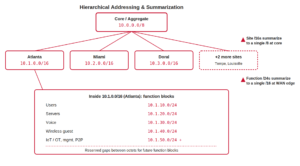
Site ID Table
| Site | Block |
|---|---|
| Atlanta | 10.1.0.0/16 |
| Miami | 10.2.0.0/16 |
| Doral | 10.3.0.0/16 |
| Tempe | 10.4.0.0/16 |
| Louisville | 10.5.0.0/16 |
Function ID Table (applied inside every site’s /16)
| Function | Octet | Example (Atlanta) |
|---|---|---|
| Users | .10 | 10.1.10.0/24 |
| Servers | .20 | 10.1.20.0/24 |
| Voice | .30 | 10.1.30.0/24 |
| Wireless guest | .40 | 10.1.40.0/24 |
| IoT / OT | .50 | 10.1.50.0/24 |
| Management / OOB | .60 | 10.1.60.0/24 |
| Point to point / transit | .90 | 10.1.90.0/24 |
| Reserved for growth | .11-.19, .21-.29, etc. | n/a |
Notice the gaps between function octets. Adding a new function later (say, a dedicated block for AV or building automation) means picking the next unused decade, not renumbering anything.
For the WAN edge and any public facing or SD-WAN transit interfaces referenced in design documentation before real addressing is assigned, this plan uses the RFC 2544 benchmarking range, 198.18.0.0/15, exactly as described above. Every site’s WAN interface in the diagram gets an address out of that range as a placeholder, which keeps the documentation self contained and safe to share without exposing anything real.
At the WAN edge, each site’s advertised route is the single /16, not seven or eight individual /24s. That’s the summarization payoff: a five site organization advertises five routes to the core instead of thirty five, and adding a sixth site is a matter of assigning 10.6.0.0/16 and applying the same function table, not designing anything new.
Common Mistakes
Allocating tight to current headcount. The most common regret in addressing design is sizing a subnet to exactly what’s needed today. Growth, IoT proliferation, and guest network expansion will eat that headroom faster than expected.
Designing bottom up instead of top down. Grabbing “the next free /24” per request instead of carving down from a planned top level block is how you end up with a routing table that can’t summarize.
Letting exceptions creep in. The first site that “does it differently” because it was acquired, or because someone was in a hurry, is the beginning of the tribal knowledge problem the whole exercise was meant to solve. Renumber the exception into the pattern as soon as it’s practical, even if it’s inconvenient in the short term.
Treating IPv6 as a someday project. Sketching the IPv6 side of the plan alongside the IPv4 side costs very little time and saves a scramble later when a partner, cloud provider, or compliance requirement forces the issue.
Keeping the plan in a spreadsheet indefinitely. A spreadsheet is a fine draft tool. It is not a source of truth once more than one person is allocating from it, and it doesn’t stop two engineers from assigning the same subnet an hour apart.
Wrap Up
An IP addressing scheme is one of the few pieces of network design that gets more expensive to fix the longer you wait. Design it hierarchically, size it with room to grow, tie it to your functional security boundaries, and put it somewhere it can be queried and automated against instead of remembered. Do that once, and every routing, DHCP, DNS, and firewall policy decision that follows gets easier instead of harder.
Recent posts
-

-

DNS is one of those technologies that quietly underpins... Full Story
-

BGP issues on FortiGate firewalls usually trace back to... Full Story
-

Every time your laptop talks to your router, a... Full Story
-

If you've spent any time configuring NAT on a... Full Story
-

If you have spent any time configuring firewall policies... Full Story
-

High availability on FortiGate is one of those features... Full Story
-

If you've configured SD-WAN on a FortiGate, you've almost... Full Story
-

FortiLink is the management protocol that turns a FortiSwitch... Full Story
-

FortiSwitches are pretty rock solid from Mean Time Between... Full Story
-

This is a quicky tip. Have you ever gone... Full Story
-

DNS is one of those quiet pieces of internet... Full Story
-

This article is an updated version of the previous... Full Story
-

You will add ns2 as a secondary (slave) BIND9... Full Story
-

In the process of deploying my lab, I needed... Full Story
-

RFC 8805, used to be known as Self-Correcting IP... Full Story
-

Years back, I wrote an article about certificate pinning. ... Full Story
-

FortiGates have the ability to send alerts to Microsoft... Full Story
-

In this post, I am going to walk through... Full Story
-

Troubleshooting VoIP on a FortiGate can feel like trying... Full Story
-

Prior to FortiOS 7.0, there were three commands to... Full Story
-

In this post, I am going to go over... Full Story
-

What we are going to do: We are going... Full Story
-

Choosing between FGCP (FortiGate Clustering Protocol) and FGSP (FortiGate... Full Story
-

Creating a VLAN on macOS (The "Pro" Move) A... Full Story
-

This blog post explores the logic behind how macOS... Full Story
-

Pretty Fly for a Wi-Fi Tell My Wi-Fi Love... Full Story
-

Part of my daily gig is creating BoMs (Bill-of-Materials)... Full Story
-

ICMP introduces several security risks, but careful filtering, rate... Full Story
-

The command diag debug application dhcps -1 enables full... Full Story
-

In the world of FortiOS, execute tac report is... Full Story
-

LLDP; What is it The Link Layer Discovery Protocol... Full Story
-

What it actually does When you run diagnose fdsm... Full Story
-

Monkey Bites are bite-sized, high-impact security insights designed for... Full Story
-

I have run macOS in macOS with Parallels but... Full Story
-

Don't be confused with my other FortiNAC posts where... Full Story
-

This is the third session in a multi-part article... Full Story
-

Today I was configuring key-based authentication on a FortiGate... Full Story
-

Netcat, often called the "Swiss Army knife" of networking,... Full Story
-

At its core, IEEE 802.1X is a network layer... Full Story
-

In case you did not see the previous FortiNAC... Full Story
-

This is our 5th session where we are going... Full Story
-

Now that we have Wireshark installed and somewhat configured,... Full Story
-

The Philosophy of Packet Analysis Troubleshooting isn't about looking... Full Story
-

InfoSecMonkey Threat Response October 24, 2026 | No fluff.... Full Story
-

InfoSecMonkey Threat Response October 24, 2026 | No fluff.... Full Story
-

Plus what you actually get with FortiCare Essential, Premium... Full Story