
If you've spent any time configuring user authentication on... Full Story
By Manny Fernandez
August 24, 2026
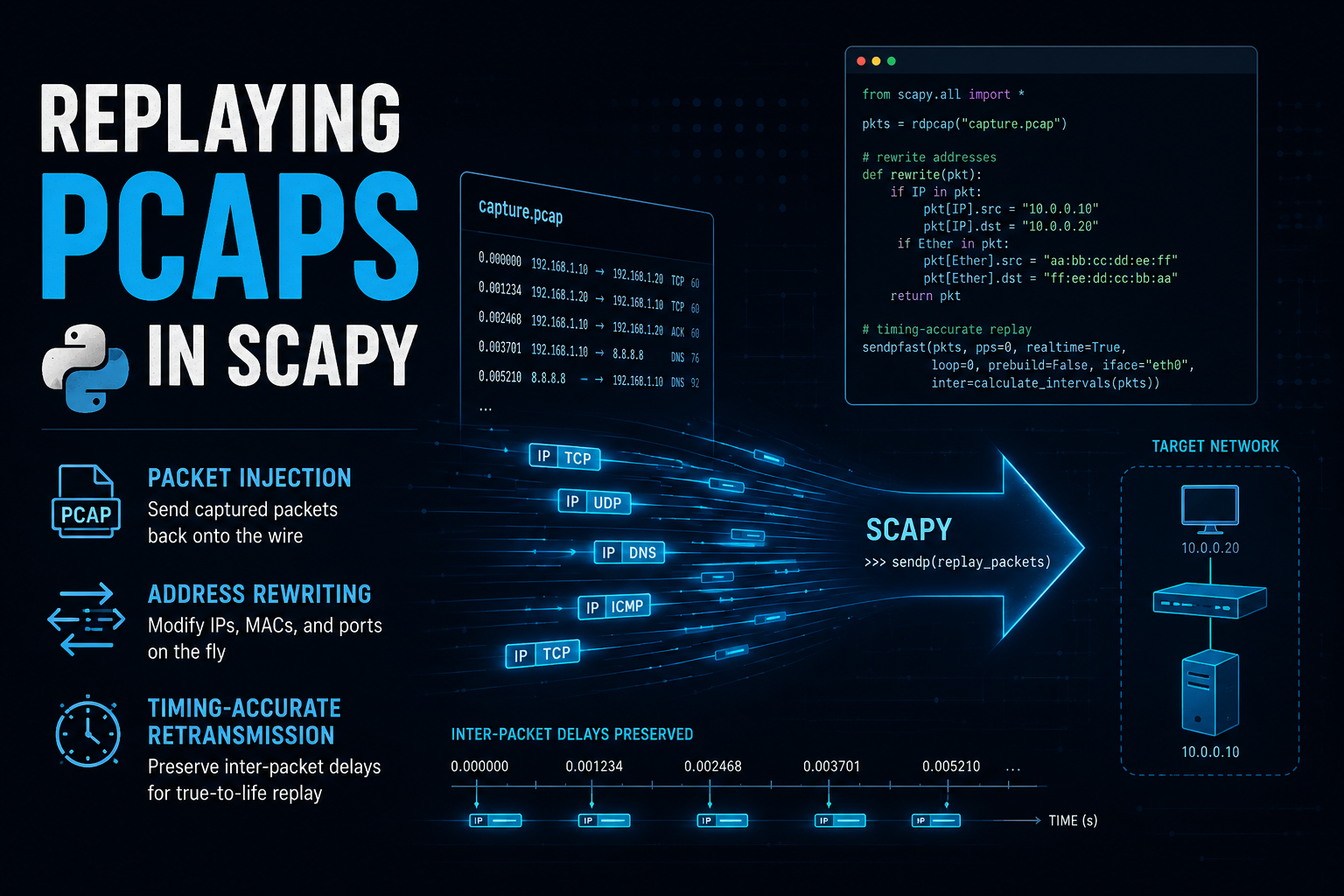
Replaying PCAPs in Scapy: Packet Injection, Address Rewriting, and Timing-Accurate Retransmission
Objective: This guide shows how to use Scapy to load a .pcap file and retransmit its packets onto a live interface, exactly as captured or with fields rewritten for lab reuse. It covers raw Layer 2 injection, checksum-safe address rewriting, timestamp-accurate pacing, and streaming replay for large captures, then wraps the workflow into a reusable command-line tool.
Target Audience: Network engineers, security analysts and detection engineers, penetration testers, and DevOps engineers who need a repeatable way to reproduce captured traffic for IDS/IPS validation, incident reconstruction, or packet-processing load tests.
Prerequisites & Architecture
Assumed Knowledge
- Working Python 3 (functions, loops, list comprehensions)
- TCP/IP fundamentals: Ethernet framing, IP headers, TCP/UDP, checksums
- Comfortable with the Linux command line and
sudo - Basic familiarity with
tcpdumpand/or Wireshark - Basic lab networking concepts (bridges, veth pairs, or two VM NICs on the same segment)
Environment / Lab Requirements
- Ubuntu 24.04 LTS (or any modern Linux distro with libpcap)
- Python 3.10+
- Scapy 2.6.x
tcpdumpandtsharkfor verification- Root privileges, or CAP_NET_RAW/CAP_NET_ADMIN on the Python interpreter
- A two-node lab topology: a replay host and a receiver host on the same L2 segment
- A sample
.pcapfile to replay
Component Table
| Component | Role | Example Address / Interface |
|---|---|---|
| Replay Host | Linux host running the Scapy replay script | 10.0.10.10 (eth1) |
| Receiver Host | Passive listener validating replayed traffic with tcpdump/Wireshark | 10.0.10.20 (eth1) |
| Lab Segment | L2 bridge or switch connecting the two hosts | 10.0.10.0/24 |
| Source PCAP Endpoints | Original addressing captured in the file, unless rewritten | src 198.18.10.5, dst 198.18.20.8 |
| Rewritten Target | Optional new destination when redirecting replay into a lab service | 10.0.10.30 |
Step-by-Step Implementation Workflow
Phase 1: Install Scapy and Confirm Raw Socket Access
Goal: A working Scapy environment with permission to send raw frames.
Action: Install Scapy and tcpdump, verify the interactive shell, and confirm the interface name you will send on.
sudo apt update
sudo apt install -y python3-scapy tcpdump tshark

# or, inside a virtualenv
python3 -m venv ~/scapy-lab && source ~/scapy-lab/bin/activate
pip install scapy
sudo scapy>>> conf.iface
>>> show_interfaces()If you don’t want to prefix every run with sudo, grant the interpreter the capability once (lab hosts only, this is a systemwide change to that specific binary):
sudo setcap cap_net_raw,cap_net_admin=eip $(readlink -f $(which python3))GUI Verification: Not applicable, Scapy is CLI-only. Use ip -brief link show to confirm the interface name you will pass to iface= in later phases.
Phase 2: Load and Inspect an Existing PCAP
Goal: Confirm packet count, layers, and timestamps before touching anything.
Action: rdpcap() loads the file into a PacketList; inspect with .show() and .summary().
from scapy.all import rdpcap

packets = rdpcap("/home/lab/captures/incident.pcap")
print(f"Loaded {len(packets)} packets")

packets[0].show()
for pkt in packets[:5]:
    print(pkt.summary())
rdpcap() loads the entire file into memory, fine for files up to a few hundred MB. For multi-gigabyte captures, use PcapReader instead (Phase 6).
Phase 3: Basic Layer 2 Replay onto a Live Interface
Goal: Push the packets from the pcap onto the wire exactly as captured.
Action: Use sendp(), not send(). sendp() sends the packet’s own Ethernet frame over a raw AF_PACKET socket, this is what reproduces the original capture faithfully. send() operates at Layer 3: Scapy builds a brand-new Ethernet header based on your local routing table and ARP resolution for the destination IP, discarding the original MAC addressing, useful when you want to route replayed traffic somewhere live rather than reproduce the original frame.
from scapy.all import rdpcap, sendp

packets = rdpcap("/home/lab/captures/incident.pcap")
sendp(packets, iface="eth1", verbose=True)
GUI Verification: Not applicable. Open Wireshark with a live capture on eth1 as an alternative to tcpdump for watching the replay in real time.
Phase 4: Rewrite Addressing Before Replay
Goal: Retarget the capture against lab hosts instead of the original endpoints, with checksums recalculated so the receiver doesn’t drop the frames as corrupt.
Action: Modify the Ether/IP fields, then delete the cached checksum fields so Scapy recomputes them at send time.
from scapy.all import rdpcap, sendp, IP, TCP, UDP, Ether

packets = rdpcap("/home/lab/captures/incident.pcap")

for pkt in packets:
    if pkt.haslayer(Ether):
        pkt[Ether].src = "02:00:00:00:00:01"
        pkt[Ether].dst = "02:00:00:00:00:02"
    if pkt.haslayer(IP):
        pkt[IP].src = "10.0.10.10"
        pkt[IP].dst = "10.0.10.30"
        del pkt[IP].chksum
        if pkt.haslayer(TCP):
            del pkt[TCP].chksum
        elif pkt.haslayer(UDP):
            del pkt[UDP].chksum

sendp(packets, iface="eth1", verbose=True)
Scapy caches the checksum it read from the original pcap file. If you change IP.src/IP.dst or a TCP/UDP payload without clearing chksum, the stale value ships as-is and the receiving stack silently drops the frame as corrupt. Deleting the field (not setting it to 0) is what tells Scapy to recompute it during serialization.
Phase 5: Timestamp-Accurate Pacing
Goal: Reproduce the original traffic’s timing and burst pattern instead of firing every packet back to back.
Action: Use the built-in realtime flag for the common case, or a manual pacing loop when you need per-packet logging or a speed multiplier.
from scapy.all import rdpcap, sendp

packets = rdpcap("/home/lab/captures/incident.pcap")
sendp(packets, iface="eth1", realtime=True, verbose=True)
import time
from scapy.all import rdpcap, sendp
packets = rdpcap("/home/lab/captures/incident.pcap")
speed_multiplier = 1.0 # 2.0 = twice as fast, 0.5 = half speed
t0_capture = float(packets[0].time)
t0_replay = time.time()
for pkt in packets:
target_offset = (float(pkt.time) - t0_capture) / speed_multiplier
actual_offset = time.time() - t0_replay
sleep_for = target_offset - actual_offset
if sleep_for > 0:
time.sleep(sleep_for)
sendp(pkt, iface="eth1", verbose=False)Phase 6: Streaming Large PCAPs Without Exhausting Memory
Goal: Replay multi-gigabyte captures without loading the whole file into RAM.
Action: Use PcapReader as a context manager and send one packet at a time.
from scapy.all import PcapReader, sendp

with PcapReader("/home/lab/captures/large_capture.pcap") as pcap_reader:
    for pkt in pcap_reader:
        sendp(pkt, iface="eth1", verbose=False)
Phase 7: Filtering Before Replay
Goal: Replay only a subset of the capture, such as one TCP session or one protocol.
Action: Build a list comprehension against the loaded packets, filtering on layer presence and field values.
from scapy.all import rdpcap, sendp, TCP, IP

packets = rdpcap("/home/lab/captures/incident.pcap")

target_session = [
    pkt for pkt in packets
    if pkt.haslayer(TCP)
    and pkt.haslayer(IP)
    and pkt[IP].src == "198.18.10.5"
    and pkt[TCP].dport == 443
]

print(f"Replaying {len(target_session)} of {len(packets)} packets")
sendp(target_session, iface="eth1", realtime=True)
Phase 8: Wrapping It Into a Reusable CLI Tool
Goal: Turn the one-off script into an argparse-driven tool the team can reuse.
Action: Save the following as pcap_replay.py.
#!/usr/bin/env python3
"""pcap_replay.py - replay a pcap file onto a live interface with optional
address rewriting and timestamp-accurate pacing."""

import argparse

from scapy.all import IP, TCP, UDP, Ether, rdpcap, sendp


def rewrite_addresses(packets, new_src, new_dst, new_src_mac, new_dst_mac):
    for pkt in packets:
        if new_src_mac and pkt.haslayer(Ether):
            pkt[Ether].src = new_src_mac
        if new_dst_mac and pkt.haslayer(Ether):
            pkt[Ether].dst = new_dst_mac
        if pkt.haslayer(IP):
            if new_src:
                pkt[IP].src = new_src
            if new_dst:
                pkt[IP].dst = new_dst
            if new_src or new_dst:
                del pkt[IP].chksum
                if pkt.haslayer(TCP):
                    del pkt[TCP].chksum
                elif pkt.haslayer(UDP):
                    del pkt[UDP].chksum
    return packets


def replay(packets, iface, realtime, loop_count):
    for i in range(loop_count):
        if realtime:
            sendp(packets, iface=iface, realtime=True, verbose=False)
        else:
            for pkt in packets:
                sendp(pkt, iface=iface, verbose=False)
        if loop_count > 1:
            print(f"Completed pass {i + 1} of {loop_count}")


def main():
    parser = argparse.ArgumentParser(description="Replay a pcap onto a live interface.")
    parser.add_argument("pcap", help="Path to the source pcap file")
    parser.add_argument("--iface", required=True, help="Interface to send on, e.g. eth1")
    parser.add_argument("--src", help="Rewrite source IP")
    parser.add_argument("--dst", help="Rewrite destination IP")
    parser.add_argument("--src-mac", help="Rewrite source MAC")
    parser.add_argument("--dst-mac", help="Rewrite destination MAC")
    parser.add_argument("--realtime", action="store_true", help="Pace replay using original capture timestamps")
    parser.add_argument("--loop", type=int, default=1, help="Number of times to replay the capture")
    args = parser.parse_args()

    packets = rdpcap(args.pcap)
    print(f"Loaded {len(packets)} packets from {args.pcap}")

    if args.src or args.dst or args.src_mac or args.dst_mac:
        packets = rewrite_addresses(packets, args.src, args.dst, args.src_mac, args.dst_mac)
        print("Rewrote addressing and cleared checksums for recalculation")

    replay(packets, args.iface, args.realtime, args.loop)
    print("Replay complete")


if __name__ == "__main__":
    main()
sudo python3 pcap_replay.py incident.pcap --iface eth1 --src 10.0.10.10 --dst 10.0.10.30 --realtimeVerification & Validation
- On the receiver host, capture the replayed traffic before you start the replay (command below).
- Compare packet counts between the source and what was received with
capinfos. Success looks like matching counts, accounting for any filtering applied in Phase 7. - Open the verification capture in Wireshark and check the IP/TCP/UDP checksum fields. Success looks like a green [Checksum: correct] annotation on every rewritten packet, not a red “incorrect” flag.
- If you retargeted the replay into a live lab service, confirm the service’s own access logs show connections from the rewritten source. Raw replay does not perform a real three-way handshake unless the SYN/SYN-ACK/ACK sequence is replayed in order, so a stateful service may reject out-of-context packets even though they arrive intact on the wire.
- For timestamp-accurate replay, compare inter-packet deltas between the source and verification captures with
tshark. Success looks like deltas that track the original capture within a few milliseconds of scheduling jitter.
sudo tcpdump -i eth1 -nn -c 50 -w /tmp/verify.pcapcapinfos incident.pcap
capinfos /tmp/verify.pcaptshark -r incident.pcap -T fields -e frame.time_delta
tshark -r /tmp/verify.pcap -T fields -e frame.time_deltaTroubleshooting & Gotchas
1. “Operation not permitted” or no packets appear on the wire
Cause: sendp() needs a raw socket, which requires root or CAP_NET_RAW.
Diagnostic: getcap $(which python3) to check for the capability, or simply note whether the script was run under sudo.
Fix: sudo setcap cap_net_raw,cap_net_admin=eip $(readlink -f $(which python3)) once, or prefix every run with sudo.
2. Checksums come out wrong after rewriting addresses
Cause: Scapy preserves the checksum value it read from the original pcap unless the field is explicitly cleared. Changing IP.src/IP.dst does not trigger a recompute on its own.
Diagnostic: Open the replayed capture in Wireshark and look for “Header checksum: incorrect” on the IP layer and a red “Checksum: incorrect” flag on TCP/UDP.
Fix: del pkt[IP].chksum and del pkt[TCP].chksum / del pkt[UDP].chksum before every send, this forces Scapy to compute the correct value during serialization.
3. Replayed frames never arrive at the receiver, with no errors on the sender
Cause: sendp() replays the original Ethernet destination MAC from the capture. If that MAC isn’t the actual next hop on your lab segment, the switch forwards the frame nowhere, and nothing surfaces as an error on the sending side.
Diagnostic: tcpdump -i eth1 -e -nn on the sender to see the destination MAC actually being transmitted, compared against ip neigh show for the real next hop.
Fix: Rewrite pkt[Ether].dst to the correct next-hop MAC before replay, or resolve it dynamically with getmacbyip("10.0.10.30") and assign the result.
4. Traffic goes out the wrong NIC, or nothing sends at all
Cause: Scapy’s conf.iface defaults to whichever interface owns the default route, and a misspelled or missing iface= value falls back to it silently.
Diagnostic: show_interfaces() in a Scapy shell, or python3 -c "from scapy.all import conf; print(conf.iface)".
Fix: Always pass iface="eth1" (or the exact name from ip -brief link show) explicitly to sendp()/send(). Ubuntu interface names inside VMs are often enp0s8-style rather than eth1, confirm the real name before scripting against it.
Recent posts
-

-

DNS is one of those technologies that quietly underpins... Full Story
-

BGP issues on FortiGate firewalls usually trace back to... Full Story
-

Every time your laptop talks to your router, a... Full Story
-

If you've spent any time configuring NAT on a... Full Story
-

If you have spent any time configuring firewall policies... Full Story
-

High availability on FortiGate is one of those features... Full Story
-

If you've configured SD-WAN on a FortiGate, you've almost... Full Story
-

FortiLink is the management protocol that turns a FortiSwitch... Full Story
-

FortiSwitches are pretty rock solid from Mean Time Between... Full Story
-

This is a quicky tip. Have you ever gone... Full Story
-

DNS is one of those quiet pieces of internet... Full Story
-

This article is an updated version of the previous... Full Story
-

You will add ns2 as a secondary (slave) BIND9... Full Story
-

In the process of deploying my lab, I needed... Full Story
-

RFC 8805, used to be known as Self-Correcting IP... Full Story
-

Years back, I wrote an article about certificate pinning. ... Full Story
-

FortiGates have the ability to send alerts to Microsoft... Full Story
-

In this post, I am going to walk through... Full Story
-

Troubleshooting VoIP on a FortiGate can feel like trying... Full Story
-

Prior to FortiOS 7.0, there were three commands to... Full Story
-

In this post, I am going to go over... Full Story
-

What we are going to do: We are going... Full Story
-

Choosing between FGCP (FortiGate Clustering Protocol) and FGSP (FortiGate... Full Story
-

Creating a VLAN on macOS (The "Pro" Move) A... Full Story
-

This blog post explores the logic behind how macOS... Full Story
-

Pretty Fly for a Wi-Fi Tell My Wi-Fi Love... Full Story
-

Part of my daily gig is creating BoMs (Bill-of-Materials)... Full Story
-

ICMP introduces several security risks, but careful filtering, rate... Full Story
-

The command diag debug application dhcps -1 enables full... Full Story
-

In the world of FortiOS, execute tac report is... Full Story
-

LLDP; What is it The Link Layer Discovery Protocol... Full Story
-

What it actually does When you run diagnose fdsm... Full Story
-

Monkey Bites are bite-sized, high-impact security insights designed for... Full Story
-

I have run macOS in macOS with Parallels but... Full Story
-

Don't be confused with my other FortiNAC posts where... Full Story
-

This is the third session in a multi-part article... Full Story
-

Today I was configuring key-based authentication on a FortiGate... Full Story
-

Netcat, often called the "Swiss Army knife" of networking,... Full Story
-

At its core, IEEE 802.1X is a network layer... Full Story
-

In case you did not see the previous FortiNAC... Full Story
-

This is our 5th session where we are going... Full Story
-

Now that we have Wireshark installed and somewhat configured,... Full Story
-

The Philosophy of Packet Analysis Troubleshooting isn't about looking... Full Story
-

InfoSecMonkey Threat Response October 24, 2026 | No fluff.... Full Story
-

InfoSecMonkey Threat Response October 24, 2026 | No fluff.... Full Story
-

Plus what you actually get with FortiCare Essential, Premium... Full Story