
If you've spent any time configuring user authentication on... Full Story
By Manny Fernandez
September 7, 2026
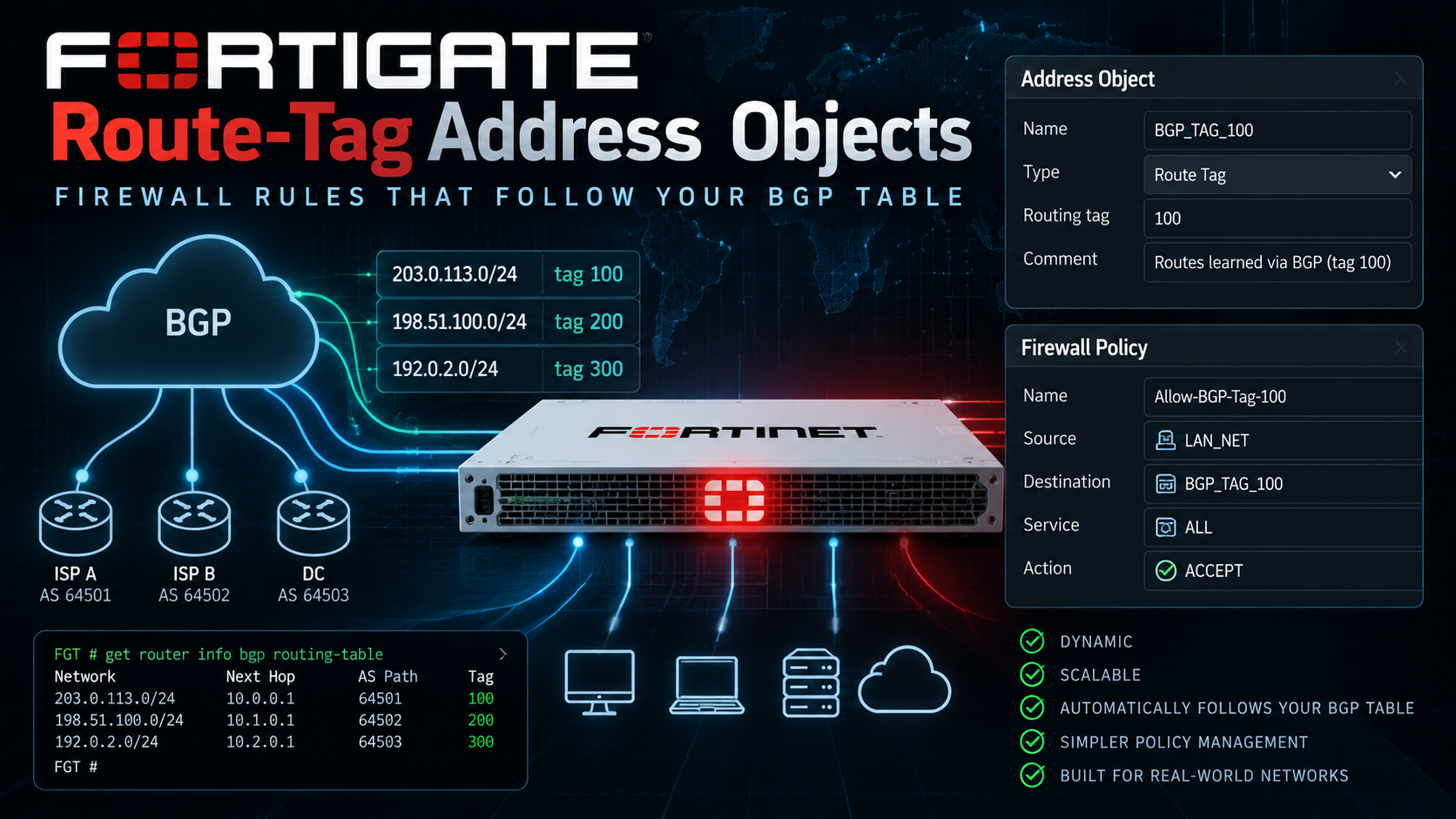
FortiGate Route-Tag Address Objects: Firewall Rules That Follow Your BGP Table
If you run FortiGate site-to-site VPNs with BGP, you already know the appeal. The remote side can add, remove, or resize subnets without anyone touching the tunnel config, and the routes just show up. The problem is your firewall policy does not know that. Somebody still has to open the destination address group every time Site A stands up a new VLAN and add 10.14.0.0/16 by hand, or the policy quietly falls behind what BGP is actually advertising.
FortiOS 7.4.0 closed that gap with a firewall address object of type route-tag. Instead of listing subnets, the object points at a locally significant tag number. Any active BGP route carrying that tag becomes a member of the object automatically, the moment it shows up in the routing table. Withdraw the route and it disappears from the object just as quietly. You stamp the tag once, on the way in, and never touch the address object again.
This post walks two designs that come up constantly in the field, both built on that one feature:
- A standard, symmetric site-to-site VPN with BGP running, where the remote side advertises several prefixes instead of one tidy summary block.
- A head-in FortiGate configured as a dial-up (dynamic) hub, taking connections from remote FortiGates that are each configured as ordinary fixed-peer site-to-site tunnels, some advertising multiple prefixes, and how to keep the resulting address objects separated per remote site even though the hub only sees one shared dial-up interface.
How Route-Tag Address Objects Actually Work
A quick disambiguation first, because Fortinet has used the phrase “route tag” for two different things and it trips people up.
The older mechanism, dating back to FortiOS 6.2-era SD-WAN, lets an SD-WAN service rule match a route-tag number directly with no address object involved. That is still around and still useful for steering traffic across SD-WAN members.
What FortiOS 7.4.0 added is different. A route tag can now be a full config firewall address object, which means it can go anywhere a normal address object goes: a firewall policy, a router policy (PBR), or an SD-WAN service rule. That is the feature this post is about.
Either way, the tag itself never travels over the wire. It is not a BGP community, and it does not exist inside the update your neighbor sends you. It is a purely local marking that FortiOS applies to a route the instant it lands in the routing table, via a route-map applied as the neighbor’s (or neighbor-group’s) inbound route-map. The tag never leaves the box that set it.
Two things worth knowing before you build one:
Minimum firmware: FortiOS 7.4.0 or later.
The GUI hides this option by default. On every 7.4.x build we have checked, Network > Address will not show a Route Tag option in the Type dropdown until you flip a hidden setting:
config system settings
    set gui-route-tag-address-creation enable
end
Even after enabling it, day-to-day visibility is still a CLI exercise. The GUI will let you create and edit the object, but it will not show you live membership. For that, one command does almost all the work in this post:
diagnose firewall route_tag listThe Two Topologies
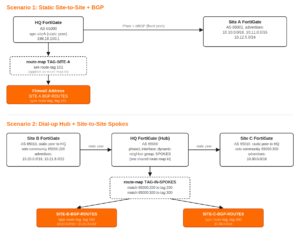
The distinction that matters: in Scenario 1, HQ has a named, static BGP neighbor for Site A, so the route-map that tags its routes can be tied to that neighbor specifically. In Scenario 2, HQ’s phase1-interface is dial-up (dynamic), so BGP neighbors are not pre-declared by IP either. They are handled with a neighbor-group and neighbor-range, which means every spoke that connects inherits the same shared route-map-in. Left alone, that produces one indiscriminate address object containing every prefix from every spoke, mixed together. Site B and Site C fix this by each stamping their own BGP community on the way out, and HQ’s single shared route-map matches on that community to hand out a different tag per site. The dial-up interface stays shared. The resulting address objects do not.
Prerequisites
This post assumes FortiGate CLI fundamentals, IPsec site-to-site basics (phase1-interface and phase2-interface), and core BGP concepts (AS numbers, neighbors, route-maps, community lists). It does not walk through building the IPsec tunnels themselves. Phase1 and phase2 are assumed to already be up with BGP already exchanging routes; we are picking up from there.
Addressing convention used throughout: 198.18.0.0/15 stands in for public and transit addressing (WAN interfaces, tunnel interface numbering), and 10.0.0.0/8-style private addressing represents each site’s internal LANs. Swap in your real space.
| Device | Role | AS | Tunnel / WAN IP | Advertises |
|---|---|---|---|---|
| HQ-FGT | Hub, policy enforcement | 65000 | 198.18.100.1 | n/a, consumer only |
| Site-A-FGT | Static site-to-site peer | 65001 | 198.18.100.2 | 10.10.0.0/16, 10.11.0.0/16, 10.12.5.0/24 |
Component table for Scenario 1. Scenario 2 introduces Site-B-FGT and Site-C-FGT, both AS 65010, both configured as ordinary static site-to-site peers pointing at HQ’s public IP, covered in that section below.
Scenario 1: Symmetric Site-to-Site with BGP
HQ and Site A already have a static, fixed-peer IPsec tunnel and an eBGP session running over it. Site A is advertising three prefixes and that list will keep changing as the site grows. We want one address object on HQ that always reflects whatever Site A currently has live in BGP, with zero maintenance.
Step 1: Tag every route from Site A on the way in
A route-map with no match clause matches everything. That is exactly what we want here since the entire point is to tag every prefix this neighbor sends, regardless of how many there are:
config router route-map
    edit "TAG-SITE-A"
        config rule
            edit 1
                set set-route-tag 101
            next
        end
    next
end
Step 2: Apply it as the neighbor’s inbound route-map
config router bgp
    set as 65000
    set router-id 198.18.1.1
    config neighbor
        edit "198.18.100.2"
            set remote-as 65001
            set interface "vpn-siteA"
            set soft-reconfiguration enable
            set route-map-in "TAG-SITE-A"
        next
    end
end
soft-reconfiguration enable matters here. Without it, editing the route-map later will not retroactively re-tag routes already in the table until you force a refresh, covered in the troubleshooting section below.
Step 3: Build the route-tag address object
config firewall address
    edit "SITE-A-BGP-ROUTES"
        set type route-tag
        set route-tag 101
        set comment "Auto-tracks every active BGP route received from Site A"
    next
end
Step 4: Reference it in a policy like any other address object
config firewall policy
    edit 10
        set name "HQ-to-SiteA-BGP-Routes"
        set srcintf "internal"
        set dstintf "vpn-siteA"
        set action accept
        set srcaddr "all"
        set dstaddr "SITE-A-BGP-ROUTES"
        set schedule "always"
        set service "ALL"
        set nat disable
    next
end
From this point forward, if Site A adds a fourth prefix and advertises it over the same BGP session, it inherits tag 101 automatically, lands in SITE-A-BGP-ROUTES, and is already permitted by policy 10. Nobody has to touch the firewall.
Verify it
get router info routing-table bgp

diagnose firewall route_tag list

diagnose firewall iprope list | grep -A 15 "policy index=10"
The first command confirms all three Site A prefixes are actually active in the BGP table. The second confirms tag 101 currently resolves to exactly those three prefixes and nothing else. The third confirms traffic destined for those prefixes is actually hitting policy 10, not falling through to a catch-all deny above or below it.
Scenario 2: Dial-up Hub, Site-to-Site Spokes, Multiple Prefixes Each
Here the head-in FortiGate is configured with a dial-up (dynamic) phase1-interface so it can onboard new remote sites without touching phase1 configuration each time. Site B and Site C, from their own side, have zero visibility into that design choice. Each of them is configured as a completely ordinary static site-to-site tunnel, pointing at HQ’s one fixed public IP, exactly as if HQ were any other single-peer remote site. That asymmetry (dynamic at the hub, static at every spoke) is one of the most common hub-and-spoke patterns in Fortinet deployments, and it is precisely what makes per-site route-tagging non-obvious.
Because HQ’s BGP neighbors arrive dynamically through a neighbor-range, they all inherit the same neighbor-group template, including its route-map-in. You cannot give Site B and Site C their own named, per-neighbor route-map the way you could in Scenario 1. The workaround is to have each spoke stamp a distinguishing BGP community on its own outbound routes before they ever reach HQ, since a community is a real, transitive path attribute that survives the trip. HQ’s one shared route-map then carries a separate sequence per community, handing out a different tag to each.
Site B: ordinary static peer, tags its own routes outbound
config router route-map
    edit "TAG-OUT-SITEB"
        config rule
            edit 1
                set set-community "65000:200"
            next
        end
    next
end

config router bgp
    set as 65010
    set router-id 198.18.2.1
    config neighbor
        edit "198.18.100.1"
            set remote-as 65000
            set interface "vpn-hq"
            set soft-reconfiguration enable
            set send-community enable
            set route-map-out "TAG-OUT-SITEB"
        next
    end
    config network
        edit 1
            set prefix 10.20.0.0 255.255.0.0
        next
        edit 2
            set prefix 10.21.8.0 255.255.252.0
        next
    end
end
send-community enable is easy to skip and the whole design silently fails without it. Nothing else here looks different from any other static site-to-site BGP peer.
Site C: same pattern, different community and prefix
config router route-map
    edit "TAG-OUT-SITEC"
        config rule
            edit 1
                set set-community "65000:300"
            next
        end
    next
end

config router bgp
    set as 65010
    set router-id 198.18.3.1
    config neighbor
        edit "198.18.100.1"
            set remote-as 65000
            set interface "vpn-hq"
            set soft-reconfiguration enable
            set send-community enable
            set route-map-out "TAG-OUT-SITEC"
        next
    end
    config network
        edit 1
            set prefix 10.30.0.0 255.255.0.0
        next
    end
end
HQ: the dial-up tunnel interface
Full IKE/phase1 parameters for the dial-up hub are outside the scope of this post; the piece that matters for BGP addressing is the tunnel interface itself, with a pool sized to cover however many spokes will connect:
config system interface
    edit "vpn-dialup-hub"
        set ip 198.18.100.1 255.255.255.255
        set remote-ip 198.18.100.128 255.255.255.128
        set type tunnel
        set interface "wan1"
    next
end
HQ: one shared route-map, one sequence per site
config router community-list
    edit "SITE-B-COMM"
        config rule
            edit 1
                set match "65000:200"
            next
        end
    next
    edit "SITE-C-COMM"
        config rule
            edit 1
                set match "65000:300"
            next
        end
    next
end

config router route-map
    edit "TAG-IN-SPOKES"
        config rule
            edit 1
                set match-community "SITE-B-COMM"
                set set-route-tag 200
            next
            edit 2
                set match-community "SITE-C-COMM"
                set set-route-tag 300
            next
        end
    next
end
HQ: the dynamic neighbor-group and neighbor-range
config router bgp
    set as 65000
    set router-id 198.18.1.1
    config neighbor-group
        edit "SPOKES"
            set remote-as 65010
            set soft-reconfiguration enable
            set route-map-in "TAG-IN-SPOKES"
        next
    end
    config neighbor-range
        edit 1
            set prefix 198.18.100.0 255.255.255.128
            set neighbor-group "SPOKES"
        next
    end
end
Every spoke that dials in from inside 198.18.100.0/25 gets the same neighbor template, same route-map-in, and the same treatment. The community each spoke set on its own routes is what actually keeps them separated once they arrive.
HQ: two route-tag address objects out of one shared interface
config firewall address
    edit "SITE-B-BGP-ROUTES"
        set type route-tag
        set route-tag 200
        set comment "Auto-tracks active BGP routes from Site B, via shared dial-up hub interface"
    next
    edit "SITE-C-BGP-ROUTES"
        set type route-tag
        set route-tag 300
        set comment "Auto-tracks active BGP routes from Site C, via shared dial-up hub interface"
    next
end

config firewall policy
    edit 20
        set name "HQ-to-Spokes-BGP-Routes"
        set srcintf "internal"
        set dstintf "vpn-dialup-hub"
        set action accept
        set srcaddr "all"
        set dstaddr "SITE-B-BGP-ROUTES" "SITE-C-BGP-ROUTES"
        set schedule "always"
        set service "ALL"
        set nat disable
    next
end
Verify it
get router info routing-table bgp

get router info bgp neighbors

diagnose firewall route_tag list
The middle command is the useful one here. It shows which dynamic peer IPs the neighbor-group actually instantiated, which is otherwise invisible since nothing was ever configured by name. The last command should show tag 200 holding exactly Site B’s two prefixes and tag 300 holding exactly Site C’s one, with no bleed between them.
Troubleshooting and Gotchas
diagnose firewall route_tag list comes back empty
Usually one of two causes. Either the route-map is applied to the wrong neighbor or neighbor-group (check with show router bgp), or the route-map was created or edited after the BGP session was already established, and the previously-received routes were never reprocessed against the new policy. BGP does not automatically re-tag routes just because you changed a route-map. Force it with a soft inbound reset, which reapplies filtering without dropping the session:
execute router clear bgp ip 198.18.100.2 soft in

execute router clear bgp all soft in
The object exists but the GUI shows nothing useful about it
Expected behavior, not a bug. Route-tag address objects are a CLI-first feature. Enabling gui-route-tag-address-creation only lets you create and edit the object through the GUI. It will not show live membership the way an FQDN or SDN dynamic address does. Live membership is a diagnose firewall route_tag list question, full stop.
Communities are not surviving the trip to a dial-up hub
If Site B’s and Site C’s tags both end up empty in Scenario 2, check the spoke side first. send-community enable has to be set explicitly under the spoke’s neighbor. Confirm the community actually arrived, rather than assuming the route-map’s match statement is broken, by checking HQ’s received routes directly for that peer before touching the route-map at all.
Two unrelated designs reuse the same tag number
Route-tag numbers are a flat, box-wide namespace. Nothing stops a second engineer, six months later, from reusing tag 101 for an entirely different neighbor, silently merging two unrelated sites into one address object. Reserve numbering blocks up front. For example, 100 to 199 for static symmetric peers and 200 and up for dial-up hub spokes, and put the scheme in the comment field of every route-tag object you create.
Wrapping Up
Route-tag address objects trade a small amount of upfront route-map plumbing for firewall policies that never go stale against BGP. For a single static peer, that plumbing is trivial: one route-map with no match clause, applied to one neighbor. For a dial-up hub with several spokes sharing one dynamic interface, the plumbing shifts to the spokes themselves, each stamping a community that HQ’s one shared route-map turns back into a per-site tag. Either way, the address object stops being something you maintain and becomes something that just reflects reality.
If you have not already got dynamic BGP running across an ADVPN mesh, our earlier post on multi-regional ADVPN with FortiGates and BGP covers the underlying neighbor-group and neighbor-range design this post builds on.
Recent posts
-

-

DNS is one of those technologies that quietly underpins... Full Story
-

BGP issues on FortiGate firewalls usually trace back to... Full Story
-

Every time your laptop talks to your router, a... Full Story
-

If you've spent any time configuring NAT on a... Full Story
-

If you have spent any time configuring firewall policies... Full Story
-

High availability on FortiGate is one of those features... Full Story
-

If you've configured SD-WAN on a FortiGate, you've almost... Full Story
-

FortiLink is the management protocol that turns a FortiSwitch... Full Story
-

FortiSwitches are pretty rock solid from Mean Time Between... Full Story
-

This is a quicky tip. Have you ever gone... Full Story
-

DNS is one of those quiet pieces of internet... Full Story
-

This article is an updated version of the previous... Full Story
-

You will add ns2 as a secondary (slave) BIND9... Full Story
-

In the process of deploying my lab, I needed... Full Story
-

RFC 8805, used to be known as Self-Correcting IP... Full Story
-

Years back, I wrote an article about certificate pinning. ... Full Story
-

FortiGates have the ability to send alerts to Microsoft... Full Story
-

In this post, I am going to walk through... Full Story
-

Troubleshooting VoIP on a FortiGate can feel like trying... Full Story
-

Prior to FortiOS 7.0, there were three commands to... Full Story
-

In this post, I am going to go over... Full Story
-

What we are going to do: We are going... Full Story
-

Choosing between FGCP (FortiGate Clustering Protocol) and FGSP (FortiGate... Full Story
-

Creating a VLAN on macOS (The "Pro" Move) A... Full Story
-

This blog post explores the logic behind how macOS... Full Story
-

Pretty Fly for a Wi-Fi Tell My Wi-Fi Love... Full Story
-

Part of my daily gig is creating BoMs (Bill-of-Materials)... Full Story
-

ICMP introduces several security risks, but careful filtering, rate... Full Story
-

The command diag debug application dhcps -1 enables full... Full Story
-

In the world of FortiOS, execute tac report is... Full Story
-

LLDP; What is it The Link Layer Discovery Protocol... Full Story
-

What it actually does When you run diagnose fdsm... Full Story
-

Monkey Bites are bite-sized, high-impact security insights designed for... Full Story
-

I have run macOS in macOS with Parallels but... Full Story
-

Don't be confused with my other FortiNAC posts where... Full Story
-

This is the third session in a multi-part article... Full Story
-

Today I was configuring key-based authentication on a FortiGate... Full Story
-

Netcat, often called the "Swiss Army knife" of networking,... Full Story
-

At its core, IEEE 802.1X is a network layer... Full Story
-

In case you did not see the previous FortiNAC... Full Story
-

This is our 5th session where we are going... Full Story
-

Now that we have Wireshark installed and somewhat configured,... Full Story
-

The Philosophy of Packet Analysis Troubleshooting isn't about looking... Full Story
-

The Problem This Solves FortiGate matches policies referencing a... Full Story
-

Ran execute factory reset on a FortiGate and now... Full Story
-

Objective: a working reference for creating and using the... Full Story