
If you've spent any time configuring user authentication on... Full Story
By Manny Fernandez
October 16, 2026
nftables Firewall: The Modern Linux Packet Filter, and Every GUI Worth Using to Manage It
1. Executive Summary
Objective: Get a working, persistent nftables firewall on a Linux host, then pick the right graphical tool to manage it without fighting the CLI or, worse, fighting a second firewall manager you forgot was running.
nftables replaced iptables, ip6tables, arptables and ebtables with one syntax, one kernel subsystem (nf_tables) and atomic ruleset loads. It has been the default netfilter backend on Debian 10+, Ubuntu 20.10+, RHEL 8+ and Fedora 32+ for years, and the Netfilter team shipped nftables 1.1.7 on September 1, 2026. Most people who say “Linux has no firewall GUI” are really saying “I never looked.” There are several, and they fall into three camps: GUIs that drive a manager which writes nftables (firewalld, Proxmox, OpenWrt), GUIs that edit native nftables objects directly (Webmin, enforza-cockpit), and policy compilers that generate rulesets for many boxes (FirewallFabrik).
Target Audience: Linux administrators, network and security engineers, and homelab operators who want nftables on servers, hypervisors or routers, and who want a GUI either for themselves or for the next person on call.
2. Prerequisites and Architecture
Assumed Knowledge
Comfort with a Linux shell and sudo, basic TCP/IP (ports, protocols, input versus forwarded traffic), and the idea of stateful connection tracking. iptables experience helps, but nftables concepts do not map one to one, so read the object model below even if you have written iptables rules for a decade.
Lab Requirements
| Requirement | Detail |
|---|---|
| Kernel | 5.x or newer. Anything shipped by a supported distro in 2026 qualifies. |
| Userspace | nftables 1.0 or newer (nft --version). Current upstream is 1.1.7. |
| Host | fw01, LAN address 10.0.0.10/16. Management subnet 10.0.10.0/24. Public and transit space shown as 198.18.0.0/15. |
| Access | Out-of-band console (KVM, IPMI, hypervisor console or cloud serial console). You will be editing the rules that keep your SSH session alive. |
| Privileges | Root or sudo. |
The nftables Object Model in 60 Seconds
| Object | What it is | Why it matters |
|---|---|---|
| Table | Top-level container with an address family: ip, ip6, inet (dual-stack), arp, bridge, netdev. |
Every manager (firewalld, Docker, Proxmox, your own config) owns its own table. Tables are how tools coexist. |
| Chain | Ordered list of rules. A base chain attaches to a kernel hook (prerouting, input, forward, output, postrouting, ingress) with a priority and default policy. A regular chain is a jump target. | Base chains in different tables on the same hook all see the packet, in priority order. |
| Rule | Match expressions plus a verdict (accept, drop, reject, jump, goto) or statement (log, counter, limit, snat, dnat). |
Rules are evaluated top to bottom inside a chain. |
| Set | Named or anonymous collection of addresses, ports or interfaces. Supports intervals, timeouts and live updates. | One rule against a 10,000-entry set beats 10,000 rules. |
| Map / vmap | Key to value lookup, including key to verdict. | Replaces long if/else rule chains with one lookup. |
The single most important rule in this post: an accept in one table does not end the packet’s trip. It only ends evaluation in that base chain. Every other base chain registered on the same hook, in any table, still gets a vote, and any drop is final. This is why “I opened 443 in the GUI but it is still blocked” happens.
Where the GUIs Sit
Every GUI below ultimately talks to the same kernel subsystem. The difference is how many layers sit in between and whether the tool owns one table or tries to own the whole ruleset.
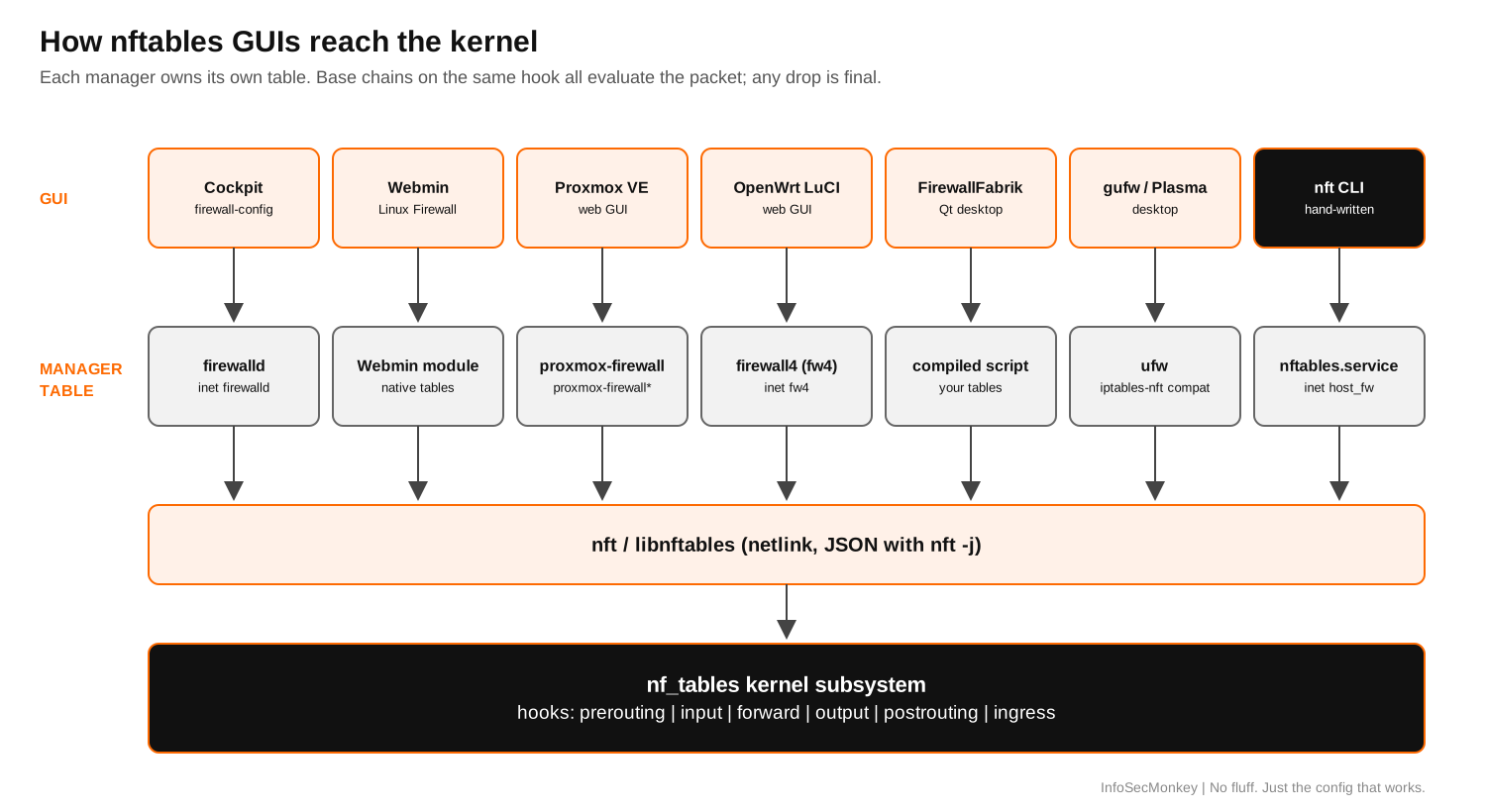
Component Table
| Component | Role in this guide |
|---|---|
nf_tables (kernel) |
Packet classification engine. Enforces everything. |
nft / libnftables |
Native userspace CLI and library. Every native GUI uses one of these, often via JSON (nft -j). |
nftables.service |
Loads your native config at boot (/etc/nftables.conf on Debian/Ubuntu, /etc/sysconfig/nftables.conf on RHEL family). |
| firewalld | Zone-based daemon. nftables is its default backend (FirewallBackend=nftables) since firewalld 0.6.0. Owns table inet firewalld. |
| iptables-nft | Compatibility layer. Accepts iptables syntax and writes nftables objects. Used by ufw, Docker and older scripts. |
3. Step-by-Step Implementation Workflow
Step 1: Find Out Who Already Owns Netfilter
Goal: Avoid the classic failure of two firewall managers writing to the same box.
Action: Inventory every table currently loaded, every firewall service, and which iptables backend the system uses.
# Every table in the kernel right now
sudo nft list tables

# Which managers are installed and running
systemctl is-active firewalld ufw nftables 2>/dev/null

# iptables backend: look for "(nf_tables)" or "(legacy)"
iptables -V
Read the output like this. table inet firewalld means firewalld is live. table ip filter and table ip nat with no firewalld usually mean ufw, Docker or a script talking through iptables-nft; nft list ruleset will print a warning that the table is managed by iptables-nft and should not be touched. table ip6 docker style or DOCKER chains mean Docker is in play. Pick one primary manager per host. Everything else either gets its own clearly named table or gets disabled.
GUI Verification: None yet. This is the step people skip, and it is the step that decides which GUI you can use.
Step 2: Write a Baseline Native Ruleset
Goal: A stateful, default-deny host firewall that allows management only from the management subnet and web traffic from anywhere.
Action: Create a table-scoped config. Note that it does not start with flush ruleset. Flushing the whole ruleset deletes Docker, libvirt and firewalld tables too; deleting only your own table is the polite version.
#!/usr/sbin/nft -f
# /etc/nftables.conf  (RHEL family: /etc/sysconfig/nftables.conf)

# Idempotent reset of OUR table only
table inet host_fw
delete table inet host_fw

table inet host_fw {
    set mgmt_v4 {
        type ipv4_addr
        flags interval
        elements = { 10.0.10.0/24 }
    }

    set web_ports {
        type inet_service
        elements = { 80, 443 }
    }

    chain input {
        type filter hook input priority filter; policy drop;

        ct state established,related accept
        ct state invalid drop
        iif "lo" accept

        # ICMP and ICMPv6 (IPv6 neighbor discovery breaks without it)
        meta l4proto icmp accept
        meta l4proto ipv6-icmp accept

        # SSH, Cockpit (9090) and Webmin (10000) from management only
        ip saddr @mgmt_v4 tcp dport { 22, 9090, 10000 } accept

        tcp dport @web_ports accept

        limit rate 5/minute log prefix "nft-in-drop: "
        counter drop
    }

    chain forward {
        type filter hook forward priority filter; policy drop;
    }

    chain output {
        type filter hook output priority filter; policy accept;
    }
}
Two named sets do the heavy lifting. When the management subnet grows or you add port 8443, you change a set element, not a rule.
GUI Verification: Webmin’s Linux Firewall module and enforza-cockpit both display named sets as reusable objects, so a ruleset written this way stays readable when you hand it to a GUI later.
Step 3: Validate and Apply With an Automatic Rollback
Goal: Never lock yourself out of a remote box.
Action: Syntax check first, arm a rollback timer, apply, then cancel the timer only after you have confirmed a fresh SSH session works.
# 1. Syntax and semantic check, no changes made
sudo nft -c -f /etc/nftables.conf && echo "config OK"

# 2. Arm a rollback: in 3 minutes, remove our table (host falls back to open)
sudo systemd-run --on-active=180 --unit=nft-rollback \
    /usr/sbin/nft delete table inet host_fw

# 3. Apply atomically (all rules load or none do)
sudo nft -f /etc/nftables.conf

# 4. From a NEW terminal, open a fresh SSH session. If it works:
sudo systemctl stop nft-rollback.timer
If the new session fails, do nothing. In three minutes the timer deletes the table and you are back in. This is the same idea as FortiOS configuration revert mode, built from parts every systemd host already has.
GUI Verification: Several nftables GUIs build this pattern in. enforza-cockpit uses a confirm-or-revert apply, and Proxmox and Webmin both keep a saved configuration separate from what is live in the kernel.
Step 4: Make It Persistent
Goal: Survive a reboot.
# Debian / Ubuntu: nftables.service loads /etc/nftables.conf
sudo systemctl enable --now nftables

# RHEL / Rocky / Alma: nftables.service loads /etc/sysconfig/nftables.conf
# Native nftables and firewalld should not both manage the host
sudo systemctl disable --now firewalld
sudo systemctl enable --now nftables
GUI Verification: systemctl is-enabled nftables returns enabled. In Cockpit, the Services page shows nftables.service as enabled and active.
Step 5: Pick a GUI
Goal: Choose a management interface that matches the box’s role, then install it without creating a second owner.
The options below are ordered from most common in enterprise to most niche. Each one notes whether it edits native nftables objects or drives a manager that generates them, because that decides what you can and cannot see in the GUI.
Option A: firewalld with Cockpit and firewall-config
What it is: firewalld is the zone-based firewall daemon that ships enabled on RHEL, Rocky, Alma, Fedora, Oracle Linux and openSUSE. Its default backend is nftables, controlled by FirewallBackend in /etc/firewalld/firewalld.conf, and it writes into its own inet firewalld table. Two GUIs sit on top of it: Cockpit (web console on TCP 9090, Networking then Firewall) and firewall-config (GTK desktop app, plus firewall-applet for the tray).
Best fit: RHEL-family servers, mixed teams where junior admins need a safe web UI, and anyone who thinks in zones (trusted, internal, public, dmz) rather than chains.
# RHEL / Rocky / Alma / Fedora
sudo dnf install -y firewalld cockpit firewall-config
sudo systemctl enable --now firewalld cockpit.socket

# Confirm the nftables backend and the table firewalld owns
grep ^FirewallBackend /etc/firewalld/firewalld.conf
sudo nft list tables | grep firewalld

# CLI equivalent of a Cockpit "Add services" click
sudo firewall-cmd --permanent --zone=public --add-service=https
sudo firewall-cmd --reload
GUI Verification: Browse to https://10.0.0.10:9090, sign in, open Networking, then Edit rules and zones under Firewall. The service you added shows under the public zone. firewall-config shows the same data with a Runtime versus Permanent selector at the top; changes made in Runtime vanish on reload, which is the number one firewall-config surprise.
Limits: firewalld hides the nftables object model behind zones, services and policies. You will not edit sets or chains directly. Rich rules and policies cover most needs; anything stranger belongs in a separate native table.
Option B: Webmin Linux Firewall (nftables) Module
What it is: Webmin 2.640 added a native nftables module, listed as Linux Firewall under the Networking category on systems where nftables is available. It manages tables, chains, sets and rules directly, offers starter profiles (for example a management-only profile that allows SSH and the Webmin port), quick allow, block and port-forward controls, a View Active Ruleset page that labels tables as managed by Webmin, externally managed or unclaimed, Apply Changes to push saved rules to the kernel, and Activate at Boot for persistence. The older iptables-based module is still there under a separate entry.
Best fit: Debian and Ubuntu servers where you want a true native-nftables GUI, and hosting boxes already running Webmin or Virtualmin.
# Add the official Webmin repository, then install the full package
curl -o webmin-setup-repo.sh \
  https://raw.githubusercontent.com/webmin/webmin/master/webmin-setup-repo.sh
sudo sh webmin-setup-repo.sh
sudo apt install -y --install-recommends webmin
# RHEL family: sudo dnf install -y webmin

# Minimal Webmin builds (Virtualmin repos) ship the module separately.
# Only needed if Networking > Linux Firewall is missing:
sudo dnf install -y webmin-nftables
GUI Verification: Browse to https://10.0.0.10:10000, open Networking, then Linux Firewall. On the View Active Ruleset page, inet host_fw from Step 2 appears as an externally managed or unclaimed table. Use the module’s import of the active ruleset if you want Webmin to take it over, then confirm Activate at Boot is on.
Limits: The module is new. Early users on the Virtualmin forum note it does not yet display rule comments the way the old iptables module did. Treat it as production-capable for straightforward host policies and keep complex rulesets in Git.
Option C: Proxmox VE Firewall (proxmox-firewall)
What it is: Proxmox VE has a full web GUI for datacenter, node, VM, container and VNet rules, with security groups, IP sets and aliases. The classic backend is pve-firewall (iptables). The newer proxmox-firewall service implements the same configuration on nftables and is the only backend that supports forwarded-traffic rules and VNet-level rules. As of the current admin guide it is still labeled a technology preview.
Best fit: Hypervisors. The GUI is the management plane; you never write nftables yourself.
# On each node
apt install -y proxmox-firewall

# Then in the GUI: Node > Firewall > Options > nftables = Yes
# (file equivalent: [OPTIONS] nftables: 1 in /etc/pve/nodes/<node>/host.fw)

systemctl status proxmox-firewall
nft list tables | grep proxmox
GUI Verification: Datacenter, then Firewall, then Options shows the firewall enabled. On the node, Firewall then Options shows nftables: Yes. nft list tables shows the proxmox-firewall and proxmox-firewall-guests tables.
Limits: Do not set the nftables option without installing the package first; Proxmox warns that no rules are generated in that state, leaving host and guests unprotected. Always keep an SSH session open and confirm port 8006 is allowed before enabling the firewall at the datacenter level.
Option D: OpenWrt LuCI with firewall4 (fw4)
What it is: Since OpenWrt 22.03, the firewall is firewall4, which keeps the same UCI configuration syntax as before but generates nftables rules instead of iptables. LuCI (Network, then Firewall) edits zones, forwardings, port forwards and traffic rules; fw4 compiles them into table inet fw4.
Best fit: Routers, branch boxes, travel routers and lab edge devices.
# Show the nftables ruleset fw4 would generate from UCI
fw4 print

# Live table
nft list table inet fw4

# Custom native snippets are included from /etc/nftables.d/*.nft
GUI Verification: In LuCI, Network then Firewall shows the lan and wan zones. After Save and Apply, nft list table inet fw4 reflects the change.
Limits: LuCI rewrites /etc/config/firewall and strips # comments from it. Keep comments in the rule name field instead.
Option E: FirewallFabrik (fwbuilder Successor)
What it is: A Qt desktop application by Linuxfabrik that carries forward the Firewall Builder model: a central policy database of reusable objects (hosts, networks, services), rule sets per firewall, and a compiler that generates deployment-ready scripts for iptables or nftables targets.
Best fit: Teams managing tens or hundreds of Linux firewalls from one policy file, especially former fwbuilder shops.
# Run without installing (requires uv)
uvx --from 'firewallfabrik[gui]' fwf

# Or install as a tool
uv tool install 'firewallfabrik[gui]'
GUI Verification: Create a firewall object with platform nftables, add a policy rule, compile, and review the generated script before deployment.
Limits: It is a policy compiler, not a live editor. Out-of-band changes on a target are overwritten on the next deploy, which is the point.
Option F: enforza-cockpit (Native nftables in Cockpit)
What it is: A free, MIT-licensed Cockpit plugin that gives you a browser GUI over a local nftables firewall without firewalld. It renders your policy into its own inet enforza table, supports reusable network and port objects, per-rule logging, IP forwarding plus SNAT for a simple NAT gateway, a preview that dry-runs the generated nftables JSON against the kernel, and a confirm-or-revert apply.
Best fit: Homelab NUCs, Raspberry Pis and cloud VMs where you want Cockpit’s look but native nftables underneath.
Limits: Young project. Install from the project’s own repository instructions, run it on a box where firewalld is disabled, and review the generated table with nft list table inet enforza before trusting it.
Option G: ufw with gufw or KDE Plasma Firewall (Indirect)
What it is: ufw is a front end to the iptables command set. On modern Ubuntu and Debian, iptables points at iptables-nft, so ufw rules land in the nf_tables kernel subsystem through the compatibility layer. gufw (GTK) and KDE’s Plasma Firewall settings page (which supports both ufw and firewalld backends) are the desktop GUIs.
Best fit: Ubuntu desktops and laptops.
Limits: This is not native nftables. You get iptables-shaped rules in table ip filter, no named sets or verdict maps, and a warning from nft list ruleset telling you not to edit those tables by hand. Do not mix ufw with a native nftables config on the same host.
Emerging Web Dashboards
A wave of small projects now wraps nftables in a web UI, including NiftyWall (a containerized dashboard that keeps its rules in its own inet niftywall table) and NeuroWall (a lightweight NGFW-style UI enforcing via nftables). They are worth watching for homelab use. For anything with real users behind it, wait for maturity, read the code paths that run as root, and never expose the admin UI to the internet.
Choosing Quickly
| Tool | Type | Native nft objects? | Best fit | Maturity |
|---|---|---|---|---|
| firewalld + Cockpit / firewall-config | Web + desktop over a daemon | No (zones, services, policies) | RHEL-family servers | Mature, distro default |
| Webmin Linux Firewall | Web | Yes (tables, chains, sets, rules) | Debian/Ubuntu servers, Virtualmin hosts | New in Webmin 2.640 |
| Proxmox VE (proxmox-firewall) | Web, cluster-wide | No (PVE rules compiled to nft) | Hypervisors | Tech preview backend |
| OpenWrt LuCI + fw4 | Web on router | No (UCI compiled to nft) | Routers and edge | Mature since 22.03 |
| FirewallFabrik | Desktop policy compiler | Generates nft scripts | Fleets of firewalls | Active, young |
| enforza-cockpit | Cockpit plugin | Yes (own table) | Homelab, single VMs | Young |
| ufw + gufw / Plasma | Desktop over iptables-nft | No (compat layer) | Desktops | Mature |
4. Verification and Validation
Test 1: Ruleset loaded and counters moving.
sudo nft list table inet host_fw
sudo nft list set inet host_fw mgmt_v4
Expected success output (abridged):
table inet host_fw {
        set mgmt_v4 {
                type ipv4_addr
                flags interval
                elements = { 10.0.10.0/24 }
        }
        ...
                counter packets 42 bytes 2520 drop
Test 2: Reachability from both sides of the policy. From a management host (10.0.10.50) and from a LAN host outside the management subnet (10.0.20.50):
nmap -Pn -p 22,80,443,9090,10000 10.0.0.10Expected: from 10.0.10.50, ports 22, 9090 and 10000 are open (if the services run) and 80/443 are open. From 10.0.20.50, ports 22, 9090 and 10000 are filtered, and 80/443 are open. filtered rather than closed proves the drop policy, not the service, is answering.
Test 3: Live set update with no reload.
sudo nft add element inet host_fw mgmt_v4 { 10.0.11.0/24 }
sudo nft list set inet host_fw mgmt_v4
Test 4: Persistence. Reboot, then run sudo nft list tables. inet host_fw (or the GUI’s own table) must be present without manual action.
5. Troubleshooting and Gotchas
Gotcha 1: Allowed in the GUI, Still Blocked
Symptom: You added an allow rule in Cockpit, Webmin or LuCI, but traffic still drops.
Cause: Another table has a base chain on the same hook with a drop policy or drop rule. Accept in table A does not stop table B from dropping.
Diagnose: List every base chain on the input hook, then trace one test flow.
# Every chain, every table; look for "hook input"
sudo nft list chains

# Trace packets from one source through all tables
sudo nft add chain inet host_fw trace_pre \
    '{ type filter hook prerouting priority -350; }'
sudo nft add rule inet host_fw trace_pre ip saddr 10.0.20.50 meta nftrace set 1
sudo nft monitor trace

# Clean up afterwards
sudo nft delete chain inet host_fw trace_pre
Resolution: Pick one owner. Either move the rule into the table that is dropping, or remove the competing manager (for example systemctl disable --now firewalld when you have committed to native nftables).
Gotcha 2: Locked Out After Apply
Symptom: SSH hangs immediately after loading a ruleset.
Cause: Usually a missing ct state established,related accept above the drop, or the management subnet set does not include your source IP (VPN pools and jump hosts are frequent offenders).
Resolution: Wait for the Step 3 rollback timer, or use the console and run sudo nft delete table inet host_fw. Before re-applying, confirm your real source address with who -u or ss -tnp | grep :22.
Gotcha 3: iptables-nft Tables Invisible to Native GUIs
Symptom: nft list ruleset shows table ip filter with a warning that it is managed by iptables-nft, and your native GUI shows it as externally managed.
Cause: ufw, Docker or an old script is writing through the compatibility layer.
Resolution: Do not edit those tables with nft or a native GUI; manage them with the tool that created them (ufw status numbered, iptables-nft -S). For Docker hosts, filter container traffic in the DOCKER-USER chain and keep your own host policy in a separate native table.
Gotcha 4: Rules Gone After Reboot
Cause: nftables.service not enabled, the config written to the wrong path for the distro family, or the GUI’s boot activation left off (Webmin’s Activate at Boot, firewall-config Runtime-only changes).
Resolution: systemctl is-enabled nftables, confirm the file path from Step 4, and for firewalld always use --permanent or the Permanent view, followed by a reload.
References
Recent posts
-

-

DNS is one of those technologies that quietly underpins... Full Story
-

BGP issues on FortiGate firewalls usually trace back to... Full Story
-

Every time your laptop talks to your router, a... Full Story
-

If you've spent any time configuring NAT on a... Full Story
-

If you have spent any time configuring firewall policies... Full Story
-

High availability on FortiGate is one of those features... Full Story
-

If you've configured SD-WAN on a FortiGate, you've almost... Full Story
-

FortiLink is the management protocol that turns a FortiSwitch... Full Story
-

FortiSwitches are pretty rock solid from Mean Time Between... Full Story
-

This is a quicky tip. Have you ever gone... Full Story
-

DNS is one of those quiet pieces of internet... Full Story
-

This article is an updated version of the previous... Full Story
-

You will add ns2 as a secondary (slave) BIND9... Full Story
-

In the process of deploying my lab, I needed... Full Story
-

RFC 8805, used to be known as Self-Correcting IP... Full Story
-

Years back, I wrote an article about certificate pinning. ... Full Story
-

FortiGates have the ability to send alerts to Microsoft... Full Story
-

In this post, I am going to walk through... Full Story
-

Troubleshooting VoIP on a FortiGate can feel like trying... Full Story
-

Prior to FortiOS 7.0, there were three commands to... Full Story
-

In this post, I am going to go over... Full Story
-

What we are going to do: We are going... Full Story
-

Choosing between FGCP (FortiGate Clustering Protocol) and FGSP (FortiGate... Full Story
-

Creating a VLAN on macOS (The "Pro" Move) A... Full Story
-

This blog post explores the logic behind how macOS... Full Story
-

Pretty Fly for a Wi-Fi Tell My Wi-Fi Love... Full Story
-

Part of my daily gig is creating BoMs (Bill-of-Materials)... Full Story
-

ICMP introduces several security risks, but careful filtering, rate... Full Story
-

The command diag debug application dhcps -1 enables full... Full Story
-

In the world of FortiOS, execute tac report is... Full Story
-

LLDP; What is it The Link Layer Discovery Protocol... Full Story
-

What it actually does When you run diagnose fdsm... Full Story
-

Monkey Bites are bite-sized, high-impact security insights designed for... Full Story
-

I have run macOS in macOS with Parallels but... Full Story
-

Don't be confused with my other FortiNAC posts where... Full Story
-

This is the third session in a multi-part article... Full Story
-

Today I was configuring key-based authentication on a FortiGate... Full Story
-

Netcat, often called the "Swiss Army knife" of networking,... Full Story
-

At its core, IEEE 802.1X is a network layer... Full Story
-

In case you did not see the previous FortiNAC... Full Story
-

This is our 5th session where we are going... Full Story
-

Now that we have Wireshark installed and somewhat configured,... Full Story
-

The Philosophy of Packet Analysis Troubleshooting isn't about looking... Full Story
-

1. Executive Summary Objective: Get a working, persistent nftables... Full Story
-

Executive Summary Objective: Identify every cleartext and unauthenticated legacy... Full Story
-

Executive Summary Objective: Roll an expiring SAML signing certificate... Full Story