
If you've spent any time configuring user authentication on... Full Story
By Manny Fernandez
November 7, 2026
CVE-2026-97631: EDK2 PXE ICMP Overflow Turns Network Boot into Pre-Boot RCE
CVE-2026-97631: EDK2 PXE ICMP Overflow Turns Network Boot into Pre-Boot RCE
InfoSecMonkey | October 29, 2026 | No fluff. Just the config that works.
Executive Summary
The EDK2 PXE ICMP overflow (CVE-2026-97631, CVSS 4.0 score 9.5, Critical) lets an unauthenticated attacker run code inside UEFI firmware while a machine is network booting. One oversized ICMP error message, sent to the client’s IP during the PXE window, overflows a fixed 504-byte buffer in the EDK II PXE Base Code driver. The result is either a hung boot or attacker code running in the DXE phase at ring 0, before Secure Boot or measured boot has verified a single byte of the operating system.
EDK II (TianoCore) is the open source UEFI reference code that most commercial firmware is built on, so this is not one vendor’s bug. It lands in servers, workstations, thin clients and virtual machines that use OVMF.
| Item | Detail |
|---|---|
| CVE | CVE-2026-97631 |
| Severity | Critical, CVSS 4.0 base score 9.5 |
| Vector | CVSS:4.0/AV:N/AC:L/AT:P/PR:N/UI:N/VC:H/VI:H/VA:H/SC:H/SI:H/SA:H |
| Weakness | CWE-120 classic buffer overflow, CWE-131 incorrect buffer size calculation, CWE-787 out-of-bounds write |
| Component | NetworkPkg/UefiPxeBcDxe (PXE Base Code driver) |
| Vulnerable functions | PxeBcIcmpErrorDpcHandle (IPv4) and PxeBcIcmp6ErrorDpcHandle (IPv6) |
| Affected | EDK II master as of 2026-09-14 and downstream firmware built from it |
| Upstream fix | PR #13302, merged to master October 15, 2026 (commit fa78907) |
| Credit | Alex Matrosov (Anthropic) and Dan Holmes-Mitra (Google) |
Objective: explain how the bug works, find out where you are exposed, and put patching, isolation and detection in place on your provisioning networks with FortiGate.
Target audience: network and security engineers, data center and VDI teams that run PXE, and anyone who owns firmware patching for a server fleet.
How the EDK2 PXE ICMP Overflow Works
Where it lives in the boot chain
UEFI boots in phases: SEC, PEI, DXE, then BDS hands off to a boot loader. The PXE Base Code driver runs in DXE. At that point the firmware owns the CPU, nothing from your OS exists yet, and the Secure Boot checks that protect you later have not started on the OS loader. That is why a firmware network bug is worth more to an attacker than almost any OS bug: there is no EDR, no kernel protection, and no log.
The bug
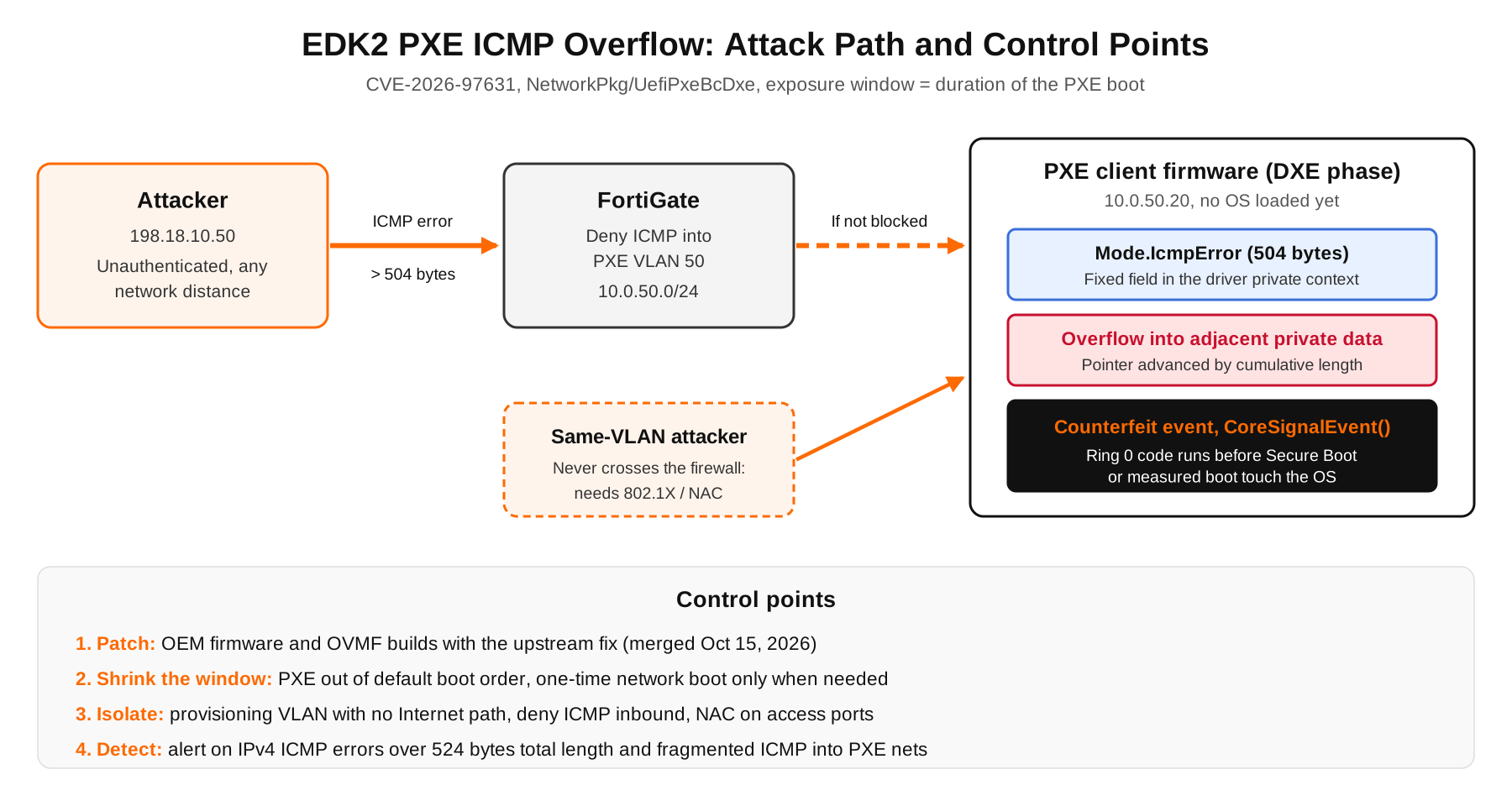
During a network boot the PXE driver keeps a receive request open for ICMP error messages (destination unreachable, time exceeded and so on) so it can report them to the boot loader. Each received error is copied into Mode.IcmpError, a fixed 504-byte field inside the driver’s private context structure. The copy loop gets two things wrong, in both the IPv4 and IPv6 handlers:
- It keeps copying bytes into the field when the message is longer than 504 bytes instead of stopping or truncating.
- It advances the destination pointer by the cumulative length copied so far instead of the length of the fragment it just copied, so later fragments land further and further past the end of the field.
- Nothing earlier in the receive path limits the size of the incoming ICMP message, so the attacker controls how far the write goes and what it writes.
The logic looks roughly like this. This is an illustrative sketch built from the public description, not the actual EDK II source:
// ILLUSTRATIVE ONLY: simplified from the published root cause
UINT8 *Dst = (UINT8 *)&Mode->IcmpError; // 504-byte field
UINT32 Copied = 0;
for (Index = 0; Index < RxData->FragmentCount; Index++) {
Len = RxData->FragmentTable[Index].FragmentLength;
Copied += Len; // running total
// Bug 1: no hard stop once Copied passes 504 bytes
CopyMem (Dst, RxData->FragmentTable[Index].FragmentBuffer, Len);
Dst += Copied; // Bug 2: should be += Len
}The upstream fix does what you would expect: zero the buffer first, copy at most the space that remains, advance by the per-fragment length, and truncate anything that does not fit.
// ILLUSTRATIVE ONLY: the shape of the fix
ZeroMem (&Mode->IcmpError, sizeof (Mode->IcmpError));
Remaining = sizeof (Mode->IcmpError);
for (Index = 0; Index < RxData->FragmentCount; Index++) {
if (Remaining == 0) {
break; // truncate oversized errors
}
Len = MIN (RxData->FragmentTable[Index].FragmentLength, Remaining);
CopyMem (Dst, RxData->FragmentTable[Index].FragmentBuffer, Len);
Dst += Len;
Remaining -= Len;
}What an attacker gets
- Denial of service, every time. The overflow corrupts the driver’s private data, and the next ICMP error triggers a CPU exception inside the DXE core. The boot hangs, which breaks OS provisioning and recovery for whatever is being imaged.
- Code execution, with homework. An attacker who knows the target firmware build can place a counterfeit event structure in the same packet. When the firmware calls
CoreSignalEvent()on it, the attacker’s bytes are dispatched at ring 0 in DXE. That build knowledge is why the vector says Attack Requirements: Present. - No credentials, no user, any distance. The attacker only needs to land a unicast ICMP error on the client’s IP. If that IP is reachable from where the attacker sits, distance does not matter.
The exposure window is the PXE boot itself. A laptop that PXE boots once a year is a small target. A server whose boot order tries the network before the disk opens that window on every single reboot, patch night included.
If this sounds familiar, it should. NetworkPkg was the same code behind the PixieFail set of bugs in early 2024. Pre-boot network stacks are small, old and rarely fuzzed, and they parse attacker-reachable packets before anything else on the box is awake.
Prerequisites and Architecture
Assumed knowledge: UEFI boot order basics, PXE (DHCP plus TFTP or HTTP), FortiGate interfaces and firewall policies, and reading tcpdump filters.
Lab requirements: a FortiGate running FortiOS 7.4 or later, a provisioning VLAN, a Linux host for packet capture, and one test host outside the VLAN. Never test against production machines that are mid-boot: a vulnerable client will hang.
| Component | Role | Lab address |
|---|---|---|
| FortiGate | Gateway and policy point for the provisioning VLAN | 10.0.50.1 (VLAN 50) |
| Provisioning VLAN | Where PXE clients boot | 10.0.50.0/24 |
| Boot server | DHCP, TFTP or HTTP boot images | 10.0.50.10 |
| PXE client | Server or VM being imaged | 10.0.50.20 |
| Capture host | Linux box on a mirror port or the boot server | 10.0.50.11 |
| External test host | Simulates an off-segment sender | 198.18.10.50 |
Figure 1: Attack path and control points for CVE-2026-97631
Step-by-Step: Find, Patch and Contain
Step 1: Find the machines that network boot
Goal: a list of hosts that attempt PXE, and how often.
Action: read the UEFI boot entries from the running OS. Anything with a network entry ahead of the disk in BootOrder tries PXE on every reboot.
# Linux: list UEFI boot entries and the boot order
sudo efibootmgr -v | grep -iE 'BootOrder|pxe|ipv4|ipv6|network|nic'
# Windows (elevated): firmware boot manager entries
bcdedit /enum firmwareGUI verification: open the BMC (iDRAC, iLO, XClarity or similar) or the firmware setup screen and check the boot sequence. Note whether IPv4 and IPv6 network boot are both enabled on each NIC.
Step 2: Identify the firmware and check for a vendor fix
Goal: know which firmware build each host runs and whether your OEM has shipped one with the fix.
Action: the upstream fix only protects you once your platform vendor rebuilds firmware on top of it. Pull the version, then check the OEM and the BIOS vendor (AMI, Insyde, Phoenix and others) for an advisory that names CVE-2026-97631.
# Current BIOS/UEFI vendor, version and date
sudo dmidecode -s bios-vendor
sudo dmidecode -s bios-version
sudo dmidecode -s bios-release-date
# Hardware that publishes through LVFS
sudo fwupdmgr refresh
sudo fwupdmgr get-updatesGUI verification: in the BMC firmware inventory, confirm the BIOS version after the update and that the host completed a full power cycle.
Step 3: Patch virtual firmware (OVMF)
Goal: VMs that boot with OVMF get a fixed EDK II build.
Action: check the package on every hypervisor. At the time of writing, the Debian security tracker for CVE-2026-97631 still lists the edk2 source package as vulnerable in bookworm, trixie and sid, so watch your distribution for the update.
# Debian / Ubuntu hosts
apt policy ovmf
# RHEL / Rocky / Alma hosts
rpm -q edk2-ovmf
# Proxmox VE
pveversion -v | grep -i edk2GUI verification: after the update, power the VM fully off and start it again from the hypervisor console. A reboot from inside the guest keeps the old firmware loaded (see Troubleshooting).
Step 4: Shrink the exposure window
Goal: hosts only PXE boot when someone actually wants them to.
Action: move network boot below local disk in the default order, disable the IP stack you do not use for network boot, and use a one-time boot override when you need to reimage.
# Put the disk entry first (example entry numbers, use your own)
sudo efibootmgr -o 0001,0000
# Request PXE for the next boot only through the BMC
ipmitool -I lanplus -H <BMC_IP> -U <USER> -P '<PASS>' chassis bootdev pxe
ipmitool -I lanplus -H <BMC_IP> -U <USER> -P '<PASS>' power cycleBoth the IPv4 and IPv6 handlers are vulnerable, so turning one off reduces exposure but does not remove it. If you are moving to UEFI HTTP boot, confirm with your firmware vendor that the build you run is patched, rather than assuming a different boot protocol means different code.
GUI verification: the BMC boot settings show local disk first and the one-time override cleared after the next boot.
Step 5: Isolate the provisioning VLAN on FortiGate
Goal: nobody outside the provisioning VLAN can deliver an ICMP message to a booting client.
Action: give provisioning its own VLAN, keep the boot server inside it, and deny ICMP from every other interface into it. PXE clients do not need ICMP errors from the outside world to boot.
config system interface
edit "PXE-VLAN50"
set vdom "root"
set ip 10.0.50.1 255.255.255.0
set allowaccess ping
set role lan
set interface "<PARENT_INTF>"
set vlanid 50
next
end
config firewall address
edit "NET-PXE-10.0.50.0"
set subnet 10.0.50.0 255.255.255.0
next
endconfig firewall policy
edit 0
set name "DENY-ICMP-INTO-PXE"
set srcintf "<WAN_INTF>" "<CORE_INTF>"
set dstintf "PXE-VLAN50"
set srcaddr "all"
set dstaddr "NET-PXE-10.0.50.0"
set action deny
set schedule "always"
set service "ALL_ICMP"
set logtraffic all
next
edit 0
set name "DENY-ICMP6-INTO-PXE"
set srcintf "<WAN_INTF>" "<CORE_INTF>"
set dstintf "PXE-VLAN50"
set srcaddr6 "all"
set dstaddr6 "<PXE_NET6_OBJECT>"
set action deny
set schedule "always"
set service "ALL_ICMP6"
set logtraffic all
next
endPolicies created with edit 0 land at the bottom of the list. Move both above any policy that permits traffic into the VLAN:
config firewall policy
move <DENY_ICMP_ID> before <FIRST_ALLOW_INTO_PXE_ID>
move <DENY_ICMP6_ID> before <FIRST_ALLOW_INTO_PXE_ID>
endThen make sure the VLAN has no outbound path to the Internet or to untrusted networks. Pull boot images from a server inside the VLAN.
GUI verification: Policy and Objects, Firewall Policy. Both deny policies sit above the allow rules for PXE-VLAN50, and Log Allowed Traffic is set to All Sessions so hits are visible.
Step 6: Close the same-segment path
Goal: an attacker plugged into the provisioning VLAN cannot reach booting clients either.
Action: traffic between two hosts in 10.0.50.0/24 never touches the FortiGate, so the firewall policy above cannot see it. Lock down access ports on the provisioning VLAN with 802.1X or MAC authentication bypass through your NAC, keep user and IoT devices off it entirely, and consider a separate provisioning VLAN per build rack so one compromised host cannot reach every client being imaged.
GUI verification: on the switch or FortiSwitch port view, every port in VLAN 50 shows an authenticated device or is shut down.
Step 7: Detect oversized ICMP errors
Goal: see an attempt even where you cannot block it.
Action: the trigger is an ICMP message longer than 504 bytes. For IPv4 without options that is an IP total length above 524. RFC 1812 caps ICMPv4 errors at 576 bytes, so anything bigger is out of spec, and anything between 525 and 576 aimed at a PXE client deserves a look. Fragmented ICMP into a provisioning network is also odd enough to alert on.
# IPv4 ICMP errors (types 3,4,5,11,12) longer than 504 bytes of ICMP
sudo tcpdump -ni <IFACE> 'icmp and (icmp[0]=3 or icmp[0]=4 or icmp[0]=5
or icmp[0]=11 or icmp[0]=12) and ip[2:2] > 524'
# Any fragmented ICMP (MF set or non-zero offset)
sudo tcpdump -ni <IFACE> 'icmp and (ip[6:2] & 0x3fff != 0)'
# ICMPv6 error messages (types 0-127) over 504 bytes, no ext headers
sudo tcpdump -ni <IFACE> 'icmp6 and ip6[40] < 128 and ip6[4:2] > 504'On the FortiGate itself, the same IPv4 filter works with the built-in sniffer:
diagnose sniffer packet PXE-VLAN50 'icmp and ip[2:2] > 524' 4 0 lGUI verification: if you feed the capture into a SIEM, build an alert for any match where the destination is in a provisioning subnet.
Verification and Validation
Firewall check (lab only): from the external test host, send a few oversized ICMP destination-unreachable messages at an idle lab client. The FortiGate should drop and log them, and the capture on PXE-VLAN50 should stay empty.
# From 198.18.10.50: three type 3 code 1 messages with 600 data bytes
sudo hping3 --icmp -C 3 -K 1 -d 600 -c 3 10.0.50.20execute log filter category traffic
execute log filter field policyid <DENY_ICMP_ID>
execute log displayExpected success output: deny entries from the external host, and nothing on the inside sniffer.
1: date=2026-10-29 time=11:42:07 type="traffic" subtype="forward"
srcip=198.18.10.50 dstip=10.0.50.20 proto=1 action="deny"
policyid=<DENY_ICMP_ID> policyname="DENY-ICMP-INTO-PXE"
service="icmp" dstintf="PXE-VLAN50"
FGT # diagnose sniffer packet PXE-VLAN50 'icmp and ip[2:2] > 524' 4 0 l
interfaces=[PXE-VLAN50]
filters=[icmp and ip[2:2] > 524]
0 packets received by filterFirmware check: after the vendor update and a full power cycle, sudo dmidecode -s bios-version returns the fixed build listed in the OEM advisory. For VMs, the hypervisor package version matches the fixed release from your distribution.
Troubleshooting and Gotchas
1. The hypervisor is patched but the VM is still vulnerable
OVMF is read when the QEMU process starts. A reboot from inside the guest reuses the same process and the old firmware image. Stop and start the VM, or live migrate it to a patched host, then confirm the process started after the package update:
# QEMU processes and their start time
ps -eo pid,lstart,cmd | grep -i [q]emu | grep -i ovmf2. ICMP still reaches the VLAN despite the deny policy
A stateful firewall forwards ICMP errors that relate to a session it already allowed, because that is how path MTU discovery and unreachable messages are supposed to work. If PXE clients open sessions to anything outside the VLAN, such as a remote TFTP or HTTP boot server, an attacker on that path can ride the existing session. Keep the boot server inside the VLAN and check for outbound sessions:
diagnose sys session filter clear
diagnose sys session filter src 10.0.50.0 10.0.50.255
diagnose sys session list3. Detection fires on legitimate IPv6 errors
RFC 4443 lets an ICMPv6 error carry as much of the original packet as fits in 1280 bytes, so normal IPv6 errors can exceed 504 bytes. Treat the IPv6 filter as alert and correlate, not block, and narrow it to destinations in the provisioning prefix. If you see a capture that shows nothing at all, also confirm you are on a port that sees the client traffic: two hosts on the same VLAN talk through the switch, not the FortiGate.
Bottom Line
- Ask every server, workstation and BMC vendor for firmware that includes the CVE-2026-97631 fix, and update OVMF on your hypervisors.
- Until then, network boot should be a one-time event, not a default boot order entry.
- Provisioning VLANs get no Internet path, no inbound ICMP, and authenticated access ports.
- Alert on oversized and fragmented ICMP errors aimed at provisioning subnets.
Sources
- EDK II pull request #13302: Fix ICMP buffer overflow in IPv4/IPv6 handlers (CVE-2026-97631)
- Debian security tracker entry for CVE-2026-97631
InfoSecMonkey: No fluff. Just the config that works.
Recent posts
-

-

DNS is one of those technologies that quietly underpins... Full Story
-

BGP issues on FortiGate firewalls usually trace back to... Full Story
-

Every time your laptop talks to your router, a... Full Story
-

If you've spent any time configuring NAT on a... Full Story
-

If you have spent any time configuring firewall policies... Full Story
-

High availability on FortiGate is one of those features... Full Story
-

If you've configured SD-WAN on a FortiGate, you've almost... Full Story
-

FortiLink is the management protocol that turns a FortiSwitch... Full Story
-

FortiSwitches are pretty rock solid from Mean Time Between... Full Story
-

This is a quicky tip. Have you ever gone... Full Story
-

DNS is one of those quiet pieces of internet... Full Story
-

This article is an updated version of the previous... Full Story
-

You will add ns2 as a secondary (slave) BIND9... Full Story
-

In the process of deploying my lab, I needed... Full Story
-

RFC 8805, used to be known as Self-Correcting IP... Full Story
-

Years back, I wrote an article about certificate pinning. ... Full Story
-

FortiGates have the ability to send alerts to Microsoft... Full Story
-

In this post, I am going to walk through... Full Story
-

Troubleshooting VoIP on a FortiGate can feel like trying... Full Story
-

Prior to FortiOS 7.0, there were three commands to... Full Story
-

In this post, I am going to go over... Full Story
-

What we are going to do: We are going... Full Story
-

Choosing between FGCP (FortiGate Clustering Protocol) and FGSP (FortiGate... Full Story
-

Creating a VLAN on macOS (The "Pro" Move) A... Full Story
-

This blog post explores the logic behind how macOS... Full Story
-

Pretty Fly for a Wi-Fi Tell My Wi-Fi Love... Full Story
-

Part of my daily gig is creating BoMs (Bill-of-Materials)... Full Story
-

ICMP introduces several security risks, but careful filtering, rate... Full Story
-

The command diag debug application dhcps -1 enables full... Full Story
-

In the world of FortiOS, execute tac report is... Full Story
-

LLDP; What is it The Link Layer Discovery Protocol... Full Story
-

What it actually does When you run diagnose fdsm... Full Story
-

Monkey Bites are bite-sized, high-impact security insights designed for... Full Story
-

I have run macOS in macOS with Parallels but... Full Story
-

Don't be confused with my other FortiNAC posts where... Full Story
-

This is the third session in a multi-part article... Full Story
-

Today I was configuring key-based authentication on a FortiGate... Full Story
-

Netcat, often called the "Swiss Army knife" of networking,... Full Story
-

At its core, IEEE 802.1X is a network layer... Full Story
-

In case you did not see the previous FortiNAC... Full Story
-

This is our 5th session where we are going... Full Story
-

Now that we have Wireshark installed and somewhat configured,... Full Story
-

The Philosophy of Packet Analysis Troubleshooting isn't about looking... Full Story
-

No fluff. Just the config that works. Executive Summary... Full Story
-

INFOSECMONKEY | CVE BRIEF | NO FLUFF. JUST THE... Full Story
-

APT CVE-2026-109518: How a Download Retry Lets an Attacker... Full Story