
If you've spent any time configuring user authentication on... Full Story
By Manny Fernandez
November 6, 2026
Microsoft Paint CVE-2026-83844: The RCE Fix Windows Update Will Never Install
No fluff. Just the config that works.
Executive Summary
Paint CVE-2026-83844 is a remote code execution bug in the Windows 11 Paint app that Microsoft fixed in the October 13, 2026 security release. Here is the catch that is burning patch teams right now: the fix lives in the Microsoft Store, not in the Windows cumulative update. You can be 100 percent green on Windows Update compliance and still have a vulnerable Paint on every desktop in the building.
Objective: understand why Windows Update never touches this fix, confirm which Paint build is actually safe, and push, verify and enforce the Store update across single PCs and whole fleets.
Target audience: Windows admins, endpoint and vulnerability management teams, MSPs, and anyone whose patch report says “compliant” without checking Store apps.
TL;DR: Get Paint to 11.2609.401.0 or later through the Microsoft Store (or winget’s msstore source). The October cumulative update does not fix it. Check every user profile, not just yours.
Paint CVE-2026-83844 at a Glance
| Item | Detail |
|---|---|
| CVE | CVE-2026-83844, Windows Paint Remote Code Execution |
| Published | October 13, 2026 (Patch Tuesday) |
| Weakness | CWE-125, out-of-bounds read |
| Severity | Important, CVSS 3.1 base 8.1 |
| Vector | AV:N/AC:H/PR:N/UI:N/S:U/C:H/I:H/A:H |
| Exploited / disclosed | No / No. Microsoft rates exploitation less likely. Not in CISA KEV |
| Affected | Store package Microsoft.Paint on Windows 11, builds below 11.2609.401.0 |
| Fixed build | 11.2609.401.0 (Store product ID 9PCFS5B6T72H) |
| Delivery channel | Microsoft Store only. Not Windows Update, not the LCU |
| Windows 10 | Classic Paint on Windows 10 is not listed as affected |
Microsoft’s own description says an unauthenticated attacker can get code execution over a network with no user interaction. Paint is a desktop image editor, not a listening service, so most analysts (including ThreatDefence and Joho no Todai) read the realistic path as crafted image data reaching Paint through a download, attachment or share. High attack complexity and no public exploit put this in your normal patch cycle, not your hair-on-fire queue. The real problem is that your normal patch cycle probably does not reach it.
Why Windows Update Will Not Fix Paint CVE-2026-83844
Windows 11 ships Paint as an inbox Store app (an MSIX/Appx package), the same model as Notepad, Snipping Tool, Photos and the Raw Image Extension. Those apps are serviced on their own track:
- Windows Update, WSUS, Intune update rings, Autopatch deliver the OS cumulative update (LCU). That patches the kernel, system DLLs and in-box OS components. Paint is not one of them.
- The Microsoft Store (or winget against the
msstoresource, or an Intune “Microsoft Store app (new)” assignment) delivers app package updates, per user profile.
Figure 1: Two servicing channels: only the Store path reaches Paint
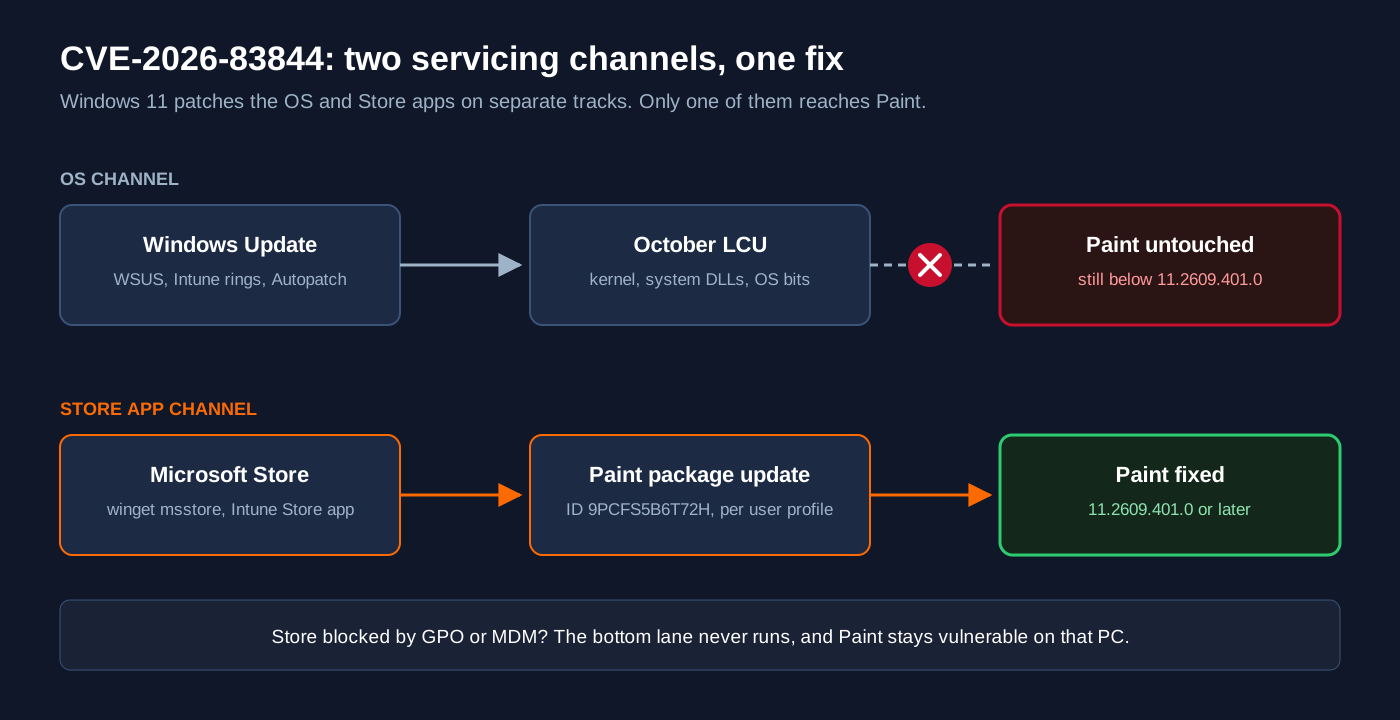
So the October LCU installs, the dashboard turns green, and Paint sits on whatever build it had before. CrowdStrike’s October Patch Tuesday analysis flagged the same trap for the Raw Image Extension: environments that lock down the Store, or run WSUS without Store integration, simply never get the app fix. Malware.News puts it plainly too: OS patch compliance does not prove the Paint package was updated.
Who stays vulnerable
- Fleets that block the Store or Store auto-updates through Group Policy or MDM. Paint never moves. This is most hardened corporate builds and kiosks.
- Shared and multi-user PCs. Store apps update per profile, so one user can be fixed while the next logon is still on the old build.
- Fresh profiles built from an old image. A new user gets the provisioned Paint version from the image and waits for the Store to catch up.
- PCs with the Store working but stuck. Even with automatic updates on, testers reported Paint parked on 11.2603.251.0 with no update offered. Check, do not assume.
The Fixed Build Confusion: 11.2605.91.0 vs 11.2609.401.0
If you patched in October and still could not get a “fixed” build, you were not crazy. Microsoft originally named 11.2605.91.0 as the fix, and that build never showed up in the public Store catalog. Admins asked about it on Microsoft Q&A in late October with no luck. In early November the MSRC Security Update Guide quietly changed the fixed build to 11.2609.401.0, while the CVE.org record still shows the old cutoff.
Per ThreatDefence’s read of the Store catalog, the published Paint builds jump from 11.2605.81.0 straight to 11.2609.401.0, so in practice both cutoffs flag the same machines. Make your rule simple:
Anything below 11.2609.401.0 is vulnerable. Build your detection, compliance and reporting against that number, not the one in the CVE record.
Prerequisites and Architecture
- Comfortable with PowerShell 5.1 or 7 and running elevated sessions.
- Windows 11 endpoints (22000 or later). Lab or pilot group first if you manage a fleet.
- For fleet work: Intune, Configuration Manager, or PowerShell remoting (WinRM) to your Windows 11 PCs.
- Rights to read and change the Store-related policies in GPO or your MDM.
| Component | Role in this fix | Notes |
|---|---|---|
| Microsoft Store | Primary delivery of Paint 11.2609.401.0 | Per user profile, can be blocked by policy |
| winget (msstore source) | Scriptable Store update | Run in the user context, not SYSTEM |
| Intune “Microsoft Store app (new)” | Enforced, kept-current deployment | Uses winget under the hood |
| Windows Update / WSUS / LCU | Patches the OS only | Does not update Paint |
| Get-AppxPackage | Version truth per profile | Use -AllUsers from an elevated shell |
Step-by-Step Remediation
Step 1: Check the Paint build on a PC
Goal: know exactly which Paint build each profile is running.
Action: run this from an elevated PowerShell window. It is read-only.
Get-AppxPackage -AllUsers -Name Microsoft.Paint |
  Select-Object Name, Version, PackageUserInformation
For a quick pass or fail with the profile names spelled out:
$fixed = [version]'11.2609.401.0'
Get-AppxPackage -AllUsers -Name Microsoft.Paint | ForEach-Object {
  [pscustomobject]@{
    Version = $_.Version
    Status  = $(if ([version]$_.Version -ge $fixed) { 'FIXED' } else { 'VULNERABLE' })
    Users   = ($_.PackageUserInformation.UserSecurityId.Username) -join ', '
  }
}
Version Status Users
------- ------ -----
11.2603.251.0 VULNERABLE LAB\manny, LAB\frontdeskGUI verification: open Paint, select the gear icon (Settings), and read the version under About Paint.
Step 2: Find the policy that is blocking the Store
Goal: confirm nothing in GPO or MDM is stopping Store app updates.
Action: read the Store policy keys. AutoDownload set to 2 means automatic app updates are turned off; 4 means always on. RemoveWindowsStore set to 1 means the Store app is disabled.
Get-ItemProperty -Path 'HKLM:\SOFTWARE\Policies\Microsoft\WindowsStore' `
  -ErrorAction SilentlyContinue |
  Select-Object AutoDownload, RemoveWindowsStore, DisableStoreApps
GUI verification: in the Group Policy editor, check Computer Configuration, Administrative Templates, Windows Components, Store for “Turn off Automatic Download and Install of updates” and “Turn off the Store application”. In Intune, check your Settings Catalog profiles for the matching Microsoft App Store settings.
Step 3: Push the update on the PC
Goal: get Paint to 11.2609.401.0 now, without waiting for the Store’s schedule.
Action (GUI): Microsoft Store, Downloads (Library), Get updates. Confirm Paint is in the list and finishes.
Action (CLI): run winget upgrade against the Store source in the signed-in user’s session:
winget upgrade --id 9PCFS5B6T72H --source msstore `
  --accept-package-agreements --accept-source-agreements
Close and reopen Paint afterwards, and restart if prompted. MSRC notes a restart may be needed.
Step 4: Enforce it across the fleet
Goal: make Paint stay current without anyone clicking anything.
Action (Intune): add Paint as a Microsoft Store app (new), search for 9PCFS5B6T72H, set the install behavior to User, and assign it as Required to your Windows 11 device or user groups. Intune then keeps it on the latest Store build.
Action (no Intune): sweep your Windows 11 machines over PowerShell remoting and get a vulnerable list in one table:
$pcs = Get-Content .\win11-pcs.txt
Invoke-Command -ComputerName $pcs -ArgumentList '11.2609.401.0' -ScriptBlock {
  param($fixedText)
  $fixed = [version]$fixedText
  Get-AppxPackage -AllUsers -Name Microsoft.Paint | ForEach-Object {
    [pscustomobject]@{
      Version = $_.Version
      Status  = $(if ([version]$_.Version -ge $fixed) { 'FIXED' } else { 'VULNERABLE' })
    }
  }
} | Sort-Object Status -Descending |
  Format-Table PSComputerName, Version, Status -AutoSize
GUI verification: Intune, Apps, Windows, select Paint, then Device install status. In Defender Vulnerability Management, filter the software inventory for Paint below 11.2609.401.0.
Step 5: Remove Paint where nobody needs it
Goal: shrink the attack surface on kiosks, jump hosts and servers with Desktop Experience that cannot stay current.
Action: this is a hardening choice, not a Microsoft workaround. Remove the installed package and the provisioned copy so new profiles do not get it back:
Get-AppxPackage -AllUsers -Name Microsoft.Paint | Remove-AppxPackage -AllUsers
Get-AppxProvisionedPackage -Online |
  Where-Object DisplayName -eq 'Microsoft.Paint' |
  Remove-AppxProvisionedPackage -Online
GUI verification: Settings, Apps, Installed apps, search for Paint. It should be gone.
Verification and Validation
Run the Step 1 check again on each machine and each profile. Success looks like this:
Version         Status Users
-------         ------ -----
11.2609.401.0   FIXED  LAB\manny, LAB\frontdesk
Then check the provisioned copy, which is what brand-new profiles inherit:
Get-AppxProvisionedPackage -Online |
  Where-Object DisplayName -eq 'Microsoft.Paint' |
  Select-Object DisplayName, Version
If the provisioned version is old, new users start vulnerable until the Store updates them. Keep Store updates on (or the Intune Required assignment) so that window stays short, and refresh your golden image.
Troubleshooting and Gotchas
The Store says Paint is up to date, but the version is old
The Store’s “up to date” only reflects what it offered that profile. Re-run the Step 2 policy check, then force it with the Step 3 winget command. If nothing is offered at all, you may be in the same staged-rollout gap others reported. Keep checking, and deploy through Intune so it lands as soon as the build is offered.
winget works in my session but fails from my RMM or Intune script
Store installs through winget are tied to the user. Running the msstore source as SYSTEM frequently fails or targets the wrong profile. Run it in the user context, or let Intune’s Store app (new) type handle it.
winget source list
winget upgrade --id 9PCFS5B6T72H --source msstore --verbose-logs
My audit shows only one Paint entry on a shared PC
Without -AllUsers, Get-AppxPackage only returns the current user. Always run the audit elevated with -AllUsers, and remember each profile updates independently.
Hunting for Abuse
No exploitation has been reported, but a compromised Paint would behave very differently from a normal one: Paint does not spawn shells or script hosts. If you run Defender for Endpoint, a quick advanced hunting query covers the most obvious signal. ThreatDefence has a fuller hunt pack covering crashes, network activity and dropped files.
DeviceProcessEvents
| where Timestamp > ago(30d)
| where InitiatingProcessFolderPath has "Microsoft.Paint_"
| where FileName in~ ("cmd.exe", "powershell.exe", "pwsh.exe",
    "rundll32.exe", "regsvr32.exe", "mshta.exe", "wscript.exe")
| project Timestamp, DeviceName, AccountName, FileName, ProcessCommandLine
Bottom Line
Paint CVE-2026-83844 is not a fire drill, but it is a perfect example of the patch blind spot that Store-serviced apps create. If your vulnerability program only measures the LCU, it is missing Paint, Notepad, Snipping Tool and the image codecs that ride the same channel. Add Store app versions to your compliance checks, unblock Store updates (or enforce them through Intune), and verify 11.2609.401.0 on every profile.
Sources
- NetManageIT: Paint RCE fix available, but Windows Update will not deliver it
- Microsoft MSRC Security Update Guide: CVE-2026-83844 Windows Paint RCE
- CVE Program record for CVE-2026-83844
- ThreatDefence: Microsoft Paint CVE-2026-83844 patching and hunting
- Joho no Todai: Paint CVE-2026-83844 fix not arriving through Store updates
- Brandefense: Windows Paint RCE (CVE-2026-83844)
- Malware.News: Paint RCE CVE-2026-83844 raises Store update questions
- CrowdStrike: October 2026 Patch Tuesday analysis
InfoSecMonkey: No fluff. Just the config that works.
Recent posts
-

-

DNS is one of those technologies that quietly underpins... Full Story
-

BGP issues on FortiGate firewalls usually trace back to... Full Story
-

Every time your laptop talks to your router, a... Full Story
-

If you've spent any time configuring NAT on a... Full Story
-

If you have spent any time configuring firewall policies... Full Story
-

High availability on FortiGate is one of those features... Full Story
-

If you've configured SD-WAN on a FortiGate, you've almost... Full Story
-

FortiLink is the management protocol that turns a FortiSwitch... Full Story
-

FortiSwitches are pretty rock solid from Mean Time Between... Full Story
-

This is a quicky tip. Have you ever gone... Full Story
-

DNS is one of those quiet pieces of internet... Full Story
-

This article is an updated version of the previous... Full Story
-

You will add ns2 as a secondary (slave) BIND9... Full Story
-

In the process of deploying my lab, I needed... Full Story
-

RFC 8805, used to be known as Self-Correcting IP... Full Story
-

Years back, I wrote an article about certificate pinning. ... Full Story
-

FortiGates have the ability to send alerts to Microsoft... Full Story
-

In this post, I am going to walk through... Full Story
-

Troubleshooting VoIP on a FortiGate can feel like trying... Full Story
-

Prior to FortiOS 7.0, there were three commands to... Full Story
-

In this post, I am going to go over... Full Story
-

What we are going to do: We are going... Full Story
-

Choosing between FGCP (FortiGate Clustering Protocol) and FGSP (FortiGate... Full Story
-

Creating a VLAN on macOS (The "Pro" Move) A... Full Story
-

This blog post explores the logic behind how macOS... Full Story
-

Pretty Fly for a Wi-Fi Tell My Wi-Fi Love... Full Story
-

Part of my daily gig is creating BoMs (Bill-of-Materials)... Full Story
-

ICMP introduces several security risks, but careful filtering, rate... Full Story
-

The command diag debug application dhcps -1 enables full... Full Story
-

In the world of FortiOS, execute tac report is... Full Story
-

LLDP; What is it The Link Layer Discovery Protocol... Full Story
-

What it actually does When you run diagnose fdsm... Full Story
-

Monkey Bites are bite-sized, high-impact security insights designed for... Full Story
-

I have run macOS in macOS with Parallels but... Full Story
-

Don't be confused with my other FortiNAC posts where... Full Story
-

This is the third session in a multi-part article... Full Story
-

Today I was configuring key-based authentication on a FortiGate... Full Story
-

Netcat, often called the "Swiss Army knife" of networking,... Full Story
-

At its core, IEEE 802.1X is a network layer... Full Story
-

In case you did not see the previous FortiNAC... Full Story
-

This is our 5th session where we are going... Full Story
-

Now that we have Wireshark installed and somewhat configured,... Full Story
-

The Philosophy of Packet Analysis Troubleshooting isn't about looking... Full Story
-

No fluff. Just the config that works. Executive Summary... Full Story
-

INFOSECMONKEY | CVE BRIEF | NO FLUFF. JUST THE... Full Story
-

APT CVE-2026-109518: How a Download Retry Lets an Attacker... Full Story