
If you've spent any time configuring user authentication on... Full Story
By Manny Fernandez
November 10, 2026
Meraki CVE-2026-76463: Find and Patch Every Affected Device
Cisco Meraki Security Hardening Release, October 2026: the access control bundle, what adjacent means for your network, and how to prove you are on fixed firmware
Executive Summary
Meraki CVE-2026-76463 is not one bug. It is the improper access control (CWE-284) bucket of the Cisco Meraki Security Hardening Release: October 2026, a batch of internally discovered flaws that Cisco grouped by weakness class and published on October 7, 2026. The bucket scores CVSS 8.8 (High), needs no credentials and no user interaction, and is reachable from the adjacent network. There is no workaround. The only fix is firmware.
Objective: inventory every Meraki MX, MS, MR, MV and MG device (plus Campus Gateways) in your organization, compare it to the fixed release table, schedule the upgrades, and shrink the adjacent attack surface while the rollout runs.
Target audience: network and security engineers who run Meraki Dashboard organizations, MSPs with many orgs, and anyone whose vulnerability scanner just lit up with one CVE across half the estate.
| Field | Value |
|---|---|
| CVE | CVE-2026-76463 |
| Advisory | cisco-sa-hardening-meraki-os-drbEX9GH (v1.3, updated November 9, 2026) |
| Weakness class | CWE-284 Improper Access Control (authorization, authentication, privileges, bypasses) |
| CVSS 3.1 | 8.8 High, AV:A/AC:L/PR:N/UI:N/S:C/C:H/I:L/A:L |
| Affected | MX, MS, MR, MV, MG and Campus Gateways, regardless of configuration |
| Exploited in the wild | Not known (Cisco PSIRT), not in CISA KEV, CISA SSVC exploitation: none |
| Workaround | None. Upgrade to a fixed release. |
What Meraki CVE-2026-76463 Actually Covers
Cisco moved to a risk-based disclosure model in 2026. Instead of one advisory per bug, product teams ship a hardening release that fixes everything an internal review found, and Cisco assigns one CVE per CWE class. Per the advance notification, these hardening releases publish on the first and third Wednesday of each month, with seven days of notice. Cisco’s risk-based disclosure policy took effect in July 2026 and also promises quarterly hardening releases per major platform.
Two details matter for how you read this CVE:
- The 8.8 is a ceiling, not an average. Cisco states that each CVE’s score is the severity of the single worst flaw inside that class. Some of the bugs under 76463 are likely less severe, but you cannot tell which from the public record.
- The source is internal testing plus frontier AI models. The advisory credits both. Expect more of these bundled releases, more often.
- The CVE Program has pushed back on the bundling. On November 7, 2026 the record was tagged
x_bundling-flagged-by-CVE-Program, with a note that one ID for many vulnerabilities breaks the one vulnerability, one ID principle. See the CVE Program post on preserving vulnerability-level identification.
CVE-2026-76463 has six siblings in the same advisory. Patch for all of them at once, because the fix is the same firmware:
| CVE | Highest CVSS | CWE class |
|---|---|---|
| CVE-2026-76463 | 8.8 | CWE-284 Improper access control |
| CVE-2026-76464 | 9.6 | CWE-119 Memory buffer bounds (overflows, OOB writes) |
| CVE-2026-76467 | 7.5 | CWE-664 Resource lifetime (null deref, invalid free) |
| CVE-2026-76468 | 8.2 | CWE-20 Input validation, path traversal |
| CVE-2026-76469 | 7.4 | CWE-691 Control flow (loops, recursion, races) |
| CVE-2026-76470 | 8.8 | CWE-682 Incorrect calculation (integer overflow) |
| CVE-2026-76472 | 8.8 | CWE-74 Injection (command, OS, argument) |
Why Adjacent Network Still Means Patch Now
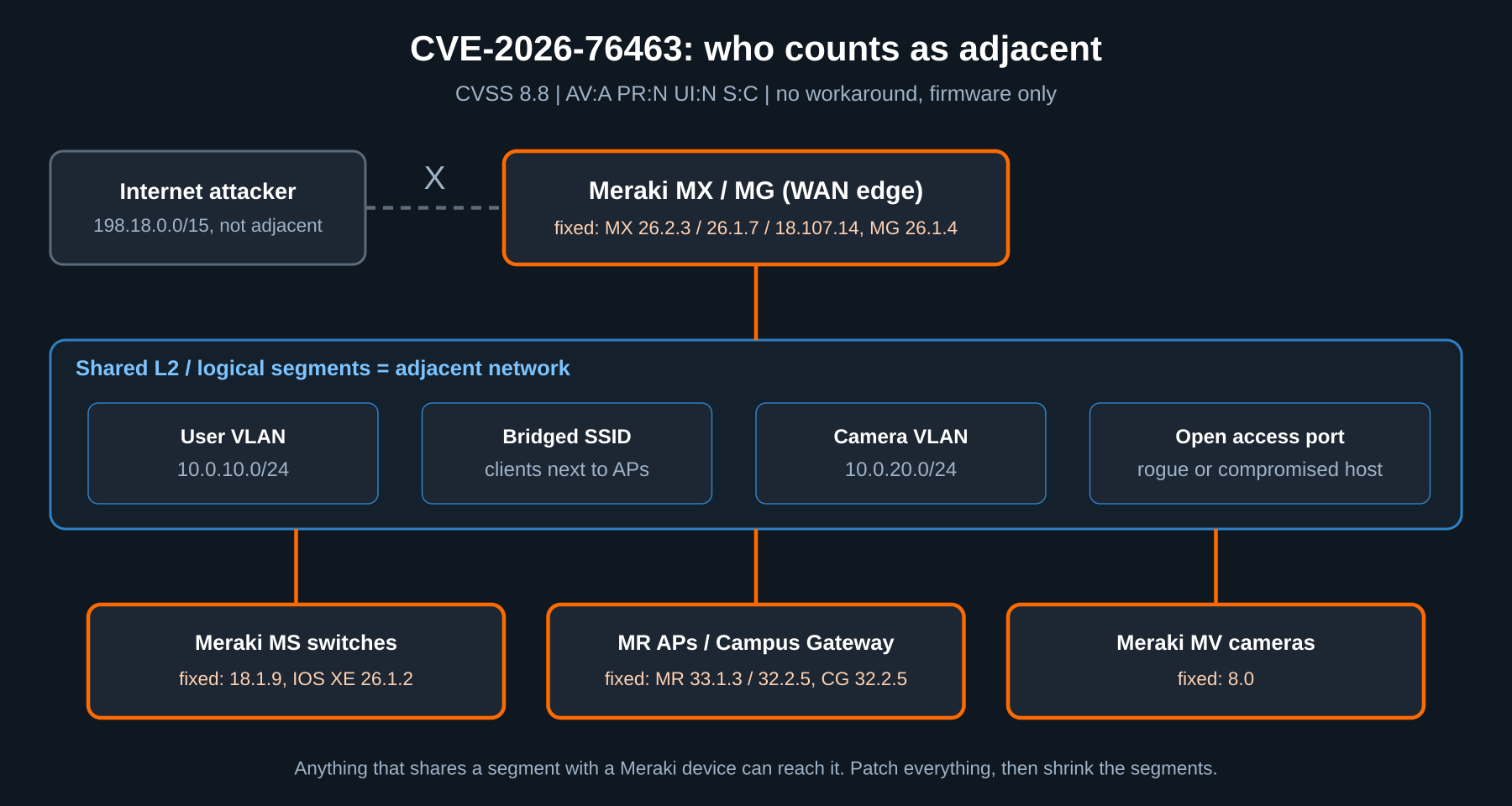
AV:A is easy to wave off as “they have to be inside.” On Meraki gear, inside is a big place. Adjacent means the attacker shares a Layer 2 or logical segment with the device: a laptop on the same VLAN as the MX LAN interface, a client on an SSID bridged into the same subnet as the AP, a compromised printer next to a camera, a rogue device plugged into an access port. Add PR:N and UI:N and any foothold on those segments is enough. S:C (scope changed) means impact can reach beyond the vulnerable component itself.
The public advisory does not say which interface or service carries each flaw, so treat every segment that can reach a Meraki device as in scope.
Figure 1: Who counts as adjacent for CVE-2026-76463
Prerequisites and Architecture
Assumed knowledge: Meraki Dashboard navigation, basic REST and curl, VLAN design.
Lab requirements: a Dashboard organization with at least one network, an API key from an account with full organization access (read-only works for the inventory steps), and a workstation with curl and jq. Examples use 198.18.0.0/15 for public addressing and 10.0.0.0/16 for internal LANs.
| Component | Role in this guide | First fixed release |
|---|---|---|
| Meraki MX (security and SD-WAN) | Edge, VPN, LAN gateway | 18.107.14, 19.2.9 (Z3 only), 26.1.7, 26.2.3 |
| Meraki MS (switches) | Access and distribution | 18.1.9; IOS XE 17.15.6, 17.18.4.1, 26.1.2 |
| Meraki MR (access points) | Wireless | 30.7.3, 31.1.8.1, 32.2.5, 33.1.3 |
| Meraki MV (cameras) | Video | 8.0 |
| Meraki MG (cellular) | Cellular WAN | 4.1.4 (MG21/E only), 26.1.4 |
| Campus Gateway | Wireless gateway | 32.2.5; 33.1.4 (mid-November 2026) |
| Dashboard API v1 | Inventory and scheduling | n/a |
Step-by-Step Implementation
Step 1: Pull a Firmware Inventory from the Dashboard API
Goal
Get every device, its product type and its running firmware in one list, across every network in the org.
Action
Export your key, find the organization ID, then dump device firmware. Replace <org-id> with your value.
export MERAKI_KEY='<your-api-key>'
API='https://api.meraki.com/api/v1'

# 1. List the organizations this key can see
curl -s -H "Authorization: Bearer $MERAKI_KEY" "$API/organizations" \
  | jq -r '.[] | "\(.id)  \(.name)"'

# 2. Save every device in the org (perPage max is 1000)
curl -s -H "Authorization: Bearer $MERAKI_KEY" \
  "$API/organizations/<org-id>/devices?perPage=1000" > devices.json

jq -r '.[] | [.productType, .model, .name, .serial, .firmware] | @tsv' \
  devices.json | sort > meraki-firmware.tsv

# 3. Count devices per product and firmware
jq -r '.[] | "\(.productType)\t\(.firmware)"' devices.json | sort | uniq -c
Example output (yours will differ, and firmware strings vary by product family):
     12 appliance MX 18.211.2
     40 switch switch-18-1-8
     88 wireless wireless-32-2-4
     14 camera camera-7-3-2
      2 cellularGateway cellular-gateway-26-1-3
Tip: Over 1000 devices? Follow the Link header the API returns for the next page. For an MSP, loop step 2 over every org ID from step 1 and write one file per customer. The org list is the only thing that changes.
GUI Verification
In Dashboard, go to Organization > Firmware upgrades. The Overview tab shows each product family’s current versions and how many devices run each one. The counts should match your file.
Step 2: Map Each Device to the Fixed Release Table
Goal
Turn the inventory into a short list of devices still below the first fixed release for their train.
Action
Compare each firmware string to this table, taken from advisory v1.3. Upgrade anything below the fixed release on its train, and anything on a train that is not listed.
| Product | Train | First fixed release |
|---|---|---|
| MX | 18.1 | 18.107.14 (contact Meraki support if it is not offered) |
| MX | 19.2 | 19.2.9 (recommended only for Z3) |
| MX | 26.1 / 26.2 | 26.1.7 / 26.2.3 |
| MS | 17.2 and 18.1 | 18.1.9 |
| MS (IOS XE) | 17.15 / 17.18 / 26.1 | 17.15.6 / 17.18.4.1 / 26.1.2 |
| MR | 30.7 / 31.1 | 30.7.3 (Wi-Fi 5 Wave 2 only) / 31.1.8.1 (MR45/55 only) |
| MR | 32.2 / 33.1 | 32.2.5 / 33.1.3 |
| MV | 7 | 8.0 |
| MG | 4.1 / 26.1 | 4.1.4 (MG21/E only) / 26.1.4 |
| Campus Gateway | 32.2 / 33.1 | 32.2.5 / 33.1.4 (mid-November 2026) |
To see the exact versions Dashboard will offer each network, ask the firmware upgrades endpoint. Replace <network-id> with a network from the inventory.
curl -s -H "Authorization: Bearer $MERAKI_KEY" \
  "$API/networks/<network-id>/firmwareUpgrades" \
  | jq '.products | to_entries[] | {product: .key,
        current: .value.currentVersion.shortName,
        offered: [.value.availableVersions[]?.shortName]}'
GUI Verification
Under Organization > Firmware upgrades > Schedule upgrades, pick a product family and open the target version list. The fixed release for your train should be in it.
Step 3: Schedule the Upgrades
Goal
Get every network onto fixed firmware inside a maintenance window, without guessing at version IDs.
Action
In the GUI: Organization > Firmware upgrades > Schedule upgrades, choose the product, tick the networks, pick the fixed version and a time. For many networks, use the API. Take the version id from the Step 2 output (availableVersions[].id), not the display name.
# Schedule the MX (appliance) upgrade for one network
curl -s -X PUT -H "Authorization: Bearer $MERAKI_KEY" \
  -H 'Content-Type: application/json' \
  "$API/networks/<network-id>/firmwareUpgrades" \
  -d '{
    "products": {
      "appliance": {
        "nextUpgrade": {
          "time": "2026-11-14T06:00:00Z",
          "toVersion": { "id": "<fixed-version-id>" }
        }
      }
    }
  }' | jq '.products.appliance.nextUpgrade'
Repeat with wireless, switch, camera and cellularGateway as the product key. Do the MX last on sites where it is the only path to Dashboard, so a failed upgrade elsewhere does not leave you blind.
Warning: Upgrades reboot the device. Use staged upgrades for MS and MR where your org has them, so a whole floor does not drop at once, and confirm how your MX warm spare pairs behave in the window before you schedule them.
GUI Verification
The Scheduled changes tab lists every pending upgrade with its network, product, target version and time.
Step 4: Shrink the Adjacent Surface While You Wait
Goal
Cut down who counts as adjacent until every device is patched. These are compensating controls, not a fix. Cisco states that no workaround addresses these vulnerabilities.
Action
- Put management on its own VLAN. Move switch, AP and camera management IPs to a dedicated management subnet such as 10.0.99.0/24 that user VLANs cannot reach.
- Isolate cameras. Put MV cameras on a camera-only VLAN with no user devices in it. Cameras only need outbound access to the Meraki cloud.
- Use NAT mode or Layer 2 isolation on guest SSIDs. A guest client should never share a broadcast domain with infrastructure.
- Lock down access ports. Use 802.1X or MAB with access policies on MS ports so a random device plugged into the wall does not land on a trusted VLAN.
- Watch for new clients on infrastructure VLANs. Any client that is not a Meraki device on the management or camera VLAN deserves a ticket.
To list every client seen on the management VLAN in the last 24 hours:
curl -s -H "Authorization: Bearer $MERAKI_KEY" \
  "$API/networks/<network-id>/clients?timespan=86400&perPage=1000" \
  | jq -r '.[] | select(.vlan == "99")
           | [.mac, .ip, .description, .manufacturer] | @tsv'
GUI Verification
Under Network-wide > Clients, filter by VLAN 99. The list should be empty or contain only devices you expect.
Verification and Validation
Re-run the Step 1 inventory after each maintenance window and diff it against the last run:
mv meraki-firmware.tsv meraki-firmware-before.tsv
# re-run Step 1, then:
diff meraki-firmware-before.tsv meraki-firmware.tsv | grep '^>'
Success looks like: every line shows a firmware at or above the fixed release for its train, and the Step 2 check returns the fixed version as current for every product. Example (display names vary by product):
{ "product": "appliance", "current": "MX 26.2.3", "offered": [] }
{ "product": "wireless",  "current": "MR 33.1.3", "offered": [] }
{ "product": "switch",    "current": "MS 18.1.9", "offered": [] }
Close the loop in your scanner too. Many scanners report CVE-2026-76463 and its six siblings separately. One firmware upgrade clears all seven, so mark them together with the advisory ID as evidence.
Troubleshooting and Gotchas
The fixed MX version is not offered
Symptom: you are on MX 18.1 or 19.2 and 18.107.14 or 19.2.9 is not in the version list.
Fix: the advisory says to contact Meraki support in that case. Also note that 19.2.9 is recommended only for Z3 devices. Everything else on 19.2 should move to a 26.x fixed release. Confirm what Dashboard offers with the Step 2 firmwareUpgrades call before you open the case.
Model-limited fixed releases
Symptom: an MR on 30.7 or 31.1, or an MG on 4.1, will not take the fixed version.
Fix: 30.7.3 is only for the Wi-Fi 5 (802.11ac) Wave 2 family, 31.1.8.1 only for MR45 and MR55, and 4.1.4 only for MG21 and MG21E. Any other model on those trains has to move to a newer train (32.2.5 or 33.1.3 for MR, 26.1.4 for MG). Check hardware support for the newer train first.
Cloud-managed Catalyst and Campus Gateway
Symptom: Catalyst switches in Dashboard are not covered by this table, and Campus Gateway 33.1.4 is not out yet.
Fix: the Meraki advisory points cloud-configured Catalyst running IOS XE to the Cisco IOS XE Software Security Hardening Release: August 2026 advisory (fixed in 17.9.10, 17.12.8, 17.15.6, 17.18.4 and 26.1.2), and those fixed versions are still delivered through Dashboard. For Campus Gateway on 33.1, Cisco lists 33.1.4 for mid-November 2026. Until it ships, apply the Step 4 controls and keep the advisory bookmarked, since it has already had three revisions.
Sources
- Cisco advisory: Cisco Meraki Security Hardening Release, October 2026 (cisco-sa-hardening-meraki-os-drbEX9GH)
- Cisco advance notification for the October 7, 2026 security advisories
- NVD entry for CVE-2026-76463
- CVE.org record for CVE-2026-76463
- CVE Program blog: Preserving Vulnerability-Level Identification
- Cisco: Transition to a Risk-Based Vulnerability Disclosure Model
- Cisco advisory: IOS XE Software Security Hardening Release, August 2026 (for cloud-managed Catalyst)
- OpenCVE record for CVE-2026-76463 (CVSS vector, affected versions, CISA SSVC)
InfoSecMonkey: No fluff. Just the config that works.
Recent posts
-

-

DNS is one of those technologies that quietly underpins... Full Story
-

BGP issues on FortiGate firewalls usually trace back to... Full Story
-

Every time your laptop talks to your router, a... Full Story
-

If you've spent any time configuring NAT on a... Full Story
-

If you have spent any time configuring firewall policies... Full Story
-

High availability on FortiGate is one of those features... Full Story
-

If you've configured SD-WAN on a FortiGate, you've almost... Full Story
-

FortiLink is the management protocol that turns a FortiSwitch... Full Story
-

FortiSwitches are pretty rock solid from Mean Time Between... Full Story
-

This is a quicky tip. Have you ever gone... Full Story
-

DNS is one of those quiet pieces of internet... Full Story
-

This article is an updated version of the previous... Full Story
-

You will add ns2 as a secondary (slave) BIND9... Full Story
-

In the process of deploying my lab, I needed... Full Story
-

RFC 8805, used to be known as Self-Correcting IP... Full Story
-

Years back, I wrote an article about certificate pinning. ... Full Story
-

FortiGates have the ability to send alerts to Microsoft... Full Story
-

In this post, I am going to walk through... Full Story
-

Troubleshooting VoIP on a FortiGate can feel like trying... Full Story
-

Prior to FortiOS 7.0, there were three commands to... Full Story
-

In this post, I am going to go over... Full Story
-

What we are going to do: We are going... Full Story
-

Choosing between FGCP (FortiGate Clustering Protocol) and FGSP (FortiGate... Full Story
-

Creating a VLAN on macOS (The "Pro" Move) A... Full Story
-

This blog post explores the logic behind how macOS... Full Story
-

Pretty Fly for a Wi-Fi Tell My Wi-Fi Love... Full Story
-

Part of my daily gig is creating BoMs (Bill-of-Materials)... Full Story
-

ICMP introduces several security risks, but careful filtering, rate... Full Story
-

The command diag debug application dhcps -1 enables full... Full Story
-

In the world of FortiOS, execute tac report is... Full Story
-

LLDP; What is it The Link Layer Discovery Protocol... Full Story
-

What it actually does When you run diagnose fdsm... Full Story
-

Monkey Bites are bite-sized, high-impact security insights designed for... Full Story
-

I have run macOS in macOS with Parallels but... Full Story
-

Don't be confused with my other FortiNAC posts where... Full Story
-

This is the third session in a multi-part article... Full Story
-

Today I was configuring key-based authentication on a FortiGate... Full Story
-

Netcat, often called the "Swiss Army knife" of networking,... Full Story
-

At its core, IEEE 802.1X is a network layer... Full Story
-

In case you did not see the previous FortiNAC... Full Story
-

This is our 5th session where we are going... Full Story
-

Now that we have Wireshark installed and somewhat configured,... Full Story
-

The Philosophy of Packet Analysis Troubleshooting isn't about looking... Full Story
-

Cisco Meraki Security Hardening Release, October 2026: the access... Full Story
-

nmap Companion Tools: The Command-Line Ecosystem That Reads Your... Full Story
-

CVE-2026-19868: SonicWall SAML MFA Bypass on SSLVPN, Patch and... Full Story