
If you've spent any time configuring user authentication on... Full Story
By Manny Fernandez
November 11, 2026
Outlook CVE-2026-124194: Patch the Zero-Day That Leaks NTLM Hashes
No fluff. Just the config that works.
Executive Summary
Outlook CVE-2026-124194 is the one Microsoft flaw from the November 10, 2026 Patch Tuesday that attackers were already using before the fix shipped. A user opens a crafted message file, classic Outlook reaches out to an attacker-controlled server without its usual external-content warning, and Windows hands over the user’s NTLMv2 hash on the way. Microsoft scores it a Moderate 6.5 and calls it a spoofing bug. Do not let either label push it down your list: it is on the CISA Known Exploited Vulnerabilities catalog with a November 24, 2026 federal deadline.
Objective: confirm which Outlook builds you have, push the November Office update, and add the network and identity controls that make a leaked hash worthless the next time Outlook (or anything else) gets tricked into authenticating outbound.
Target audience: Windows and Microsoft 365 admins, FortiGate admins who own internet egress, and SOC analysts who need hunt leads while patching catches up.
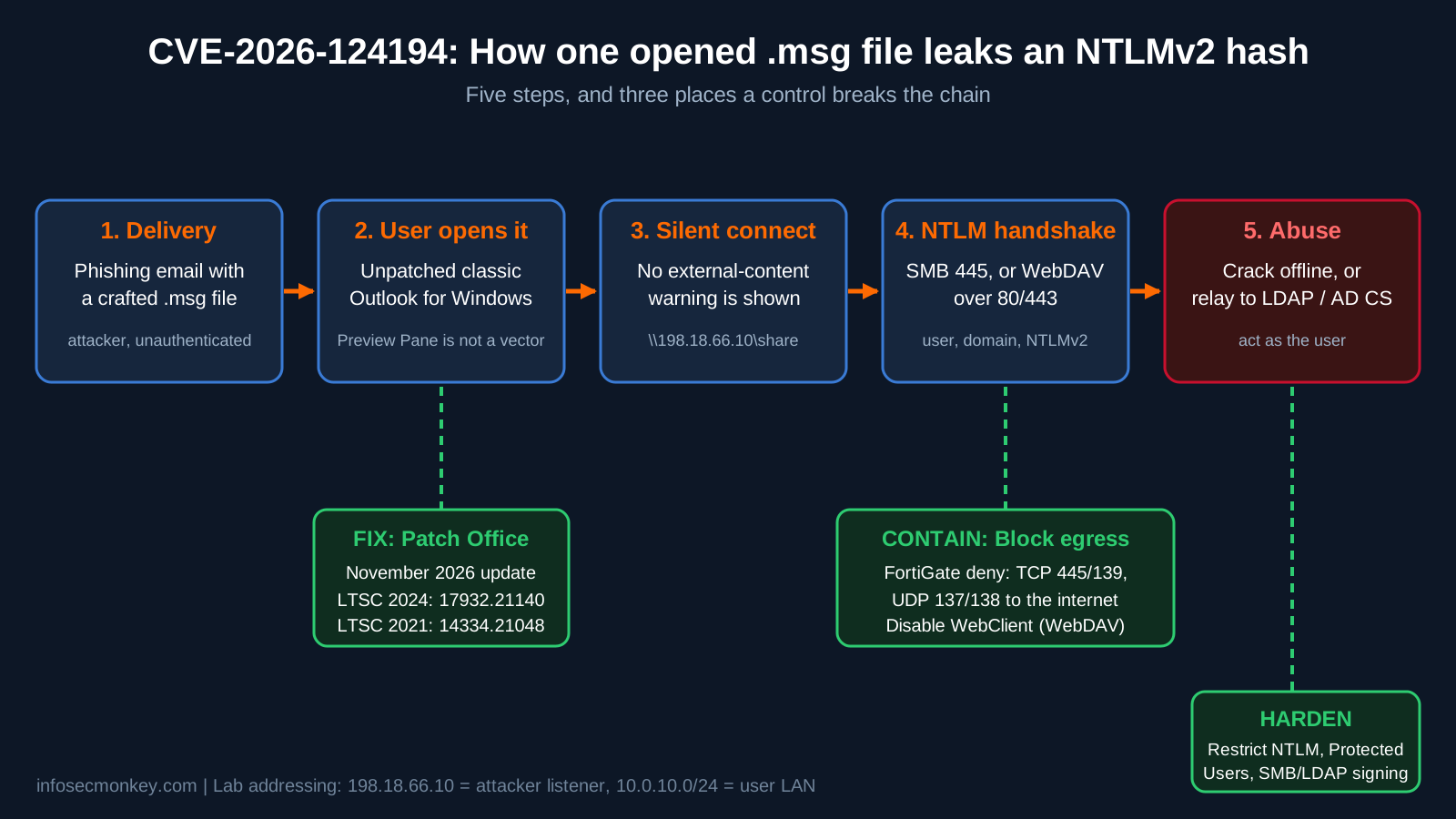
Figure 1: Outlook CVE-2026-124194 attack chain and where each control breaks it
What Outlook CVE-2026-124194 Actually Does
| Field | Value |
|---|---|
| CVE | CVE-2026-124194, Microsoft Outlook Spoofing Vulnerability |
| Weakness | CWE-356, product UI does not warn the user of an unsafe action |
| CVSS 3.1 | 6.5 Medium, AV:N/AC:L/PR:N/UI:R/S:U/C:H/I:N/A:N/E:H/RL:O/RC:C |
| Status | Exploited in the wild as a zero-day, added to CISA KEV on 2026-11-10, due 2026-11-24 |
| Products | Microsoft 365 Apps for Enterprise, Office LTSC 2021, Office LTSC 2024 (32-bit and 64-bit) |
| User action | The victim must open the message file. Microsoft states the Preview Pane is not an attack vector |
| Fix | November 2026 Office security update only. Microsoft lists no workaround |
The “spoofing” label is about impersonation, not forged senders. Once the attacker has the NTLMv2 response they can crack it offline or relay it and act as that user. Microsoft has not named the actor, the scale of the attacks, or the researcher, and the flaw was not publicly disclosed before the patch.
Independent analysis ties the root cause to how Outlook resolves a remote path stored in a message property, the same family as the 2023 reminder bug CVE-2023-23397. The difference: CVE-2023-23397 fired with no user interaction, while this one needs the message opened. Microsoft has not confirmed the property-level details, so treat them as a lead for your mail-gateway and sandbox teams, not as gospel. See the CVE Reports analysis for the full write-up, which flags itself as needing verification against the vendor advisory.
Practitioner note: Why a 6.5 still goes first: the rating assumes the hash is the end of the story. In a real domain it is the start. A relayed NTLM session against LDAP or an AD CS web enrollment endpoint can turn one opened attachment into account takeover or a forged certificate.
Prerequisites and Architecture
Assumed knowledge
- Basic PowerShell and Group Policy administration
- How Microsoft 365 Apps update channels (Current, Monthly Enterprise, Semi-Annual Enterprise) deliver builds
- FortiOS CLI basics: custom services, firewall policies, log filtering
Lab and component table
| Component | Role | Lab value |
|---|---|---|
| Windows 11 workstation | Runs classic Outlook (Microsoft 365 Apps) | 10.0.10.25, user LAN 10.0.10.0/24 |
| FortiGate | Internet egress, policy enforcement, logging | LAN internal, WAN wan1 (198.18.0.1) |
| Active Directory | Group Policy, Protected Users group | 10.0.1.10 |
| Attacker listener | Rogue SMB / WebDAV server catching hashes | 198.18.66.10 |
| Mail flow | Exchange Online or on-prem Exchange | Transport rule for .msg attachments |
Fixed Builds for CVE-2026-124194
Microsoft 365 Apps report the build as 16.0.<build>. Compare the last two fields against your channel.
| Product / channel | Fixed version (build) |
|---|---|
| Current Channel | Version 2610 (Build 20527.20196) |
| Monthly Enterprise Channel | 2610 (20527.20194), 2609 (20430.20264), 2608 (20326.20320) |
| Semi-Annual Enterprise Channel | 2610 (20527.20192), 2609 (20430.20262), 2608 (20326.20318) |
| Office LTSC 2024 (volume licensed) | 2408 (17932.21140), full version 16.0.17932.21140 |
| Office LTSC 2021 (volume licensed) | 2108 (14334.21048), full version 16.0.14334.21048 |
Gotcha: The November Windows cumulative updates do not carry this fix. Outlook is patched through the Office update path (Click-to-Run, WSUS Office updates, Intune, ConfigMgr), so a fully patched Windows box can still be exposed.
Step-by-Step: Patch and Contain Outlook CVE-2026-124194
Step 1: Find exposed Outlook builds
Goal: know exactly which version and update channel each machine is on.
Action: read the Click-to-Run configuration key. Run it locally, or wrap it in Invoke-Command for a list of hosts.
$k = "HKLM:\SOFTWARE\Microsoft\Office\ClickToRun\Configuration"
Get-ItemProperty $k | Select-Object VersionToReport, CDNBaseUrl, UpdateChannel

# Fleet check (replace with your host list)
$hosts = Get-Content .\workstations.txt
Invoke-Command -ComputerName $hosts -ScriptBlock {
    (Get-ItemProperty $using:k).VersionToReport
} | Select-Object PSComputerName, @{n="Build";e={$_}}
The channel GUID at the end of CDNBaseUrl tells you which row of the table above applies: 492350f6-... is Current Channel, 55336b82-... is Monthly Enterprise, 7ffbc6bf-... is Semi-Annual Enterprise.
GUI verification: in Outlook, go to File, Office Account, About Outlook. The version and build line must match or beat the fixed build for that channel.
Step 2: Force the November Office update
Goal: get every Outlook install to the fixed build now, not whenever the channel gets around to it.
Action: trigger Click-to-Run directly. This closes Office apps, so schedule it or warn users first.
$c2r = "$env:CommonProgramFiles\microsoft shared\ClickToRun\OfficeC2RClient.exe"
& $c2r /update user updatepromptuser=false forceappshutdown=true displaylevel=false
For managed fleets, set a short deadline in your Intune Microsoft 365 Apps update policy or approve the November Office updates in WSUS or ConfigMgr. Then re-run the Step 1 fleet check. Do not assume Click-to-Run got there on its own.
GUI verification: File, Office Account, Update Options, Update Now on a single machine, then restart Outlook and check About Outlook again.
Step 3: Block outbound SMB and NetBIOS at the FortiGate
Goal: even if a user opens the file on an unpatched box, the SMB connection to 198.18.66.10 never leaves the building. Microsoft does not list this as a mitigation for this CVE, but blocking SMB to the internet is long-standing practice and it kills the whole forced-authentication class, not just this one bug.
Action: create a service object and a deny policy, inside to WAN, logged. Replace the placeholders with your interface names.
config firewall service custom
    edit "SMB-NETBIOS"
        set tcp-portrange 445 139
        set udp-portrange 137 138
    next
end

config firewall policy
    edit 0
        set name "Deny-SMB-Out"
        set srcintf "<LAN_INTF>"
        set dstintf "<WAN_INTF>"
        set srcaddr "all"
        set dstaddr "all"
        set action deny
        set service "SMB-NETBIOS"
        set schedule "always"
        set logtraffic all
    next
end
edit 0 assigns the next free policy ID. Find it, then move the deny above your general internet allow policy:
show firewall policy | grep -f "Deny-SMB-Out"
config firewall policy
    move <NEW_ID> before <INTERNET_ALLOW_ID>
end
If you use SD-WAN, set dstintf to your SD-WAN zone instead of a single WAN port. If branch users reach file servers over IPsec, those tunnels are separate destination interfaces and stay untouched.
GUI verification: Policy and Objects, Firewall Policy. Deny-SMB-Out sits above the internet allow rule, action Deny, Log Violation Traffic enabled.
Step 4: Cover roaming laptops with Windows Firewall
Goal: the FortiGate only protects users behind it. Laptops on hotel or home Wi-Fi need the same block on the host.
Action: block SMB outbound on the Public and Private profiles only. The Domain profile is active when the laptop can see a domain controller, on site or over VPN, so internal file shares keep working.
New-NetFirewallRule -DisplayName "Block outbound SMB off-network" `
    -Direction Outbound -Action Block -Protocol TCP `
    -RemotePort 445,139 -Profile Public,Private
Push it through Group Policy (Windows Defender Firewall with Advanced Security) or an Intune endpoint security firewall rule rather than running it by hand. More host firewall tricks are in Managing Windows Firewall from the Command Line.
Step 5: Audit, then restrict outgoing NTLM
Goal: stop Windows from sending NTLM to servers that have no business receiving it. This also covers the WebDAV path that port blocking cannot.
Action: start in audit mode. The Group Policy setting is Computer Configuration, Windows Settings, Security Settings, Local Policies, Security Options, “Network security: Restrict NTLM: Outgoing NTLM traffic to remote servers”. Set it to Audit all. The registry equivalent:
# 1 = Audit all, 2 = Deny all, 0 = Allow all
reg add "HKLM\SYSTEM\CurrentControlSet\Control\Lsa\MSV1_0" `
    /v RestrictSendingNTLMTraffic /t REG_DWORD /d 1 /f

# Review what would be blocked
$f = @{LogName="Microsoft-Windows-NTLM/Operational"; Id=8001}
Get-WinEvent -FilterHashtable $f -MaxEvents 50 |
    Format-Table TimeCreated, Message -Wrap
Let audit run for at least a week, list the legitimate targets (old NAS boxes, scanners, line-of-business apps) in “Network security: Restrict NTLM: Add remote server exceptions for NTLM authentication”, then set the policy to Deny all.
Step 6: Protect privileged accounts and shut the WebDAV fallback
Goal: make sure the accounts worth stealing cannot authenticate with NTLM at all, and remove the HTTP path around your SMB block.
# Protected Users blocks NTLM for members
# Test first: it breaks NTLM-only apps and cached logons
Add-ADGroupMember -Identity "Protected Users" -Members "<ADMIN_ACCOUNT>"

# With SMB blocked, Windows can fall back to WebDAV over 80/443
# through the WebClient service
Stop-Service WebClient
Set-Service WebClient -StartupType Disabled
Close the relay half of the problem too: require SMB signing on servers and domain controllers, enforce LDAP signing and channel binding, and turn on Extended Protection for Authentication on AD CS web enrollment and Exchange.
Step 7: Hold the door at the mail gateway until you are patched
Goal: cut the delivery step while the update rolls out.
# Exchange Online PowerShell
New-TransportRule -Name "Quarantine external .msg attachments" `
    -FromScope NotInOrganization `
    -AttachmentExtensionMatchesWords "msg" `
    -Quarantine $true
Test it with a forwarded-as-attachment message as well as a dropped .msg file. Embedded Outlook items and file attachments are not always handled the same way, which is exactly why this is a stopgap and the patch is the fix. Brief the users who routinely receive outside message files (legal, HR, finance) to hold off opening them until their client is patched.
Verification and Validation
Outlook is on the fixed build
PS C:\> $k = "HKLM:\SOFTWARE\Microsoft\Office\ClickToRun\Configuration"
PS C:\> (Get-ItemProperty $k).VersionToReport
16.0.20527.20196
Expected: the build meets or beats the fixed build for that machine’s channel.
SMB cannot leave the network
PS C:\> Test-NetConnection 198.18.66.10 -Port 445

ComputerName     : 198.18.66.10
RemoteAddress    : 198.18.66.10
RemotePort       : 445
InterfaceAlias   : Ethernet
SourceAddress    : 10.0.10.25
TcpTestSucceeded : False
Expected: TcpTestSucceeded : False. Then confirm the FortiGate logged it:
execute log filter reset
execute log filter category 0
execute log filter field dstport 445
execute log filter field action deny
execute log display
Expected: a traffic log line with srcip=10.0.10.25 dstip=198.18.66.10 dstport=445 action="deny" policyname="Deny-SMB-Out". In FortiAnalyzer or the GUI Log View, the same filter is dstport==445 and action==deny.
Hunt leads while you patch
- Any deny hit on
Deny-SMB-Outfrom a workstation shortly after the user opened mail. Every one is worth a look, and the user’s password is worth resetting. - Event 8001 entries pointing at external or unknown hosts once NTLM auditing is on.
OUTLOOK.EXEopening connections to non-corporate addresses on 445, 139, 80 or 443 in your EDR telemetry.- Unusual sign-ins for users who reported opening a suspicious message file.
None of these are confirmed signatures for this CVE. They are behaviors forced authentication always produces.
Troubleshooting and Gotchas
1. The build did not move after the update
Monthly Enterprise and Semi-Annual Enterprise devices only take builds for their channel, and an Intune or GPO update deferral can hold them back. Check the channel and any policy-set target version:
$k = "HKLM:\SOFTWARE\Microsoft\Office\ClickToRun\Configuration"
Get-ItemProperty $k | Select-Object UpdateChannel, UpdateUrl, UpdateDeadline

$p = "HKLM:\SOFTWARE\Policies\Microsoft\office\16.0\common\officeupdate"
Get-ItemProperty $p -ErrorAction SilentlyContinue
Fix: remove a stale updatetargetversion or updatepath pointing at an old share, then rerun the Step 2 update command.
2. Deny all NTLM broke a printer, scanner or old NAS
You skipped the audit phase or missed a target. Event 8001 on the affected client names the server it tried to reach.
Fix: add that server to the remote server exceptions list, or move the device to Kerberos. Roll back to /d 1 (audit) while you sort it out, not to 0.
3. SMB is blocked but a test hash still leaks
Windows fell back to WebDAV over HTTP or HTTPS, which your port-based deny cannot see. Check the WebClient service:
Get-Service WebClient | Select-Object Status, StartTypeFix: disable WebClient where nobody needs WebDAV, and lean on the outgoing NTLM restriction from Step 5, which applies no matter which transport carries the authentication.
Bottom Line
Patch Office first: that is the only thing Microsoft says fixes CVE-2026-124194. Then make sure your network never lets NTLM walk out the door, because this is the third or fourth Outlook forced-authentication bug, and it will not be the last.
Working through the same week’s Fortinet PSIRT drop as well? See countermeasures for pre-auth FortiGate, FortiManager and FortiAnalyzer vulnerabilities.
Sources
- CVE Reports technical analysis of CVE-2026-124194 (forced authentication and NetNTLMv2 leakage)
- SMTPedia: Outlook Zero-Day CVE-2026-124194 Leaks NTLM Hashes, fixed builds by channel
- SecurityOnline: Microsoft Outlook Zero-Day CVE-2026-124194 Exploited in the Wild
- WindowsForum: November 2026 Patch Tuesday, exploited Outlook zero-day megathread
- ThreatInt CVE record for CVE-2026-124194 (CVSS vector, CWE-356, affected builds, KEV dates)
InfoSecMonkey | No fluff. Just the config that works.
Recent posts
-

-

DNS is one of those technologies that quietly underpins... Full Story
-

BGP issues on FortiGate firewalls usually trace back to... Full Story
-

Every time your laptop talks to your router, a... Full Story
-

If you've spent any time configuring NAT on a... Full Story
-

If you have spent any time configuring firewall policies... Full Story
-

High availability on FortiGate is one of those features... Full Story
-

If you've configured SD-WAN on a FortiGate, you've almost... Full Story
-

FortiLink is the management protocol that turns a FortiSwitch... Full Story
-

FortiSwitches are pretty rock solid from Mean Time Between... Full Story
-

This is a quicky tip. Have you ever gone... Full Story
-

DNS is one of those quiet pieces of internet... Full Story
-

This article is an updated version of the previous... Full Story
-

You will add ns2 as a secondary (slave) BIND9... Full Story
-

In the process of deploying my lab, I needed... Full Story
-

RFC 8805, used to be known as Self-Correcting IP... Full Story
-

Years back, I wrote an article about certificate pinning. ... Full Story
-

FortiGates have the ability to send alerts to Microsoft... Full Story
-

In this post, I am going to walk through... Full Story
-

Troubleshooting VoIP on a FortiGate can feel like trying... Full Story
-

Prior to FortiOS 7.0, there were three commands to... Full Story
-

In this post, I am going to go over... Full Story
-

What we are going to do: We are going... Full Story
-

Choosing between FGCP (FortiGate Clustering Protocol) and FGSP (FortiGate... Full Story
-

Creating a VLAN on macOS (The "Pro" Move) A... Full Story
-

This blog post explores the logic behind how macOS... Full Story
-

Pretty Fly for a Wi-Fi Tell My Wi-Fi Love... Full Story
-

Part of my daily gig is creating BoMs (Bill-of-Materials)... Full Story
-

ICMP introduces several security risks, but careful filtering, rate... Full Story
-

The command diag debug application dhcps -1 enables full... Full Story
-

In the world of FortiOS, execute tac report is... Full Story
-

LLDP; What is it The Link Layer Discovery Protocol... Full Story
-

What it actually does When you run diagnose fdsm... Full Story
-

Monkey Bites are bite-sized, high-impact security insights designed for... Full Story
-

I have run macOS in macOS with Parallels but... Full Story
-

Don't be confused with my other FortiNAC posts where... Full Story
-

This is the third session in a multi-part article... Full Story
-

Today I was configuring key-based authentication on a FortiGate... Full Story
-

Netcat, often called the "Swiss Army knife" of networking,... Full Story
-

At its core, IEEE 802.1X is a network layer... Full Story
-

In case you did not see the previous FortiNAC... Full Story
-

This is our 5th session where we are going... Full Story
-

Now that we have Wireshark installed and somewhat configured,... Full Story
-

The Philosophy of Packet Analysis Troubleshooting isn't about looking... Full Story
-

FortiGate IPAM vs DHCP: Differences, Overlap, and What to... Full Story
-

No fluff. Just the config that works. Executive Summary... Full Story
-

InfoSecMonkey Practitioner Guide Advanced Audit Policy, command line capture,... Full Story