
If you've spent any time configuring user authentication on... Full Story
By Manny Fernandez
April 10, 2026
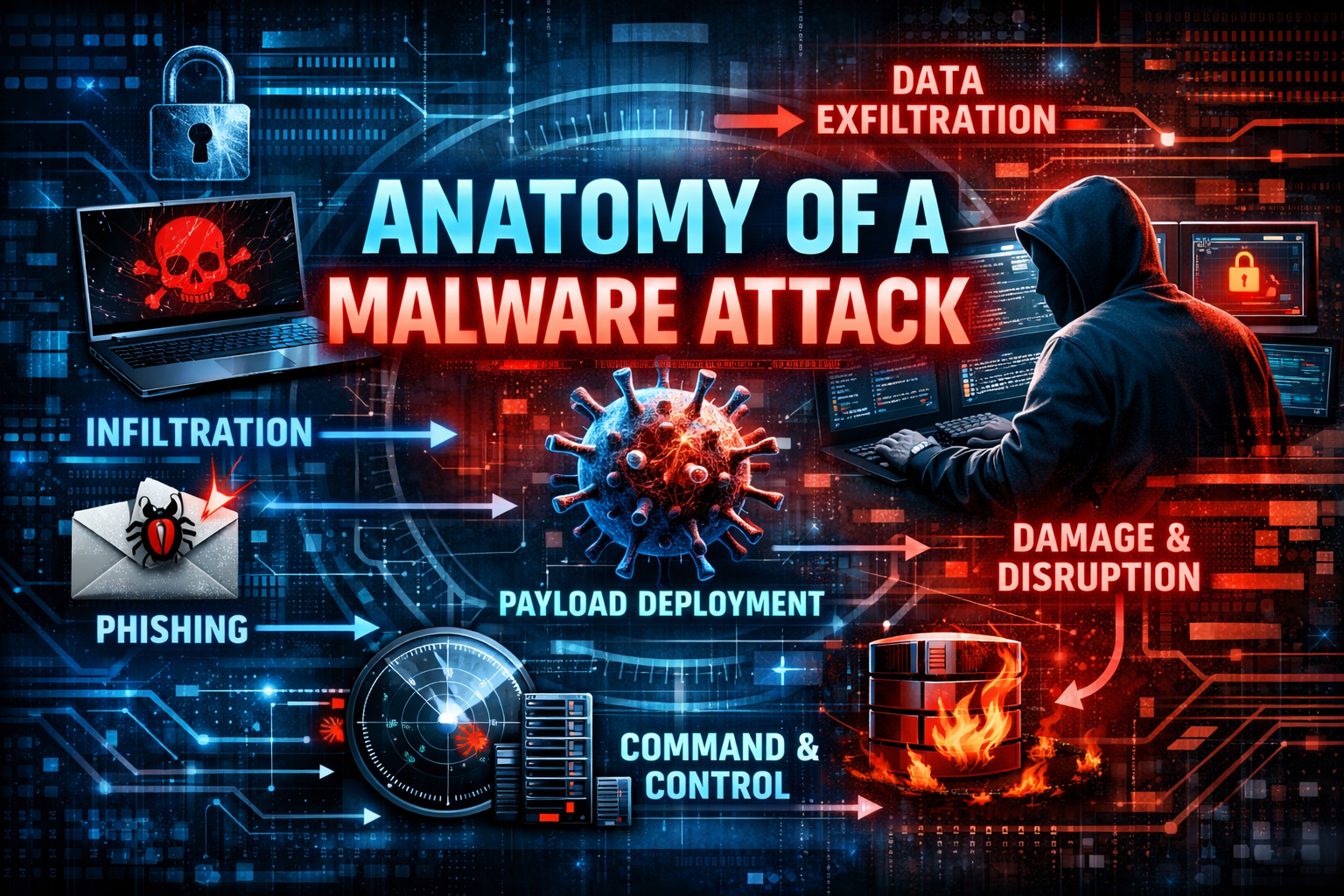
Anatomy of a malware attack
Today I was at a stop light and decided to take a look at my calendar for tomorrow to see what I had coming up. I was surprised to see that I had a strange event in my calendar in green. Green is my personal calendar yet it made reference to Payroll. I waited til I got home. From my phone, I could see there was an attachment on the invite.
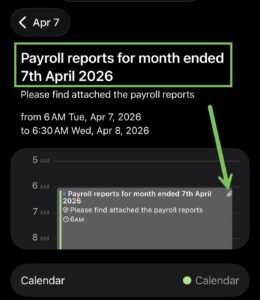
The event title showed typical PHISH like language often creating a false sense of panic, demanding immediate action to prevent account suspension, legal action, or financial loss. I calendar in an isolated VM. I was able to see the attachment which was a .txt file.
I decided to run the file through my FortiSandbox Cloud.
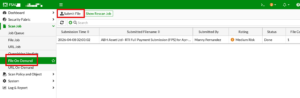
FortiSandbox has a File on Demand and URL on Demand , then we can choose Upload File
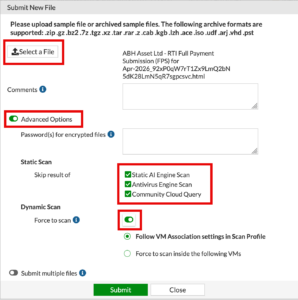
After you submit the file to the FortiSandbox, you can monitor the process
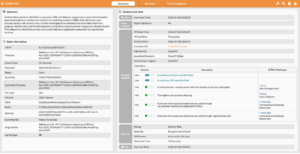
Here is the command the attachment tried to run.
"c:\program files (x86)\microsoft\edge\application
\msedge.exe" --disable-field-trial-config --disable-background-networking --disable-background-timer
-throttling --disable-backgrounding-occluded-windo ws
--disable-back-forward-cache --disable-breakpad
--disable-client-side-phishing-detection --disabl
e-component-extensions-with-background-pages --dis
able-component-update --no-default-browser-check -
-disable-default-apps --disable-dev-shm-usage --di
sable-extensions --disable-features=ImprovedCookie
Controls,LazyFrameLoading,GlobalMediaControls,Dest
royProfileOnBrowserClose,MediaRouter,DialMediaRout
eProvider,AcceptCHFrame,AutoExpandDetailsElement,C
ertificateTransparencyComponentUpdater,AvoidUnnece
ssaryBeforeUnloadCheckSync,Translate,HttpsUpgrades ,
PaintHolding,PlzDedicatedWorker --allow-pre-commi t-input
--disable-hang-monitor --disable-ipc-flood ing-protection
--disable-popup-blocking --disable- prompt-on-repost
--disable-renderer-backgrounding --force-color-profile=srgb
--metrics-recording-onl y --no-first-run --enable-automation
--password-st ore=basic --use-mock-keychain
--no-service-autorun --export-tagged-pdf
--disable-search-engine-choic e-screen
--unsafely-disable-devtools-self-xss-warn ings --no-sandbox
--headless --disable-gpu "--user -agent=Mozilla/5.0
(Macintosh; Intel Mac OS X 10_1 5_3) AppleWebKit/537.36
(KHTML, like Gecko) Chrome /80.0.3987.132 Safari/537.36"
--ignore-certificate -errors --enable-features=NetworkService
--no-sand box --disable-dev-shm-usage
--disable-web-security --disable-features=TranslateUI
--disable-backgrou nd-timer-throttling
--disable-backgrounding-occlud ed-windows
--disable-renderer-backgrounding --disa
ble-ipc-flooding-protection --memory-pressure-off
--no-first-run --no-default-browser-check --disabl
e-default-apps --disable-component-extensions-with
-background-pages --edge-skip-compat-layer-relaunc h
--disable-background-networking --user-data-dir=
C:\Users\ADMINI~1\AppData\Local\Temp\playwright_ch
romiumdev_profile-8jgU5M --remote-debugging-pipe a
This command is highly suspicious and indicates that the phishing file you analyzed is likely a component of a larger automated attack chain, potentially using a framework like Playwright or Puppeteer to perform “Browser-in-the-Browser” (BitB) operations or credential relaying.
Here is the breakdown of the command and its security implications.
The command launches Microsoft Edge with dozens of flags specifically designed to strip away security features, prevent user interaction, and automate the browsing session.
Disabling Security Controls
The attacker is explicitly turning off the browser’s built-in protections to ensure their malicious scripts run without interference:
--disable-client-side-phishing-detection: Disables Edge’s SmartScreen/Phishing protection, preventing the browser from blocking the very phishing sites it is trying to reach.
--disable-web-security: Disables the Same-Origin Policy (SOP). This is a critical security boundary; disabling it allows scripts on a malicious page to read data from other open tabs or sites.
--no-sandbox: Completely disables the browser sandbox. This is extremely dangerous as it allows a web-based exploit to potentially break out of the browser and execute code directly on the underlying operating system.
--ignore-certificate-errors: Forces the browser to ignore SSL/TLS certificate warnings, which is useful if the attacker is using self-signed certs or performing a Man-in-the-Middle (MitM) attack.
Automation and Headless Mode
The flags indicate this is not a human user opening a browser, but a script:
--headless: The browser runs in the background without a visible window. This allows the attack to happen silently without the victim noticing a new browser instance.
--enable-automation: Informs the browser it is being controlled by software (like Playwright), which often disables certain user-side prompts.
--user-data-dir=...playwright_chromiumdev_profile...: This confirms the use of Playwright, a browser automation library often used by developers for testing, but increasingly used by threat actors to automate login spoofing or data exfiltration
Fingerprint Manipulation (Evasion)
The attacker is trying to hide the true nature of the machine running the command:
--user-agent=Mozilla/5.0 (Macintosh; Intel Mac OS X 10_15_3)...: Even though the file path shows this is running on Windows(C:\program files (x86)...), it is telling websites it is a Macintosh. This is used to bypass conditional access policies or to appear as a generic user to security monitors.
Essentially, this attack will load a logo of Excel and then prompt you for your credentials to Office 365. But this can be integrated with so many other attacks and payloads.
Recent posts
-

-

DNS is one of those technologies that quietly underpins... Full Story
-

BGP issues on FortiGate firewalls usually trace back to... Full Story
-

Every time your laptop talks to your router, a... Full Story
-

If you've spent any time configuring NAT on a... Full Story
-

If you have spent any time configuring firewall policies... Full Story
-

High availability on FortiGate is one of those features... Full Story
-

If you've configured SD-WAN on a FortiGate, you've almost... Full Story
-

FortiLink is the management protocol that turns a FortiSwitch... Full Story
-

FortiSwitches are pretty rock solid from Mean Time Between... Full Story
-

This is a quicky tip. Have you ever gone... Full Story
-

DNS is one of those quiet pieces of internet... Full Story
-

This article is an updated version of the previous... Full Story
-

You will add ns2 as a secondary (slave) BIND9... Full Story
-

In the process of deploying my lab, I needed... Full Story
-

RFC 8805, used to be known as Self-Correcting IP... Full Story
-

Years back, I wrote an article about certificate pinning. ... Full Story
-

FortiGates have the ability to send alerts to Microsoft... Full Story
-

In this post, I am going to walk through... Full Story
-

Troubleshooting VoIP on a FortiGate can feel like trying... Full Story
-

Prior to FortiOS 7.0, there were three commands to... Full Story
-

In this post, I am going to go over... Full Story
-

What we are going to do: We are going... Full Story
-

Choosing between FGCP (FortiGate Clustering Protocol) and FGSP (FortiGate... Full Story
-

Creating a VLAN on macOS (The "Pro" Move) A... Full Story
-

This blog post explores the logic behind how macOS... Full Story
-

Pretty Fly for a Wi-Fi Tell My Wi-Fi Love... Full Story
-

Part of my daily gig is creating BoMs (Bill-of-Materials)... Full Story
-

ICMP introduces several security risks, but careful filtering, rate... Full Story
-

The command diag debug application dhcps -1 enables full... Full Story
-

In the world of FortiOS, execute tac report is... Full Story
-

LLDP; What is it The Link Layer Discovery Protocol... Full Story
-

What it actually does When you run diagnose fdsm... Full Story
-

Monkey Bites are bite-sized, high-impact security insights designed for... Full Story
-

I have run macOS in macOS with Parallels but... Full Story
-

Don't be confused with my other FortiNAC posts where... Full Story
-

This is the third session in a multi-part article... Full Story
-

Today I was configuring key-based authentication on a FortiGate... Full Story
-

Netcat, often called the "Swiss Army knife" of networking,... Full Story
-

At its core, IEEE 802.1X is a network layer... Full Story
-

In case you did not see the previous FortiNAC... Full Story
-

This is our 5th session where we are going... Full Story
-

Now that we have Wireshark installed and somewhat configured,... Full Story
-

The Philosophy of Packet Analysis Troubleshooting isn't about looking... Full Story
-

Stand up TRex on Ubuntu, wire it through a... Full Story
-

1. Executive Summary Objective: Get a working, persistent nftables... Full Story
-

Executive Summary Objective: Identify every cleartext and unauthenticated legacy... Full Story