
If you've spent any time configuring user authentication on... Full Story
By Manny Fernandez
October 18, 2026
Nmap Scripting Engine (NSE): From One-Liners to Your First Custom Script
Nmap Scripting Engine (NSE): From One-Liners to Your First Custom Script
Executive Summary
Objective: Use the Nmap Scripting Engine (NSE) to turn Nmap from a port scanner into a targeted assessment tool. You will run the built-in NSE scripts the right way, chain them with category logic, pass script arguments, and then write, register, and validate your own NSE script that audits HTTP security headers.
Target audience: Network and security engineers, SEs, and blue-team analysts who already use nmap -sV and want repeatable, scriptable checks without bolting on another scanner.
Why it matters: NSE ships with hundreds of Lua scripts covering discovery, TLS and SSH crypto auditing, SMB posture, brute forcing, and vulnerability checks. Most people only ever type -sC. Knowing how to select, tune, and extend scripts is the difference between “port 443 is open” and “port 443 still offers TLS 1.0 and leaks the Apache build.”
Authorization first: Only scan networks you own or have written permission to test. Several NSE categories (intrusive, brute, dos, exploit) generate traffic that will trip IPS signatures and can disrupt fragile services.
Prerequisites and Architecture
Assumed knowledge
- Comfortable on a Linux or macOS shell
- Basic Nmap usage:
-p,-sV,-Pn, output flags - Reading simple code (the custom script is Lua, but no prior Lua is required)
Lab requirements
| Component | Role | Address / Version |
|---|---|---|
| Scanner | Ubuntu Server 24.04 LTS with Nmap | 10.0.0.50 |
| Web target | Linux host running Apache or Nginx | 10.0.10.20 |
| Windows target | File server (SMB checks) | 10.0.10.30 |
| Lab subnet | Internal target range | 10.0.10.0/24 |
| Edge firewall | FortiGate (optional, to watch IPS logs) | 198.18.0.1 |
| Nmap | Scanner build | 7.94 or later (7.99 is current, released March 2026) |
How the Nmap Scripting Engine runs scripts
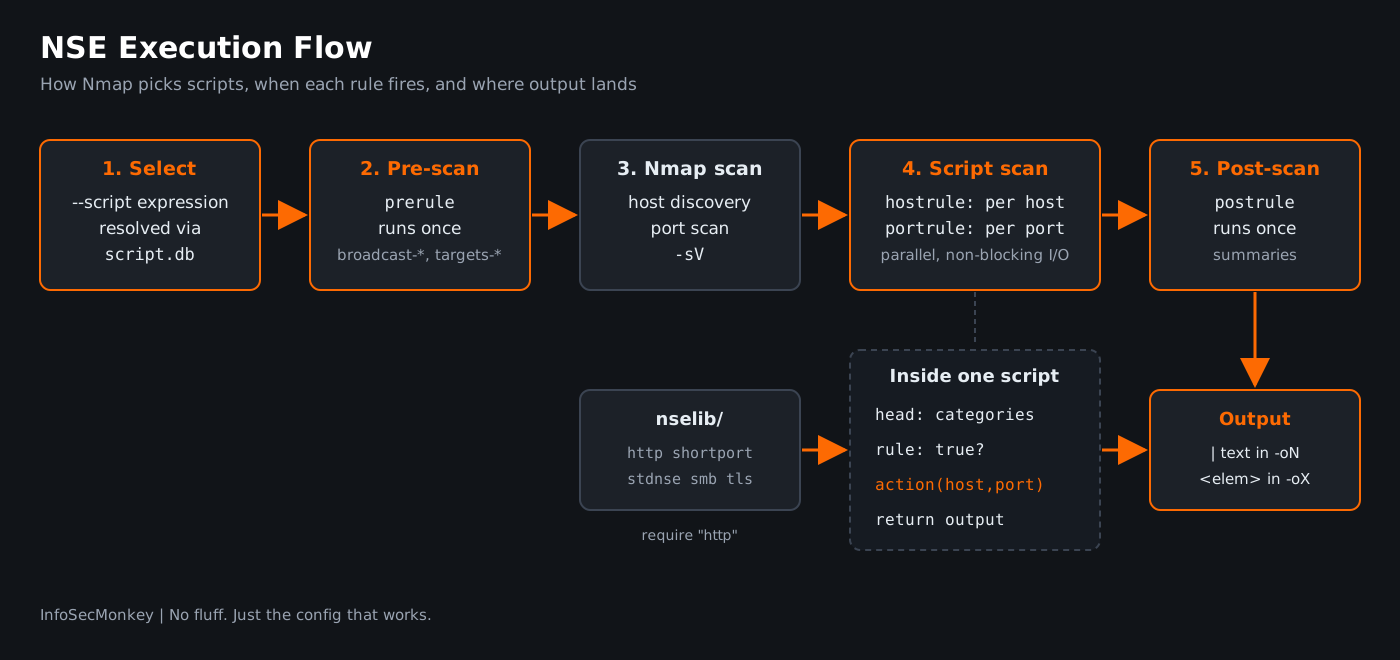
NSE runs scripts in four rule types. Each script declares one or more rules, and Nmap only calls the script’s action function when its rule returns true.
| Rule | When it fires | Typical use |
|---|---|---|
prerule |
Once, before any host is scanned | Broadcast discovery, target generation |
hostrule |
Once per host, after the port scan | Host-level checks (SMB OS info, traceroute geo) |
portrule |
Once per matching open port | Service checks (TLS ciphers, HTTP headers) |
postrule |
Once, after all hosts finish | Summaries, cross-host correlation |
Scripts run in parallel, and network I/O is non-blocking under the hood, which is why a script scan across a /24 finishes far faster than looping a single-host tool.
Script categories
Every script belongs to one or more categories. Counts below are from a stock Nmap 7.94 install (605 scripts, 132 libraries). Your build may differ slightly.
| Category | Scripts | Meaning | Production safe? |
|---|---|---|---|
default |
122 | What -sC runs |
Mostly |
safe |
343 | Unlikely to crash services or trip alarms | Yes |
discovery |
301 | Enumerates more about the network | Usually |
version |
45 | Extends -sV detection |
Yes |
vuln |
104 | Checks for specific known vulnerabilities | Mixed, review first |
auth |
38 | Auth bypass and credential checks | Mixed |
brute |
73 | Credential guessing | No, causes lockouts |
intrusive |
207 | May crash services or be logged as attacks | No |
exploit |
45 | Actively exploits a vulnerability | No |
dos |
11 | Can deny service | Never |
external |
33 | Sends data to third-party services | Data leaves your network |
broadcast |
46 | Discovers hosts via local broadcast | Yes, local segment |
malware |
10 | Looks for backdoor indicators | Yes |
fuzzer |
3 | Sends randomized input | No |
Step-by-Step Implementation
Step 1: Install Nmap and locate the script database
Goal: Know exactly where scripts live so you can read them, add your own, and troubleshoot “script not found.”
Action: Install from your package manager, confirm the version, and find the scripts directory.
# Ubuntu / Debian
sudo apt update && sudo apt install -y nmap

# macOS (Homebrew)
brew install nmap

# Confirm version
nmap --version

# Find the scripts directory and count scripts
ls /usr/share/nmap/scripts/*.nse | wc -l      # Linux packages
ls $(brew --prefix)/share/nmap/scripts | wc -l # Homebrew| Install method | Scripts path |
|---|---|
| apt / dnf package | /usr/share/nmap/scripts/ |
| Source build | /usr/local/share/nmap/scripts/ |
| Homebrew (Apple Silicon) | /opt/homebrew/share/nmap/scripts/ |
Libraries that scripts import (http, shortport, stdnse, smb, and so on) live in the sibling nselib/ directory. The index Nmap uses to resolve names and categories is scripts/script.db.
Verification: nmap --version prints the version and the compiled-in Lua version. A count in the hundreds confirms the scripts are present.
Step 2: Run the default script set the right way
Goal: Get useful script output with one flag, and understand what that flag actually does.
Action: -sC is shorthand for --script=default. Pair it with -sV, because many portrules key off the detected service name, not just the port number.
nmap -sV -sC -p- --min-rate 1000 10.0.10.20 -oA web01-defaultExpected output (trimmed):
PORT    STATE SERVICE  VERSION
22/tcp  open  ssh      OpenSSH 9.6p1 Ubuntu 3ubuntu13
| ssh-hostkey:
|   256 a1:b2:...:9f (ECDSA)
|_  256 c3:d4:...:0e (ED25519)
443/tcp open  ssl/http Apache httpd 2.4.58 ((Ubuntu))
|_http-title: Intranet Portal
| ssl-cert: Subject: commonName=web01.lab.local
|_Not valid after:  2027-04-02T00:00:00
Verification: Lines starting with | and ending with |_ are script output. If you see only the port table, the scripts did not match; see Troubleshooting.
Step 3: Select scripts by name, wildcard, category, and expression
Goal: Run exactly the scripts you want and nothing you do not.
Action: --script accepts filenames, wildcards, categories, directories, and boolean expressions using and, or, not, and parentheses. Quote expressions so the shell does not mangle them.
# One script by name
nmap -p 443 --script ssl-enum-ciphers 10.0.10.20

# Wildcard: every SMB script that is also safe
nmap -p 445 --script "smb-* and safe" 10.0.10.30

# Category combination: discovery and safe, minus anything brute
nmap -sV --script "(default or discovery) and safe and not brute" \
  10.0.10.0/24

# A custom directory of your own scripts
nmap -p 80,443 --script /opt/nse-custom/ 10.0.10.20
Read what a script does before you run it:
nmap --script-help ssl-enum-ciphers
nmap --script-help "vuln and safe"
Verification: --script-help lists each matched script with its categories and NSEDoc link. If the list contains anything in intrusive, brute, or dos, tighten the expression.
Step 4: Pass script arguments
Goal: Tune script behavior (paths, credentials, user agents, timeouts) without editing the script.
Action: Use --script-args for a few values, or --script-args-file for a reusable set. Arguments are key=value, comma separated. Script-specific keys are prefixed with the script name.
# Request a specific path and spoof the user agent
nmap -p 443 --script http-title \
  --script-args http.useragent="Mozilla/5.0",http-title.url=/login \
  10.0.10.20

# Brute force with your own lists, capped at 5 minutes (lab only)
nmap -p 22 --script ssh-brute \
  --script-args userdb=users.txt,passdb=pass.txt,unpwdb.timelimit=5m \
  10.0.10.20

# Load arguments from a file (one key=value per line)
nmap -p 443 --script http-title --script-args-file nse-args.txt 10.0.10.20
Verification: Each script’s @args block in --script-help (or the NSEDoc page) lists the keys it honors. A misspelled key is silently ignored, so if behavior does not change, check spelling first.
Step 5: High-value recipes
Goal: Have a short list of scripts that answer real customer and audit questions.
Action: Run these against authorized targets. All are in the safe category except ssl-enum-ciphers, which is tagged intrusive because it opens many TLS handshakes. It is benign in practice, but it will show up in IPS and web server logs.
| Question | Command |
|---|---|
| Which TLS versions and ciphers are offered, graded A to F? | nmap -p 443 --script ssl-enum-ciphers <host> |
| Is the cert expired, self-signed, or weak? | nmap -p 443 --script ssl-cert <host> |
| Which SSH kex, cipher, and MAC algorithms are allowed? | nmap -p 22 --script ssh2-enum-algos <host> |
| Is SMBv1 still enabled? | nmap -p 445 --script smb-protocols <host> |
| Is SMB signing required? | nmap -p 445 --script smb2-security-mode <host> |
| Which HTTP methods are allowed? | nmap -p 80,443 --script http-methods <host> |
| What is that unknown port saying? | nmap -sV -p <port> --script banner <host> |
| Which DHCP servers answer on this segment? | sudo nmap --script broadcast-dhcp-discover |
| What CVEs map to these versions? (external) | nmap -sV --script vulners <host> |
Note: vulners is in the external category. It sends detected product and version strings to the Vulners API. Clear that with the customer before running it on their network.
Verification: ssl-enum-ciphers ends with a least strength grade line. Anything below A is a finding worth reporting.
Step 6: Write your first custom NSE script
Goal: Build a script that flags missing HTTP security headers and version leakage in the Server and X-Powered-By headers.
Action: Every NSE script has three parts: a head (description, NSEDoc, author, license, categories), a rule (when to run), and an action (what to do). Save the following as http-header-audit.nse.
local http = require "http"
local shortport = require "shortport"
local stdnse = require "stdnse"
local table = require "table"

description = [[
Audits an HTTP(S) service for missing security headers and banner leakage.
Reports which recommended response headers are absent and whether the
Server or X-Powered-By headers disclose product and version strings.
]]

---
-- @usage
-- nmap -p 80,443,8080,8443 --script http-header-audit <target>
--
-- @args http-header-audit.path URI to request. Default: /
--
-- @output
-- 443/tcp open  https
-- | http-header-audit:
-- |   status: 200
-- |   missing:
-- |     Strict-Transport-Security
-- |     Content-Security-Policy
-- |   leaks:
-- |_    server: Apache/2.4.58 (Ubuntu)

author = "InfoSecMonkey"
license = "Same as Nmap--See https://nmap.org/book/man-legal.html"
categories = {"safe", "discovery"}

portrule = shortport.http

local REQUIRED = {
  "Strict-Transport-Security",
  "Content-Security-Policy",
  "X-Content-Type-Options",
  "X-Frame-Options",
  "Referrer-Policy",
}

action = function(host, port)
  local path = stdnse.get_script_args(SCRIPT_NAME .. ".path") or "/"
  local resp = http.get(host, port, path)

  if not resp or not resp.status then
    return stdnse.format_output(false, "No HTTP response")
  end

  local out = stdnse.output_table()
  out.status = resp.status

  local missing = {}
  for _, name in ipairs(REQUIRED) do
    if not resp.header[string.lower(name)] then
      table.insert(missing, name)
    end
  end
  if #missing > 0 then out.missing = missing end

  local leaks = {}
  for _, name in ipairs({"server", "x-powered-by"}) do
    local value = resp.header[name]
    if value and value:match("%d") then
      table.insert(leaks, name .. ": " .. value)
    end
  end
  if #leaks > 0 then out.leaks = leaks end

  return out
end
What each piece does:
| Element | Purpose |
|---|---|
require "http" |
NSE HTTP library: handles TLS, redirects, chunked encoding, and caching |
shortport.http |
Portrule helper that matches common HTTP ports and any service -sV identifies as HTTP |
stdnse.get_script_args |
Reads --script-args values, prefixed with the script name |
resp.header |
Response headers as a table with lowercase keys |
stdnse.output_table() |
Ordered table that renders as normal text and as structured XML |
categories |
Controls whether --script safe or default picks the script up |
Verification: Run a syntax check before Nmap ever loads it:
luac -p http-header-audit.nse && echo "syntax ok"Step 7: Run and register the script
Goal: Use the script by path during development, then install it so it resolves by name and category like a built-in.
Action:
# Development: run by path
nmap -p 80,443 --script ./http-header-audit.nse 10.0.10.20

# Production: install and rebuild the script database
sudo cp http-header-audit.nse /usr/share/nmap/scripts/
sudo nmap --script-updatedb

# Now it resolves by name, by category, and in expressions
nmap -p 443 --script http-header-audit 10.0.10.20
nmap -p 443 --script "safe and http-*" 10.0.10.20

# Override the request path
nmap -p 443 --script http-header-audit \
  --script-args http-header-audit.path=/login 10.0.10.20
Verification: sudo nmap --script-updatedb prints NSE: Script Database updated successfully. and nmap --script-help http-header-audit returns your description.
Step 8: Feed structured output into your tooling
Goal: Pull script results into a report, ticket, or SIEM without screen-scraping text.
Action: Because the script returns an output_table, XML output contains real <elem> and <table> nodes. Scan to XML and parse it.
nmap -p 80,443 --script http-header-audit 10.0.10.0/24 -oX headers.xmlSave as parse_headers.py:
import sys
import xml.etree.ElementTree as ET

root = ET.parse(sys.argv[1]).getroot()
for host in root.iter("host"):
    addr = host.find("address").get("addr")
    for port in host.iter("port"):
        for s in port.iter("script"):
            if s.get("id") != "http-header-audit":
                continue
            missing = [e.text for t in s.findall("table[@key='missing']")
                       for e in t.findall("elem")]
            print(f"{addr}:{port.get('portid')} "
                  f"missing={len(missing)} {','.join(missing)}")
python3 parse_headers.py headers.xmlVerification: One line per web service, for example 10.0.10.20:443 missing=2 Strict-Transport-Security,Content-Security-Policy.
Verification and Validation
Run the full chain against the lab web server and confirm each result.
# 1. Script is installed and indexed
nmap --script-help http-header-audit | head -3

# 2. Script runs and returns findings
nmap -Pn -p 443 --script http-header-audit 10.0.10.20

# 3. Structured output parses
nmap -Pn -p 443 --script http-header-audit 10.0.10.20 -oX t.xml
python3 parse_headers.py t.xml
Expected success output for step 2:
PORT    STATE SERVICE
443/tcp open  https
| http-header-audit:
|   status: 200
|   missing:
|     Strict-Transport-Security
|     Content-Security-Policy
|     X-Content-Type-Options
|     X-Frame-Options
|     Referrer-Policy
|   leaks:
|_    server: Apache/2.4.58 (Ubuntu)
Harden the web server (add the headers, set ServerTokens Prod in Apache or server_tokens off; in Nginx), rescan, and confirm the missing and leaks sections disappear and only status: 200 remains.
If the FortiGate sits in path, check Log & Report > Security Events > Intrusion Prevention during a safe run. It should be quiet. Run a brute script and watch the signatures fire. That contrast is a useful demo for customers asking what “safe” actually means.
Troubleshooting and Gotchas
1. “did not match a category, filename, or directory”
Symptom: NSE: failed to initialize the script engine followed by 'http-header-audit' did not match a category, filename, or directory.
Cause: The file is not in the scripts directory, or script.db was not rebuilt after copying it.
Fix:
ls -l /usr/share/nmap/scripts/http-header-audit.nse
sudo nmap --script-updatedb
# Or bypass the database entirely during testing
nmap -p 443 --script ./http-header-audit.nse 10.0.10.20
Homebrew users: the scripts path is under $(brew --prefix)/share/nmap/scripts, not /usr/share.
2. The script runs, but prints nothing
Symptom: The port shows open and no script output appears, with no error.
Cause: The portrule returned false. A web app on a non-standard port such as 9443 will not match shortport.http unless -sV identifies it as HTTP. NSE does not tell you a rule declined.
Fix: Add -sV, then watch what the engine actually does.
nmap -sV -p 9443 --script http-header-audit -d 10.0.10.20
nmap -sV -p 9443 --script http-header-audit --script-trace 10.0.10.20
-d shows which scripts were selected and started. --script-trace hex-dumps every packet the script sends and receives, so you can see the request leave and the response come back.
3. “Script execution failed” or scans that never finish
Symptom: |_script-name: ERROR: Script execution failed (use -d to debug), or a large range hangs on one slow host.
Cause: A Lua runtime error (often a nil value from an unexpected response), or a service that accepts the connection and never answers.
Fix: Get the stack trace with -d, guard nil values in your code, and cap script runtime per host.
nmap -p 443 --script http-header-audit -d 10.0.10.20 2>&1 | grep -A5 ERROR
nmap -p 80,443 --script http-header-audit --script-timeout 30s \
  --host-timeout 5m 10.0.10.0/24
Gotcha: --script vuln is not a safe sweep. In a stock 7.94 install, 57 of the 104 vuln scripts are also intrusive and 8 are also dos. Use --script "vuln and safe" on anything you cannot afford to bounce.
Recent posts
-

-

DNS is one of those technologies that quietly underpins... Full Story
-

BGP issues on FortiGate firewalls usually trace back to... Full Story
-

Every time your laptop talks to your router, a... Full Story
-

If you've spent any time configuring NAT on a... Full Story
-

If you have spent any time configuring firewall policies... Full Story
-

High availability on FortiGate is one of those features... Full Story
-

If you've configured SD-WAN on a FortiGate, you've almost... Full Story
-

FortiLink is the management protocol that turns a FortiSwitch... Full Story
-

FortiSwitches are pretty rock solid from Mean Time Between... Full Story
-

This is a quicky tip. Have you ever gone... Full Story
-

DNS is one of those quiet pieces of internet... Full Story
-

This article is an updated version of the previous... Full Story
-

You will add ns2 as a secondary (slave) BIND9... Full Story
-

In the process of deploying my lab, I needed... Full Story
-

RFC 8805, used to be known as Self-Correcting IP... Full Story
-

Years back, I wrote an article about certificate pinning. ... Full Story
-

FortiGates have the ability to send alerts to Microsoft... Full Story
-

In this post, I am going to walk through... Full Story
-

Troubleshooting VoIP on a FortiGate can feel like trying... Full Story
-

Prior to FortiOS 7.0, there were three commands to... Full Story
-

In this post, I am going to go over... Full Story
-

What we are going to do: We are going... Full Story
-

Choosing between FGCP (FortiGate Clustering Protocol) and FGSP (FortiGate... Full Story
-

Creating a VLAN on macOS (The "Pro" Move) A... Full Story
-

This blog post explores the logic behind how macOS... Full Story
-

Pretty Fly for a Wi-Fi Tell My Wi-Fi Love... Full Story
-

Part of my daily gig is creating BoMs (Bill-of-Materials)... Full Story
-

ICMP introduces several security risks, but careful filtering, rate... Full Story
-

The command diag debug application dhcps -1 enables full... Full Story
-

In the world of FortiOS, execute tac report is... Full Story
-

LLDP; What is it The Link Layer Discovery Protocol... Full Story
-

What it actually does When you run diagnose fdsm... Full Story
-

Monkey Bites are bite-sized, high-impact security insights designed for... Full Story
-

I have run macOS in macOS with Parallels but... Full Story
-

Don't be confused with my other FortiNAC posts where... Full Story
-

This is the third session in a multi-part article... Full Story
-

Today I was configuring key-based authentication on a FortiGate... Full Story
-

Netcat, often called the "Swiss Army knife" of networking,... Full Story
-

At its core, IEEE 802.1X is a network layer... Full Story
-

In case you did not see the previous FortiNAC... Full Story
-

This is our 5th session where we are going... Full Story
-

Now that we have Wireshark installed and somewhat configured,... Full Story
-

The Philosophy of Packet Analysis Troubleshooting isn't about looking... Full Story
-

Nmap Scripting Engine (NSE): From One-Liners to Your First... Full Story
-

Stand up TRex on Ubuntu, wire it through a... Full Story
-

1. Executive Summary Objective: Get a working, persistent nftables... Full Story