
If you've spent any time configuring user authentication on... Full Story
By Manny Fernandez
June 19, 2026
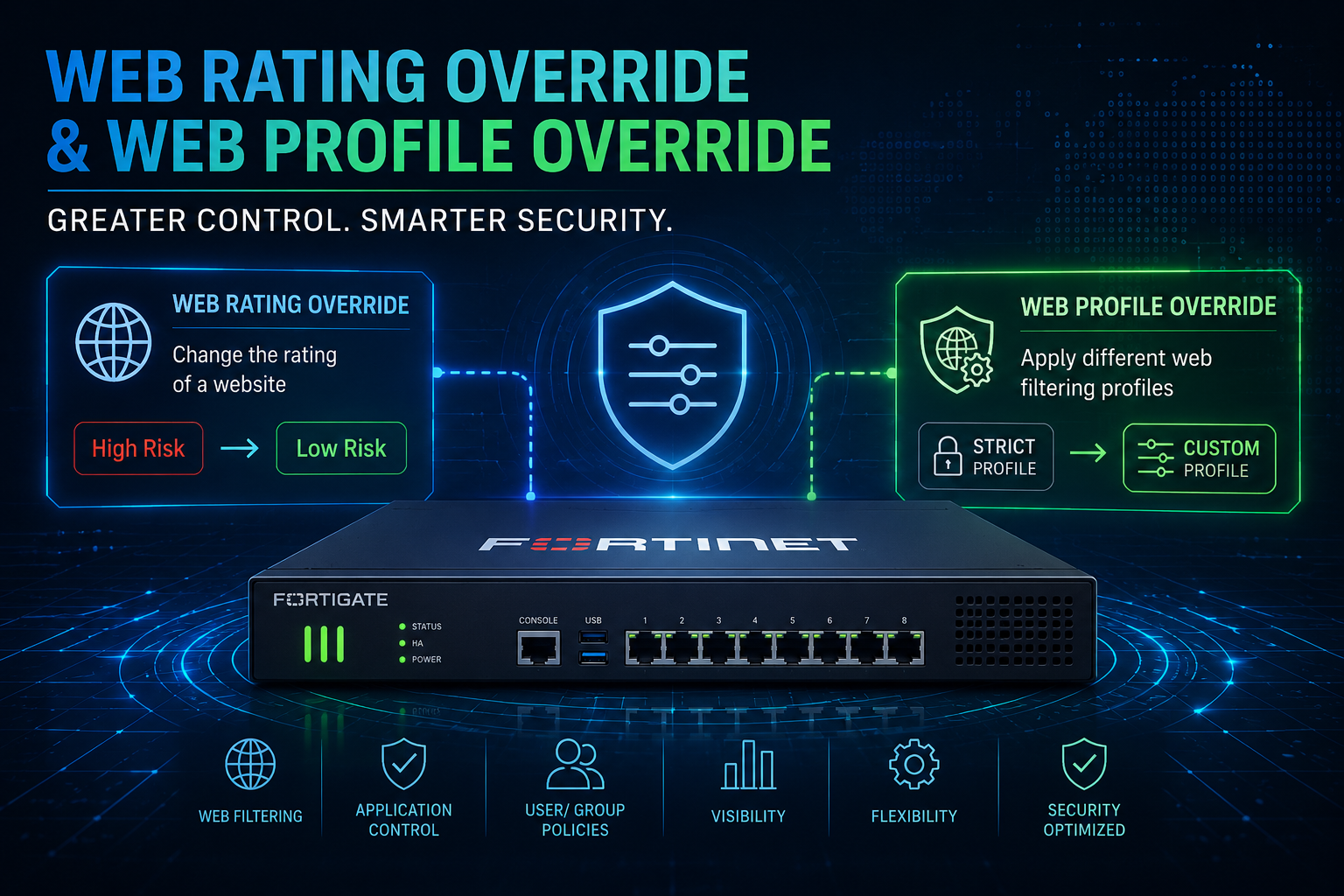
Securing the Gate with Security Profiles Series: Web Rating Override and Web Profile Override on the FortiGate Firewall
1. The two features people keep confusing
FortiOS ships two Web Filter capabilities whose names sound nearly identical but solve completely different problems. Engineers regularly reach for one when they meant the other, and the docs do not always make the distinction obvious. This guide separates them cleanly and then walks each one end to end.
| Feature | What it actually changes | Scope of effect |
| Web Rating Override (also called web rating override or FortiGuard rating override) | Reclassifies a specific URL into a different category. You are telling FortiGuard, “for this box, treat example.com as this category instead of the one FortiGuard assigned.” | Applies to the URL everywhere that category is evaluated. It is a rating-engine change, not a policy change. |
| Web Profile Override | Temporarily swaps the entire web filter profile applied to a user, group, or source IP, or grants a time-boxed exemption. Nothing about the URL’s rating changes. | Applies to a defined identity or address for a defined duration, then reverts automatically. |
The one-liner: Web Rating Override changes what a URL is. Web Profile Override changes which rules a person gets, and only for a while.
Both live under Security Profiles > Web Filter, and both are configured inside a web filter profile, which is why they get tangled together. Keep the table above in mind as you read; almost every “gotcha” in this guide traces back to mixing up rating logic with profile logic.
2. Background you need first
2.1 How FortiGuard web rating works
Every web filter profile in FortiGuard category-filtering mode asks the FortiGuard service (or the local rating cache) to classify each requested URL into a category such as Information Technology, Social Networking, or Malicious Websites. The profile then maps each category to an action: Allow, Monitor, Block, Warning, or Authenticate.
There are three families of categories, and their order of precedence matters a great deal once overrides enter the picture:
| Category type | ID range | Precedence when a URL matches several |
| Local (custom) categories | 140 to 191 | Highest. Evaluated first. |
| Remote (threat feed) categories | 192 to 221 | Second. |
| FortiGuard categories | 1 to 139 (predefined) | Lowest. Only wins if no local or remote category matches. |
Precedence rule: If a URL ends up in more than one active category, FortiOS resolves it as local, then remote, then FortiGuard. This is the single most important fact behind web rating override behavior.
2.2 Proxy-based vs flow-based inspection
Web filter profiles run in one of two inspection modes, set by set feature-set {flow | proxy}. Both support web rating override and web profile override, but the user experience differs:
– Flow-based is the default on most modern deployments. Lower latency, but replacement pages and the override authentication prompt are best-effort and can behave inconsistently on HTTPS without deep inspection.
– Proxy-based gives the cleanest replacement-message and override-prompt experience because the FortiGate fully terminates the session. If you depend on the user-driven override prompt, proxy mode is more predictable.
2.3 SSL/TLS inspection is a prerequisite, not an option
Almost all web traffic is HTTPS. Without SSL inspection, the FortiGate sees only the SNI / certificate hostname, not the full URL path. That has direct consequences:
– Web rating override at the hostname level still works on SNI, but path-specific overrides (for example overriding only example.com/news) require full SSL inspection.
– Block, Warning, and override replacement pages can only be injected cleanly when the FortiGate can see and rewrite the HTTP response, which again means deep inspection.
Plan for this early: Decide your SSL inspection posture before you design overrides. A certificate-inspection-only profile will quietly limit what your overrides can do, and you will burn an afternoon wondering why a path-level override never fires.
3. Web Rating Override
3.1 What it is
A web rating override remaps a specific URL from its FortiGuard-assigned category to a category you choose. The target category can be:
– a different FortiGuard category (for example, move a misclassified vendor site out of Newly Observed Domain into Information Technology);
– a custom local category you created (IDs 140 to 191); or
– a remote / threat-feed category sourced from an external resource (IDs 192 to 221).
The override lives in the rating layer, so once www.example.com is rated as your custom “Sanctioned-SaaS” category, every web filter profile on the box that has an action set for that category will treat the site accordingly. You are not editing one profile; you are editing how the box rates a URL.
3.2 When to use it
| Scenario | Why a rating override fits |
| A legitimate business site is miscategorized and getting blocked. | Move it into an allowed category instead of poking a hole in every profile by hand. |
| You want a uniform custom bucket (for example, “Approved-Cloud-Apps”) that you can allow or block in one place across many profiles. | Create a local category, rate the URLs into it, then set the action once per profile. |
| You need to block a specific site organization-wide regardless of its FortiGuard category. | Rate it into a custom category whose action is Block. Cleaner and more auditable than per-profile URL filters. |
| You are layering a threat feed and want feed hits to outrank FortiGuard ratings. | Remote categories sit above FortiGuard in precedence, so a feed match wins. |
Rating override vs static URL filter: If you only need to allow or block one or two URLs in one profile, a static URL filter entry is simpler. Reach for a rating override when you want the decision to be consistent across profiles or you want to manage many URLs as a single named category.
3.3 Configuration: GUI walkthrough
This example moves www.example.com into a custom local category called Sanctioned-SaaS and allows it.
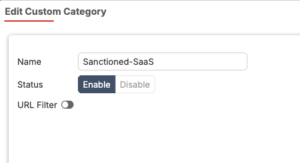
1. Create the custom category. Go to Security Profiles > Web Rating Overrides, or in older builds Web Filter > FortiGuard Categories > Custom Categories. Create a local category named Sanctioned-SaaS.
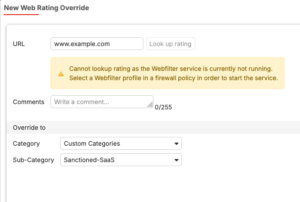
2. Add the rating override. Still under Web Rating Overrides, click Create New. Enter the URL (www.example.com), then select the target category Sanctioned-SaaS. Save.
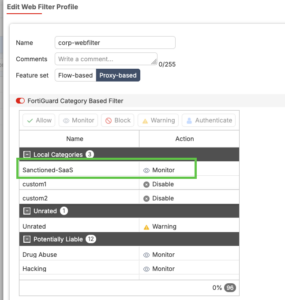
3. Set the action in each profile.Open Security Profiles > Web Filter, edit the profile(s), find Sanctioned-SaaS under Local Categories, and set the action to Allow (or Monitor, Block, Warning, Authenticate).
4. Apply the profile to a policy. Attach the web filter profile to a firewall policy along with an SSL inspection profile, and confirm the policy matches the traffic you care about.
Easy to miss: A brand-new custom category has no effect until you set its action inside each web filter profile. Until then the override is inert; the URL keeps behaving as if nothing changed.
3.4 Configuration: CLI
The same result from the CLI. First the custom category, then the rating, then the per-profile action.
config vdom
edit root# 1. Create the custom local category (ID must be 140-191)
config webfilter ftgd-local-cat
edit "Sanctioned-SaaS"
set id 140
next
end# 2. Rate the URL into that category
config webfilter ftgd-local-rating
edit "www.example.com"
set rating 140
set status enable
next
end# 3. Set the action for category 140 inside the web filter profile
config webfilter profile
edit "corp-webfilter"
config ftgd-wf
config filters
edit 0
set category 140
set action monitor# orallow/block/warning/authenticate
next
end
end
next
end
next
end
Default action gotcha: When you first add a filter for a custom category, FortiOS defaults the action to Monitor with logging enabled, not Allow and not Block. If you wanted a hard block or a silent allow, set it explicitly.
3.5 Threat-feed (remote) rating overrides
To make an external blocklist outrank FortiGuard ratings, import it as a FortiGuard-category external resource. Remote categories occupy IDs 192 to 221.
config global
config system external-resource
edit "BlockList-Feed"
set type category
set category 192
set resource "https://10.10.10.5/lists/blocklist.txt"
next
end
end# Then enable category 192 in the profile and set action to block
config vdom
edit root
config webfilter profile
edit "corp-webfilter"
config ftgd-wf
config filters
edit 0
set category 192
set action block
next
end
end
next
end
next
end
3.6 Interaction with SSL inspection exemptions
Custom and remote categories are not automatically considered by SSL/SSH inspection exemptions or proxy-address category lists. If you want a custom category exempt from deep inspection (common for banking or health sites you rate into a No-Inspect bucket), you must add that category explicitly:
– In Security Profiles > SSL/SSH Inspection, with Full SSL Inspection selected, add the local/remote category to Exempt from SSL Inspection > Web categories.
– In proxy addresses, custom categories must be explicitly selected as URL categories before they apply.
Precedence still applies here: Inside these category lists, if a URL matches several selected categories, the same local > remote > FortiGuard order decides which one wins.
3.7 Rating override limitations and gotchas
| Gotcha | What happens / what to do |
| Override does nothing on its own. | A custom-category rating has no effect until the category’s action is set inside each web filter profile. |
| Default action is Monitor. | New filters for custom/remote categories default to Monitor + log, not Block or Allow. Set it deliberately. |
| Path-level overrides need full SSL inspection. | Without deep inspection you only match the hostname/SNI, so example.com/path overrides will not fire. |
| ID ranges are fixed. | Local 140-191, remote 192-221. Run out of IDs and you cannot add more of that type; plan your category taxonomy. |
| Subdomains and exact match. | A rating on www.example.com does not automatically cover api.example.com. Rate each host (or use a broader match) you actually need to cover. |
| Rating cache and propagation. | Overrides apply going forward; already-cached ratings and live sessions may need a moment or a session refresh. Use diagnostics to confirm (see Section 6). |
| Per-VDOM scope. | ftgd-local-cat and ftgd-local-rating are configured per VDOM (categories can be global in some builds). Confirm you are in the right VDOM. |
| HTTPS without SNI. | Sites using ESNI/ECH or raw-IP access can evade hostname-only rating; deep inspection or IP-based controls are needed. |
4. Web Profile Override
4.1 What it is
A web profile override temporarily replaces the web filter profile that applies to a user, user group, or source IP, or grants temporary access to blocked content, for a defined window of time. When the window expires, the original profile reasserts itself automatically. Nothing about any URL’s rating changes; you are switching which set of rules a person or address is subjected to.
There are two distinct flavors, and they are configured in different places:
| Flavor | Who triggers it | Typical use |
| User-driven override (“Allow users to override blocked categories”) | The end user, from the block/replacement page, after authenticating against an allowed group. | Let trusted staff self-elevate to a looser profile for a short period without a help-desk ticket. |
| Administrative override | An administrator, on behalf of a user, group, or IP. | Grant a contractor or an executive temporary access to otherwise-blocked sites for a set time, with no prompt or auth shown to them. |
4.2 When to use and not use it
When TO use use it:
– A user legitimately needs access to a blocked category for a short, bounded period (research, vendor demo, incident work) and you do not want a permanent rule.
– You want self-service elevation for a trusted group, gated by authentication, so the help desk is not in the loop for every request.
– An admin needs to grant a specific person or IP temporary access now, silently, without making them re-authenticate.
When NOT to use it: If the access need is permanent, do not lean on overrides. Build a proper policy or a dedicated profile. Overrides are designed to expire; using them for standing access creates invisible, time-bombed exceptions nobody remembers.
4.3 The switch parameters you must understand
User-driven overrides hinge on three settings. Getting these wrong is the most common source of “the override does not behave the way I expected” tickets.
Switch applies to (scope) defines what the override attaches to once triggered:
– User: the override follows the authenticated user account.
– User group: the override follows membership in a specified group.
– IP: the override attaches to the source IP address.
Shared-IP warning: If scope is IP and several people sit behind the same NAT or share a host, one user’s override applies to everyone on that address for the duration. On multi-user systems or behind CGNAT, prefer User scope.
Switch duration:
– Predefined: a fixed length (days/hours/minutes; default 15 minutes) that always applies. On the override page the duration is shown but greyed out.
– Ask: the user chooses the duration when they engage the override. The duration field becomes editable on the override page.
Groups that can override: one or more user groups permitted to perform the override. These can be local groups or external identities surfaced through FSSO (for example AD groups). If the authenticating user is not in an allowed group, the override is refused.
4.4 Configuration: user-driven override (GUI)
Goal: let members of local_group switch from their normal profile to a looser profile named webfilter_new for 15 minutes, scoped to their IP.
1. Go to Security Profiles > Web Filter and create or edit the profile users start on (the stricter one).
2. Expand Category Usage Quota (or the override section, depending on build) and enable Allow users to override blocked categories.
3. In Groups that can override, select local_group.
4. In Profile Name, select the destination profile webfilter_new.
5. Set Switch applies to to IP (or User / User group as appropriate).
6. Set Switch Duration to Predefined and leave the default 15 minutes (or choose Ask to let users pick).
7. Save, then attach the starting profile to a firewall policy with SSL inspection so the override/replacement page can be presented.
Result for the user: When a user in local_group hits a blocked category, the replacement page offers an override. They authenticate, and for the next 15 minutes traffic from their IP is filtered by webfilter_new instead. Then it reverts.
4.5 Configuration: user-driven override (CLI)
config webfilter profile
edit "corp-webfilter"# the starting (stricter) profile
config override
set ovrd-cookie enable
set ovrd-scope ip#ip|user|user-group| (ask)
set profile-type list
set ovrd-dur-mode constant#constant =Predefined| ask
set ovrd-dur 15m# default 15 minutes
set ovrd-user-group "local_group"
set profile "webfilter_new"# destination profile
end
next
end
Field names vary by version: The override sub-table keys (for example ovrd-scope, ovrd-dur-mode) differ slightly across 7.0, 7.2, 7.4, and 7.6. Always confirm with show full-configuration or tab-completion on your exact build rather than copying blindly.
4.6 Configuration: administrative override
Administrative overrides grant temporary access without showing the user a block page or an auth prompt. You define who it applies to (user, group, or source IP) and a hard expiry by date and time (default 15 minutes).
In the GUI this is typically managed from the web filter monitor / override area; from the CLI it lives under config webfilter override:
config webfilter override
edit 1
set status enable
set scope user# user | user-group | ip | ip6`
set user "jdoe"
set profile "webfilter_new"# profile to apply during the window
set expires 2026-06-12 18:00:00
next
end
| Scope | Authentication basis |
| User | Whether the request comes from a specific user account. |
| User group | Whether the supplied credential is a member of the specified group. |
| IP / IPv6 | Whether the request originates from the specified source address. |
Silent by design: With an administrative override active, the user sees **no** block page and is **not** asked to authenticate. That is the point, but it also means the exception is invisible to the user and easy for the admin to forget. Track expiries.
4.7 Profile override limitations and gotchas
| Gotcha | What happens / what to do |
| IP scope on shared addresses leaks. | An IP-scoped override covers every user on that address. Behind NAT/CGNAT/RDS, use User scope. |
| It is temporary on purpose. | Overrides expire. Do not use them for permanent access; build a real policy instead. |
| Replacement page needed for user-driven flow. | The user triggers the override from the block/replacement page. If SSL inspection or flow-mode behavior suppresses that page on HTTPS, users never get the prompt. |
| Group must be reachable at auth time. | FSSO/LDAP group lookups must succeed. If identity is not resolved, the user is not in an allowed group and the override is refused. |
| Destination profile is a real profile. | The ‘switch to’ profile is a normal web filter profile you must build and maintain. An overly loose destination profile is a standing risk every time the override fires. |
| Ask-duration can be abused. | With Switch Duration = Ask, users may set very long windows. Prefer Predefined for tighter control, or cap expectations via the destination profile. |
| Auditing and visibility. | Administrative overrides are silent to the user. Without a tracking process, time-boxed exceptions accumulate unnoticed. Log and review them. |
| Override cookie / session basis. |
5. Side-by-side decision guide
When you are not sure which feature you want, work down this table.
| Question | Web Rating Override | Web Profile Override |
| What am I changing? | The category a URL is rated as. | Which profile applies to a person/IP, temporarily. |
| How long does it last? | Permanent until you remove it. | A defined window, then auto-reverts. |
| Who/what is the target? | A URL (and the category bucket). | A user, group, or source IP. |
| Does it affect all profiles? | Yes, anywhere that category has an action set. | No. Only the targeted identity/IP for the duration. |
| Typical trigger | Admin reclassifies a site. | User self-elevates, or admin grants access. |
| Best for | Fixing miscategorization; uniform custom buckets; feed-driven blocking. | Short-term, bounded exceptions to filtering rules. |
Rule of thumb: Permanent and about the site? Rating override. Temporary and about the person? Profile override.
6. Verification and troubleshooting
6.1 Confirm a URL’s effective rating
Check how the box actually rates a URL after an override, and watch live rating lookups:
# Look up the rating the box will use for a URL
diagnose webfilter fortiguard rate-lookup <vfid> https://www.example.com# Watch live FortiGuard rating queries (run, generate traffic, then Ctrl-C)
diagnose debug application urlfilter -1
diagnose debug enable# Inspect the FortiGuard rating cache
diagnose webfilter fortiguard cache dump# Confirm FortiGuard web filter contract / connectivity
diagnose debug rating
Local vs remote vs FortiGuard: If a rating override does not seem to take, confirm the URL is not also matched by a higher-precedence category. Remember local beats remote beats FortiGuard.
6.2 Confirm an override is active
# List active administrative web filter overrides
diagnose webfilter override list# Show override-related profile config
show webfilter profile <name># Verify the destination profile exists and is built as intended
show webfilter profile webfilter_new
6.3 Watch it in the logs
In Log & Report > Web Filter (or forwarded to FortiAnalyzer), filter on the URL or user. Look for the action that fired and the category that matched. A common “why is this still blocked” answer is that the log shows a different category than you expected, meaning a higher-precedence category or a missing per-profile action is in play.
– Override events appear with the switched profile name and, for user-driven overrides, the authenticating user.
– If you see the block page but no override option, recheck SSL inspection and that the user’s group is in Groups that can override.
7. Practical recommendations
– Design your category taxonomy up front. Reserve local-category IDs deliberately (for example 140 = Sanctioned-SaaS, 141 = Hard-Block, 142 = No-Inspect) and document them. ID ranges are finite.
– Prefer rating overrides for site decisions, URL filters for one-offs. Use a rating override when you want consistency across profiles; a static URL filter entry is fine for a single profile exception.
– Keep the destination override profile tight. A profile override is only as safe as the profile it switches to. Do not switch users to “allow everything.” Loosen only what is needed.
– Favor User scope over IP scope wherever multiple users can share an address.
– Use Predefined durations for tighter governance; reserve Ask for trusted, low-population groups.
– Track administrative overrides. They are silent to users and expire quietly. Keep a register or alert on creation/expiry so exceptions do not pile up.
– Get SSL inspection right first. Path-level rating overrides and clean override prompts both depend on deep inspection.
– Validate after every change. Use rate-lookup and the web filter logs to confirm the box does what you intended before you close the ticket.
Recent posts
-

-

DNS is one of those technologies that quietly underpins... Full Story
-

BGP issues on FortiGate firewalls usually trace back to... Full Story
-

Every time your laptop talks to your router, a... Full Story
-

If you've spent any time configuring NAT on a... Full Story
-

If you have spent any time configuring firewall policies... Full Story
-

High availability on FortiGate is one of those features... Full Story
-

If you've configured SD-WAN on a FortiGate, you've almost... Full Story
-

FortiLink is the management protocol that turns a FortiSwitch... Full Story
-

FortiSwitches are pretty rock solid from Mean Time Between... Full Story
-

This is a quicky tip. Have you ever gone... Full Story
-

DNS is one of those quiet pieces of internet... Full Story
-

This article is an updated version of the previous... Full Story
-

You will add ns2 as a secondary (slave) BIND9... Full Story
-

In the process of deploying my lab, I needed... Full Story
-

RFC 8805, used to be known as Self-Correcting IP... Full Story
-

Years back, I wrote an article about certificate pinning. ... Full Story
-

FortiGates have the ability to send alerts to Microsoft... Full Story
-

In this post, I am going to walk through... Full Story
-

Troubleshooting VoIP on a FortiGate can feel like trying... Full Story
-

Prior to FortiOS 7.0, there were three commands to... Full Story
-

In this post, I am going to go over... Full Story
-

What we are going to do: We are going... Full Story
-

Choosing between FGCP (FortiGate Clustering Protocol) and FGSP (FortiGate... Full Story
-

Creating a VLAN on macOS (The "Pro" Move) A... Full Story
-

This blog post explores the logic behind how macOS... Full Story
-

Pretty Fly for a Wi-Fi Tell My Wi-Fi Love... Full Story
-

Part of my daily gig is creating BoMs (Bill-of-Materials)... Full Story
-

ICMP introduces several security risks, but careful filtering, rate... Full Story
-

The command diag debug application dhcps -1 enables full... Full Story
-

In the world of FortiOS, execute tac report is... Full Story
-

LLDP; What is it The Link Layer Discovery Protocol... Full Story
-

What it actually does When you run diagnose fdsm... Full Story
-

Monkey Bites are bite-sized, high-impact security insights designed for... Full Story
-

I have run macOS in macOS with Parallels but... Full Story
-

Don't be confused with my other FortiNAC posts where... Full Story
-

This is the third session in a multi-part article... Full Story
-

Today I was configuring key-based authentication on a FortiGate... Full Story
-

Netcat, often called the "Swiss Army knife" of networking,... Full Story
-

At its core, IEEE 802.1X is a network layer... Full Story
-

In case you did not see the previous FortiNAC... Full Story
-

This is our 5th session where we are going... Full Story
-

Now that we have Wireshark installed and somewhat configured,... Full Story
-

The Philosophy of Packet Analysis Troubleshooting isn't about looking... Full Story
-

InfoSecMonkey Threat Response October 24, 2026 | No fluff.... Full Story
-

InfoSecMonkey Threat Response October 24, 2026 | No fluff.... Full Story
-

Objective: Build an authoritative BIND9 server on Ubuntu that... Full Story