
If you've spent any time configuring user authentication on... Full Story
By Manny Fernandez
November 12, 2019
Troubleshooting IPSec VPNs on Fortigate Firewalls
Lets start with a little primer on IPSec. I am going to describe some concepts of IPSec VPNs.
IPSec Primer
Authentication Header or AH – The AH protocol provides authentication service only. AH provides data integrity, data origin authentication, and an optional replay protection service. AH authenticates IP headers and their payloads, with the exception of certain header fields that can be legitimately changed in transit, such as the Time To Live (TTL) field.
Encapsulating Security Payload or ESP – The ESP protocol provides data confidentiality by using encryption and authentication (data integrity, data origin authentication, and replay protection). ESP can be used with confidentiality only, authentication only, or both confidentiality and authentication. When ESP provides authentication functions, it uses the same algorithms as AH, but the coverage is different. AH-style authentication authenticates the entire IP packet, including the outer IP header, while the ESP authentication mechanism authenticates only the IP datagram portion of the IP packet.
Transport Mode – Transport Mode provides a secure connection between two endpoints as it encapsulates IP’s payload.
Tunnel Mode – Tunnel Mode encapsulates the entire IP packet to provide a virtual “secure hop” between two gateways.
Main Mode – Main mode requires six packets back and forth, but affords complete security during the establishment of an IPsec connection.
Aggressive mode – The fallacy is that this is better since it is “aggressive” however, Aggressive mode uses half the exchanges providing a bit less security because some information is transmitted in cleartext. If you get audited, they WILL ding you on this. Remote access IPSec VPNs use aggressive mode.
Internet Key Exchange or IKE – Is the mechanism by which the two devices exchange the keys.
Phase I – The purpose of phase 1 is to establish a secure channel for control plane traffic. The result of a successful phase 1 operation is the establishment of an ISAKMP SA which is then used to encrypt and verify all further IKE communications. Phase 1 can operate in two modes: main and aggressive.
Phase II – IKE phase 2 establishes IPSec SAs (one in each direction) for the VPN connection, and is referred to as Quick Mode. At the conclusion of phase 2 each peer will be ready to pass data plane traffic through the VPN. Quick mode consists of 3 messages sent between peers (with an optional 4th message). All messages in phase 2 are secured using the ISAKMP SA established in phase 1.
Fortigate Debug Command
Diag Commands
To filter out VPNs so that you focus on the one VPN you are trying to troubleshoot
FW-01 # diagnose vpn ike log-filter
list Display the current filter.
clear Erase the current filter.
name Phase1 name to filter by.
src-addr4 IPv4 source address range to filter by.
msrc-addr4 multiple IPv4 source address to filter by.
dst-addr4 IPv4 destination address range to filter by.
mdst-addr4 multiple IPv4 destination address to filter by.
src-addr6 IPv6 source address range to filter by.
msrc-addr6 multiple IPv6 source address to filter by.
dst-addr6 IPv6 destination address range to filter by.
mdst-addr6 multiple IPv6 destination addresses to filter by.
src-port Source port range to filter by.
dst-port Destination port range to filter by.
vd Index of virtual domain. -1 matches all.
interface Interface that IKE connection is negotiated over.
negate Negate the specified filter parameter.
Above you can see the different filtering criteria. This allows you to filter a VPN to a destination of 2.2.2.2 as an example:
diagnose vpn ike log-filter dst-addr4 2.2.2.2
Now you can run the following commands
diag debug app ike -1
diag debug enable
Clearing Established Connections
diagnose vpn ike restart
diagnose vpn ike gateway clear
Lets get started
I have created a VPN in my lab and I will break it at different points and identify it on the output of the debug commands.
Pre-Shared Key Mismatch
The first example, we are going to look at non-matching pre-shared keys
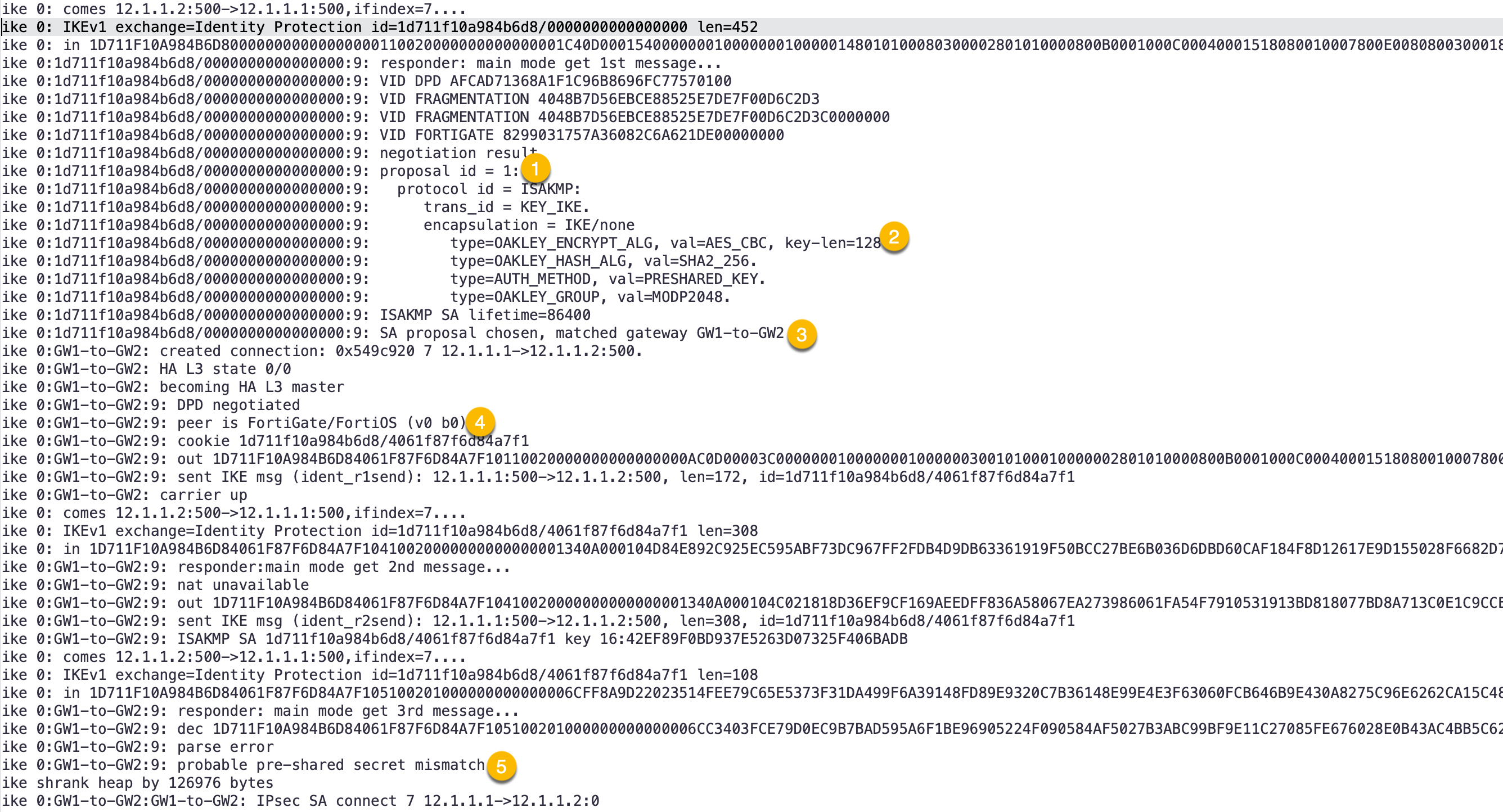
I will break down the sections:
- Here we can see the first ISKMP proposal the firewall received.
- This section shows it is receiving AES 128 with a Hash of SHA 256
- Shows that we matched a particular VPN we have configured and it matches what I created
GW1-to-GW2 - Here we can see the platform connecting to/from.
- Here we see the cause of the problem
possible pre-shared secret mismatch.
Phase I – No Proposal Chosen
In this example, I left ONLY AES-128 SHA256 while the remote firewall had the AES-128 SHA256 removed causing a mismatch.
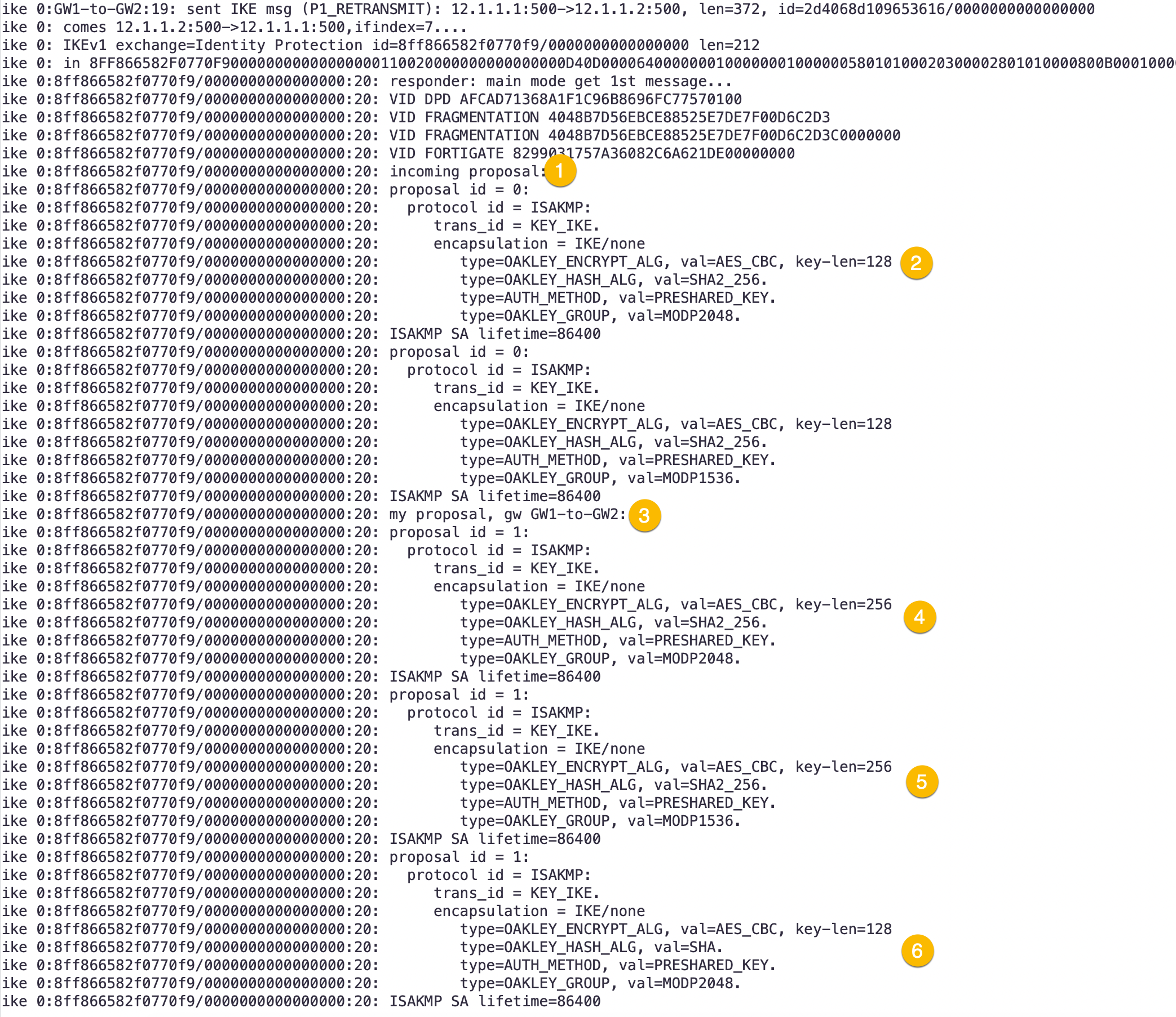
- Here we see the
incomingproposal. - We can see
AES-128 and SHA-256as stated above. - This section shows
my proposaland show us iterating through our proposals we have configured. - Another
my proposal - Another
my proposal - Another
my proposal
Next screen shot for more output
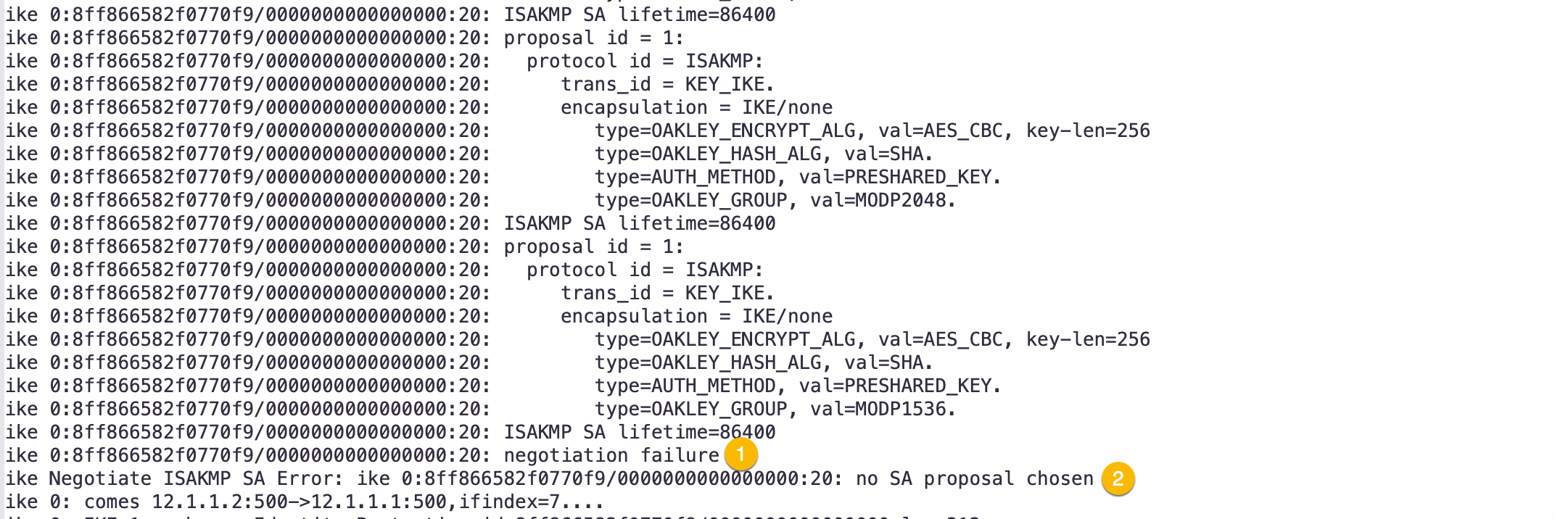
- Finally, we see the error
negotiation failure - Now we have the final outcome of
no SA proposal chosen
PFS Mismatch
In this section, I removed PFS on one side of the VPN.
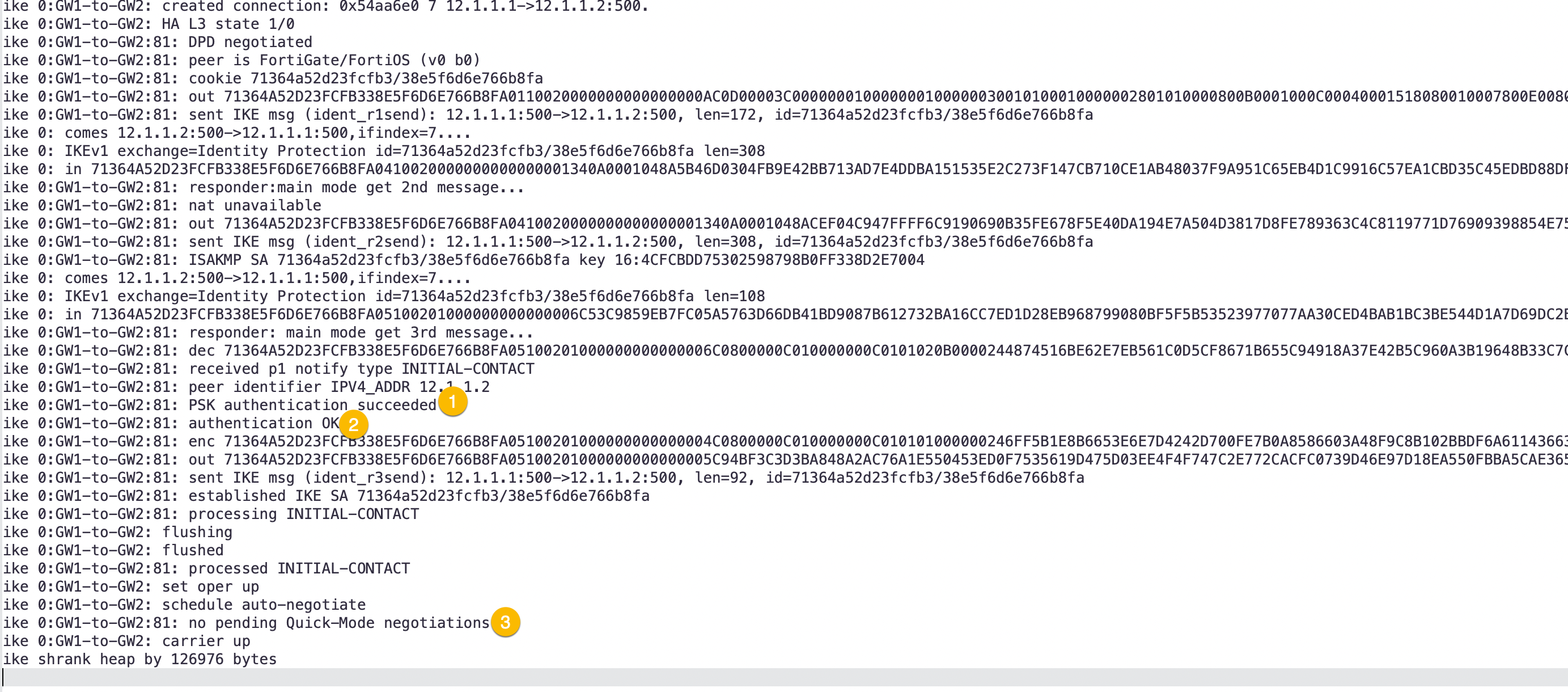
In this output, we can see:
- Pre-shared Key authentication is successful
- Authentication OK. This shows us Phase I is up.
- Here we can see that Quick-Mode has failed.
In this output, we do not see a specific PFS error, but normally in Phase II these are the following situations you will find:
- Proposal mismatch. In this scenario, you could have AES-256 SHA-256 but it not be configured on the other side.
- Phase II Selectors not matching (you will see this next). Essentially, you would see 10.x.x.x/24 on one side but the other configured as 192.168.0.0/24 as an example.
- PFS or Perfect Forward Secrecy.
- NAT-T or NAT Traversal mismatch on either side.
- And finally, Some remote firewalls such as Cisco, do not like Fortinet/Palo/Checkpoint etc groups on Phase II Selectors. Cisco would make you create separate Phase II selectors.
Phase II Selector Mismatch
In route-based VPNs we normally use 0.0.0.0/0 as the Phase II selectors. Because of this, you would not see this error. However if not:
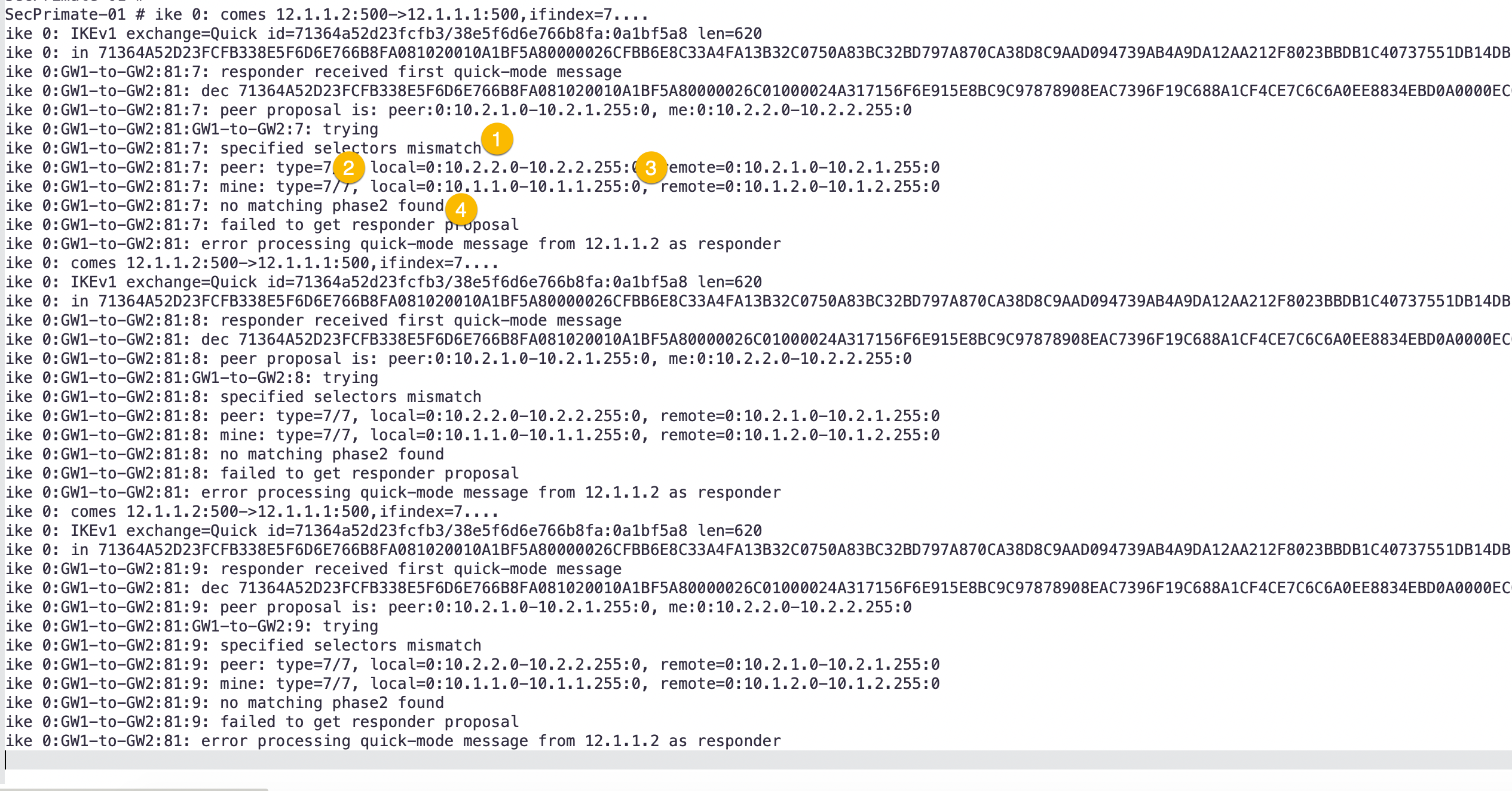
Here we can see:
- The error saying that the Phase II selector was the issue.
- Give you what the
localPhase II selector you have configured (where you are capturing the the debug from) - This give you the
remotePhase II Selectors. This is useful because if it is a third party vendor, you can tell them what they are sending and what you are expecting. - Finally the error telling you no matching Phase II found.
Other Things to Look At
- Policies – Ensure you have the corresponding policies to allow the
interestingtraffic to flow through the firewall. Remember that although the VPN may be using the WAN1 or WAN2 interface to get to the remote side, the policies need to reference theVPNinterface NOT theWANinterfaces. - Network Address Translation (NAT) – Ensure that you have the correct NAT configuration you are expecting. Depending on Policy NAT or Central NAT, the configuration may change. You can take a look at the Central NAT Article I did a while back.
- Routing – Weather you are running
route-basedVPN orpolicy-basedVPN, you will need to have either a static route or a routing protocol. Again, ensure that thedestinationinterface is the VPN interface and NOT theWANinterface. - Key Lifetime – Also, if the tunnel comes up and drops, you may need to check the key lifetime in Phase I and Phase II.
- Interoperability – From an interoperability perspective, although the Fortigate can do address groups in the PhaseII selectors, other vendors such as Cisco does not like it and will require you to create separate Phase II selectors to match their crypto-map ACLs.
diag vpn ipsec tunnel details
Hope this helps.
Recent posts
-

-

DNS is one of those technologies that quietly underpins... Full Story
-

BGP issues on FortiGate firewalls usually trace back to... Full Story
-

Every time your laptop talks to your router, a... Full Story
-

If you've spent any time configuring NAT on a... Full Story
-

If you have spent any time configuring firewall policies... Full Story
-

High availability on FortiGate is one of those features... Full Story
-

If you've configured SD-WAN on a FortiGate, you've almost... Full Story
-

FortiLink is the management protocol that turns a FortiSwitch... Full Story
-

FortiSwitches are pretty rock solid from Mean Time Between... Full Story
-

This is a quicky tip. Have you ever gone... Full Story
-

DNS is one of those quiet pieces of internet... Full Story
-

This article is an updated version of the previous... Full Story
-

You will add ns2 as a secondary (slave) BIND9... Full Story
-

In the process of deploying my lab, I needed... Full Story
-

RFC 8805, used to be known as Self-Correcting IP... Full Story
-

Years back, I wrote an article about certificate pinning. ... Full Story
-

FortiGates have the ability to send alerts to Microsoft... Full Story
-

In this post, I am going to walk through... Full Story
-

Troubleshooting VoIP on a FortiGate can feel like trying... Full Story
-

Prior to FortiOS 7.0, there were three commands to... Full Story
-

In this post, I am going to go over... Full Story
-

What we are going to do: We are going... Full Story
-

Choosing between FGCP (FortiGate Clustering Protocol) and FGSP (FortiGate... Full Story
-

Creating a VLAN on macOS (The "Pro" Move) A... Full Story
-

This blog post explores the logic behind how macOS... Full Story
-

Pretty Fly for a Wi-Fi Tell My Wi-Fi Love... Full Story
-

Part of my daily gig is creating BoMs (Bill-of-Materials)... Full Story
-

ICMP introduces several security risks, but careful filtering, rate... Full Story
-

The command diag debug application dhcps -1 enables full... Full Story
-

In the world of FortiOS, execute tac report is... Full Story
-

LLDP; What is it The Link Layer Discovery Protocol... Full Story
-

What it actually does When you run diagnose fdsm... Full Story
-

Monkey Bites are bite-sized, high-impact security insights designed for... Full Story
-

I have run macOS in macOS with Parallels but... Full Story
-

Don't be confused with my other FortiNAC posts where... Full Story
-

This is the third session in a multi-part article... Full Story
-

Today I was configuring key-based authentication on a FortiGate... Full Story
-

Netcat, often called the "Swiss Army knife" of networking,... Full Story
-

At its core, IEEE 802.1X is a network layer... Full Story
-

In case you did not see the previous FortiNAC... Full Story
-

This is our 5th session where we are going... Full Story
-

Now that we have Wireshark installed and somewhat configured,... Full Story
-

The Philosophy of Packet Analysis Troubleshooting isn't about looking... Full Story
-

InfoSecMonkey Threat Response October 24, 2026 | No fluff.... Full Story
-

InfoSecMonkey Threat Response October 24, 2026 | No fluff.... Full Story
-

Plus what you actually get with FortiCare Essential, Premium... Full Story