
If you've spent any time configuring user authentication on... Full Story
By Manny Fernandez
September 21, 2026
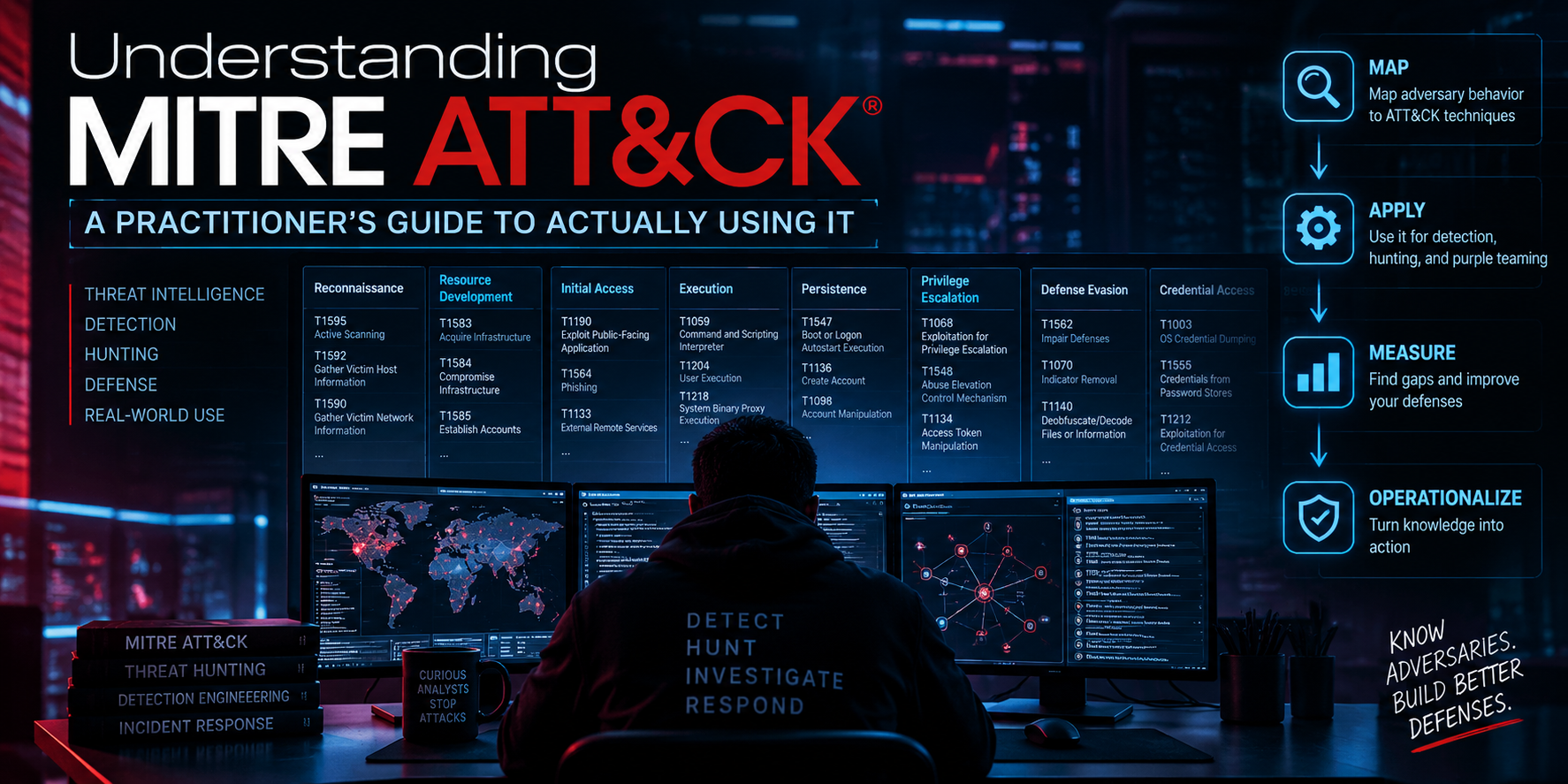
Understanding MITRE ATT&CK A Practitioner’s Guide to Actually Using It
Executive Summary
MITRE ATT&CK is not a checklist, a certification, or a product. It is a living knowledge base of adversary behavior, built from real intrusions, and organized so defenders can talk about attacker behavior in a shared, structured language. Most teams know that much. Fewer teams have turned that knowledge base into something that changes what they detect, how they test, and where they spend their next engineering hour.
This guide is written for the second group, or for practitioners who want to get there. It assumes you already know what a SIEM alert and an EDR telemetry event are, and it skips the introductory summary you have already read a dozen times. Instead it covers the data model in enough depth to use it correctly, the four places ATT&CK actually earns its keep, a hands-on Navigator workflow, real code and rule examples, a maturity model, and the mistakes that quietly turn “ATT&CK-informed” into “ATT&CK-decorated.”
Target audience: SOC analysts, detection engineers, threat intel analysts, purple team leads, and security architects who are past the “what is ATT&CK” stage and want a repeatable operational workflow.
Prerequisites & Architecture
Assumed knowledge: core SOC concepts (SIEM correlation, EDR telemetry, alert triage), basic familiarity with the idea of an attack lifecycle, and hands-on exposure to at least one detection content format (Sigma, EDR custom rules, or SIEM correlation rules).
Environment and tooling referenced in this guide:
| Component | Role |
|---|---|
| ATT&CK Enterprise Matrix | Primary reference for tactics, techniques, and sub-techniques (attack.mitre.org) |
| ATT&CK Navigator | Web tool for scoring and visualizing coverage as heatmap layers |
| DeTT&CT | Framework for scoring detection and visibility maturity per technique |
| Atomic Red Team | Library of scoped adversary emulation tests mapped to technique IDs |
| CALDERA | MITRE’s automated adversary emulation platform |
| Sigma | Vendor-neutral detection rule format widely used for ATT&CK-mapped logic |
| mitreattack-python | Official Python library for querying the ATT&CK STIX dataset |
None of these tools are required to get conceptual value from ATT&CK, but the workflow in this guide assumes you have, or can stand up, at minimum the Navigator and a way to tag existing detection content with technique IDs.
The ATT&CK Data Model
Most of the confusion practitioners run into with ATT&CK comes from treating it as a flat list of attack types instead of understanding the actual object hierarchy. Get this right and everything downstream, scoring, gap analysis, detection mapping, gets easier.
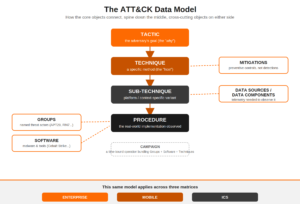
Tactic is the adversary’s why, the tactical goal of a phase of an operation. Enterprise ATT&CK currently defines fourteen tactics, from Reconnaissance and Initial Access through Execution, Persistence, Privilege Escalation, Defense Evasion, Credential Access, Discovery, Lateral Movement, Collection, Command and Control, Exfiltration, and Impact. Tactics are not strictly linear; a real intrusion loops through several of them repeatedly.
Technique is the how, a specific method used to achieve a tactic. T1053 (Scheduled Task/Job) sits under Persistence, Privilege Escalation, and Execution simultaneously, because the same mechanism serves multiple tactical goals depending on how it is used.
Sub-technique is a more specific variant of a technique. T1053.005 is specifically Scheduled Task on Windows, distinct from T1053.003 (Cron) on Linux/macOS. Sub-techniques exist because “detect scheduled task abuse” is too coarse to build a real detection against; the telemetry, binaries, and log sources differ completely between platforms.
Procedure is the specific, real-world implementation: how a particular threat actor or piece of malware actually executed the technique, down to the command line, registry key, or API call. Procedures are cataloged on Group and Software pages, and they matter because two actors using “the same” sub-technique often leave completely different forensic footprints. A detection tuned to one actor’s procedure will frequently miss another actor’s procedure for the identical sub-technique. This is the single most under-appreciated fact in the framework, and the reason “we detect T1053.005” is a claim that needs far more evidence than most teams provide.
Cross-cutting objects
- Groups: named threat actors (APT29, FIN7, Scattered Spider) with an associated list of techniques and software.
- Software: malware families and tools (Cobalt Strike, Mimikatz, PsExec) mapped to the techniques they implement.
- Campaigns: time-bound, named operations attributed to a specific set of groups and software.
- Mitigations: defensive controls mapped to the techniques they reduce risk against. Preventive, not detective.
- Data Sources and Data Components: the telemetry categories needed to actually observe a technique, the bridge between “we should detect this” and “do we have the log source to detect this.”
- Assets: ICS-specific objects representing physical or logical assets such as an HMI or PLC.
The diagram below shows how these pieces connect. The spine runs top to bottom, Tactic through Procedure; Groups, Software, Mitigations, and Data Sources attach from the side.
The three matrices
This same model applies to different domains: Enterprise (Windows, macOS, Linux, cloud IaaS/SaaS, network, containers, identity provider platforms), Mobile (Android and iOS), and ICS (industrial control systems, using the Asset object in place of typical enterprise assets). Most practitioners live in Enterprise ATT&CK; teams touching OT/ICS environments will find a meaningfully different tactic list built around physical process impact.
How Practitioners Actually Use ATT&CK
Knowing the data model is table stakes. Here is where it actually changes daily work.
1. Cyber Threat Intelligence (CTI)
Raw threat reporting describes behavior in prose. Mapping that prose to technique IDs turns it into something comparable and queryable. When a new vendor report on a threat actor drops, mapping its described behavior to ATT&CK IDs answers three questions immediately: which of these techniques do we already detect, which actors have historically used overlapping technique sets, and which newly reported techniques are net-new to our detection backlog.
Group and Software pages already do a lot of this mapping for well-tracked actors. The practitioner work is mapping your own incident data and your own vendor feeds the same way, consistently, so the technique ID becomes your organization’s common vocabulary across CTI, detection engineering, and IR.
2. Adversary Emulation and Purple Teaming
ATT&CK gives red and purple teams a structured way to build test plans instead of running generic, unscoped engagements. Instead of “try to get domain admin,” a purple team exercise built from ATT&CK is a specific, ordered list of technique and sub-technique IDs relevant to the organization’s threat model, each with a defined test procedure.
Atomic Red Team is the most widely used library of these tests: small, single-technique test cases that can be executed safely and repeatedly, each mapped to a specific technique ID. CALDERA automates execution of chained technique sequences and can simulate a more complete adversary operation rather than isolated atomic tests.
The purple team loop: pick technique, execute test, observe whether detection fired, if it didn’t determine why (missing telemetry, missing rule logic, rule present but not tuned to this procedure variant), fix, retest, and record the result against the technique ID. That last step is what turns a one-off exercise into a maturity asset instead of a report that gets read once and shelved.
3. Detection Engineering
This is where the Data Source/Data Component objects matter most. Before writing a detection for a technique, check whether you actually have the required telemetry. A common failure mode is writing detection logic against a technique for which the organization has no visibility at all, producing a rule that will never fire, regardless of how well written the logic is.
Once telemetry is confirmed, detections should be built and tagged at the sub-technique level, not the technique level, and should ideally account for more than one procedure variant. A Sigma rule targeting T1055.012 (Process Hollowing) that only matches one specific API call sequence will miss other implementations of the same sub-technique. Tag detection content with the specific technique/sub-technique ID in its metadata so coverage can be tracked programmatically instead of from memory.
title: Suspicious Scheduled Task Creation via schtasks.exe
id: 7f9e2c31-4b8a-4e1d-9c3f-8a2d6e5b1a90
status: stable
description: Detects creation of a scheduled task using schtasks.exe with
  parameters commonly seen in persistence establishment
tags:
    - attack.persistence
    - attack.privilege_escalation
    - attack.t1053.005
logsource:
    category: process_creation
    product: windows
detection:
    selection:
        Image|endswith: '\schtasks.exe'
        CommandLine|contains: '/create'
    filter_legit:
        ParentImage|endswith:
            - '\services.exe'
            - '\msiexec.exe'
    condition: selection and not filter_legit
falsepositives:
    - Legitimate software installers registering scheduled tasks
level: mediumNote the attack.t1053.005 tag. This is the mechanism that lets you programmatically ask which sub-techniques have at least one active detection across an entire rule repository, rather than relying on a spreadsheet someone updates twice a year.
4. Gap Analysis and Coverage Assessment
ATT&CK Navigator layers are the standard way to visualize coverage as a heatmap: color each technique cell by detection maturity, then look at the matrix for red patches. DeTT&CT extends this into a more rigorous scoring model with separate scores for visibility (do we have the telemetry), detection (do we have a rule), and threat actor relevance (does this technique matter given our threat model), each on a defined maturity scale rather than a subjective red, yellow, or green.
The prioritization question is not how to cover all 200-plus techniques and 600-plus sub-techniques, it is which techniques matter most given the threat groups that actually target your industry and region. Cross-reference the Group pages relevant to your sector against your current coverage layer, and the gap list that falls out is your actual roadmap, not a generic top-ten list copied from a blog post.
5. Incident Response and Threat Hunting
During an active investigation, tagging observed adversary behavior with technique IDs as you go turns a narrative timeline into a structured one, making it far easier to answer what else this actor typically does that you haven’t seen yet, and whether you should be hunting for it. A hunting hypothesis built directly from a technique page is a much sharper starting point than an open-ended hunt.
Hands-On: ATT&CK Navigator Walkthrough
- Create a new layer at the Navigator (mitre-attack.github.io/attack-navigator), selecting the Enterprise domain and the current ATT&CK version.
- Choose a scoring scheme. A simple three-color scheme (no coverage, partial coverage, strong coverage) is a reasonable starting point; DeTT&CT’s more granular scale is a reasonable upgrade later.
- Score each technique your organization has any detection or visibility against, using the comment field on each cell to record which rule ID or EDR analytic backs the score.
- Create a second layer from a Group page. Navigator supports importing a group’s known techniques directly, representing an actor relevant to your threat model.
- Use the layer-combination feature to overlay your coverage layer against the threat-actor layer, highlighting exactly which of that actor’s known techniques you have no coverage for.
- Export the combined layer as an image or JSON and share it with stakeholders.
Practical Code: Querying ATT&CK Programmatically
For teams tracking coverage at any scale, manual Navigator scoring does not stay accurate for long. The mitreattack-python library lets you pull the current ATT&CK STIX dataset and cross-reference it against your own detection inventory.
from mitreattack.stix20 import MitreAttackData

attack_data = MitreAttackData("enterprise-attack.json")

# Get all sub-techniques of a given technique
technique = attack_data.get_object_by_attack_id("T1053", "attack-pattern")
subtechniques = attack_data.get_subtechniques_of_technique(technique["id"])

for entry in subtechniques:
    sub = entry["object"]
    print(sub["external_references"][0]["external_id"], "-", sub["name"])

# Get every technique associated with a specific threat group
group = attack_data.get_object_by_attack_id("G0016", "intrusion-set")  # APT29
techniques_used = attack_data.get_techniques_used_by_group(group["id"])
print(f"{group['name']} has {len(techniques_used)} mapped techniques")This same pattern, pull the current STIX bundle and join it against your internal rule inventory by technique ID, is the basis for most homegrown coverage dashboards, and is far more durable than hand-maintained spreadsheets that drift out of sync with each biannual ATT&CK release.
A DeTT&CT YAML scoring entry, for comparison, looks like this once you move past manual Navigator scoring:
- technique_id: T1053.005
  detection:
    - date: '2026-06-15'
      score: 2
      comment: 'Sigma rule sch-task-create-v3 deployed to production SIEM'
  visibility:
    - date: '2026-06-15'
      score: 3
comment: 'Sysmon Event ID 1 and 4688 ingested from all domain-joined endpoints'Measuring Program Maturity
Use this as a rough self-assessment, not a formal maturity model with a certifying body behind it.
Crawl. The team knows what ATT&CK is and references technique IDs informally in incident reports and CTI summaries. No systematic mapping of existing detection content exists yet. Entirely awareness-level.
Walk. Existing detection content is tagged with technique/sub-technique IDs. A Navigator layer, or equivalent, represents current coverage and is updated at least quarterly. CTI reporting is normalized to ATT&CK IDs. A basic gap analysis has been run against a relevant threat group list.
Run. Purple team exercises continuously validate, not just assume, detection coverage, feeding results back into the coverage layer. DeTT&CT or an equivalent tracks visibility and detection maturity over time as trend data, not a single snapshot. Threat-informed defense drives the detection engineering backlog. ATT&CK IDs are a native field in the SIEM, EDR, and ticketing system.
Most organizations that believe they are at Run are, on close inspection, at a well-organized Walk: good tagging and a maintained layer, but no continuous validation loop actually re-testing that tagged detections still fire against current procedure variants.
Common Pitfalls and Gotchas
Coverage theater. Marking a technique green because a single generic rule exists somewhere, without validating that it fires against realistic procedure variants. A rule never tested against an Atomic Red Team case is a claim, not a validated control.
Technique sprawl. Attempting even coverage across all techniques and sub-techniques instead of prioritizing based on the groups and software relevant to your sector. This produces broad, shallow coverage instead of deep coverage where it matters.
Technique-level scoring hiding sub-technique gaps. Scoring T1055 as covered when only one of its eight sub-techniques has a working detection creates a false sense of security. Score at the sub-technique level wherever one is defined.
Procedure blindness. Assuming that detecting one actor’s implementation of a sub-technique means the sub-technique is covered against all actors. Review multiple Group and Software procedure examples before declaring it handled.
Stale scoring after version releases. ATT&CK updates roughly twice a year, with techniques added, renamed, deprecated, and occasionally restructured. A coverage layer not re-validated against the current version is quietly going stale.
Detection-only tunnel vision. Focusing exclusively on detection while ignoring Mitigations. A technique with no realistic detection path today may still be meaningfully reduced in risk by a preventive control mapped to the same technique ID.
A Practical First 30 Days
- Identify the threat groups most relevant to your industry and region using Group pages and available industry-specific threat reporting.
- Stand up ATT&CK Navigator and create a baseline coverage layer, even if the initial scoring is rough.
- Tag existing detection content (Sigma rules, EDR custom detections, SIEM correlation rules) with technique/sub-technique IDs in their metadata.
- Run a baseline DeTT&CT, or equivalent, visibility and detection assessment to separate “we have telemetry but no rule” from “we have neither.”
- Cross-reference your coverage layer against the technique sets of your top three to five relevant threat groups, and pull out the resulting gap list as your next sprint’s detection engineering backlog.
- Schedule a first purple team exercise scoped to five to ten of the highest-priority gap techniques, using Atomic Red Team test cases where available.
Conclusion
MITRE ATT&CK earns its value the moment it stops being a reference page you consult during an incident and becomes the shared vocabulary connecting your threat intelligence, your detection engineering backlog, your purple team calendar, and your coverage reporting. None of the individual pieces in this guide are complicated on their own; the discipline is in doing all of them consistently, at the sub-technique level, with continuous validation instead of one-time scoring.
Further resources
- MITRE ATT&CK: attack.mitre.org
- ATT&CK Navigator: mitre-attack.github.io/attack-navigator
- MITRE Center for Threat-Informed Defense: mitre-engenuity.org/cybersecurity/center-for-threat-informed-defense
- DeTT&CT: github.com/rabobank-cdc/DeTTECT
- Atomic Red Team: github.com/redcanaryco/atomic-red-team
- CALDERA: github.com/mitre/caldera
- Sigma: github.com/SigmaHQ/sigma
Recent posts
-

-

DNS is one of those technologies that quietly underpins... Full Story
-

BGP issues on FortiGate firewalls usually trace back to... Full Story
-

Every time your laptop talks to your router, a... Full Story
-

If you've spent any time configuring NAT on a... Full Story
-

If you have spent any time configuring firewall policies... Full Story
-

High availability on FortiGate is one of those features... Full Story
-

If you've configured SD-WAN on a FortiGate, you've almost... Full Story
-

FortiLink is the management protocol that turns a FortiSwitch... Full Story
-

FortiSwitches are pretty rock solid from Mean Time Between... Full Story
-

This is a quicky tip. Have you ever gone... Full Story
-

DNS is one of those quiet pieces of internet... Full Story
-

This article is an updated version of the previous... Full Story
-

You will add ns2 as a secondary (slave) BIND9... Full Story
-

In the process of deploying my lab, I needed... Full Story
-

RFC 8805, used to be known as Self-Correcting IP... Full Story
-

Years back, I wrote an article about certificate pinning. ... Full Story
-

FortiGates have the ability to send alerts to Microsoft... Full Story
-

In this post, I am going to walk through... Full Story
-

Troubleshooting VoIP on a FortiGate can feel like trying... Full Story
-

Prior to FortiOS 7.0, there were three commands to... Full Story
-

In this post, I am going to go over... Full Story
-

What we are going to do: We are going... Full Story
-

Choosing between FGCP (FortiGate Clustering Protocol) and FGSP (FortiGate... Full Story
-

Creating a VLAN on macOS (The "Pro" Move) A... Full Story
-

This blog post explores the logic behind how macOS... Full Story
-

Pretty Fly for a Wi-Fi Tell My Wi-Fi Love... Full Story
-

Part of my daily gig is creating BoMs (Bill-of-Materials)... Full Story
-

ICMP introduces several security risks, but careful filtering, rate... Full Story
-

The command diag debug application dhcps -1 enables full... Full Story
-

In the world of FortiOS, execute tac report is... Full Story
-

LLDP; What is it The Link Layer Discovery Protocol... Full Story
-

What it actually does When you run diagnose fdsm... Full Story
-

Monkey Bites are bite-sized, high-impact security insights designed for... Full Story
-

I have run macOS in macOS with Parallels but... Full Story
-

Don't be confused with my other FortiNAC posts where... Full Story
-

This is the third session in a multi-part article... Full Story
-

Today I was configuring key-based authentication on a FortiGate... Full Story
-

Netcat, often called the "Swiss Army knife" of networking,... Full Story
-

At its core, IEEE 802.1X is a network layer... Full Story
-

In case you did not see the previous FortiNAC... Full Story
-

This is our 5th session where we are going... Full Story
-

Now that we have Wireshark installed and somewhat configured,... Full Story
-

The Philosophy of Packet Analysis Troubleshooting isn't about looking... Full Story
-

INFOSECMONKEY | CVE BRIEF | NO FLUFF. JUST THE... Full Story
-

APT CVE-2026-109518: How a Download Retry Lets an Attacker... Full Story
-

Managing Windows Firewall from the Command Line: netsh, PowerShell... Full Story