
If you've spent any time configuring user authentication on... Full Story
By Manny Fernandez
September 22, 2026
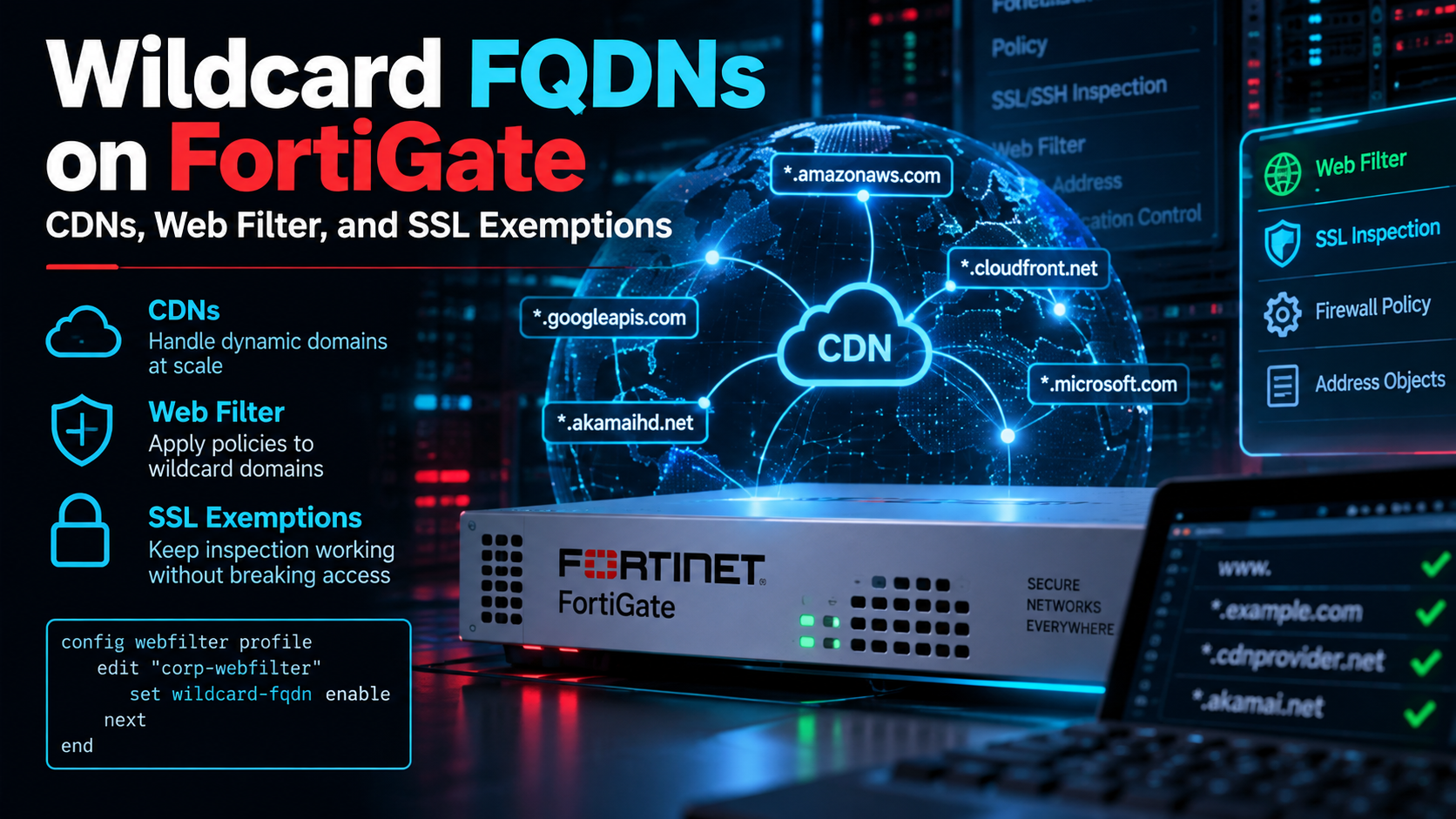
Wildcard FQDNs on FortiGate: CDNs, Web Filter, and SSL Exemptions
Executive Summary
| Item | Detail |
|---|---|
| Objective | Explain how a FortiGate populates a wildcard FQDN address object when the domain is served from a CDN, and how wildcard matching in firewall addresses, Web Filter URL filters, and SSL inspection exemptions interact. |
| Target audience | FortiGate administrators, security engineers, and SEs designing policy for SaaS and CDN-hosted destinations. |
| FortiOS scope | 7.0 and later. Behavior described here is consistent through 7.4.x and 7.6.x. |
The short version
Wildcard FQDN address objects, Web Filter wildcard URL entries, and SSL exemption wildcard FQDNs are three separate engines. They run at different stages of the session, match on different data, and share no objects or state. Web Filter and SSL exemption match on names and do not care about CDNs. The wildcard FQDN address object matches on IPs learned from DNS, and that is exactly where CDNs cause trouble.
Prerequisites and Lab Architecture
Assumed knowledge: FortiGate firewall policy, SSL/SSH inspection profiles, Web Filter profiles, and basic DNS (A, AAAA, CNAME, TTL).
| Component | Lab Value |
|---|---|
| FortiGate | FortiOS 7.4.x or 7.6.x, single VDOM |
| Internal LAN | 10.0.10.0/24 on port2 |
| Internal DNS resolver | 10.0.1.53, forwarding out through the FortiGate WAN |
| WAN / transit | 198.18.0.0/15 represents public address space |
| Example CDN edge IPs | 198.18.10.21 and 198.18.10.22 (shared edge nodes) |
| Example domain | *.example.com, fronted by a CDN through a CNAME |
Three Wildcards, Three Engines
The word wildcard shows up in three places in FortiOS. They look similar in the GUI, but under the hood they are unrelated.
| Feature | Configured In | Matches On | CDN Impact |
|---|---|---|---|
| Wildcard FQDN address | config firewall address (type fqdn, value *.example.com), used as policy src/dst |
IPs learned by snooping DNS responses | High. Shared IPs over-match, churn and out-of-band DNS under-match |
| Web Filter wildcard | config webfilter urlfilter, entry type wildcard |
Hostname from SNI or cert (cert inspection), full URL (deep inspection) | None |
| SSL exemption wildcard | ssl-exempt entry type wildcard-fqdn, referencing config firewall wildcard-fqdn custom |
SNI in the ClientHello or the server certificate CN/SAN | None |
Note that the SSL exemption objects live in config firewall wildcard-fqdn custom, a completely different table from config firewall address, even though both use the phrase wildcard FQDN.
How Wildcard FQDN Address Objects Learn IPs
A FortiGate cannot resolve *.example.com on its own. There is no single name to query. Instead, the object starts empty and is populated by DNS snooping: when a client resolves a name that matches the wildcard, the FortiGate parses the DNS response and adds the IPs from the answer section to the object. Those IPs are then loaded into any firewall policy that references the object.
- DNS has to transit the FortiGate. The
dns-udpsession helper, present by default, is what parses the responses. If someone deletes it, wildcard objects never populate. - Clients and FortiGate should agree on resolvers. If clients resolve through a path the FortiGate never sees, the cache stays empty for them.
- Entries follow the record TTL. When the TTL expires, the IP is removed until the next query.
set cache-ttlon the address object keeps short-TTL answers around longer. - There is a ceiling. A single wildcard FQDN object holds up to 1000 IP addresses.
- Encrypted DNS is a blind spot. DoH is invisible to the snooper. DoT can be parsed on FortiOS 7.0 and later when the DNS traffic hits a policy with a DoT-capable DNS filter profile.
- The cache is volatile. It is per VDOM, and a reboot means every IP has to be learned again.
What Happens When the Domain Is on a CDN
CDN-fronted names almost always resolve through a CNAME chain. A representative answer section looks like this:
;; ANSWER SECTION:
www.example.com.                 300 IN CNAME www.example.com.cdn-edge.net.
www.example.com.cdn-edge.net.     60 IN CNAME e1234.a.cdn-edge.net.
e1234.a.cdn-edge.net.             20 IN A     198.18.10.21
e1234.a.cdn-edge.net.             20 IN A     198.18.10.22
The FortiGate ties the final A/AAAA records back to the name that was queried, so 198.18.10.21 and 198.18.10.22 land in *.example.com. The mapping itself works. The problems come from what those IPs actually are.
Problem 1: Shared edge IPs over-match
A CDN edge IP serves thousands of unrelated tenants. Once 198.18.10.21 is in the *.example.com cache, any session to that IP matches the policy, regardless of which site the client actually intended to reach. Policy matching is L3/L4 and the address object never looks at SNI. On an allow policy, a wildcard FQDN address for a CDN-fronted domain permits far more than you think it does. It is not a security boundary.
Problem 2: Short TTLs and geo-DNS create churn
CDN TTLs are often 20 to 60 seconds, and different resolvers or client locations receive different edge IPs. The cache only knows what it has seen pass through, so it is always a snapshot that lags reality.
Problem 3: Out-of-band resolution under-matches
If a client used DoH, a resolver on a path the FortiGate does not see, or a DNS answer it cached before the FortiGate learned it (very common right after a reboot or HA failover), the IP is never cached. The policy silently fails to match and the session falls through to whatever policy is next.
Web Filter Wildcards: Name-Based and CDN-Agnostic
A Web Filter URL filter entry of type wildcard is evaluated against the hostname the session is actually for. With certificate inspection that comes from the SNI or server certificate. With deep inspection the FortiGate sees the full URL and Host header. The IP address is irrelevant, so a shared CDN edge does not confuse it.
config webfilter urlfilter
    edit 10
        set name "example-cdn-only"
        config entries
            edit 1
                set url "*.example.com"
                set type wildcard
                set action allow
            next
            edit 2
                set url "example.com"
                set type simple
                set action allow
            next
            edit 3
                set url ".*"
                set type regex
                set action block
            next
        end
    next
end
Gotcha
*.example.com does not cover the bare apex example.com. Add the apex as its own entry, as shown above.
SSL Exemption Wildcards: Also Name-Based
SSL exemptions in a deep inspection profile decide whether a session is decrypted. An exemption of type wildcard-fqdn references an object from config firewall wildcard-fqdn custom (the predefined g-* groups live there too) and is matched against the SNI or the server certificate, not the destination IP.
config firewall wildcard-fqdn custom
    edit "wc-exempt-example"
        set wildcard-fqdn "*.example.com"
    next
end
config firewall ssl-ssh-profile
    edit "deep-inspect-lab"
        set ssl-exemptions-log enable
        config ssl-exempt
            edit 0
                set type wildcard-fqdn
                set wildcard-fqdn "wc-exempt-example"
            next
        end
    next
end
Watch the exemption type
ssl-exempt also supports type address. If you point that at a wildcard FQDN firewall address, the exemption becomes IP-based and inherits every CDN over-match problem described above. Keep exemptions on type wildcard-fqdn so they stay tied to the name.
How the Three Chain Together
The three features do not share data, but they do run in a fixed order on every session:
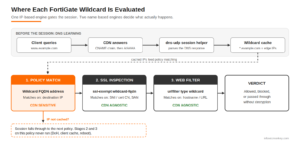
- Policy match. The wildcard FQDN address cache decides whether this policy matches at all. If the IP is not cached, the session never reaches the profiles attached to this policy.
- SSL inspection profile. The exemption check runs on SNI or certificate, so it is name-accurate even on a shared CDN IP.
- Web Filter. It evaluates the hostname, or the full URL under deep inspection. For exempted traffic, Web Filter still sees the SNI, so hostname-level wildcard entries and FortiGuard category rating continue to work. Path-level URL filtering does not, because the payload was never decrypted.
The practical result: you can put a wildcard FQDN address on a policy for a CDN-fronted service and pair it with a Web Filter profile. The address object is a loose, IP-based gate that over-matches. The Web Filter wildcard, backed by an allow-then-block URL filter, is what actually enforces the domain. The SSL exemption only decides whether traffic gets decrypted, never whether it is allowed.
Step-by-Step Lab Configuration
Step 1: Create the wildcard FQDN address
Goal: Build the IP-based gate for the policy. Action: Create the address and extend the cache TTL so 20 second CDN answers do not flap.
config firewall address
    edit "LAN-10.0.10.0"
        set subnet 10.0.10.0 255.255.255.0
    next
    edit "wc-example.com"
        set type fqdn
        set fqdn "*.example.com"
        set cache-ttl 3600
    next
end
GUI verification: Policy & Objects > Addresses. Hover over wc-example.com after a client has resolved a matching name. The resolved IPs appear in the tooltip.
Step 2: Confirm DNS is visible to the FortiGate
Goal: Make sure the snooper can see answers. Action: Verify the session helper exists and that the resolver’s outbound DNS crosses a FortiGate policy.
show system session-helper | grep -B1 -A3 dns-udp
config firewall policy
    edit 100
        set name "DNS-resolver-out"
        set srcintf "port2"
        set dstintf "port1"
        set action accept
        set srcaddr "DNS-10.0.1.53"
        set dstaddr "all"
        set schedule "always"
        set service "DNS"
        set nat enable
    next
end
Step 3: Create the SSL exemption and Web Filter profile
Goal: Put the name-based controls in place. Action: Use the wc-exempt-example and example-cdn-only objects from the sections above, then attach the URL filter to a Web Filter profile.
config webfilter profile
    edit "wf-example-only"
        config web
            set urlfilter-table 10
        end
    next
end
Step 4: Build the policy
Goal: Chain all three engines on one policy. Action: Reference the wildcard address, the deep inspection profile, and the Web Filter profile.
config firewall policy
    edit 110
        set name "LAN-to-example-CDN"
        set srcintf "port2"
        set dstintf "port1"
        set action accept
        set srcaddr "LAN-10.0.10.0"
        set dstaddr "wc-example.com"
        set schedule "always"
        set service "HTTPS"
        set utm-status enable
        set ssl-ssh-profile "deep-inspect-lab"
        set webfilter-profile "wf-example-only"
        set logtraffic all
        set nat enable
    next
end
GUI verification: Policy & Objects > Firewall Policy. Policy 110 shows the wildcard address, the inspection profile, and the Web Filter profile icon.
Verification and Validation
From a client on 10.0.10.0/24, resolve and browse a matching name, then check the cache:
diagnose firewall fqdn list-all | grep -A4 "example.com"
diagnose firewall iprope list 100004
Representative success output. The count should be non-zero and the edge IPs should be listed:
fqdn_u 0x55dbb4208add *.example.com: type:(1) ID(186) count(2) generation(3) ...
        198.18.10.21 expires:3591
        198.18.10.22 expires:3591
Now prove the Web Filter guardrail catches the CDN over-match. Force a request for an unrelated tenant onto the same edge IP:
# Legit site: expect HTTP 200
curl -skI https://www.example.com

# Unrelated tenant on the same edge IP: policy 110 matches on IP,
# but the Web Filter blocks it by hostname (expect the block page)
curl -skI --resolve other-tenant.net:443:198.18.10.21 https://other-tenant.net
The second request matching policy 110 and then being blocked by wf-example-only is the whole story in one test: the address object let it in, the name-based control stopped it. Confirm in Log & Report > Security Events > Web Filter.
Troubleshooting and Gotchas
Gotcha 1: The policy never matches, or traffic hits the wrong policy
Cause: The FortiGate never saw the DNS answer (DoH in the browser, a client-side DNS cache, a reboot, or a missing session helper). Diagnose:
diagnose firewall fqdn list-all | grep -A4 "example.com"
diagnose debug flow filter addr 198.18.10.21
diagnose debug flow show function-name enable
diagnose debug flow trace start 20
diagnose debug enable
Resolution: Disable browser Secure DNS or block DoH with Application Control, confirm dns-udp exists, and flush the client DNS cache (ipconfig /flushdns on Windows) so the next query crosses the FortiGate. diagnose test application dnsproxy 1 clears the FortiGate DNS cache when you need a clean retest.
Gotcha 2: The policy matches traffic for unrelated sites
Cause: Shared CDN edge IPs. This is expected behavior, not a bug. Resolution: Add a Web Filter allow-then-block guardrail like the one above, or use Internet Service Database (ISDB) objects for major SaaS and CDN-backed services instead of a wildcard address.
Gotcha 3: The SSL exemption does not apply, or applies too broadly
Cause: The exemption is type address pointing at a wildcard FQDN firewall address (IP-based), the profile is not doing deep inspection, or the client hid the SNI. Resolution: Switch to type wildcard-fqdn, enable ssl-exemptions-log, and check the SSL log for the exemption reason.
Design Recommendations
- Enforce by name, not IP. Use Web Filter URL filters, FortiGuard categories, or Application Control for the actual allow or deny decision.
- Use ISDB for big SaaS and CDN-backed services. Microsoft 365, Zoom, and similar services are tracked by FortiGuard-maintained Internet Service objects, which are far more reliable than snooped wildcard caches.
- Reserve wildcard FQDN addresses for destinations on dedicated IPs, or for cases where over-matching is acceptable, such as a coarse SD-WAN steering hint rather than a security control.
- Keep DNS visible. Block or inspect DoH and DoT, and make sure clients resolve through a path the FortiGate sees.
- Keep SSL exemptions on
type wildcard-fqdnso they stay tied to SNI and the certificate. - Plan for ECH. Encrypted Client Hello hides the real SNI, which weakens both name-based engines. Controlling DNS HTTPS/SVCB records through the FortiGate is the usual mitigation, so check what your FortiOS release supports.
Bottom Line
Wildcard FQDN address objects are a DNS-learned IP list, and CDNs turn that list into a set of shared doors. Treat the address object as a loose gate, and let the name-based engines (Web Filter and SSL exemptions) do the real enforcement. When the destination is a major SaaS platform, skip the wildcard entirely and reach for ISDB.
Recent posts
-

-

DNS is one of those technologies that quietly underpins... Full Story
-

BGP issues on FortiGate firewalls usually trace back to... Full Story
-

Every time your laptop talks to your router, a... Full Story
-

If you've spent any time configuring NAT on a... Full Story
-

If you have spent any time configuring firewall policies... Full Story
-

High availability on FortiGate is one of those features... Full Story
-

If you've configured SD-WAN on a FortiGate, you've almost... Full Story
-

FortiLink is the management protocol that turns a FortiSwitch... Full Story
-

FortiSwitches are pretty rock solid from Mean Time Between... Full Story
-

This is a quicky tip. Have you ever gone... Full Story
-

DNS is one of those quiet pieces of internet... Full Story
-

This article is an updated version of the previous... Full Story
-

You will add ns2 as a secondary (slave) BIND9... Full Story
-

In the process of deploying my lab, I needed... Full Story
-

RFC 8805, used to be known as Self-Correcting IP... Full Story
-

Years back, I wrote an article about certificate pinning. ... Full Story
-

FortiGates have the ability to send alerts to Microsoft... Full Story
-

In this post, I am going to walk through... Full Story
-

Troubleshooting VoIP on a FortiGate can feel like trying... Full Story
-

Prior to FortiOS 7.0, there were three commands to... Full Story
-

In this post, I am going to go over... Full Story
-

What we are going to do: We are going... Full Story
-

Choosing between FGCP (FortiGate Clustering Protocol) and FGSP (FortiGate... Full Story
-

Creating a VLAN on macOS (The "Pro" Move) A... Full Story
-

This blog post explores the logic behind how macOS... Full Story
-

Pretty Fly for a Wi-Fi Tell My Wi-Fi Love... Full Story
-

Part of my daily gig is creating BoMs (Bill-of-Materials)... Full Story
-

ICMP introduces several security risks, but careful filtering, rate... Full Story
-

The command diag debug application dhcps -1 enables full... Full Story
-

In the world of FortiOS, execute tac report is... Full Story
-

LLDP; What is it The Link Layer Discovery Protocol... Full Story
-

What it actually does When you run diagnose fdsm... Full Story
-

Monkey Bites are bite-sized, high-impact security insights designed for... Full Story
-

I have run macOS in macOS with Parallels but... Full Story
-

Don't be confused with my other FortiNAC posts where... Full Story
-

This is the third session in a multi-part article... Full Story
-

Today I was configuring key-based authentication on a FortiGate... Full Story
-

Netcat, often called the "Swiss Army knife" of networking,... Full Story
-

At its core, IEEE 802.1X is a network layer... Full Story
-

In case you did not see the previous FortiNAC... Full Story
-

This is our 5th session where we are going... Full Story
-

Now that we have Wireshark installed and somewhat configured,... Full Story
-

The Philosophy of Packet Analysis Troubleshooting isn't about looking... Full Story
-

Nmap Scripting Engine (NSE): From One-Liners to Your First... Full Story
-

Stand up TRex on Ubuntu, wire it through a... Full Story
-

1. Executive Summary Objective: Get a working, persistent nftables... Full Story