
If you've spent any time configuring user authentication on... Full Story
By Manny Fernandez
December 14, 2019

Password Recovery Options on the Fortigate firewall
Fortigate firewalls have a process for recovering a lost admin password. You can reset the admin password or reset to factory default once you are in the Fortigate CLI. Here are the options:
Maintainer Account
Fortigate has a maintainer account that will allow you to recover the password. The catch is that you need to be locally on the box. The process is as follows:
Console into the device
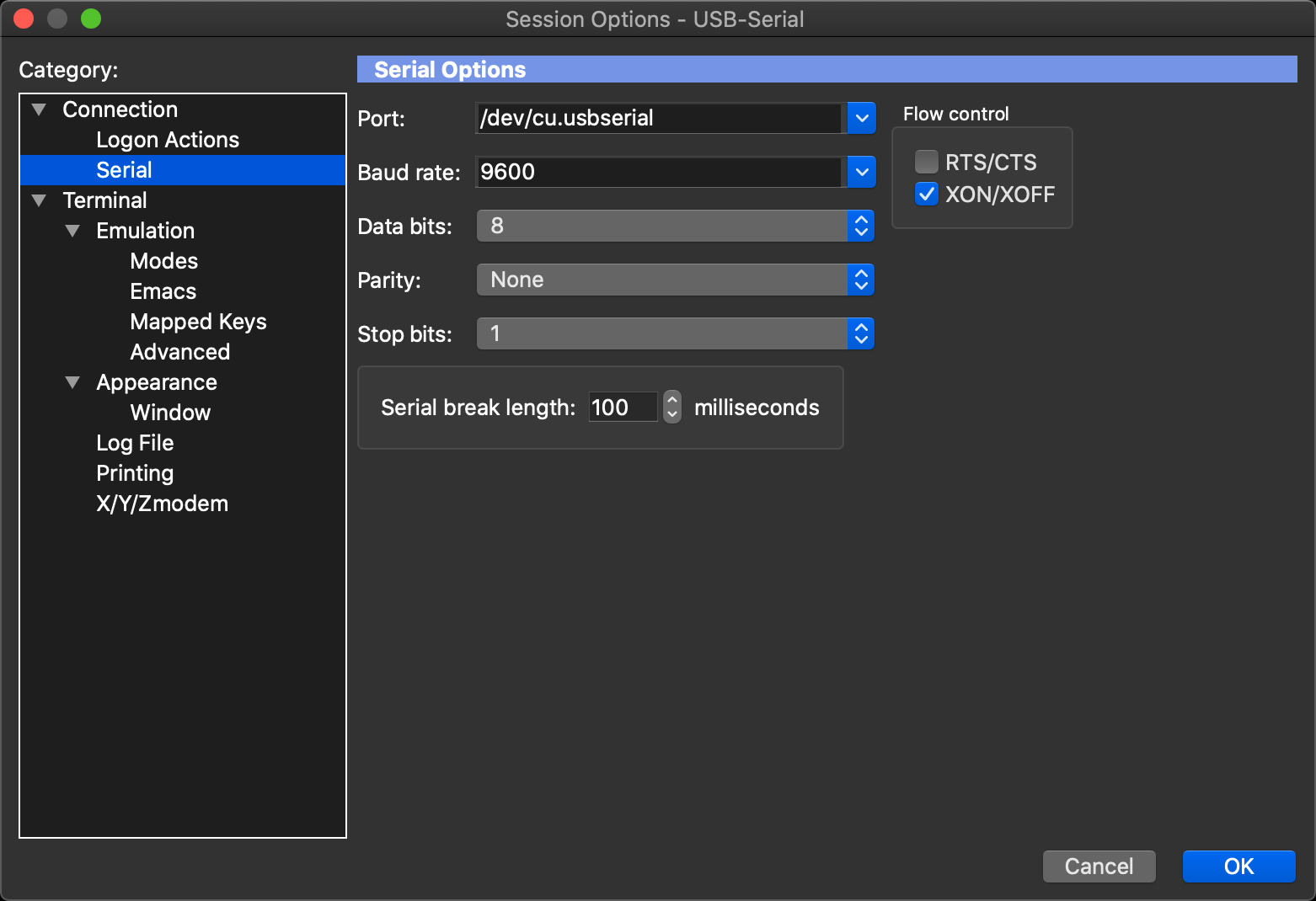
I use SecureCRT from VanDyke Software and love it. However any serial software should work fine. You can use a null-modem cable (The Cisco blue cable works fine). Note the setting for the standard Fortigate firewall (unless changed prior), 9600 Baud, 8 Bits, No Parity, and 1 stop bits. (9600,8,N,1)
reboot
when prompted for username, enter maintainer when prompted for password, enter bcpb<SerialNumber>
The requirement is that you must enter the maintainer username within 14 seconds of the login prompt appearing in the CLI.
Preparing for the Maintainer Method
Since you have a limited time to enter the serial number with the preceding bcbp the best practice is to type the serial number and the bcbp on a text editor
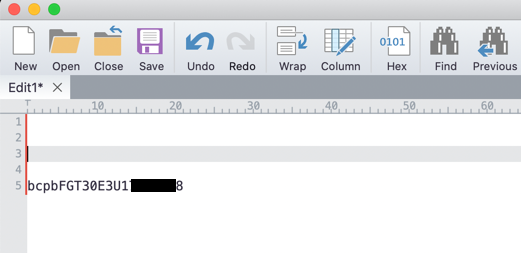
In my case, I am using a 30E. As you can see, I write out the entire portion the firewall will be expecting, again that is the letters bcpb followed by the Serial Number of the unit (using capital letters) with no spaces. (leave bcpb in lowercase)
........

Booting OS...

Reading boot image... 2934784 bytes.
Initializing firewall...

System is starting...

FortiGate-30E login: maintainer
Password: ********************
Welcome !
Resetting Admin Password
Now that you are logged in, you can modify the admin password.
FortiGate-30E # config system admin
FortiGate-30E (admin) # edit admin
FortiGate-30E (admin) # set password Fortinet
FortiGate-30E (admin) # end
There are no other functions allowed in this mode as this is used to just reset the password and factory default.
Factory Defaulting
If you do not want to save the configuration and want to just factory default the unit, then you can also do that from the maintainer account login.
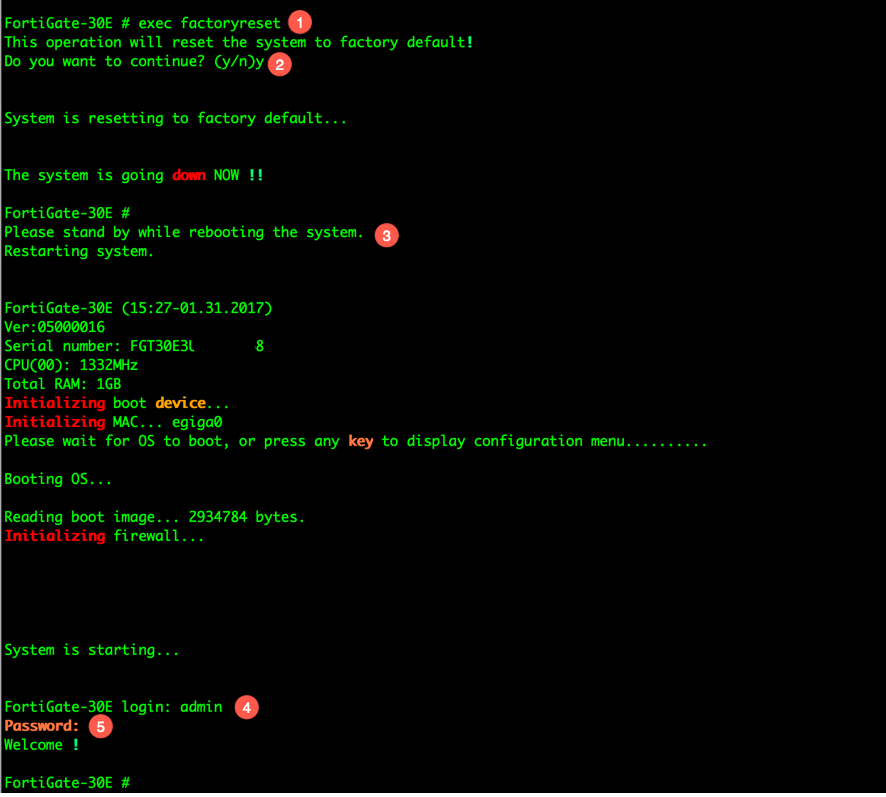
Here we can see the following:
- We run the
execute factoryreset - Choose
Yto verify. - The firewall will now reboot.
- Once rebooted, login as
admin - This should be the default of no password, so just hit enter.
Disabling the Maintainer Account
In some cases, you may want to disable the maintainer account. I saw this at a large "Bank" that sent out their own Fortigates to customers and did not want the customer to have the ability to reverse engineer their config.
To disable the maintainer account:
config system global
   set admin-maintainer disable
end
Note: I recommend creating a backdoor account that has super-admin. In the past, banks would generate a password between two people and a third one, would store it in a vault or safe. Each of the two would write their passwords and place inside an envelope where they would sign the sealed envelope. The third person put both envelopes into another one and signed that one. Any 1 person would know that the other opened the respective envelopes. Your mileage may vary.
Reloading FortiOS from Serial Connection
If the maintainer account is disabled, your option will be to reload FortiOS from the serial / TFTP. You can do this by rebooting and choosing Option F when you see Press any key to display… during boot up process.
FortiBootLoader
FortiAnalyzer-1000D (13:37-03.07.2013)
Ver:00010003
Serial number:FL-<REMOVED>
Total RAM: 16352MB
Boot up, boot device capacity: 1968MB.
Press any key to display configuration menu…
…
[G]: Get firmware image from TFTP server.
[F]: Format boot device.
[B]: Boot with backup firmware and set as default.
[Q]: Quit menu and continue to boot with default firmware.
[H]: Display this list of options.

Enter Selection [G]:

Enter G,F,B,Q,or H:
G – Will allow you to point the FAZ (or other Forinet device) to a TFTP server.
F – Format the drives
B – The FAZ has two images, you can boot from the deault one.
The other two are self-explanatory
After choosing G
Please connect TFTP server to Ethernet port “1”.

Enter TFTP server address [192.168.1.168]: 10.1.108.2
Enter local address [192.168.1.188]: 10.1.108.3
Enter firmware image file name [image.out]: FAZ_1000D-v6-build0255-FORTINET.out
MAC:408D5CE44EBC
##############################################################################################################
Total 115631071 bytes data downloaded.
Verifying the integrity of the firmware image..

Total 266240kB unzipped.

Save as Default firmware/Backup firmware/Run image without saving:[D/B/R]?D
Programming the boot device now.
……………………………………………………………………..
Enter the IP address of your laptop or TFTP server. The Local address will be the one it assigns to port 1 of the device, and finally the image name.
When asked how to save the image file. In my case, ‘D’ since I wanted to make it my default.
Once this is done loading the image, the device will boot the correct image and you will be able to login with the admin admin creds.
Running a TFTP Server on your OS
macOS X
If you need to enable TFTP Server on your macOS X, here is a good article on doing that.
Windows
Here is a link to a list of Windows supported TFTP Server
Linux
If you are running Ubuntu, here is a link for that as well.
As a side note, SecureCRT has a built-in TFTP server that you can auto launch when the app is opened. This is what I normally use. In my case, I point the os-based TFTP server to the same location as I do for the SecureCRT. This way I can use either one.
Recent posts
-

-

DNS is one of those technologies that quietly underpins... Full Story
-

BGP issues on FortiGate firewalls usually trace back to... Full Story
-

Every time your laptop talks to your router, a... Full Story
-

If you've spent any time configuring NAT on a... Full Story
-

If you have spent any time configuring firewall policies... Full Story
-

High availability on FortiGate is one of those features... Full Story
-

If you've configured SD-WAN on a FortiGate, you've almost... Full Story
-

FortiLink is the management protocol that turns a FortiSwitch... Full Story
-

FortiSwitches are pretty rock solid from Mean Time Between... Full Story
-

This is a quicky tip. Have you ever gone... Full Story
-

DNS is one of those quiet pieces of internet... Full Story
-

This article is an updated version of the previous... Full Story
-

You will add ns2 as a secondary (slave) BIND9... Full Story
-

In the process of deploying my lab, I needed... Full Story
-

RFC 8805, used to be known as Self-Correcting IP... Full Story
-

Years back, I wrote an article about certificate pinning. ... Full Story
-

FortiGates have the ability to send alerts to Microsoft... Full Story
-

In this post, I am going to walk through... Full Story
-

Troubleshooting VoIP on a FortiGate can feel like trying... Full Story
-

Prior to FortiOS 7.0, there were three commands to... Full Story
-

In this post, I am going to go over... Full Story
-

What we are going to do: We are going... Full Story
-

Choosing between FGCP (FortiGate Clustering Protocol) and FGSP (FortiGate... Full Story
-

Creating a VLAN on macOS (The "Pro" Move) A... Full Story
-

This blog post explores the logic behind how macOS... Full Story
-

Pretty Fly for a Wi-Fi Tell My Wi-Fi Love... Full Story
-

Part of my daily gig is creating BoMs (Bill-of-Materials)... Full Story
-

ICMP introduces several security risks, but careful filtering, rate... Full Story
-

The command diag debug application dhcps -1 enables full... Full Story
-

In the world of FortiOS, execute tac report is... Full Story
-

LLDP; What is it The Link Layer Discovery Protocol... Full Story
-

What it actually does When you run diagnose fdsm... Full Story
-

Monkey Bites are bite-sized, high-impact security insights designed for... Full Story
-

I have run macOS in macOS with Parallels but... Full Story
-

Don't be confused with my other FortiNAC posts where... Full Story
-

This is the third session in a multi-part article... Full Story
-

Today I was configuring key-based authentication on a FortiGate... Full Story
-

Netcat, often called the "Swiss Army knife" of networking,... Full Story
-

At its core, IEEE 802.1X is a network layer... Full Story
-

In case you did not see the previous FortiNAC... Full Story
-

This is our 5th session where we are going... Full Story
-

Now that we have Wireshark installed and somewhat configured,... Full Story
-

The Philosophy of Packet Analysis Troubleshooting isn't about looking... Full Story
-

Quick-Tip The default macOS zsh prompt prints your username,... Full Story
-

Executive summary. After Apple significantly upgraded Reminders, I finally... Full Story
-

The 20-byte tunnel nobody talks about: config system ipip-tunnel... Full Story