
If you've spent any time configuring user authentication on... Full Story
By Manny Fernandez
January 22, 2026

Traffic Shaping with FortiGate Firewalls
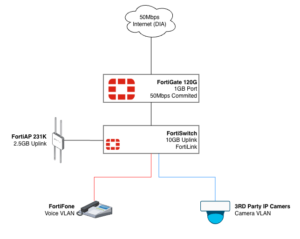
In this post, we are going to look at a real-world customer use-case where they currently have a 50Mbps Internet circuit and are struggling with over utilization of that bandwidth by some users with specific needs. Obviously, the first thing you should do is get C-Level buy in. You need to understand what the business feels is mission-critical versus what IT or Security feels. The option may be to upgrade the bandwidth altogether.
The problem we are solving for:
We have a grocery store chain that has video cameras on-site. Their internet circuit is 50Mbps. The cameras are using high-resolution and as such, rendering the video when watching the cameras live from remote, consumes much of the allocated bandwidth for the store. For this store, we are going to say that the priority is their voice traffic, although we know that it is more likely PoS.
Proposed Solution:
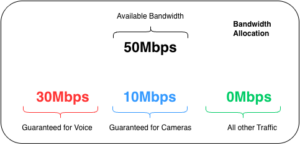
We want to shape the traffic so that we guarantee at least 30Mbps to the Voice traffic when congestion is experienced and only 10Mbps for the camera traffic. When no Voice traffic is present, the cameras should have full access to the available bandwidth. Everything else is best-effort.

Proposed Bandwidth Allocation
What we want is while the there is sufficient bandwidth, such as a situation when no phone calls are taking place, we want to allow the maximum bandwidth (50Mbps In our case). We can FORCE the guaranteed bandwidth match the maximum bandwidth.
Key Concepts
In order to understand the FortiGate Traffic Shaping offering, we need to expand on a few key concepts we are going to use in this post.
Shared Traffic Shapers – Is a Quality of Service (QoS) tool that limits total bandwidth for multiple users or services defined in a firewall policy, sharing the allocated bandwidth among them, unlike per-IP shapers that give each user their own limit. It ensures that a group of hosts or applications (like YouTube) collectively don’t exceed a set maximum (e.g., 100Mbps), prioritizing important traffic during congestion by guaranteeing minimums or capping maximums for that entire group.
Per-IP Shapers – Is a Quality of Service (QoS) feature that limits bandwidth and concurrent sessions for each individual IP address within a security policy, ensuring fair bandwidth distribution by preventing a single user from monopolizing resources, unlike a shared shaper, which pools bandwidth for all users in the policy. It allows administrators to set maximum bandwidth (e.g., 1 Mbps per user) and session limits for every host using that policy, guaranteeing each gets their allocated share
Differentiated Services Code Point (DSCP) is a networking standard for classifying and prioritizing internet traffic (Quality of Service or QoS) by marking packets with specific values in the IP header, allowing routers to treat critical data, like VoIP or video, with more urgency than less time-sensitive traffic, ensuring smoother performance and better resource allocation. It uses 6 bits in the IP header, offering 64 possible values to define different levels of service (e.g., high priority, low drop chance)
FortiGate traffic shaping lets you control who gets bandwidth and when, so critical apps stay fast while less important traffic is slowed or dropped during congestion.
Policing – If traffic exceeds the configured limit, extra packets are dropped immediately; this is simple but not forgiving.
Queuing – Extra packets are put into queues and sent later when bandwidth frees up; packets are only dropped if the queue fills up.
Both methods can enforce guaranteed bandwidth and maximum bandwidth limits, but queuing uses queues and algorithms (RED/FIFO + HTB) while policing does not.
RED (Random Early Detection): A congestion avoidance algorithm that randomly drops packets before a queue becomes full, preventing sudden drops and allowing TCP (Transmission Control Protocol) to slow down gradually, improving overall network stability.
FIFO (First-In, First-Out): A basic queuing method where packets are processed in the order they arrive; simple but can lead to bufferbloat and delays under heavy load.
HTB (Hierarchical Token Bucket): A powerful Linux queuing discipline (qdisc) that creates virtual links (classes) with assigned bandwidth, allowing complex traffic shaping and prioritization by organizing traffic into a hierarchy.
When is this enforced?
The question I always get is, “When does the FortiGate start to enforce the shapers?” The answer is the typical engineer answer; “It Depends”

Guaranteed Bandwidth: This reserves a portion of the bandwidth for critical traffic (e.g., VoIP). If the link is empty, other traffic can typically “borrow” this unused space. The guarantee only “kicks in” when the link is full, ensuring your VoIP packets get through while others are dropped.
Priority (High/Medium/Low): This determines the order in which packets are sent. If the interface is not full, priority is irrelevant because all packets are sent immediately. Priority only matters when packets are lining up (queuing) to leave the interface; high-priority packets jump to the front of the line.
DSCP – Differentiated Services Code Point Essentially tells the layer 3 boundary device how important a packet is. Sometime, the post office analogy is used whereby standard mail goes in a pile and is delivered best effort while the packages that are 3 day delivery will be removed from the standard pile and moved to a prioritized stack where the Next Day Air is prioritized more than the 3-Day.
Enabling Traffic Shaping
Go to System then Feature Visibility then look for Traffic Shaping. Then enable
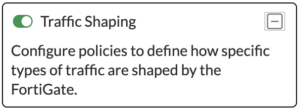
Now if you refresh, you should see the Traffic Shaping under Policy & Objects.
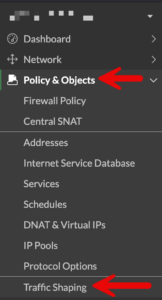
If you choose the Traffic Shaper tab on the top, you will see that there are some shapers already created for you.
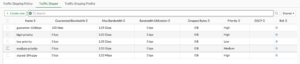
Lets Create new
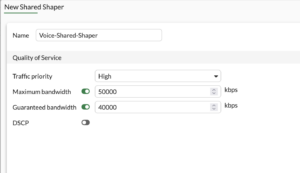
We can see that this will be for the Voice traffic. Going back to our Bandwidth Allocation diagram, we can see that we are allowing a Maximum Bandwidth of 50000 kbps (50Mbps) and a Guaranteed Bandwidth of 40000 kbps (40Mbps).
Now lets create the video shaper
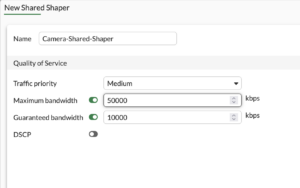
On the Camera shaper, we are allowing a Maximum Bandwidth of 50000 kbps (50Mbps) and a Guaranteed Bandwidth of 10000 kbps (10Mbps).
NOTE: If we wanted to only EVER allow 10Mbps and not allow for “Bursting” to 50Mbps, you would change the Maximum Bandwidth to 10000 kbps (10 Mbps)
Applied via Firewall Policy
You can apply the traffic shaper to the Firewall Policy or under the Traffic Shaping Policy
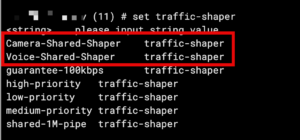
You can edit in cli from inside the firewall policy, or you can shell out and go to config firewall policy enter then edit the policy number you want to edit by typing edit X where X Is the firewall policy id of the policy.
If you type set traffic-shaper ? It will show you the list of the default shapers as well as the two we created. You can also set traffic-shaper-reverse. Remember that without the reverse this is uni-directional.
Applied via Traffic Shaping Policy
Under Policy & Objects and Traffic Shaping you will see a Traffic Shaping Policy tab, you can Create new to create a new policy
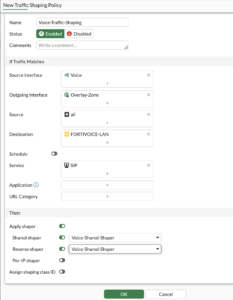
Here we can see my Incoming interface which is the Voice VLAN. The Outgoing interface is my SD WAN Zone named Overlay-Zone. Then we have Source as all and destination is FORTIVOICE-LAN which lives on the other side of the SD WAN Zone with the SIP service.
Outbandwidth
You want to define the outbandwidth on the egress interfaces. Configuring bandwidth statements on the interfaces on the FortiGate
config system interface
     edit "wan1"
        set inbandwidth 1000000
        set outbandwidth 1000000
     next
end
Troubleshooting Traffic
To display information such as current, max, guaranteed, priorities, packets and bytes dropped, run …
diagnose firewall shaper traffic-shaper list
For per-ip you can run diagnose firewall shaper per-ip-shaper list .
To see traffic shaper combined output diagnose firewall shaper traffic-shaper stats
Hope this helps.
Recent posts
-

-

DNS is one of those technologies that quietly underpins... Full Story
-

BGP issues on FortiGate firewalls usually trace back to... Full Story
-

Every time your laptop talks to your router, a... Full Story
-

If you've spent any time configuring NAT on a... Full Story
-

If you have spent any time configuring firewall policies... Full Story
-

High availability on FortiGate is one of those features... Full Story
-

If you've configured SD-WAN on a FortiGate, you've almost... Full Story
-

FortiLink is the management protocol that turns a FortiSwitch... Full Story
-

FortiSwitches are pretty rock solid from Mean Time Between... Full Story
-

This is a quicky tip. Have you ever gone... Full Story
-

DNS is one of those quiet pieces of internet... Full Story
-

This article is an updated version of the previous... Full Story
-

You will add ns2 as a secondary (slave) BIND9... Full Story
-

In the process of deploying my lab, I needed... Full Story
-

RFC 8805, used to be known as Self-Correcting IP... Full Story
-

Years back, I wrote an article about certificate pinning. ... Full Story
-

FortiGates have the ability to send alerts to Microsoft... Full Story
-

In this post, I am going to walk through... Full Story
-

Troubleshooting VoIP on a FortiGate can feel like trying... Full Story
-

Prior to FortiOS 7.0, there were three commands to... Full Story
-

In this post, I am going to go over... Full Story
-

What we are going to do: We are going... Full Story
-

Choosing between FGCP (FortiGate Clustering Protocol) and FGSP (FortiGate... Full Story
-

Creating a VLAN on macOS (The "Pro" Move) A... Full Story
-

This blog post explores the logic behind how macOS... Full Story
-

Pretty Fly for a Wi-Fi Tell My Wi-Fi Love... Full Story
-

Part of my daily gig is creating BoMs (Bill-of-Materials)... Full Story
-

ICMP introduces several security risks, but careful filtering, rate... Full Story
-

The command diag debug application dhcps -1 enables full... Full Story
-

In the world of FortiOS, execute tac report is... Full Story
-

LLDP; What is it The Link Layer Discovery Protocol... Full Story
-

What it actually does When you run diagnose fdsm... Full Story
-

Monkey Bites are bite-sized, high-impact security insights designed for... Full Story
-

I have run macOS in macOS with Parallels but... Full Story
-

Don't be confused with my other FortiNAC posts where... Full Story
-

This is the third session in a multi-part article... Full Story
-

Today I was configuring key-based authentication on a FortiGate... Full Story
-

Netcat, often called the "Swiss Army knife" of networking,... Full Story
-

At its core, IEEE 802.1X is a network layer... Full Story
-

In case you did not see the previous FortiNAC... Full Story
-

This is our 5th session where we are going... Full Story
-

Now that we have Wireshark installed and somewhat configured,... Full Story
-

The Philosophy of Packet Analysis Troubleshooting isn't about looking... Full Story
-

In this guide Executive Summary Prerequisites: Which vi Do... Full Story
-

Objective: Strip blank and whitespace-only lines out of config... Full Story
-

In this guide Executive Summary Prerequisites and Architecture How... Full Story