
If you've spent any time configuring user authentication on... Full Story
By Manny Fernandez
June 6, 2026
Loomi: My First IOS App
At work, they wanted us to keep track of activity. I started doing the spreadsheet way but found it clunky especially trying to enter info on Excel from my iPhone. I decided to try and find an app. However everything was complicated and not built specifically for what I wanted. Enter Loomi. Don’t know why I named it as such, but there it is. I found out its a seasoning, so there you go.

What it does:
It is essentially an activity tracker. It tracks three types of categories: Customers, Partners and Corporate.
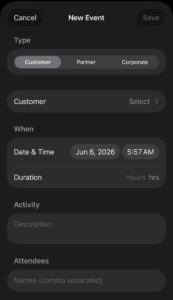
You can import a list of customers and partners that will be saved for your data entry. If you upload a second list, it will append to the existing one. Also, you can add a manual customer or partner and choose to either save to use moving forward with the Save and Use, or Use Once for the one-offs when you help a colleague with a customer that you will not use again.
As you can see above, you can choose Customer, Partner or Corporate. You will then have the Select and depending on what you chose above (Customer , Partner or Corporate) you can choose from that corresponding list.
Customers:
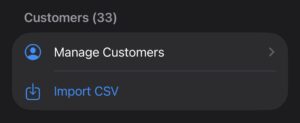
You can initially upload a CSV (or really a list) of all of your customers. In my case, I have 31 named accounts. It will also let you add new ones. As stated above, you can append to the list or manually add on the fly.
Partners:
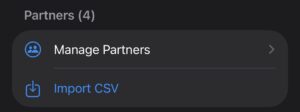
Same as Customer but helps me keep track of Customer vs Partner activity.
Corporate:
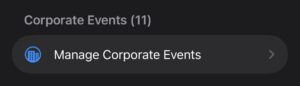
It will come pre-loaded with the following activities (Dinner, Happy Hour and QBR). You can of course, delete these and add new ones, or add to the list.
Landing Page:
The Landing Page will give you insight from a Daily, Weekly, Monthly perspective.
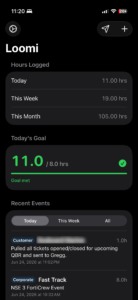
The landing page is broken up into a top row where you have the Settings button, the Send Button and the + for adding new activity.
Hours Logged
Under that top section, you have your Today, This Week and This Month showing the number of hours you accounted for during the respective timeframes.
Today’s Goals
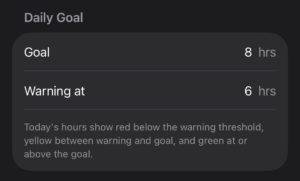
I added a setting for goals. You can set the goal for the day (see below). It will show anything 8 hours > as green, 6-8 in yellow and anything under 6 will show red. As you can see in the screenshot above, I had 11 hours and it shows green.
Recent Events
Under the Recent Events section, you can filter out Today , This Week or All. This allows you to see all of the entries entered previously. By clicking on any of the recorded records, you can edit them as needed.
Notifications
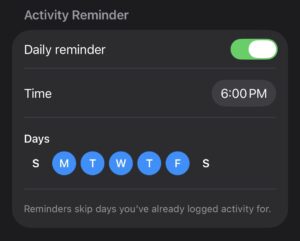
You can enable Notifications (Off by default). If you have not entered any data by a configurable Time, do a pop-up Notification. You can select the days expected to enter activity. In the example above, it is only the weekdays and excludes Saturday and Sunday.
Report Recipients
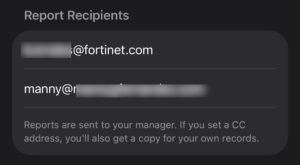
I updated this section to include my manager’s email as well as a Cc so I can have a copy as well.
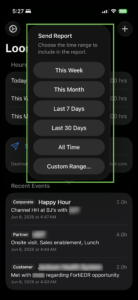
When you hit the send icon, you have a choice to send This Week, This Month, Last 7 Days, Last 30 Days, All Times and Custom Range
When the email is sent, it will use your default mail app to send. It will create an email to your manager, and add your email to the Cc.
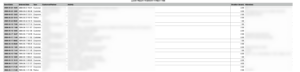
I know the graphic is bad, but essentially we cover:
Event Date # This is the actual date of the activity.
Entered Date #This is the date you entered it, could have been the following day.
Type # (Customer, Partner or Corporate)
Customer/Partner #The name of the Partner or the Customer.
Activity #What you did
Duration (hours) #How long you did it for
Attendees #Who you did it with.
iCloud Backup/Sync
Although I only have it for iPhone right now, I may add iPad and maybe macOS, but the practicality of the app is the iPhone for quick entry. It fully support iCloud Drive sync and backups.
I should have it in the App Store by end of July 2026.
Here is the website for the app.
Ideally, my company would give me an API access so I could connect and update our SalesForce, but I highly doubt I will get that.
Recent posts
-

-

DNS is one of those technologies that quietly underpins... Full Story
-

BGP issues on FortiGate firewalls usually trace back to... Full Story
-

Every time your laptop talks to your router, a... Full Story
-

If you've spent any time configuring NAT on a... Full Story
-

If you have spent any time configuring firewall policies... Full Story
-

High availability on FortiGate is one of those features... Full Story
-

If you've configured SD-WAN on a FortiGate, you've almost... Full Story
-

FortiLink is the management protocol that turns a FortiSwitch... Full Story
-

FortiSwitches are pretty rock solid from Mean Time Between... Full Story
-

This is a quicky tip. Have you ever gone... Full Story
-

DNS is one of those quiet pieces of internet... Full Story
-

This article is an updated version of the previous... Full Story
-

You will add ns2 as a secondary (slave) BIND9... Full Story
-

In the process of deploying my lab, I needed... Full Story
-

RFC 8805, used to be known as Self-Correcting IP... Full Story
-

Years back, I wrote an article about certificate pinning. ... Full Story
-

FortiGates have the ability to send alerts to Microsoft... Full Story
-

In this post, I am going to walk through... Full Story
-

Troubleshooting VoIP on a FortiGate can feel like trying... Full Story
-

Prior to FortiOS 7.0, there were three commands to... Full Story
-

In this post, I am going to go over... Full Story
-

What we are going to do: We are going... Full Story
-

Choosing between FGCP (FortiGate Clustering Protocol) and FGSP (FortiGate... Full Story
-

Creating a VLAN on macOS (The "Pro" Move) A... Full Story
-

This blog post explores the logic behind how macOS... Full Story
-

Pretty Fly for a Wi-Fi Tell My Wi-Fi Love... Full Story
-

Part of my daily gig is creating BoMs (Bill-of-Materials)... Full Story
-

ICMP introduces several security risks, but careful filtering, rate... Full Story
-

The command diag debug application dhcps -1 enables full... Full Story
-

In the world of FortiOS, execute tac report is... Full Story
-

LLDP; What is it The Link Layer Discovery Protocol... Full Story
-

What it actually does When you run diagnose fdsm... Full Story
-

Monkey Bites are bite-sized, high-impact security insights designed for... Full Story
-

I have run macOS in macOS with Parallels but... Full Story
-

Don't be confused with my other FortiNAC posts where... Full Story
-

This is the third session in a multi-part article... Full Story
-

Today I was configuring key-based authentication on a FortiGate... Full Story
-

Netcat, often called the "Swiss Army knife" of networking,... Full Story
-

At its core, IEEE 802.1X is a network layer... Full Story
-

In case you did not see the previous FortiNAC... Full Story
-

This is our 5th session where we are going... Full Story
-

Now that we have Wireshark installed and somewhat configured,... Full Story
-

The Philosophy of Packet Analysis Troubleshooting isn't about looking... Full Story
-

Executive Summary Objective: Get you from zero to writing... Full Story
-

NAND cells, the flash translation layer, SLC caching, TRIM,... Full Story
-

Nmap Scripting Engine (NSE): From One-Liners to Your First... Full Story