
If you've spent any time configuring user authentication on... Full Story
By Manny Fernandez
June 4, 2026
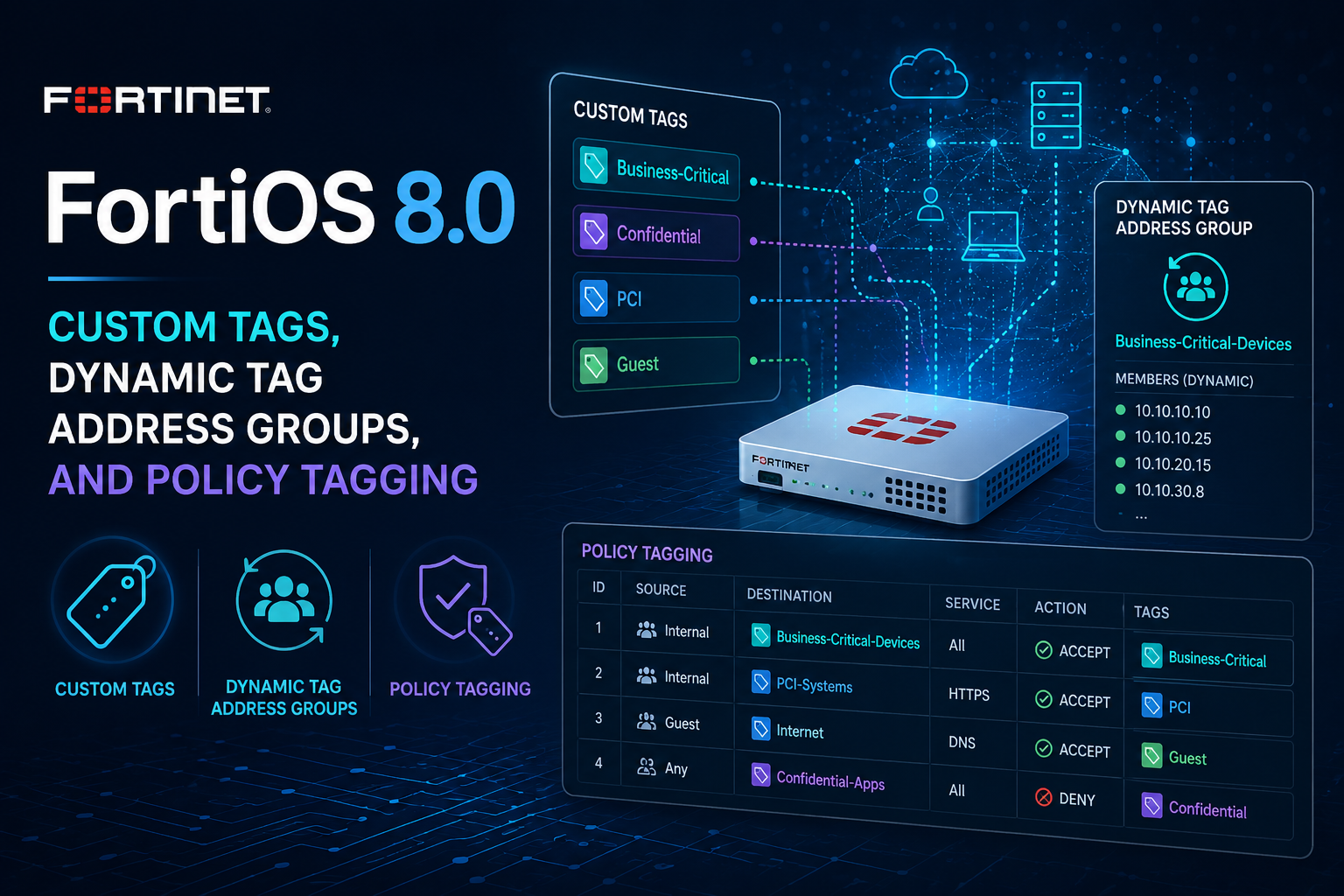
FortiOS 8.0: Custom Tags, Dynamic Tag Address Groups, and Policy Tagging
Overview
FortiOS 8.0 introduces custom tags as a first-class organizational and operational construct across the firewall object model. Tags can be created once and applied to a wide range of address objects, address groups, and policy types. The result is twofold: administrators gain a fast visual and search-based way to categorize a large object table, and, more importantly, tags become a membership mechanism for address groups. An address group whose members are tags rather than named objects is called a dynamic tag address group, and its contents update automatically as objects are tagged and untagged.
This is worth distinguishing from the older config system object-tagging feature that has existed since earlier releases. The legacy mechanism was essentially a color and label scheme for visual organization. The 8.0 custom tags feature is functional: tags drive group membership and can be referenced directly inside policies, so tagging an object can change what traffic a policy matches without any edit to the policy itself.
What can be tagged
The following objects can have custom tags assigned in FortiOS 8.0:
- Firewall address and address groups (IPv4 and IPv6)
- Proxy address and address groups
- Multicast addresses (IPv4 and IPv6)
- Firewall policy
- NGFW security policy
- Multicast policy
- DoS policy
- Local-in policy
- Central SNAT mapping
- Proxy policy
When address groups use custom tags as their members instead of named objects, they are referred to as dynamic tag address groups.
Why this matters: the operational value
The headline use case is automatic group membership. Consider a fleet of Linux servers that all need to reach an update repository. Traditionally you would create an address object for each server, then maintain an address group listing every object as a member. Every time a server is added or decommissioned, you have to remember to edit the group.
With dynamic tag address groups, you instead create a tag (for example, linux-fleet), build a group whose only member is that tag, and reference the group in your firewall policy. From then on, adding a new server is a matter of creating its address object and applying the linux-fleet tag. The object is automatically included in the group, and the policy that references the group automatically covers the new server. No policy edit is required, and no group membership edit is required. Removing a server is symmetric: untag it (or delete it) and it falls out of the group.
This decouples policy authoring from object lifecycle management. Policies describe intent in terms of roles or categories, and the day-to-day churn of individual hosts becomes a tagging operation rather than a policy change. For environments managed at scale, that reduces both the change-control burden and the risk of stale group membership.
Tagging policies themselves is a secondary benefit. It is primarily useful for filtering and visual organization in the policy table rather than for traffic matching. If you maintain hundreds of policies, being able to tag them by project, owner, compliance scope, or change ticket and then filter the policy list on those tags can meaningfully speed up audits and troubleshooting.
Policy Tagging is off by default
Applying tags to policies requires enabling Policy Tagging first. It is not enabled by default. In the GUI:
- Go to
System>Feature Visibility. - Under
Additional Features, enablePolicy Tagging. - Click
Apply.
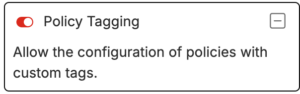
Once enabled, a tag (or a dynamic address group built from tags) can be applied to a policy. Tags then appear in the Policy list page, can be viewed in the Tags column, and can be filtered from the Search bar. The display adjusts slightly when multiple object tags are present on a single entry.
Note that tagging address objects and building dynamic tag address groups does not depend on the Policy Tagging toggle. That toggle specifically governs whether tags can be attached to policy entries.
Worked example: PC1 to PC5 with dynamic tag address groups
The canonical Fortinet example creates two custom tags, associates each with an address object, wraps each tag in its own dynamic tag address group, and then writes a single firewall policy that allows traffic from one group to the other. The key property is that the policy references the groups, the groups reference the tags, and the tags reference the objects, so future objects bearing the same tag are picked up automatically.
Step 1: Create address objects and apply tags
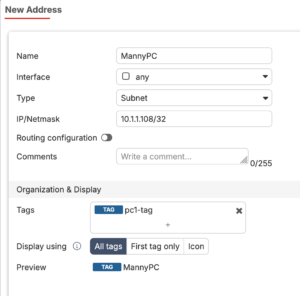
Create an address object for PC1 and assign it the tag pc1_tag. Create an address object for PC5 and assign it the tag pc5_tag.
Step 2: Create the dynamic tag address groups
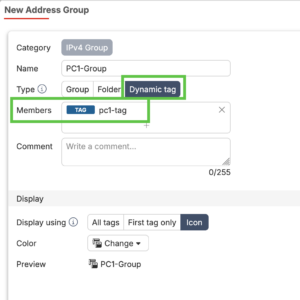
Create an address group named pc1_grp and add the custom tag pc1_tag as its member (rather than the PC1 address object directly). Repeat to create pc5_grp with pc5_tag as its member.
Because the group member is a tag, any address object carrying that tag is automatically part of the group.
Step 3: Create the firewall policy
- Go to
Policy & Objects>Firewall Policy. - Click
Create new. - Enter a
Name. - Beside
Source, click+, select the address grouppc1_grp, and clickClose. - Beside
Destination, click+, select the address grouppc5_grp, and clickClose. - Set the remaining options (interfaces, services, inspection, logging) as needed.
The policy now allows traffic from PC1 to PC5. To extend coverage, you define additional address objects and apply the relevant tag. The dynamic tag address group updates to include them and the firewall policy uses the new objects automatically. No changes to the firewall policy are required. I created a new object MannyPC and added the PC1 tag to it. It was automatically added to the PC1-Group since we used the dynamic tagging.

CLI configuration
Tags applied to address objects are configured directly on the object. A representative configuration looks like the following:
config firewall address
    edit "PC1"
        set subnet 10.1.1.10 255.255.255.255
        set tags "pc1_tag"
    next
    edit "PC5"
        set subnet 10.1.1.50 255.255.255.255
        set tags "pc5_tag"
    next
end
A dynamic tag address group references tag names as its members:
config firewall addrgrp
    edit "pc1_grp"
        set member "pc1_tag"
    next
    edit "pc5_grp"
        set member "pc5_tag"
    next
end
The firewall policy then references the groups in the normal way:
config firewall policy
    edit 0
        set name "pc1-to-pc5"
        set srcintf "port1"
        set dstintf "port2"
        set srcaddr "pc1_grp"
        set dstaddr "pc5_grp"
        set action accept
        set schedule "always"
        set service "ALL"
        set logtraffic all
    next
end
Validate the exact tag and group syntax against your specific build with the 8.0 CLI Reference, as field names and accepted values can vary slightly between maintenance releases.
Relationship to the legacy object-tagging feature
FortiOS has long included config system object-tagging, which defines tag categories and a color, and lets you toggle which object classes (address, device, interface) a category applies to:
config system object-tagging
    edit <category>
        set address [disable|mandatory|optional]
        set device  [disable|mandatory|optional]
        set interface [disable|mandatory|optional]
        set multiple [enable|disable]
        set color {integer}
        set tags <name1>, <name2>, ...
    next
end
That mechanism remains primarily about visual organization and grouping in the GUI. The 8.0 custom tags feature is the functional evolution: tags are no longer just labels, they participate in group membership and policy matching. When reading older documentation or migrating configurations, keep the distinction in mind so you do not conflate cosmetic tagging with the dynamic membership behavior introduced in 8.0.
Practical guidance
- Treat tags as a controlled namespace. Agree on naming conventions before rolling them out broadly, because tags become operationally significant once dynamic groups depend on them. A typo in a tag name silently removes an object from a group.
- Favor role and category names (
linux-fleet,pci-scope,branch-printers) over host-specific names, since the value of the feature is grouping by intent. - Use dynamic tag address groups for objects that share a security treatment and churn frequently. For static, rarely changing sets, conventional named-member groups are still perfectly fine.
- Enable Policy Tagging only if you intend to use tags for policy organization. It is a separate concern from address tagging.
- Remember that policy tags are mostly for filtering and visibility, not traffic matching. The traffic-matching power comes from dynamic tag address groups referenced in source and destination fields.
Summary
Custom tags in FortiOS 8.0 turn tagging from a cosmetic aid into an operational primitive. By letting address groups take tags as members, the feature makes group membership self-maintaining: tag an object and it joins every dependent group and policy automatically. Policy tagging adds organizational filtering on top. For administrators running large object and policy tables, this is one of the more quietly impactful additions in the release, because it shifts routine host churn out of policy change control and into a simple tagging workflow.
I hope Fortinet expands on this feature. Ideally, I would like to be able to tag everything. For instance, I am creating a VPN (e.g. HQ-to-DC). This VPN is going to have a Phase1 and a PhaseII, Possibly a P2 Selector (if not quad zeros), address objects, address-groups, routes, policies, etc. I would like to do a search for HQ-to-DC and have all the object come up in a list that allows me to edit if necessary.
Recent posts
-

-

DNS is one of those technologies that quietly underpins... Full Story
-

BGP issues on FortiGate firewalls usually trace back to... Full Story
-

Every time your laptop talks to your router, a... Full Story
-

If you've spent any time configuring NAT on a... Full Story
-

If you have spent any time configuring firewall policies... Full Story
-

High availability on FortiGate is one of those features... Full Story
-

If you've configured SD-WAN on a FortiGate, you've almost... Full Story
-

FortiLink is the management protocol that turns a FortiSwitch... Full Story
-

FortiSwitches are pretty rock solid from Mean Time Between... Full Story
-

This is a quicky tip. Have you ever gone... Full Story
-

DNS is one of those quiet pieces of internet... Full Story
-

This article is an updated version of the previous... Full Story
-

You will add ns2 as a secondary (slave) BIND9... Full Story
-

In the process of deploying my lab, I needed... Full Story
-

RFC 8805, used to be known as Self-Correcting IP... Full Story
-

Years back, I wrote an article about certificate pinning. ... Full Story
-

FortiGates have the ability to send alerts to Microsoft... Full Story
-

In this post, I am going to walk through... Full Story
-

Troubleshooting VoIP on a FortiGate can feel like trying... Full Story
-

Prior to FortiOS 7.0, there were three commands to... Full Story
-

In this post, I am going to go over... Full Story
-

What we are going to do: We are going... Full Story
-

Choosing between FGCP (FortiGate Clustering Protocol) and FGSP (FortiGate... Full Story
-

Creating a VLAN on macOS (The "Pro" Move) A... Full Story
-

This blog post explores the logic behind how macOS... Full Story
-

Pretty Fly for a Wi-Fi Tell My Wi-Fi Love... Full Story
-

Part of my daily gig is creating BoMs (Bill-of-Materials)... Full Story
-

ICMP introduces several security risks, but careful filtering, rate... Full Story
-

The command diag debug application dhcps -1 enables full... Full Story
-

In the world of FortiOS, execute tac report is... Full Story
-

LLDP; What is it The Link Layer Discovery Protocol... Full Story
-

What it actually does When you run diagnose fdsm... Full Story
-

Monkey Bites are bite-sized, high-impact security insights designed for... Full Story
-

I have run macOS in macOS with Parallels but... Full Story
-

Don't be confused with my other FortiNAC posts where... Full Story
-

This is the third session in a multi-part article... Full Story
-

Today I was configuring key-based authentication on a FortiGate... Full Story
-

Netcat, often called the "Swiss Army knife" of networking,... Full Story
-

At its core, IEEE 802.1X is a network layer... Full Story
-

In case you did not see the previous FortiNAC... Full Story
-

This is our 5th session where we are going... Full Story
-

Now that we have Wireshark installed and somewhat configured,... Full Story
-

The Philosophy of Packet Analysis Troubleshooting isn't about looking... Full Story
-

InfoSecMonkey Threat Response October 24, 2026 | No fluff.... Full Story
-

InfoSecMonkey Threat Response October 24, 2026 | No fluff.... Full Story
-

Plus what you actually get with FortiCare Essential, Premium... Full Story