
If you've spent any time configuring user authentication on... Full Story
By Manny Fernandez
July 19, 2026
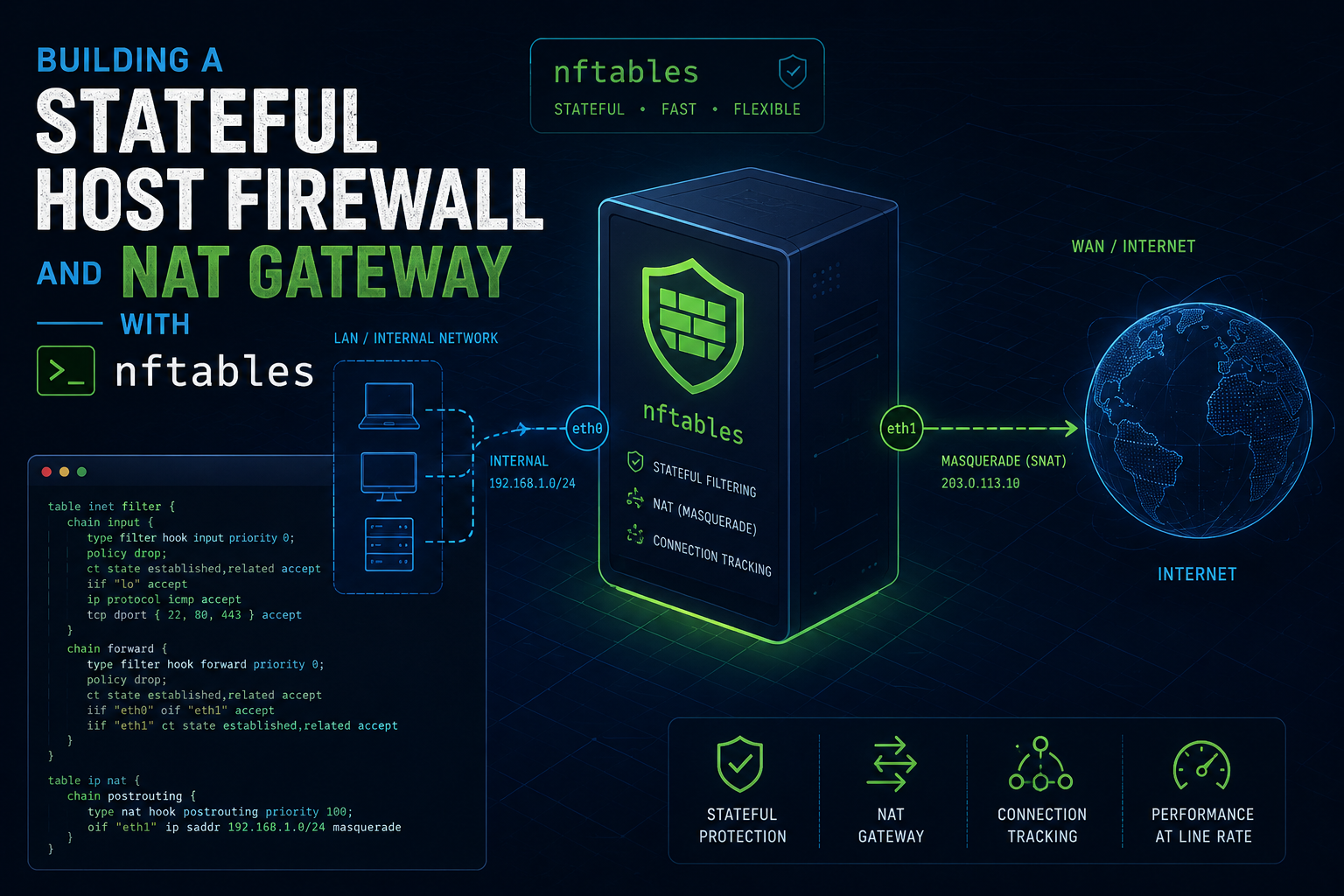
Building a Stateful Host Firewall and NAT Gateway with nftables
1. Executive Summary
Objective: This guide walks you through building a complete, production-grade firewall on modern Linux using nftables: a stateful, dual-stack (IPv4 + IPv6) inbound policy on a single host, plus optional forwarding and source NAT so the same box can act as an internet gateway. You will end with an atomic, version-controlled ruleset that survives reboots and reloads cleanly.
Why it matters: nftables is the successor to iptables, ip6tables, arptables, and ebtables. It replaces four tools and their separate rule stores with one syntax, one kernel subsystem (nf_tables), and atomic rule replacement. If you are still hand-writing iptables rules, you are maintaining a framework the kernel maintainers consider legacy.
Target Audience: Linux system administrators, network engineers, and DevOps or platform engineers who manage bare-metal or virtualized Linux hosts and want a firewall they can read, audit, and put in Git.
2. Prerequisites and Architecture
Assumed Knowledge
You should be comfortable with the Linux shell and sudo, understand basic TCP/IP (ports, protocols, the difference between inbound and forwarded traffic), and have a working mental model of stateful connection tracking (the idea that reply packets belong to an existing flow). Prior iptables experience helps but is not required, and in a few places it actively works against you because the concepts do not map one to one.
Environment and Lab Requirements
| Requirement | Detail |
|---|---|
| Kernel | Linux 5.6 or newer recommended. NAT in the inet family needs kernel 5.2 or newer and nft 0.9.3 or newer. |
| Userspace | nftables 1.0 or newer (nft --version). Named priorities like filter, srcnat, and dstnat require 0.9.0 or newer. |
| Package | nftables (ships on Debian 11+, Ubuntu 20.04+, RHEL/Rocky/Alma 8+, Fedora). |
| Privileges | Root or a user with sudo. Rule changes touch kernel netfilter hooks. |
| Access | For remote hosts, use out-of-band console access (KVM, cloud serial console, IPMI) as a safety net. You will be editing the rules that keep your SSH session alive. |
Confirm your tooling before you touch anything:
nft --version
uname -r
# Verify the nf_tables backend is present
lsmod | grep nf_tables || sudo modprobe nf_tables
Component Table
The reference build is a gateway host named fw01 with a WAN uplink and a trusted LAN. If you only need a host firewall, ignore the NAT and forwarding sections; everything in the input chain still applies.
| Component | Role | Example |
|---|---|---|
fw01 |
Linux firewall or router host | Debian 12 or Ubuntu 24.04 |
| WAN interface | Untrusted uplink to the internet | eth0, 203.0.113.10/30 |
| LAN interface | Trusted internal network | eth1, 10.10.0.1/24 |
/etc/nftables.conf |
Persistent ruleset loaded at boot | Managed file, kept in Git |
table inet filter |
Stateful filtering (input, forward, output) | Dual-stack, single table |
table inet nat |
Source NAT or masquerade for LAN egress | Optional, gateway only |
nftables.service |
systemd unit that loads the config at boot | systemctl enable nftables |
A quick note on families: inet is a dual-stack family that handles both IPv4 and IPv6 in one table. It is the right default for a host firewall because you write one policy instead of two. ip is IPv4 only and ip6 is IPv6 only; you will only need those in edge cases noted later.
3. Step-by-Step Implementation Workflow
Phase 1: Understand the Object Model Before You Type
Goal: Avoid the most common beginner mistake, which is treating nftables like iptables with new syntax.
Action: Internalize four object types. Everything you build is a combination of these.
Table: a namespace that holds chains, sets, and maps. It belongs to a family (inet, ip, ip6, arp, bridge, netdev). Tables do nothing on their own.
Chain: a list of rules. A base chain attaches to a netfilter hook and has a type, a priority, and a policy. A regular chain is just a container you jump or goto from another chain, like a function.
Rule: one or more matches followed by a verdict (accept, drop, jump, goto, return, queue, continue).
Set / Map: named or anonymous collections. Sets hold values (addresses, ports). Maps associate a key with a value or a verdict.
The hooks a base chain can attach to are prerouting, input, forward, output, and postrouting. Priority controls ordering when multiple base chains share a hook; lower numbers run first. Use the named priorities (raw -300, mangle -150, dstnat -100, filter 0, security 50, srcnat 100) rather than raw integers so intent stays readable.
Config: Nothing to apply yet. This phase is load-bearing understanding, not commands.
Phase 2: Start From a Clean, Known State
Goal: Remove any preexisting rules so you build on a predictable baseline, and confirm nothing else is managing the firewall.
Action: Check for conflicting managers first. firewalld, ufw, Docker, Podman, libvirt, and Kubernetes CNI plugins all write to nf_tables. If one of them is active and you are not intentionally integrating with it, decide now whether to disable it or coexist (see the Docker gotcha in Section 5, this is not optional reading).
Config:
# See who is currently managing packet filtering
sudo nft list ruleset
systemctl is-active firewalld ufw docker 2>/dev/null

# If this is a dedicated firewall host with no Docker/firewalld,
# you can safely start clean. On a host running containers, DO NOT
# run a global flush; see Section 5.
sudo nft flush ruleset
Heads up: flush ruleset wipes every table in every family, including tables owned by Docker and firewalld. On a container host this breaks networking instantly. Scope your work to your own table instead.
Phase 3: Build the Stateful Input Policy
Goal: Protect the host itself. Drop everything inbound by default, then explicitly allow return traffic, loopback, essential ICMP, and the services you actually run.
Action: Create the inet filter table with an input base chain set to policy drop. The order of rules matters: connection-tracking acceptance comes first so established flows are cheap to allow, then loopback, then ICMP, then your services, then a logging drop.
Config: Put this in a working file, /etc/nftables.conf. The shebang lets you run the file directly, and flush table (not flush ruleset) keeps the change scoped and atomic on reload.
#!/usr/sbin/nft -f

# Scope the reset to our own table so we do not disturb Docker/libvirt/etc.
table inet filter
delete table inet filter

table inet filter {
    chain input {
        type filter hook input priority filter; policy drop;

        # 1. Accept traffic that belongs to an existing flow.
        ct state established,related accept
        ct state invalid drop

        # 2. Loopback is always trusted; block spoofed loopback from the wire.
        iif "lo" accept
        iif != "lo" ip  daddr 127.0.0.0/8 drop
        iif != "lo" ip6 daddr ::1        drop

        # 3. Essential ICMP (IPv4) and ICMPv6 (breaks IPv6 badly if omitted).
        ip protocol icmp icmp type {
            echo-request, echo-reply, destination-unreachable,
            time-exceeded, parameter-problem
        } accept

        meta l4proto ipv6-icmp icmpv6 type {
            destination-unreachable, packet-too-big, time-exceeded,
            parameter-problem, echo-request, echo-reply,
            nd-router-solicit, nd-router-advert,
            nd-neighbor-solicit, nd-neighbor-advert
        } accept

        # 4. Services this host offers. Rate-limit SSH to blunt brute force.
        tcp dport 22 ct state new limit rate 10/minute burst 5 packets accept
        tcp dport { 80, 443 } accept

        # 5. Anything that reaches here is unwanted. Log (rate-limited) then drop.
        limit rate 5/minute log prefix "nft-input-drop: " flags all counter
        counter drop
    }

    chain forward {
        type filter hook forward priority filter; policy drop;
    }

    chain output {
        type filter hook output priority filter; policy accept;
    }
}
A few decisions worth calling out. The output chain is set to accept because this guide trusts the host to originate traffic; tighten it later if your threat model requires egress filtering. The ICMPv6 allowances are not optional decoration: neighbor discovery is how IPv6 hosts find each other, so dropping it will make IPv6 appear randomly broken. The final counter drop gives you a running tally of blocked packets you can read with nft list ruleset.
GUI Verification: nftables has no GUI. The nearest equivalent to verifying in an interface is checking whether a higher-level manager will overwrite you. On systems using firewalld, run firewall-cmd --state; if it returns running, it owns the ruleset and hand-written tables may be flushed on its next reload.
Phase 4: Use Sets and Verdict Maps for Scale and Readability
Goal: Replace repetitive rules with data structures. This is where nftables earns its keep over iptables.
Action: Define a named set for a blocklist you can update at runtime without reloading the whole ruleset, and use a verdict map to route service ports to verdicts in a single line.
Config: Add these inside the table inet filter { ... } block.
    # A named set with interval support for CIDR ranges.
    set blocklist_v4 {
        type ipv4_addr
        flags interval
        elements = { 192.0.2.0/24, 198.51.100.13 }
    }

    # A verdict map: port -> verdict, evaluated in one rule.
    map service_ports {
        type inet_service : verdict
        elements = {
            22  : accept,
            80  : accept,
            443 : accept
        }
    }
Then reference them in the input chain. Place the blocklist check high, before you spend cycles on service matching:
        # near the top of the input chain, after ct state rules
        ip saddr @blocklist_v4 counter drop

        # replaces the individual tcp dport lines from Phase 3
        tcp dport vmap @service_ports
The payoff is operational. You can add or remove blocklist entries live, with no reload and no disruption to existing connections:
sudo nft add element inet filter blocklist_v4 { 203.0.113.66 }
sudo nft delete element inet filter blocklist_v4 { 198.51.100.13 }
Phase 5: Enable Forwarding and Source NAT (Gateway Role Only)
Goal: Turn the host into a router that NATs an internal LAN out to the internet. Skip this phase for a pure host firewall.
Action: Three things must all be true for forwarding to work: the kernel must be allowed to forward packets (a sysctl), the forward chain must explicitly accept the LAN-to-WAN direction, and a postrouting NAT chain must masquerade outbound traffic.
Config, step 1, enable kernel forwarding persistently:
sudo tee /etc/sysctl.d/99-forwarding.conf >/dev/null <<'EOF'
net.ipv4.ip_forward = 1
net.ipv6.conf.all.forwarding = 1
EOF
sudo sysctl --system
Config, step 2, allow the forwarded direction. Replace the empty forward chain from Phase 3 with this. Return traffic is already handled by the ct state established,related rule, so you only need to permit new flows from LAN toward WAN:
    chain forward {
        type filter hook forward priority filter; policy drop;

        ct state established,related accept
        ct state invalid drop

        # LAN (eth1) may initiate out to WAN (eth0). WAN cannot initiate in.
        iifname "eth1" oifname "eth0" accept
    }
Config, step 3, add the NAT table. This is a separate table from filter. Masquerade rewrites the source address to whatever the WAN interface currently holds, which is what you want for dynamic uplinks:
table inet nat {
    chain postrouting {
        type nat hook postrouting priority srcnat; policy accept;
        oifname "eth0" masquerade
    }
}
Heads up: If your kernel is older than 5.2, inet NAT is unavailable. Use table ip nat (and table ip6 nat if you NAT IPv6) instead. The chain body is otherwise identical.
GUI Verification: None. Confirm the kernel accepted forwarding with sysctl net.ipv4.ip_forward, which should return 1.
Phase 6: Make It Persistent and Reloadable
Goal: Ensure the ruleset loads at boot and that you have a safe reload workflow.
Action: Consolidate everything into /etc/nftables.conf, validate it, then enable the service. Debian and Ubuntu load this file by default. On RHEL-family systems the nftables.service reads /etc/sysconfig/nftables.conf, which typically uses include directives to pull in your .nft files; adjust the path accordingly.
Config:
# Syntax-check without applying. Catches typos before they lock you out.
sudo nft -c -f /etc/nftables.conf

# Apply atomically (all rules load, or none do).
sudo nft -f /etc/nftables.conf

# Enable at boot.
sudo systemctl enable --now nftables
To regenerate the file from the running state after live edits, dump the ruleset and prepend a shebang and flush so it reloads cleanly:
{ echo '#!/usr/sbin/nft -f'; echo 'flush ruleset'; sudo nft list ruleset; } \
  | sudo tee /etc/nftables.conf >/dev/null
Keep /etc/nftables.conf in Git. Atomic reloads plus version control give you a real change-management story for the firewall.
4. Verification and Validation
Work through these in order. Each confirms a different layer is doing its job.
Confirm the ruleset loaded and read the counters. The -a flag prints rule handles you need for surgical edits:
sudo nft -a list ruleset
sudo nft list table inet filter
Success looks like your input chain showing policy drop, your accept rules present in order, and the trailing counter drop accumulating packets over time.
Confirm which ports are actually reachable. From another host:
# Should succeed on allowed services
nc -vz 203.0.113.10 443

# Should hang then fail on a blocked port
nc -vz 203.0.113.10 3306
Confirm state tracking is doing the work. Watch the established/related counter climb while a session is active:
sudo nft list chain inet filter input
# The "ct state established,related accept" rule's counter should
# carry the bulk of your packets, proving return traffic is matched cheaply.
Watch events live. nft monitor is the closest thing to tcpdump for ruleset changes and is invaluable while tuning:
sudo nft monitorValidate NAT (gateway only). From a LAN client behind fw01, confirm outbound reachability and that the public source address is the gateway WAN IP:
# On the LAN client
ping -c2 1.1.1.1
curl -s https://ifconfig.me   # should return 203.0.113.10, not the client's LAN IP
Success for the gateway is: LAN clients reach the internet, curl ifconfig.me shows the WAN address, and unsolicited inbound connections from WAN to LAN are refused.
5. Troubleshooting and Gotchas
Gotcha 1: flush ruleset nukes Docker, firewalld, and libvirt
Symptom: You reload your firewall and suddenly containers lose networking, docker port mappings stop working, or VMs go dark.
Cause: flush ruleset and nft list ruleset operate across every table in every family. Docker maintains its own nat and filter chains (for example the DOCKER and DOCKER-USER chains); firewalld and libvirt do the same. A global flush deletes all of them, and Docker does not automatically rebuild them.
Diagnosis:
sudo nft list tables          # Look for tables you did not create (docker, firewalld, libvirt)
sudo nft list chain ip nat DOCKER 2>/dev/null
Resolution: Never use flush ruleset on a shared host. Scope your reset to your own table with the delete table pattern shown in Phase 3, and put your custom rules in DOCKER-USER if you need to filter container traffic. If you must recover after an accidental flush, sudo systemctl restart docker rebuilds Docker chains.
Gotcha 2: You lock yourself out over SSH
Symptom: You apply a ruleset remotely and your session freezes; you cannot reconnect.
Cause: Either policy drop took effect with no rule permitting your SSH source, or you reloaded a ruleset whose input chain dropped the connection tracking state of your live session.
Diagnosis: By definition you cannot diagnose this from the dead session, which is the whole problem. Prevention is the fix.
Resolution: Always apply remote changes with a dead-man rollback so a bad ruleset reverts itself before your session dies:
# Save current working state
sudo nft list ruleset | sudo tee /root/nft.rollback >/dev/null

# Schedule an automatic revert in 2 minutes
echo "nft -f /root/nft.rollback" | sudo at now + 2 minutes

# Now apply the new rules. If you get locked out, wait 2 minutes and reconnect.
sudo nft -f /etc/nftables.conf

# If everything still works, cancel the rollback:
sudo atrm $(atq | awk '{print $1}')
Also always keep ct state established,related accept as the first substantive rule in input, so reloading never severs an in-flight session.
Gotcha 3: Forwarding or NAT silently does nothing
Symptom: LAN clients cannot reach the internet even though masquerade is configured.
Cause: Forwarding has three independent requirements and all must be met. The usual culprits are the kernel forwarding sysctl being off, the forward chain policy being drop with no accept rule for the LAN-to-WAN direction, or a NAT chain with the wrong hook priority.
Diagnosis:
sysctl net.ipv4.ip_forward                 # must be 1
sudo nft list chain inet filter forward     # must accept iifname LAN oifname WAN
sudo nft list chain inet nat postrouting    # priority must be srcnat, oifname must match WAN
Resolution: Fix whichever layer is missing. Set the sysctl (Phase 5, step 1), add the directional accept in the forward chain (step 2), and confirm the postrouting chain uses priority srcnat with the correct WAN oifname. A frequent subtle error is a NAT chain sitting at priority filter instead of srcnat, which places it before routing decisions are final and breaks masquerade.
Bonus Gotcha: iif fails to load when an interface is down
Symptom: The ruleset refuses to load at boot with an error about an unknown interface, yet loads fine when you run it manually later.
Cause: iif and oif resolve an interface to its numeric index at load time, so the interface must already exist when the rules load. During early boot it may not.
Resolution: Use the string-based iifname and oifname for anything that touches physical uplinks or interfaces that may appear late. They match on name and tolerate an interface that is not yet present. Reserve iif and oif for always-present interfaces like lo.
Recent posts
-

-

DNS is one of those technologies that quietly underpins... Full Story
-

BGP issues on FortiGate firewalls usually trace back to... Full Story
-

Every time your laptop talks to your router, a... Full Story
-

If you've spent any time configuring NAT on a... Full Story
-

If you have spent any time configuring firewall policies... Full Story
-

High availability on FortiGate is one of those features... Full Story
-

If you've configured SD-WAN on a FortiGate, you've almost... Full Story
-

FortiLink is the management protocol that turns a FortiSwitch... Full Story
-

FortiSwitches are pretty rock solid from Mean Time Between... Full Story
-

This is a quicky tip. Have you ever gone... Full Story
-

DNS is one of those quiet pieces of internet... Full Story
-

This article is an updated version of the previous... Full Story
-

You will add ns2 as a secondary (slave) BIND9... Full Story
-

In the process of deploying my lab, I needed... Full Story
-

RFC 8805, used to be known as Self-Correcting IP... Full Story
-

Years back, I wrote an article about certificate pinning. ... Full Story
-

FortiGates have the ability to send alerts to Microsoft... Full Story
-

In this post, I am going to walk through... Full Story
-

Troubleshooting VoIP on a FortiGate can feel like trying... Full Story
-

Prior to FortiOS 7.0, there were three commands to... Full Story
-

In this post, I am going to go over... Full Story
-

What we are going to do: We are going... Full Story
-

Choosing between FGCP (FortiGate Clustering Protocol) and FGSP (FortiGate... Full Story
-

Creating a VLAN on macOS (The "Pro" Move) A... Full Story
-

This blog post explores the logic behind how macOS... Full Story
-

Pretty Fly for a Wi-Fi Tell My Wi-Fi Love... Full Story
-

Part of my daily gig is creating BoMs (Bill-of-Materials)... Full Story
-

ICMP introduces several security risks, but careful filtering, rate... Full Story
-

The command diag debug application dhcps -1 enables full... Full Story
-

In the world of FortiOS, execute tac report is... Full Story
-

LLDP; What is it The Link Layer Discovery Protocol... Full Story
-

What it actually does When you run diagnose fdsm... Full Story
-

Monkey Bites are bite-sized, high-impact security insights designed for... Full Story
-

I have run macOS in macOS with Parallels but... Full Story
-

Don't be confused with my other FortiNAC posts where... Full Story
-

This is the third session in a multi-part article... Full Story
-

Today I was configuring key-based authentication on a FortiGate... Full Story
-

Netcat, often called the "Swiss Army knife" of networking,... Full Story
-

At its core, IEEE 802.1X is a network layer... Full Story
-

In case you did not see the previous FortiNAC... Full Story
-

This is our 5th session where we are going... Full Story
-

Now that we have Wireshark installed and somewhat configured,... Full Story
-

The Philosophy of Packet Analysis Troubleshooting isn't about looking... Full Story
-

Here is a quick article on running lldp on... Full Story
-

If you have ever stared at a Terminal window... Full Story
-

The Problem This Solves FortiGate matches policies referencing a... Full Story