
If you've spent any time configuring user authentication on... Full Story
By Manny Fernandez
October 22, 2026
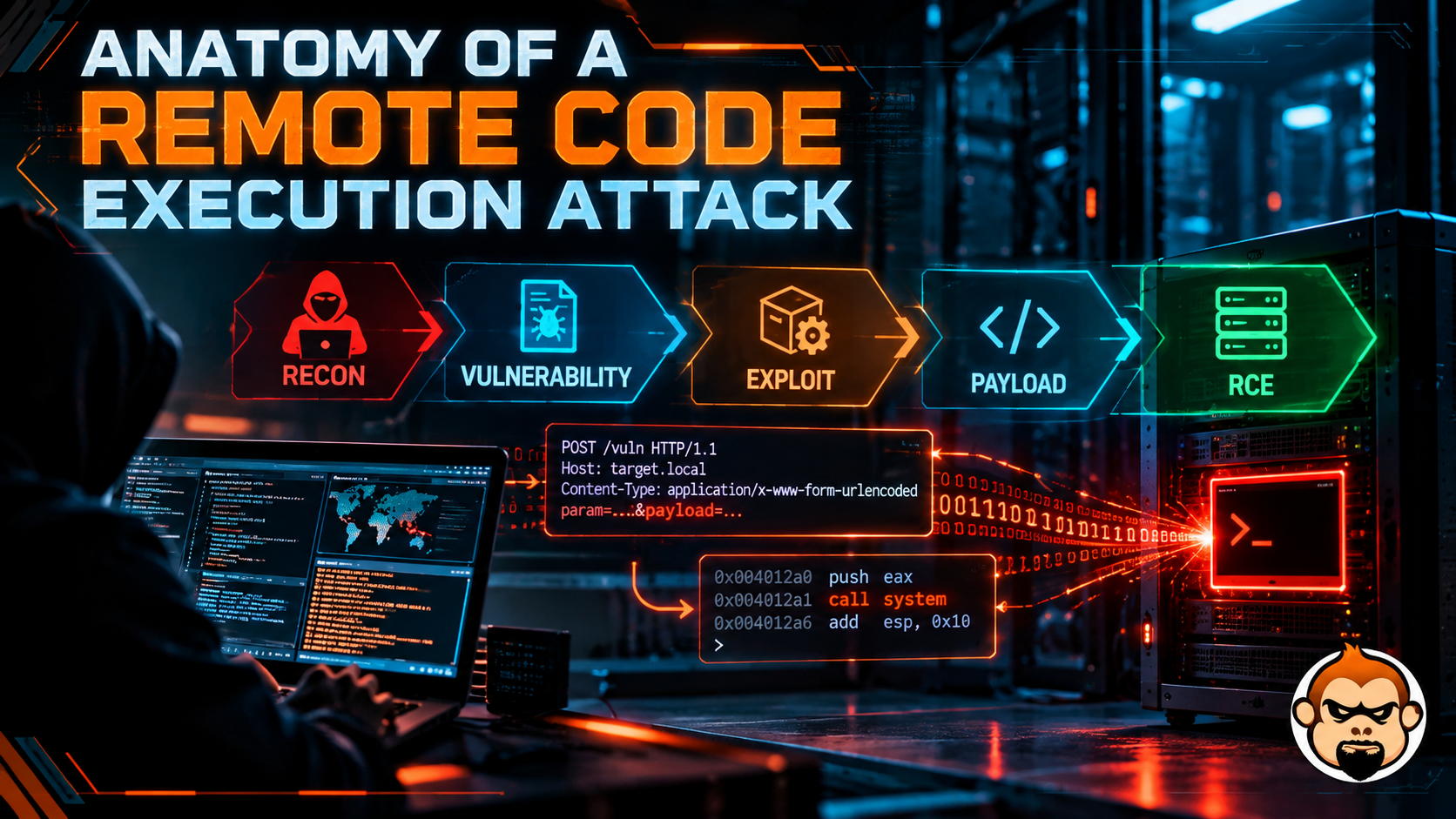
Anatomy of a Remote Code Execution Attack
From the first probe to post-exploitation, stage by stage, with what defenders see (and miss) at each step.
Executive Summary
Objective: Break a remote code execution (RCE) attack into its component stages so you can recognize it, detect it, and cut it off at the stage where your controls are strongest.
Target audience: Network and security engineers, SOC analysts, and anyone who owns an internet-facing service and wants to understand what “unauthenticated RCE, CVSS 9.8” actually means for their environment.
The short version: RCE is not a single event. It is a chain: discovery, fingerprinting, delivery, trigger, callback, and post-exploitation. The exploit itself lasts milliseconds. Everything around it takes minutes to months, and that is where you win. This post is a defender’s map of that chain. It does not contain working exploit payloads, because you do not need them to defend, and the detection and hardening steps are what actually move the needle.
What RCE Actually Means
Remote code execution is any flaw that lets an attacker run code of their choosing on a target system, over a network, without legitimate access to run code there. It sits at the top of the vulnerability food chain because every other goal (data theft, ransomware, persistence, lateral movement) becomes a follow-on task once an attacker can execute commands.
Three qualifiers decide how bad a given RCE is:
| Qualifier | Worst case | Why it matters |
|---|---|---|
| Authentication | Pre-auth (unauthenticated) | Anyone who can reach the port can exploit it |
| Reachability | Internet-facing service | Mass scanning finds you within hours of disclosure |
| Execution context | root / SYSTEM / appliance kernel | No privilege escalation step needed |
An unauthenticated RCE on an internet-facing edge device that runs as root checks all three boxes. That is why VPN gateways, firewalls, file transfer servers, and load balancers dominate the CISA Known Exploited Vulnerabilities (KEV) catalog.
The Vulnerability Classes Behind RCE
RCE is an outcome, not a bug type. Several distinct bug classes end in the same place. Knowing the class tells you which control stops it:
| Class | Root cause | Primary defense |
|---|---|---|
| OS command injection | User input concatenated into a shell command | Parameterized calls, no shell, strict input validation |
| Insecure deserialization | Untrusted data rebuilt into live objects | Do not deserialize untrusted input; allow-list types |
| Expression / template injection | Input evaluated by an expression or template engine | Sandboxed engines, no user input in templates |
| Memory corruption | Writing outside a buffer, use-after-free | Vendor patching, memory-safe languages, exploit mitigations |
| Unrestricted file upload | Server stores and executes an uploaded file | Validate type, store outside web root, no execute permission |
| SQLi chained to RCE | DB features that execute commands or write files | Parameterized queries, least-privilege DB accounts |
The one pattern under all of them
Nearly every RCE reduces to a single idea: untrusted data is treated as instructions. The classic teaching example is OS command injection, where a diagnostic feature builds a shell string out of a user-supplied field:
# VULNERABLE: user input is concatenated into a shell string
import subprocess
def ping_host(host):
    return subprocess.run(f"ping -c 1 {host}", shell=True,
                          capture_output=True, text=True).stdout
The flaw is that the shell, not the application, decides where the “host” ends. The fix is not a smarter blocklist. It is removing the shell from the path and validating the input as the thing it is supposed to be:
# FIXED: no shell, argument vector, strict type validation
import ipaddress, subprocess
def ping_host(host):
    ip = ipaddress.ip_address(host)          # raises on anything that is not an IP
    return subprocess.run(["ping", "-c", "1", str(ip)],
                          capture_output=True, text=True).stdout
Two changes carry the weight: shell=False (the default when you pass a list) means no shell metacharacters are interpreted, and ipaddress.ip_address() rejects anything that is not a valid address before it ever reaches ping. The same principle, enforce structure at the trust boundary, defeats deserialization, template, and SQL injection flaws too.
The Attack Chain, Stage by Stage
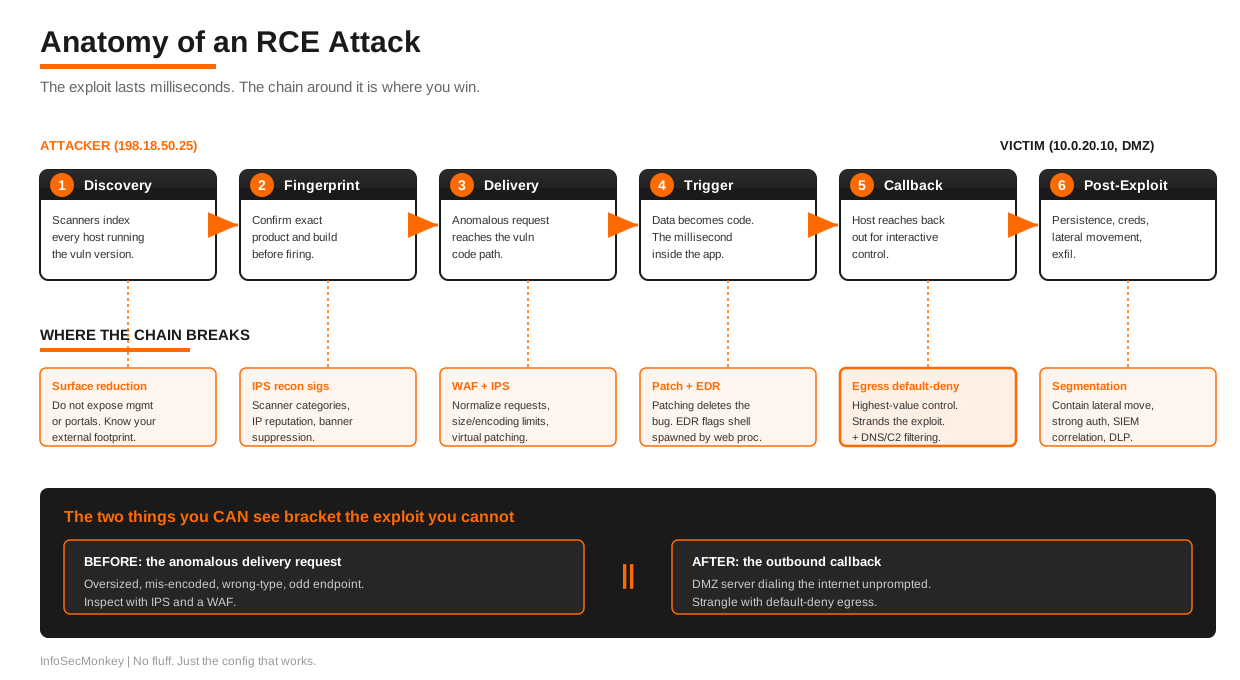
The lab addressing below follows the InfoSecMonkey convention: 198.18.0.0/15 stands in for public IPs and 10.0.0.0/16 for internal networks. The victim is a web application 10.0.20.10 in the DMZ, published through a VIP on 198.18.10.10.
Stage 1: Discovery
Attacker goal: Find every host running the vulnerable software.
Modern RCE campaigns rarely start with a chosen victim. They start with a vulnerable version and a list of every IP running it. Internet-wide scanners and search engines (Shodan, Censys, FOFA) index banners, TLS certificates, favicon hashes, and HTTP titles. Within hours of a public advisory, someone has a target list.
What you see: Almost nothing. Scanning traffic looks like the background radiation every public IP absorbs all day.
Where to act: Attack surface reduction. If the management interface or SSL VPN portal is not exposed, it is not on the list. Know your external footprint better than the scanners do. Run your own external discovery regularly so your inventory matches reality.
Stage 2: Fingerprinting
Attacker goal: Confirm the exact product and version before spending an exploit.
The attacker requests version-revealing content (static assets with build hashes, login page resources, API version endpoints) or sends a harmless probe that behaves differently on patched versus unpatched builds. This stage separates “running the product” from “running a vulnerable build of the product.”
What you see: Requests for unusual static paths, often from cloud-hosted or recently-registered IPs, often with scripted or default User-Agent strings. IPS signatures for many RCE CVEs fire here first, on the recon and version check, before any exploit is attempted.
Where to act: IPS with the scanner and reconnaissance signature categories enabled, reputation-based blocking of known scanning infrastructure, and suppressing version banners wherever the product allows it.
Stage 3: Delivery
Attacker goal: Get the malicious input to the vulnerable code path.
This is where the crafted input reaches the vulnerable parameter: a specific header, form field, URI, cookie, or uploaded file, depending on where the bug lives. The important point for defenders is structural, not the payload contents: the request is almost always malformed or anomalous in a way a proxy can see. It is unusually large, it carries encoding that the legitimate client never uses, it targets a parameter with data of the wrong type, or it hits an endpoint no real user hits.
What you see: With deep inspection in place, the anomaly is visible even when the specific exploit is novel. Oversized headers, nested or double encoding, binary content in text fields, and content-length or protocol violations are all detectable without a signature for that exact CVE.
Where to act: This is the strongest choke point for most organizations. A WAF or inline proxy that normalizes and validates requests, enforces size and encoding limits, and runs IPS signatures catches a large share of delivery attempts here, including the commodity re-use of a public exploit that follows every major disclosure.
Stage 4: Trigger
Attacker goal: Make the vulnerable code execute the injected logic.
Delivery and trigger are often the same request, but conceptually they differ: delivery places the input, trigger is the moment the flawed parser, deserializer, or interpreter acts on it. This is the millisecond where “data” becomes “code.” It happens inside the application, so network controls cannot see it directly. What they can see is the before (anomalous delivery) and the after (unexpected behavior).
What you see: Nothing on the wire at the instant of execution. The tell is on the host: a web server process spawning a shell or interpreter, a service writing to a path it never writes to, or an appliance daemon crashing and restarting (a common side effect of memory-corruption exploits that do not land cleanly).
Where to act: Endpoint detection and response (EDR) and host logging. A web server whose child process is a command shell is one of the highest-fidelity RCE signals that exists.
Stage 5: Callback
Attacker goal: Turn code execution into interactive control.
Code execution alone is blind. To do anything useful, the attacker typically has the compromised host reach back out to infrastructure they control, establishing a channel for commands and data. This outbound connection is the single most reliable detection opportunity in the whole chain, because it violates a simple expectation: your DMZ web server has no business initiating connections to the internet.
What you see: A server in a server VLAN or DMZ making outbound connections, often to a raw IP rather than a name, often on an odd port, sometimes beaconing at a regular interval, sometimes tunneled inside DNS or HTTPS to look normal.
Where to act: Egress filtering is the highest-value, most-neglected control here. Default-deny outbound from server segments, allowing only the destinations and ports a server legitimately needs, turns a successful exploit into a dead end. Outbound IPS, DNS filtering, and botnet/C2 reputation feeds catch what slips past the policy.
Stage 6: Post-Exploitation
Attacker goal: Accomplish the actual objective: persistence, credential theft, lateral movement, data exfiltration, or ransomware staging.
Once there is a reliable channel, the attacker’s work starts. They establish persistence so a reboot or patch does not evict them, harvest credentials to move laterally, map internal systems, and stage data for exfiltration. For most intrusions this phase is measured in days to months, not seconds. It is also the phase with the most observable activity: internal scanning, authentication anomalies, new scheduled tasks or services, and large or unusual outbound transfers.
What you see: East-west scanning and connection attempts, credential use that does not match normal patterns, and data movement toward the egress edge.
Where to act: Internal segmentation to blunt lateral movement, strong authentication to limit credential re-use, DLP and egress controls on exfiltration, and SIEM correlation to connect the dots across host, network, and identity logs.
Where the Chain Breaks: Mapping Controls to Stages
No single control stops RCE. Defense in depth means each stage meets a different control, so one failure does not become a breach:
| Stage | Primary control | Backstop |
|---|---|---|
| Discovery | Attack surface reduction | External posture monitoring |
| Fingerprinting | IPS recon signatures, banner suppression | IP reputation / scanner blocking |
| Delivery | WAF / proxy normalization, IPS | Virtual patching |
| Trigger | Patching (removes the bug) | EDR behavioral detection |
| Callback | Egress filtering (default-deny) | Outbound IPS, DNS/C2 filtering |
| Post-exploitation | Segmentation, strong auth | SIEM correlation, DLP |
The two controls that pay off most across the whole chain are patching (it deletes the trigger entirely) and egress filtering (it strands everything downstream of a successful trigger). If you do nothing else after reading this, confirm those two.
FortiGate: Practical Controls by Stage
Everything above is vendor-neutral. Here is how it maps onto a FortiGate at the edge, which is where many readers of this blog will be applying it. These are configuration directions, not a turnkey script; adapt interface and object names to your environment.
Virtual patching and IPS (Fingerprinting, Delivery, Trigger)
FortiGate’s IPS engine ships signatures for disclosed RCE CVEs, frequently before you can patch the affected product. Applying an IPS profile with an aggressive posture on the policy that publishes the service gives you virtual patching: the exploit is blocked in transit even while the vulnerable host is still unpatched.
config ips sensor
    edit "edge-protect"
        config entries
            edit 1
                set severity high critical
                set status enable
                set action block
            next
        end
        set block-malicious-url enable
    next
end
Attach the sensor to the inbound policy that serves the published application, and enable SSL inspection on that policy so the engine can see inside HTTPS. An IPS profile on an encrypted policy with no inspection sees only the TLS handshake.
WAF and proxy normalization (Delivery)
For published web applications, front them with the FortiGate inline WAF or an explicit/transparent proxy policy. Request normalization, size and encoding limits, and signature enforcement catch the anomalous-request structure described in Stage 3 without needing a signature for the specific CVE.
Egress filtering (Callback)
This is the control most environments are missing, and the one that most reliably turns a compromise into a non-event. From any server or DMZ segment, the outbound policy should be default-deny, permitting only known-good destinations and ports:
config firewall policy
    edit 20
        set name "dmz-egress-allowlist"
        set srcintf "port-dmz"
        set dstintf "port-wan"
        set srcaddr "dmz-web-servers"
        set dstaddr "approved-update-mirrors" "approved-api-endpoints"
        set action accept
        set service "HTTPS" "DNS"
        set utm-status enable
        set ips-sensor "edge-protect"
        set application-list "block-proxy-and-tor"
        set logtraffic all
    next
    edit 21
        set name "dmz-egress-default-deny"
        set srcintf "port-dmz"
        set dstintf "port-wan"
        set srcaddr "dmz-web-servers"
        set dstaddr "all"
        set action deny
        set logtraffic all
    next
end
The explicit deny with set logtraffic all is not decoration. Those deny logs are your highest-fidelity RCE alert: a DMZ web server trying to reach an address outside the allow-list means something on that server initiated a connection it never should have.
Outbound threat intelligence (Callback)
Layer DNS filtering and the botnet C2 / malicious-IP feeds on the egress policy so that callbacks to known infrastructure are blocked even if a destination slips through the allow-list, for example when an attacker abuses a legitimate cloud provider you have permitted.
config dnsfilter profile
    edit "block-c2"
        set block-botnet enable
        config domain-filter
            set domain-filter-table 1
        end
    next
end
Segmentation (Post-Exploitation)
Put internal segments behind the FortiGate (or use VDOMs / internal segmentation firewalling) so east-west traffic between the DMZ and internal zones is policied and inspected, not flat. A compromised DMZ host should not be able to reach a domain controller or a database VLAN without crossing an inspected policy that logs and limits it.
Verification and Validation
You do not validate these controls by waiting for a real attack. Validate them deliberately:
- IPS / virtual patching: From an authorized test host, confirm that a benign request to a protected endpoint is permitted and that the IPS logs show the sensor is attached and inspecting. Check
diagnose ipscounters and the IPS log for the policy. - Egress default-deny: From a server in the DMZ segment, attempt an outbound connection to an arbitrary external IP on an unusual port. It should fail, and the deny policy should log it. This is a two-minute test that proves the single most important control.
- SSL inspection coverage: Confirm the inbound policy that serves the application has SSL inspection enabled. Without it, IPS and WAF are inspecting an opaque tunnel.
- Logging reaches the SIEM: Verify that both IPS events and egress deny events are forwarded to FortiAnalyzer / your SIEM, and that someone has an alert on DMZ egress denials.
Troubleshooting and Gotchas
IPS is enabled but nothing is logged. The most common cause is SSL inspection missing on the policy, so the engine never sees cleartext. The second is the profile being set to monitor rather than block, or the relevant signature severity being excluded from the sensor. Confirm the sensor is attached to the correct policy and that the policy actually matches the traffic (check the policy hit counters).
Egress allow-list breaks legitimate updates. Appliances and servers often need to reach vendor update and licensing endpoints, which can sit behind rotating CDN IPs. Use FQDN address objects and, where the vendor supports it, internet service database (ISDB) objects rather than hardcoded IPs, so the allow-list tracks the real destinations without opening the segment wide.
Callback uses DNS or HTTPS to blend in. Default-deny on destinations handles the obvious cases, but C2 tunneled over permitted DNS or HTTPS needs the behavioral layer: DNS filtering with botnet blocking, outbound IPS, and SIEM analytics looking for beaconing intervals and abnormal query volume. If DNS is allowed outbound from servers directly, force it through an internal resolver you can inspect instead.
You patched, so you think you are done. Patching removes the trigger for known bugs. It does nothing for the next zero-day, and nothing for a host that was already compromised before you patched. The post-patch checklist is: confirm the fix, then hunt for the callback and persistence that may predate it. Egress logs and EDR are where you look.
The Takeaway
RCE is frightening because the exploit is instantaneous and often unauthenticated. But the attack that uses it is a chain with six links, and you only need to break one. The exploit you cannot see is bracketed by two things you can: the anomalous request that delivers it, and the outbound callback that makes it useful. Inspect the first with IPS and a WAF. Strangle the second with default-deny egress. Patch to delete the trigger, segment to contain the aftermath, and log every denial so the attempt that gets blocked still tells you someone tried.
Recent posts
-

-

DNS is one of those technologies that quietly underpins... Full Story
-

BGP issues on FortiGate firewalls usually trace back to... Full Story
-

Every time your laptop talks to your router, a... Full Story
-

If you've spent any time configuring NAT on a... Full Story
-

If you have spent any time configuring firewall policies... Full Story
-

High availability on FortiGate is one of those features... Full Story
-

If you've configured SD-WAN on a FortiGate, you've almost... Full Story
-

FortiLink is the management protocol that turns a FortiSwitch... Full Story
-

FortiSwitches are pretty rock solid from Mean Time Between... Full Story
-

This is a quicky tip. Have you ever gone... Full Story
-

DNS is one of those quiet pieces of internet... Full Story
-

This article is an updated version of the previous... Full Story
-

You will add ns2 as a secondary (slave) BIND9... Full Story
-

In the process of deploying my lab, I needed... Full Story
-

RFC 8805, used to be known as Self-Correcting IP... Full Story
-

Years back, I wrote an article about certificate pinning. ... Full Story
-

FortiGates have the ability to send alerts to Microsoft... Full Story
-

In this post, I am going to walk through... Full Story
-

Troubleshooting VoIP on a FortiGate can feel like trying... Full Story
-

Prior to FortiOS 7.0, there were three commands to... Full Story
-

In this post, I am going to go over... Full Story
-

What we are going to do: We are going... Full Story
-

Choosing between FGCP (FortiGate Clustering Protocol) and FGSP (FortiGate... Full Story
-

Creating a VLAN on macOS (The "Pro" Move) A... Full Story
-

This blog post explores the logic behind how macOS... Full Story
-

Pretty Fly for a Wi-Fi Tell My Wi-Fi Love... Full Story
-

Part of my daily gig is creating BoMs (Bill-of-Materials)... Full Story
-

ICMP introduces several security risks, but careful filtering, rate... Full Story
-

The command diag debug application dhcps -1 enables full... Full Story
-

In the world of FortiOS, execute tac report is... Full Story
-

LLDP; What is it The Link Layer Discovery Protocol... Full Story
-

What it actually does When you run diagnose fdsm... Full Story
-

Monkey Bites are bite-sized, high-impact security insights designed for... Full Story
-

I have run macOS in macOS with Parallels but... Full Story
-

Don't be confused with my other FortiNAC posts where... Full Story
-

This is the third session in a multi-part article... Full Story
-

Today I was configuring key-based authentication on a FortiGate... Full Story
-

Netcat, often called the "Swiss Army knife" of networking,... Full Story
-

At its core, IEEE 802.1X is a network layer... Full Story
-

In case you did not see the previous FortiNAC... Full Story
-

This is our 5th session where we are going... Full Story
-

Now that we have Wireshark installed and somewhat configured,... Full Story
-

The Philosophy of Packet Analysis Troubleshooting isn't about looking... Full Story
-

Plus what you actually get with FortiCare Essential, Premium... Full Story
-

No fluff. Just the config that works. This one... Full Story
-

No fluff. Just the config that works. Executive Summary... Full Story