
If you've spent any time configuring user authentication on... Full Story
By Manny Fernandez
November 8, 2026

FortiGate Threat Feed Stuck on Not Start? Check for a 301 Redirect
No fluff. Just the config that works.
FortiGate can pull IP, domain, URL and malware hash lists from outside servers under Security Fabric > External Connectors. I wrote about dynamic address lists years ago, but I never covered FortiGate threat feed troubleshooting for the day the pull quietly stops working. This post is that missing piece, built from a real failure on my own FortiGate.
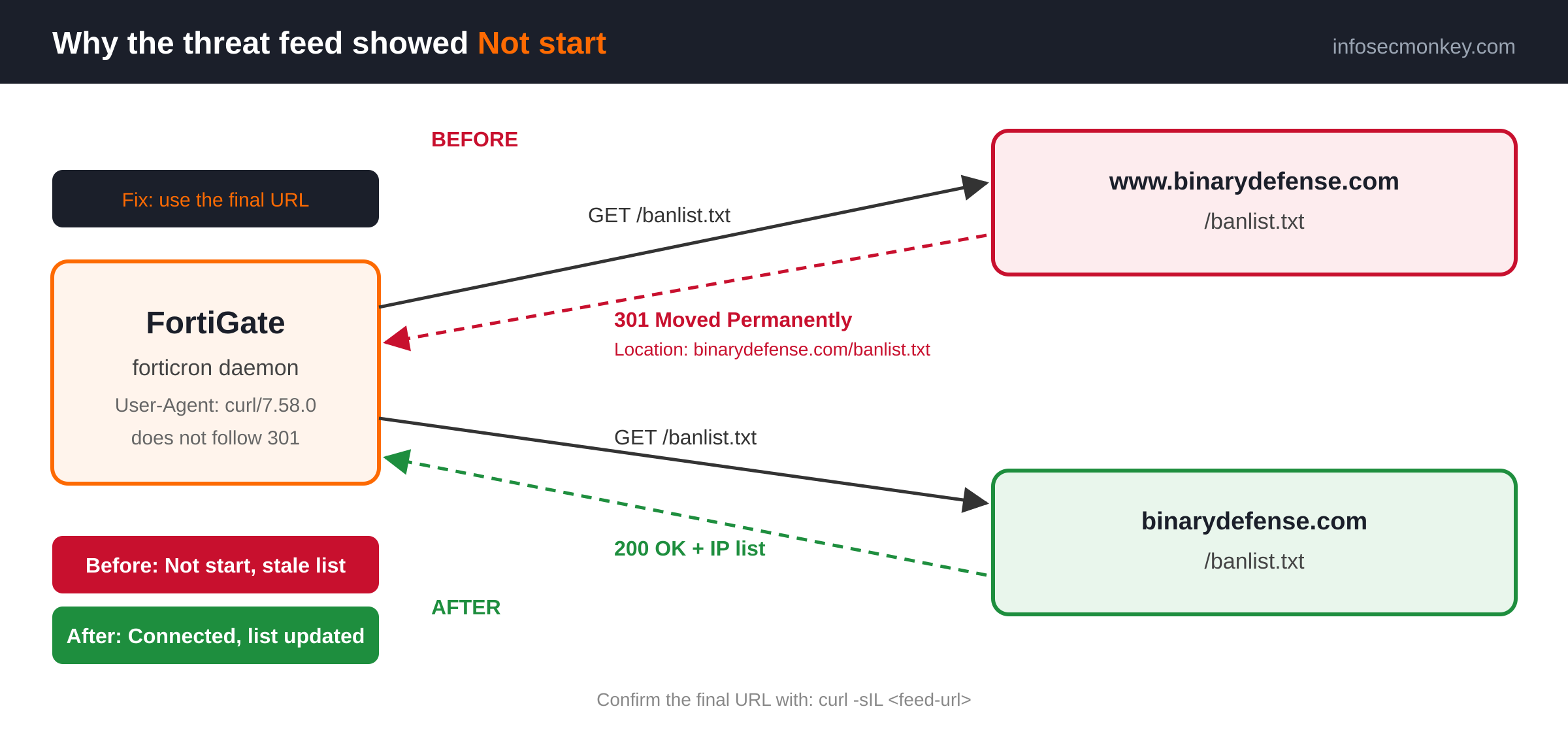
TL;DR: The connector showed Not start with a last update of 08/13/2025. A forticron debug showed the feed URL answering with 301 Moved Permanently. The FortiGate treated the 301 as the answer instead of following it. Pointing the connector at the final URL, without the www, fixed it on the next pull.
Executive Summary
Objective: find out why a FortiGate external threat feed stopped updating, prove the cause from the CLI and from a workstation, fix the connector, and verify the list is current again.
Target audience: FortiGate administrators and SOC engineers who use IP address, domain or URL threat feeds in firewall policy, DNS filter or web filter.
Prerequisites and Architecture
- FortiOS 7.2 or later. The same steps work on 7.0, only the narrow debug mask differs.
- CLI access with a super_admin profile.
- A workstation with
curl(macOS, Linux, or Windows 10 and later). - Outbound HTTPS from the FortiGate to the feed server.
| Component | Role | Value in this post |
|---|---|---|
| FortiGate | Polls the feed and enforces the list in policy | FGT, FortiOS 7.2 or later |
| forticron | FortiGate daemon that downloads external resources | Built in |
| Threat feed server | Hosts the plain text IP list | Original: www.binarydefense.com/banlist.txt. Final: binarydefense.com/banlist.txt |
| Admin workstation | Checks HTTP behavior outside the FortiGate | macOS with curl |
Figure 1: The www URL answers with a 301 and forticron stops. The final URL answers with a 200 and the list loads.
The Symptom: Not Start and a Stale List
Figure 2: Security Fabric > External Connectors: last update 08/13/2025, Connection Status Not start.
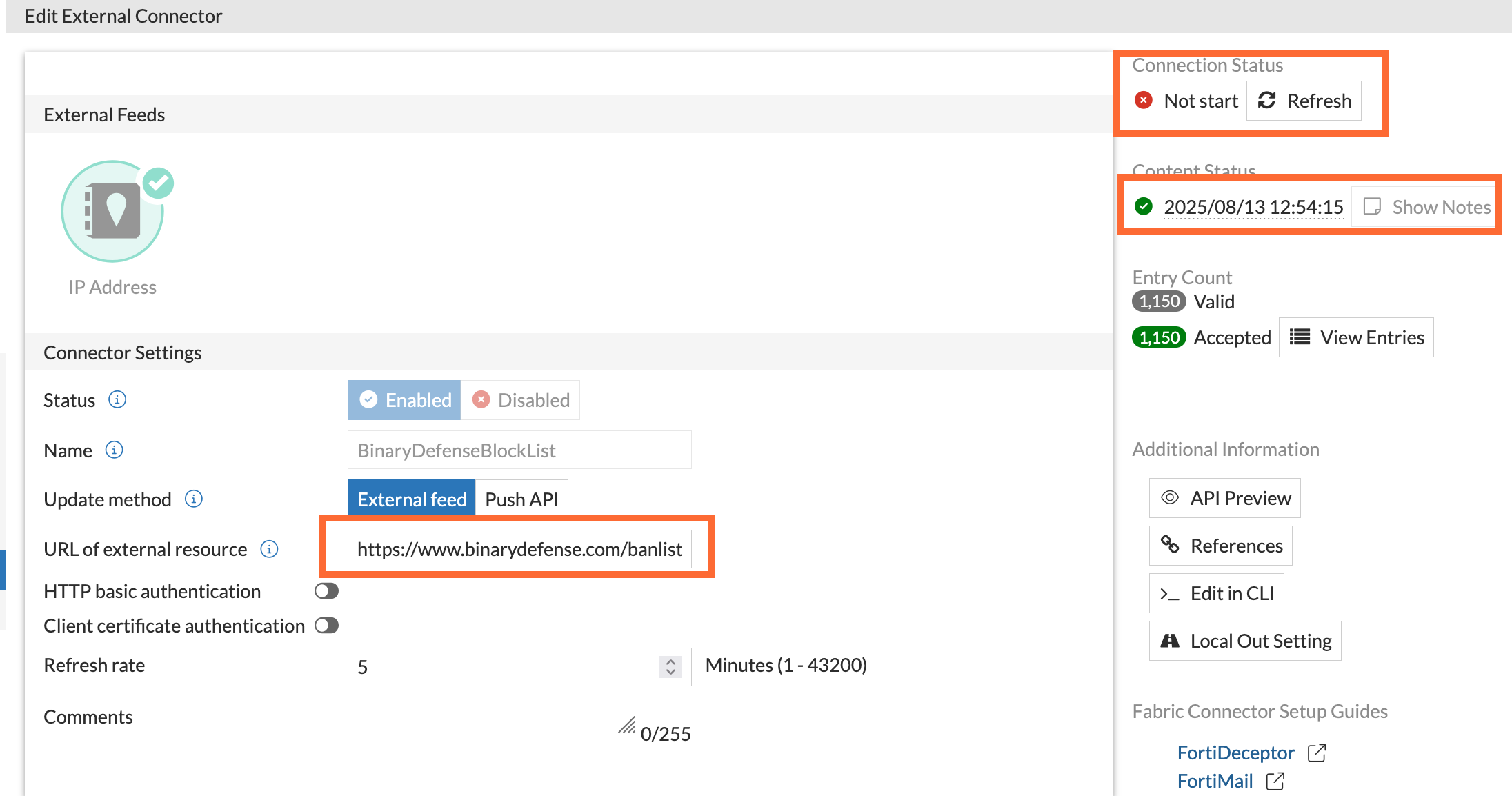
The connector showed a last update of 08/13/2025 and a Connection Status of Not start. As of this writing it is November 2026, so this FortiGate had been enforcing a list that was about 15 months old, and nothing in the policy view said so. The GUI gives no reason for Not start, so the CLI is the next stop.
FortiGate Threat Feed Troubleshooting Workflow
Step 1: Debug forticron and force a pull
Goal: see the actual HTTP exchange between the FortiGate and the feed server.
Action: turn on the forticron debug, then force an update so you do not wait for the refresh timer.
diagnose debug reset
diagnose debug application forticron -1
diagnose debug console timestamp enable
diagnose debug enable
execute update-external-resource "<connector-name>"
-1 enables every forticron debug level. If that is too noisy, Fortinet uses the narrower 0xf00 mask on 7.2 and later and 960 on 7.0 (Fortinet KB: connection status Not start). execute update-external-resource refreshes one connector; diagnose test application forticron 8 reloads all of them (Fortinet KB: manually reload a threat feed).
What came back (trimmed and representative, your function line numbers will differ):
Output
14:02:11 __update_ext()-248: Updating EXT '<connector-name>' with HTTP
GET /banlist.txt HTTP/1.1
Host: www.binarydefense.com
User-Agent: curl/7.58.0

HTTP/1.1 301 Moved Permanently
Location: https://binarydefense.com/banlist.txt

14:02:12 __http_stop()-734: Close http connect: response code not Accept
Figure 3: forticron debug: the feed URL answers with a 301 and the FortiGate closes the connection.
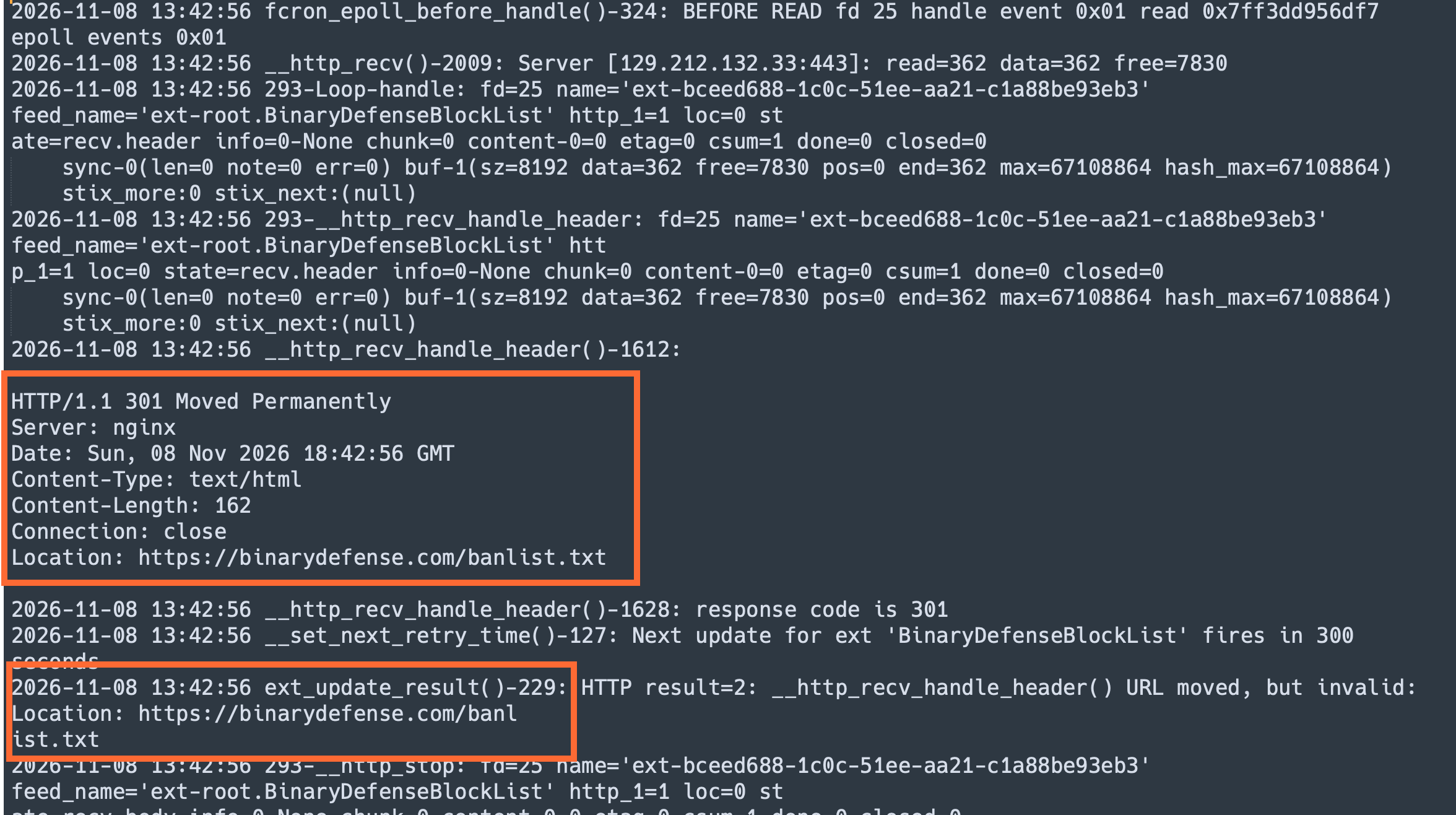
That is the whole problem. The FortiGate took the 301 as the response, not as a redirect to follow, so every poll since 2025 ended right there and the old list stayed in place. Fortinet shows the same behavior in its own threat feed troubleshooting example, where a missing trailing slash produced a 301 Moved Permanently and the fix was correcting the URL (FortiOS 7.6.1 Administration Guide: troubleshooting an external feed).
GUI verification: none yet. The connector still shows Not start at this point.
Step 2: Confirm the redirect from a workstation
Goal: prove the redirect lives on the server side, not in the FortiGate.
Action: request headers only and follow every hop.
curl -sIL https://www.binarydefense.com/banlist.txt
-s hides the progress meter, -I asks for headers only, and -L follows redirects so you see every hop. Representative output:
Output
HTTP/2 301
location: https://binarydefense.com/banlist.txt

HTTP/2 200
content-type: text/plain
Figure 4: curl -sIL from the workstation: a 301 on the www hop, then a 200 on the final URL.
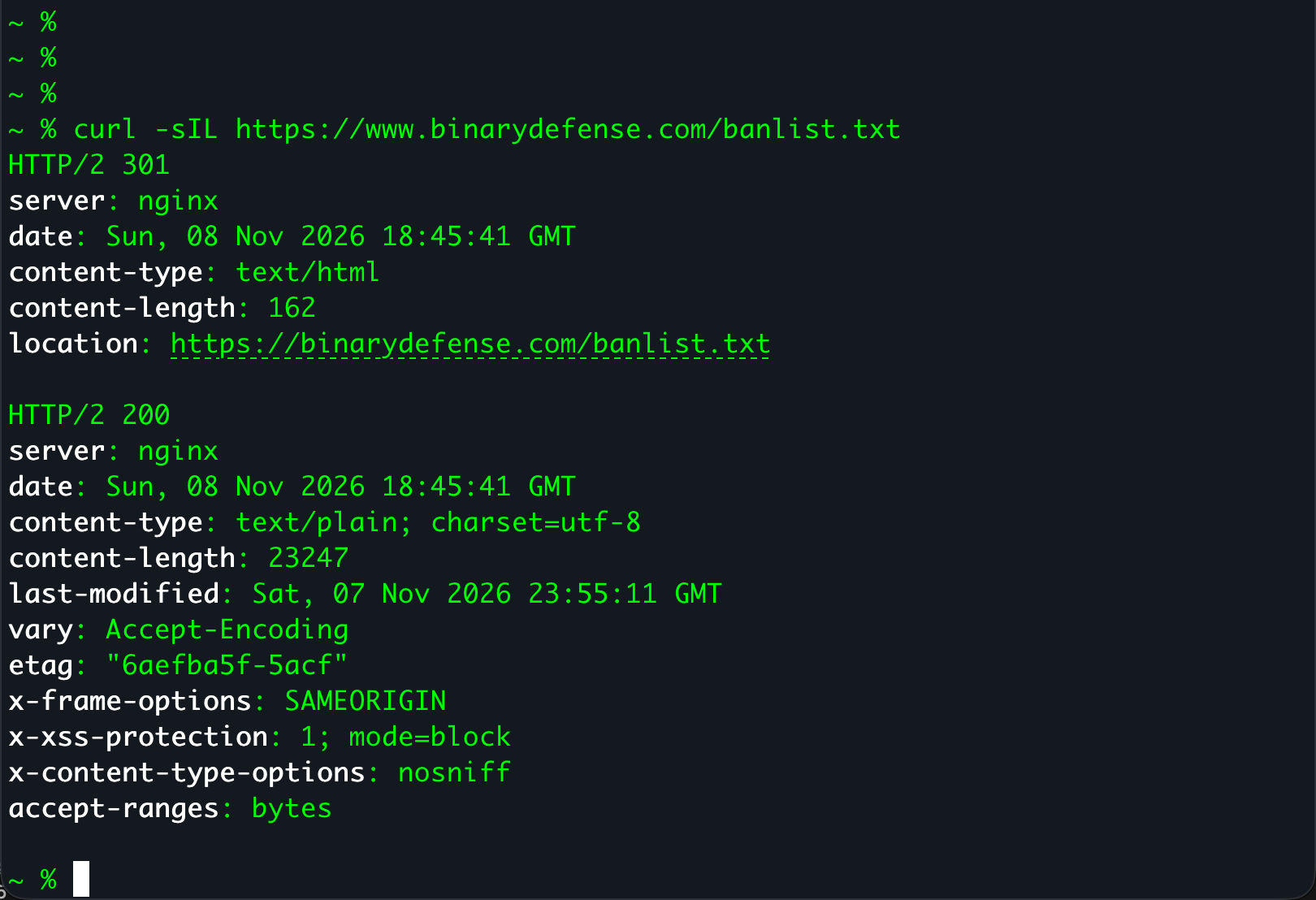
Two status codes means the URL in the connector is not the final URL. A browser and curl -L follow the redirect without telling you, which is why the link looked fine every time I opened it.
Step 3: Point the connector at the final URL
Goal: give forticron a URL that answers with a 200 on the first hop.
Action: update the resource on the connector.
config system external-resource
    edit "<connector-name>"
        set resource "https://binarydefense.com/banlist.txt"
    next
end
Figure 5: The connector with the resource changed to binarydefense.com/banlist.txt.
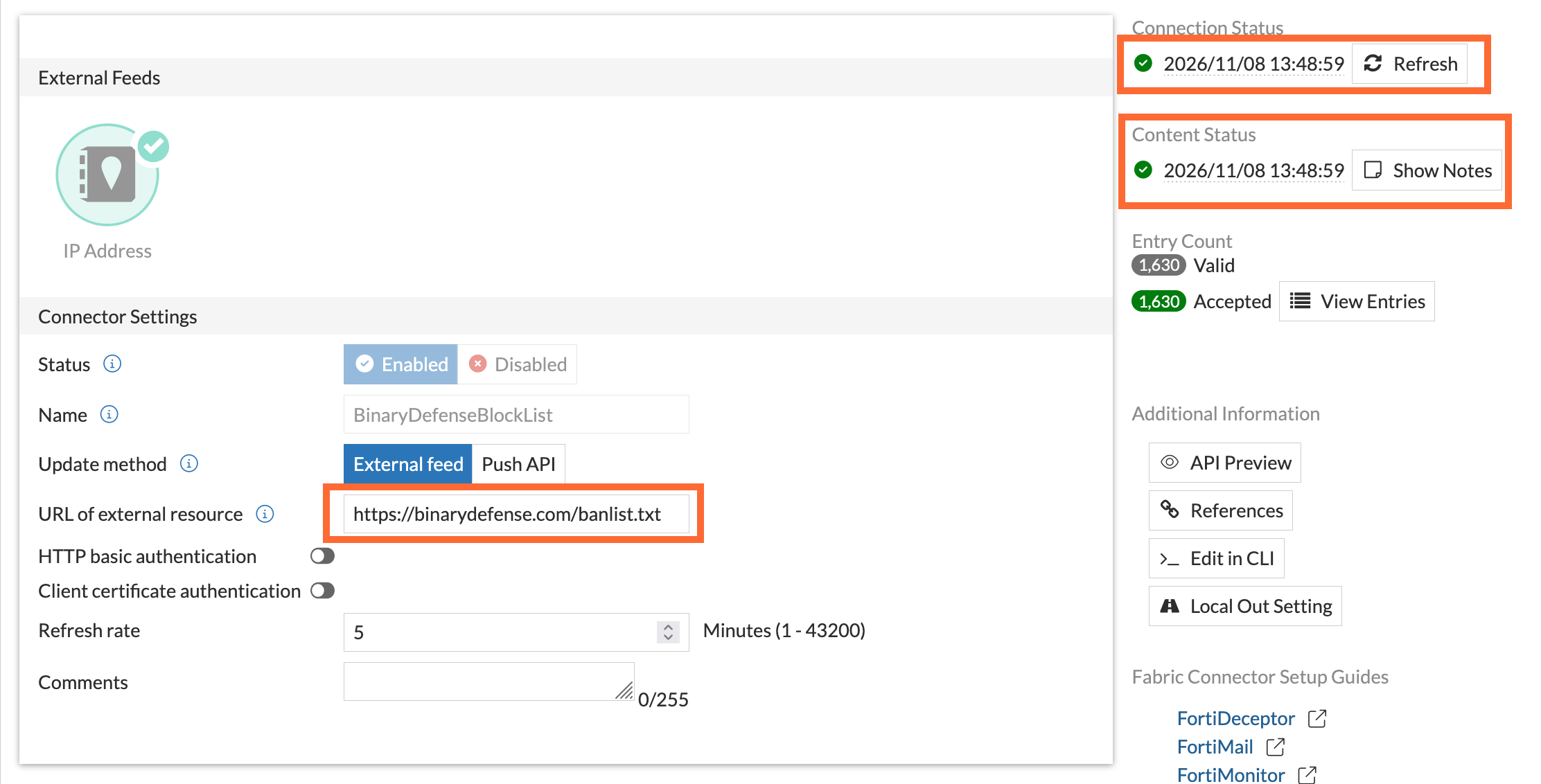
GUI verification: Security Fabric > External Connectors, edit the connector, and confirm URI of external resource shows the URL without www.
Step 4: Force a refresh and turn debug off
Goal: pull the list now and leave the box clean.
execute update-external-resource "<connector-name>"
diagnose debug disable
diagnose debug reset
GUI verification: the connector moves to Connected and the last update changes to today. Mine changed to 11/08/2026.
Verification and Validation
diagnose sys external-address-resource list
diagnose sys external-address-resource list "<connector-name>"
fnsysctl ls -la /var/log/external
Expected success:
- The forticron debug from Step 4 shows
HTTP/1.1 200 OKfollowed by anupdate doneline. diagnose sys external-address-resource listshows the connector with a current entry count.- The connector files in
/var/log/externalcarry today’s timestamp. Fortinet notes the CLI list can take about 60 seconds to catch up after a download (Fortinet KB: threat feed behavior when changes are detected). - The GUI shows Connected and today’s date under last update.
Output
HTTP/1.1 200 OK
Content-Type: text/plain
14:09:40 ext_file_sync()-1250: update done: tag=1
Troubleshooting and Gotchas
1. Any redirect breaks the pull, not just www
A missing trailing slash, an http URL that redirects to https, or a vendor that moved its list to a CDN all produce the same symptom (FortiOS 7.6.1 troubleshooting example). Before you paste any feed URL into a connector, ask curl for the final URL and use that:
curl -s -o /dev/null -w '%{url_effective}\n' -L "<feed-url>"
2. The server blocks the FortiGate user agent
forticron identifies itself as curl/7.58.0 by default, and some hosting platforms and bot filters reject that string, which also leaves the connector at Not start (Fortinet KB: connection status Not start). Test with the same user agent, and override it on the connector if the server refuses:
curl -sI -A "curl/7.58.0" "<final-url>"

config system external-resource
    edit "<connector-name>"
        set user-agent "Mozilla/5.0"
    next
end
3. A stale list hides the failure
When a pull fails, the FortiGate keeps enforcing the last list it downloaded, so policy keeps working and nobody notices. A 404 or 301 in the debug ends with response code not Accept (Fortinet KB: threat feed update failed). Check Last update on every connector during routine reviews, and always finish a session with diagnose debug disable so forticron debug does not run for its full timer.
Quick Reference
| Command | What it does |
|---|---|
diagnose debug application forticron -1 |
Debug the threat feed daemon at every level |
execute update-external-resource "<name>" |
Force one connector to pull now |
diagnose test application forticron 8 |
Reload every external resource |
diagnose test application forticron 7 |
Dump threat feed object values |
diagnose sys external-address-resource list |
List address feeds and entry counts |
fnsysctl ls -la /var/log/external |
Show downloaded feed files and timestamps |
curl -sIL <url> |
Show every redirect hop from a workstation |
Sources
- FortiOS 7.6.1 Administration Guide: troubleshooting an external feed (301 example)
- Fortinet KB 337712: External connector threat feed connection status Not start
- Fortinet KB 328126: How to troubleshoot the Threat feed update failed
- Fortinet KB 328180: How to manually reload an external threat feed
- Fortinet KB 421292: FortiGate Threat Feed External Connector behavior when changes are detected
- InfoSecMonkey: Using dynamic address lists in FortiGate firewalls
Recent posts
-

-

DNS is one of those technologies that quietly underpins... Full Story
-

BGP issues on FortiGate firewalls usually trace back to... Full Story
-

Every time your laptop talks to your router, a... Full Story
-

If you've spent any time configuring NAT on a... Full Story
-

If you have spent any time configuring firewall policies... Full Story
-

High availability on FortiGate is one of those features... Full Story
-

If you've configured SD-WAN on a FortiGate, you've almost... Full Story
-

FortiLink is the management protocol that turns a FortiSwitch... Full Story
-

FortiSwitches are pretty rock solid from Mean Time Between... Full Story
-

This is a quicky tip. Have you ever gone... Full Story
-

DNS is one of those quiet pieces of internet... Full Story
-

This article is an updated version of the previous... Full Story
-

You will add ns2 as a secondary (slave) BIND9... Full Story
-

In the process of deploying my lab, I needed... Full Story
-

RFC 8805, used to be known as Self-Correcting IP... Full Story
-

Years back, I wrote an article about certificate pinning. ... Full Story
-

FortiGates have the ability to send alerts to Microsoft... Full Story
-

In this post, I am going to walk through... Full Story
-

Troubleshooting VoIP on a FortiGate can feel like trying... Full Story
-

Prior to FortiOS 7.0, there were three commands to... Full Story
-

In this post, I am going to go over... Full Story
-

What we are going to do: We are going... Full Story
-

Choosing between FGCP (FortiGate Clustering Protocol) and FGSP (FortiGate... Full Story
-

Creating a VLAN on macOS (The "Pro" Move) A... Full Story
-

This blog post explores the logic behind how macOS... Full Story
-

Pretty Fly for a Wi-Fi Tell My Wi-Fi Love... Full Story
-

Part of my daily gig is creating BoMs (Bill-of-Materials)... Full Story
-

ICMP introduces several security risks, but careful filtering, rate... Full Story
-

The command diag debug application dhcps -1 enables full... Full Story
-

In the world of FortiOS, execute tac report is... Full Story
-

LLDP; What is it The Link Layer Discovery Protocol... Full Story
-

What it actually does When you run diagnose fdsm... Full Story
-

Monkey Bites are bite-sized, high-impact security insights designed for... Full Story
-

I have run macOS in macOS with Parallels but... Full Story
-

Don't be confused with my other FortiNAC posts where... Full Story
-

This is the third session in a multi-part article... Full Story
-

Today I was configuring key-based authentication on a FortiGate... Full Story
-

Netcat, often called the "Swiss Army knife" of networking,... Full Story
-

At its core, IEEE 802.1X is a network layer... Full Story
-

In case you did not see the previous FortiNAC... Full Story
-

This is our 5th session where we are going... Full Story
-

Now that we have Wireshark installed and somewhat configured,... Full Story
-

The Philosophy of Packet Analysis Troubleshooting isn't about looking... Full Story
-

No fluff. Just the config that works. Executive Summary... Full Story
-

No fluff. Just the config that works. FortiGate can... Full Story
-

Executive Summary A routine external scan of a customer's... Full Story