
If you've spent any time configuring user authentication on... Full Story
By Manny Fernandez
November 10, 2026

OpenSSH *sshole (CVE-2026-123158): Find, Patch and Lock Down Alpine sshd
No fluff. Just the config that works.
Objective: The OpenSSH *sshole bug (CVE-2026-123158) lets anyone who can reach port 22 log in to a passwordless account on an affected Alpine Linux box by typing a very long password. This post explains how the bug works in plain terms, gives you a five minute check to tell whether a host or container is exposed, and walks through patching, mitigating, hunting for prior abuse, and tightening SSH exposure at the FortiGate.
Target audience: Linux and container admins, DevOps and platform engineers who ship Alpine based images, SOC analysts, and network engineers who own the firewall in front of those hosts.
Bottom line: Upgrade the openssh package on every Alpine host and image, restart sshd, and set
PasswordAuthentication no anywhere you only use keys. Then grep your logs for password logins on accounts that should never have one.What the OpenSSH *sshole Bug Actually Is
On November 5, 2026, the OpenSSH team shipped Portable OpenSSH 10.6p2 with what they called a critical security workaround for Linux systems that use musl libc with PAM disabled (OpenSSH 10.6p2 announcement). The issue was reported by Özgün Kültekin of Wakefield, who named it sshole, and MITRE scores it 8.1 (High) on CVSS 3.1 (Cycode analysis).
Nothing in it is a classic memory corruption bug. It is three reasonable decisions, made years apart by different projects, lining up badly:
- musl, 2012: musl’s
crypt()returns the string*on failure instead of a NULL pointer, and a few weeks later musl capped SHA-512 password input at 256 bytes to stop CPU exhaustion attacks. A longer password fails, socrypt()hands back*(GBHackers write-up). - Linux account convention: a single
*in the/etc/shadowpassword field means the account has no usable password. Key-only users and, from Alpine 3.16 on, the default root account use it (OX Security analysis). - OpenSSH, 2016: to stop username enumeration by timing, sshd hashes the attempt even when the account has no real hash, borrowing a salt from another local account that does (GBHackers write-up).
Put those together on a box where sshd checks passwords itself (no PAM): the attacker sends a 257 to 1024 byte password, musl’s crypt() fails and returns *, sshd compares that to the stored *, and the strings match. Login accepted (Detectify advisory).
Figure 1. How a long password turns into a successful login on musl without PAM
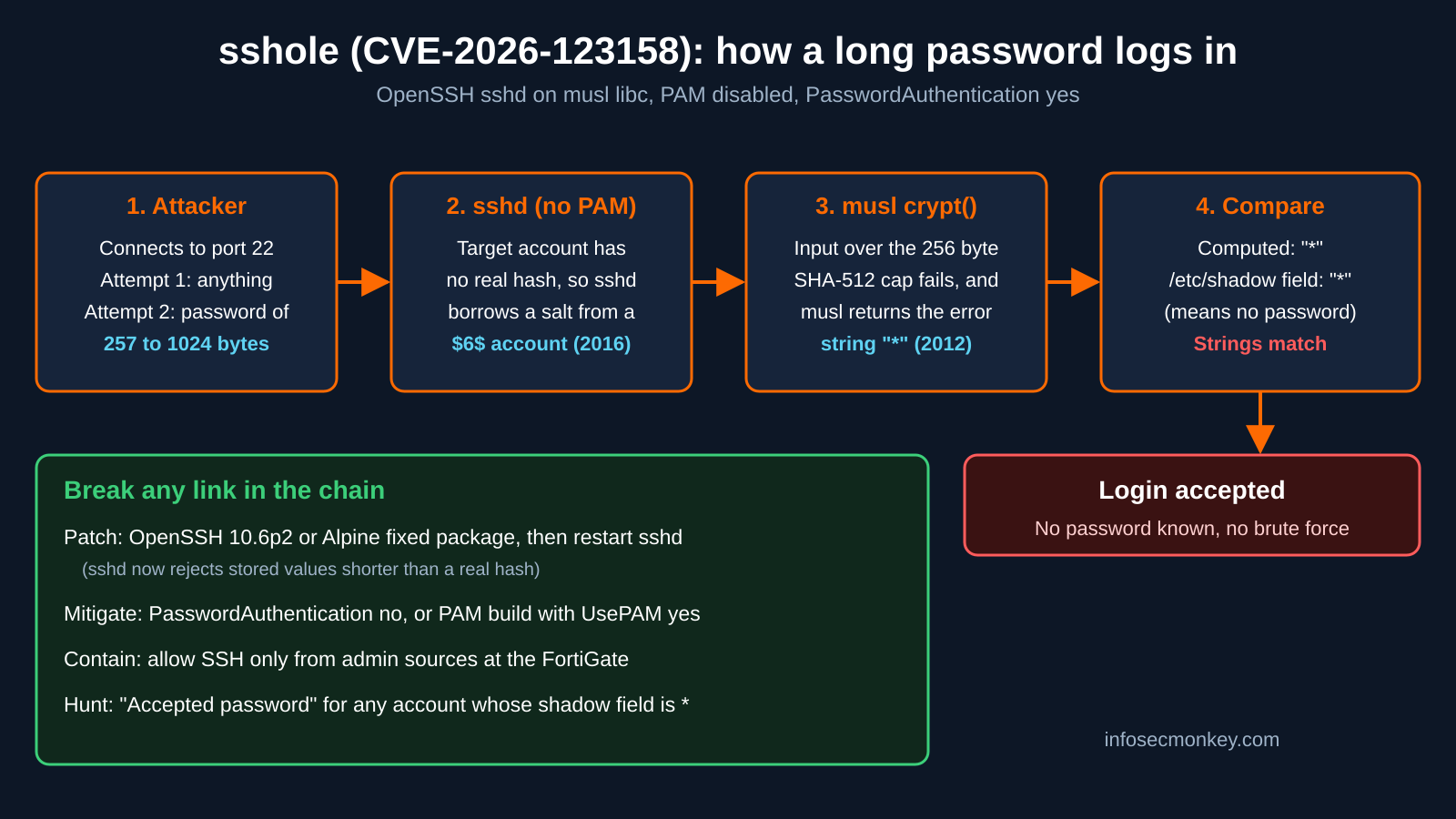
The upstream fix stops trusting short stored values: OpenSSH now checks the stored field against a minimum valid hash length (MIN_PASSWORD_HASH_LEN) instead of relying on musl’s * behavior (oss-security thread).
Are You Affected? The Four Conditions
A host is exploitable only when all four of these are true (Cycode analysis, Cloudflare Radar brief):
| # | Condition | Alpine default? | How to check |
|---|---|---|---|
| 1 | sshd runs without PAM (musl build, or openssh-server-pam with UsePAM no) | Yes, openssh-server has no PAM | sshd -T | grep -i usepam |
| 2 | PasswordAuthentication is on | Yes, OpenSSH default | sshd -T | grep -i passwordauthentication |
| 3 | At least one account has exactly * as its password field |
Yes on 3.16+ (root, key-only users) | Shadow field check in Step 3 |
| 4 | At least one other account has a real $5$ or $6$ hash (the salt donor) |
No, until an admin sets a password | Shadow field check in Step 3 |
A few facts that change the risk picture:
- root is usually safe: the default
PermitRootLogin prohibit-passwordkeeps root out of password logins unless someone changed it (Cycode analysis). - The alpine cloud user is the real target: Alpine’s official cloud images 3.18.11 to 3.24.3 ship an
alpineuser with no password that can rundoasas root. They are safe on first boot, but the moment anyone sets a console password (a$6$hash appears), that user becomes reachable and one command away from root (Cycode analysis, Cloudflare Radar brief). - glibc distros are not affected: Debian, Ubuntu and Fedora are out, and so is anything that logs in through PAM (Cycode analysis).
- Not just Alpine: OpenWrt with OpenSSH installed (the default Dropbear is not affected), Buildroot, and Yocto builds with musl can all carry the same combination (StepSecurity lab write-up).
- Many popular images already turn passwords off: Gitea, Gogs, the Jenkins SSH agent, and linuxserver openssh-server (unless
PASSWORD_ACCESS=true) disable password logins by default (Cycode analysis). Jenkins still shipped docker-ssh-agent 9.4.0 with the fixed package for anyone who overrides that config (Jenkins docker-ssh-agent 9.4.0 release).
Exploitation status: reports conflict. Cloudflare noted that neither OpenSSH nor Alpine had reported exploitation as of November 6 (Cloudflare Radar brief), while Secure.com reported attacker activity against a honeypot running real Alpine (Secure.com report). A public lab and reproduction already exist, so treat this as actively exploitable either way.
Prerequisites and Lab Architecture
Assumed knowledge: basic Linux shell, OpenRC service control, editing sshd_config, and FortiOS CLI for the edge section.
| Component | Role | Lab address |
|---|---|---|
| Alpine Linux 3.24 host | sshd target to assess and patch | 10.0.10.20 |
| Admin jump host | Only source allowed to SSH in after hardening | 10.0.5.10 |
| Docker host | Runs Alpine based containers with sshd | 10.0.10.30 |
| FortiGate | Edge and internal segmentation, VIP for public SSH | 198.18.0.1 (WAN) |
| Public VIP (if you expose SSH) | Maps to the Alpine host | 198.18.10.20 |
You need root (or doas) on each Alpine host, and a working SSH key login to it before you touch password settings.
Step-by-Step: Assess, Patch and Harden
Step 1: Check the Installed openssh Version
Goal: know whether the package is already fixed. Action: list the installed openssh packages and compare against the fixed versions table below.
apk list --installed 'openssh*'
cat /etc/alpine-release| Alpine branch | Fixed openssh version |
|---|---|
| edge | 10.6_p2-r0 |
| 3.24 | 10.3_p1-r2 |
| 3.23 | 10.2_p1-r1 |
| 3.22 | 10.0_p1-r11 |
| 3.21 | 9.9_p2-r1 |
| 3.20 | 9.7_p1-r6 |
| 3.19 | 9.6_p1-r3 |
| 3.18 | 9.3_p2-r4 |
| 3.17 | 9.1_p1-r7 |
| 3.16 | 9.0_p1-r6 |
Source for the table: Cycode analysis, which mirrors the Alpine advisory. Alpine backported the fix to every branch from 3.16 to edge. Anything older than 3.16 gets no fixed package.
Verification: if the version is at or above the row for your branch, you are patched (but see the scanner gotcha below).
Step 2: Check the Effective sshd Settings
Goal: confirm conditions 1 and 2. Action: dump the running configuration as root. This reads every include file, so it beats grepping sshd_config.
sshd -T | grep -i -E 'passwordauthentication|usepam|permitrootlogin'Expected on a safe host: either passwordauthentication no or usepam yes. If you see passwordauthentication yes and no usepam line (or usepam no), keep going.
Step 3: Check the Shadow Field Types (Without Printing Hashes)
Goal: confirm conditions 3 and 4. Action: print only the field type per account, never the hash itself.
awk -F: '$2=="*"{print "STAR",$1} $2~/^\$[56]\$/{print "HASH",$1}' /etc/shadowRead the output: any STAR line plus any HASH line on the same host means the four conditions can line up. STAR accounts are the ones an attacker could log in as.
Step 4: Patch and Restart sshd
Goal: the permanent fix. Action: upgrade all packages from the refreshed index, then restart the service.
apk upgrade -U -a
rc-service sshd restart
apk list --installed 'openssh*'Verification: the version now matches or exceeds the table row for your branch. The restart matters: a patched binary on disk does nothing for the sshd process that is already running.
Step 5: Mitigate If You Cannot Patch Yet
Goal: close the hole on hosts you cannot update today, including anything older than Alpine 3.16, where this is the only fix. Action: confirm key login works from a second session, then turn password authentication off.
# From your workstation, in a separate terminal, confirm key auth works first
ssh -i ~/.ssh/<your-key> <user>@10.0.10.20 'echo key-login-ok'
# On the Alpine host
grep -rni passwordauthentication /etc/ssh/
sed -i 's/^#\?PasswordAuthentication.*/PasswordAuthentication no/' \
/etc/ssh/sshd_config
sshd -t
rc-service sshd restart
sshd -T | grep -i passwordauthenticationIf a file under sshd_config.d also sets PasswordAuthentication, fix it there too: the first value sshd reads wins. Both PasswordAuthentication no and switching to the PAM build with UsePAM yes were verified to block the bypass on a vulnerable sshd (StepSecurity lab write-up).
Step 6: Hunt for Prior Abuse
Goal: find out whether anyone already used it. Action: look for password logins, then compare the usernames with your STAR list from Step 3.
grep "Accepted password" /var/log/messages*
# Flag password logins for accounts whose shadow field is '*'
for u in $(awk -F: '$2=="*" {print $1}' /etc/shadow); do
grep "Accepted password for $u " /var/log/messages*
doneAn accepted password login for an account that has no password means the host is compromised: isolate it and rebuild rather than clean it (Cycode analysis, Orca Security research). If you forward syslog to a SIEM, run the same search there, since an attacker with root can edit local logs.
Step 7: Sweep Containers and Images
Goal: catch the Alpine containers that quietly run sshd. Action: check every running container, then rebuild and redeploy any image with an old package. Patching inside a running container is lost on the next restart.
for c in $(docker ps -q); do
echo "== $(docker inspect -f '{{.Name}} {{.Config.Image}}' $c)"
docker exec $c sh -c "apk list --installed 'openssh-server*' 2>/dev/null"
doneIn your Dockerfiles, look for the risky pattern: Alpine base, openssh-server installed, a password set with chpasswd, and password logins left on. Rebuild with --pull --no-cache so you actually pick up the fixed package.
Step 8: Shrink SSH Exposure at the FortiGate
Goal: make sure only admins can even reach port 22, so the next sshd bug is a non-event. Action: allow SSH to the Alpine hosts from the jump host only, and log it.
config firewall address
edit "ADMIN_JUMP"
set subnet 10.0.5.10 255.255.255.255
next
edit "ALPINE_HOSTS"
set subnet 10.0.10.0 255.255.255.0
next
end
config firewall policy
edit 0
set name "SSH-to-Alpine-admins-only"
set srcintf "<admin-interface>"
set dstintf "<server-interface>"
set srcaddr "ADMIN_JUMP"
set dstaddr "ALPINE_HOSTS"
set action accept
set schedule "always"
set service "SSH"
set logtraffic all
next
endIf you publish SSH to the internet through a VIP such as 198.18.10.20, restrict the policy source to known admin addresses or put it behind ZTNA or VPN. Internet facing Alpine hosts with password login on are the most exposed group (Orca Security research). GUI Verification: Policy and Objects, Firewall Policy, confirm the policy sits above any broader rule, then check Log and Report, Forward Traffic, filtered on destination port 22.
Verification and Validation
Run these after patching or mitigating. None of them attempt the exploit.
# 1. Package is fixed
apk list --installed 'openssh*'
# 2. Running config is what you expect
sshd -T | grep -i -E 'passwordauthentication|usepam'
# 3. From a client: a forced password attempt is refused before any prompt
ssh -o PubkeyAuthentication=no -o PreferredAuthentications=password <user>@10.0.10.20Expected success output for test 3 on a host with passwords disabled:
<user>@10.0.10.20: Permission denied (publickey).If you still get a password prompt, PasswordAuthentication is still on somewhere. That is fine on a patched host that needs passwords, as long as Step 1 shows the fixed version and sshd was restarted.
Troubleshooting and Gotchas
Gotcha 1: Your Scanner Says a Patched Host Is Still Vulnerable
Alpine backported the fix into older version numbers (for example 10.3_p1-r2 on 3.24), so tools that only compare against upstream 10.6p2 flag patched hosts as exposed (StepSecurity lab write-up). Trust the package revision from apk list --installed against the branch table, not the version banner.
apk list --installed 'openssh*'
cat /etc/alpine-releaseGotcha 2: A Single Long Password Test Looked Safe
In lab testing, a long password sent as the first attempt on a connection was rejected; the bypass only worked on a second or later attempt in the same connection, because the first attempt primes the borrowed salt (StepSecurity lab write-up). A one-shot check is a false negative. Base your exposure call on the four conditions and the package version, not on a quick manual try.
Gotcha 3: The Host Was Safe Yesterday
A cloud image with the passwordless alpine user is not exploitable until a $5$ or $6$ hash exists on the box. Someone running passwd for console access flips it to exposed (Cloudflare Radar brief). Re-run the Step 3 check after any account change, or better, keep PasswordAuthentication no as the baseline in your image build so the condition never lines up.
awk -F: '$2 ~ /^\$[56]\$/ {print "HASH",$1}' /etc/shadowSources
- CVE-2026-123158 record (CVE Program, cvelistV5)
- Announce: Portable OpenSSH 10.6p2 released (oss-security)
- sshole: password authentication bypass, OpenSSH plus musl libc (oss-security)
- Cycode: sshole (CVE-2026-123158) OpenSSH password bypass on Alpine Linux
- StepSecurity: CVE-2026-123158 lab reproduction on Alpine Linux
- Detectify: Critical OpenSSH authentication bypass on Alpine Linux
- OX Security: OpenSSH password authentication bypass on Alpine Linux
- Orca Security: sshole OpenSSH authentication bypass on Alpine Linux
- Cloudflare Radar: sshole OpenSSH password bypass on musl Linux
- BleepingComputer: OpenSSH flaw lets attackers log into password-disabled Linux accounts
- GBHackers: OpenSSH sshole flaw
- Secure.com: OpenSSH sshole bypass on Alpine Linux
- Jenkins docker-ssh-agent 9.4.0 release notes
Recent posts
-

-

DNS is one of those technologies that quietly underpins... Full Story
-

BGP issues on FortiGate firewalls usually trace back to... Full Story
-

Every time your laptop talks to your router, a... Full Story
-

If you've spent any time configuring NAT on a... Full Story
-

If you have spent any time configuring firewall policies... Full Story
-

High availability on FortiGate is one of those features... Full Story
-

If you've configured SD-WAN on a FortiGate, you've almost... Full Story
-

FortiLink is the management protocol that turns a FortiSwitch... Full Story
-

FortiSwitches are pretty rock solid from Mean Time Between... Full Story
-

This is a quicky tip. Have you ever gone... Full Story
-

DNS is one of those quiet pieces of internet... Full Story
-

This article is an updated version of the previous... Full Story
-

You will add ns2 as a secondary (slave) BIND9... Full Story
-

In the process of deploying my lab, I needed... Full Story
-

RFC 8805, used to be known as Self-Correcting IP... Full Story
-

Years back, I wrote an article about certificate pinning. ... Full Story
-

FortiGates have the ability to send alerts to Microsoft... Full Story
-

In this post, I am going to walk through... Full Story
-

Troubleshooting VoIP on a FortiGate can feel like trying... Full Story
-

Prior to FortiOS 7.0, there were three commands to... Full Story
-

In this post, I am going to go over... Full Story
-

What we are going to do: We are going... Full Story
-

Choosing between FGCP (FortiGate Clustering Protocol) and FGSP (FortiGate... Full Story
-

Creating a VLAN on macOS (The "Pro" Move) A... Full Story
-

This blog post explores the logic behind how macOS... Full Story
-

Pretty Fly for a Wi-Fi Tell My Wi-Fi Love... Full Story
-

Part of my daily gig is creating BoMs (Bill-of-Materials)... Full Story
-

ICMP introduces several security risks, but careful filtering, rate... Full Story
-

The command diag debug application dhcps -1 enables full... Full Story
-

In the world of FortiOS, execute tac report is... Full Story
-

LLDP; What is it The Link Layer Discovery Protocol... Full Story
-

What it actually does When you run diagnose fdsm... Full Story
-

Monkey Bites are bite-sized, high-impact security insights designed for... Full Story
-

I have run macOS in macOS with Parallels but... Full Story
-

Don't be confused with my other FortiNAC posts where... Full Story
-

This is the third session in a multi-part article... Full Story
-

Today I was configuring key-based authentication on a FortiGate... Full Story
-

Netcat, often called the "Swiss Army knife" of networking,... Full Story
-

At its core, IEEE 802.1X is a network layer... Full Story
-

In case you did not see the previous FortiNAC... Full Story
-

This is our 5th session where we are going... Full Story
-

Now that we have Wireshark installed and somewhat configured,... Full Story
-

The Philosophy of Packet Analysis Troubleshooting isn't about looking... Full Story
-

nmap Companion Tools: The Command-Line Ecosystem That Reads Your... Full Story
-

CVE-2026-19868: SonicWall SAML MFA Bypass on SSLVPN, Patch and... Full Story
-

No fluff. Just the config that works. Objective: The... Full Story