
If you've spent any time configuring user authentication on... Full Story
By Manny Fernandez
November 10, 2026

CVE-2026-19868: SonicWall SAML MFA Bypass on SSLVPN, Patch and Hunt Guide
CVE-2026-19868: SonicWall SAML MFA Bypass on SSLVPN, Patch and Hunt Guide
InfoSecMonkey | No fluff. Just the config that works.
Executive Summary
CVE-2026-19868 is a SonicWall SAML MFA bypass in the SonicOS SSLVPN service, and it is being exploited in the wild. If your SSLVPN login is SAML-backed (Entra ID, Okta, FortiAuthenticator, any IdP) and the firewall still accepts some other authentication method, a person holding a password for that other method can get a VPN session without your identity provider ever seeing the login and without an MFA prompt ever firing.
SonicWall fixed it on November 6, 2026 in advisory SNWLID-2026-0014 and says there is no workaround. CISA added it to the Known Exploited Vulnerabilities catalog the same day, with a November 20, 2026 deadline for US federal civilian agencies (Help Net Security). Treat that date as your deadline too.
- Objective: confirm whether you are exposed, contain it if you cannot patch today, upgrade SonicOS, and hunt for sessions that already slipped past SAML.
- Target audience: firewall admins, MSPs and SOC analysts who run or monitor SonicWall Gen7 or Gen8 SSLVPN.
- Time to complete: about 30 minutes to confirm and contain, one maintenance window to upgrade, and an hour for the log hunt.
At a glance
| Item | Detail |
|---|---|
| CVE | CVE-2026-19868 |
| Product | SonicOS SSLVPN service, Gen7 and Gen8 firewalls |
| Weakness | CWE-308, Use of Single-factor Authentication |
| Vendor CVSS | 7.1 High (AV:N/AC:H/PR:L/UI:N/S:C/C:H/I:L/A:N) |
| NVD (CISA ADP) | 7.5 High |
| Exploited | Yes. Listed in CISA KEV on November 6, 2026 |
| KEV due date | November 20, 2026 |
| Exposure condition | SAML enabled for SSLVPN logins |
| Workaround | None. Upgrade is the only fix |
| Reported by | Ryan Harris, The Electronic Office |
Scores and credit per SecurityWeek and nFlo.
How the SonicWall SAML MFA Bypass Works
Most shops moved SSLVPN to SAML for one reason: to force every VPN login through the IdP, where MFA and conditional access live. Local users, LDAP, RADIUS or TACACS+ often stay configured on the box for admins, legacy groups, or break-glass access.
CVE-2026-19868 breaks the enforcement between those two worlds. SonicWall describes it as an authentication enforcement flaw where a user with valid credentials for an alternate authentication method may bypass SAML authentication controls, and with them any MFA the SAML flow enforced (SecurityWeek). The SSLVPN service is supposed to insist on SAML. It does not.
Figure 1: Intended path vs. the bypass path
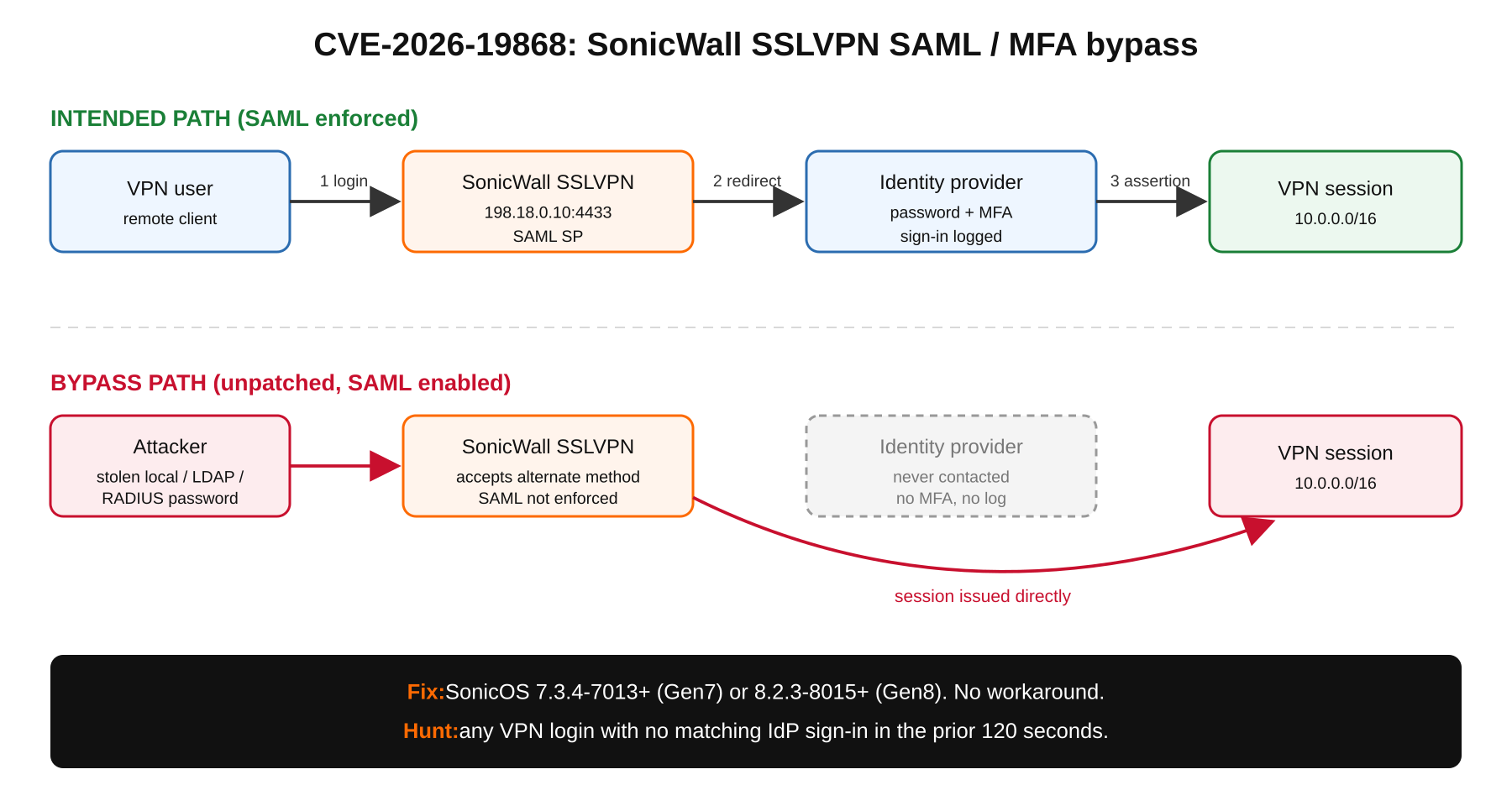
Two things to keep straight:
- It is not unauthenticated. The attacker needs a working password for some non-SAML method. That is a low bar: VPN credentials are cheap on access markets, and this is exactly the scenario SAML-enforced MFA was supposed to neutralize.
- Your IdP logs are blind to it. A bypassed login never reaches the IdP, so there is no sign-in event and no push to the user’s phone. The firewall’s own SSLVPN log is the only record, which is why the hunt in Step 5 compares the two.
This is not the first time. In 2025, Akira affiliates got into SonicWall firewalls that had OTP-based MFA enabled, and attackers were seen exploiting CVE-2024-12802, another SonicWall SSLVPN MFA bypass, earlier in 2026 (Help Net Security). Neither SonicWall nor CISA has published IoCs or attack details for CVE-2026-19868, and SonicWall has not said which alternate methods are involved. Treat every non-SAML method on the box as in scope.
Affected and Fixed Versions
| Generation | Models | Vulnerable | Fixed |
|---|---|---|---|
| Gen7 | TZ, NSa, NSsp, NSv | 7.3.3-7015 and older | 7.3.4-7013 or later |
| Gen8 | TZ, NSa, NSv | 8.2.2-8015 and older | 8.2.3-8015 or later |
Version data per SecurityWeek and Help Net Security. Gen6 is not listed as affected, but Gen6 is end of support and SonicWall advises moving to Gen8. Deployments without SAML on SSLVPN are not exposed to this CVE, but they still need the upgrade because the same advisory fixes six other flaws.
The other six flaws in SNWLID-2026-0014
None of these are flagged as exploited, but they ride the same upgrade (SecurityWeek, nFlo):
- Two management-interface bugs rated 8.8, a permissive cross-domain policy issue and a session validation issue, either of which can let a remote attacker take unauthorized actions without logging in under certain conditions.
- Three pre-authentication buffer overflows in the SSLVPN service and the TACACS+ authentication client that can knock the service over (DoS).
- Weak password hashing on virtual appliances that lets someone with high-privilege local access recover a platform credential.
The management-interface pair is one more reason the SonicOS admin UI should never face the internet.
Prerequisites and Architecture
- Assumed knowledge: SonicOS admin UI basics, how your SSLVPN authentication is set up, and how to export logs from your IdP.
- Access needed: firewall admin rights, a MySonicWall account for firmware, read access to IdP sign-in logs, and Python 3.8 or later for the hunt script.
- Change window: the upgrade reboots the firewall. Plan it, and keep a console or out-of-band path handy.
| Component | Lab value | Role |
|---|---|---|
| SonicWall Gen7 or Gen8 | WAN 198.18.0.10, SSLVPN on TCP 4433 | SSLVPN gateway (SAML SP) |
| Identity provider | Entra ID, Okta, FortiAuthenticator | SAML IdP enforcing MFA |
| Trusted admin egress | 198.18.10.0/24 | Only sources allowed to reach SSLVPN while unpatched |
| Admin workstation | 10.0.10.50 | Runs the checks and the hunt script |
| Internal LAN | 10.0.0.0/16 | What a bypassed session can reach |
Step-by-Step Response
Step 1: Confirm firmware and generation
Goal: know in two minutes whether each firewall is on a vulnerable build.
Action: SSH to the management interface and read the version, or check the dashboard. Do this for every SonicWall, including NSv instances in ESX, KVM, Hyper-V, AWS and Azure.
admin@<FW-NAME>> show versionGUI verification: the firmware version shows on the device dashboard’s system panel. Compare it with the table above. If you manage the fleet through NSM, export the inventory and filter on the firmware column.
Step 2: Confirm SAML is in the SSLVPN path and inventory every other method
Goal: decide whether CVE-2026-19868 applies, and find every credential that could be used for the bypass.
Action: in the SSLVPN and user authentication settings, confirm whether SAML is the login method for SSLVPN users. Then list every other method the box will accept: local users, LDAP or Active Directory, RADIUS, and TACACS+. Note which accounts can authenticate through each one. Menu names shift between 7.x and 8.x builds, so go by the setting rather than the path.
While you are there, check what the internet can actually reach. Run this from outside your network:
nmap -Pn -p 443,4433 --open 198.18.0.10
curl -skI https://198.18.0.10:4433/ | head -n 5
GUI verification: you end the step with a short written list: SAML on or off for SSLVPN, every alternate method, and every account each method can authenticate. That list drives Steps 3 and 6.
Step 3: Contain it if you cannot patch today
Goal: shrink exposure until the maintenance window. There is no vendor workaround, so these reduce risk rather than remove it.
- Restrict the portal by source. Allow SSLVPN only from known egress ranges (198.18.10.0/24 in the lab) with an access rule on the WAN zone. Opportunistic credential stuffing goes away.
- Strip alternate methods from VPN users. Remove local, LDAP or RADIUS access for any account that should only ever log in through SAML. Keep documented break-glass accounts with long random passwords.
- Consider taking WAN SSLVPN offline if the user base can tolerate it, per nFlo.
- Do not turn SAML off as a fix. That kills the bypass by removing MFA for everyone, which is worse.
GUI verification: re-run the Step 2 nmap from an address outside the allowed range. Port 4433 should not answer.
Step 4: Upgrade SonicOS
Goal: land on 7.3.4-7013 or later (Gen7) or 8.2.3-8015 or later (Gen8).
Action: export a configuration backup and take a settings snapshot, download the firmware from MySonicWall, upload it, and boot to the new image with current configuration. HA pairs follow your usual secondary-first process.
admin@<FW-NAME>> show version
# expect 7.3.4-7013 or later (Gen7), 8.2.3-8015 or later (Gen8)
GUI verification: the dashboard firmware version matches the fixed build, and SSLVPN users can still sign in through the IdP.
Step 5: Hunt for logins that skipped the IdP
Goal: find sessions that already used the bypass. Patched does not mean clean.
Action: export SSLVPN login events from the firewall (or your SIEM, if SonicOS syslog is forwarded) for at least the last 30 days, and export IdP sign-ins for the same window. Every legitimate SAML login produces an IdP sign-in just before the VPN session starts. A VPN login with no IdP sign-in in the preceding two minutes is the signal (Help Net Security).
This script does the correlation. It strips DOMAIN\ and @domain so usernames line up, converts both sides to UTC, and prints every unmatched VPN login as CSV. Set the column names to match your exports.
#!/usr/bin/env python3
"""Flag SonicWall SSLVPN logins that have no matching IdP sign-in.

Usage:
  python3 vpn_idp_gap.py vpn_logins.csv idp_signins.csv \
    --vpn-user-col User --vpn-time-col Time --vpn-utc-offset -5 \
    --idp-user-col UserPrincipalName --idp-time-col CreatedDateTime \
    --window 120 --exclude breakglass1,breakglass2 > unmatched.csv
"""
import argparse
import csv
import sys
from datetime import datetime, timedelta, timezone

FORMATS = ("%Y-%m-%d %H:%M:%S", "%Y-%m-%dT%H:%M:%S", "%Y-%m-%dT%H:%M:%SZ",
           "%m/%d/%Y %H:%M:%S", "%m/%d/%Y %I:%M:%S %p")


def norm_user(raw):
    user = raw.strip().lower()
    user = user.split("\\")[-1]      # DOMAIN\user -> user
    return user.split("@")[0]       # user@corp.com -> user


def parse_ts(raw, utc_offset):
    raw = raw.strip()
    try:
        ts = datetime.fromisoformat(raw.replace("Z", "+00:00"))
    except ValueError:
        ts = None
        for fmt in FORMATS:
            try:
                ts = datetime.strptime(raw, fmt)
                break
            except ValueError:
                continue
        if ts is None:
            raise ValueError("unparsed timestamp: " + raw)
    if ts.tzinfo is None:
        ts = ts.replace(tzinfo=timezone(timedelta(hours=utc_offset)))
    return ts.astimezone(timezone.utc)


def load(path, user_col, time_col, utc_offset):
    rows = []
    with open(path, newline="", encoding="utf-8-sig") as f:
        for r in csv.DictReader(f):
            if not r.get(user_col) or not r.get(time_col):
                continue
            rows.append((norm_user(r[user_col]),
                         parse_ts(r[time_col], utc_offset), r))
    return rows


def main():
    ap = argparse.ArgumentParser()
    ap.add_argument("vpn_csv")
    ap.add_argument("idp_csv")
    ap.add_argument("--vpn-user-col", default="User")
    ap.add_argument("--vpn-time-col", default="Time")
    ap.add_argument("--vpn-utc-offset", type=float, default=0.0)
    ap.add_argument("--idp-user-col", default="UserPrincipalName")
    ap.add_argument("--idp-time-col", default="CreatedDateTime")
    ap.add_argument("--idp-utc-offset", type=float, default=0.0)
    ap.add_argument("--window", type=int, default=120,
                    help="seconds before the VPN login to look for an IdP sign-in")
    ap.add_argument("--exclude", default="",
                    help="comma-separated documented break-glass users")
    a = ap.parse_args()

    skip = {norm_user(u) for u in a.exclude.split(",") if u.strip()}
    vpn = load(a.vpn_csv, a.vpn_user_col, a.vpn_time_col, a.vpn_utc_offset)
    idp = load(a.idp_csv, a.idp_user_col, a.idp_time_col, a.idp_utc_offset)

    by_user = {}
    for user, ts, _ in idp:
        by_user.setdefault(user, []).append(ts)

    before = timedelta(seconds=a.window)
    after = timedelta(seconds=30)  # tolerate small clock drift
    out = csv.writer(sys.stdout)
    out.writerow(["vpn_user", "vpn_login_utc", "nearest_idp_signin_utc"])
    flagged = 0
    for user, ts, _ in sorted(vpn, key=lambda x: x[1]):
        if user in skip:
            continue
        hits = by_user.get(user, [])
        if any(ts - before <= h <= ts + after for h in hits):
            continue
        nearest = min(hits, key=lambda h: abs(h - ts)) if hits else None
        out.writerow([user, ts.isoformat(),
                      nearest.isoformat() if nearest else "none"])
        flagged += 1

    print("Checked %d VPN logins, %d with no IdP sign-in in %ds"
          % (len(vpn), flagged, a.window), file=sys.stderr)
    return 1 if flagged else 0


if __name__ == "__main__":
    sys.exit(main())
python3 vpn_idp_gap.py vpn_logins.csv idp_signins.csv \
--vpn-user-col User --vpn-time-col Time --vpn-utc-offset -5 \
--idp-user-col UserPrincipalName --idp-time-col CreatedDateTime \
--window 120 --exclude breakglass1 > unmatched.csvGUI verification: the script prints a summary line to the terminal and exits 1 if anything was flagged. Each row in unmatched.csv is a session to investigate: source IP, what it touched, and whether the user recognizes it.
Step 6: Rotate credentials and kill sessions
Goal: remove the prerequisite for the bypass and evict anyone already in.
- Reset passwords for every account that can authenticate by a non-SAML method on the firewall, plus LDAP bind accounts and RADIUS shared secrets.
- Terminate active SSLVPN sessions after the upgrade so everyone re-authenticates through SAML.
- For every flagged session from Step 5, reset that account and review what it accessed on 10.0.0.0/16.
Verification and Validation
| Check | How | Expected success |
|---|---|---|
| Firmware | show version or the dashboard |
7.3.4-7013+ (Gen7) or 8.2.3-8015+ (Gen8) |
| Bypass closed | Try a test account’s local password at the SSLVPN portal | Login refused or redirected to the IdP, no session |
| Normal path | Sign in as a SAML user | IdP sign-in and MFA event, then a VPN session |
| Hunt clean | Re-run the script for the post-patch window | Checked N VPN logins, 0 with no IdP sign-in in 120s |
| Exposure | nmap from an untrusted source |
4433 filtered if you kept the source restriction |
Run the bypass test only with a dedicated test account, in a window you announced to the SOC.
Troubleshooting and Gotchas
The fixed Gen7 build number looks lower
Vulnerable is 7.3.3-7015, fixed is 7.3.4-7013. If a script or a tired admin compares the build suffix alone, 7013 looks older than 7015. Compare the release (7.3.4 vs. 7.3.3) first. Some secondary bulletins also print the Gen8 line differently (the Canadian Cyber Centre bulletin lists versions before 8.2.2-8015). Go by the vendor’s fixed build: 8.2.3-8015.
Every VPN login shows up as unmatched
Almost always a time zone or username format mismatch. Firewall exports are often local time while IdP exports are UTC. Set --vpn-utc-offset (for example -5 for Eastern standard time), and confirm NTP is healthy on the firewall. If usernames differ beyond domain prefixes and suffixes, map them before running the script.
head -n 3 vpn_logins.csv idp_signins.csvBreak-glass and service accounts trip the hunt
Documented local or RADIUS accounts will never have an IdP event. Pass them in --exclude, but only after you confirm each one is still needed, and review their sessions by hand. An undocumented account on that list is a finding, not noise.
Patched but still compromised
The upgrade closes the hole. It does not log anyone out or expire stolen passwords. Skipping Step 6 leaves an attacker who got in before November 6 sitting on a valid session or a valid password.
The Takeaway for Any VPN
The lesson is bigger than one vendor. If MFA lives at the IdP, every path into the VPN has to go through the IdP. Remove local and directory fallbacks for remote access, keep break-glass accounts few and watched, and alert on any VPN session that has no matching IdP sign-in. That correlation catches this CVE, and the next one like it.
Sources
- SecurityWeek: SonicWall Patches Exploited SonicOS Vulnerability That Weakens VPN Logins
- Help Net Security: Exploited SonicWall SSL-VPN flaw lets attackers bypass SAML-enforced MFA (CVE-2026-19868)
- Canadian Centre for Cyber Security: SonicWall security advisory (AV26-1133)
- nFlo: CVE-2026-19868, SAML and MFA Bypass in SonicWall SonicOS SSLVPN (Actively Exploited)
- Decryption Digest: SonicWall SSLVPN CVE-2026-19868 MFA bypass on Gen7/Gen8 firewalls
InfoSecMonkey | No fluff. Just the config that works.
Recent posts
-

-

DNS is one of those technologies that quietly underpins... Full Story
-

BGP issues on FortiGate firewalls usually trace back to... Full Story
-

Every time your laptop talks to your router, a... Full Story
-

If you've spent any time configuring NAT on a... Full Story
-

If you have spent any time configuring firewall policies... Full Story
-

High availability on FortiGate is one of those features... Full Story
-

If you've configured SD-WAN on a FortiGate, you've almost... Full Story
-

FortiLink is the management protocol that turns a FortiSwitch... Full Story
-

FortiSwitches are pretty rock solid from Mean Time Between... Full Story
-

This is a quicky tip. Have you ever gone... Full Story
-

DNS is one of those quiet pieces of internet... Full Story
-

This article is an updated version of the previous... Full Story
-

You will add ns2 as a secondary (slave) BIND9... Full Story
-

In the process of deploying my lab, I needed... Full Story
-

RFC 8805, used to be known as Self-Correcting IP... Full Story
-

Years back, I wrote an article about certificate pinning. ... Full Story
-

FortiGates have the ability to send alerts to Microsoft... Full Story
-

In this post, I am going to walk through... Full Story
-

Troubleshooting VoIP on a FortiGate can feel like trying... Full Story
-

Prior to FortiOS 7.0, there were three commands to... Full Story
-

In this post, I am going to go over... Full Story
-

What we are going to do: We are going... Full Story
-

Choosing between FGCP (FortiGate Clustering Protocol) and FGSP (FortiGate... Full Story
-

Creating a VLAN on macOS (The "Pro" Move) A... Full Story
-

This blog post explores the logic behind how macOS... Full Story
-

Pretty Fly for a Wi-Fi Tell My Wi-Fi Love... Full Story
-

Part of my daily gig is creating BoMs (Bill-of-Materials)... Full Story
-

ICMP introduces several security risks, but careful filtering, rate... Full Story
-

The command diag debug application dhcps -1 enables full... Full Story
-

In the world of FortiOS, execute tac report is... Full Story
-

LLDP; What is it The Link Layer Discovery Protocol... Full Story
-

What it actually does When you run diagnose fdsm... Full Story
-

Monkey Bites are bite-sized, high-impact security insights designed for... Full Story
-

I have run macOS in macOS with Parallels but... Full Story
-

Don't be confused with my other FortiNAC posts where... Full Story
-

This is the third session in a multi-part article... Full Story
-

Today I was configuring key-based authentication on a FortiGate... Full Story
-

Netcat, often called the "Swiss Army knife" of networking,... Full Story
-

At its core, IEEE 802.1X is a network layer... Full Story
-

In case you did not see the previous FortiNAC... Full Story
-

This is our 5th session where we are going... Full Story
-

Now that we have Wireshark installed and somewhat configured,... Full Story
-

The Philosophy of Packet Analysis Troubleshooting isn't about looking... Full Story
-

nmap Companion Tools: The Command-Line Ecosystem That Reads Your... Full Story
-

CVE-2026-19868: SonicWall SAML MFA Bypass on SSLVPN, Patch and... Full Story
-

No fluff. Just the config that works. Objective: The... Full Story